
To create folders in Outlook on a computer or the web, right-click the top of your folder list for a new folder beside Inbox, or right-click an existing folder for a subfolder, then type a name and press Enter. In classic Outlook the top of the list is your account name and the command is New Folder. New Outlook uses your email address and Create new folder, and on the web you right-click Folders, or the account name if there is no Folders heading.
In new Outlook and on the web, the subfolder command is Create new subfolder, while classic Outlook and Outlook for Mac use New Folder for both. The folder you right-click decides where the new one lands, so pick it with care. On iPhone and Android, Microsoft's route starts from a message instead: Move to Folder, then the add folder icon.
The short version
- Beside Inbox: right-click the account name at the top of the folder list, or Folders on Outlook.com, then New Folder or Create new folder.
- Inside another folder: right-click that folder, then New Folder or Create new subfolder.
- Keyboard, classic Outlook: press Ctrl + Shift + E, name the folder and pick its location before you select OK.
- No Folder tab in classic Outlook: switch the ribbon to Classic Ribbon, or use the right-click menu.
- Wrong place, classic Outlook: right-click the folder, choose Move Folder and pick the account name.
Outlook folder steps at a glance
| Where you work | Folder beside Inbox | Subfolder | To finish |
|---|---|---|---|
| Classic Outlook for Windows | Right-click the account name > New Folder, or press Ctrl + Shift + E | Right-click the parent folder > New Folder | Type the name and press Enter, or select OK in the dialog |
| New Outlook for Windows | Right-click your email address > Create new folder | Right-click the parent folder > Create new subfolder | Type the name and press Enter |
| Outlook on the web, work or school account | Right-click Folders, or the account name when there is no Folders heading > Create new folder | Right-click the parent folder > Create new subfolder | Type the name and press Enter |
| Outlook.com, personal account | Right-click Folders > Create new folder | Right-click the parent folder > Create new subfolder | Type the name and press Enter |
| Outlook for Mac | Right-click the account name > New Folder | Right-click the parent folder > New Folder | Type the name and press Return |
| Outlook for iPhone and Android | Select a message, choose Move to Folder, then tap the add folder icon | Create nested folders on a computer or on the web | Or choose an existing folder to move the message there |
We saw the classic Outlook steps and the account name route in Outlook on the web for ourselves. The other rows are Microsoft's steps, and each version has its own section below.
Where a new Outlook folder goes
Every Outlook mailbox is a tree. The account name, or a Folders heading in some web layouts, sits at the top, Inbox and the other built-in folders hang directly under it, and each folder can hold folders of its own. A folder at the same indent as Inbox is a top-level folder, and anything indented under another folder is a subfolder.
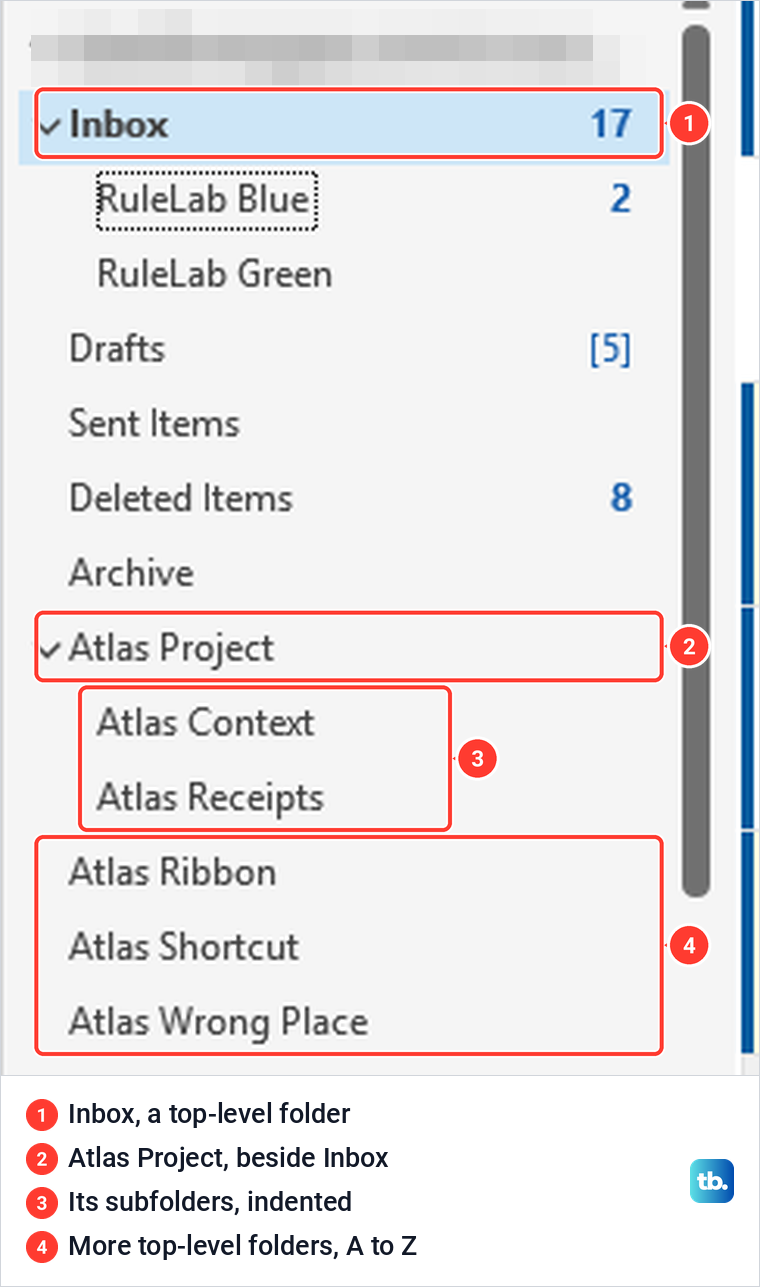
The folder you right-click becomes the parent. Right-click the account name and the new folder sits beside Inbox. Right-click Inbox and it goes inside Inbox, which Microsoft describes as adding "a folder inside the Inbox". Neither is wrong, but a folder buried in Inbox is easy to lose once Inbox has a few subfolders.
In classic Outlook on our PC, Inbox, Drafts, Sent Items, Deleted Items and Archive stayed at the top. The folders we made at the top level fell into alphabetical order among the folders below those, and subfolders were sorted A to Z under their parent. Microsoft says a new folder is "inserted in alphabetical order under the parent folder".
Create a folder in classic Outlook
Open Mail and find the account name at the top of your folder list, below Favorites if it is shown. It is usually your email address. Right-click it and choose New Folder from the menu.
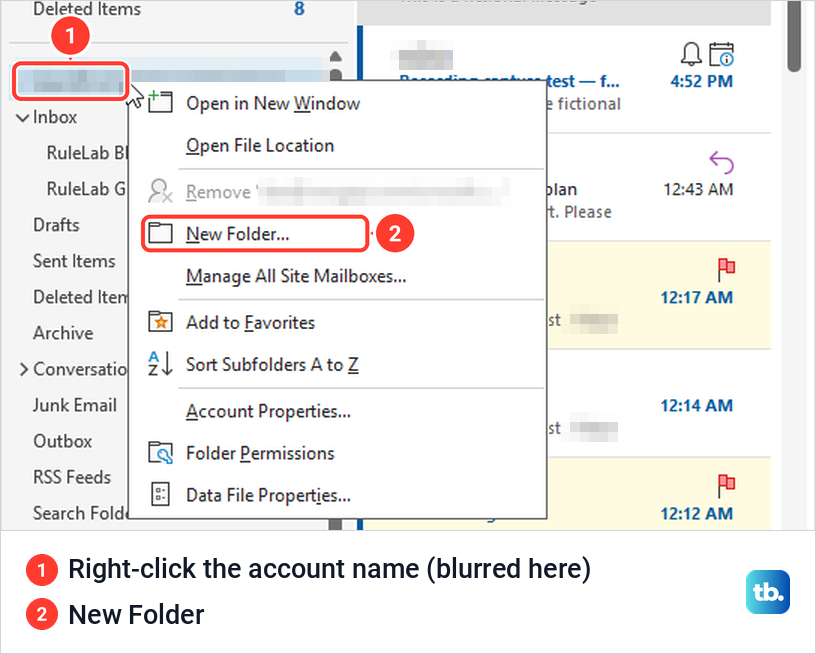
On our PC, New Folder did not open a window. An empty name box appeared in the folder list, just under the account name. We typed Atlas Project and pressed Enter, and the folder appeared at the same level as Inbox, between Archive and Conversation History.
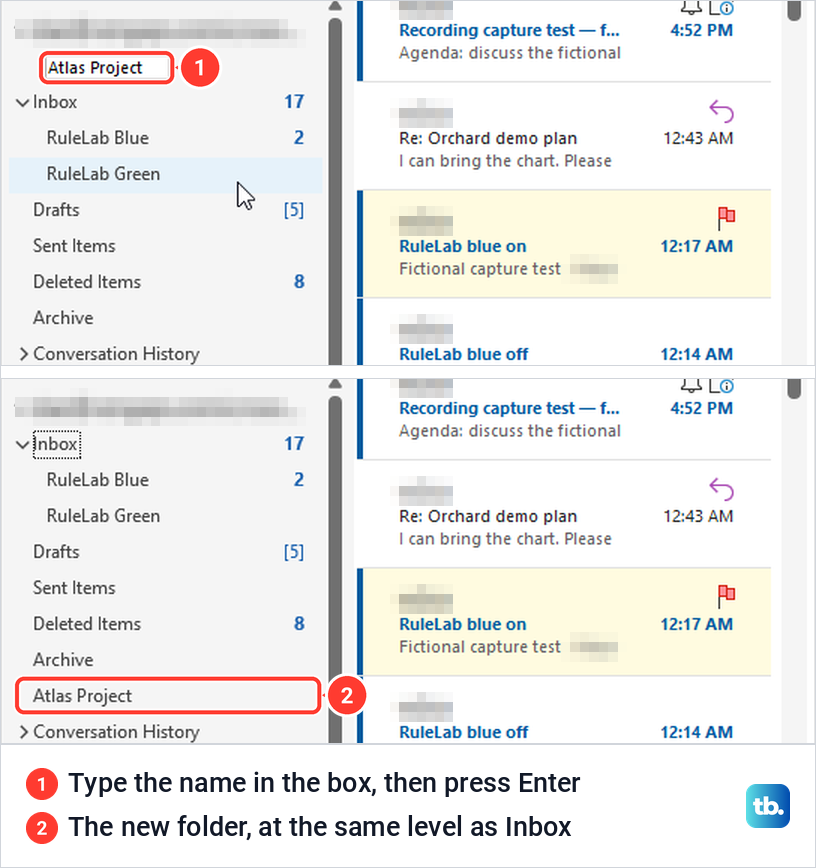
Select the new folder to open it, and it opens empty. If you prefer a window where you choose the location yourself, use the Folder tab or the keyboard shortcut described below.
Make a subfolder in classic Outlook
Right-click the folder that should hold the new one and choose New Folder. The same menu also has Rename Folder, Copy Folder, Move Folder, Delete Folder and Add to Favorites, which come up again further down.
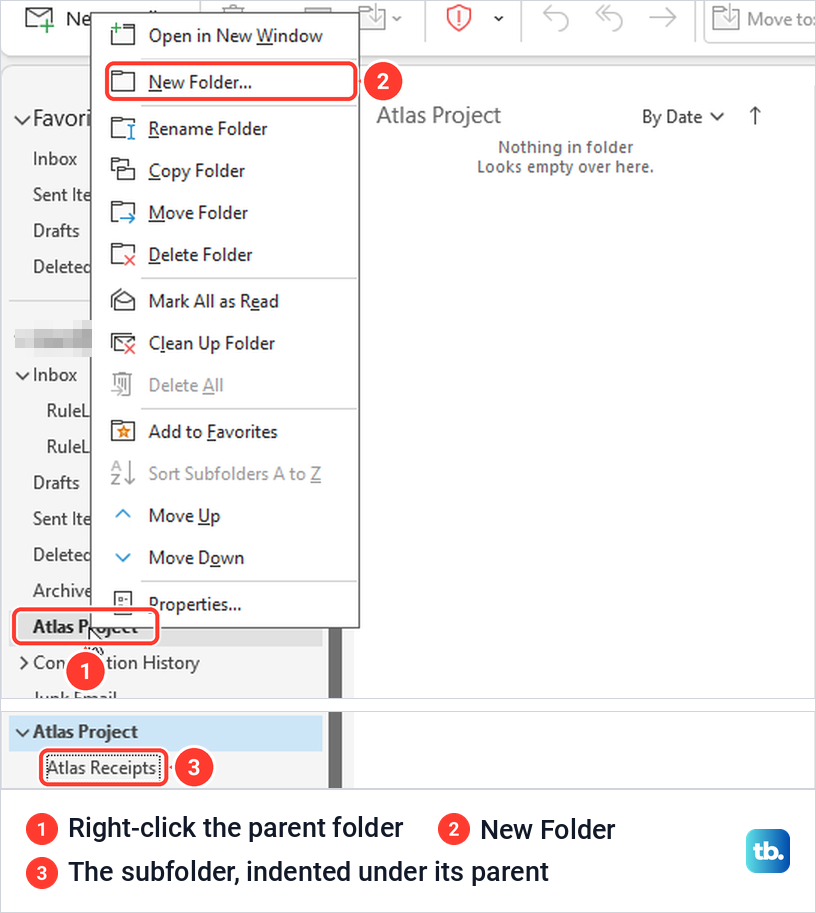
The name box appears indented under the parent, and Outlook expands the parent so you can see it. We named ours Atlas Receipts, pressed Enter, and it sat one level in from Atlas Project. Select the small arrow next to a parent folder to hide or show its subfolders.
You can nest further by right-clicking the subfolder and repeating the step. Keep the tree shallow enough to scan, because every extra level is another arrow to open when you file a message by hand.
Use the Folder tab or a keyboard shortcut
Many instructions start with "select the Folder tab". Classic Outlook on our PC opened with the Simplified Ribbon, the single-line layout, and its tabs were File, Home, Send / Receive, View and Help, with no Folder tab. The ribbon customization page had no Folder tab to switch on either.
The fix is the small arrow at the far right end of the ribbon. Under Ribbon Layout, choose Classic Ribbon. The Folder tab then appears between Send / Receive and View, with New Folder at its left end. You can switch back to Simplified Ribbon from the same arrow at any time.
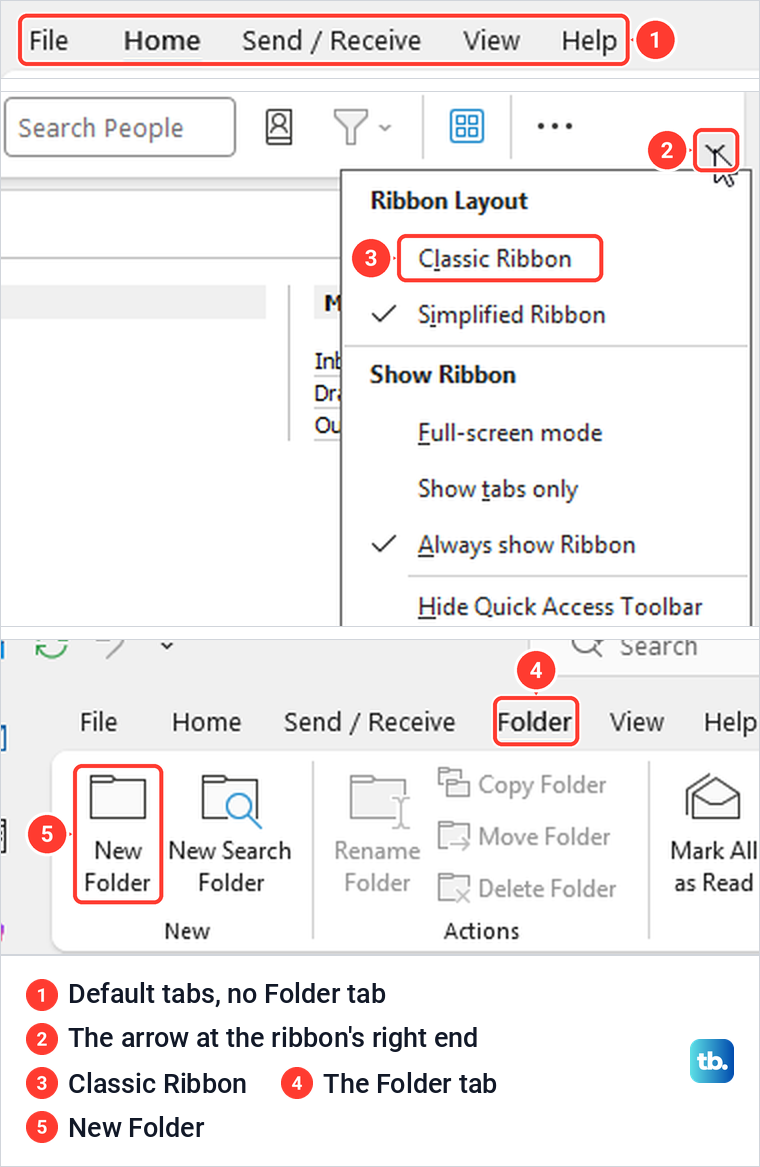
Folder > New Folder opens the Create New Folder window. It has a Name box, a Folder contains list already set to Mail and Post Items, and a Select where to place the folder list. Pick the parent in that list, then select OK. If you prefer the classic ribbon and this dialog, and you are currently in new Outlook, you can switch back to classic Outlook first.
The quickest route skips the ribbon entirely. Press Ctrl + Shift + E with a mail folder open and the same window opens. Watch the location list before you select OK. When we pressed the shortcut, it had already selected the folder we had open, a subfolder of Inbox, so a quick OK would have put the new folder inside it.
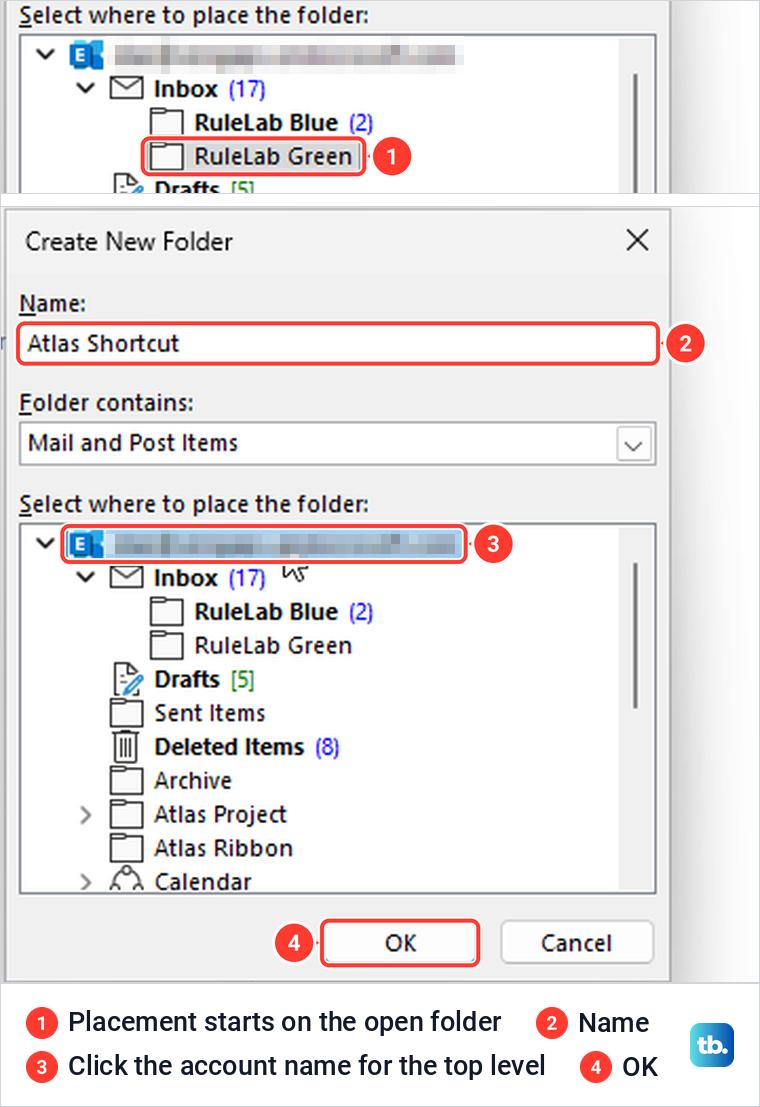
To make a top-level folder from this window, click the account name at the top of the location list. We did that, named the folder Atlas Shortcut, and it appeared beside Inbox.
There is a keyboard route for the right-click menu too, with one catch. Clicking a folder leaves the keyboard focus in the message list, so Shift + F10 opened the message list's menu instead of the folder menu on our PC. Press F6 until the folder list has focus, then Shift + F10 and N opens the name box under the selected folder.
You may also see Alt, O, N suggested for the Create New Folder window. On the Simplified Ribbon it did nothing useful for us: no tab has the key tip O, and the N that followed opened the Notifications pane. Ctrl + Shift + E is the shortcut to remember.
Create folders in new Outlook for Windows
New Outlook uses different menu names. Microsoft's steps are to right-click your email address in the folder pane, or hover over it and select More options, then choose Create new folder. Type a name and press Enter.
For a subfolder, right-click the parent folder, or use its More options button, and choose Create new subfolder. Microsoft notes that if these steps do not match your screen, you may still be in classic Outlook, so follow the classic steps above. If your menus look different from both, update the Outlook app and check which version you are running.
Create folders in Outlook on the web and Outlook.com
Microsoft's instructions for Outlook on the web with a work or school account say to right-click Folders in the folder pane. The Outlook on the web folder pane we saw had no Folders heading. The account address sat at the top of the folder list instead, and right-clicking it gave four commands: Create new folder, Go to folder, Add shared folder or mailbox, and Sharing and permissions.
Choose Create new folder, type the name in the box that appears at the top of the list and press Enter. Hovering over the account name also shows a three-dot More options button, which opens the same menu. Both routes made a top-level folder outside Inbox for us.
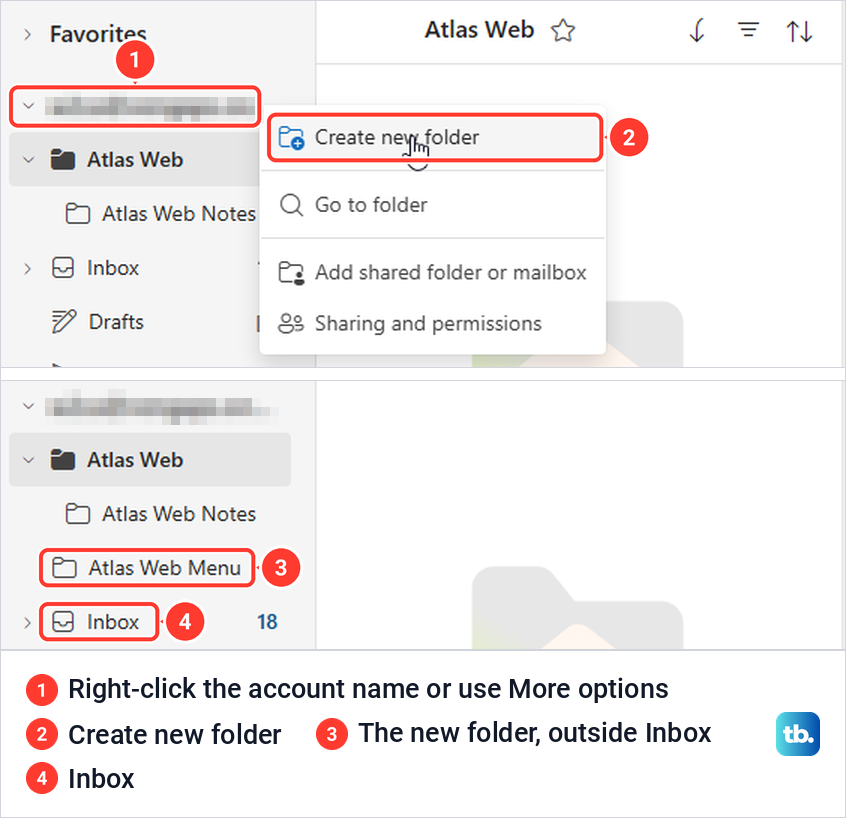
One difference from classic Outlook: right after we made it, the new web folder was listed above Inbox, not below Archive as in classic Outlook. It still opened empty, with a star next to its name at the top of the message list.
For a subfolder, right-click the parent folder and choose Create new subfolder, or hover over the parent and use its More options button. Type the name and press Enter. Both ways put the new folder inside the parent in our test.
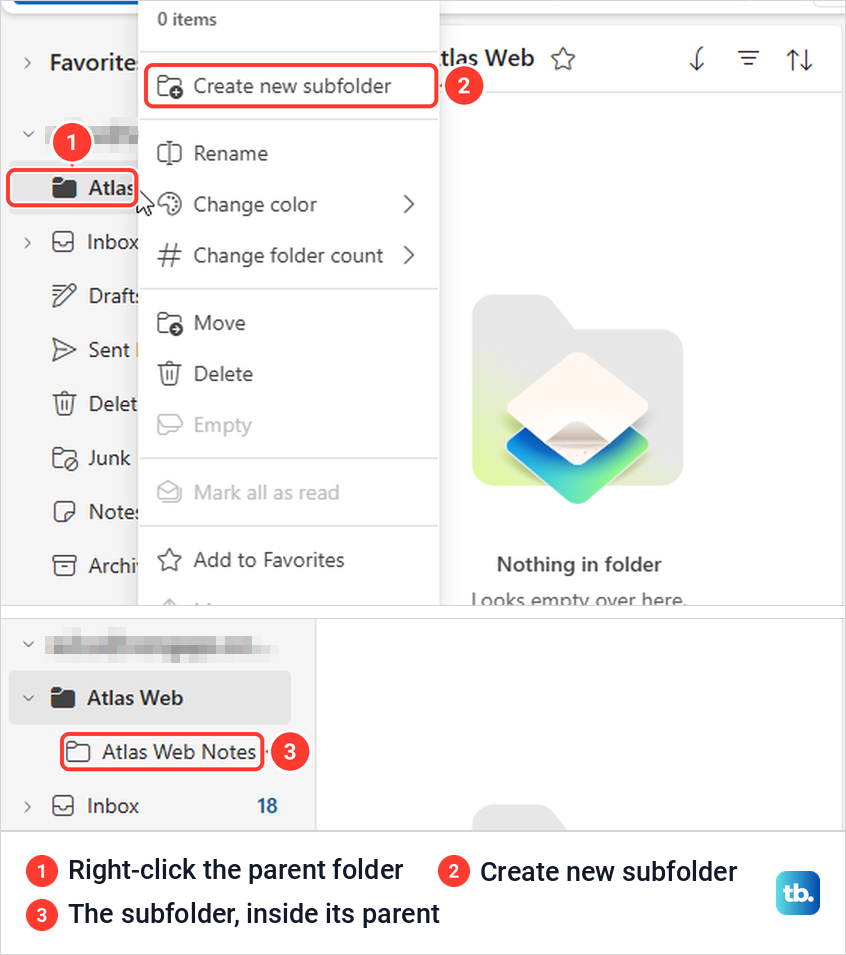
Outlook.com, the free personal version, follows the same pattern in Microsoft's instructions. Right-click Folders in the folder pane and select Create new folder, or right-click an existing folder and choose Create new subfolder, then type the name and press Enter.
Create folders in Outlook for Mac, iPhone and Android
In Outlook for Mac, right-click your account name in the sidebar and select New Folder, then type a name and press Return. For a nested folder, right-click the folder that should hold it and select New Folder. Microsoft adds that the arrow next to a parent folder hides or shows its subfolders.
The phone apps start from a message. Microsoft's steps are to tap and hold a message in your inbox, tap the three-dot menu, and select Move to Folder. A list of your folders opens, where you choose the folder the message should go to, or tap the add folder icon in the upper right corner to create a new folder. Those instructions only cover that add folder button, so build any nested folders on a computer or on the web.
Move emails into your new folder
A new folder starts empty. Microsoft's simplest method is to select a message and drag it onto the folder in the folder list. To move several at once, select several emails in Outlook with Ctrl or Shift, then drag the whole selection. If dragging a message onto a folder does nothing, fix Outlook drag and drop before you try again.
Folders also make good targets for rules, which file new mail automatically. Create the folder first, then choose it as the destination when you set up a rule in Outlook. If messages keep landing in Inbox afterwards, our guide to fix rules that are not working covers the usual causes.
Move a folder that ended up in the wrong place
An easy slip is right-clicking Inbox instead of the account name. When we did that in classic Outlook, the new folder went inside Inbox, indented above the subfolders that were already there.
You do not need to delete it and start again. In classic Outlook, right-click the folder, choose Move Folder, and a Move Folder window lists every folder in the mailbox. Click the account name at the top of the list and select OK. Ours moved out of Inbox and sat beside it, in alphabetical order with the other folders we had made.
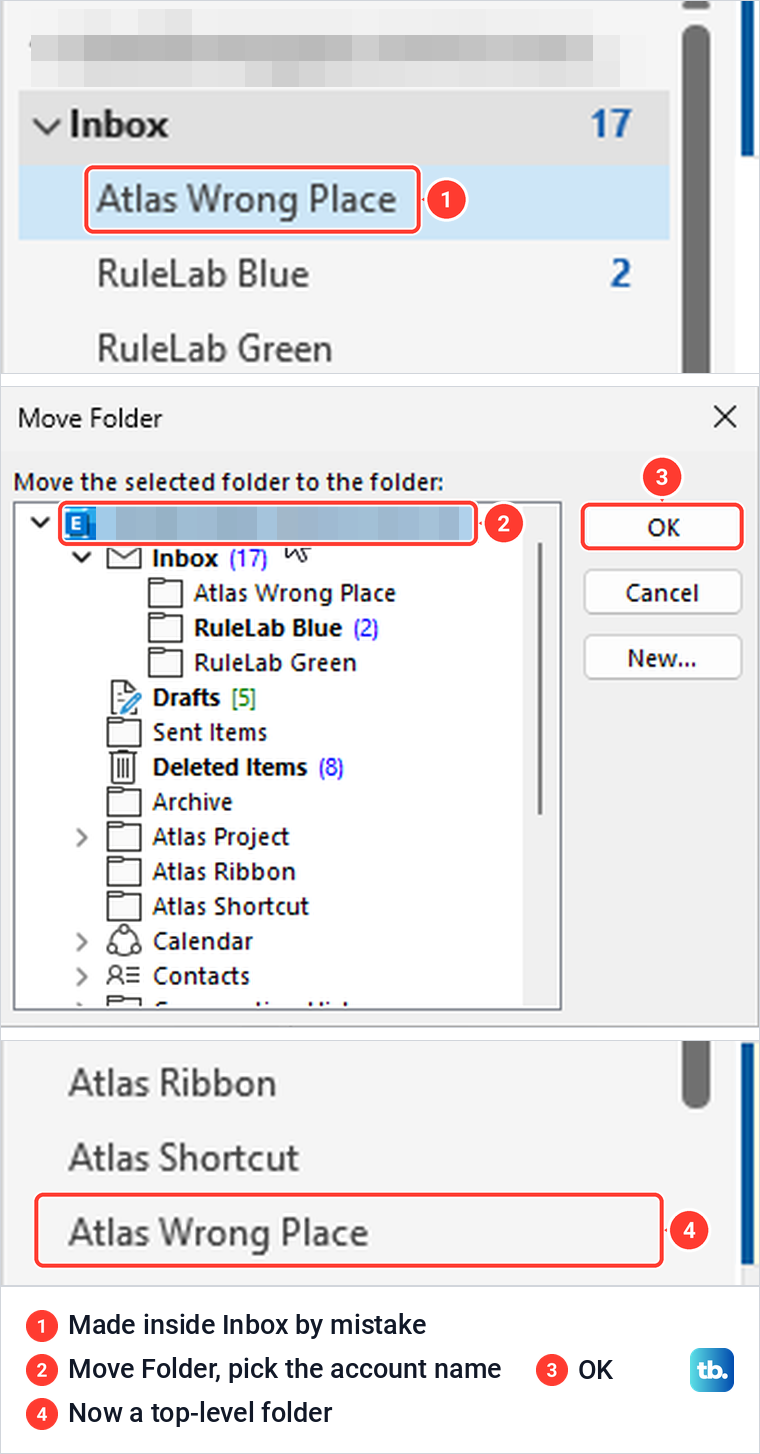
The window also has a New button, next to OK and Cancel, for when the destination does not exist yet. Microsoft adds that you can also drag a folder to a new spot in the folder list. In the Outlook on the web folder menu we saw, the command is Move.
Rename, reorder or delete a folder
The right-click menu on a folder you made has Rename Folder (Rename on the web), and in classic Outlook it also has Move Up and Move Down for changing the order by hand. Microsoft says you can drag folders into a custom order, and that Folder > Show All Folders A to Z puts them back in alphabetical order.
Deleting a folder deletes everything inside it. Microsoft says a deleted folder is first moved to Deleted Items, where you can still get it back, and only goes for good when you empty Deleted Items or delete it from there. Check a folder's contents before you remove it.
Find a folder that seems to be missing
Start with the parent. A new subfolder is only visible when its parent is expanded, so select the arrow next to the folder you right-clicked. If you are not sure which folder that was, check Inbox first, since right-clicking it by mistake is an easy slip.
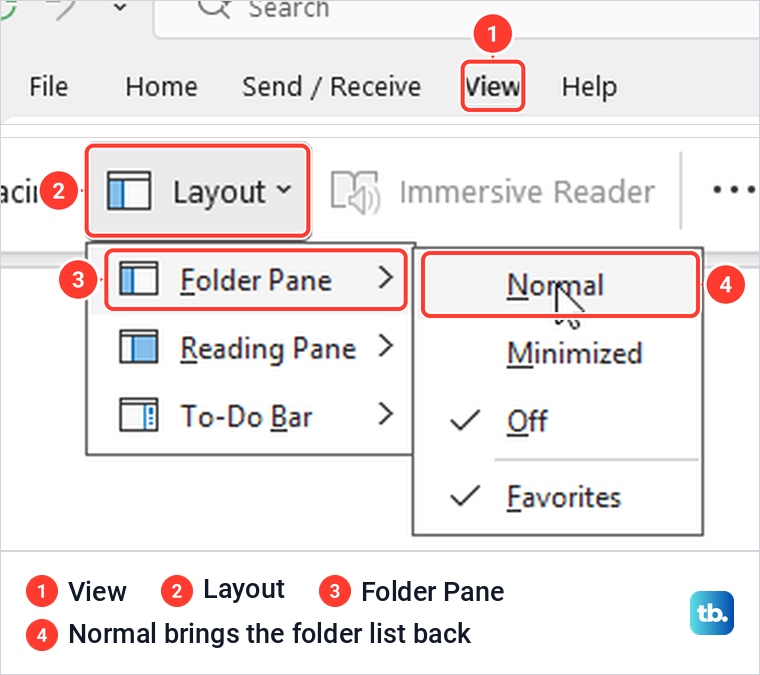
If the whole folder list has gone, the folder pane is turned off or minimized. In classic Outlook, select View > Layout > Folder Pane > Normal. On our PC, Off removed the list completely, and Normal brought it back with every folder we had made.
In new Outlook, Microsoft's route is the View tab, then Folder pane, then Folder list and Show. If a folder is visible but a search will not find the messages inside it, our guide to fix Outlook search results walks through it. And if a folder you made does not show up in the Outlook app on your Windows PC, fix Outlook that is not syncing before you make it again.
Pin a folder to Favorites
Favorites is the short list at the top of the folder pane. Right-click any folder and choose Add to Favorites to pin it there. It is a shortcut, not a move.
When we added a web folder to Favorites, it showed up in the Favorites list and stayed in its usual place under the account at the same time. The star beside the folder name at the top of the message list filled in, and the folder's own menu then offered Remove from Favorites.
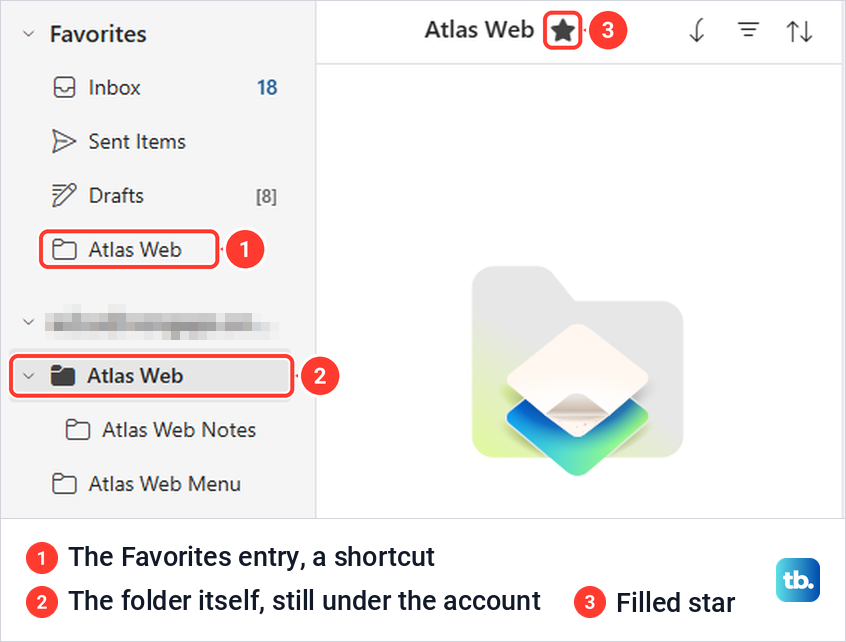
Microsoft's instructions give a second way to pin a folder: select it and drag it onto Favorites. Either way, the folder itself stays under the account.
When New Folder is missing or greyed out
Check which part of Outlook is open. In Calendar, the Folder tab and the right-click menu offered New Calendar instead of New Folder on our PC, and Microsoft's instructions say the same. Go back to Mail and New Folder returns. If you were really after a calendar other people can see, here is how to create a shared calendar in Outlook.
Folders that belong to someone else follow that person's permissions. In Microsoft's permission table, Publishing Editor and Publishing Author can create subfolders, while Editor cannot. Ask the owner to change your permission level.
Also watch for New Search Folder, which sits next to New Folder on the Folder tab. Microsoft describes a Search Folder as "a virtual folder" that shows messages matching a search, so you cannot file mail into it. A folder is also not a group: if your team needs a shared inbox and calendar, create an Outlook group instead.
How we tested this guide
We tested this in classic Outlook for Microsoft 365 on Windows 11, version 25H2, and Outlook on the web in Microsoft Edge, creating top-level folders and subfolders.
Frequently Asked Questions
How do I make a folder beside Inbox instead of inside it?
Right-click the account name at the top of the folder list, or Folders on Outlook.com, not Inbox, and choose New Folder or Create new folder. In the classic Create New Folder window, click the account name in the location list before you select OK.
What is the keyboard shortcut for a new folder in Outlook?
In classic Outlook for Windows, press Ctrl + Shift + E. The Create New Folder window opens with the folder you have open already selected as the location, so pick the right parent before you select OK.
Why is there no Folder tab in Outlook?
Classic Outlook with the Simplified Ribbon showed no Folder tab on our PC. Select the arrow at the right end of the ribbon and choose Classic Ribbon to bring it back, or use the right-click menu or Ctrl + Shift + E instead.
Where did my new folder go?
It went inside whichever folder you right-clicked or selected in the location list. Expand that folder, and Inbox if you are unsure. If the whole list is gone in classic Outlook, select View > Layout > Folder Pane > Normal.
Does adding a folder to Favorites move it?
No. Favorites only adds a shortcut. In our test the folder appeared under Favorites and stayed in its place under the account at the same time.
Why can't I create a folder in someone else's shared folder?
Creating subfolders needs the right permission. Microsoft lists it for the Publishing Editor and Publishing Author levels, but not for Editor, so ask the owner to change your permission level.