

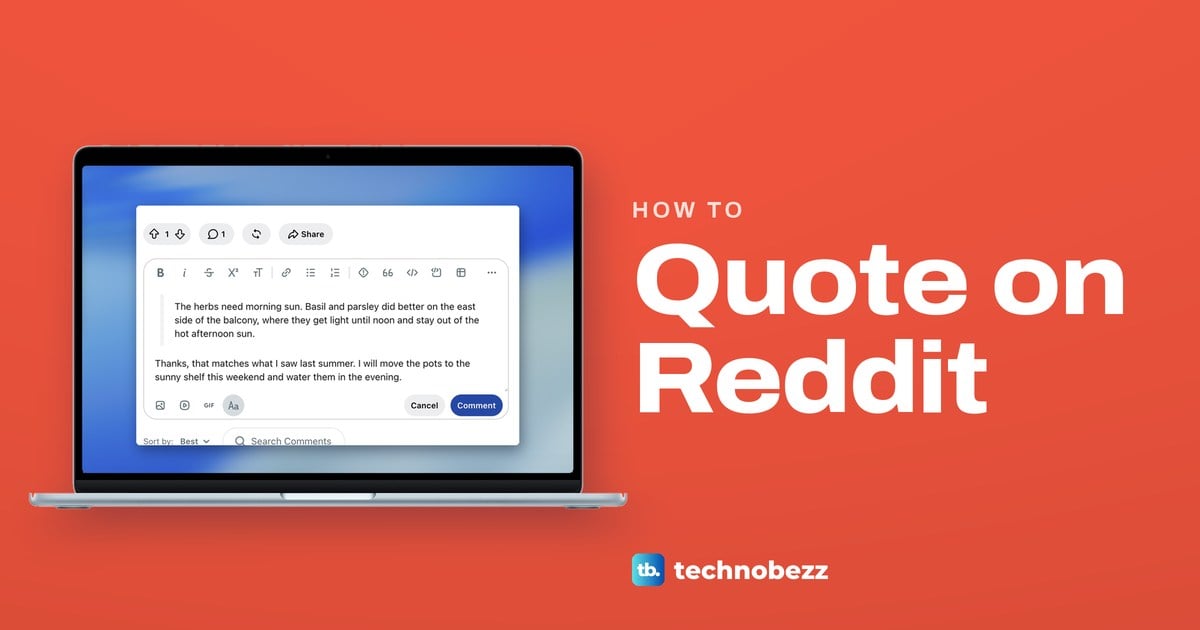
To quote on Reddit in a computer browser, click the comment box, click Aa to open the formatting toolbar, put your cursor in the line you want to quote and click Quote Block, the button that looks like 66. In the Markdown Editor, start the line with a greater-than sign (>) instead. Press Enter twice to leave the quote, then write your reply underneath.
We quoted a line of our own in an unsent comment on reddit.com in Chrome, then checked the same quote in the Markdown Editor. Two things are easy to miss: the toolbar that holds the quote button stays hidden until you click Aa, and you do not have to select the words before you click it.
The short version
- Comment on a computer: click the comment box, click Aa, put the cursor in the line and click Quote Block (66).
- Back to normal text: press Enter twice at the end of the quoted line.
- Markdown Editor: start the line with > and leave an empty line before your reply.
- New post: the same 66 button sits in the toolbar under Body text.
- Reddit app: if a typed > stays plain text, look for a quote button in the toolbar or use reddit.com in a browser.
Ways to quote on Reddit at a glance
| Where you are | How to quote | What to check |
|---|---|---|
| Comment box on a computer | Click Aa, put the cursor in the line, click Quote Block (66) | A grey bar beside the line and the 66 button lit |
| Markdown Editor on a computer | Type > at the start of the line | An empty line between the quote and your reply |
| New post on a computer | Put the cursor in the line, click Quote Block (66) under Body text | Only the quoted line sits behind the grey bar |
| Reddit app on iPhone or Android | Use a quote button in the formatting toolbar if the app shows one | If there is none, open the thread at reddit.com in a browser |
How to quote a comment on Reddit on a computer
Open the post on reddit.com. If the words you want to quote come from someone else's comment, highlight them and copy them first, because the comment box starts empty. Then click the comment box under the post, which reads Join the conversation, or click Reply under the comment you are answering.
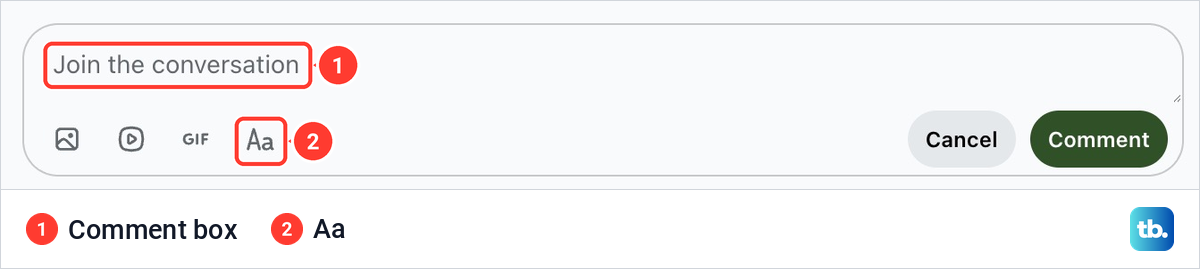
One click opens the box, but not the formatting tools. All we saw at first was a row of small icons for an image, a video and a GIF, then Aa, with Cancel and Comment on the right. Click Aa and the full formatting toolbar appears above the text.
Paste or type the words you want to quote. We typed a line of our own, The herbs need morning sun. Quote Block sits after Spoiler and looks like the number 66, and Switch to Markdown is at the far right.
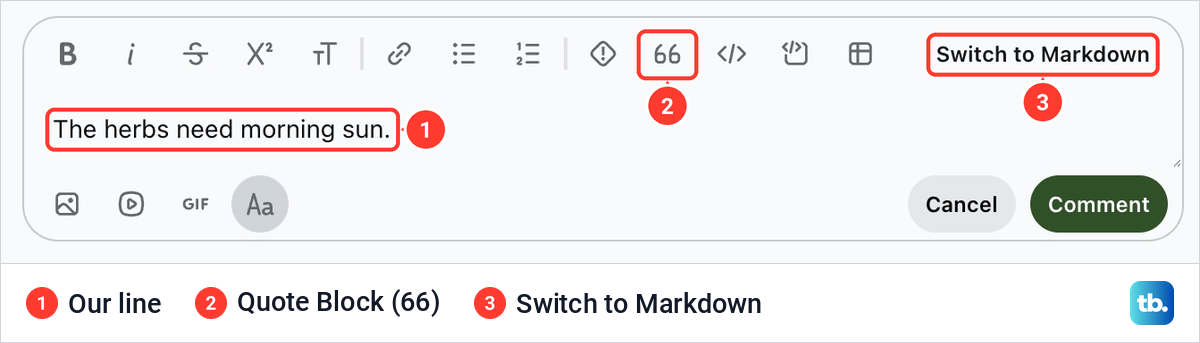
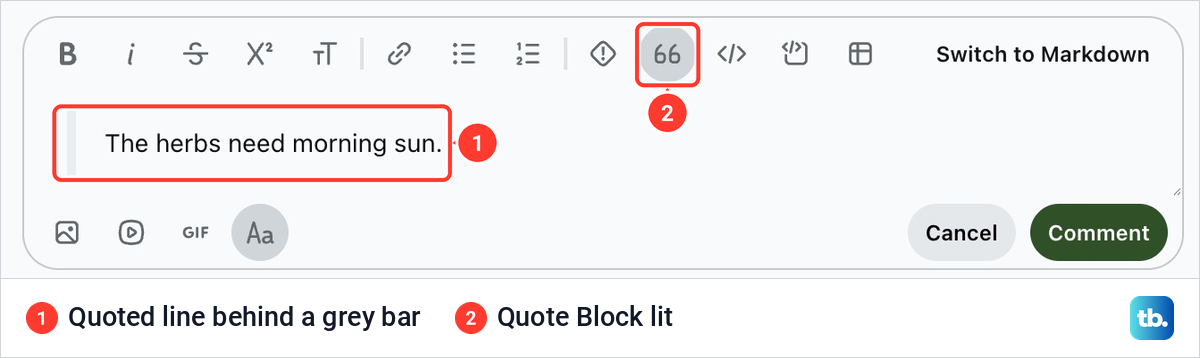
Click anywhere inside the line you want to quote, then click the 66 button. There is no need to select the words first. In our draft, the whole paragraph moved in behind a grey bar and the 66 button stayed lit, which shows the cursor is inside a quote.
How to end the quote and write your reply
Click at the end of the quoted line and press Enter twice. When we did that, the cursor dropped below the grey bar and the 66 button was no longer lit. Our reply about moving the pots to a sunny shelf then stayed outside the quote as ordinary text.
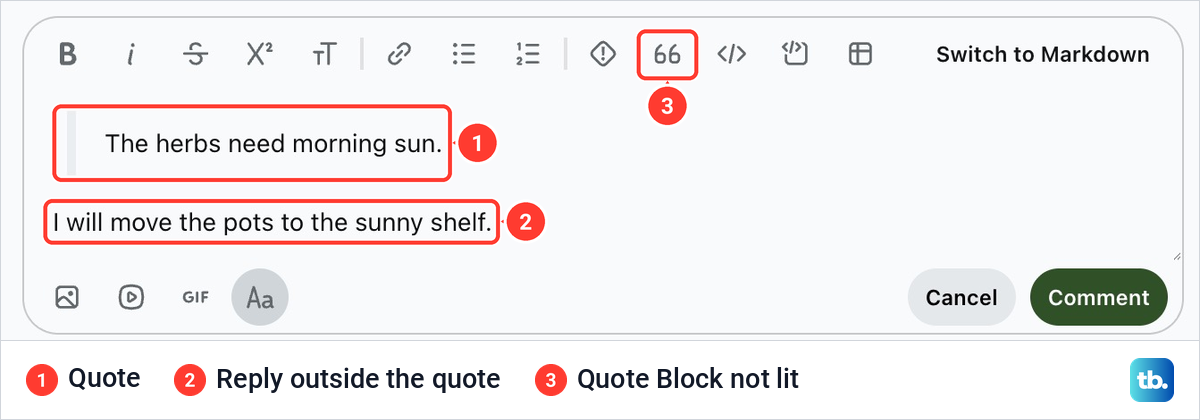
If the 66 button is still lit, the line you are on is still part of the quote. If your reply ended up behind the grey bar too, cut it, click at the end of the quoted line, press Enter twice and paste it there.
How to quote with the Markdown Editor
The Markdown Editor is the plain text mode, and it is where the familiar greater-than sign works. Click Switch to Markdown at the right end of the toolbar. When we switched, Reddit did not ask anything first, and the quote we had made with the 66 button was already written out as Markdown. In a narrower Chrome window, our toolbar ended in a three-dot button with no Switch to Markdown on it, so widen the window if you cannot see the switch.
Our line now began with >, followed by an empty line and then our reply. A line that starts with > is a quote, and an empty line ends it. To go back, click Switch to Rich Text Editor at the top right.
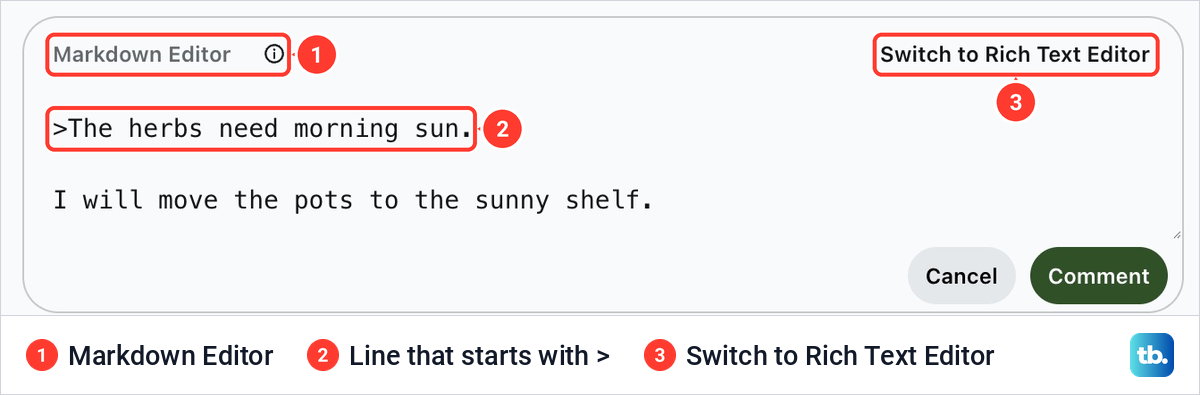
Reddit wrote our quote with no space after the sign, and a space after it is fine too. Do not skip the empty line, though. Lines that follow each other with no empty line between them join into one paragraph, so your reply would be pulled into the quote.
How to quote several paragraphs
In the Markdown Editor, one > at the start of a paragraph quotes the whole paragraph, however long it wraps. For two or more paragraphs, start each one with >. To keep them in a single quote block, also put a > on its own on the empty line between them.
| Line | What to type |
|---|---|
| 1 | > First quoted paragraph |
| 2 | > |
| 3 | > Second quoted paragraph |
| 4 | Nothing (an empty line) |
| 5 | Your reply |
Two signs, > >, put a quote inside a quote. Use that when the comment you are answering already quotes someone.
How to quote only part of a comment
Highlight just the sentence you are answering, copy it with Ctrl + C on Windows or Cmd + C on a Mac, and paste it into your reply. Then quote it with the 66 button or a >.
If you are answering several points, quote and answer them one at a time, so each answer sits right under the words it is about. On a Windows PC you can copy every passage first and use Windows clipboard history to paste each one in turn.
A quote carries only the words, with no name attached. If it is not obvious who wrote it, add their u/ username before the quote.
How to quote in a Reddit post
Posts use the same editor. Click Create at the top right of reddit.com and pick the community at the top of the form. The formatting toolbar, 66 button included, is already in view under Body text (optional), so there is no Aa to click this time.
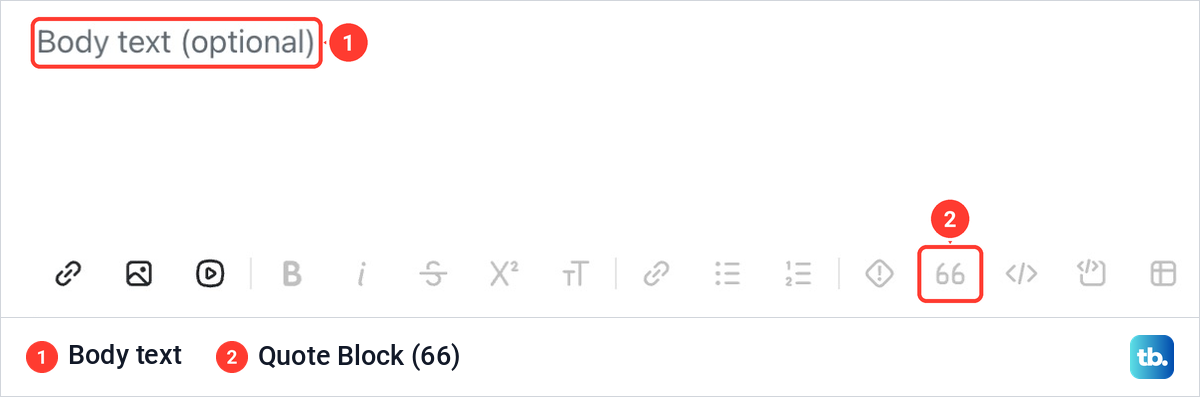
Type or paste your text in the body, put the cursor in the line you want to quote and click the 66 button. On our empty form, the formatting buttons from Bold to Table, 66 included, were greyed out, and so were Save Draft and Post. The post form also has a Markdown Editor, so the > rules above apply in a post too.
How to quote on the Reddit app for iPhone and Android
Reddit is moving its iPhone and Android apps entirely to its rich text composer and retiring Markdown there. It has already gone from the app's post composer and is being phased out of the comment box, so a line that starts with > may stay plain text.
In the app, open the post, tap the comment box or Reply, and look at the formatting toolbar. If it shows a quote button, put the cursor in the line and tap it. If it does not, open the same thread at reddit.com in your phone's browser. If that page shows the 66 button or a Markdown switch, follow the computer steps above, and if it shows neither, quote from reddit.com on a computer.
If the comment box will not open or freezes while you write your quote, first make sure the app is up to date. On iPhone, update an app on iPhone from the App Store, and on Android, use the Play Store. On Android, clear the app cache on Android next, and if the comment box still freezes, restart your phone when it freezes.
When a Reddit quote does not work
On a computer, > is Markdown, so it belongs in the Markdown Editor. If a > shows up as a plain character, switch to the Markdown Editor before typing it, or use the 66 button instead. In the Markdown Editor, a reply that ends up inside the quote is missing its empty line.
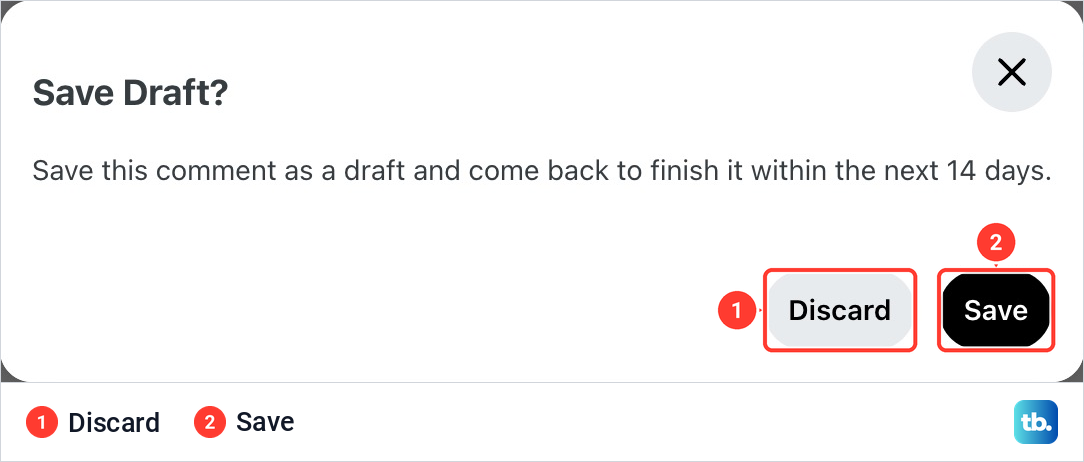
Closing the comment box does not have to lose your work. When we clicked Cancel on our unfinished comment, Reddit asked Save Draft? and offered to keep it for 14 days, with Discard and Save buttons. Reddit keeps up to 20 comment drafts, and you find them under Drafts in the menu behind your profile picture.
If the quote button misbehaves the same way every time, report it in the r/bugs community with your device, OS version, the steps, what you expected, what happened and a screenshot. On a computer, take a screenshot on Windows or take a screenshot on a Mac with the comment box in view. In the app, take a screenshot on iPhone or take a screenshot on Android instead, and remove your username first.
How we tested this guide
We tested this on Reddit on the web in Chrome on a Mac, quoting a line in an unsent comment in both the rich text editor and the Markdown editor.
Frequently Asked Questions
How do I quote someone in a Reddit comment?
Copy the words you are answering and paste them into your reply. Put the cursor in that line, click Aa if the toolbar is hidden, then click Quote Block, the 66 button. Press Enter twice at the end of the quote and write your answer.
Why does the > sign show up as text instead of a quote?
On a computer, > is Markdown, so type it in the Markdown Editor or use the 66 button instead. Reddit is retiring Markdown in its apps, so if > stays plain text there, use a quote button or reddit.com in a browser.
Do I need a space after the > sign?
No. When Reddit turned our quote into Markdown, it wrote the line with no space after the sign.
How do I quote on Reddit on my phone?
In the Reddit app, look for a quote button in the formatting toolbar, because Reddit is retiring the > shortcut in its apps. If there is none, open the thread at reddit.com in your phone's browser.
Does a Reddit quote show who wrote it?
No. The quote holds only the words you put in it. If the reader cannot tell who said them, add the person's u/ username before the quote.