


To create a group chat in Microsoft Teams for work or school, select New message at the top of your chat list, add at least two other people in To, write a first message and select Send. To give the chat a name, first select the down arrow at the far right of To and type a Group name. Sending that first message starts the conversation, and everyone in it can reply.
If you searched for how to create a group in Teams, a group chat is usually what you are after: a private conversation among people you pick. A team is a larger workspace with channels and its own members, and a Microsoft 365 group made in Outlook is a different thing again. These steps are for Teams with a work or school account; the free Teams app for personal use starts from New Chat instead, covered in the section on the free app below.
One detail the usual instructions leave out: in our Teams for the web, a named chat with only one other person in To would not send at all. Clicking Send, pressing Enter and pressing Ctrl + Enter all left the message sitting in the box, with no error. Add a second person to make it a group, or clear the name and Teams takes you to your one-to-one chat instead.
The short version
- In Teams for work or school, select New message, or press Ctrl + N in the Teams app on Windows and Alt + Shift + N in a browser, then add at least two other people in To.
- For a name, select the arrow at the far right of To and type a Group name before you send.
- Send a first message to start the chat. A named chat with only one other person did not send for us.
- From a one-to-one chat, open View and add participants and choose Start a group chat. The old messages stay behind.
- When you add someone to an existing group, check how much chat history they will see before you select Add.
Create a group chat in the Teams app on Windows or Mac
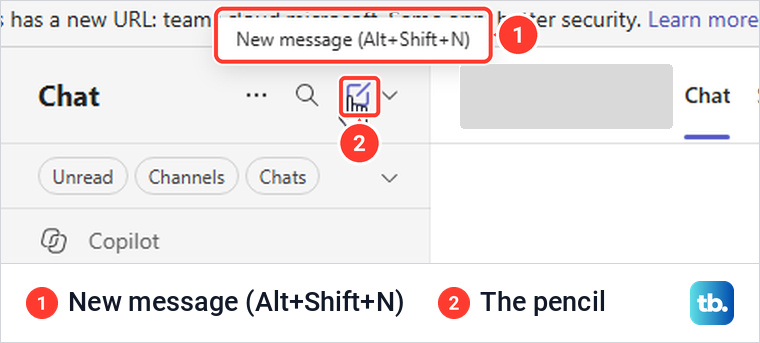
Open Teams and select Chat on the bar at the left. At the top of your list of chats and channels, select New message, the pencil icon. Microsoft also lists Ctrl + N on Windows and Cmd + N on a Mac as the shortcut for a new chat or channel message in the Teams app.
A blank conversation opens with a To line across the top and the message box at the bottom. In our Teams for the web, pictured below, To read Enter name, chat, channel, email or tag, a few suggested people dropped down below it, and the middle of the window said You're starting a new conversation. A New message entry also appeared in the chat list on the left while the draft was open.
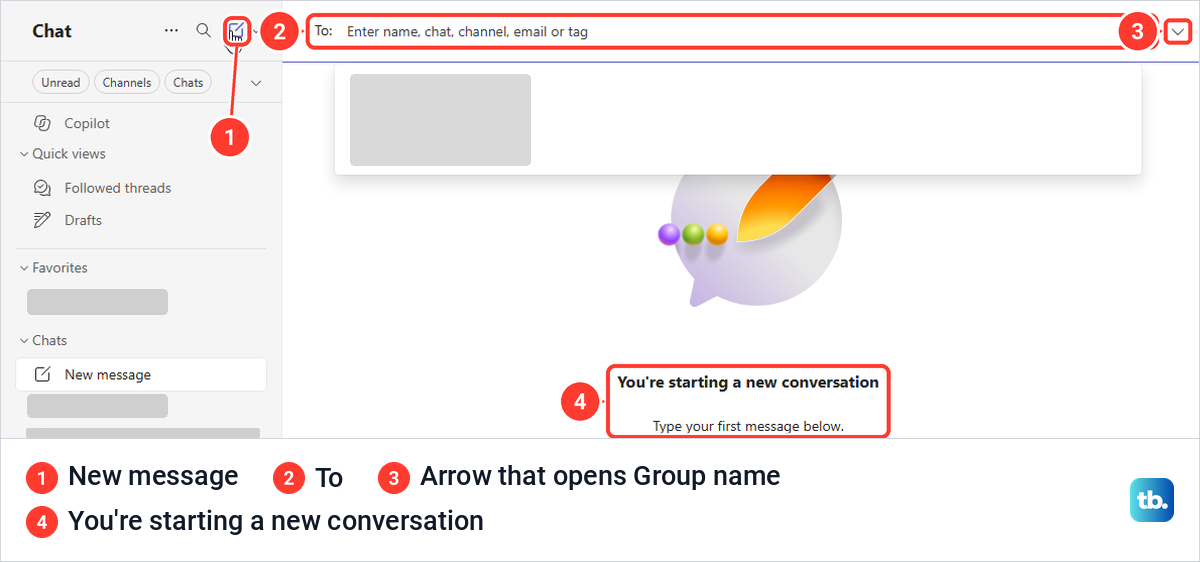
If you want a name, select the small down arrow at the far right of the To line and type it in Group name. Then type the first person's name in To and pick them from the suggestions, and repeat for everyone else. Microsoft's steps put the name before the people, and you can leave it out altogether.
Write your first message in the box at the bottom and select Send, the paper plane, or press Enter. Microsoft says this starts a new conversation and that everyone who has access to the group chat can send messages. Send that message before you click away. For us, a New message holding a group name and a person but no text was gone from the chat list, and from Drafts, as soon as we clicked away.
Ways to start a Teams group chat
New message is the main route, but Teams has four others. They differ in who ends up in the conversation and in what earlier messages come with it.
| What you want | Start here | Who is in it | Earlier messages |
|---|---|---|---|
| A new group chat | New message, then at least two other people in To | The people you picked | None, the chat starts empty |
| A group from a one-to-one chat | View and add participants, then Start a group chat | You, the person from the one-to-one chat, and the people you add | None, the one-to-one messages stay where they are |
| More people in a group you already have | View and add participants, then Add people | The current group plus the newcomers | None, a number of days, or all of it |
| A group built around one message | More options on the message, then Forward | The people you forward it to | Only the forwarded message |
| Everyone in a team tag | New message, then the tag's name in To | The tag's current members | None, the chat starts empty |
Pick the route by the history question first. If people must not see an old conversation, start fresh or use Start a group chat, and if they need the background, add them to the existing group and choose how far back they can read.
Name the group before you send
The arrow that opens Group name has no label you can see, and hovering over it showed no tooltip for us. Its accessible name, which screen readers use, is Add group name and create a new group chat. One click added a Group name line above To with the cursor already in it, and the To hint changed to Enter a name, email, or tag.
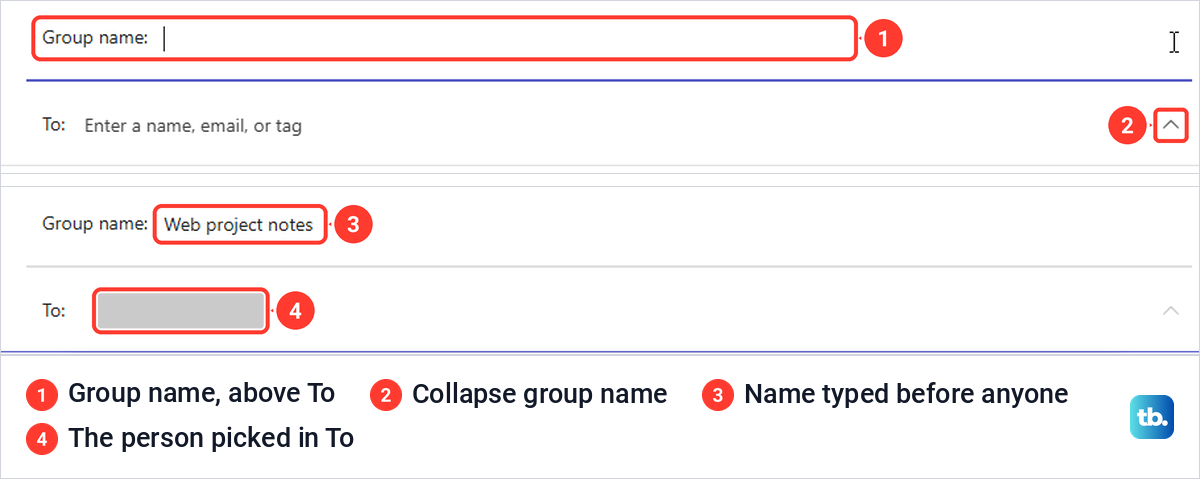
We could type a name before adding anyone, then type part of a person's name in To and pick the match, which turned it into a name chip. Choose a name people will recognize in a long chat list, such as the project or the shift, because that list is where they will look for it.
The name is optional. Microsoft's own page on chatting with people outside your organization says you can add a group name (optional) before your first message. On a phone, Microsoft's steps name the chat after it starts instead, which the phone section below covers.
When a named chat with one person will not send
On our screen, with a Group name filled in and only one other person in To, the window stayed on You're starting a new conversation. Two clicks on Send, Enter and Ctrl + Enter all left the message in the box, with no error and no hint, and nothing had been created 45 seconds later.
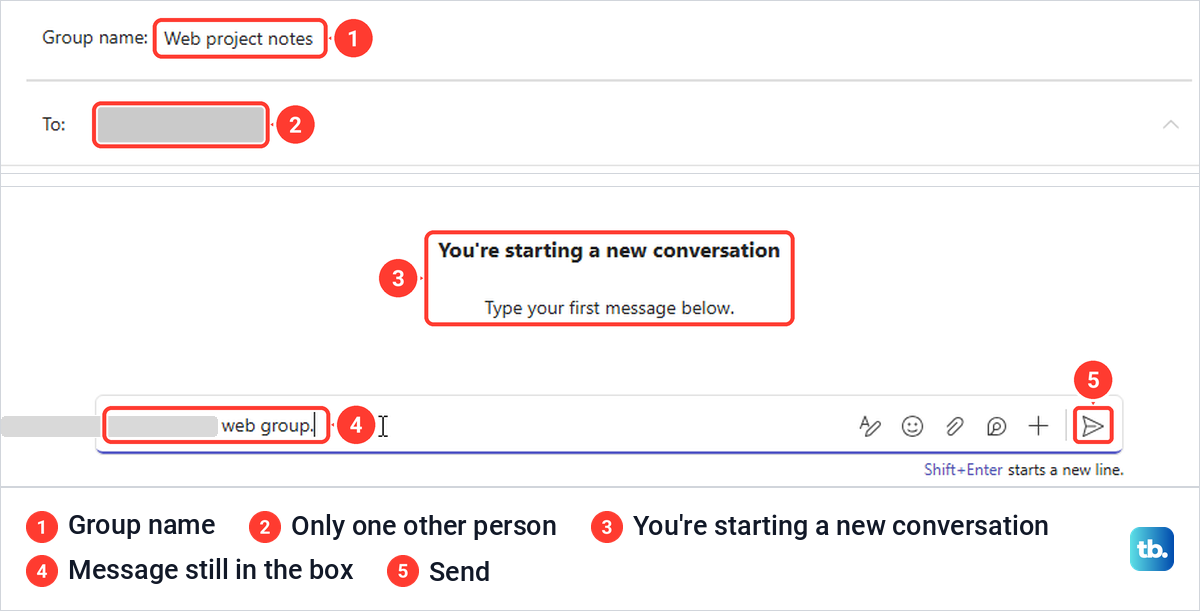
Teams treats a chat with one other person as a one-to-one conversation, and Microsoft describes group chats as conversations with multiple people. Others on Teams forums report the same rule, that a group needs two people added besides you. If you only want to talk to that one person, clear the Group name line.
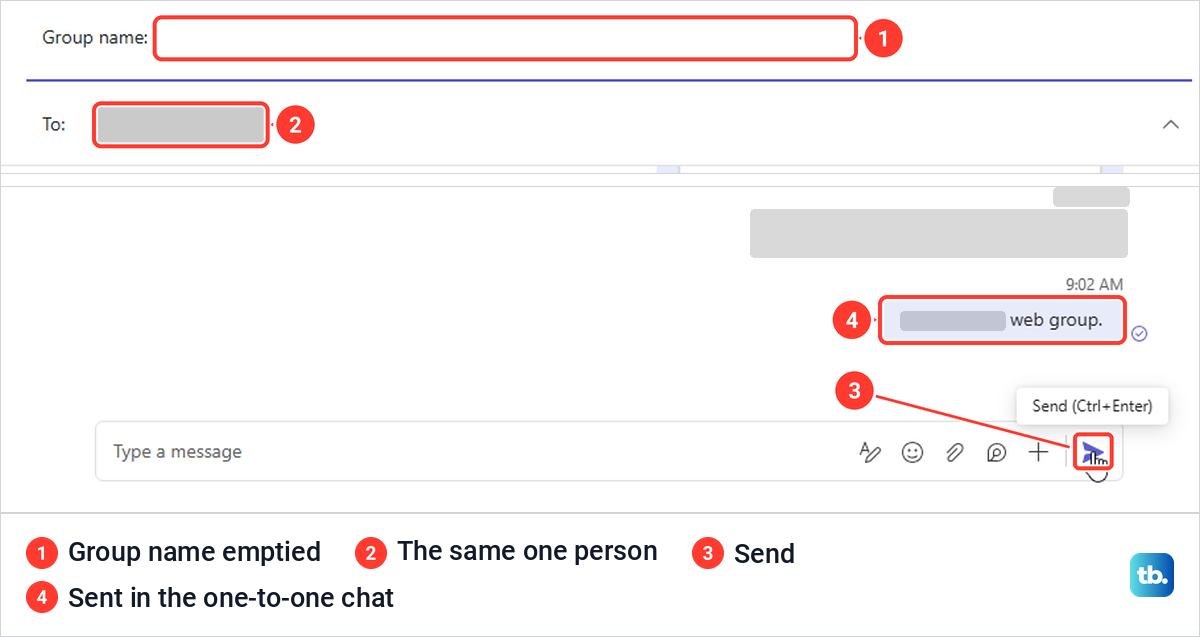
When we emptied Group name and left the same person in To, Teams switched straight to the existing one-to-one chat with that person, and one click on Send posted the message there. Picking a single person with no name did the same thing. To keep a separate, named conversation, add a second person before you send.
Start a group chat in Teams on the web
Teams on the web works the same way once it is open. Go to teams.microsoft.com in your browser and sign in with your work or school account. For us, that address loaded Teams at teams.cloud.microsoft, with a bar saying Teams has a new URL.
In Teams for the web, our chat list combined chats with teams and channels, with Unread, Channels and Chats filters at the top. Select New message above the list, then follow the same steps as in the app.
Keyboard shortcuts are where the browser differs. Pointing at the pencil showed the tooltip New message (Alt+Shift+N), and pressing Alt + Shift + N opened the composer. Pressing Ctrl + N instead opened a new Microsoft Edge window and left Teams untouched, because the browser takes that shortcut first.
The Send button's tooltip on the web read Send (Ctrl+Enter), but plain Enter sent a message in an ordinary chat too. A hint under the box said Shift + Enter starts a new line, which is what to use when your first message needs more than one line.
Turn a one-to-one chat into a group chat
When you are already talking to one person and want to bring in someone else, open that chat and select View and add participants, the people icon near the top right. In a one-to-one chat, its menu listed both people under People, then Start a group chat and Add agents. There was no Add people item in a one-to-one chat.
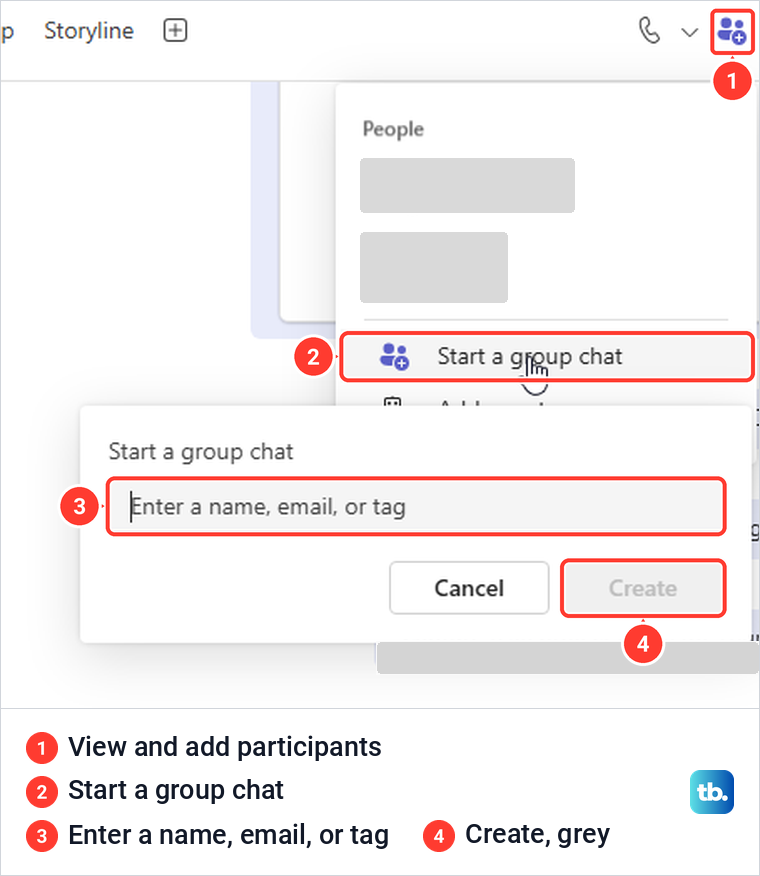
Start a group chat opened a small box with Enter a name, email, or tag, a Cancel button and a Create button that was grey while nobody was chosen. Typing the name of the person already in the chat gave We couldn't find any matches, so the box only takes new people. Type each extra person, pick them, then select Create.
This box offered no chat history choice. Microsoft says that when you add someone to a one-to-one chat, a new chat is created and your chat history won't move over, and that history can be included only when adding someone to an existing group chat. Your original one-to-one chat stays as it is, and Cancel closed the box and left the one-to-one chat as it was.
Add people to an existing group chat
To add people to a group chat you already have, Microsoft's steps are to select View and add participants, then Add people, type the names, choose how much of the chat history to include, and select Add. The history choice is the step to slow down on, because it decides what the newcomer can read.
We saw that dialog in a meeting chat, where View and add participants also offers Add people. It had a name box and three choices: Don't include chat history, which was selected when the dialog opened, Include history from the past number of days with a number box, and Include all chat history. The Add button was grey while the name box was empty. When you add people to a group, check which choice is selected before you select Add.
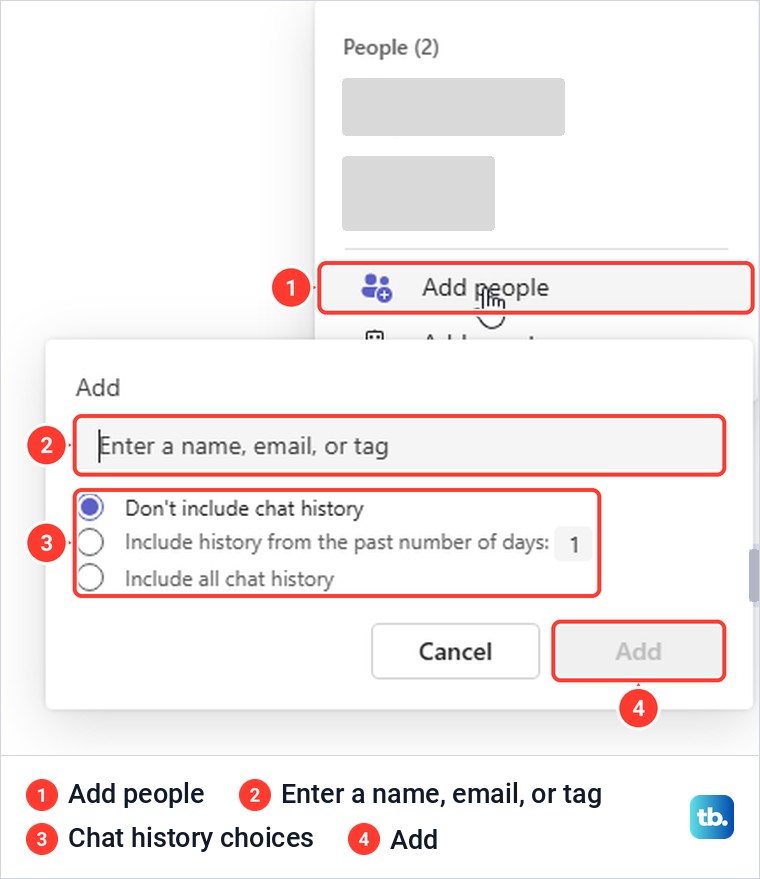
Read back through the chat before you pick all history. Microsoft says Teams keeps the entire chat history back to the first message, so Include all chat history gives the newcomer everything, including remarks made long before they joined. If only the last few days matter, set the number box to that and leave older messages out.
Start a group chat from a forwarded message
Sometimes the group exists only because of one message, such as a request a few colleagues must act on. Point at the message, select More options (the three dots) and choose Forward. Our menu also listed Reply with quote, Copy link, Save this message, Delete, Pin for everyone, Mark as unread, Share to Outlook and Translation.
Forward opened a window titled Forward this message, with the line You can forward to any chat or channel, an Add recipients box and a message preview with Add a message (optional) above it. Typing a name offered the person and any existing chats that included them.
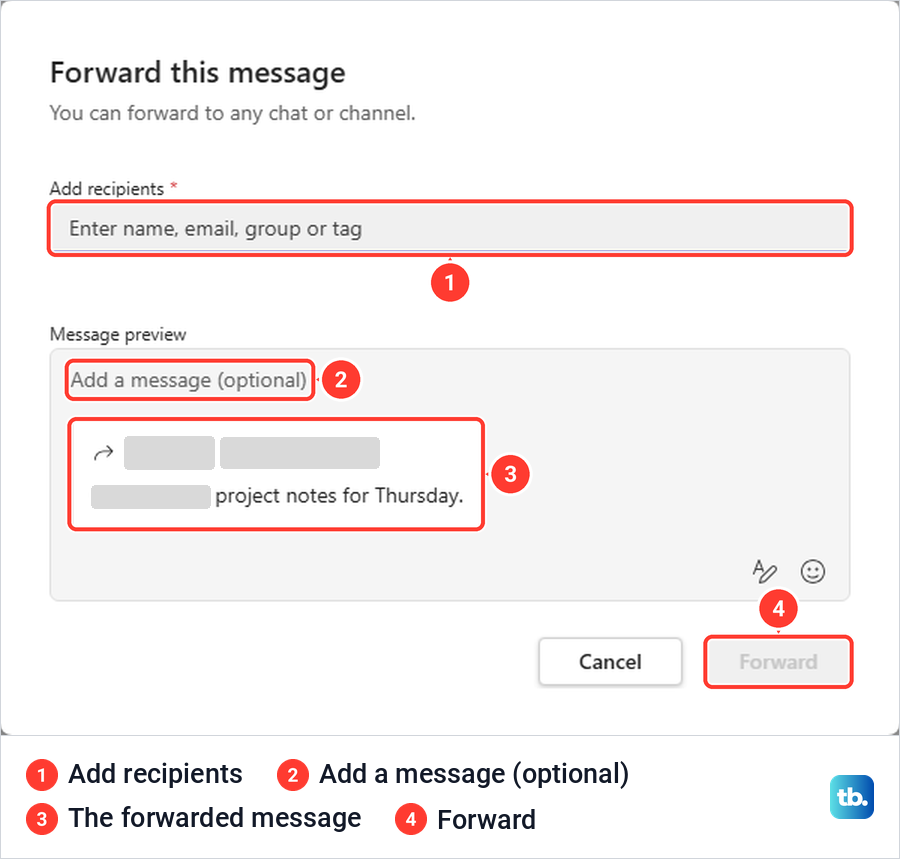
Microsoft says adding multiple people will forward the content to a group chat, so pick two or more people rather than an existing chat to start a new group. Only what you forward goes across, not the rest of the conversation, and Microsoft allows up to five messages at a time through Forward and then Multiple messages. A team's sensitivity labels can remove the Forward option from its channels.
Fill the To box with a team tag
If you message the same set of people often and they belong to one team, a tag can fill To for you. Microsoft's steps are to select New message, start typing the tag's name and select it, and everyone in the tag group will be added to the To field. Check the names before you send, since a tag follows its members and can change.
Tags live in the team, not in chat. In the team we opened, More options next to the team name held Manage tags, and with none set up the page said This team doesn't have any tags yet, with a Create tag button. Microsoft says custom tags are created by team owners, or by members if the owner allows it.
Create a group chat on your phone or in the free Teams app
In the Teams mobile app for work or school, Microsoft's steps are to tap Chat, then New message, type the names of the people in To, write a message and tap Send. The name comes afterwards: tap the participants' names at the top of the chat, tap Group chat name, enter a name and tap Save. To add someone later, tap the names at the top, tap Add people, enter the names, choose how much chat history to include and tap Done.
The free Teams app for personal use has its own steps. On a computer, Microsoft's steps are to select New Chat, type the names, phone numbers or email addresses in the To line, choose Name group chat if you want a name, then type a message and select Send. From a one-on-one chat, select the top of the chat, then Create a group chat, enter the contacts and select Create, which Microsoft says creates a new group chat and keeps your one-on-one chat.
On a phone, Microsoft's steps for the free app are to tap New Chat, enter the names, phone numbers or emails of the people, tap Next and send a message to finish creating the group, then name it from the chat header with Name group chat. Microsoft says that if you start a group with a new contact, they need to accept your group invitation.
Group chat, channel or meeting chat
The arrow next to New message, which Teams calls New items, shows how many other things Teams can start. Ours listed New message, New channel, New storyline post, Join team, New team, Join communities and New section. Of the items in this menu, only New message starts a group chat; New team builds a whole workspace with its own members and channels.
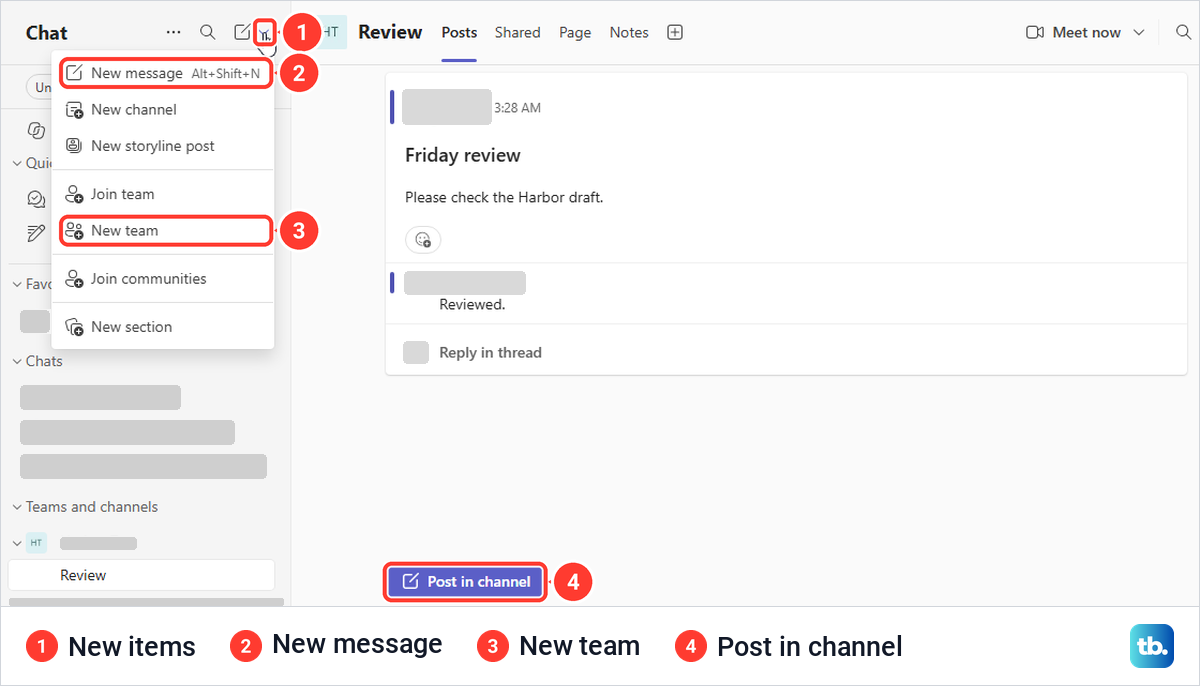
A channel works differently from a chat. Ours opened on a Posts tab with a Post in channel button and no message box, and everyone who can open the channel sees what is posted there.
A meeting chat comes with a meeting, and Microsoft says who can use it before, during and after the meeting depends on how each person was invited or joined, and might be limited depending on organizer settings or IT admin policies. If you want people on a call at a set time, schedule a Teams meeting and send invites rather than starting a group chat.
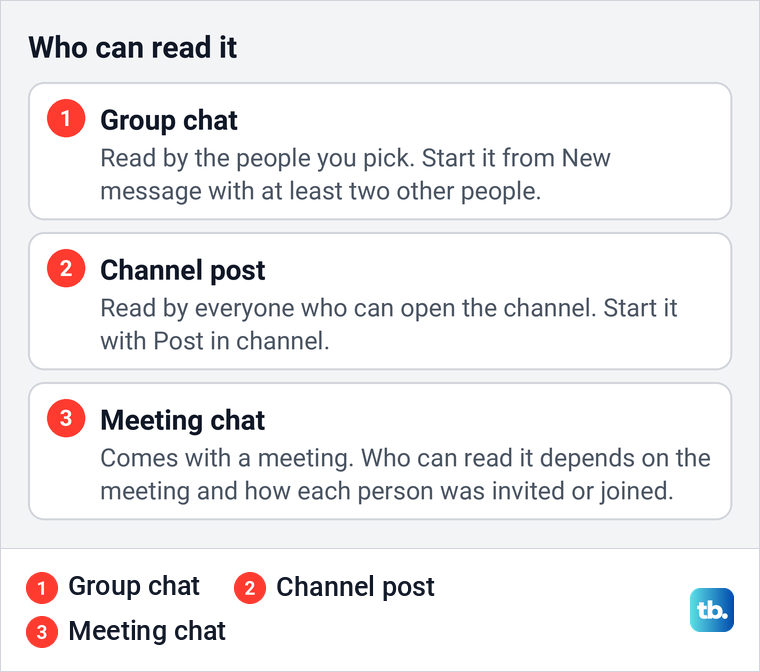
Use a group chat for a small, private conversation among people you choose, a channel when a whole team should see the discussion, and a meeting chat for talk around a scheduled call. When the call itself comes round, our guide on how to join a Teams meeting shows the ways in.
When a person or the chat box is missing
If a name does not show up in To, check the spelling and try the person's full name or work email. A made-up name gave us We couldn't find any matches, while the exact display name of a colleague brought up one suggestion straight away.

People outside your organization can join group chats if they use Teams or Teams Free and your organization allows it. Microsoft says external access is turned on automatically, but an org's admin can turn it off or limit it, and either organization's settings can block the chat, so ask your IT admin when an outside contact will not come up.
If you see Post in channel instead of a message box, you are in a channel, not a chat. The New message pencil stayed at the top of the list while a channel was open, and picking a chat or the Chats filter at the top of the list took us back to chats; selecting Chat on the left bar did not leave the channel. If Chat is missing altogether, your admin may have turned chat off in a messaging policy.
If Teams itself misbehaves, with the chat list failing to load or New message doing nothing after a restart, clear the Teams cache and try again. Do this only once you have ruled out the one-person rule above, which looks like a fault but is not one.
Manage the group chat once it exists
To see who is in a group chat, select View and add participants at the top right for a list of everyone's names. Microsoft puts the limit at 250 people per group chat, with no more than 200 added at the same time. Above 20 people, Microsoft says Teams turns off video and audio calling, sharing, read receipts, the typing indicator, Teams status messages and Outlook automatic replies in that chat.
That matters if your group relies on automatic replies, because a colleague who followed the steps to set out of office in Teams will not have that reply show in a chat of more than 20 people. For a smaller group, you can start a call from the chat and share your screen on Teams as in any call.
When the group has to decide something, you can create a poll in a Teams chat instead of counting replies. If group messages arrive without a sound, check whether the chat is muted, then work through our Teams notification sound fixes. Our guide on how to delete Teams chats and messages covers a message sent to the wrong group.
To leave a group chat, Microsoft says to find it in the chat list and select More options and then Leave, after which you can rejoin only if someone invites you again. Removing someone else needs a setting your admin must turn on, works in group chats of three or more people, and posts a notice in the chat.
Removing a person does not take back what they saw. Microsoft says people removed from a chat can see the previous chat history but cannot send new messages or see new conversations or files, and that their own messages remain in the chat. Microsoft adds that editing a message in a group chat makes that message invisible to former participants.
If you are new to the rest of the app, our guide to using Microsoft Teams for chats and meetings walks through the other parts of the left bar. Start there if a group chat is your first step in Teams and the rest of the window is still unfamiliar.
How we tested this guide
We tested this in Teams for the web in Microsoft Edge on Windows 11, version 25H2, entering a group name and a person in New message, then pressing Send.
Frequently Asked Questions
Can I make a named Teams group chat with just one other person?
It did not work for us. With a group name and one other person in To, Teams for the web would not send the first message and showed no error. Add a second person for a group, or clear the name to use your one-to-one chat.
Does a new member see the old messages in a group chat?
Only if you allow it. When you add someone to an existing group, choose between Don't include chat history, a set number of days, or Include all chat history, and check which one is selected before you select Add.
Does adding a person to a one-to-one chat share our old messages?
No. Start a group chat makes a new, separate conversation and offered no history choice. Microsoft says your chat history won't move over, and the one-to-one chat stays as it was.
How many people can be in a Teams group chat?
Microsoft says up to 250, with no more than 200 added at once. Above 20 people, calling, sharing, read receipts, status messages and automatic replies are turned off in that chat.
Why can I not find someone from outside my organization?
Type their full work email and pick the suggestion. They must use Teams or Teams Free, and either organization can block or limit external chat, so ask your IT admin if they still do not appear.
Is a group chat the same as a team in Teams?
No. A group chat is a private conversation among people you choose, made from New message. A team, made from New items and New team, is a workspace with channels and its own list of members.