

To change your iPhone name, open Settings, tap General, tap About, then tap Name. Tap the Clear Text button, type the new name and tap Done on the keyboard. That one name is what Bluetooth and your Personal Hotspot show to other people, what AirDrop shows to people who do not have you in their contacts, and what iCloud and your computer call the phone.
There is no separate AirDrop name or hotspot name to look for. Apple's own instruction for the hotspot is to rename the device that provides it, so the steps above cover all three.
The short version
- The path: Settings > General > About > Name, tap Clear Text, type the new name, tap Done.
- No separate settings: Bluetooth and Personal Hotspot use the iPhone's name. AirDrop shows it to people who do not have you in their contacts.
- Check it: Settings > Bluetooth shows "This iPhone is discoverable as" followed by the current name.
- Old name still showing? Find My and iCloud can take a while to update after a rename.
- Row will not edit? A supervised work or school iPhone can block name changes. Ask whoever manages it.
Change your iPhone name in Settings
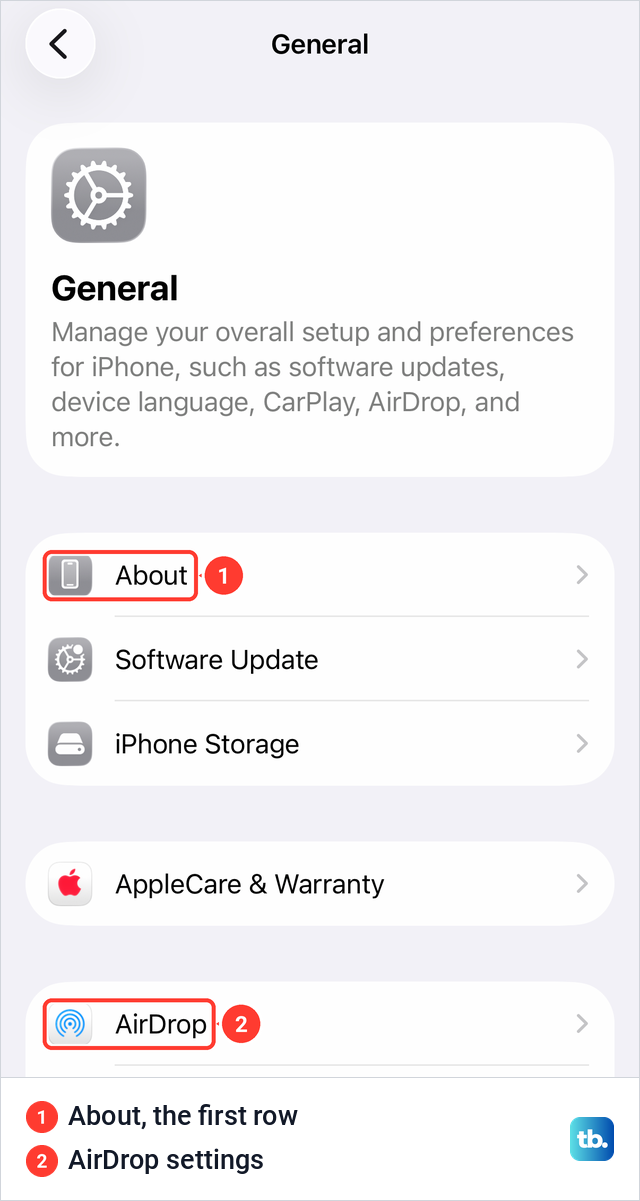
Open the Settings app and tap General. On our iPhone 17 Pro with iOS 26.6, About is the first row in General, above Software Update and iPhone Storage. AirDrop sits further down the same list, but that page is for AirDrop options such as Use Cellular Data, and the name AirDrop shows still comes from About.
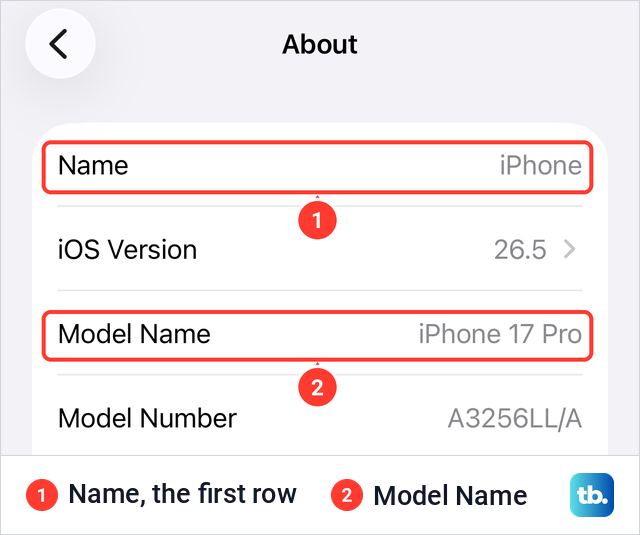
Tap About, then tap Name. On iOS 26.5, Name is the first row of the About screen, with the current name in grey on the right. The rows below it list the iOS Version and the Model Name, which is also the quickest way to find out which iPhone you have.
Apple's steps are to tap the Clear Text button, then enter a new name. Then tap Done on the keyboard, which is how Apple's earlier iPhone steps and its current Apple Watch steps end.
Apple's guide for iOS 27 gives the same path, Settings, General, About, Name, so nothing changes if you have already updated. The iPad uses it too. Renaming changes a label only, and nothing in Apple's steps deletes or resets anything on the phone.
Where your iPhone name shows up
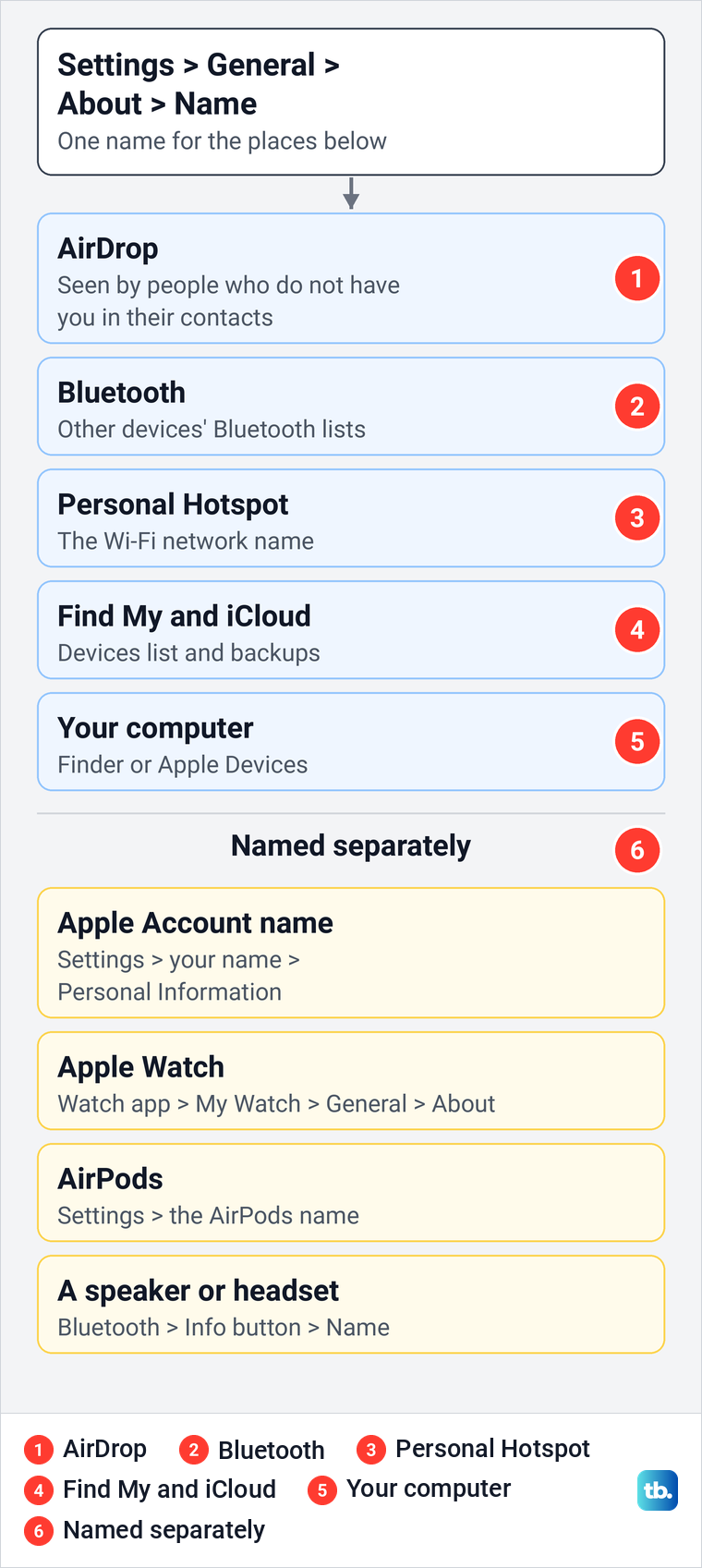
Apple says the name is used by iCloud, AirDrop, Bluetooth, your Personal Hotspot and your computer. Find My and your iCloud backups list devices by name as well. The table shows what each place displays and whether the iPhone name controls it.
| Where | What you see there | Uses the iPhone name? |
|---|---|---|
| AirDrop on other iPhones, iPads and Macs | Your iPhone among the nearby devices someone can send to | Yes for people who do not have you in their contacts; contacts see your name and photo |
| Bluetooth lists on other devices | Your iPhone while its Bluetooth settings are open | Yes |
| Personal Hotspot | The Wi-Fi network other devices join | Yes, there is no separate hotspot name |
| Find My and iCloud.com | Your iPhone in the Devices list | Yes, once it updates |
| iCloud backups and the Apple Account device list | Each backed-up or signed-in device by name | Yes, once it updates |
| Finder on a Mac, Apple Devices on Windows | The connected iPhone in the sidebar | Yes |
| Your Apple Account name | Your own name on the account | No, it is set under Settings > your name |
In Find My, Apple's steps are to tap Devices, then tap the name of the device you want to locate, so the new name is the one to look for. The same list appears when you use Find My iPhone on a computer. Backups are listed by device name too, in iCloud and when you find iPhone backups on a Mac.
Check the name other devices see
The quickest check is on the iPhone itself. Open Settings and tap Bluetooth. On our iPhone 17 Pro, the line under the Bluetooth switch read "This iPhone is discoverable as", then the phone's name in quotes, then "while Bluetooth Settings is open."
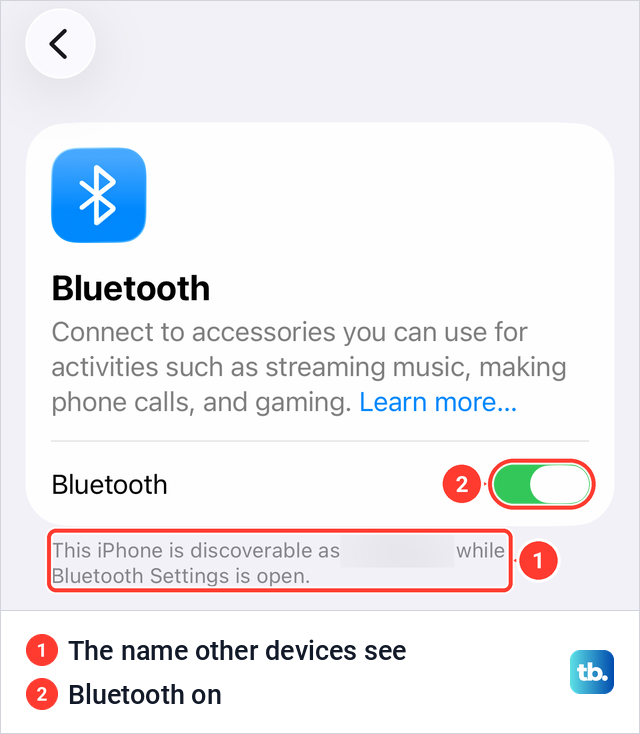
That is the name a Mac or a car finds when it searches for your phone while that screen is open. If the line still shows the old name, go back to About and check that the new one was saved.
Change your Personal Hotspot name
Your hotspot has no name setting of its own. Apple puts it plainly: "To change the name of the Personal Hotspot, change the name of the device providing the hotspot", then gives the same path, Settings, General, About, Name. Other iPhones, iPads and Macs then show the hotspot under the new name in their Wi-Fi lists.
A computer that joins over Bluetooth picks your iPhone from its list of nearby Bluetooth devices instead, which shows the same name. The password is separate, and Apple keeps it under Wi-Fi Password on the Personal Hotspot screen, at least eight characters long. If other devices cannot see or join the hotspot, our guide to set up and fix Personal Hotspot goes through the switches.
The hotspot name has nothing to do with your home network. To rename the network your router broadcasts, change your Wi-Fi network name in the router's settings instead.
Change the name people see in AirDrop
AirDrop has no name setting of its own, and it does not always show your iPhone's name. Apple's security documentation says that when a sender's device verifies you as one of their contacts, it shows your first name and photo from their Contacts. Devices that are not verified appear with a silhouette icon and the device's name, as set in Settings > General > About > Name.
So a new iPhone name changes what people without you in their contacts see. You can also change who can send to you. Apple's steps are to open Control Center, touch and hold the top-left group of controls, tap AirDrop, then choose Contacts Only or Everyone for 10 Minutes.
On our iPhone 17 Pro with iOS 26.6, the large AirDrop button sat in that top-left group, and the smaller Personal Hotspot button sat among the small buttons below it. Apple adds that from iOS 26.2, someone who is not in your contacts must use an AirDrop code to send you something.
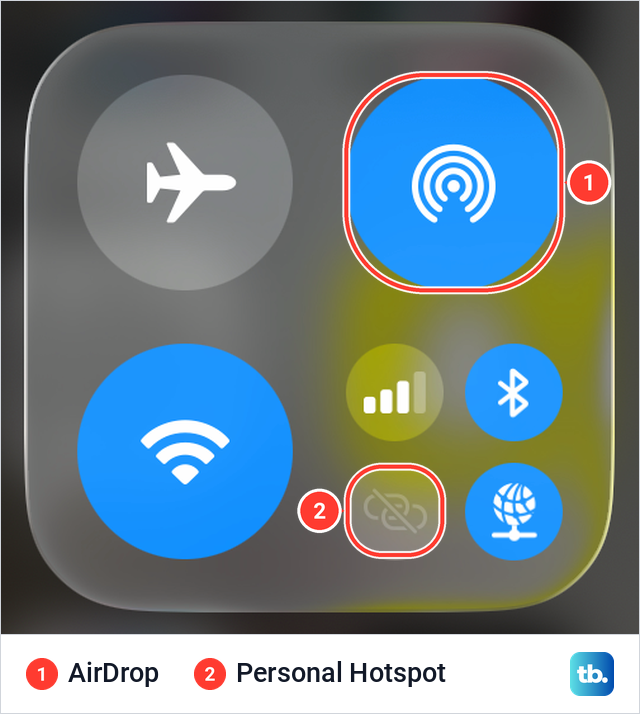
Apple says the people you see in AirDrop are those nearby with Wi-Fi and Bluetooth turned on who can accept files from you. If your iPhone does not show up on a Mac at all, work through our fixes for AirDrop not working on a Mac.
See your iPhone name on a Mac or PC
On a Mac with macOS Catalina or later, Apple says the connected iPhone's name appears in the Finder sidebar. On a Windows PC it appears in the Apple Devices app after you connect the phone with a USB cable, unlock it and choose Trust This iPhone if asked.
Apple's steps for changing an iPhone's name use Settings on the phone, so rename it there and the computer shows the name you set. A supervised work or school iPhone is the exception, covered in the next section.
When the Name row will not let you edit it
A work or school iPhone can be locked down by the organisation that manages it. Apple's device management documentation lists a restriction called Modify device name for supervised devices. When an organisation applies it, users can't change the name of the device as shown in Settings > General > About. Apple's table lists name changes as allowed by default, so the block only appears when an organisation sets it.
To see whether your iPhone is managed, open Settings > General > VPN & Device Management, which is where people on Apple's forums look first. If a management profile is listed there, ask whoever manages the phone whether name changes are restricted, because only they can lift the restriction. Apple's Configurator app for Mac can rename supervised devices, which is a job for the IT team rather than the person holding the phone.
Why the old name still shows somewhere
A new name does not reach every place at the same moment. There are three common cases, and the fix is different for each. A managed iPhone is covered in the section above; the other two come from what people on Apple's support forums describe.
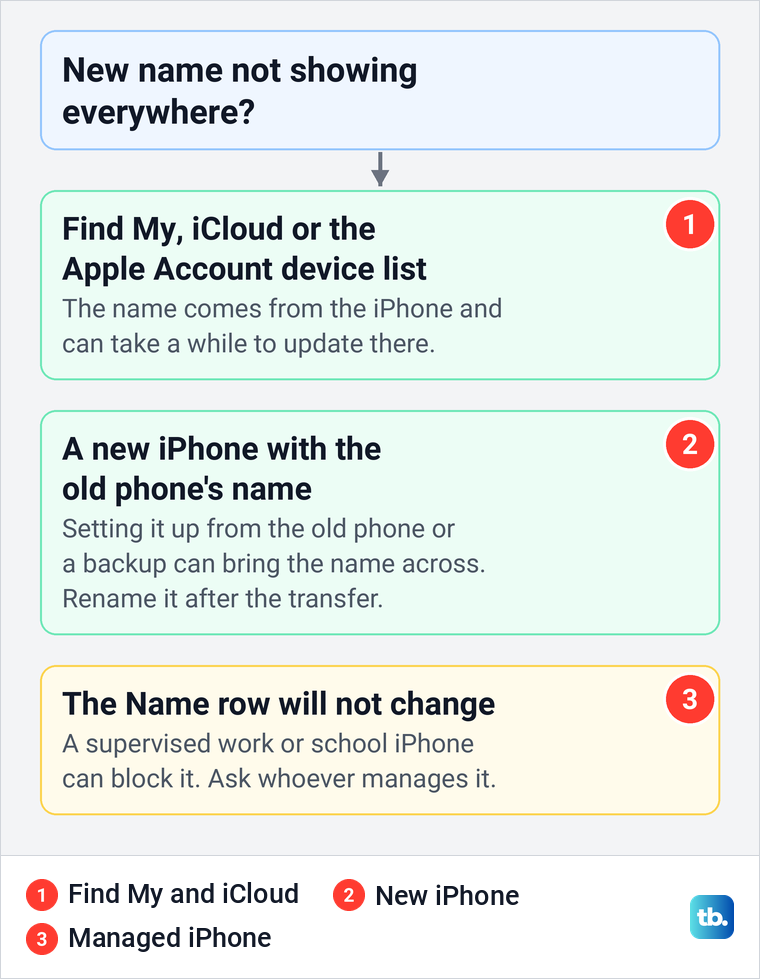
Find My, iCloud and the device list under your Apple Account take the name from the phone. Forum answers say the new name syncs to iCloud eventually, sometimes after a day or two. A restart is quick and harmless to try while you wait, and here is how to restart your phone. If the old name is still there after a couple of days, check the usual causes when iCloud is not syncing.
A new iPhone can also arrive with your old phone's name. Forum answers explain that setting it up from the old phone or from a backup brings the name across, so rename it in Settings once the transfer has finished. If the old phone is going to someone else, a new name is not enough, so erase the iPhone before you sell it.
Your iPhone name is not your Apple Account name
The device name and the name on your Apple Account are two different settings. The device name lives in General > About. Your own name is under Settings, then your name at the top, then Personal Information, where Apple says you update the name, birthdate and photo on the account.
Renaming the phone changes neither the account name nor the email address you sign in with. To change that address, see how to change your Apple ID email address.
Rename an iPad, Apple Watch or AirPods
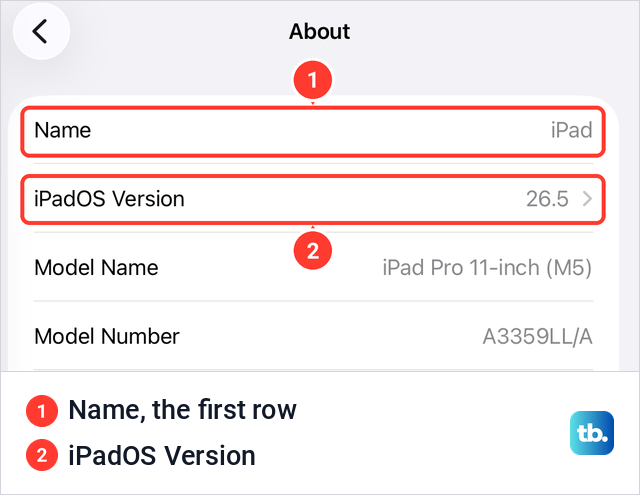
An iPad uses the same path as an iPhone: Settings, General, About, Name, then Clear Text and the new name. On an iPad Pro 11-inch with iPadOS 26.5, Name was the first row of About, above iPadOS Version, just as on the iPhone.
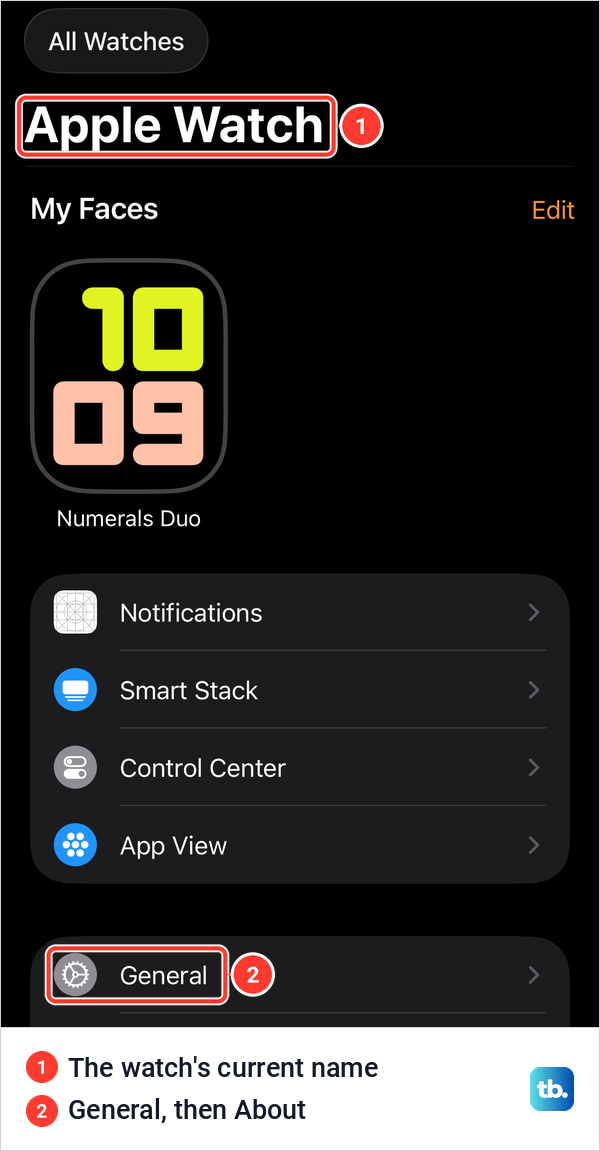
An Apple Watch is renamed from the iPhone it is paired with. Apple's steps are to open the Apple Watch app, tap the My Watch tab, go to General, tap About, tap the first line with the watch's name, rename it and tap the Done button on the keyboard. In the Watch app on iOS 26.5, paired with an Apple Watch Series 11 with watchOS 26.5, the big heading on the My Watch tab was the watch's name.
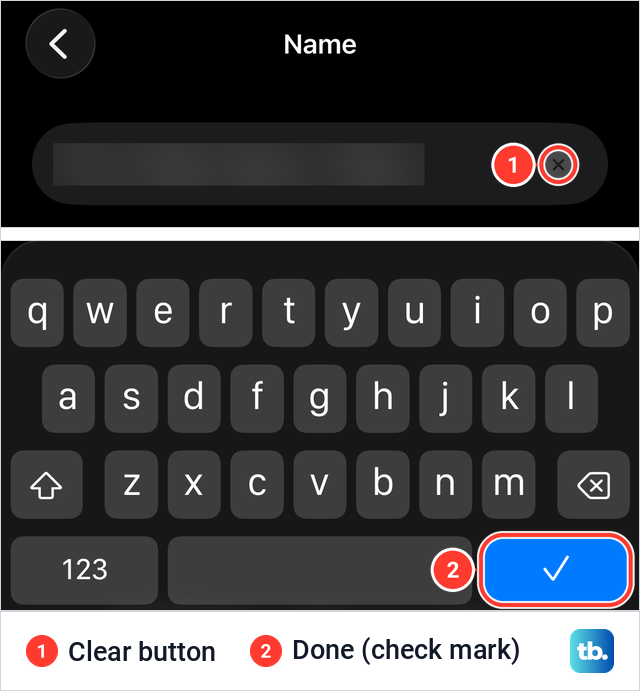
When we tapped the Name row, a Name screen opened with the current name in a field, a clear button at its end and a keyboard whose Done key was a blue check mark. With the field cleared, the old name stayed visible in grey as a hint.
AirPods are renamed in Settings on the iPhone while they are connected. Apple's steps are to wear them, open Settings, tap the name of your AirPods near the top of the screen, tap the current name and enter a new one. Apple says the new name is updated across devices signed in to the same Apple Account, and if they are not connected yet, pair AirPods with your iPhone first.
Other Bluetooth accessories keep names of their own. Apple's steps are Settings > Bluetooth, the Info button next to the accessory, then Name, and Apple notes that not all Bluetooth accessories support renaming.
Pick a name that is safe to show strangers
Your iPhone's name is not private. Other people nearby can see it in their Wi-Fi list while Allow Others to Join is turned on in Personal Hotspot settings, in a Bluetooth scan while your Bluetooth settings are open, and in AirDrop when people who do not have you in their contacts look for you while you accept items from everyone.
A first name, a nickname or a plain label such as Kitchen iPhone tells your own devices apart without handing strangers your full name. Leave out your surname, phone number and email address. The name is easy to change again later, so pick something you would be happy to see on a stranger's screen.
How we tested this guide
We tested this on an iPhone 17 Pro with iOS 26.6 and an iPad Pro 11-inch with iPadOS 26.5, checking where each device shows its name.
Frequently Asked Questions
Why does my new iPhone still have my old iPhone's name?
Setting up a new iPhone from your old one or from a backup can bring the old name across, as people on Apple's forums report. Rename it in Settings > General > About > Name once the transfer has finished.
I changed my iPhone name, so why does Find My still show the old one?
Find My takes the name from the phone and can take a while to update. Forum answers say it changes on its own, sometimes after a day or two. A restart is quick to try while you wait.
Why can't I change my iPhone name?
On a supervised work or school iPhone, the organisation can block name changes with Apple's Modify device name restriction, and then the name in About cannot be changed. Check Settings > General > VPN & Device Management and ask whoever manages the phone.
Does changing my iPhone name change my hotspot and AirDrop name?
Yes for the hotspot, because Apple says you rename it by renaming the iPhone. AirDrop shows the new name to people who do not have you in their contacts, while contacts see your name and photo from their Contacts.
Does renaming my iPhone change my Apple ID name?
No. Your Apple Account name is a separate setting under Settings, your name, Personal Information, and renaming the phone leaves it and your sign-in email alone.
How do I change my Apple Watch name?
Open the Apple Watch app on your iPhone, tap My Watch, then General, About and the first line with the watch's name. Type the new name and tap Done on the keyboard, which showed as a check mark when we opened that screen.