

To use Reddit, type a topic into the search box at the top of reddit.com, open the Communities tab, read a community's page and click Join if its posts are what you are after. The communities you join then fill your Home feed, where you can save posts, vote and comment. Communities may have their own posting rules, so read them before you write anything.
The computer steps come first below, with screenshots from reddit.com in Chrome. The Android and iPhone apps have a section of their own.
The short version
- Find a community: search for a topic, then open the Communities tab.
- Check it first: read the description and any rules in the right-hand column of its page.
- Join: click Join. The button turns into Joined and the community's posts come into Home.
- Keep a post: click the three dots on it and choose Save.
- Take part: comment in the box under a post, or start a post with Create at the top right.
Where to find everything on Reddit
| Goal | On a computer | Android app | iPhone app |
|---|---|---|---|
| Find a community | Search box at the top, then the Communities tab | Search icon at the top right, then Communities | Search icon at the top right, then Communities |
| Read the rules | Right-hand column of the community's page | See more, then the About tab | See more, then the About tab |
| Join or leave | Join on the community's page, Joined to leave | Join, or Joined and then the leave option | Join, or Joined and then the leave option |
| Start a post | Create at the top right, or Create Post in a community | Create icon at the bottom of the screen | Create icon at the top right |
| Save a post | Three dots on the post, then Save | Menu at the post's top right, then Save | Menu at the post's top right, then Save |
| Find saved posts | Your profile, Saved tab | Avatar, three-line menu, Saved | Avatar, three-line menu, Saved |
| Stop recommendations in Home | Settings, Preferences, Show recommendations in home feed | Account settings, Privacy, Enable home feed recommendations | Account Settings, Privacy, Show recommendations in home feed |
The Android and iPhone apps have their own section further down. Labels in the apps can shift a little between versions, so look for the nearest match.
What Reddit is and what you can do without an account
Reddit is one large site made of more than 100,000 smaller communities, which Reddit also calls subreddits. Each one has a name that starts with r/, a topic, and moderators from among its own users who can set and enforce rules of their own. Every community also follows Reddit's sitewide rules.
You do not need an account to read public posts and comments. Reddit may still ask you to sign in for some features and content, depending on your age. You must be at least 13 to create an account, and the minimum is higher in some countries. Joining, voting, saving, commenting and posting all happen on a signed-in account.
To make an account, click Log In on reddit.com and choose Sign Up where the form asks whether you are new to Reddit. Enter an email address and type the six-digit code Reddit emails you to verify it, or choose to continue with a phone number instead.
Then create a username and password. Choose the username with care, because you cannot change it once you have it. If you ever want to close the account, our guide on how to delete a Reddit account walks through it.
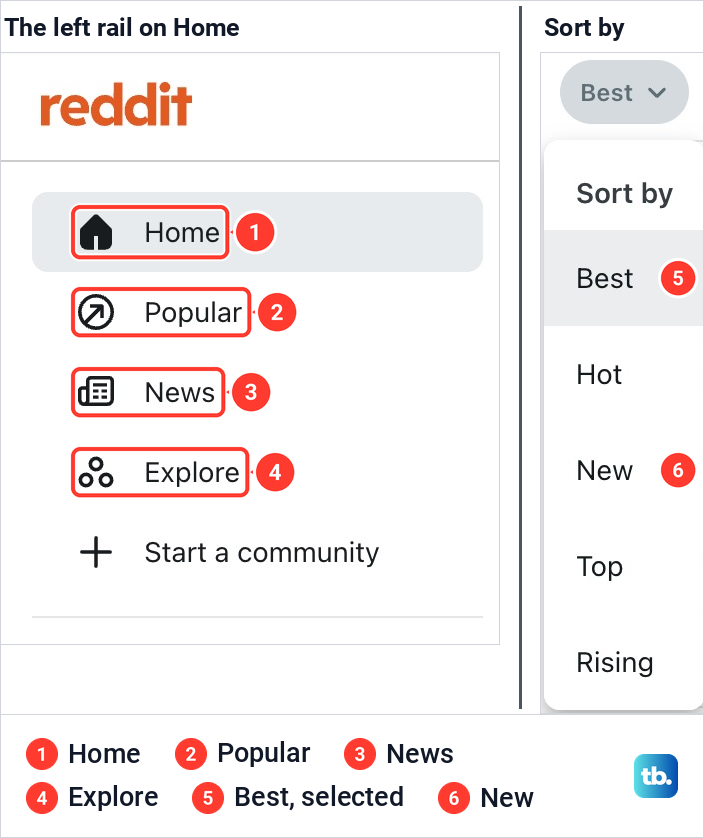
Signed in, reddit.com opened on Home for us. The left rail lists Home, Popular, News and Explore, with Start a community below them. Above the posts sit a sort button that read Best and a switch for how posts are laid out.
Home shows posts from the communities you have joined, mixed by default with recommendations from others. Explore suggests communities by topic and interest, and Popular is a good place to look for ideas when you do not know what to search for yet.
Use the Home feed and change the sort
The sort button opens a list. On the feed we had open it read Best, Hot, New, Top and Rising, with Best selected. Best is Reddit's personalised order and the one that carries Home's recommendations, and New is the one to pick when you want the newest posts first.
Search results have sorts of their own. Relevance is the default, Hot favours posts that have recently been getting upvotes and comments, Top favours the most upvoted and can be limited by time, New puts the newest first whatever their votes, and a fifth sort goes by comment count. Use New in either place when you want the latest posts on a subject.
Find communities about a topic
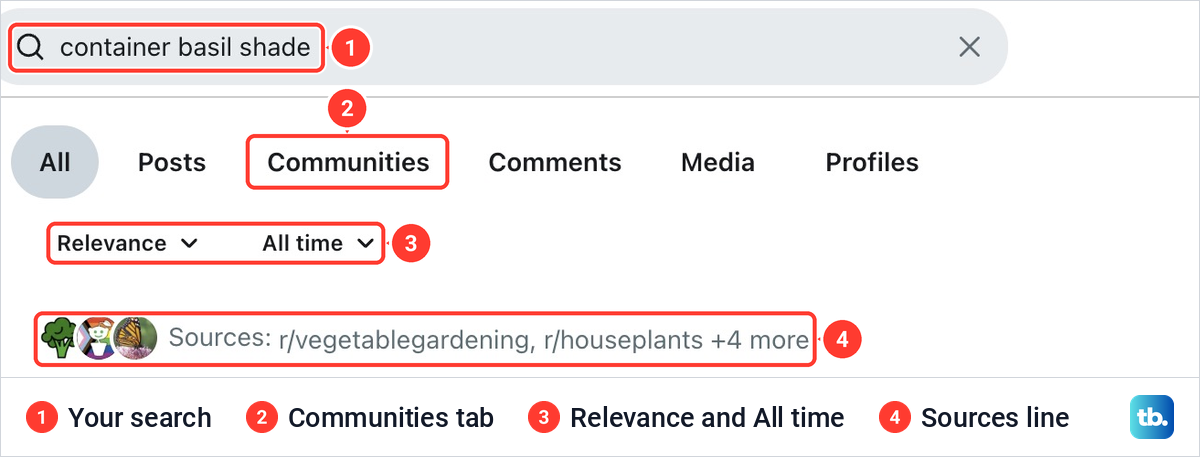
Click the search box at the top of any page and type what you are interested in, in plain words. You do not need to start with r/. We searched for container basil shade and pressed Enter.
The results page has six tabs: All, Posts, Communities, Comments, Media and Profiles, with Relevance and All time filters under them. The All tab opened with a short summary and a Sources line naming the communities it drew on. That line is already a list of places worth a look.
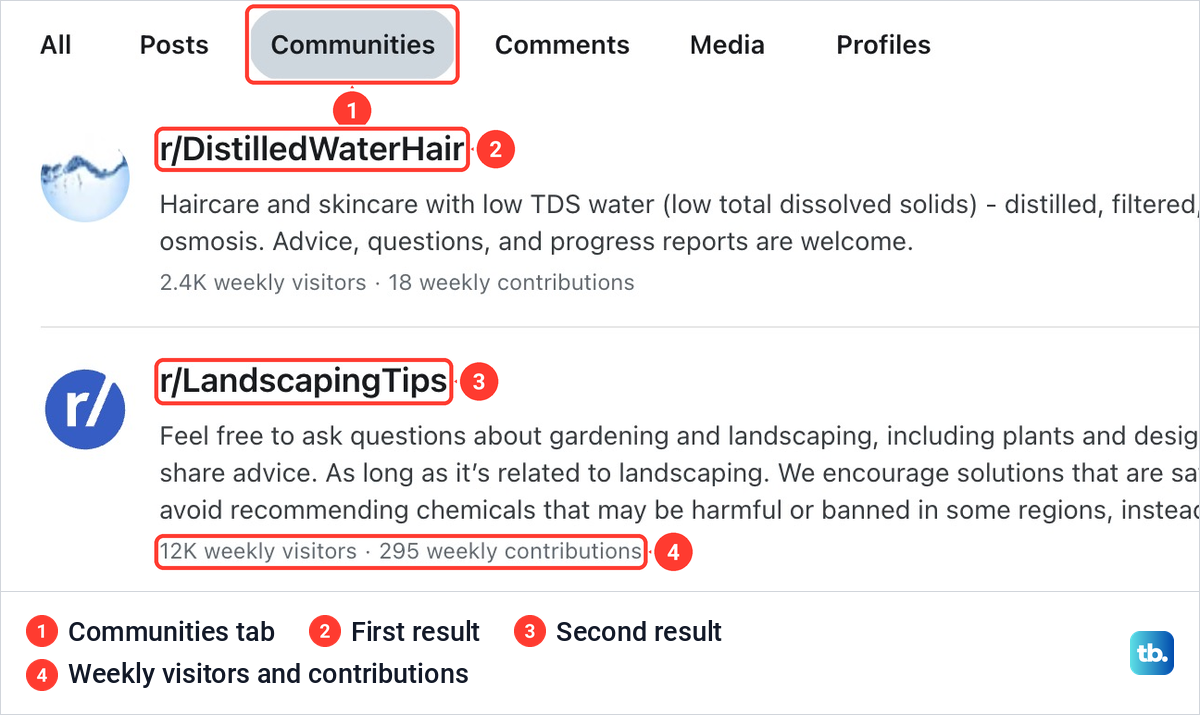
Click Communities to see groups instead of single posts. Each row gives the community's name, its description and two numbers, weekly visitors and weekly contributions. A Join button sits at the right of each row, but it is worth opening the community before you use it.
Read the descriptions, not only the names. For our basil question the first result was a hair-care community about low-mineral water, and the landscaping community that suited the question came second. The weekly numbers show how busy each one is: 18 contributions a week for the first, 295 for the second.
Open a community and read it before you join
Click a community's name to open its page. On the right is an about box with the community's title, a description of what it is for, the date it was created and whether it is Public, plus a Community Guide button. Create Post and Join sit above it.
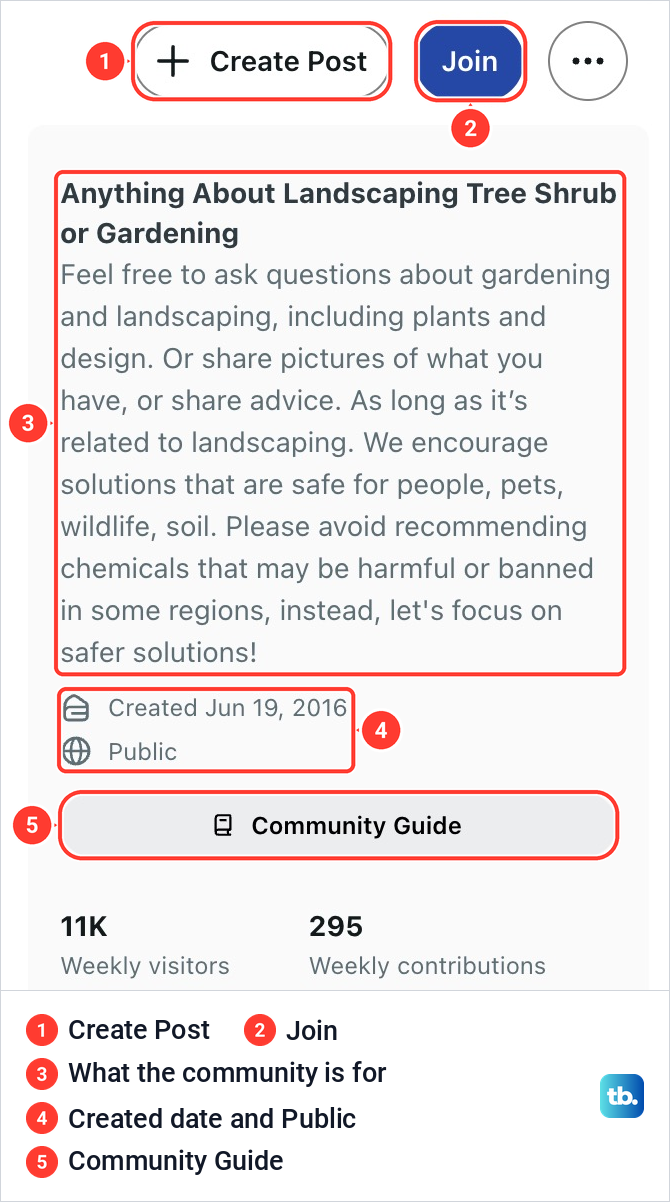
Reddit puts each community's rules in that right-hand sidebar on reddit.com. Read them, and scroll through a few of the community's posts, before you join or write anything. Rules can decide what may be posted, how a post must be formatted and whether it has to stay on one topic, and a post that breaks them can be removed by a moderator.
Search inside one community
On a community's page the search box changes. Ours showed an r/LandscapingTips chip with an X and read Search in r/LandscapingTips, so a search from there looks in that community only. Click the X on the chip to search the whole of Reddit again.
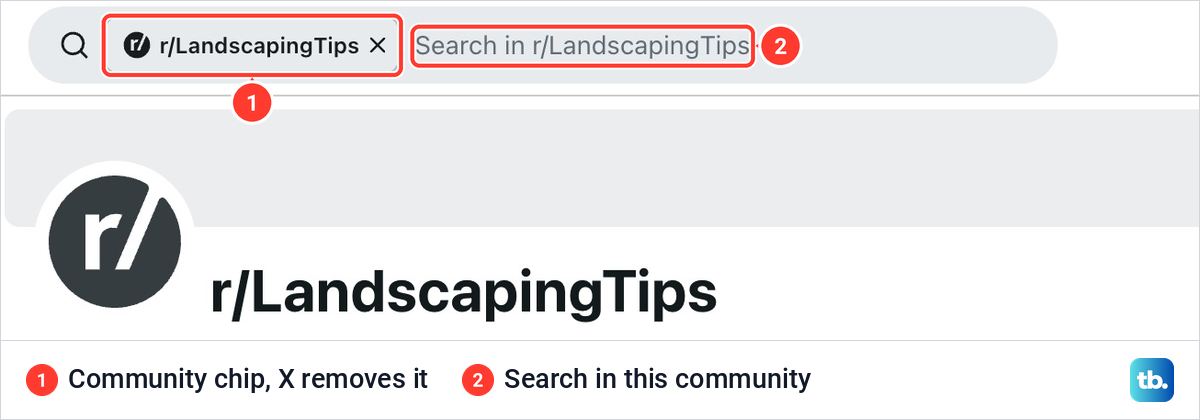
This is the quickest way to see whether your question has already been answered. Search before you post, and sort the results by New if you want recent answers.
Join a community and leave it again
Click Join. On our community page the button changed to Joined, and a bell button appeared beside it. The community now appears in your list of joined communities in the left rail, and its posts come into your Home feed.
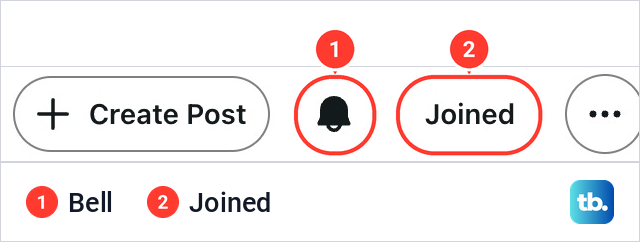
The bell sets which notifications you get from that one community. To leave, open the community and click Joined, and Reddit removes it from your list. You can join as many communities as you like, although Home draws on around 250 of them on any visit.
For alerts from the whole account in the Android and iPhone apps, open Settings, then your account settings, then Manage notifications. On an iPhone you can also turn off notification alerts on your iPhone for the Reddit app as a whole.
Save, hide or report a post
Every post has three dots at its top right. On a Home post they opened a menu with Follow post, Award this post, Show fewer posts like this, Save, Hide, an entry that explains why the post was recommended, and Report.
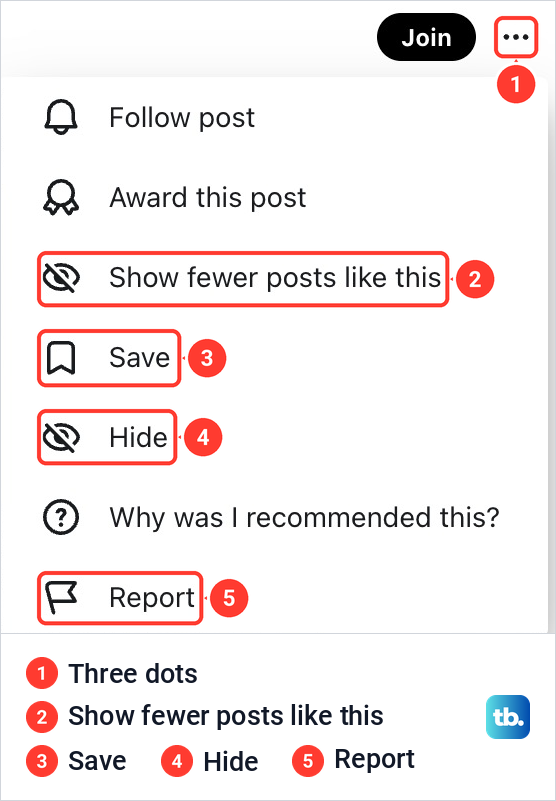
Save keeps the post for later. On reddit.com your saved posts are on your profile under the Saved tab. Hide sits right under Save, so check which one you are clicking.
The same menu helps with Home's recommendations. The post we opened it on had a Join button beside the three dots, so it came from a community we had not joined. Show fewer posts like this is Reddit's way of stopping suggestions from that community.
Report sends a post or comment to Reddit when you think it breaks Reddit's rules or the community's rules. Reddit asks you to report while signed in, and you can also block the account that posted it.
Vote on posts and comments
Next to every post and comment are an up arrow and a down arrow. An upvote says the content adds something to the community, and a downvote says the opposite in stronger terms, that the content should not be shown at all. Votes help decide what is shown and surfaced in communities and across the site.
Votes on your own posts and comments change your karma, the score on your profile. Karma is only an approximate reflection of those votes, so one upvote is not one karma point. Click your avatar, then View Profile, to see your total.
Karma matters because some communities only let you post once you have enough of it, once your account is old enough or once your email is verified. Reddit does not publish those thresholds. The way in is to earn a little karma by commenting in communities you care about, not to chase the number.
Comment on a post
Open a post and click the box under it that reads Join the conversation. It shows icons for an image, a video, a GIF and Aa, with Cancel and Comment on the right. Aa opens the formatting toolbar, with bold, italic, links, lists, spoilers, quotes, code and tables, and, in a wide window, Switch to Markdown at the end of the row.
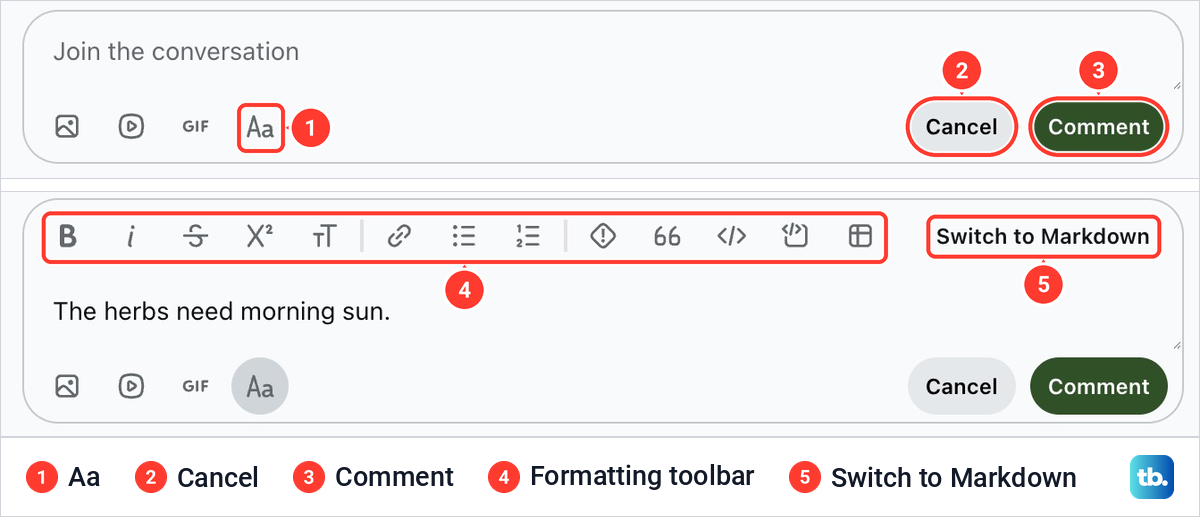
Type your reply and click Comment to publish it. It then appears below the post, and you can edit it later from its three dots. To answer someone else's comment instead, click Reply under that comment. When you are answering one line of a long comment, it helps to quote that line above your reply.
We typed a line and clicked Cancel. Reddit offered to keep it as a draft for 14 days, with Discard and Save. Saved drafts are under Drafts in the avatar menu, so an unfinished reply is not lost when you close the page.
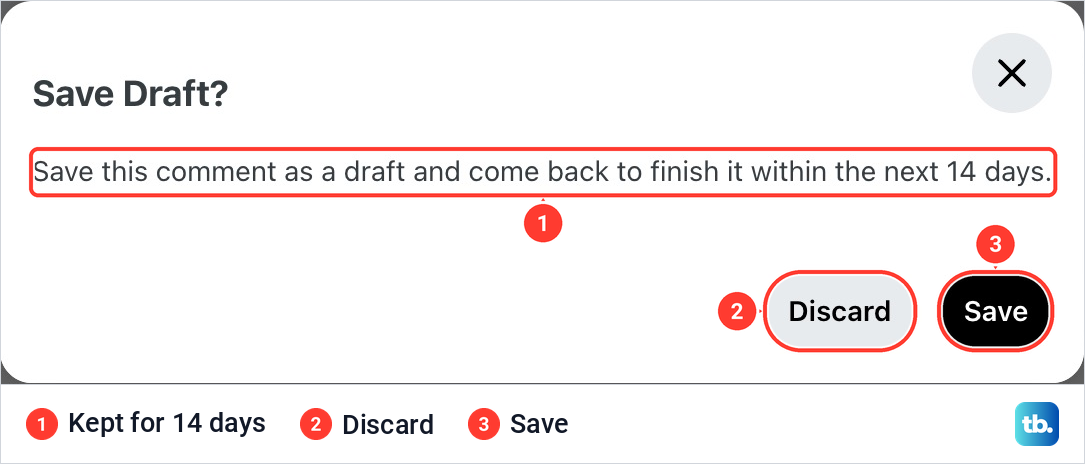
Reddit also saves comment drafts on its own as you type, up to 20 of them. Images and other media in a comment are not part of the saved draft.
Write your first post
Click Create at the top right of the page, or Create Post on a community's page. The form opened with its community picker already set to r/lawncare, because the post we had open lived there. If you start from Home, choose the community in that picker first.
Below the picker come Title, marked with a red star as required, Add flair and tags, also starred in this community, and Body text, which is optional. With nothing typed, Save Draft and Post were both greyed out. A Drafts link sits at the top right of the form.
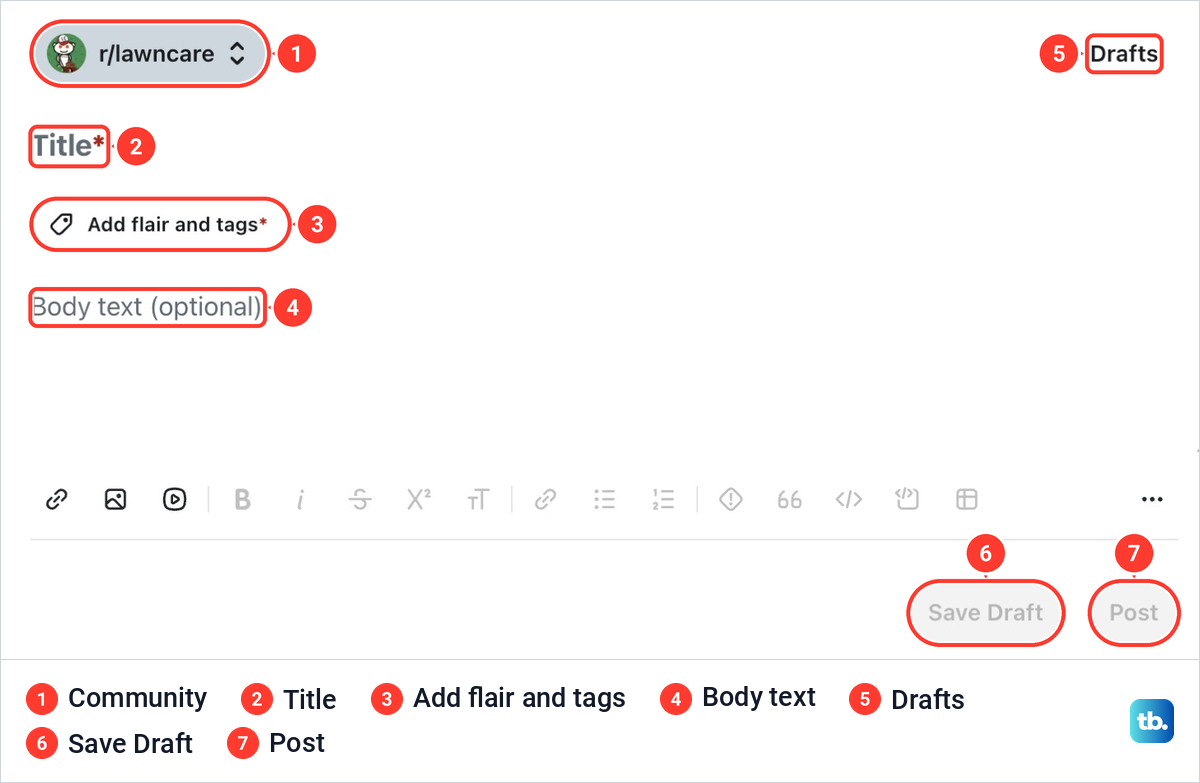
The red star on Add flair and tags means this community wants a tag on every post before it will take it. Write a title that says exactly what the post is about and put the detail in the body. Reddit lets you edit the body after posting, but never the title.
The toolbar under the body offers links, images and video, but not every community allows every type. Some communities also set requirements for posters: a minimum karma, a minimum account age or a verified email. If your account does not meet them, Reddit may show an eligibility notice when you start a post there, listing which criteria you meet and which you do not.
Click Post when everything is filled in. Reddit may first check your draft against the community's rules and point out possible problems. The check only points them out and never stops you posting. Once the post is live, people can reply, and you can edit the body from its three dots.
Change settings and turn off recommendations
Click your avatar at the top right to open the account menu. It holds View Profile, Drafts, Achievements, Display Mode and Log Out. Settings sits at the bottom of the menu, and if you cannot see it, scroll inside the menu. Settings opened on the Account tab, with Profile, Privacy, Preferences, Notifications and Email beside it.
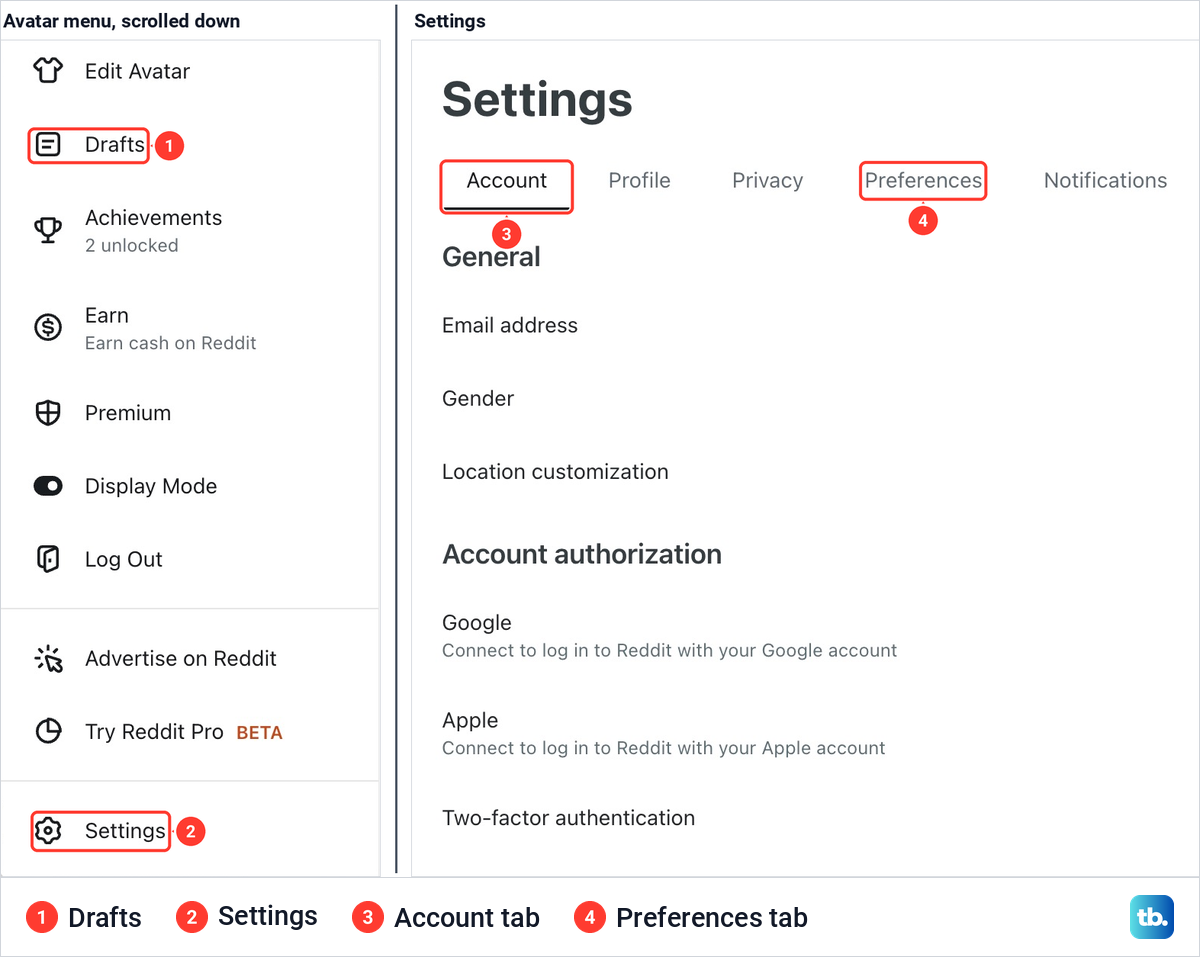
To keep Home to the communities you joined, open Preferences and turn off Show recommendations in home feed. To keep one community out of Home, Popular and your notifications, open its page, click its three dots and choose to mute it. Your muted communities are listed in Preferences too.
The Account tab is where your email address and the Google and Apple sign-in options live. Notifications is where you change or turn off the alerts Reddit sends, including those from a particular community.
Use the Reddit app on Android and iPhone
To find a community in the app, tap the search icon at the top right, search for a topic, open the Communities tab and tap Join, or tap a community's name to look around first. The communities you have joined are in the menu at the top left.
A community's rules are under See more and then the About tab. To post, tap the Create icon, which is at the bottom of the screen on Android and at the top right on iPhone, or use the one inside a community. Comment or Reply opens a text box at the bottom of the screen, and the send icon publishes your reply.
To save a post, tap the menu at its top right and choose Save. Your saved posts are on your profile: tap your avatar, then the three-line menu near the top right, then Saved. The same three-line menu leads to Settings. If the buttons in your app do not match these steps, update the app on your iPhone, or through Google Play on Android, and look again.
Recommendations are switched off in the Privacy section of your account settings. On iPhone, tap your avatar, the three-line menu, Settings and your username under Account Settings, then turn off Show recommendations in home feed. On Android the path runs through Settings and the account settings for your username, and the switch is called Enable home feed recommendations.
When your post or comment does not show up
A missing post is often still there. Most communities sort by Hot by default, and a new post may be hard to find in a Hot-sorted list. Switch the community's sort to New and look again.
If it is still missing, read the community's rules again, because a moderator may have removed it. New accounts can also hit Reddit's limits on how often they post or comment, and earning a little karma by commenting helps there. If you think a removal was a mistake, first take a screenshot on any device to keep a copy of your post, then message the moderators.
When the whole site or app misbehaves, check Reddit's status page for an outage before changing anything. If the Android app keeps stalling, clear the app cache on Android, and if the phone itself is slow, restart your phone before opening Reddit again.
How we tested this guide
We tested this on Reddit on the web in Chrome on a Mac, searching for a community, joining it and opening the comment and post forms.
Frequently Asked Questions
Can I use Reddit without an account?
Yes, for reading. Public posts and comments are open to anyone, although Reddit may ask you to sign in for some content depending on your age. Joining, voting, saving, commenting and posting need an account. You must be at least 13 to create one, and the minimum is higher in some countries.
What is a subreddit?
A subreddit is a community on Reddit about one topic, with a name that starts with r/. It is created and moderated by users, who can set rules of their own on top of Reddit's.
How do I find communities to join?
Search for a topic, open the Communities tab and read each result's description and weekly activity. Open the one that fits, read its rules and click Join. Explore in the left rail also suggests communities.
Why do I see posts from communities I never joined?
Home includes recommendations by default. Turn them off with Show recommendations in home feed in the Preferences tab of Settings, or choose Show fewer posts like this from the three dots on a single post.
Why can't I post in a community?
The community may require a minimum karma, account age or verified email before you can post, and Reddit does not publish the exact numbers. Its rules may also limit what can be posted. Check for an eligibility notice when you start a post there, and for rules in the sidebar.
Does one upvote give one karma point?
No. Karma is an approximate reflection of the upvotes and downvotes your posts and comments receive, and the two do not have a one-to-one relationship.
Where do saved posts go on Reddit?
On reddit.com they are on your profile, in the Saved tab. In the Android and iPhone apps, tap your avatar, then the three-line menu near the top right, then Saved.