

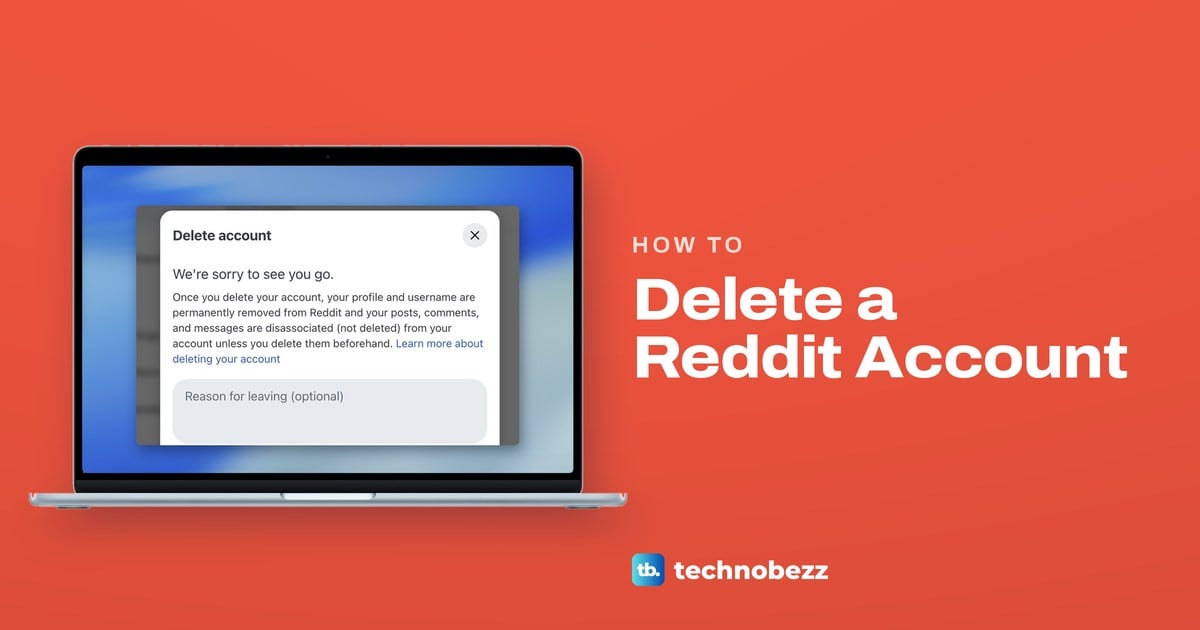
To delete a Reddit account on a computer, click your avatar at the top right of reddit.com, choose Settings at the bottom of that menu (scroll inside the menu if it is cut off), and choose Delete account under Advanced at the bottom of the Account tab. Enter your username and password, tick the box that says deleted accounts aren't recoverable, and select Delete. The iPhone and Android apps keep the same option in their own settings, with slightly different paths.
Deleting is permanent, and your username can never be used again. It also does less than most people expect: your posts and comments stay on Reddit without your name unless you delete them first, and Reddit Premium keeps billing until you cancel it. If your account signs in with Google or Apple and has no Reddit password, Reddit asks you to create one before it shows the form, which is exactly what happened on our Google-linked account.
The short version
- On a computer: avatar, Settings at the bottom of the menu, then Delete account at the bottom of the Account tab.
- The form asks for: your username, your password and a tick in the box about deleted accounts not being recoverable.
- No Reddit password: Reddit asks you to create one first. Our account signs in with Google, and Reddit emailed it a setup link.
- Phone apps: iPhone goes through Settings and Support, Android through Account settings.
- Do these first: delete any posts you want gone, save a copy of your data and cancel Premium.
Reddit account deletion at a glance
| Where you are | Path to Delete account | What Reddit asks for |
|---|---|---|
| reddit.com on a computer | Avatar, Settings (bottom of the menu), Account tab, Advanced, Delete account | Username, password and the tick box |
| Google or Apple account with no Reddit password | Select Delete account and set up a password if asked, or disconnect Google or Apple under Account authorization first, then the same path | A new Reddit password first, then the form |
| iPhone app | Avatar, three-line menu, Settings, Support, Delete account | Your Reddit password |
| Android app | Avatar, three-line menu, Settings, Account settings for u/username, Delete account | Your Reddit password |
| Account made with a phone number and no password | Delete account in the iPhone or Android app | A six-digit code from Reddit |
| Old Reddit | Preferences, delete tab | Username, password and a confirmation |
Delete your Reddit account on a computer
Sign in at reddit.com in a desktop browser and click your round avatar in the top right corner. A menu drops down with View Profile, Edit Avatar, Drafts, Premium, Display Mode, Log Out and a few more entries.
On our screen the menu stopped at Try Reddit Pro when it opened, and Settings only appeared after we scrolled inside the menu itself, not the page behind it. If Settings is not visible, scroll inside the avatar menu.
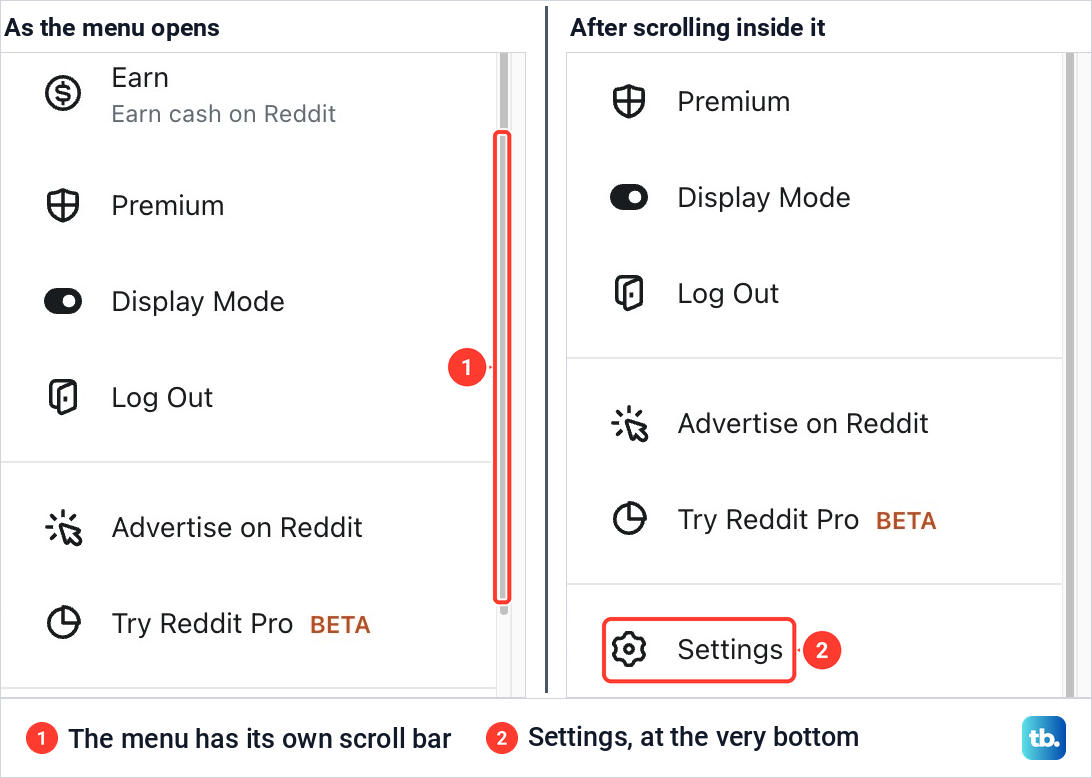
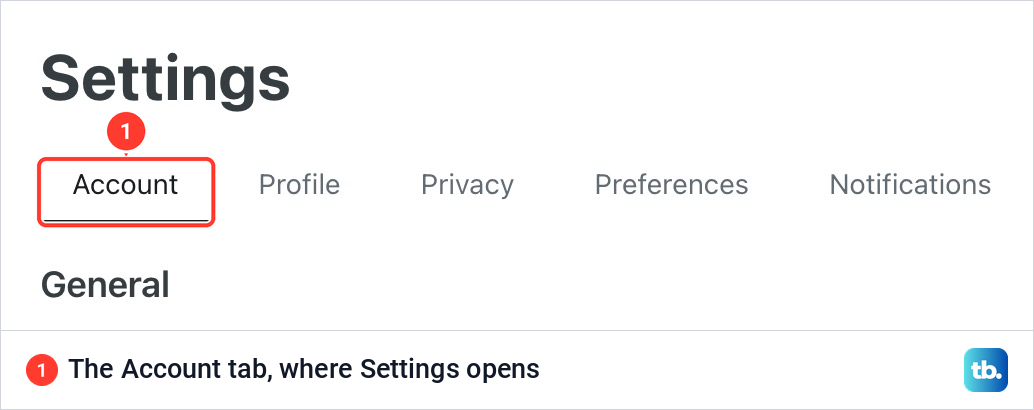
Click Settings. The page opens on the Account tab, the first of six tabs alongside Profile, Privacy, Preferences, Notifications and Email. Everything you need for deleting the account is on this tab.
Scroll to the bottom of the Account tab. Past General, Account authorization, Apps and Reddit Premium, the last heading is Advanced, and its only entry is Delete account. Click it.
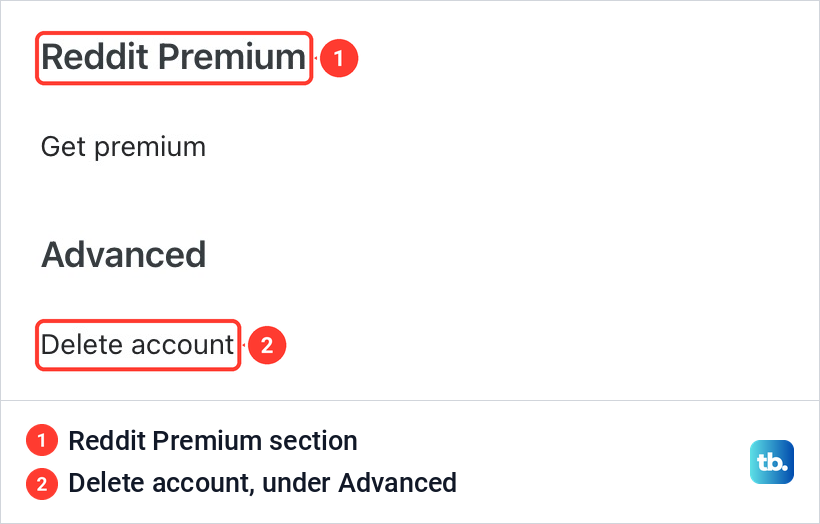
On our account, once it had a Reddit password, Delete account opened the delete form. An account that signs in with Google or Apple and has no password is asked to create one first, and the next section covers that route, including how to disconnect the linked sign-in.
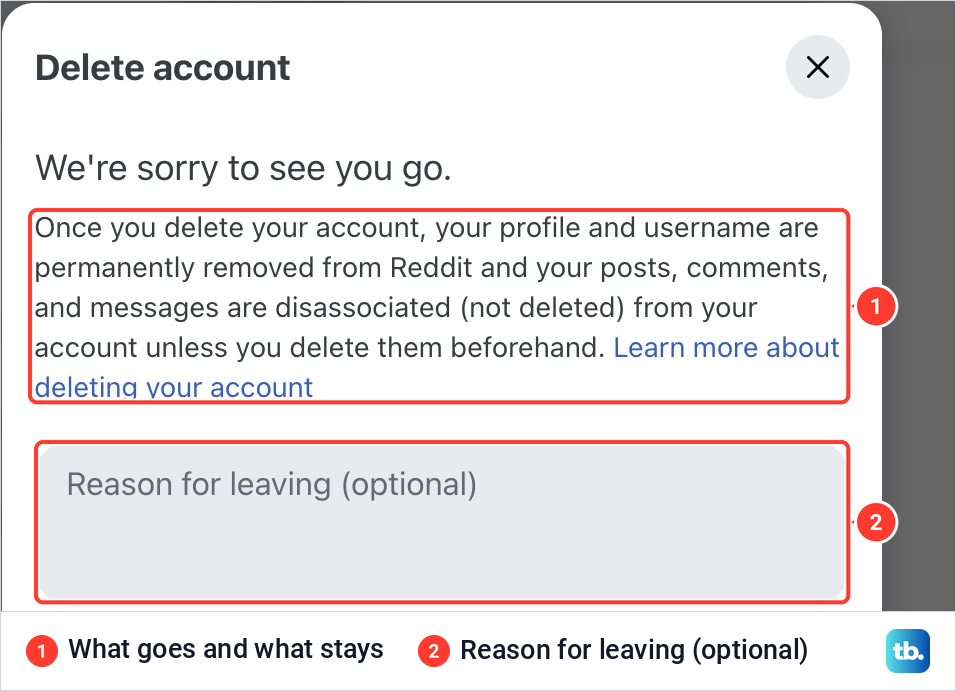
The top of the form spells out what deletion does. Your profile and username are permanently removed, while your posts, comments and messages are disassociated, not deleted, unless you delete them beforehand. Below that is a Reason for leaving box, which you can leave empty.
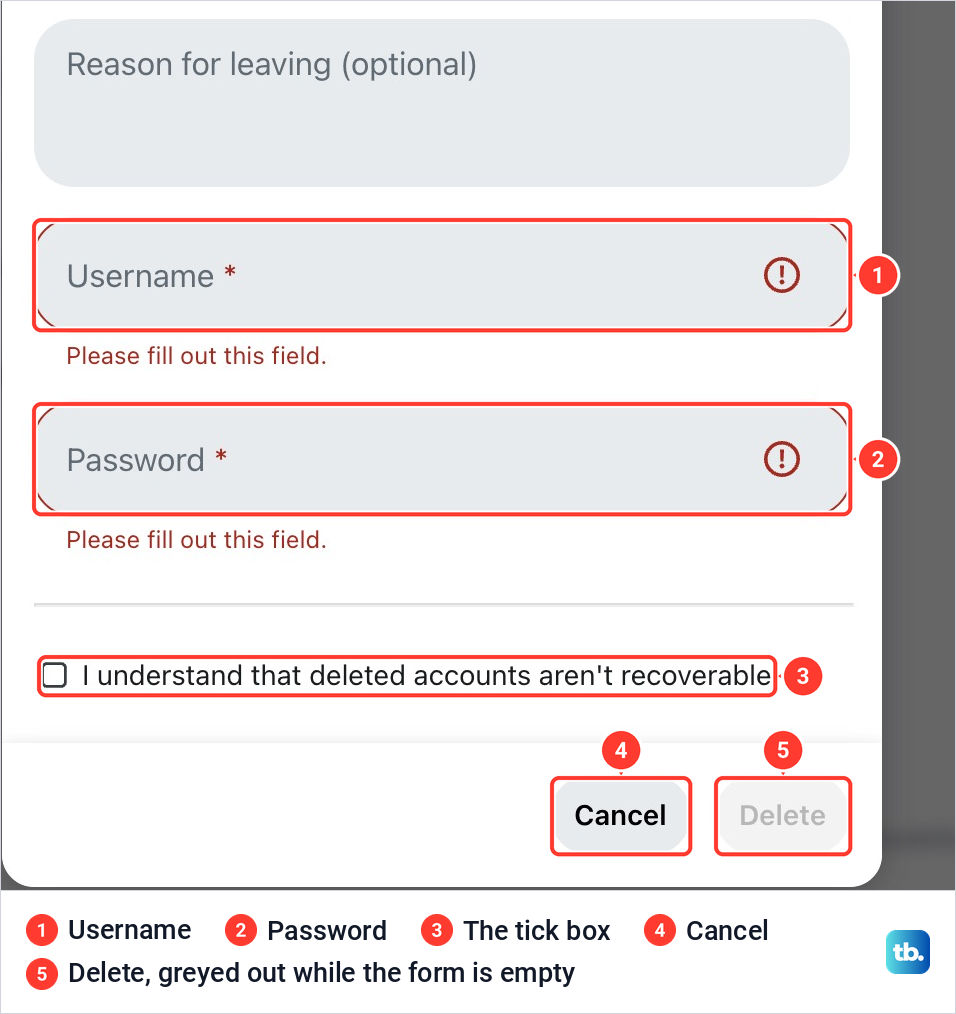
Under the reason box are two required fields, Username and Password, then a tick box that reads deleted accounts aren't recoverable. The Delete button stayed greyed out on our screen while the fields were empty and the box was unticked, so if it will not respond, check that every part of the form is filled in.
Fill in both fields, tick the box and select Delete. The account cannot be reactivated after that. Reddit begins removing or anonymizing the account on its servers within 90 days, which is a background process and not a grace period you can undo.
If you sign in with Google or Apple
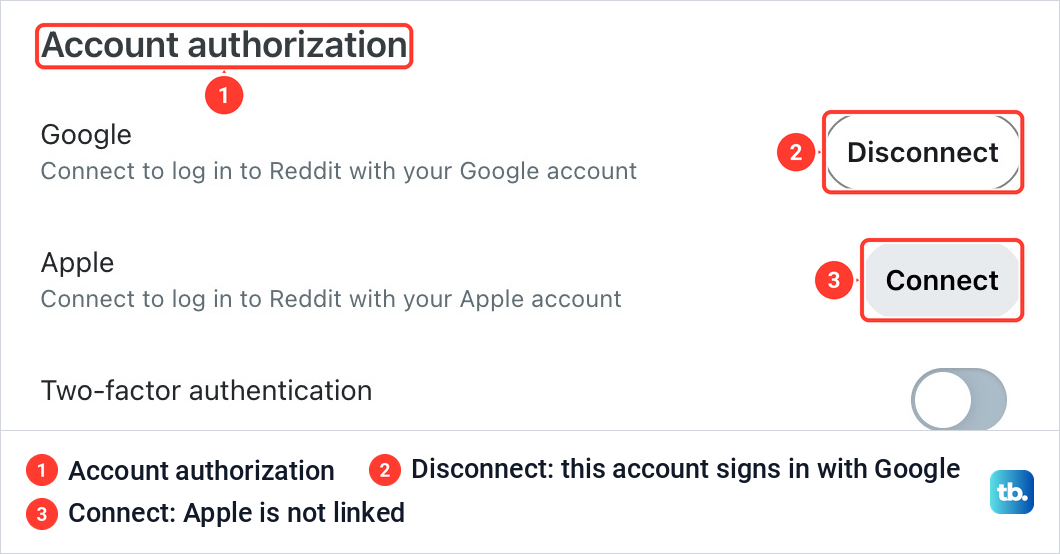
An account created with Google or Apple may have no Reddit password at all, and the delete form needs one. You can see how yours signs in under Account authorization on the same Account tab. On our account, Google showed Disconnect because the account signs in with Google, and Apple showed Connect.
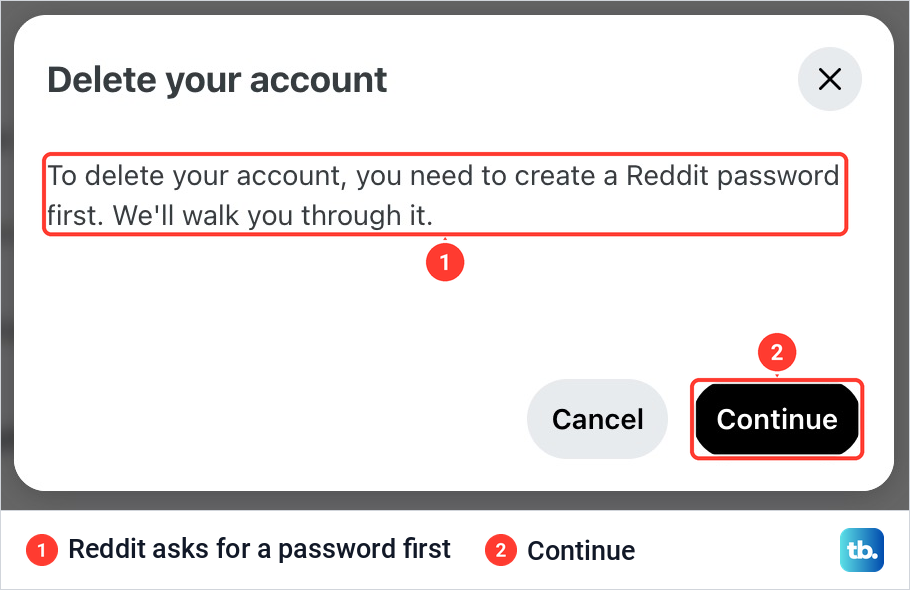
Try Delete account first. On our Google-linked account, selecting it started the password setup: instead of the form, a box titled Delete your account said a Reddit password was needed first, with Cancel and Continue buttons. If Reddit does not offer this, disconnect Google or Apple under Account authorization and create a password when asked.
Continue changed the box to Check your email. Reddit had sent a message to the account's email address with a link to create a password. We followed that link, set the password, and went back to Settings and Delete account, which then opened the normal form with its username and password fields.
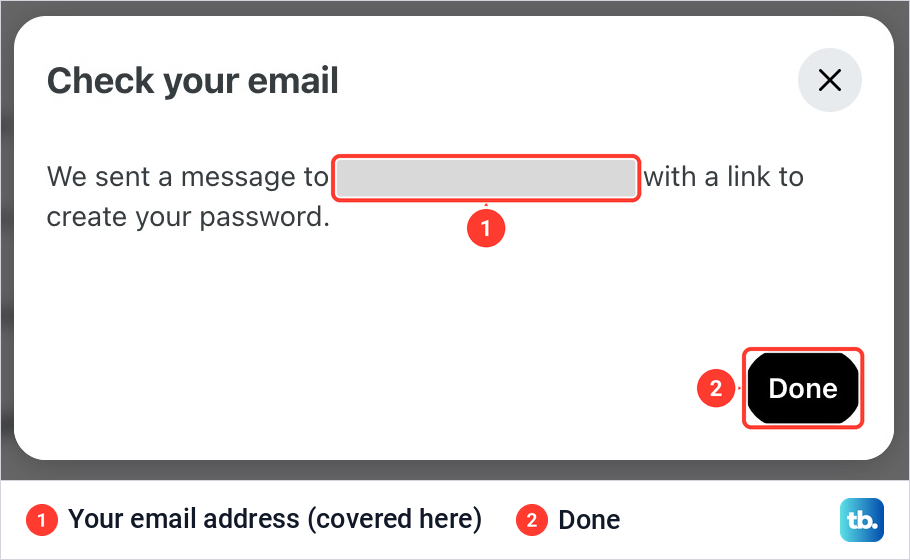
Type the Reddit password you just created into the form, not your Google or Apple password. If the email does not arrive, check your spam folder.
Delete your Reddit account in the iPhone app
In the iPhone app, start on your profile. Tap your avatar to open your profile page, then tap the menu button with three lines near the top right corner. Tap Settings, scroll down to Support and tap Delete account.
Confirm with your Reddit password when the app asks for it. If you made the account with a phone number and never set a password, Reddit sends you a six-digit code to confirm the deletion instead.
Delete your Reddit account in the Android app
On Android, the route goes one level deeper. Tap your avatar at the top right to open your profile, tap the three-line menu near the top right corner, then tap Settings and Account settings for u/ followed by your username.
Scroll to the end of that screen and tap Delete account. Confirm with your password, or with the six-digit code if the account was made with a phone number and has no password. If the Reddit app keeps closing before you get there, clear the app cache on Android and try again, or switch to a computer.
What deleting removes and what stays
The form's warning is accurate but easy to skim past. Deleting takes away the profile, the username and your ability to sign in. It does not erase what you wrote.
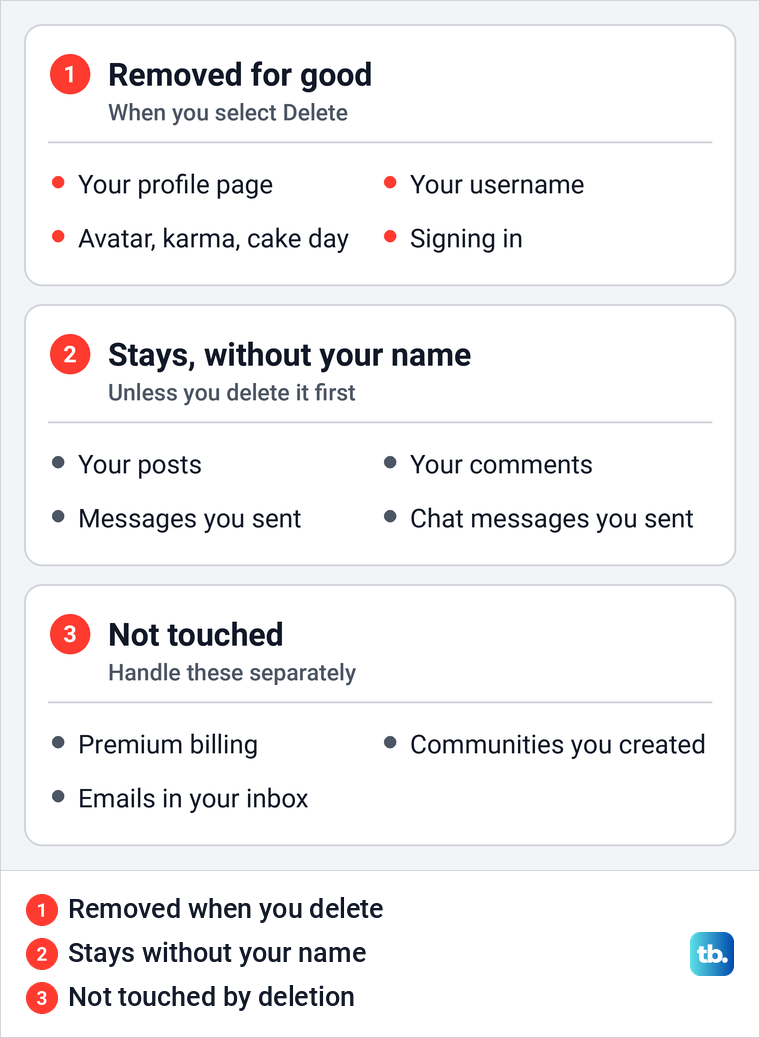
The detail is worth knowing. Anyone who opens a link to your old profile sees a message that the account has been deleted, and the username can never be registered again. Your posts and comments stay on Reddit, but people can no longer see that they came from you. The same goes for messages you sent and chats you took part in.
So if the goal is to make your words disappear, the order matters: remove the content first, then delete the account. Once the account is gone you can no longer sign in to remove anything, and Reddit's administrators cannot bring the account back for you.
Delete your posts and comments first
On a computer, click your avatar, choose View Profile and open the Posts tab. Click the three-dot menu beside a post and choose Delete. For comments, open the Comments tab on the same profile, use the three-dot menu under each comment and choose Delete Comment.
In the apps, tap your avatar and open Posts or Comments on your profile. Reddit's app steps for a comment take you to the post it belongs to first, where the three-dot menu under your comment has Delete.
There is no button that clears everything at once. Third-party tools for mass deletion are not officially supported by Reddit and may not work as intended. If you have far too much to remove by hand, you can email [email protected] from the address verified on your account and ask for help.
Save a copy of your Reddit data
Reddit's data request is made from the signed-in account, so do it before you delete. On a computer, open the Reddit data request form, follow its instructions and select Submit.
Preparing the file can take up to 30 days. The download link normally arrives as a notification in your Reddit inbox, and sometimes by email to a verified address. Wait until you have downloaded the file before you delete the account, because that inbox goes with it. If you download it on your phone instead, our guide shows how to find a downloaded file on iPhone.
Cancel Reddit Premium before you delete
Deleting the account does not cancel Reddit Premium, so a subscription keeps billing after the account is gone. Where you cancel depends on how you paid. A card or PayPal subscription is managed in the Reddit Premium section of Settings on reddit.com, the heading just above Advanced.
A subscription bought with an Apple ID is cancelled in your iPhone's subscription settings or the App Store, and our guide shows how to cancel a subscription on iPhone step by step. One bought through Google Play is cancelled in the Subscriptions section of Google Play. Cancel at least 24 hours before the subscription ends to avoid a renewal. Reddit gives no partial refunds.
Chats, messages and communities you run
Reddit lets you delete chat messages you sent, never the ones you received. Hover over a message on reddit.com and click the trash icon, or press and hold it in the app and choose Delete. If persistent messaging is turned on for a chat, neither person can delete messages from it.
Reddit has no way to delete a community, even one you created. Before you leave, you can remove yourself as a moderator, and you can post in r/adoptareddit so someone else can take the community over.
If Reddit will not delete your account
When a deletion fails, start with the basics. Check that the username and password are typed correctly, and reset the password if you are unsure of it. On the web, it also suggests clearing your browser's cookies, turning off extensions or trying a private window, and on a phone browser our guide shows how to clear Safari and Chrome cookies on iPhone.
If reddit.com keeps failing, try Old Reddit. Sign in at old.reddit.com, open preferences and choose the delete tab, then enter your username and password and confirm before you click delete account. For a Google or Apple account, disconnect it under Account authorization and create a password, as above.
Locked out entirely? Reddit staff cannot delete an account for you, and they cannot help with a deletion request until you regain access. Recover the account first with a password reset, which sends a link to the email address on the account. If you have forgotten the password, check whether your phone saved it before you reset: our guide shows how to find a saved password on iPhone.
After your Reddit account is deleted
Deleting the account clears nothing outside Reddit. Old notification emails stay in your inbox, and if there are hundreds of them you can mass delete old Reddit emails in Gmail instead of one at a time.
The Reddit app also stays on your phone until you remove it. Removing the app does not delete the account, which takes the Delete account steps above. Once the account is gone, you can remove the Reddit app from iPhone like any other app.
How we tested this guide
We tested this on Reddit on the web in Chrome on a Mac, going through Settings up to the final Delete button of the Delete account form.
Frequently Asked Questions
Can I delete my Reddit account in the app?
Yes. In the iPhone app, tap your avatar, the three-line menu, Settings, then Delete account under Support. On Android, the path is avatar, three-line menu, Settings, Account settings for u/username, then Delete account at the end of the screen.
Does deleting my Reddit account delete my posts and comments?
No. They stay on Reddit without your username attached, and so do messages you sent. Delete them from the Posts and Comments tabs of your profile before you delete the account.
Can I get a deleted Reddit account back?
No. A deleted account cannot be reactivated, Reddit's administrators cannot restore it, and the username becomes unavailable for good. There is no waiting period in which deletion can be undone.
Why does Reddit want a password when I sign in with Google?
The delete form asks for a Reddit password, and an account made with Google or Apple may not have one. On our account, Delete account offered to send a link by email, and after the password was set the form opened.
Does deleting Reddit cancel Premium?
No. Cancel it first where you paid: Reddit Premium in Settings for a card or PayPal, your Apple subscriptions for an Apple ID, or Google Play. Cancel at least 24 hours before renewal. Reddit gives no partial refunds.
Can Reddit delete my account for me?
No. Reddit's administrators cannot delete an account on your behalf, and they cannot help with a deletion request until you get back into the account. Start with a password reset if you are locked out.
How long does Reddit take to delete an account?
Once you select Delete, the account cannot be reactivated. Reddit's process to remove or anonymize it on its servers then starts within 90 days.