

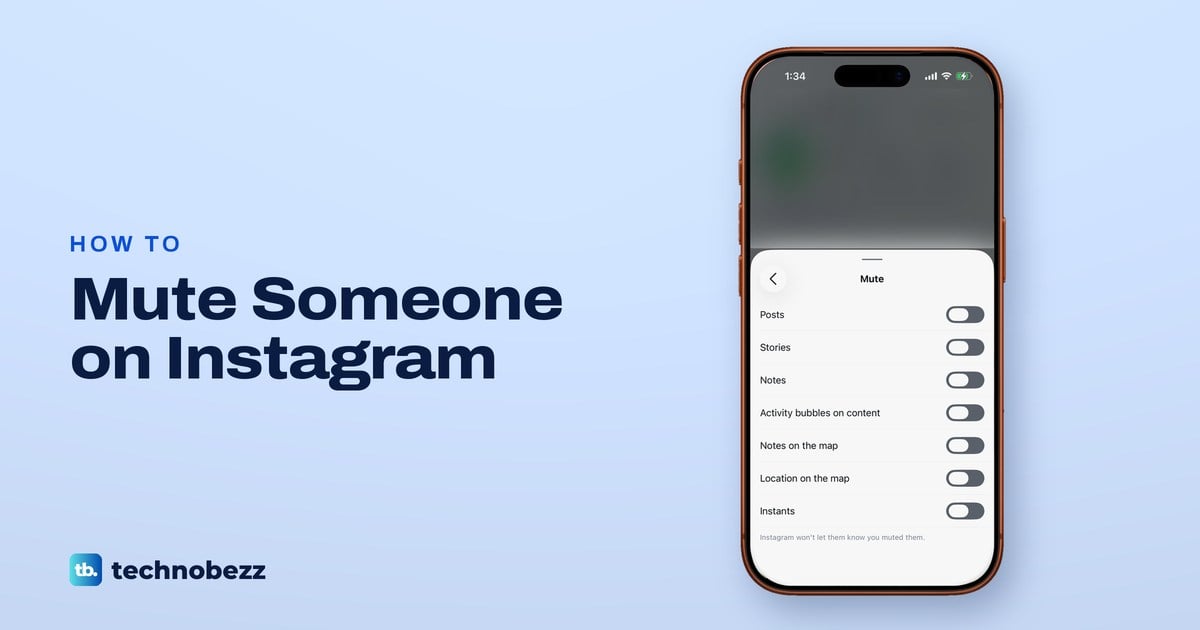
To mute someone on Instagram, open their profile, tap Following, tap Mute, then switch on Posts, Stories or any other part you want out of your way. You keep following them, and Instagram won't let them know you muted them. Their messages are muted separately, from your chat with them, and unmuting is the same path with the switch turned off.
In the Instagram app on our iPhone 17 Pro with iOS 26.6, the Mute sheet held seven switches, from Posts and Stories to Notes, the map and Instants. None of them was for messages, which are muted from the chat instead.
The short version
- Posts and stories: their profile, then Following, then Mute. Switch on Posts, Stories or both.
- Other ways in: the ••• button next to their name in your Following list, or touch and hold their story ring.
- Notes: switch on Notes on the same sheet. Muting posts or stories does not cover them.
- Messages and calls: open the chat, tap their name at the top, tap Mute, then Mute messages or Mute calls.
- Unmute: their profile, Following, Mute, then switch it off. A chat is unmuted in the chat. The list is under Settings and activity, What you see, Muted accounts.
Instagram mute options at a glance
Every kind of mute is its own switch, so pick the row that matches what is bothering you. Mutes of their content are undone on their profile under Following, then Mute, chat mutes in the chat, and Pause all on the Notifications page. None of them unfollows the person.
| What you want quiet | Where you go | What to switch on | To undo |
|---|---|---|---|
| Their posts in your feed | Their profile, Following, Mute | Posts | Switch Posts off |
| Their stories at the top of your feed | Their profile, Following, Mute | Stories | Switch Stories off |
| Their Notes in your inbox | Their profile, Following, Mute | Notes | Switch Notes off |
| Their activity on reels, the map and Instants | Their profile, Following, Mute | Activity bubbles on content, Notes on the map, Location on the map, Instants | Switch the same ones off |
| Message alerts from them | Your chat with them, their name at the top, Mute | Mute messages | Switch Mute messages off |
| Call alerts from them | Your chat with them, their name at the top, Mute | Mute calls | Switch Mute calls off |
| Every Instagram alert for a while | Settings and activity, Notifications | Pause all | Switch Pause all off |
How to mute someone's posts and stories from their profile
This is the main route, and on our iPhone it showed all seven switches on one sheet. Go to the person's profile by tapping their username on a post or story, or tap Search and type their username. Below their profile details, tap the Following button.
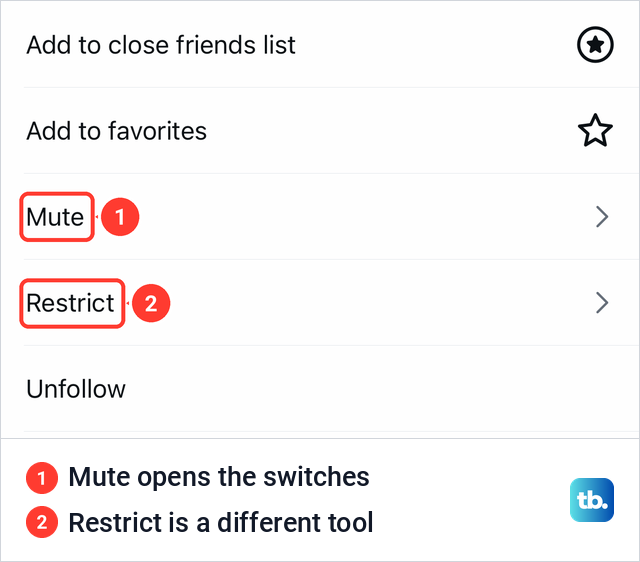
On our iPhone a sheet opened with five rows: Add to close friends list, Add to favorites, Mute, Restrict and Unfollow. Tap Mute. Restrict sits right below it and does something quite different, which is covered further down.
The Mute sheet that opens lists the switches. For someone we had never muted, all seven were off: Posts, Stories, Notes, Activity bubbles on content, Notes on the map, Location on the map and Instants. Under them, Instagram prints one line: "Instagram won't let them know you muted them."
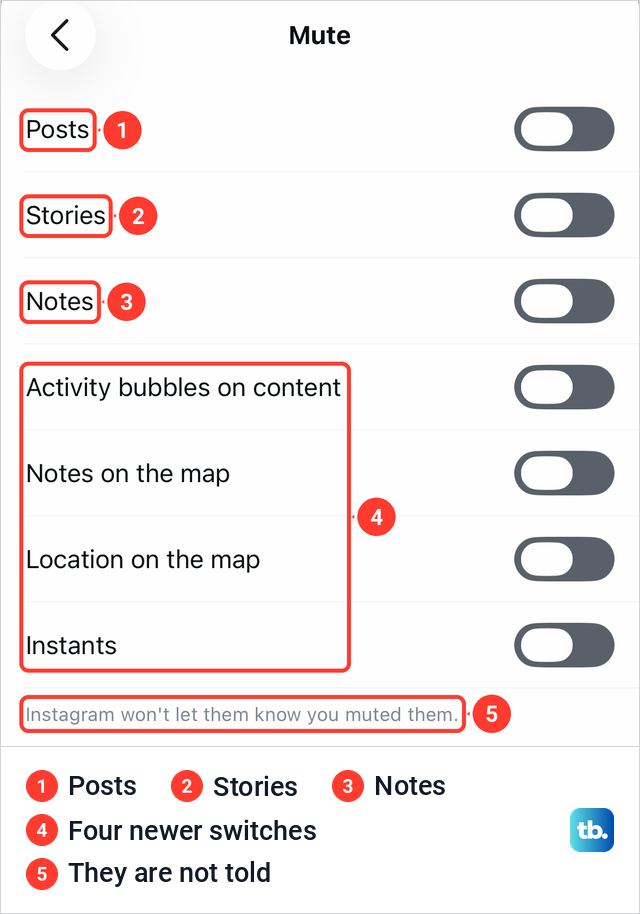
Tap the switch next to each thing you want to stop seeing. To mute only their posts, switch on Posts and leave Stories off, and do the opposite to mute only their stories. The sheet has no Save button. Close it when you are done, and you are back on their profile, still following them.
What each mute switch does
Posts takes their posts out of your feed. Meta describes it as a way to hide someone's posts in feed without unfollowing them, and notes that you can still see the posts on their profile page. Meta has said you still get notified about comments or posts you are tagged in.
Stories stops their stories appearing at the top of your feed, in the row of story rings. Notes covers the short notes people leave at the top of the inbox. Instagram's Help Center says muting someone's messages, posts or stories will not apply to the notes they share, so switch Notes on as well if their notes are part of the problem.
The other four switches follow newer features. Activity bubbles came with the Friends tab in Reels, which Meta says shows public content your friends have interacted with, and Meta lets you mute them for specific people you follow. Notes on the map and Location on the map cover the Instagram map, where Meta shows notes from people you mutually follow and the location of friends who chose to share it with you.
Instants are photos shared in the moment with close friends or followers they follow back, which disappear after they are viewed. Meta says Instagram's Block, Mute and Restrict controls work on Instants too.
Mute someone from your Following list
If you are muting several people, or you can't remember a username, start from the list of accounts you follow. Open your own profile and tap the following count to open the list. On our iPhone it had a Search username or display name field at the top, and every row had a Message button and a ••• button.
Tap ••• on the person's row. A small menu opened with Unfollow, See shared activity and Mute, so you can reach Mute without leaving the list. Be careful with the first item, which is shown in red and unfollows them instead.
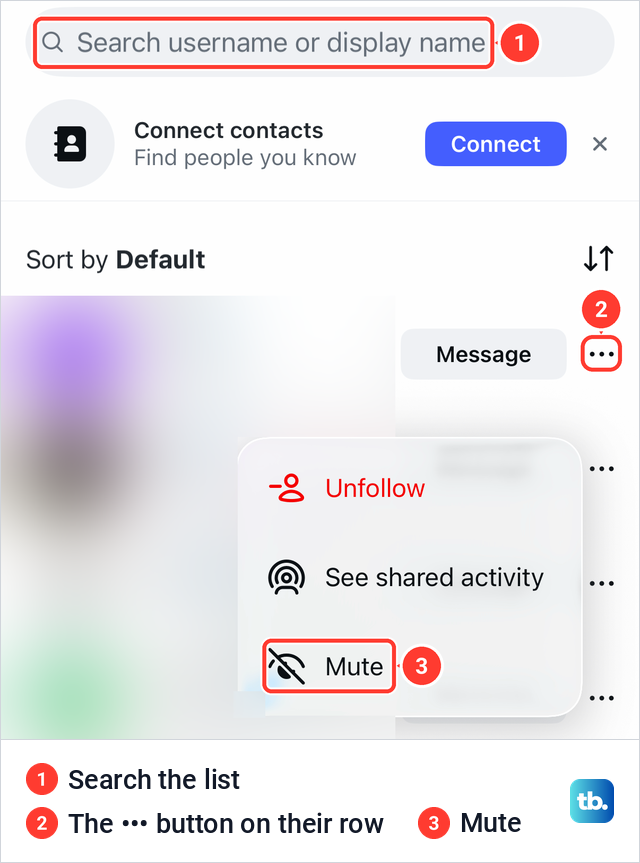
Tap Mute to carry on from the list. To see every switch before you choose, open their profile and use Following, then Mute, as above. The search field is also the quickest way back to someone when you want to unmute them later, since a muted account's posts no longer turn up in your feed for you to tap.
How to mute someone's story on Instagram
Stories have a menu of their own in the row of story rings at the top of your feed. Touch and hold the ring of the person whose stories you want to hide. On our iPhone a preview of their story came up with a two-item menu, Mute in red and View profile.
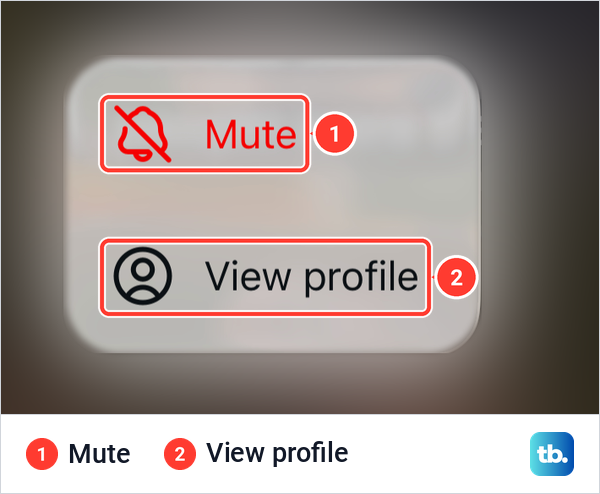
To mute only their stories and keep their posts in your feed, tap View profile, then Following and Mute, and switch on Stories alone. That sheet shows exactly which parts are muted. Dismissing the menu without choosing changes nothing, and on our iPhone the ring kept its place in the row.
Mute someone from a post in your feed
You can also start from one of their posts as it scrolls past. Instagram's Help Center gives these steps: tap the ••• options button next to their post, tap Hide, then tap Mute followed by their username. It then offers Mute Posts or Mute Posts and Story.
That route has fewer choices than the profile sheet, with no option for Notes, the map or Instants. Use it when you only want their posts or their posts and story gone, and use the profile sheet for anything finer.
How to mute messages and calls from someone
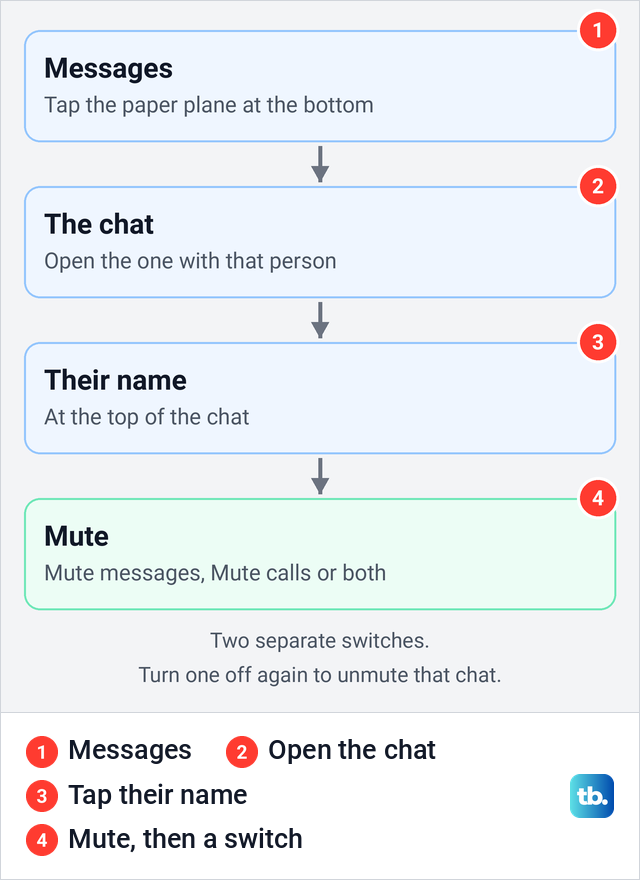
None of the seven switches touches your messages. Message and call alerts are muted from the chat itself, and Instagram's Help Center gives the steps. Tap Messages at the bottom of the app, which is the paper plane icon in the tab bar on our iPhone, and open your chat with the person.
Tap their name at the top of the chat, then tap Mute at the top of the screen that opens. Switch on Mute messages, Mute calls or both. To unmute, come back the same way and switch it off.
Muting a chat is not the same as blocking the person, which Meta says stops their messages reaching you at all. For strangers who keep writing to you, the settings that stop message requests on Instagram work better than muting chats one by one.
If you want quiet from everyone for a while rather than from one person, use Instagram's own notification settings. In Settings and activity > Notifications, our iPhone showed Pause all, Sleep mode and Messages only at the top, with Messages and Calls as separate rows further down.
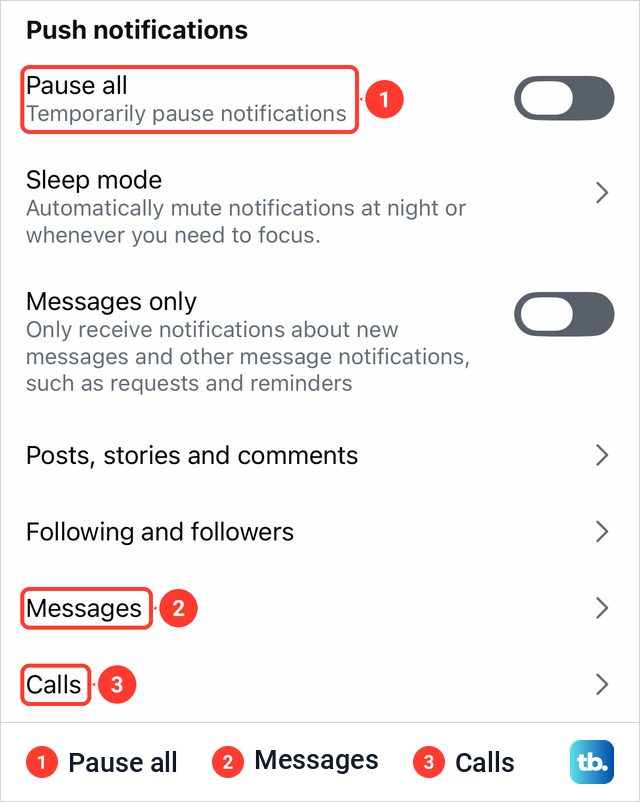
Pause all is described on screen as a way to temporarily pause notifications, and Sleep mode as a way to mute notifications at night or whenever you need to focus. For tighter limits on who can reach your inbox at all, see the options to disable DMs on Instagram.
Where to find your muted accounts on Instagram
Instagram keeps a list of the accounts you have muted, and it is no longer under Privacy, where older guides send you. Go to your profile, tap the menu button in the top right, which opens Settings and activity, and scroll down to the group called What you see.
On our iPhone that group held Favorites, Muted accounts, Content preferences and Like and share counts. Restricted sits higher up, under How others can interact with you, as a separate list.
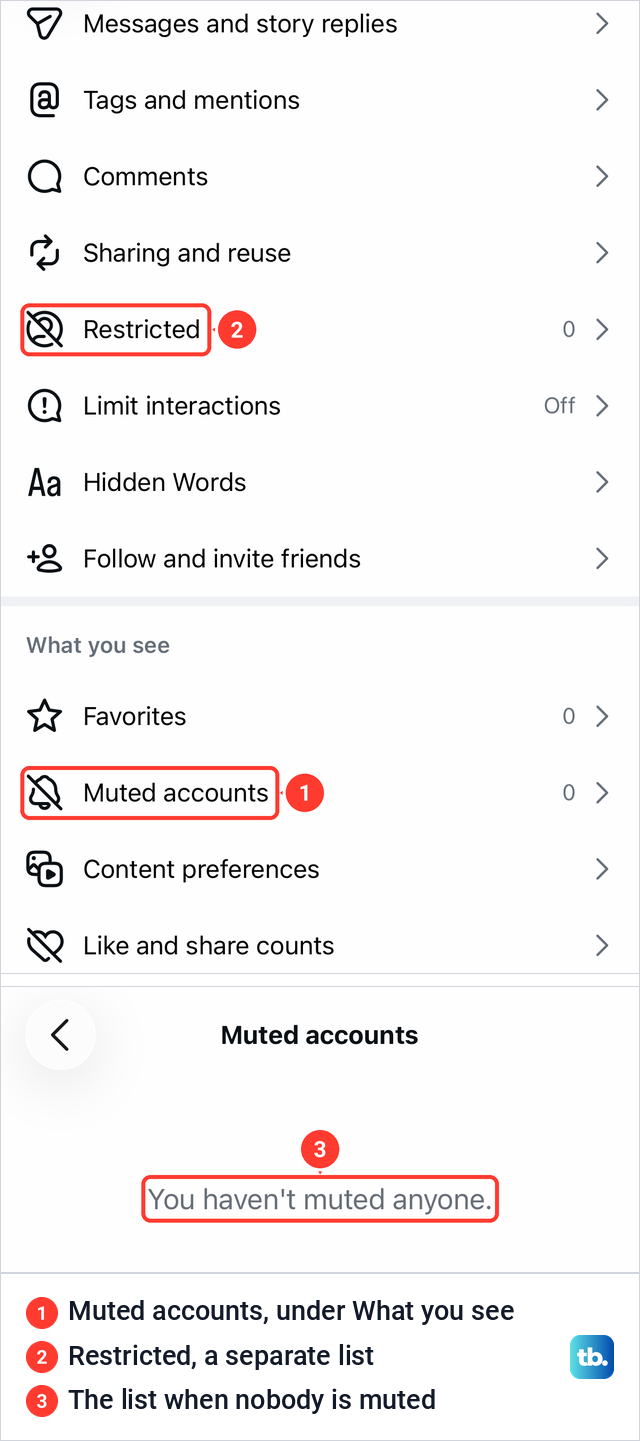
Tap Muted accounts to open the list. Ours was empty and read "You haven't muted anyone." To change what is muted for someone on the list, open their profile and use the Mute sheet, where you can see which switches are on.
How to unmute someone on Instagram
Unmuting uses the same switches, turned off. Open the person's profile, tap Following, tap Mute and switch off whatever you want back, such as Posts or Stories. Each switch is independent, so you can bring back their stories and keep their posts muted.
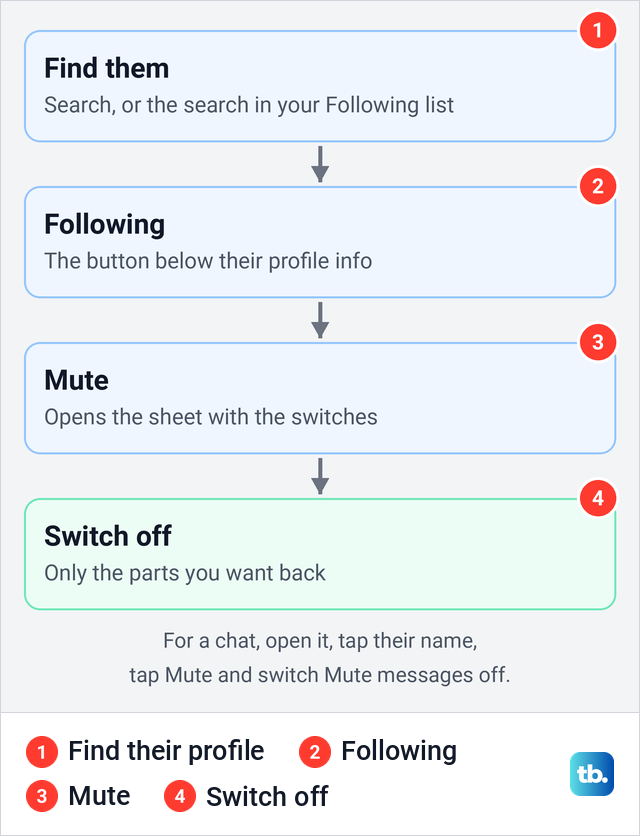
If you can't find them because their posts no longer show up, tap Search and type their username, or use the search field at the top of your Following list. For messages and calls, open your chat with them, tap their name, tap Mute and switch off Mute messages or Mute calls.
If their stories still don't show up after you switch Stories off, work through the fixes for Instagram stories not working. If a chat still seems silent after you switch Mute messages off, check the Messages row on the Notifications page above and the steps to fix Instagram DMs not working.
What the other person sees when you mute them
Instagram does not tell them you muted them, and you continue following them, which is the difference Meta draws between muting and unfollowing. Muting does not change their existing access to your posts, stories or messages.
Muting also doesn't hide anything about you. It doesn't change whether they see you online, so to stop that, turn off your active status on Instagram. To keep a post or a story away from them, the tools are separate: you can hide a post from someone on Instagram or make a private story on Instagram for a chosen list of people.
Mute vs restrict vs block on Instagram
The three tools solve different problems. Mute changes only what you see. Restrict and Block change what the other person can do, and Restrict is the one you meet first: on our iPhone it sat on the same Following sheet, right below Mute.
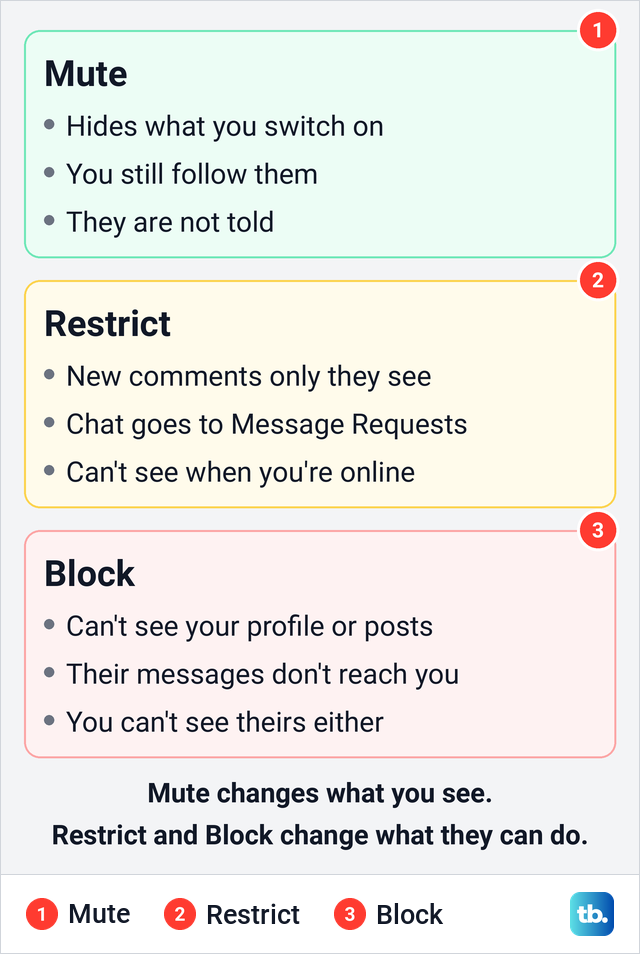
Instagram's Help Center says a restricted person's new comments on your posts are visible only to them unless you approve them, and you get no notifications for their comments. Their chat moves to Message Requests, they can't see when you are online or whether you have read their messages, and you can read what they send without them knowing.
Blocking goes furthest. Meta says a blocked person can't see your profile, posts or reels, their messages don't reach you, and the block works both ways, so you won't see what they post either. People aren't notified when you block them, but the effects are easier to spot, as our guide on the signs that someone blocked you on Instagram shows from the other side.
How we tested this guide
We tested this in the Instagram app on an iPhone 17 Pro with iOS 26.6, opening the Mute sheet and the Muted accounts list.
Frequently Asked Questions
Will someone know if I mute them on Instagram?
No. Instagram says it won't let them know you muted them, and you still show as following them. They may notice indirectly, for example that you stopped viewing their stories, since muted stories are no longer in front of you.
Can I mute only someone's stories and keep their posts?
Yes. Open their profile, tap Following, then Mute, and switch on Stories while leaving Posts off. You can also start from their story ring: touch and hold it, then tap View profile.
Does muting someone's posts also mute their messages?
No. The Mute sheet on their profile has no switch for messages. Open your chat with them, tap their name at the top, tap Mute and switch on Mute messages or Mute calls.
Where is the muted accounts list on Instagram?
Go to your profile, tap the menu button and scroll Settings and activity down to What you see. Muted accounts is the second row there, after Favorites.
How do I unmute someone whose posts I can't find?
Search for their username, or use the search field in your Following list, and open their profile. Tap Following, then Mute, and switch off the parts you want back.
Why do I still see someone's notes after muting them?
Muting posts or stories doesn't cover notes. Switch on Notes on the same Mute sheet, and Notes on the map if their notes also show up on the Instagram map.
What is the difference between mute and restrict on Instagram?
Mute hides their content from you and changes nothing for them. Restrict limits them, hiding their new comments from others and moving their chat to Message Requests.