
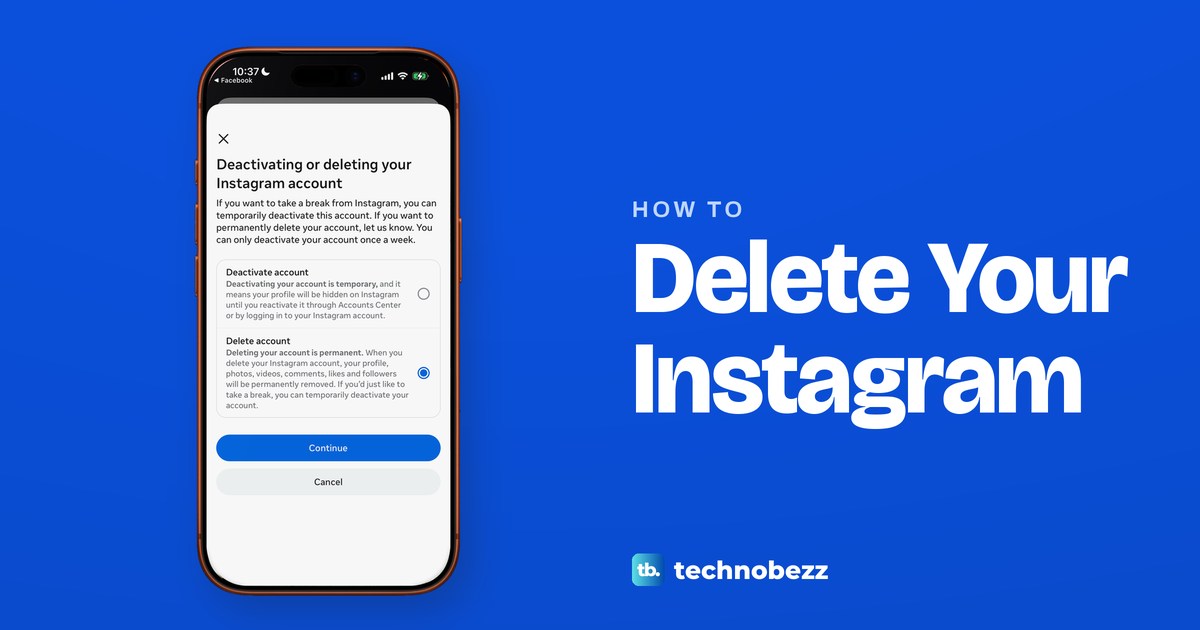
To delete your Instagram account permanently, open your profile, tap the menu, then Accounts Center or Meta Account. Tap Manage accounts, Manage next to Instagram, Deactivation or deletion, Delete account and Continue. Give a reason, enter your password and follow the prompts to confirm. Meta hides your profile from others and deletes it 30 days later.
Under Meta Account, the list of profiles is called Manage account instead. Logging back in before the 30 days end cancels the request. Before you start, export a copy of your photos and posts, because Meta says a profile scheduled for deletion can't be exported until you cancel. A Threads profile you signed up for with this account is deleted along with it, while your Facebook profile has its own separate delete steps.
On our iPhone 17 Pro with iOS 26.6, the Instagram app still said Accounts Center, with a banner about the coming move to Meta Accounts, while the Facebook app already said Meta Account. The pictures below come from the Instagram app on that iPhone.
The short version
- Do first: export your photos and posts, and cancel any Meta Verified subscription.
- On iPhone: Menu, Accounts Center or Meta Account, Manage accounts (or Manage account), Manage next to Instagram, Deactivation or deletion, Delete account.
- On a computer: More, Settings, then Accounts Center (or Meta Account) and Deactivation or deletion on instagram.com.
- On Android: Meta's Android help says to delete from instagram.com in a browser.
- Change your mind: log back in before the 30 days end.
- Other apps: a Threads profile made with this account goes too. Facebook has its own delete steps.
Delete or deactivate your Instagram account
Deleting is permanent. Once the 30 days are up, Meta removes your profile, photos, videos, comments, likes and followers, and nothing can be retrieved. Deactivating only hides your profile, photos, comments and likes until you log back in.
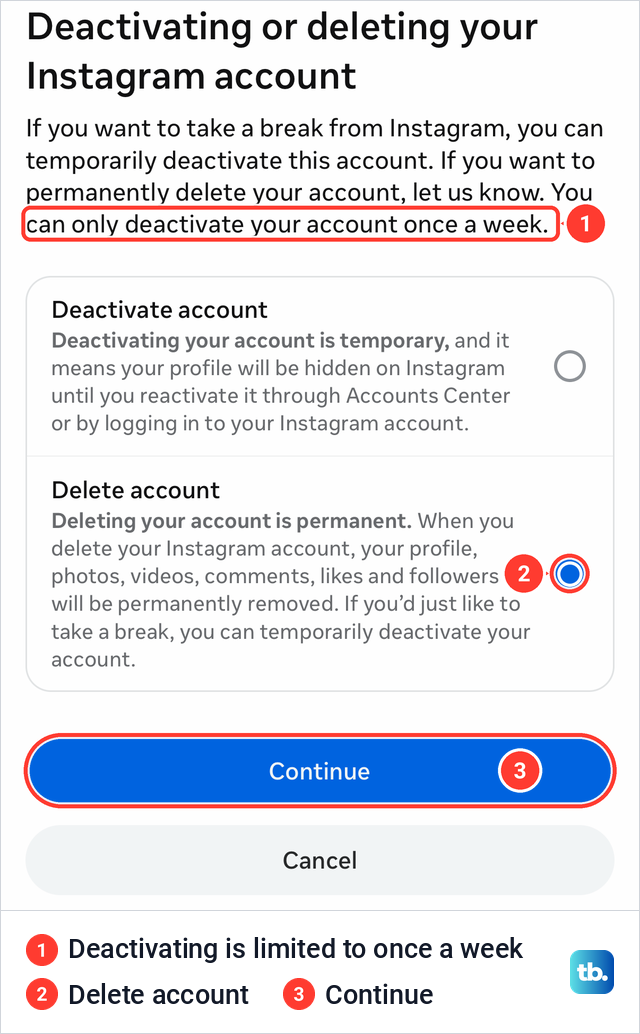
On our iPhone the same screen offered both, with a limit printed above them: "You can only deactivate your account once a week." If you only want a break, deactivate your Instagram account instead. The two paths also differ. Deactivating went from a summary straight to the password prompt, while deleting added a screen asking why you are leaving.
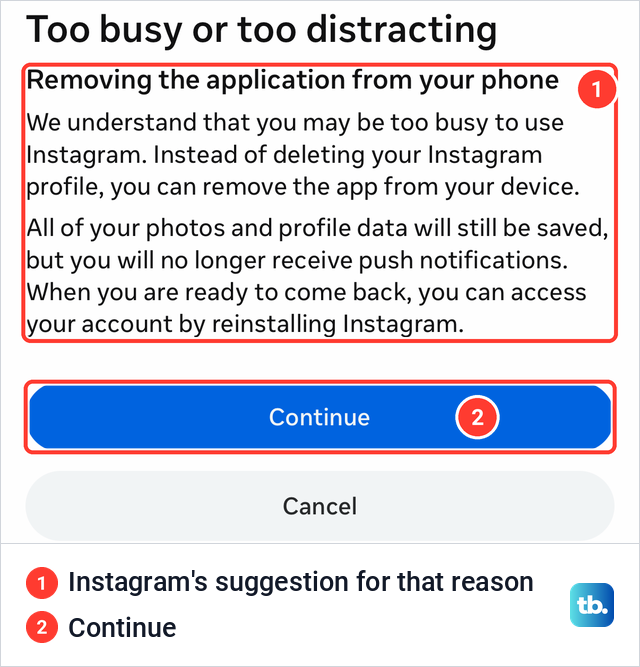
If a business or creator profile is the real problem, you can switch off a business account instead. Removing the app from your phone does not delete the account either, as Instagram itself points out if you pick Too busy as your reason for leaving.
Where to delete Instagram on each device
The steps start in a different place on each device and then meet in the same Accounts Center screens. The iPhone row is what our iPhone showed, plus the Meta Account label we saw in the Facebook app. The other rows follow Meta's instructions.
| Where you are | Start here | Then tap or click | Good to know |
|---|---|---|---|
| Instagram app on iPhone | Profile, then Menu at the top right | Accounts Center or Meta Account, Manage accounts (Manage account under Meta Account), Manage next to Instagram, Deactivation or deletion, Delete account | Asks for a reason, then your password |
| instagram.com on a computer | More at the bottom left, then Settings | Accounts Center, Profiles and personal details, Manage, Deactivation or deletion, Delete account | Ends at the same Deactivation or deletion screen |
| Instagram app on Android | A phone or computer browser | The instagram.com steps above | What Meta's Android help says to do |
| Older Accounts Center layout | Accounts Center | Personal details, Account ownership and control, Deactivation or deletion | Shown when Accounts sits at the bottom |
| Changed your mind | The Instagram login screen | Log back in to the account | Before the 30 days end, which varies by region |
Save a copy of your Instagram data first
Meta's advice is to export a copy of your information, like your photos and posts, before you delete. After the profile is deleted you lose access to the Export your information tool, and while a deletion is pending, Meta says the profile can't be exported until you cancel the deletion. So the export comes first.
In the app, go to your profile, tap Menu, then Accounts Center or Meta Account, and tap Your information and permissions. On instagram.com, Meta's route is More, Settings, then the same rows. On our iPhone that screen read "To download or transfer a copy of your information, go to Export your Information," and the Export your information row carried an icon showing that it opens outside the app.
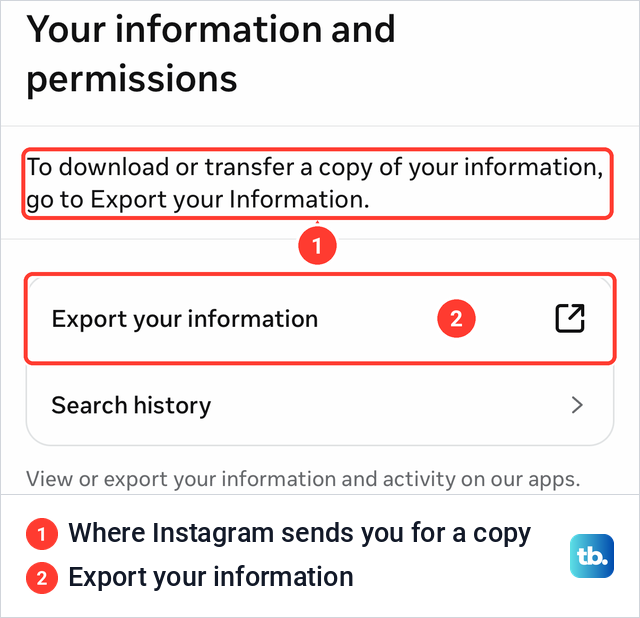
Meta's steps from there are to tap Export your information, then Create export, pick the Instagram profile and tap Next. Choose Export to device, set the information, date range, format, notification email and media quality, and tap Start export. Meta says an export to an external service can include a copy of the original photos and videos you shared.
Meta says it can take up to 30 days to email you the link, and once the export is ready you have 4 days to download it from Available downloads. The file leaves out things other people shared, such as their photos you are tagged in. Request the export first and delete only once the file is saved on your phone or computer.
Delete your Instagram account on iPhone
These are the screens we saw in the Instagram app on our iPhone, in order, and Meta gives the same steps for iPad. Near the end, Instagram asks for the account's password. If you are not sure of it, find your saved Instagram password before you start.
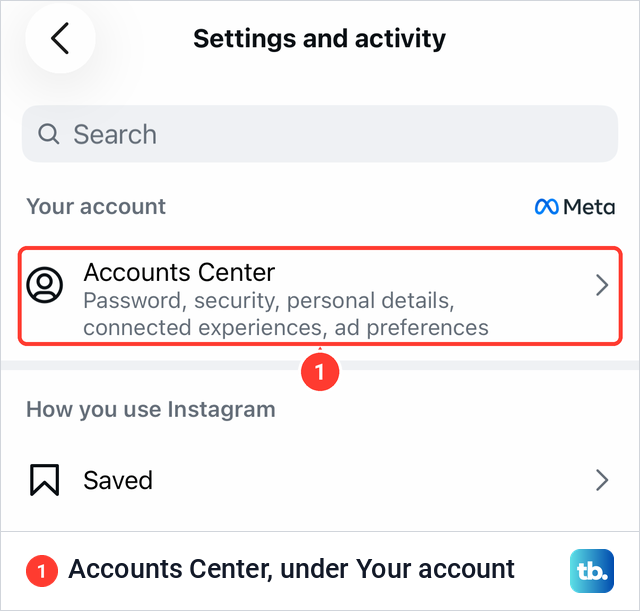
Tap Profile or your profile picture at the bottom right, then the Menu icon at the top right to open Settings and activity. On our iPhone the first row under Your account was Accounts Center, described as password, security, personal details, connected experiences and ad preferences. On an account that has moved to the new name, Meta's help pages call the same row Meta Account.
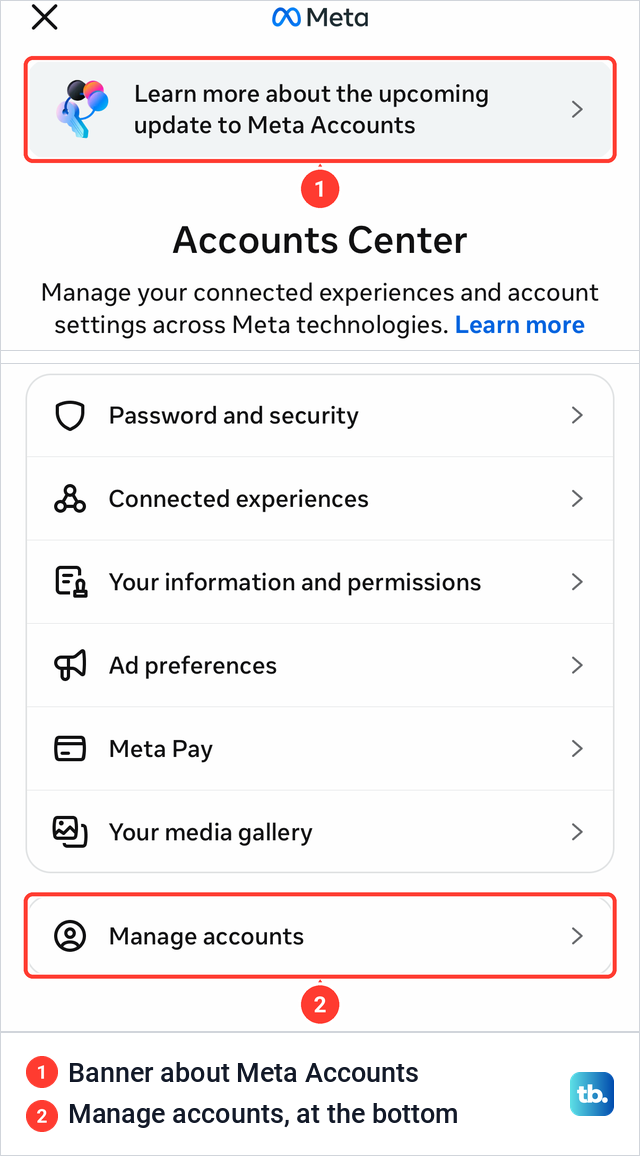
Tap Accounts Center. A sheet opened with a banner reading "Learn more about the upcoming update to Meta Accounts" above the Accounts Center title. Scroll to the bottom and tap Manage accounts. Meta's help page has steps for this exact layout that go through Profiles and personal details near the top, but on our iPhone Manage accounts went straight to the list of profiles.
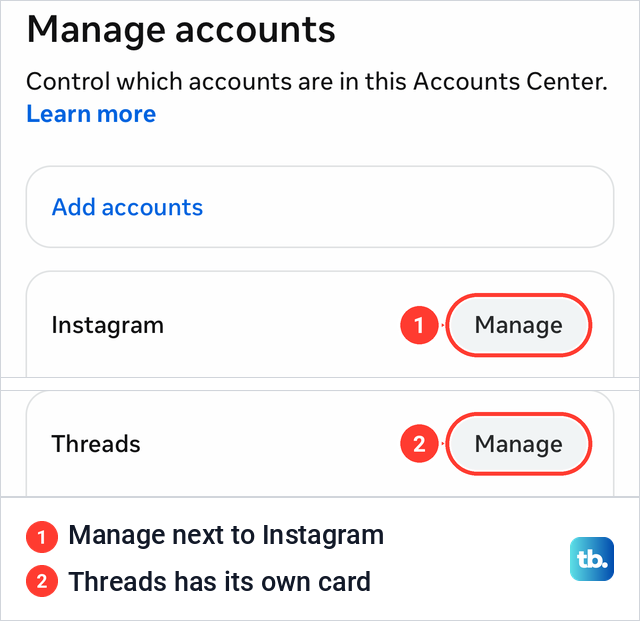
Manage accounts said "Control which accounts are in this Accounts Center" and showed each app's profile on its own card. Ours held an Instagram card and a Threads card, each with a Manage button. Tap Manage next to Instagram, and if you have more than one account, check the username on the card first.
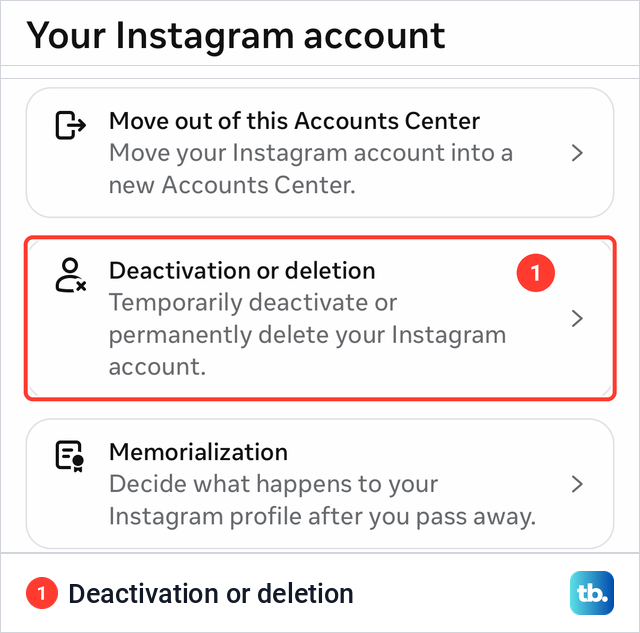
The next screen, Your Instagram account, had three rows: Move out of this Accounts Center, Deactivation or deletion and Memorialization. Tap Deactivation or deletion, which the screen describes as the place to temporarily deactivate or permanently delete your Instagram account.
The choice screen opened with Deactivate account selected. Tap Delete account to select it instead, then tap Continue. Selecting the option on its own changes nothing, and a Cancel button sits below Continue.
Instagram then showed a summary titled "Your Instagram account info will be deleted." It named the account and the date it was created, and under "Your profile information will be deleted" it counted the followers, posts, stories and reels, each with the date the last one was added, plus saved items. Treat it as a last check that you picked the right account, then tap Continue.
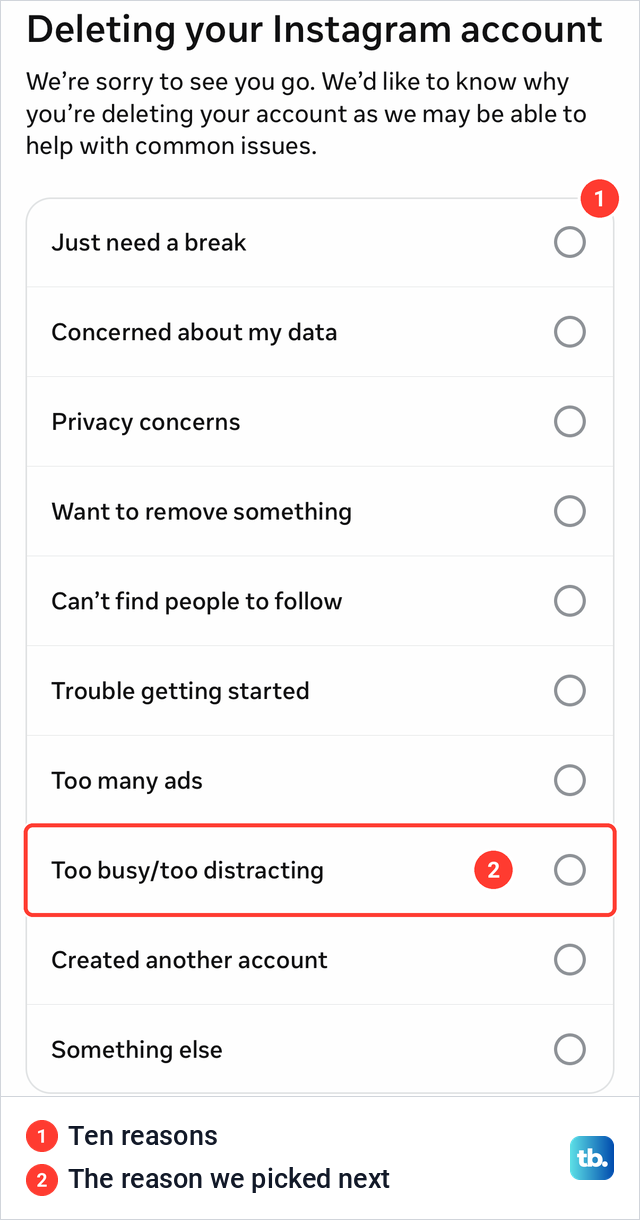
The screen after that, "Deleting your Instagram account," asks why you are leaving. It lists ten reasons, from Just need a break to Something else, which opens a text box, and we picked Too busy/too distracting.
Instagram answered with a card suggesting we remove the app instead, because our photos and profile data would stay saved. That is how deleting the Instagram app works, but it leaves the account in place, so tap Continue if deleting is what you want.
Both paths asked for the account's password on our iPhone. On the deactivate path the prompt read "For your security, please re-enter your password to continue," with a password field, a Continue button that stayed faded while the field was empty, and a Forgot password? link.
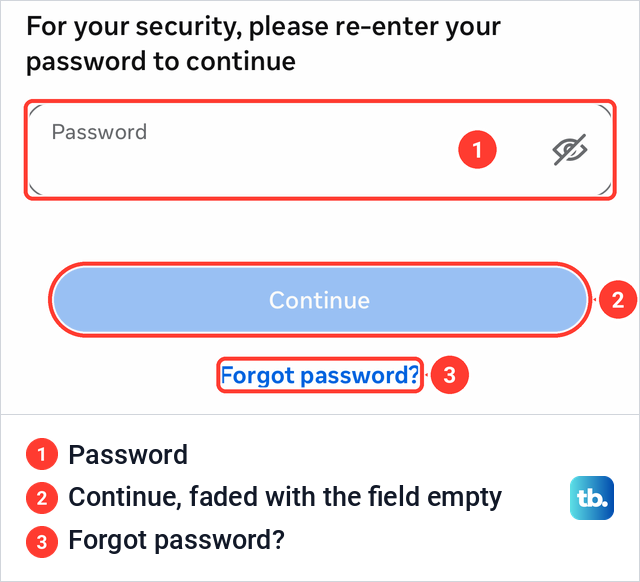
From here the steps follow Meta's instructions. Enter your password, tap Continue, then follow the instructions to confirm. Meta says your content is no longer accessible to other people on Instagram from then on, and the account is deleted for good 30 days after the request.
If you see Meta Account instead of Accounts Center
Meta is moving people to Meta Accounts gradually, and its help pages say you may see either Accounts Center or Meta Account as the place to manage your settings. Both labels were live on our iPhone at once. The Instagram app still said Accounts Center, while in the Facebook app on the same iPhone, Meta Account already sat at the top of Settings & privacy.
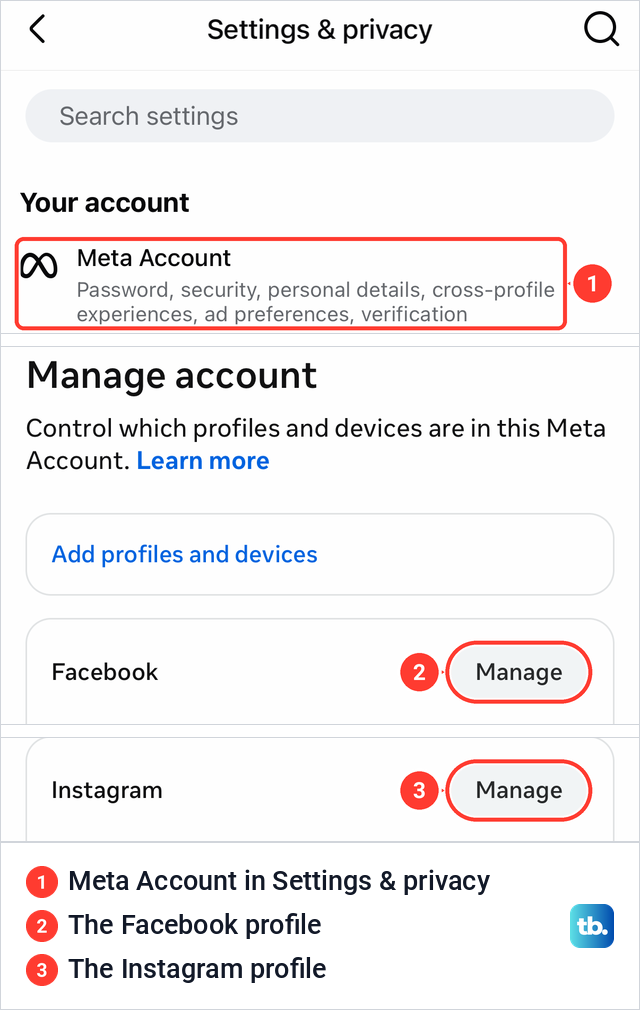
Under Meta Account, the row that lists your profiles is called Manage account, and it said "Control which profiles and devices are in this Meta Account." It held a Facebook profile card and an Instagram profile card, each with its own Manage button. Tapping Manage next to the Instagram profile opened Move out, Deactivation or deletion and Memorialization, so the steps continue as above.
Some accounts still show an older layout, with Accounts at the bottom of Accounts Center instead of Manage accounts. For that layout Meta's steps are Personal details under Account Settings, then Account ownership and control, then Deactivation or deletion. Choose the account, select Delete account and tap Continue.
Delete Instagram on a computer
On a computer, the steps follow Meta's instructions for instagram.com and lead to the same Accounts Center rows. Sign in to instagram.com in your browser first, then work through these six steps.
- 1.Click More at the bottom left, then click Settings.
- 2.Click Accounts Center or Meta Account, then click Profiles and personal details.
- 3.Click Manage next to the account type you want to delete.
- 4.Click Deactivation or deletion, then click the Instagram account.
- 5.Click Delete account, then click Continue.
- 6.Follow the instructions to confirm with your password.
If you see Accounts at the bottom of Accounts Center, click Personal details, Account ownership and control, then Deactivation or deletion instead. Older guides still give a direct deletion address on instagram.com. Meta's own steps go through Accounts Center, so use that route.
Delete Instagram on an Android phone
Meta's Android help adds one line the other versions do not have. "If you use the Instagram app on Android, you'll need to go to Instagram.com on a computer or mobile browser in order to delete your profile," it says. So open instagram.com in a browser and sign in, on a computer if you can. Meta's phone-browser steps repeat its computer steps word for word, so a computer matches them most closely.
Meta's other Instagram articles describe the same Accounts Center rows inside the app without naming a platform. If your Android app shows Deactivation or deletion under Accounts Center, the iPhone steps apply. If it does not, the browser is the route Meta's Android help points to.
Delete one Instagram account when you have several
Your phone can store the logins for several Instagram accounts, but Meta notes that you are signed in to only one at a time. The delete steps act on the account you pick under Manage accounts or Deactivation or deletion, so switch to the account you want gone and check the username on its card. Meta says each account keeps its own password, so have the password of the account you are deleting ready.
Removing an account from the login screen is a different thing. Meta says removing login information only takes the account off your iPhone or Android device and does not deactivate or delete it. That is all you need if you just want to remove an Instagram account from your phone.
What happens after you delete Instagram
Meta says that during the 30 days after your request, your content is not accessible to other people on Instagram. After 30 days your profile and all your information are permanently deleted, and you cannot retrieve them. Meta adds that the number of days you have to cancel varies by region.
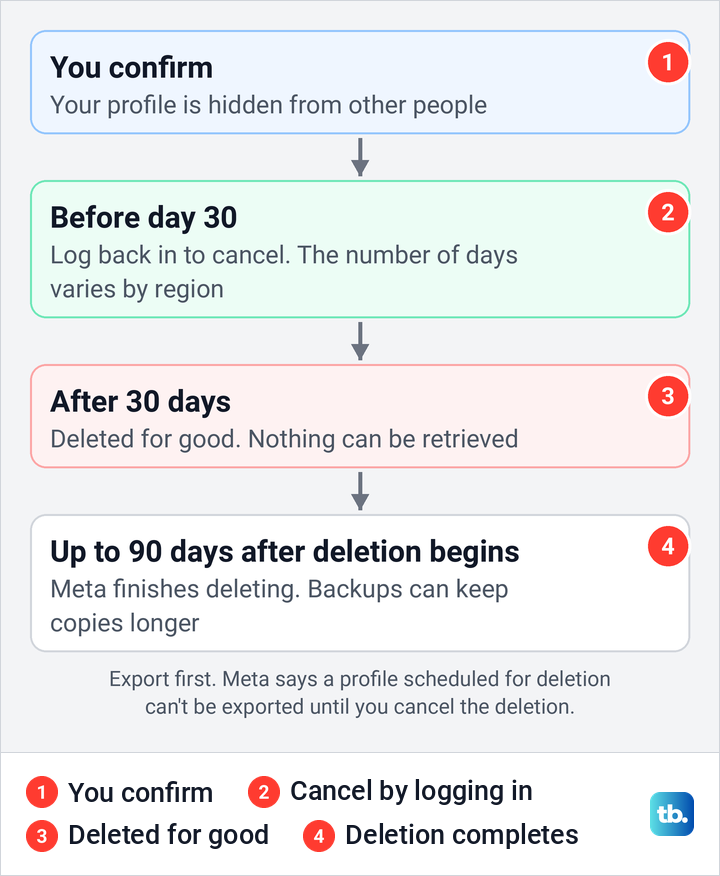
Meta says deletion can take up to 90 days after the process begins, copies may stay in backup storage after that, and some information can be kept for legal issues, terms violations or harm prevention. Instagram's terms also say the 90-day limit does not cover content that others have used under Instagram's license and not deleted.
Your username is not locked away. Meta says you can sign up again with the same username, or add it to another profile, as long as nobody else has taken it, so you can create a new Instagram account under the old name later. The exception is an account removed for breaking the Community Standards, which may not get the name back.
Chats are worth a look before you go. If there are messages you sent that you would rather take back, unsend Instagram messages you regret before you delete, while you can still sign in.
How to cancel an Instagram account deletion
You can cancel your Instagram account deletion request before the 30-day deadline by logging back into your Instagram account. After the deadline nothing can be retrieved, so if you have any doubt, log in early rather than late.
If the login code never arrives when you try to sign back in, sort that out well before the 30 days run out. Meta also says that once a deletion is cancelled, your content shows up again in Edits.
What happens to Threads, Facebook and Edits
Threads goes too if you signed up for it with this Instagram account. Meta's Threads privacy policy says a Threads profile "may be deleted at any time by deleting the account that you used to sign up with Threads." Our Manage accounts screen showed Threads on its own card next to Instagram, a quick way to spot a Threads profile in the same Accounts Center. The reverse is not true, because Meta says deleting Threads alone won't delete your Instagram or Facebook account.
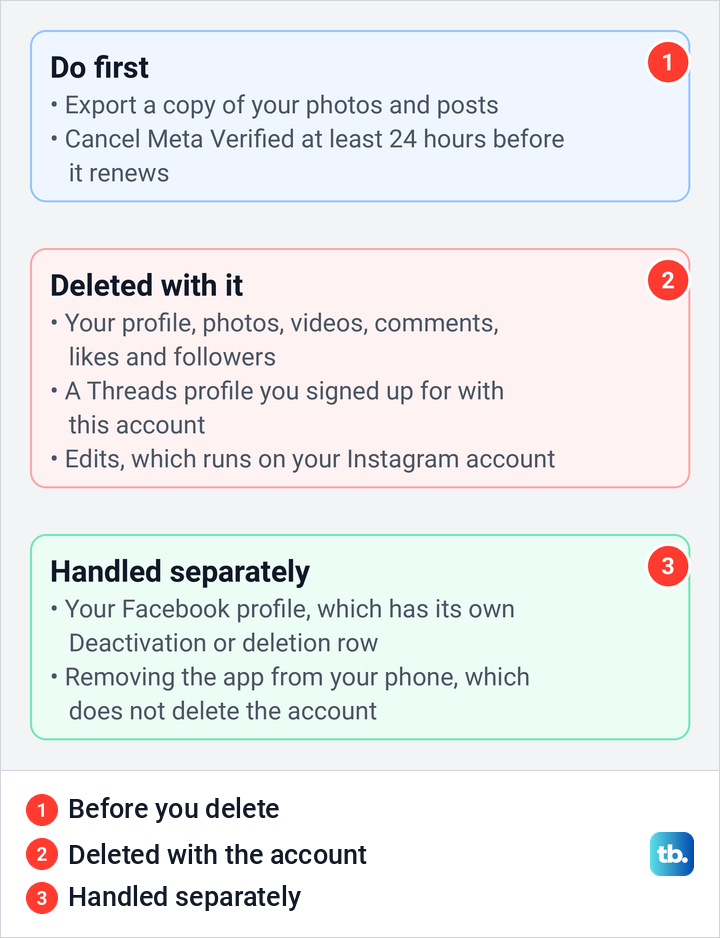
Facebook has its own delete steps. Meta's steps ask you to tap the account you want to delete, and in Meta Account our Facebook profile had its own card, its own Manage button and its own Deactivation or deletion row. If you want Facebook gone as well, delete your Facebook account separately through that row.
Edits, Meta's video editing app, runs on your Instagram account. Meta says that to delete Edits you have to delete your Instagram account, so deleting Instagram takes Edits with it.
Cancel Instagram subscriptions before you delete
Meta says that if you delete the account linked to a subscription, it cancels the subscription, and it gives no credits or partial refunds for a cancelled Meta Verified plan. Cancelling yourself first is cleaner. Meta says to do it at least 24 hours before your next payment date to avoid another charge.
If you bought Meta Verified through Apple, Meta says to cancel it in Meta account settings in the Instagram or Facebook app. Its iPhone steps are Menu, then Meta Account (Accounts Center on some accounts), Meta Verified, Manage subscription and Cancel subscription. If you bought it through Google Play, Meta says to cancel it in Google Play with the same Google account, and a subscription bought directly from Meta on a computer has to be cancelled on a computer.
Meta One works differently. If Instagram is one of several accounts on a Meta One plan, Meta says the plan stays active on the others, so cancel it yourself if you no longer want it.
After you cancel, check your iPhone subscriptions to make sure no Instagram or Meta charge is still active. Removing the Instagram app does not cancel an App Store subscription either, Apple says.
If you cannot log in to delete the account
Meta will not delete a profile for you. Its help page says "For security reasons, we can't delete a profile for you," and you need to be able to log in to request deletion. Get back into the account first, then follow the steps above.
If someone has taken over your login, recover a hacked Instagram account. If your account has been disabled, get a disabled Instagram account back. If Instagram has locked you out for a security check, unlock a locked Instagram account, then come back to these steps.
For someone who has died, Meta offers two options. Anyone can ask Meta to memorialize the profile, and an immediate family member can ask for it to be removed, using the request forms on Instagram's help page for a deceased person's profile. Meta says it cannot give out login information for a memorialized profile, and the Memorialization row on the Your Instagram account screen lets you decide ahead of time what happens to yours.
How we tested this guide
We tested this in the Instagram app on an iPhone 17 Pro with iOS 26.6, following the delete path through Accounts Center, stopping at the password prompt.
Frequently Asked Questions
How long does it take to delete an Instagram account?
Your profile is hidden from other people once you confirm, and Meta deletes it for good 30 days after the request. Meta says the number of days can vary by region, and the deletion itself can take up to 90 days after it begins, with copies possibly kept in backups after that.
Can I cancel an Instagram account deletion?
Yes. Log back into the account before the 30-day deadline and the request is cancelled. After that, the account and its content cannot be recovered.
Does deleting Instagram delete my Facebook account?
Meta's steps delete the account you choose under Deactivation or deletion. In Meta Account, the Facebook profile has its own card, Manage button and Deactivation or deletion row, so deleting it is a separate set of steps.
Does deleting Instagram delete Threads?
Yes, if you signed up for Threads with that Instagram account. Meta says deleting the account you used to sign up deletes the Threads profile, while deleting Threads alone leaves Instagram as it is.
Can I delete my Instagram account without the password?
No. Meta needs you to be able to log in, and Instagram asks for the account's password before you confirm. Use the Forgot password? link on that screen or reset the password from the login page first.
Can I delete Instagram from the Android app?
Meta's Android help says to use instagram.com in a computer or phone browser. Sign in there and follow the computer steps. If your app shows Deactivation or deletion under Accounts Center, the app steps work too.
Can I use my old username again?
Yes, as long as nobody else has taken it in the meantime. Meta says an account removed for breaking the Community Standards may not get the same username back.