Instagram DMs break in a few annoying ways. The Messages button stops responding, new chats disappear, sends get blocked, or DM photos and videos refuse to load.
Start with the checks that tell you where the problem is, then move through the app, account, notification, and browser fixes that match the exact failure you are seeing.
1. Rule Out a Wider Instagram Problem
First check: confirm whether the problem is bigger than your account before changing settings.
Open Meta Status and review the current Meta product status. Meta Status is built mainly for Meta business products, so use it as a service-side signal.
When Instagram itself is having trouble, stop troubleshooting your phone and try again later.
2. Use the Current Messages Path
- 1.Open Instagram.
- 2.Tap Messages at the bottom.
- 3.Tap Compose in the top right.
- 4.Select the recipient or recipients.
- 5.Type the message.
- 6.Tap Send.
Make sure you are using Instagram's current DM entry point. Older messaging-update screens are not the current repair path.
Instagram notes that some features vary by country or region. The main mobile entry point for DMs is still Messages.
3. Find Missing DMs in Request Folders
Missing Instagram messages often sit outside the main inbox: messages from people you do not follow go to Requests, and Instagram requires you to accept the request before it appears in your inbox.
Open Messages, tap Requests, open the message, then choose Accept, Delete, or Block.
For filtered messages, open Messages, then Requests, then Hidden or Spam. Hidden Words filtering sends some message requests there, and that filtering is not supported on web browsers or Meta Quest.
For professional accounts, open Messages and check Primary, General, and Requests. Move or organize conversations from those folders as needed.
4. Restart Instagram When Messages Will Not Open
On iPhone without a Home button: Swipe up from the bottom and pause, swipe Instagram up, then reopen Instagram.
On iPhone with a Home button: Double-click Home, swipe Instagram up, then reopen Instagram.
On Android: Swipe up from the bottom, hold, let go, swipe Instagram up, then reopen Instagram. On Android Go with 3-button navigation, tap Recent apps, swipe Instagram up, then reopen it.
When the Messages button freezes or a thread will not open, force close Instagram first.
If the app still sticks, restart the device.
On many Android phones, press and hold Power, then tap Restart or Power off.
On Pixel 6 and later, press Power and Volume Up together, then tap Restart or Power off; steps vary by manufacturer.
On iPhone or iPad, power the device off and turn it back on using the restart steps for your model.
5. Update or Reinstall the App
Store update first: the App Store page showed Instagram 438.0.0 released two days before July 16, 2026, and Google Play showed Instagram updated on July 13, 2026.
On iPhone or iPad: Open App Store, tap your account photo, go to App Updates, then tap Update next to Instagram.
You can also search for Instagram in App Store and tap Update if it appears.
On Android: Open Google Play Store, tap your profile icon, choose Manage apps & device, under Updates available tap See details, then tap Update next to Instagram.
On Android devices with Meta App Manager installed, you can also turn on Instagram's own auto-update option. Open Instagram, go to Profile, Menu, About, App updates, then turn on Auto-update Instagram.
On Android only: Clear the app cache after updating. Open Settings, Apps, Instagram, Storage or Storage & cache, then tap Clear cache.
If the problem remains, tap Clear storage or Clear data, then sign back in.
Reinstall after the update and cache fixes fail.
On iPhone or iPad, touch and hold Instagram, choose Remove App or Delete App, confirm, then reinstall from App Store.
On Android, open Google Play Store, tap your profile icon, choose Manage apps & device, Manage, Instagram, Uninstall, then reinstall Instagram from its official Google Play page.
6. Change Account Settings That Block DMs
If new DMs do not arrive, review who is allowed to contact you.
Open Profile, Menu, Messages and story replies, Message requests, then choose your settings for message requests and group chat requests.
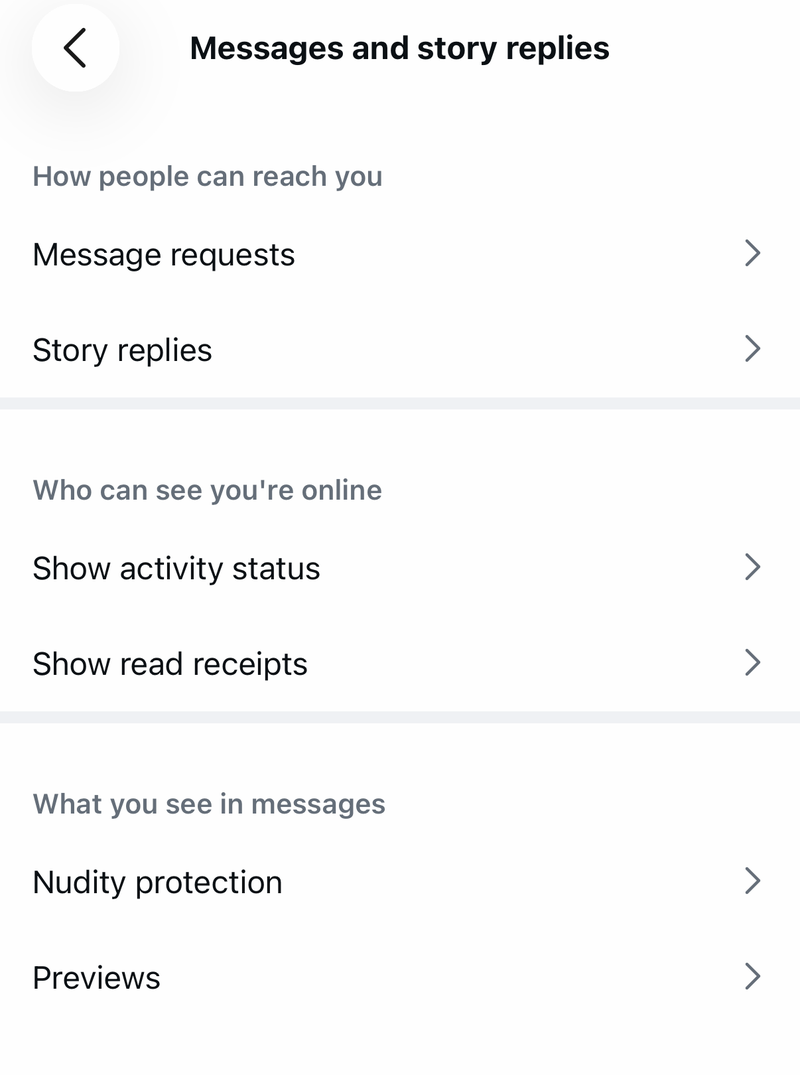
When a specific chat is the problem, check blocking.
Open Profile, Menu, Blocked, tap Unblock next to the account, then tap Unblock again.
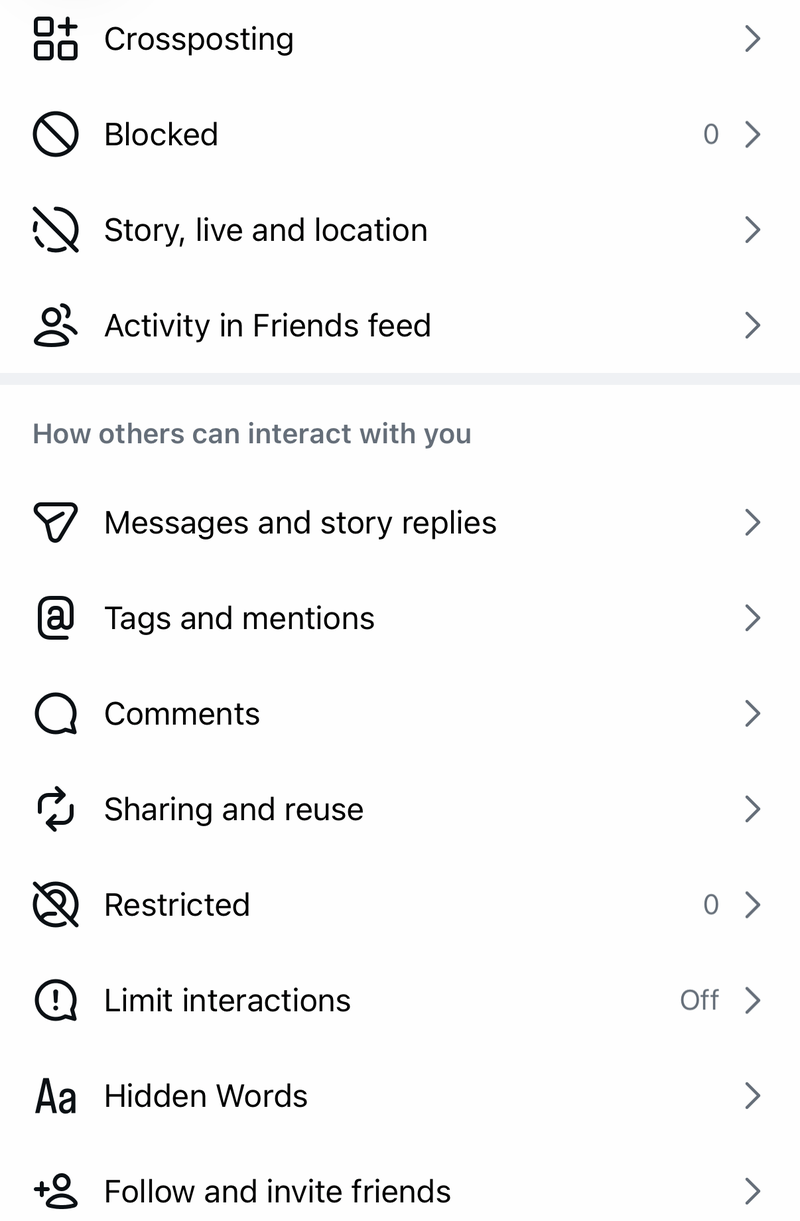
Instagram keeps existing threads after a block, but you cannot message that person until you unblock the account.
When sending or forwarding is temporarily blocked, stop repeated sending and wait for the limit to clear.
Instagram uses DM limits to reduce unwanted messages, and forwarding is limited to up to 5 chats at a time.
Check account restrictions next. Open Profile, Menu, Help, Account Status, review the restriction details, then follow the available fix or appeal prompts.
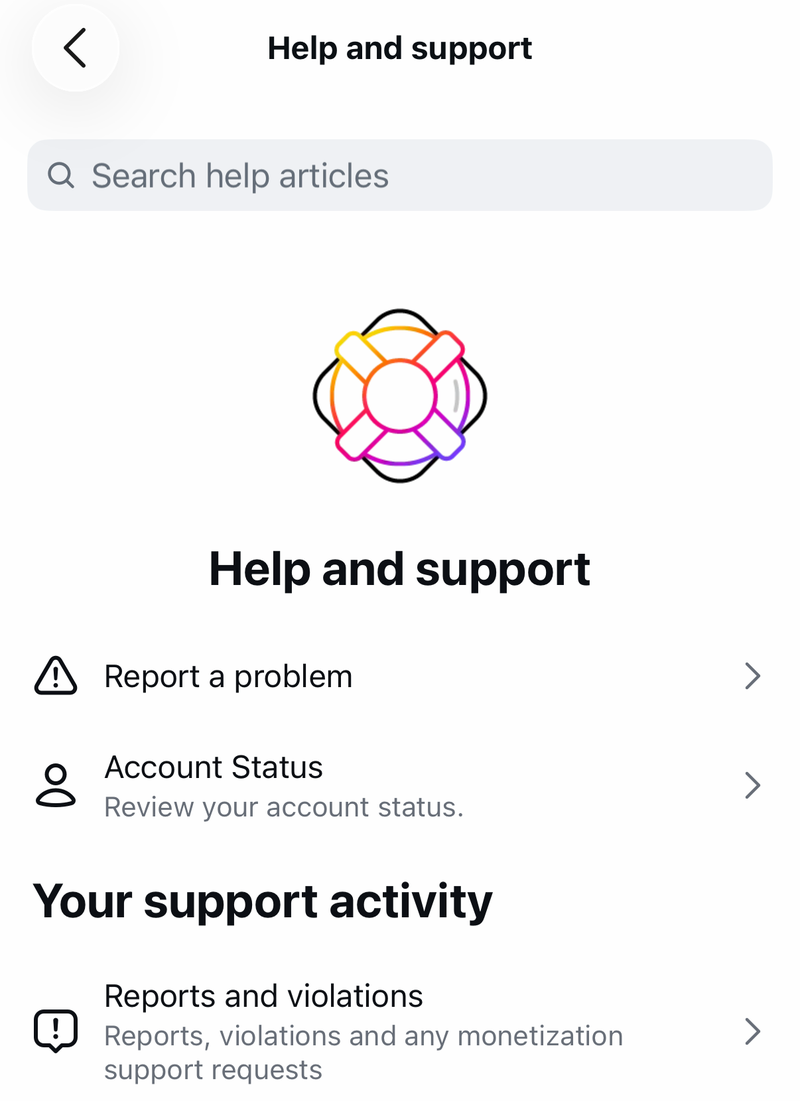
For Teen Accounts, open Profile, Menu, Teen safety settings, then Messages.
Parents or supervisors can review settings through Profile, Menu, Family Center, Supervision for Teen Accounts.
Teen accounts are set to receive messages only from accounts they follow or have previously connected with unless eligible settings are changed or approved.
7. Repair Media Alerts and Connected Tools
When text DMs work but photos, videos, previews, calls, voice notes, or alerts fail, the related permission or notification setting is the likely fix.
Open Profile, Menu, Device permissions, choose the needed permission, tap Update device settings, then enable that permission in your device settings.
For silent DMs, open Profile, Menu, Notifications, turn Pause All off, then review Messages notification settings.
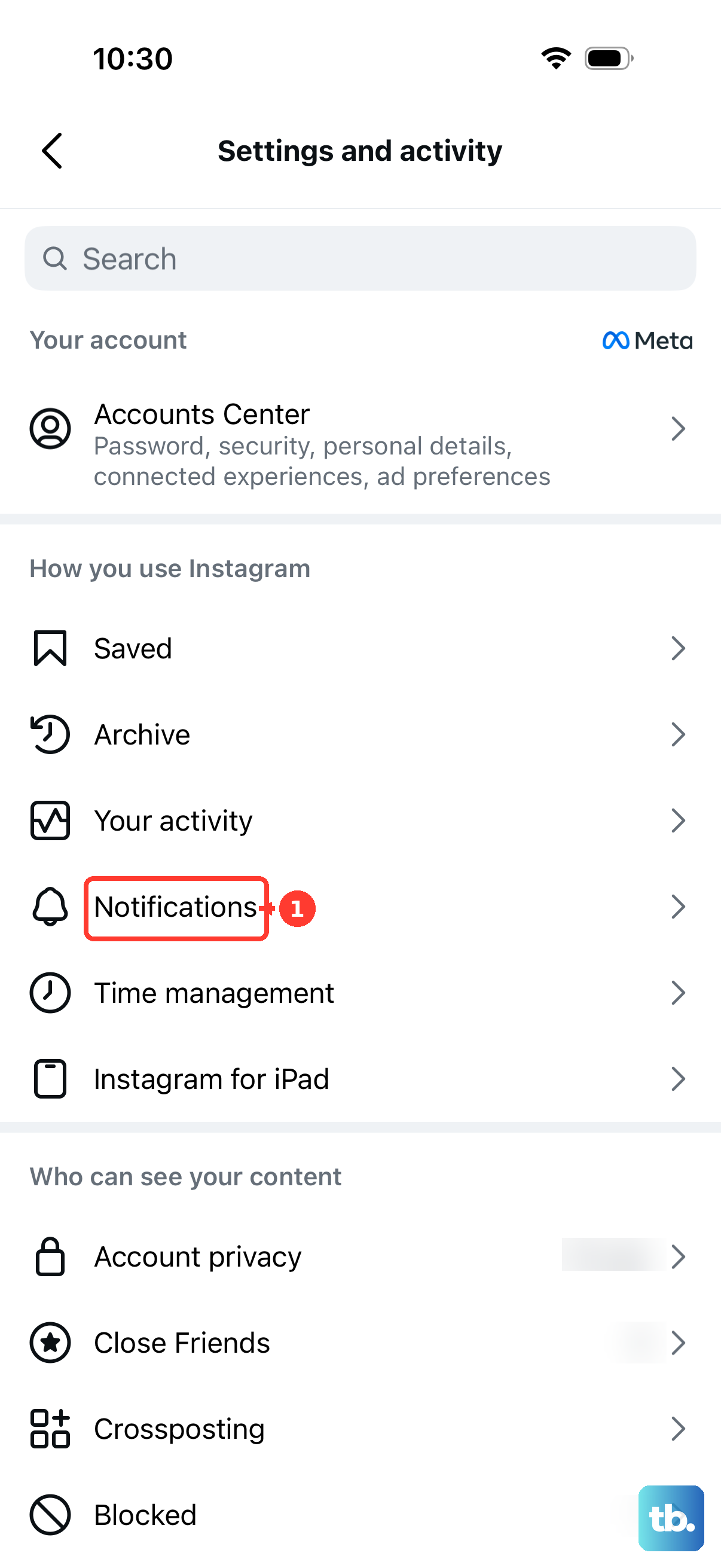
For one muted chat, open Messages, open the chat, tap the person's name or group name at the top, tap Mute, then turn the mute options off.
For slow DM photos or videos on mobile data, open Profile, Menu, Media quality, then turn Use less cellular data off.
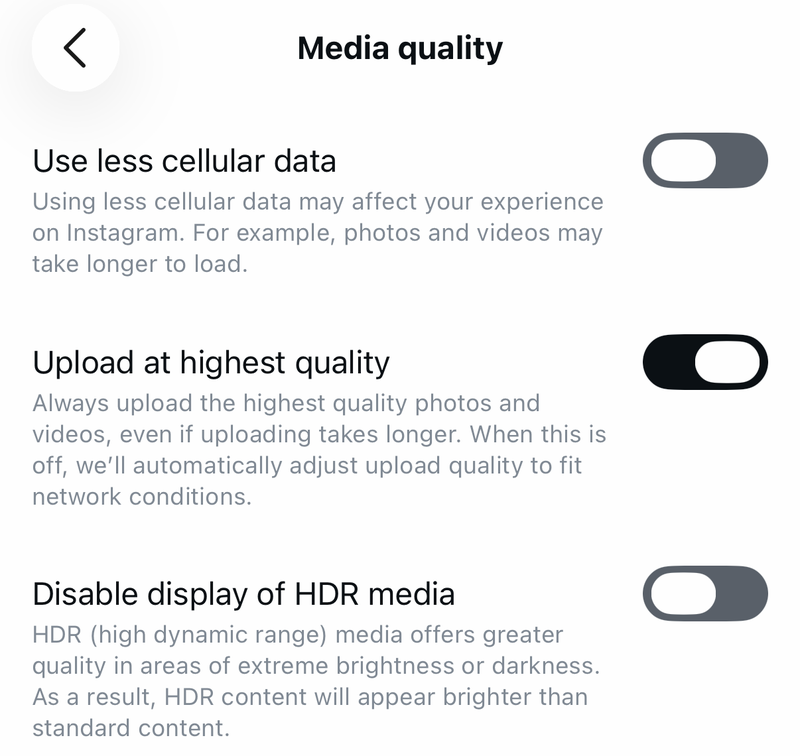
On iPhone or cellular iPad, also open Settings, Cellular, turn Cellular Data on, then turn on cellular data for Instagram.
If a professional inbox or third-party tool is not receiving Instagram messages, turn on connected tool access. Open Profile, Menu, Messages and story replies, Message requests, Connected tools, then turn on message access.
8. Test Instagram Web and Clear Browser Data
Open https://www.instagram.com/, sign in, select the Messages or DM icon, then open or start a conversation.
Chrome desktop: Open More, Delete browsing data, choose a time range, select Cookies and other site data and Cached images and files, then choose Delete data.
For only Instagram data, open More, Settings, Privacy and security, Third-party cookies, See all site data and permissions, search for instagram.com, then delete it.
Safari on iPhone or iPad: Open Settings, Apps, Safari, Clear History and Website Data, then tap Clear History.
On Mac, open Safari, Settings, Privacy, Manage Website Data, select instagram.com or Remove All, then click Remove.
Microsoft Edge: Open Settings and more, Settings, Privacy, search, and services, Clear browsing data, Choose what to clear, choose a Time range, select Cookies and other site data and Cached images and files, then choose Clear now.
Instagram web gives you a quick way to keep messaging and confirm whether the issue is only in the mobile app.
If Chrome is the browser with broken Instagram DMs, update it. Open More, Help, About Google Chrome, then click Relaunch when Chrome offers an update.
9. Report the DM Bug to Instagram
Last step: after the local fixes fail, send Instagram a technical report from inside the app.
Shake your phone while Instagram is open, tap Report a problem, then follow the prompts.
You can also open Profile, Menu, Help, Report a Problem. Include the exact DM failure, whether it happens in one chat or every chat, and whether Instagram web works.
Skip old fixes that tell you to turn on Instagram end-to-end encrypted chats or use a standalone messaging-feature update. Instagram says end-to-end encrypted messaging on Instagram is no longer supported as of May 8, 2026, and the verified current paths are app updates, message settings, request folders, and Report a Problem.
Frequently Asked Questions
Why are Instagram DMs not showing up in my inbox?
Open Messages > Requests first. Messages from people you do not follow stay in Requests until you accept them. Also check Requests > Hidden or Spam, and check Primary, General, and Requests if you use a professional account.
Why can I see Instagram messages but not get notifications?
Open Profile > Menu > Notifications and turn Pause All off, then review Messages. For one chat, open the chat, tap the name at the top, choose Mute, and turn mute off.
Why can I not send Instagram DMs to one person?
Check Profile > Menu > Blocked. Existing threads remain after you block someone, but Instagram does not let you message that person until you unblock the account.
Can Instagram web fix broken DMs in the app?
Instagram web works as a workaround and an app-only test. Sign in at instagram.com and open Messages. Feature availability differs from the mobile app.