
To change your Outlook password, change it with your email provider first, then type the new password when Outlook asks for it. For a Microsoft 365 work or school address that means My Account at myaccount.microsoft.com, for Outlook.com or Hotmail it is the Security page at account.microsoft.com, and for Gmail, Yahoo or iCloud it is that provider's own account settings.
The Outlook apps on Windows, Mac and phones cannot change that password. They only sign in with it, and Microsoft calls this the password stored in Outlook. In classic Outlook for Microsoft 365 on Windows 11, version 25H2, our work account showed no password box in any of the account settings we opened, so if yours is a Microsoft 365 work account, do not spend time hunting for one there.
The short version
- Work or school account: open myaccount.microsoft.com, expand My Account, select Change Password, fill in the three boxes and select Submit.
- Outlook.com or Hotmail: go to account.microsoft.com, open Security and select Change Password.
- Gmail, Yahoo or iCloud: change it in that provider's account settings, which for iCloud means Settings on a trusted Apple device.
- Then: open Outlook and enter the new password when it asks, or a new app password if Outlook used one.
- Data file password: the Change Password button under Data Files only protects a .pst file, never your email sign-in.
Where to change the password for each kind of account
The account behind your mailbox decides where its password lives. Look at the part of your address after the @ sign, which Microsoft says usually names your email provider, then find your row below.
| Mail account in Outlook | Where to change its password | What to do in Outlook afterward |
|---|---|---|
| Microsoft 365 work or school | My Account at myaccount.microsoft.com, then Change Password | Sign in again when Outlook asks |
| Outlook.com, Hotmail, Live or MSN | Microsoft account at account.microsoft.com, then Security | Enter the new password when Outlook asks |
| Gmail, Yahoo, iCloud or another provider | The provider's account settings, such as your Google Account, the Yahoo Account security page, or Settings on a trusted Apple device for iCloud | Enter the new password, or a new app password if Outlook used one, because Apple and Google revoke old ones when the password changes |
| A .pst Outlook Data File | File > Account Settings > Account Settings > Data Files > Settings | Nothing, because it never changes your email sign-in |
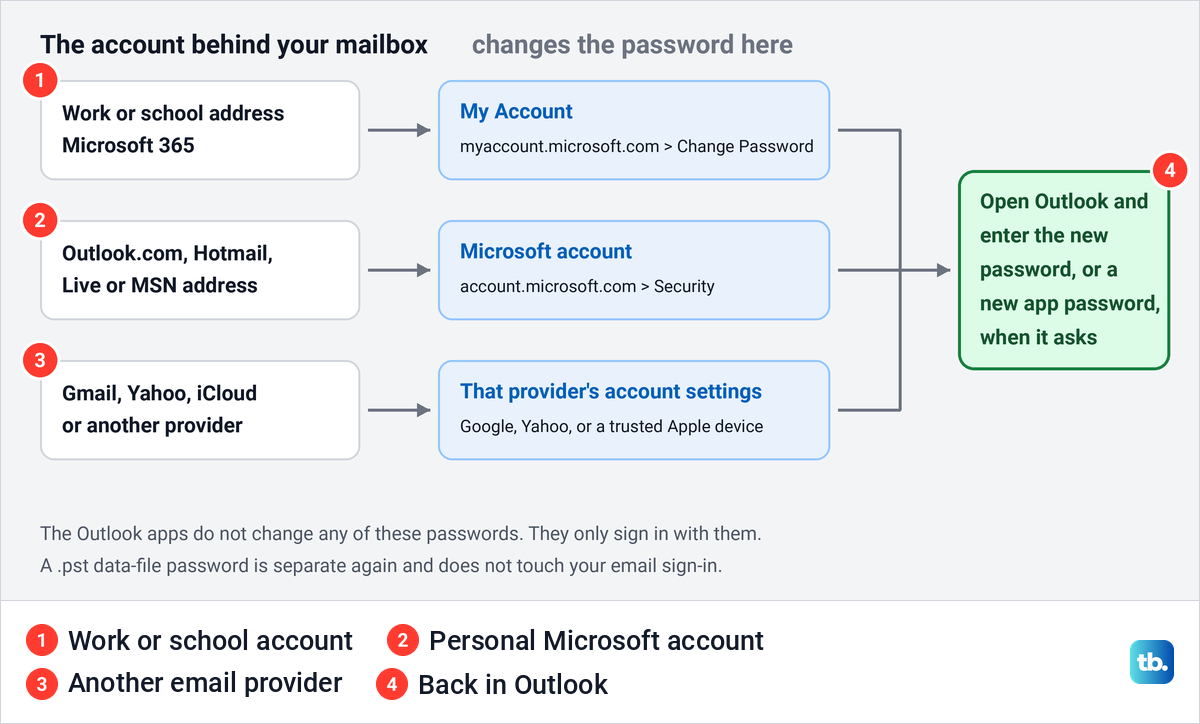
Each route ends back in Outlook. Once the provider has the new password, the app needs it too, and Microsoft says Outlook asks for it the next time it opens.
Find which account your Outlook uses
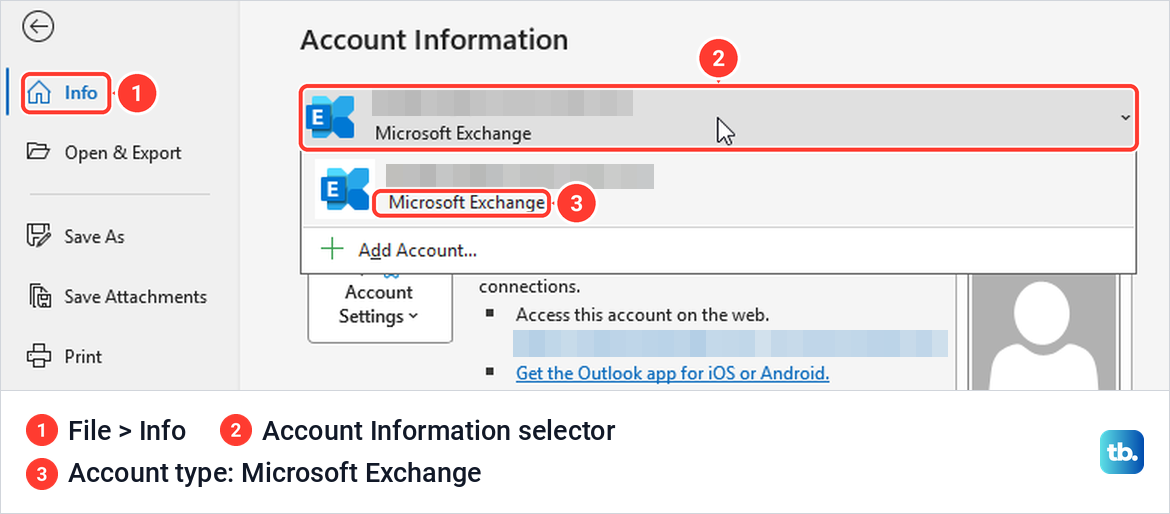
In classic Outlook for Windows, select File. The box under Account Information shows the account Outlook is using, and its dropdown lists the others, which is how Microsoft tells you to pick the account you want to change.
On our PC, the Microsoft 365 work account appeared in that list as Microsoft Exchange. An address ending in outlook.com, hotmail.com, live.com or msn.com is a personal Microsoft account, while gmail.com, yahoo.com or icloud.com belongs to that provider.
In Outlook on the web, select your account picture at the top right. The card shows the name and address you are signed in with, along with View account, Open another mailbox and Sign in with a different account. Check it before you start if you use more than one account.
Change a work or school password in My Account
Microsoft's route for a work or school password you still know is the My Account portal. Open myaccount.microsoft.com in your browser and, if it asks, sign in with your work or school account and current password.
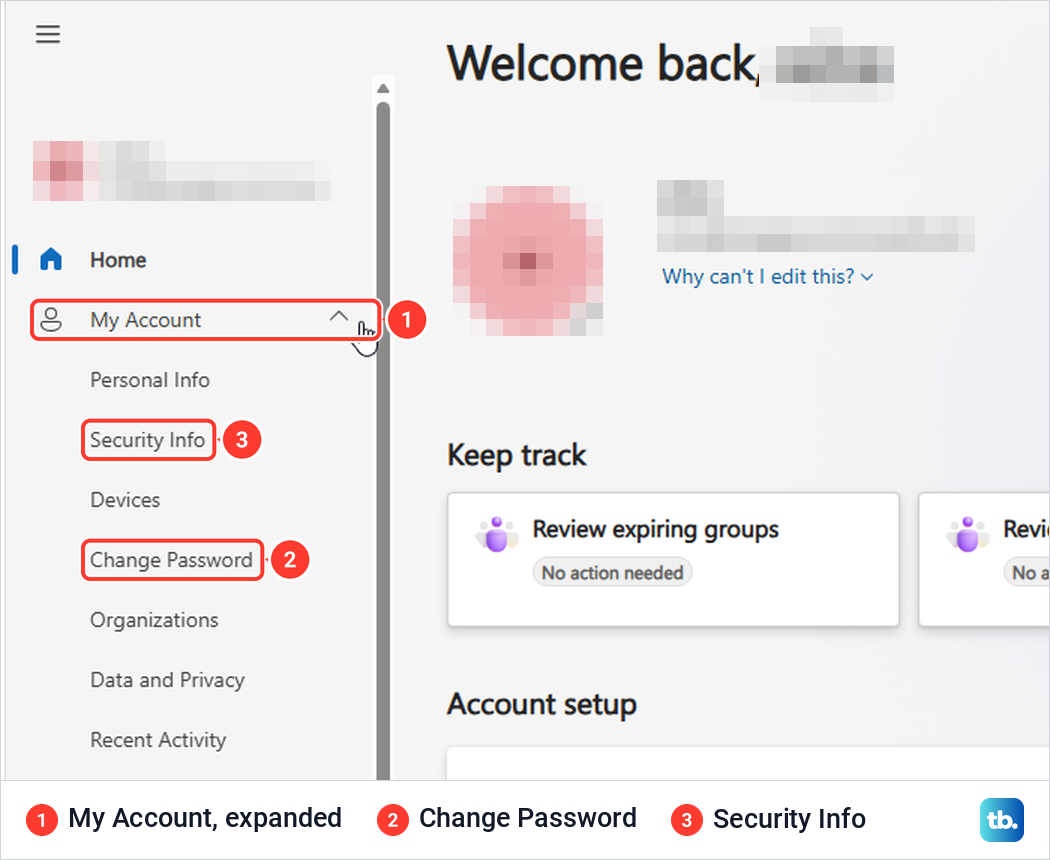
We opened it in an Edge window that was already signed in to Outlook on the web, and it went straight to the portal with no new sign-in. Microsoft's help page says to pick Change Password from the left-hand menu, but on our portal it was hidden inside the My Account group, which we had to expand first. Change Password sat in that group between Devices and Organizations.
Selecting Change Password moved us to mysignins.microsoft.com and opened a Change your password box over the Security info page. It shows your User ID, then Current password, a Forgot your password? link, New password and Confirm new password. Submit stays greyed out while the boxes are empty.
Type your current password, then the new one twice, and select Submit. Microsoft says your password is then changed and you are asked to sign in to your work or school account again, so have the new password ready.
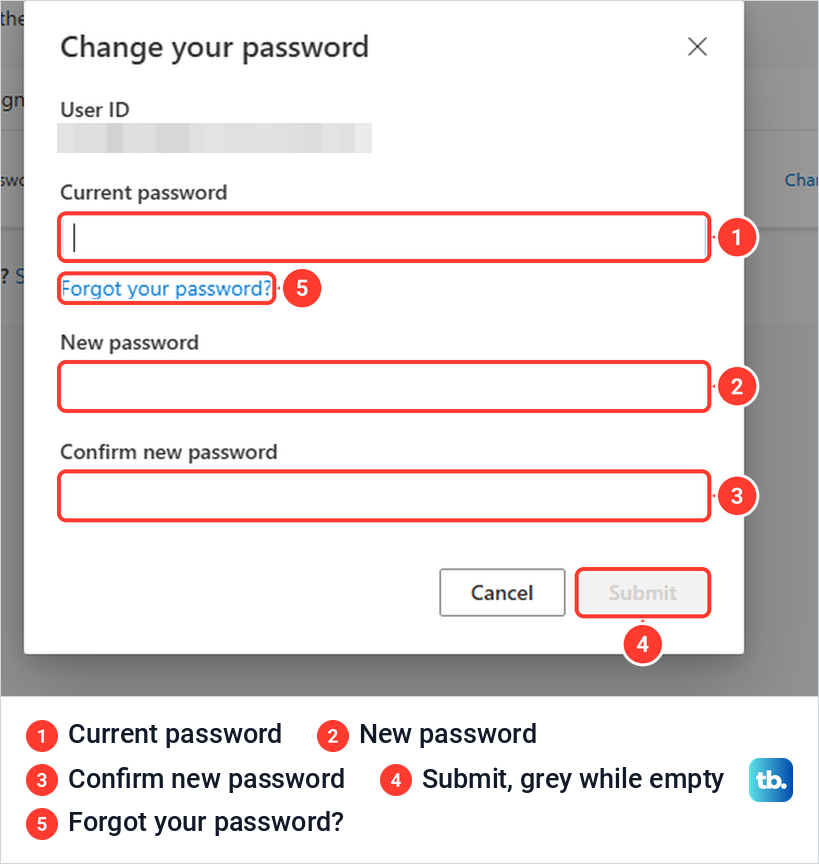
The empty form listed no length or complexity rules. Microsoft's troubleshooting table covers one error here, a new password with a word, phrase or pattern that makes it easily guessable, and its answer is a stronger password. For any other error, follow what the message on screen says.
Some companies run their own Exchange server instead of Microsoft 365. For those, Microsoft says the older Outlook Web App can change the password under Settings > Change password, and if you can't change it there, contact your helpdesk.
Open My Account for a work or school account from the web
For a work or school account, you do not have to remember the address. The account card in Outlook on the web has a View account link, and the Microsoft 365 app has one too.
Microsoft's help page says to sign in to Microsoft365.com and select My Account in the left navigation pane. When we went to microsoft365.com, it opened the Microsoft 365 Copilot app, and its left-hand menu had no My Account. The account button at the bottom left opened a card with View account, and that link took us to the My Account portal.
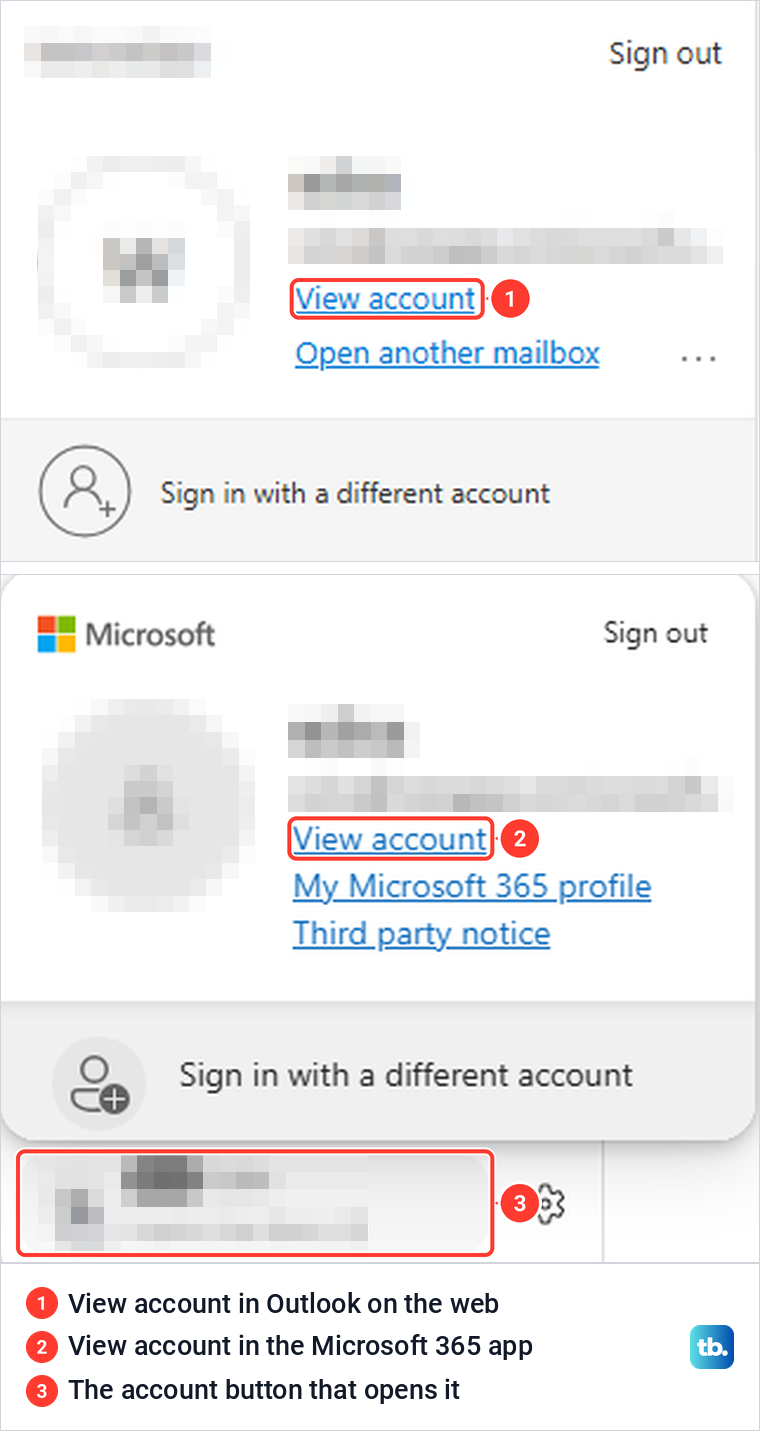
From there, expand My Account and select Change Password as above. Both cards also show which account you are signed in with, which matters if your browser holds a second work or school account.
Change an Outlook.com or Hotmail password
A personal Outlook.com, Hotmail, Live or MSN address runs on a Microsoft account. Microsoft says your Outlook.com password is the same as your Microsoft account password, so you change it once, on the Microsoft account site.
If you know your current password, go to account.microsoft.com and sign in. Open Security, select Change Password, enter your new password and select Save. Microsoft also offers an optional checkbox that prompts you to update the password every 72 days, so leave it clear if you do not want the reminders.
From Outlook.com itself, Microsoft's route is your name or account picture at the top of the page, then My profile > Change password. If you sign in to Windows with the same Microsoft account, Settings > Accounts > Sign-in options > Password > Change works too, and Microsoft says you need your old password to create the new one.
With the new password in place, setting up Microsoft account two-step verification adds a second check at sign-in. If you are changing it because of sign-ins or sent mail you do not recognize, follow our steps for securing a hacked Outlook account as well.
Change a Gmail, Yahoo or iCloud password used in Outlook
Outlook only connects to these mailboxes, so the password belongs to Google, Yahoo, Apple or whoever runs the account. Microsoft says other email accounts require you to change the password on the account provider's website, and it gives Gmail, Yahoo, Apple and Xfinity as examples.
For Gmail, Google's steps are to open your Google Account, select Security & sign-in, then Password under How you sign in to Google, enter the new password and select Change Password. For Yahoo, sign in to the Yahoo Account security page, select Password under Ways of signing in, enter the new password and select Continue.
For iCloud Mail, Microsoft points to Apple's instructions for your Apple Account password, and Apple says the easiest way is a trusted device. On an iPhone or iPad, open Settings, tap your name, then Sign-In & Security > Change Password. On a Mac the same items are in System Settings, where you also enter the password that unlocks the Mac.
The Apple website is the fallback, not the main route. Apple says account.apple.com redirects you to a trusted device when possible, and only if you have no trusted device might you be able to change the password there, under Sign-In and Security > Password.
Some accounts need an app password instead of your normal one, and Microsoft names IMAP and iCloud accounts among them. If Outlook says to create an app password on your email provider's site, Microsoft says to get one from the provider, copy it and paste it when Outlook asks for your account password.
An app password does not survive the change. Apple says changing your Apple Account password revokes all of your app-specific passwords automatically, and Google says it revokes your app passwords when you change your Google Account password. If Outlook signed in with one, create a new app password and paste that at Outlook's prompt instead of your new account password.
Update the password in Outlook for Windows
After the provider has the new password, Outlook needs it too. Microsoft says that when you open Outlook after the change, it will ask you for the updated password, and the same help page covers classic Outlook and new Outlook for Windows. If Outlook was open the whole time, close it and open it again, as our guide to restarting Outlook on your device shows.
For accounts that have them, Microsoft also documents a manual route in classic Outlook. Select File, pick the account under Account Information, then Account Settings > Server Settings and Incoming mail or Outgoing mail, where Microsoft says you can update the password after changing it with the provider. Select Next > Done to finish.
New Outlook keeps its accounts under View > View settings, or File > Account info, then Accounts > Your accounts, with a Manage button beside each one. That page manages the connection rather than the password, so wait for the sign-in prompt instead of removing anything.
Why classic Outlook shows no password box for a work account
The usual advice is to open Server Settings, and Microsoft's own page says Server Settings lets you change the login information, including the password. On our Microsoft 365 work account, that command was not there. The Account Settings menu under File listed Account Settings, Account Name and Sync Settings, Delegate Access, Download Address Book, Change Profile and Manage Profiles, and nothing else.
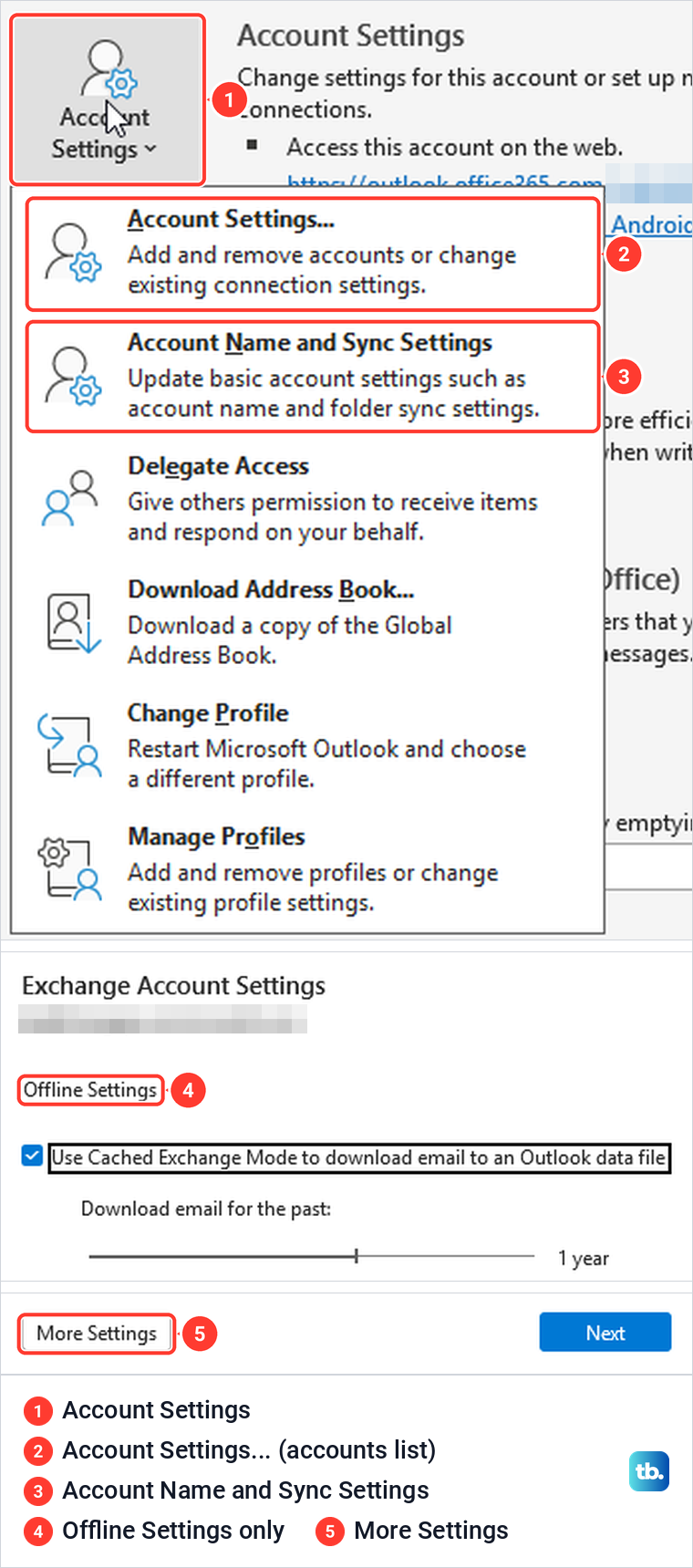
Account Name and Sync Settings opened Exchange Account Settings, which held only Offline Settings, the Cached Exchange Mode box with its download slider set to 1 year, More Settings and Next. There was no password field to fill in.
The Control Panel route behaved the same way. Mail was not on the Control Panel home page in Category view, and we found it under User Accounts as Mail (Microsoft Outlook). Email Accounts listed the account as Microsoft Exchange, and Change opened Server Settings with a greyed-out User Name and Offline Settings, with no Logon Information section and no password box.
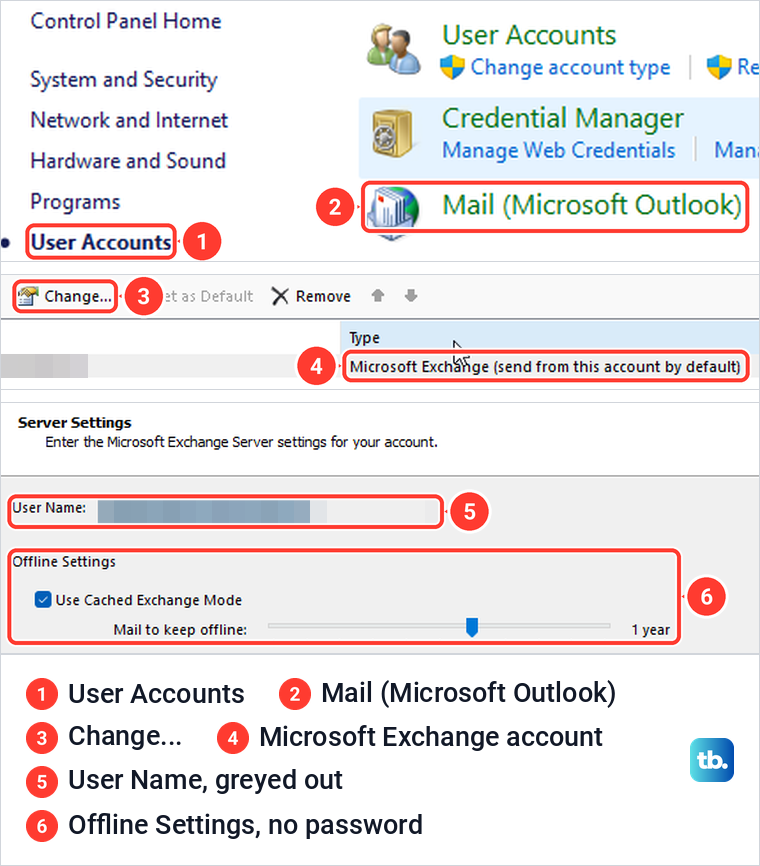
Microsoft's Control Panel steps check incoming and outgoing mail server names, ports and Logon Information, the details a POP or IMAP account needs. Our Microsoft 365 account had none of those boxes, so its password changes in My Account and Outlook asks for it afterward.
Update Outlook on a Mac, iPhone or Android phone
Microsoft is plain about the Mac, saying you can't directly update or change your Outlook password there. Change it with the provider, then open the Tools tab, select Accounts, pick the account and select the disconnect symbol next to its name. Microsoft says that symbol appears when the password has been changed but not synced, and selecting it opens a credential window for your username and new password.
Outlook for iPhone and Android needs even less. Microsoft says Outlook Mobile will prompt you to enter your latest password after it changes, so wait for that prompt and type the new one.
If you forgot your Outlook password
Changing a password needs the current one, so a forgotten password calls for a reset instead. For a personal Outlook.com or Hotmail account, select Forgot password? on the Microsoft account sign-in page and verify your identity with a code, or follow our guide to resetting a forgotten Microsoft account password.
A work or school account depends on your organization. Microsoft says your administrator must turn on self-service reset, and you must have set up a verification method in advance. Start at mysignins.microsoft.com/security-info and select Can't access your account? on the sign-in screen, and if a Contact your administrator link appears instead, the reset has to go through your IT team.
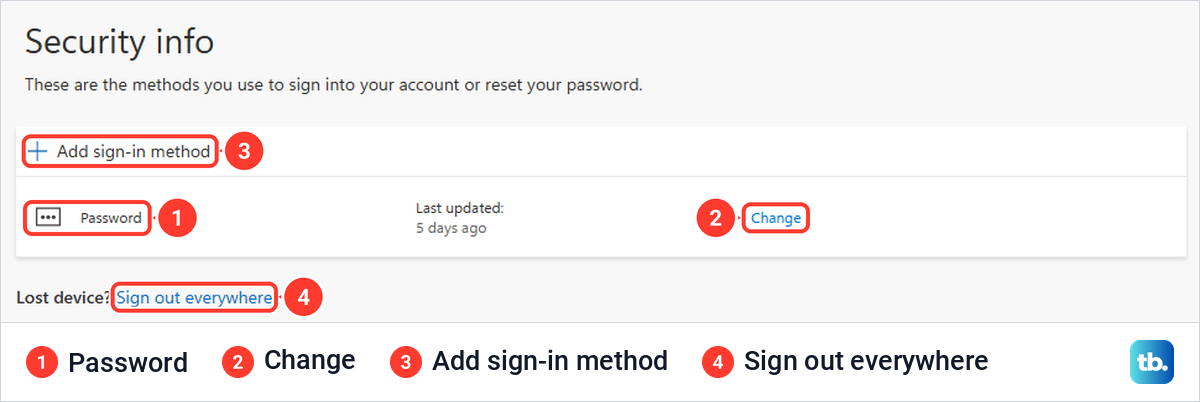
While you can still sign in, check the Security info page in the same portal. Ours listed a Password row showing when it was last updated, an Add sign-in method button and a Sign out everywhere link for a lost device.
If Outlook keeps asking for your password
First check that the new password works on the provider's own website. If it does, type it exactly at Outlook's prompt, and as Microsoft's troubleshooting suggests, make sure Caps Lock is off and the user name is your full email address.
If the prompt keeps coming back, work through our steps for fixing repeated Outlook password prompts. If you cannot reach the mailbox at all, the guide to getting back into Outlook after a sign-in failure covers that, and if sign-in works but new mail does not arrive, start with checking Outlook email problems.
Removing the account and adding it again is a last resort, not a password step. In new Outlook, Microsoft says removal deletes the account's offline cached content, and for a non-Microsoft account, Remove from all devices can permanently lose calendars or other items that exist only in Microsoft Cloud.
Changed the password on a shared or borrowed computer? Sign out when you are done, using the steps for signing out of Outlook on a shared device.
The Outlook data file password is a different thing
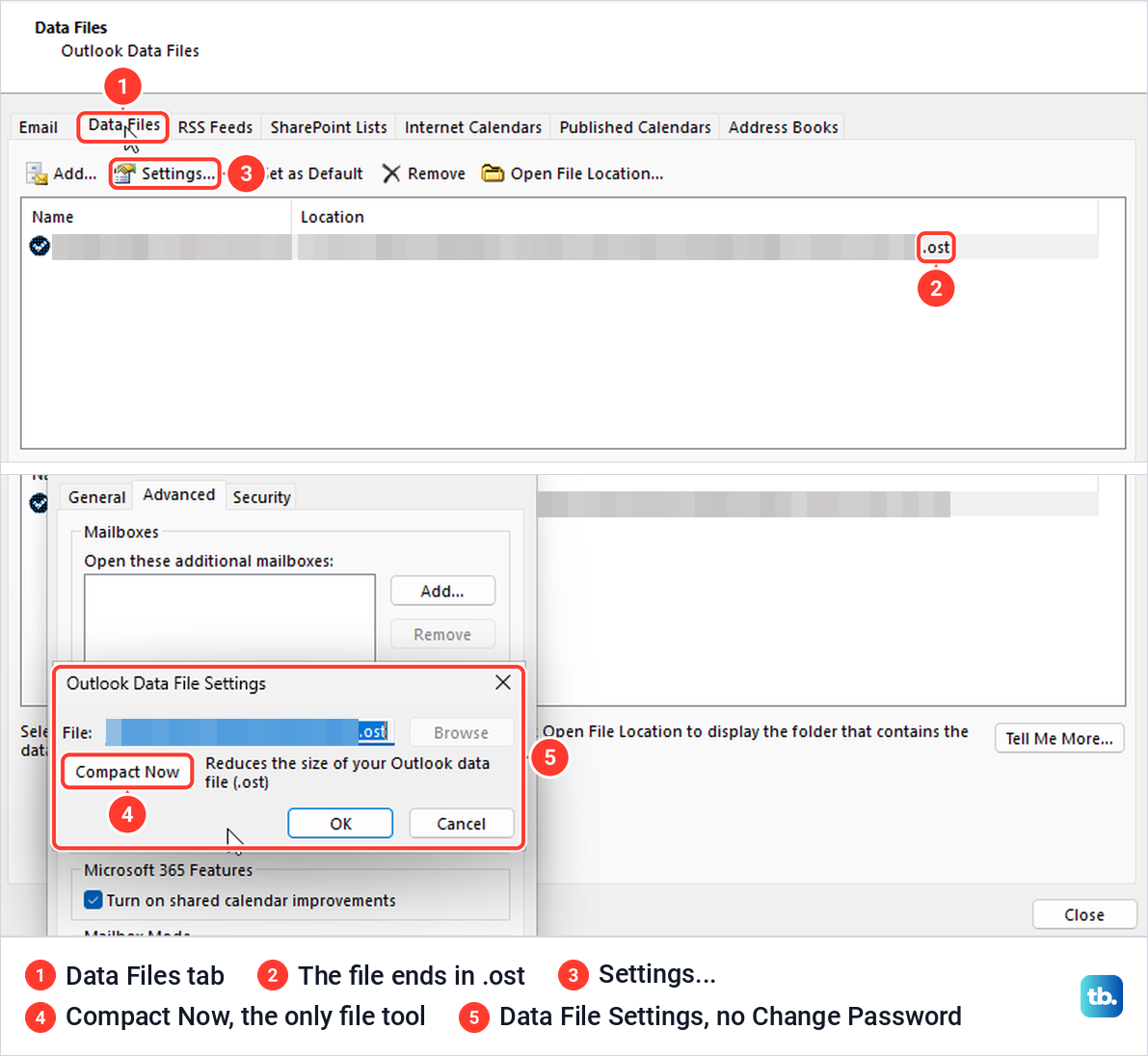
Classic Outlook has a second Change Password button that has nothing to do with your email account. It sits under File > Account Settings > Account Settings > Data Files > Settings and protects a local .pst file, and Microsoft says those steps will not reset your password with your email provider.
It also exists only for .pst files. Microsoft says many accounts, including Microsoft 365, Exchange and Outlook.com, use Offline Outlook Data Files (.ost) instead, and you cannot set a password on one. Our work account's data file ended in .ost, and its Settings opened a Microsoft Exchange box whose Outlook Data File Settings offered only Compact Now.
If you do use a .pst, Microsoft says its password can be up to 15 characters, is case-sensitive and can't be retrieved if you forget it. For keeping other people out of your mail on a shared PC, Microsoft suggests a password-protected Windows user account for each person instead.
How we tested this guide
We tested this in classic Outlook and Outlook on the web in Microsoft Edge on Windows 11, version 25H2, stopping at the Submit button on the password form.
Frequently Asked Questions
Can I change my email password inside Outlook?
Not in Outlook for Windows, Mac or phones. Microsoft says you must change it with your email provider, then update the password Outlook stores when it asks, and the only Change Password button inside classic Outlook is for a .pst data file. The exception Microsoft documents is Outlook Web App on a company's own Exchange server, under Settings > Change password.
Is my Outlook.com password the same as my Microsoft account password?
Yes. Microsoft says your Outlook.com password is the same as your Microsoft account password, so change it at account.microsoft.com under Security, including for Hotmail, Live and MSN addresses.
Why is there no password field in my Outlook account settings?
A Microsoft 365 work account can have nothing to edit there. On our PC, Outlook's Account Settings and the Control Panel Mail settings both showed only offline settings, so the change happens in My Account and Outlook asks for the new password afterward.
What if I forgot my work or school password?
Select Can't access your account? on the work sign-in page, which works if your organization turned on self-service reset and you set up security info. If Contact your administrator appears instead, your IT team has to reset it.
Will the Outlook phone app ask for the new password?
Yes. Microsoft says Outlook Mobile will prompt you to enter your latest password after it changes, so type the new one at that prompt.
Does Change Password under Data Files change my email login?
No. It sets a password on a local .pst file only. An .ost file, which Microsoft says many Microsoft 365, Exchange and Outlook.com accounts use, has no such button at all.