
To cancel Apple TV, go to tv.apple.com and sign in, select the account icon at the top right, choose Settings, scroll to Subscriptions and choose Manage, then choose Cancel Subscription if Apple TV is a plan of its own. If it comes in a bundle, check the included services and the button your page shows before you press anything. If Google Play, Amazon or a phone carrier bills you, you cancel it with them.
Apple now calls the service Apple TV, though you may know it as Apple TV+. If you do not see it listed on its own, check whether it is included with another subscription. That is what we found when we walked the web route in Chrome on a paid account: Apple TV sat inside another Apple subscription, and the last screen before the button that cancels offered only Cancel All Services, a button whose name covers the whole bundle, not Apple TV alone.
The short version
- Apple TV on its own, on the web: tv.apple.com > account icon > Settings > Subscriptions > Manage > Cancel Subscription.
- Apple TV on its own, on iPhone or iPad: Settings > your name > Subscriptions > Apple TV > Cancel Subscription.
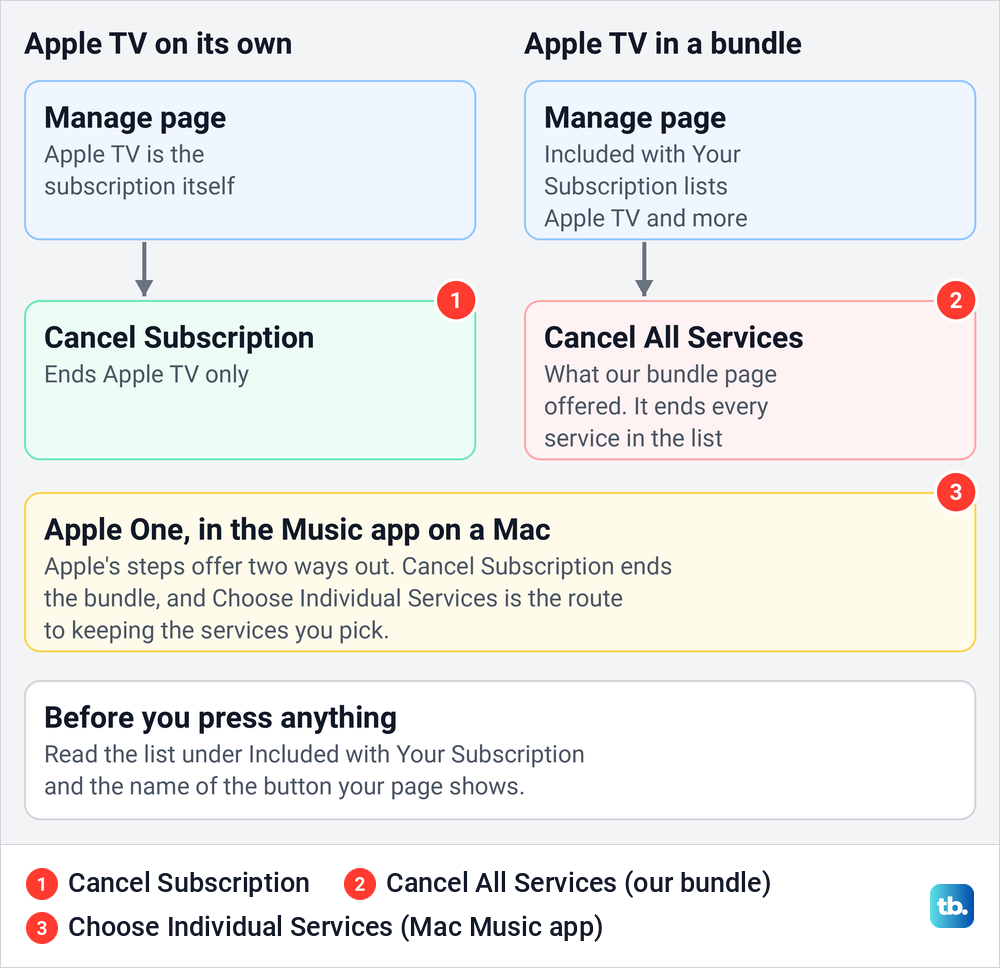
- Part of a bundle: check Included with Your Subscription and the button shown. Ours offered only Cancel All Services, which would end that whole bundle, not only Apple TV.
- Free trial: cancel at least 24 hours before it ends, and read the end date on screen first.
- Another company bills you: cancel with Google Play, Amazon, Roku or your carrier, not with Apple.
Where to cancel Apple TV at a glance
| Who bills you | Where to cancel | What to look for |
|---|---|---|
| Apple, for Apple TV on its own | tv.apple.com > account icon > Settings > Subscriptions > Manage, or Settings > your name > Subscriptions on an iPhone | Cancel Subscription, and the date your access ends |
| Apple, as part of a bundle | The same Manage page | The included services and the button shown. Ours offered only Cancel All Services, which would end the whole bundle |
| Apple, on a family member's account | Their own device or Apple Account | Only they can cancel it |
| Google Play | The Apple TV app on your Android device, or play.google.com | Cancel subscription in Google Play's subscriptions list |
| Amazon | Prime Video > Account & Settings > Subscriptions | Unsubscribe, which may read withdraw |
| Roku | my.roku.com/subscriptions, only if Apple TV is listed there | If it is not listed, Roku is not the biller |
| A wireless carrier or other provider | The carrier or provider | Contact them, and check Apple is not billing you as well |
We walked the Apple route on the web as far as the Manage page, which on the account we used showed the bundle version. The rest of the table follows the instructions of Apple, Google, Amazon and Roku.
Find out who bills your Apple TV
The cancel button lives with whoever takes your money, so start there. Apple's advice is to search your email for "receipt from Apple" or "invoice from Apple". A receipt also shows which Apple Account pays, which matters if you have more than one.
If the receipt names another Apple Account of yours, sign in with that one before you look for the subscription. If it names a family member, only that person can cancel, because Apple does not let you cancel a family member's subscription. If you watch through someone else's plan, our guide to fixing Apple TV Family Sharing explains how that shared access works.
If no Apple receipt turns up, Apple's next suggestion is your bank or credit card statement, which names the company that charged you. Our guide to finding subscriptions on your bank statement shows what those lines look like. If the name still gives no clue, find and stop recurring charges first, then come back to the right row of the table.
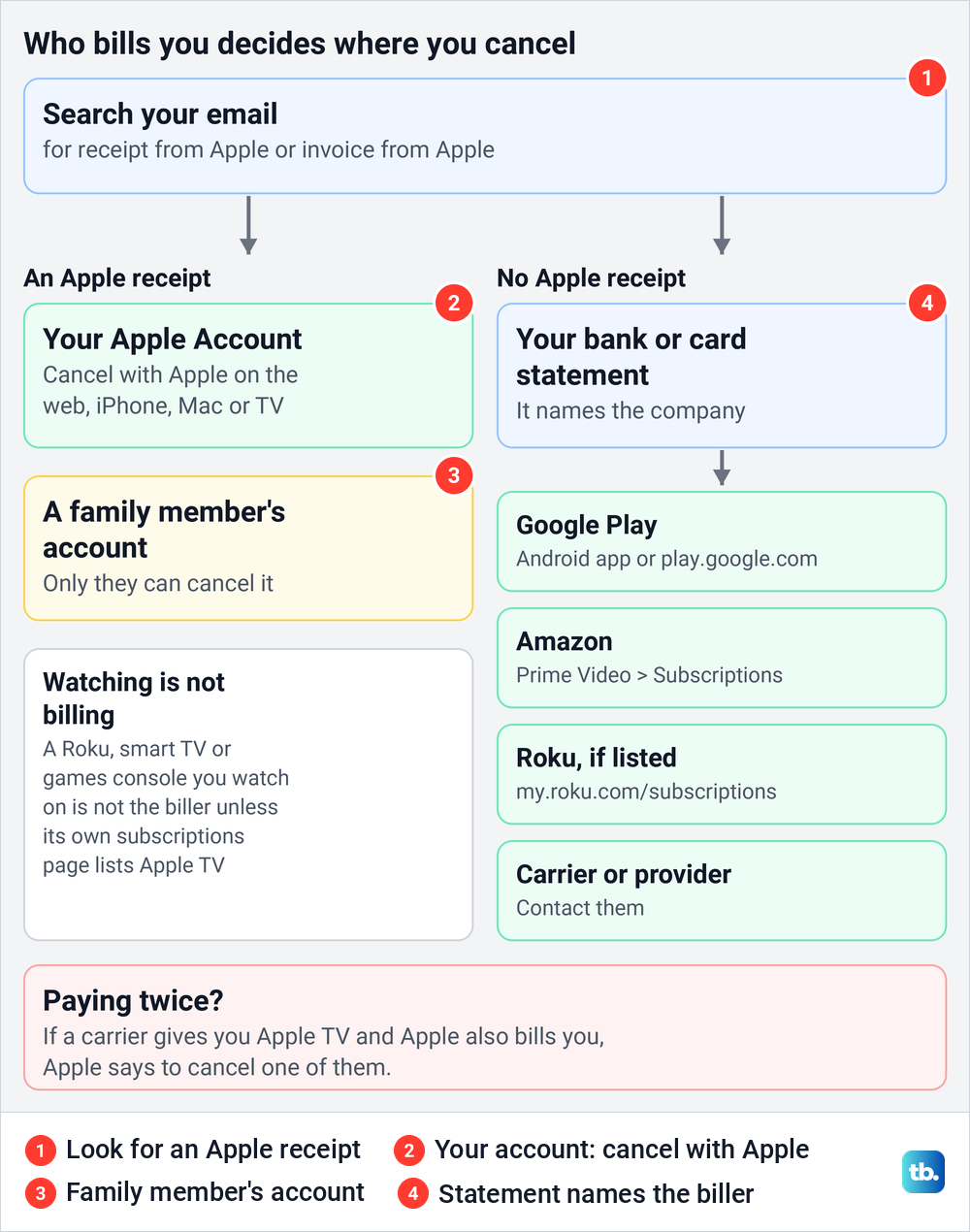
Two cases catch people out. Watching on a Roku does not make Roku the biller, because Roku lists only the subscriptions it manages at my.roku.com/subscriptions and says anything bought directly from the service is cancelled with that service. And if a carrier gives you Apple TV while Apple also bills you for it, Apple says to cancel one of them so you do not pay twice.
Cancel Apple TV on the web
The web route needs only a browser, so it also works away from your Apple devices. Go to tv.apple.com and choose Sign In at the top of the page if you see it. If the site keeps asking for your details, follow our steps to sign in at the Apple TV website, and if it stops at a code prompt, fix an Apple verification code that is not working first.
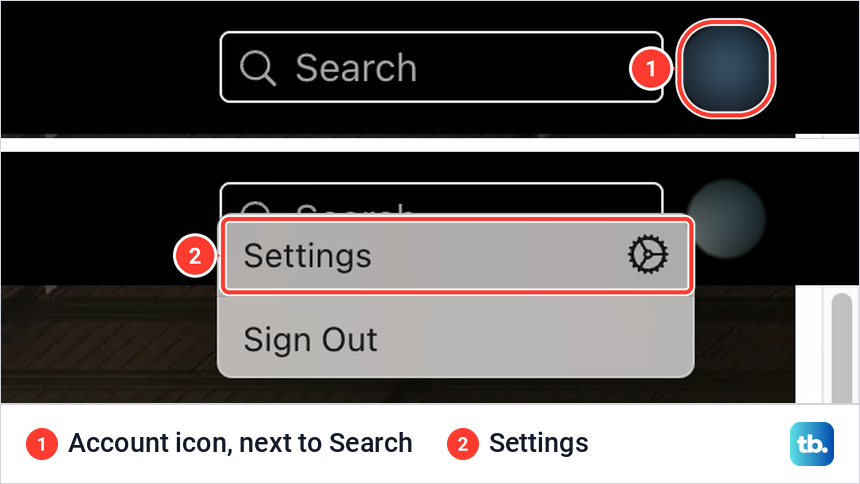
Once you are signed in, the account icon sits at the far right of the black bar, next to Search. Selecting it on the account we used opened a small menu with just two items, Settings and Sign Out. Choose Settings.
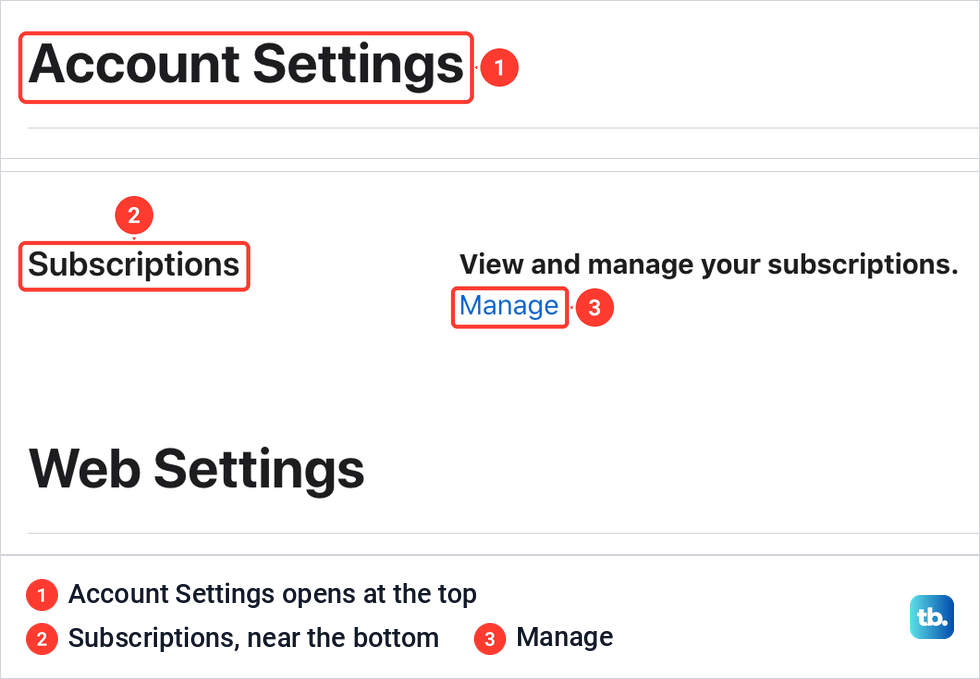
Settings opened a page headed Account Settings, not a menu. The Subscriptions section is near the bottom, so scroll past Account Summary, Account Access, Play History, Auto-Play and Parental Controls. On the page we opened it sat just above a heading called Web Settings, with the line View and manage your subscriptions and a blue Manage link.
Choose Manage. For Apple TV on its own, Apple's instructions say the next step is Cancel Subscription, followed by the on-screen prompts. Before the final button, look for the line that says how long you keep access. On the page we opened it read If you cancel now, you can still access your subscription until, followed by the date.
If tv.apple.com will not let you cancel, Apple's Apple TV help says to use Settings on an iPhone or iPad instead. Its general subscription help also offers account.apple.com, where you sign in and follow the on-screen instructions. Both are for subscriptions that Apple bills.
When Apple TV is part of a bundle
This is where our walk ended without a Cancel Subscription button. On the account we used, Manage opened a page headed iCloud+, not Apple TV. Under Included with Your Subscription it listed iCloud+, Apple TV and Apple Arcade, so Apple TV was not a subscription of its own.
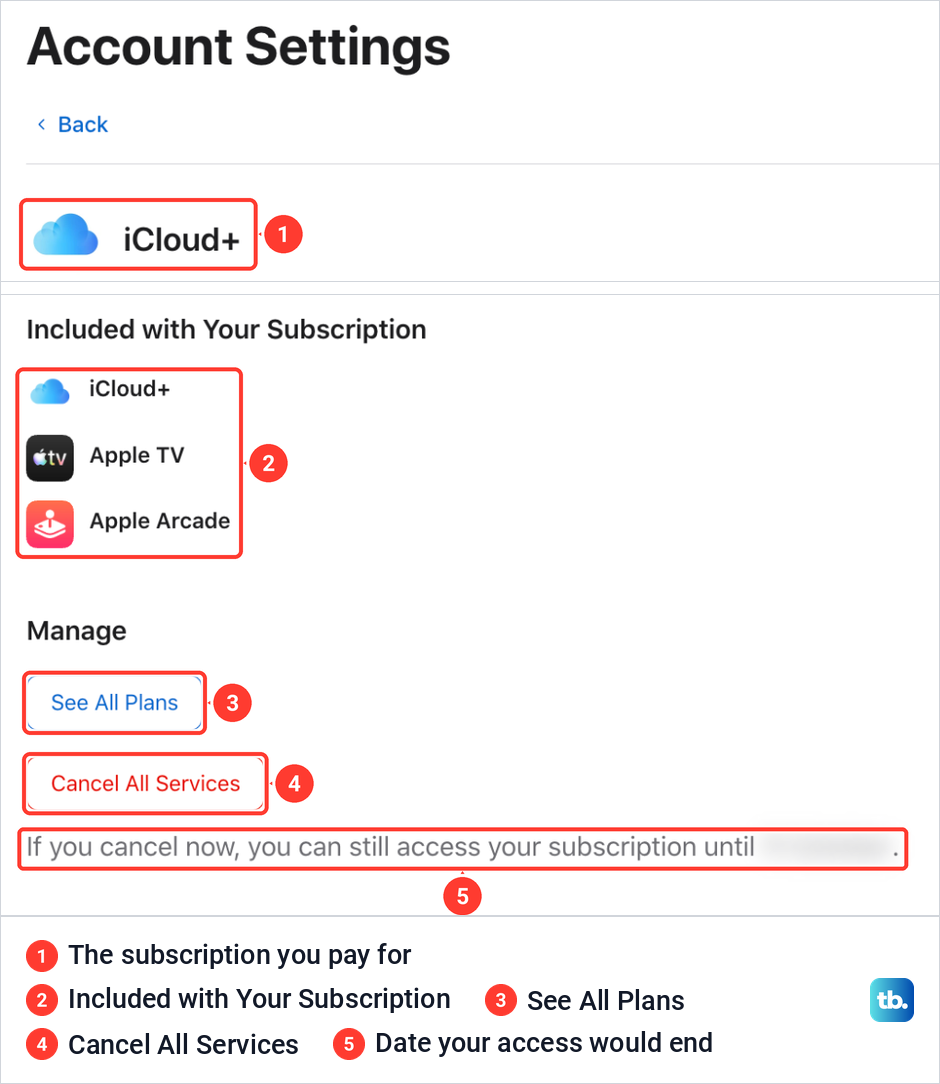
The Manage section had two buttons, See All Plans and a red Cancel All Services. There was no button for Apple TV alone. The button's name and the list above it mean it would end the whole subscription, storage and Apple Arcade included, so we left the page without pressing it.
That makes storage the thing to check first. Ending a bundle that includes iCloud+ ends its storage too, so check how much iCloud storage you use before you press anything. If you need the storage and only want rid of Apple TV, Cancel All Services is the wrong button.
There, Apple TV was listed only as part of that plan, with no stand-alone Apple TV subscription to cancel. So keeping the storage meant keeping that plan as it was or picking another one under See All Plans, and it is worth checking what a plan includes before you change to it.
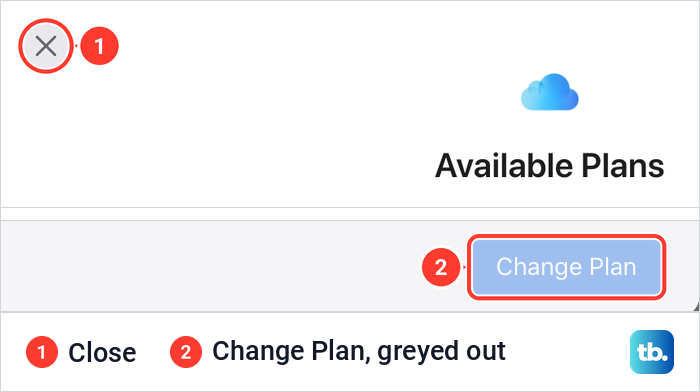
See All Plans is safe to open. For us it showed an Available Plans window listing the plan's tiers with the current one ticked, and the Change Plan button at the bottom was greyed out. Closing it with the X left the subscription exactly as it was.
If your bundle is Apple One, Apple's guide to the Music app on a Mac gives two ways out. Click the profile button at the bottom left of the Music window, click your name, click Subscriptions and then the Apple One subscription, where Cancel Subscription ends the bundle and Choose Individual Services is the route to keeping the services you pick.
Apple One also cancels stand-alone subscriptions to the services it includes, except iCloud+, once it starts billing you. So an Apple TV plan you had before joining may already be gone.
Cancel Apple TV on iPhone, iPad or Mac
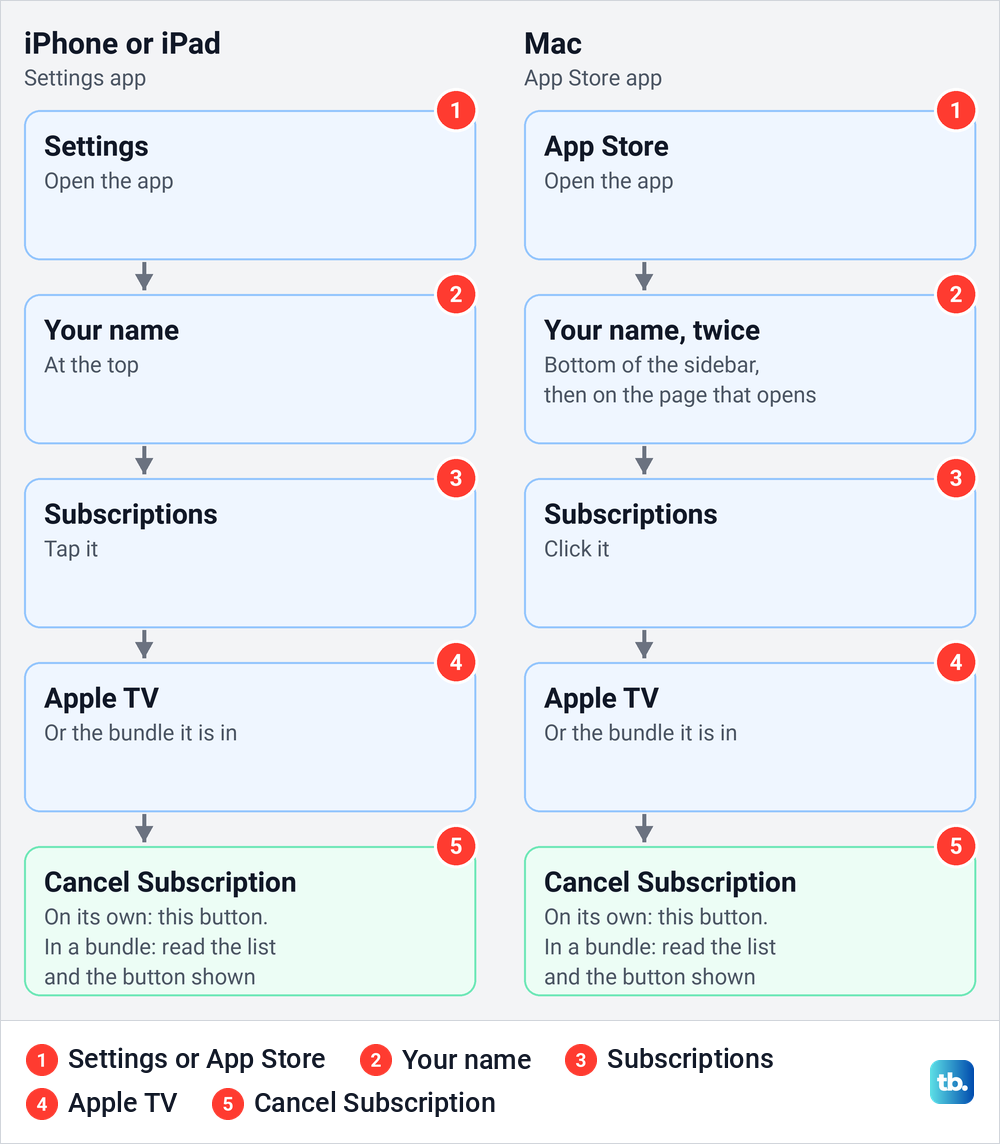
On an iPhone or iPad, open Settings, tap your name, tap Subscriptions, tap Apple TV and tap Cancel Subscription. Apple notes that you might need to scroll down to find the button. If Apple TV is in a bundle, read the list of included services and the name of the button before you tap it. Our steps to cancel subscriptions on your iPhone walk through every screen of that route, including the confirmation sheet.
The Apple TV app on iPhone has its own way in. Apple's iPhone guide says to tap Home, tap your picture or initials at the top right, then tap Subscriptions, or tap your name and then Subscriptions. From there you follow the on-screen instructions.
On a Mac, open the App Store and click your name at the bottom of the sidebar, or click Sign In and sign in first. On the page that appears, click your name, then click Subscriptions, click Apple TV and click Cancel Subscription.
On a Windows PC, Apple's route is the Apple TV app, or the web steps above. Click your name at the bottom of the sidebar, choose View My Account, click Manage next to Subscriptions, then click Edit beside Apple TV and click Cancel Subscription. On a Chromebook, use the web steps.
Cancel Apple TV on an Apple TV box or smart TV
These two look alike but keep subscriptions in different places. An Apple TV box has its own Settings app, while a smart TV, streaming stick or games console from another brand runs the Apple TV app, and the menu lives inside that app.
On an Apple TV 4K, open Settings on Apple TV, go to Profiles and Accounts, pick your profile, select Subscriptions and choose the subscription. Apple's guide then says to follow the on-screen instructions to change or cancel it. Older Apple guides call the menu Users and Accounts, so look for that name on older software.
On another brand's TV, open the Apple TV app, open the sidebar, select Settings, then Profiles. Pick a profile that is signed in with an Apple Account and select Subscriptions, which Apple describes as the place to change or cancel that profile's subscriptions. Apple lists that option for profiles linked to an Apple Account, so switch to yours first.
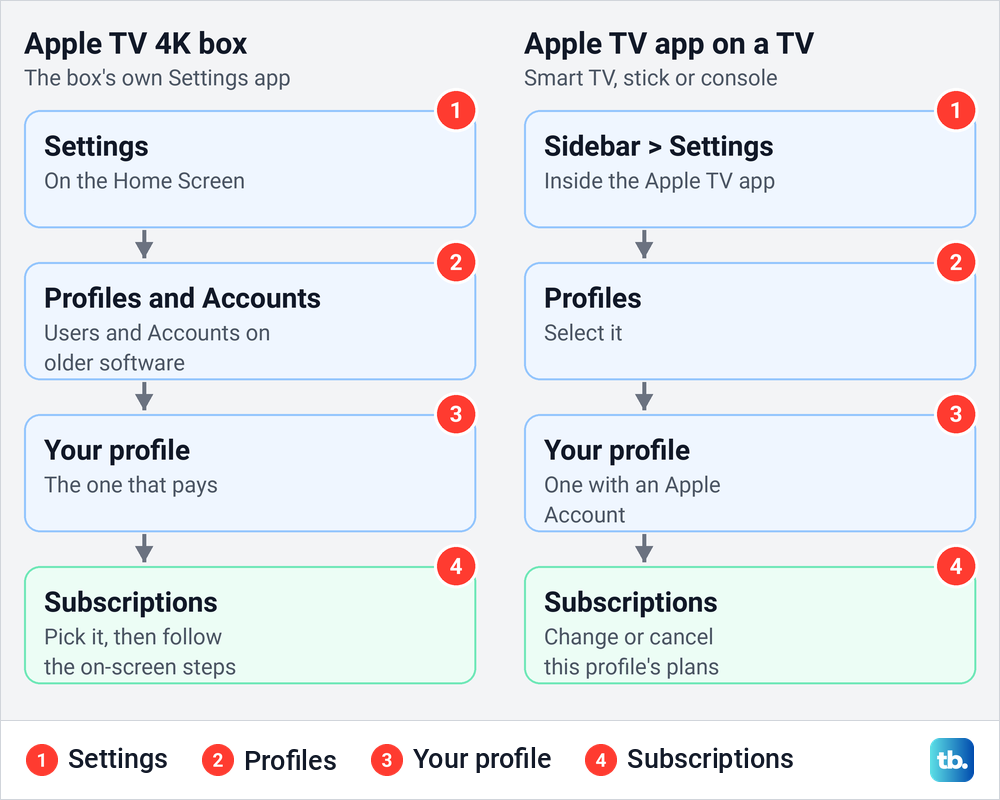
If the TV will not accept your account, fix Apple TV sign in problems before you look for the menu. Deleting the app or signing out of it is not a cancellation, so the subscription keeps renewing until you cancel it in one of the places above.
Cancel an Apple TV free trial
A trial is cancelled the same way as a paid plan, but the timing is stricter. Apple says to cancel at least 24 hours before the trial ends if you do not want it to renew. Leaving it to the last evening risks a charge for the first paid month.
Cancelling early has a cost too. Apple's terms say that if you cancel a free trial of an Apple subscription before it ends, you cannot reactivate the trial. Some offers also end access on the spot, and the terms of one Apple device offer say that cancelling during the free period means you and your family lose access immediately.
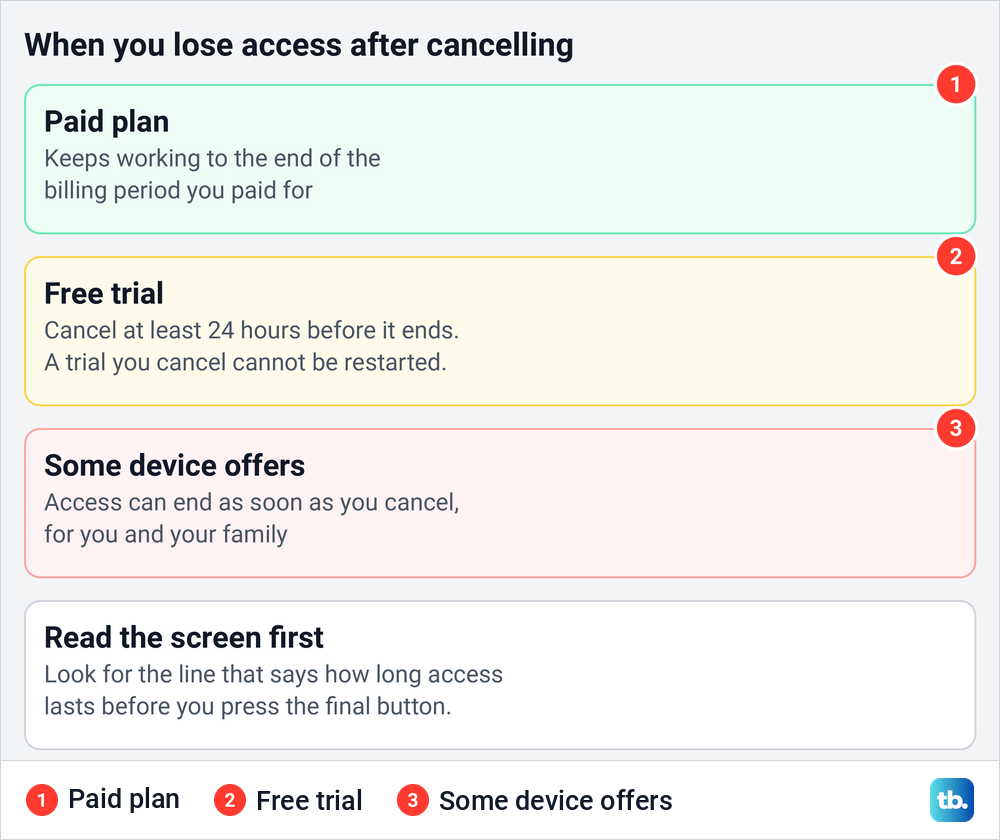
So read the screen before you confirm. A paid subscription normally runs to the end of the current billing period, and on the page we opened the date access would end sat right under the cancel button. If your screen says access ends now, you can wait and cancel a couple of days before the trial runs out instead.
Cancel when Google Play, Amazon or a carrier bills you
If you pay through Google Play, Apple says you can cancel only in the Apple TV app on your Android device or at play.google.com. Google's steps are to open your subscriptions in Google Play, select the subscription, tap Cancel subscription and follow the instructions. Google also says uninstalling an app does not cancel its subscription.
If Amazon bills you, Apple says only Amazon can cancel it. In Prime Video, go to Account & Settings, select Subscriptions from the top menu, then select Unsubscribe and confirm, and Amazon notes the option may appear as withdraw. Our steps to cancel a Prime Video add-on cover those controls in more detail, and Amazon says your end date appears on the confirmation screen.
On Roku, sign in at my.roku.com/subscriptions and look for Apple TV. If it is listed, Roku manages it and you cancel it there, and if it is not, Roku says a subscription bought directly from the service has to be cancelled with that service. For a carrier or other provider, Apple says to contact them for support.
If Cancel Subscription is missing
Check four things. The first is a bundle, where the page can show a different button, such as the Cancel All Services ours showed. The second is a subscription that is already cancelled, because Apple says that no Cancel button, or an expiration message in red text, means it is already cancelled.
The third is the wrong account. Check which Apple Account is on the receipt, and remember that a family member's subscription can only be cancelled by them. The fourth is a different biller, in which case Apple sends you to Google Play, Amazon or your carrier to cancel.
After you cancel Apple TV
For a paid plan, Apple says the subscription stops at the end of the current billing cycle, so access normally lasts until the date shown. Some free offers end access immediately instead. To check that it worked, open the same Manage page again, where an expiration message or a missing Cancel button means it is cancelled.
A cancellation is not a refund. Apple says some purchases might be eligible for a refund, and the request is separate: sign in at reportaproblem.apple.com, open the menu that asks what you would like to do and choose Request a refund, then pick a reason, choose Next, select the subscription and choose Submit. Apple's refund page suggests cancelling the subscription as well if you no longer want it.
Do not delete your Apple Account to get rid of Apple TV. Apple says deleting it cancels subscriptions only at the end of their billing cycles and permanently deletes the account details, a far bigger step than ending one plan. Apple's cancel instructions mention no pause for a plan it bills, so if you want a break, cancel now and subscribe again later.
How we tested this guide
We tested this on an Apple Account with an Apple TV bundle on the web in Chrome, going through Subscriptions up to the Cancel All Services button.
Frequently Asked Questions
Can I cancel Apple TV on a smart TV?
Yes, if the Apple TV app has a profile signed in with the Apple Account that pays. Open the sidebar, select Settings, then Profiles, pick that profile and select Subscriptions.
Will Apple TV stop working as soon as I cancel?
Not for a paid plan. Apple says it stops at the end of the current billing cycle, and the page we opened showed the date access would end before anything was pressed. Some free offers end access immediately, so read the date on your screen.
When should I cancel an Apple TV free trial?
At least 24 hours before it ends, Apple says, or it can renew as a paid plan. A free trial you cancel early cannot be restarted.
Why can I not see Cancel Subscription?
Apple TV may be part of a bundle, in which case the page can show a different button, and ours showed Cancel All Services. No Cancel button or a red expiration message means it is already cancelled, and if the plan is missing altogether, check the Apple Account on your receipt or your bank statement for another biller.
Can I cancel only Apple TV if it comes in a bundle?
Not from the bundle page we saw, which offered only See All Plans and Cancel All Services. For Apple One, Apple's steps for the Music app on a Mac include Choose Individual Services, which is the route to keeping some services when you leave the bundle.
Does deleting the Apple TV app cancel my subscription?
No. Removing the app or signing out leaves the subscription running, so cancel it in Settings, at tv.apple.com or with the company that bills you.
Does cancelling Apple TV refund the last charge?
No refund is automatic. You can ask for one at reportaproblem.apple.com, and Apple says some purchases might be eligible.