
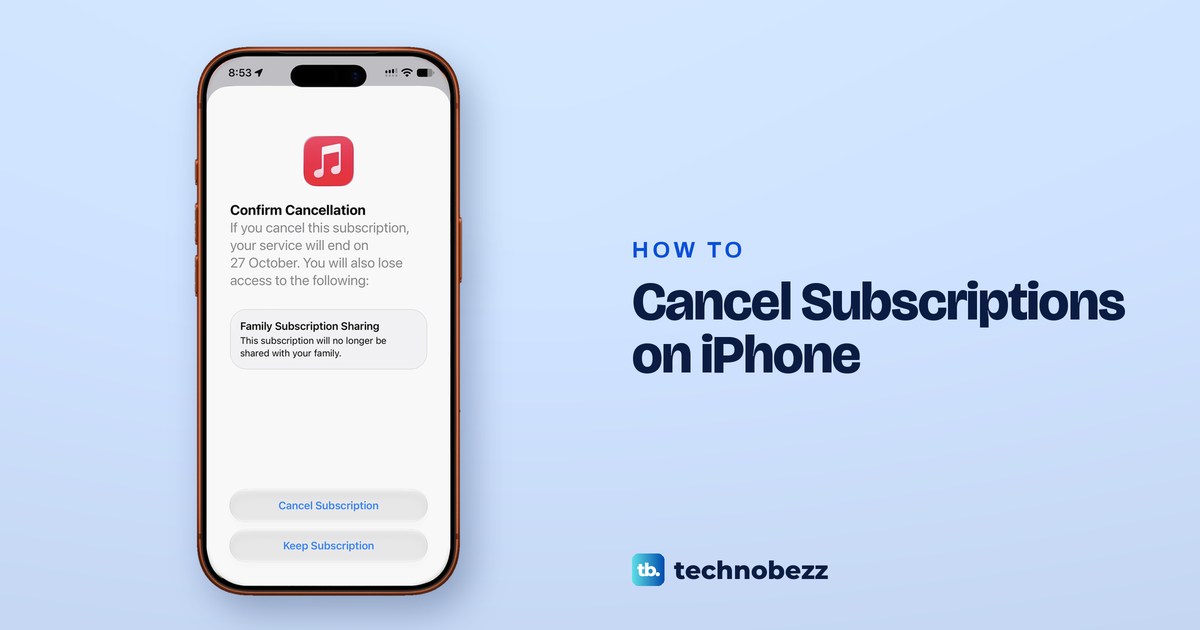
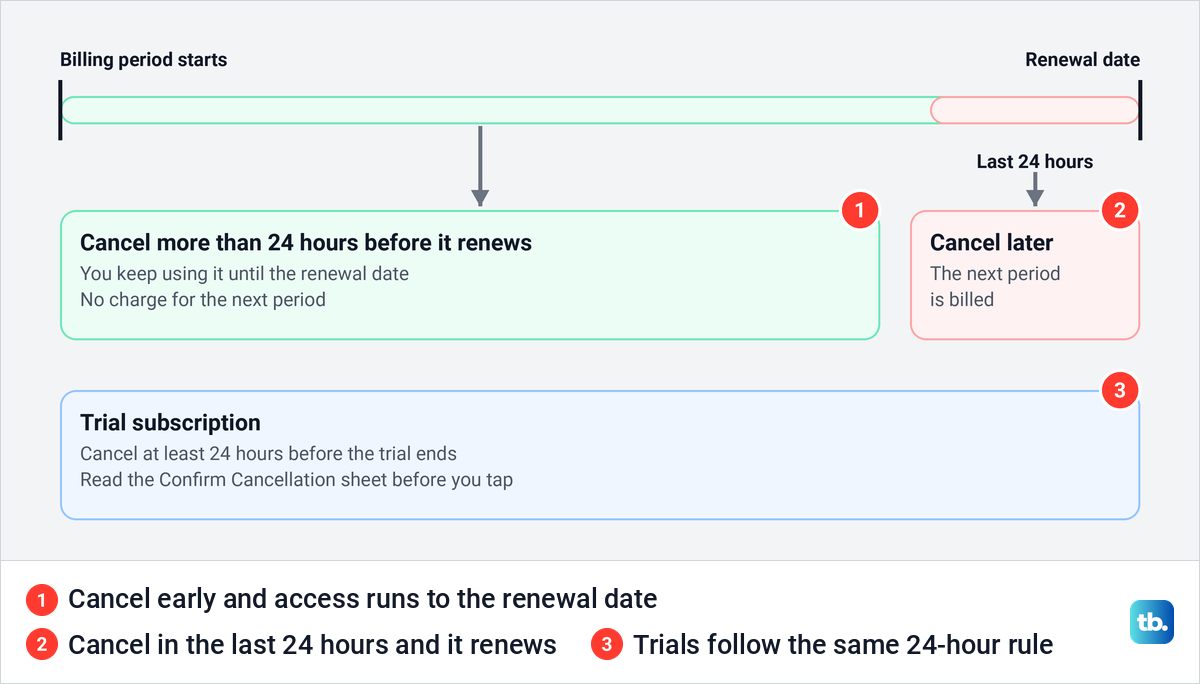
To cancel a subscription on iPhone, open Settings, tap your name, tap Subscriptions, choose the subscription and tap Cancel Subscription, then tap Cancel Subscription again on the Confirm Cancellation sheet. A paid subscription keeps working until the date shown on screen, and Apple bills the next period unless you cancel more than 24 hours before the current one ends.
If the subscription is not in the list, you may be signed in with a different Apple Account, a family member may have bought it, or another company bills you, and each has its own place to cancel. We went through the whole Settings route with real subscriptions, up to the final confirmation, and kept the subscription.
The short version
- Cancel: Settings > your name > Subscriptions, pick the subscription, tap Cancel Subscription, then tap Cancel Subscription again on the sheet.
- Timing: cancel more than 24 hours before it renews, and a trial at least 24 hours before it ends.
- Access: a paid subscription keeps working until the date on screen.
- Not in the list: check which Apple Account is on the receipt, or your bank statement for the company that bills you.
- Refunds: ask at reportaproblem.apple.com. A refund is a separate request from cancelling.
Where to cancel each kind of subscription
| Who bills you | Where to cancel | What to expect |
|---|---|---|
| Apple, for an Apple service or an App Store app | Settings > your name > Subscriptions > the subscription > Cancel Subscription | It keeps working until the end date shown |
| Apple, for Apple One | The same page, Cancel All Services | The whole bundle is cancelled, not one service |
| Apple, for iCloud+ | Subscriptions > iCloud+ on iOS 18.4 and later | Storage drops to the free plan after the billing period |
| Apple, on another Apple Account of yours | Sign in with the account on the receipt, then use Subscriptions | The same as any Apple subscription |
| Apple, on a family member's account | Their own iPhone or Apple Account | Only they can cancel it |
| Google Play, for Apple Music or Apple TV | Google Play, or the Apple Music or Apple TV app on your Android phone | Cancel it where you pay |
| Amazon, for Apple TV | Your Amazon account | Only Amazon can cancel it |
| Your wireless carrier or another provider | The carrier or provider | Contact them to cancel |
| The company itself, through its website or its own payment system | That company's account page or support | Apple cannot cancel or refund it |
Cancel a subscription in Settings
Every subscription your Apple Account pays Apple for sits in one list in Settings, whether it is an Apple service or an app from the App Store. On our list, Apple Music and iCloud+ sat next to an Instagram subscription bought through the App Store.
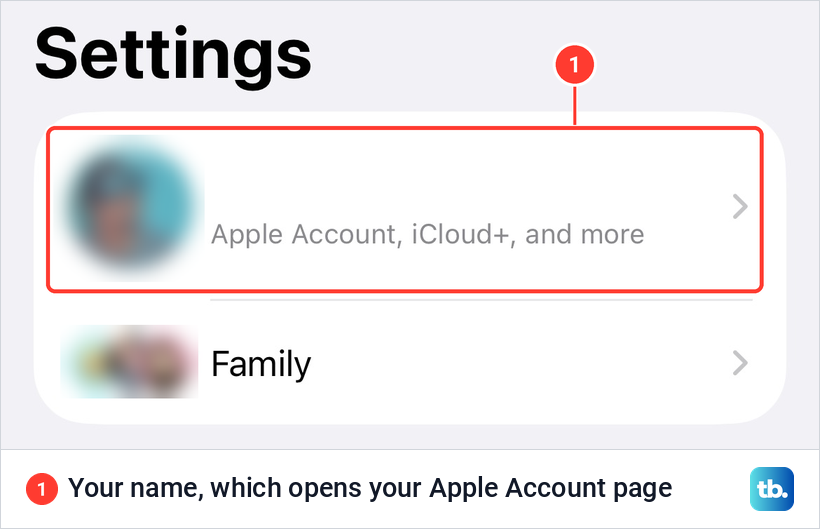
Open Settings and tap your name at the top. On our screen the grey line under it read Apple Account, iCloud+, and more, and the row opens your Apple Account page.
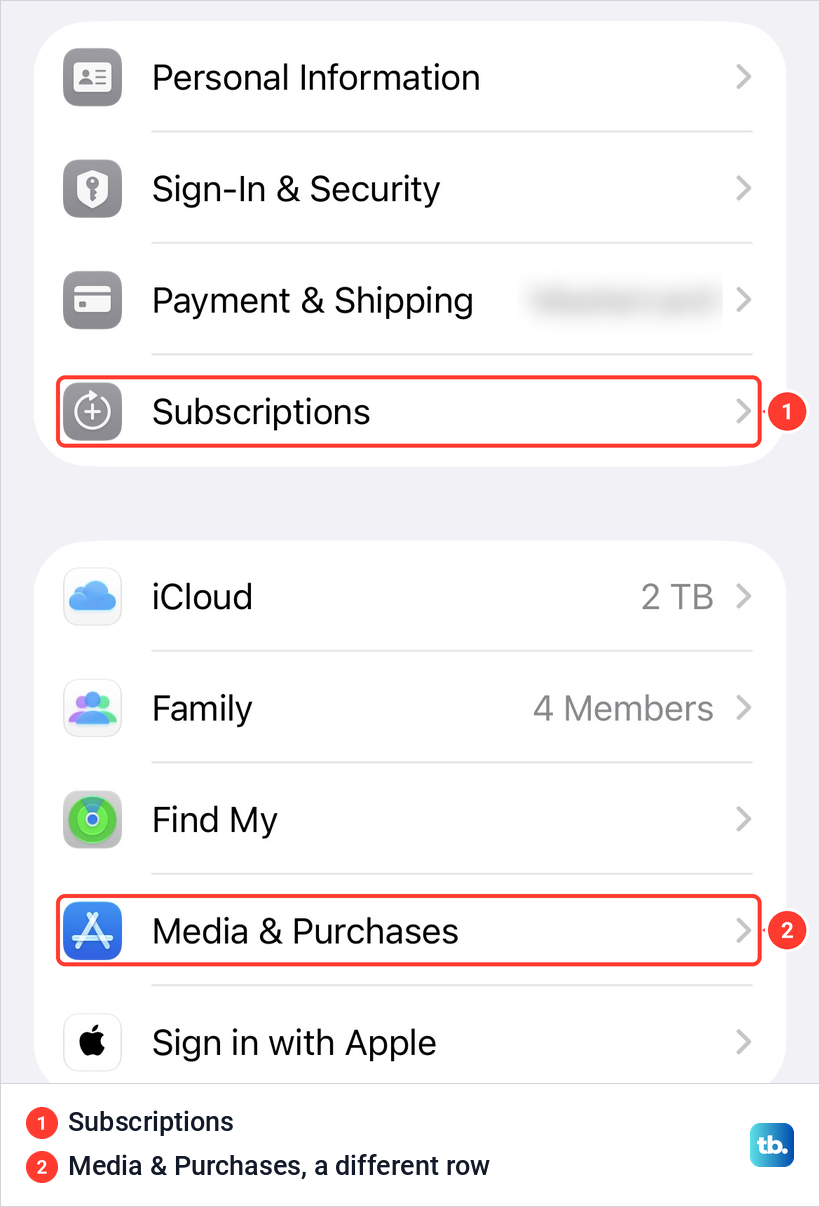
Tap Subscriptions. On our screen it was the fourth row of the first group, under Personal Information, Sign-In & Security and Payment & Shipping. Media & Purchases is a separate row further down, so skip it if an older guide sends you there.
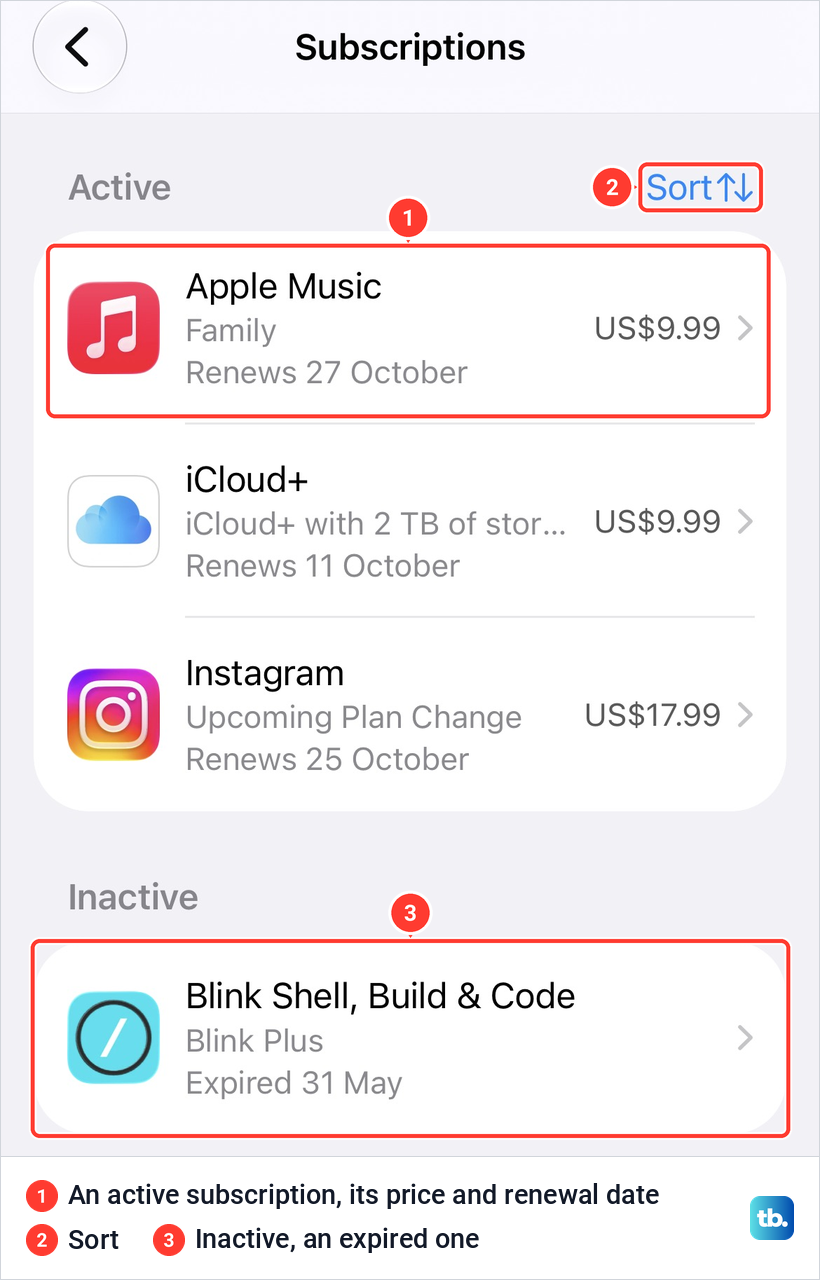
The Subscriptions page splits into Active and Inactive. Each active row shows the plan, the price and the date it renews, and Sort at the top right reorders the list. Expired subscriptions sit under Inactive, and ours read Expired 31 May.
Our list showed a price on every active row but no monthly total, so add up the active rows yourself if you want to know what you spend. Then tap the subscription you want to stop.
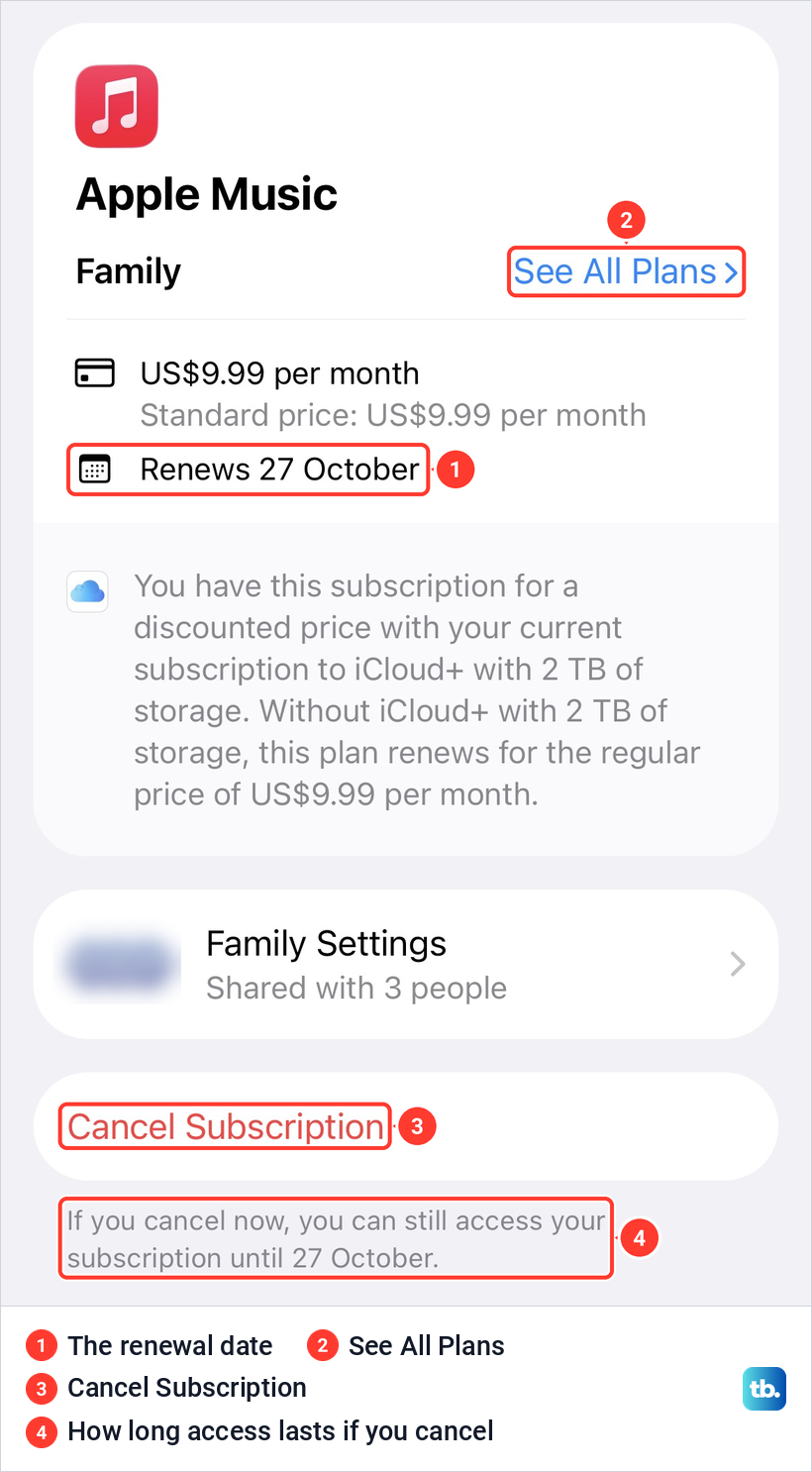
The subscription's own page shows the plan, the price, the renewal date and See All Plans, which is where you switch plans instead of cancelling. The red Cancel Subscription button sits near the bottom, and Apple says you might need to scroll to reach it. Under it, our page said: If you cancel now, you can still access your subscription until 27 October.
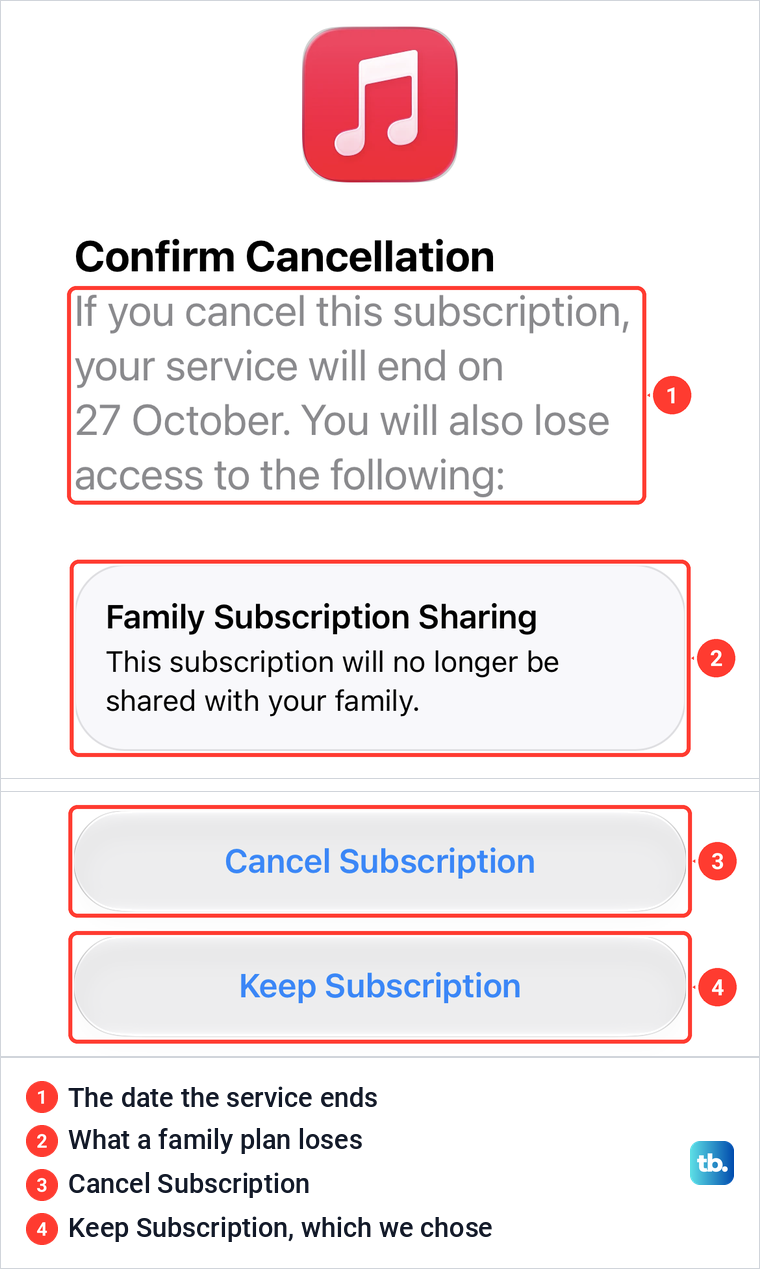
Tap Cancel Subscription. A Confirm Cancellation sheet slides up with the date your service will end and a list of anything else you lose. For our family plan the list held Family Subscription Sharing, with the line This subscription will no longer be shared with your family.
The sheet has two buttons, Cancel Subscription and Keep Subscription. Our sheet had no button named Confirm, which some older instructions mention. Tap Cancel Subscription to finish, or Keep Subscription to back out, which is what we did because we still use this one.
Apple says that if there is no Cancel button, or you see an expiration message in red text, the subscription is already cancelled. An Apple One bundle shows Cancel All Services instead of Cancel Subscription.
What happens after you cancel
Cancelling stops the renewal, not the service. Apple says you can keep using a cancelled subscription until the next billing date. Both of our screens said so before the final tap: the page promised access until the renewal date, and the sheet said the service would end on that date.
Timing matters at the end of the period. If you do not cancel more than 24 hours before your current billing period ends, Apple bills you for the next one. So cancel a day or more ahead, not on the morning it renews.
If a subscription has already expired, Apple says you can restart it from the same list: tap it under Inactive, then tap Renew. Switching to a cheaper plan in an App Store app follows the same timing: Apple's developer documentation says you keep the current plan until the next renewal date, then it renews at the lower level and price.
Some third-party services sell a monthly plan with a 12-month commitment on iOS 26.4 or later, although Apple says these plans are not offered in the United States or Singapore. If you do nothing, Apple says the subscription renews automatically at the end of the commitment, so cancel at least one day before that date. Cancelling earlier does not end the commitment: you keep paying the remaining monthly payments and keep access until it is fulfilled, and then it does not renew.
Cancel a free trial before it charges you
Apple's rule for trials is short: if you signed up for a trial subscription and do not want to renew it, cancel it at least 24 hours before the trial ends. A trial is already a subscription, Apple's developer documentation says: it starts at once, is not billed until the offer period ends, and then renews at the standard price unless you cancel.
Trials use the same cancel steps as any other subscription. Some trials stop as soon as you cancel and others run to their end date, depending on the service, so read the Confirm Cancellation sheet before you tap. On our paid subscription, the sheet gave the exact date the service would end.
Apple One trials have extra conditions. Apple says the 1-month trial covers only the services you do not already have, you might not get it if you recently cancelled a service, and the plan renews automatically when the trial ends.
Find a charge in the App Store
Apple's iPhone guide puts cancelling in Settings and uses the App Store to show what you paid for. Its App Store steps are to tap the My Account button or your picture, then Apps & Purchase History, then Purchase History, and you may be asked for Face ID, Touch ID or your passcode.
Purchase History covers apps, in-app purchases, subscriptions, music, videos, books, AppleCare+ and more. Search by name, price or order ID, or tap Last 90 Days, Paid to change the range. If you know the amount but not the item, Apple suggests searching for the amount.
A line reading apple.com/bill on a bank statement is a charge from Apple, Apple says, for apps, subscriptions, music, movies or more. Grouped purchases or something a family member bought can explain an amount you do not recognize.
Once you know what the charge is, Apple's guide sends you back to Settings, your name and Subscriptions to change or cancel it. Our Subscriptions page points the other way too: the note under its Renewal Receipt Emails switch says receipts are always available in Apple Account settings > Purchase History.
Cancel Apple One, iCloud+ and other Apple services
For Apple One, the subscription page shows Cancel All Services, which ends the whole bundle. Joining Apple One cancels the separate subscriptions it includes, except iCloud+, and Apple gives a prorated refund for those.
On iOS 18.4 and later, iCloud+ sits in the same list: tap Subscriptions, then iCloud+ under Active, then Cancel Subscription. Apple says a message warns that you may not have enough iCloud storage to sync all your data. If your screen looks different, check which iOS version your iPhone runs, because older versions keep the plan under iCloud and Downgrade Options.
The change takes effect after the current billing period. Before you cancel, check how much iCloud storage you use, because Apple says that if your data is larger than your new plan, iCloud stops syncing and backups stop completing. On the free plan you also lose iCloud+ features such as Hide My Email and Private Relay.
Read every subscription's page before you cancel storage. Our Apple Music Family page said its price was a discount tied to our iCloud+ plan with 2 TB of storage, and that without that plan it renews for the regular price. On our page the regular price shown was the same as what we paid, so check the figure on yours.
If you end up over the free limit, our guide on why iCloud is not syncing explains how to get it moving again. If you pay for both Apple One and a separate iCloud+ plan, Apple says you can cancel the separate plan and use the iCloud+ storage included in Apple One.
When Apple Music ends, Apple says songs from the Apple Music catalog stop playing, while music you had on your device before you subscribed stays. Apple TV can also be billed through Google Play or Amazon, and we cover each case in how to manage or cancel an Apple TV subscription.
Family plans and shared subscriptions
You cannot cancel a family member's subscription. Apple says the person whose Apple Account appears on the receipt has to cancel it, even when the family organizer pays. With purchase sharing on, subscriptions shared with the group are billed to the organizer's default payment method.
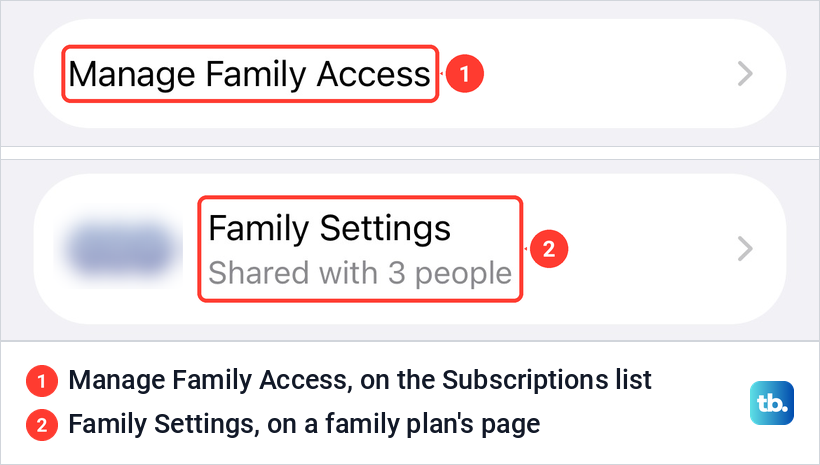
The organizer can cancel a family plan they bought, and that ends sharing for everyone. Our Confirm Cancellation sheet for Apple Music Family listed Family Subscription Sharing as something we would lose. Our screens also showed two family rows: Manage Family Access at the bottom of the Subscriptions list, and Family Settings, Shared with 3 people, on the Apple Music page.
Apple's family guide handles sharing in Settings > Family > Subscriptions. For App Store subscriptions, tap Manage Subscriptions and turn on Share with Family. If Share with Family is missing, Apple says the subscription is not eligible for sharing. Shared subscriptions only work inside a family group, the one you create when you set up Family Sharing on iPhone.
Why a subscription is missing from the list
Start with your email. Apple suggests searching your email for "receipt from Apple" or "invoice from Apple" and checking which Apple Account the receipt names. If it is another account you use, sign in with that account and cancel from its Subscriptions list.
If the receipt names an old account you cannot get into, recover an Apple Account when you forgot the password, then cancel from there. If it names a family member, only they can cancel it. If you find no Apple receipt at all, Apple says you might have bought the subscription from another company.
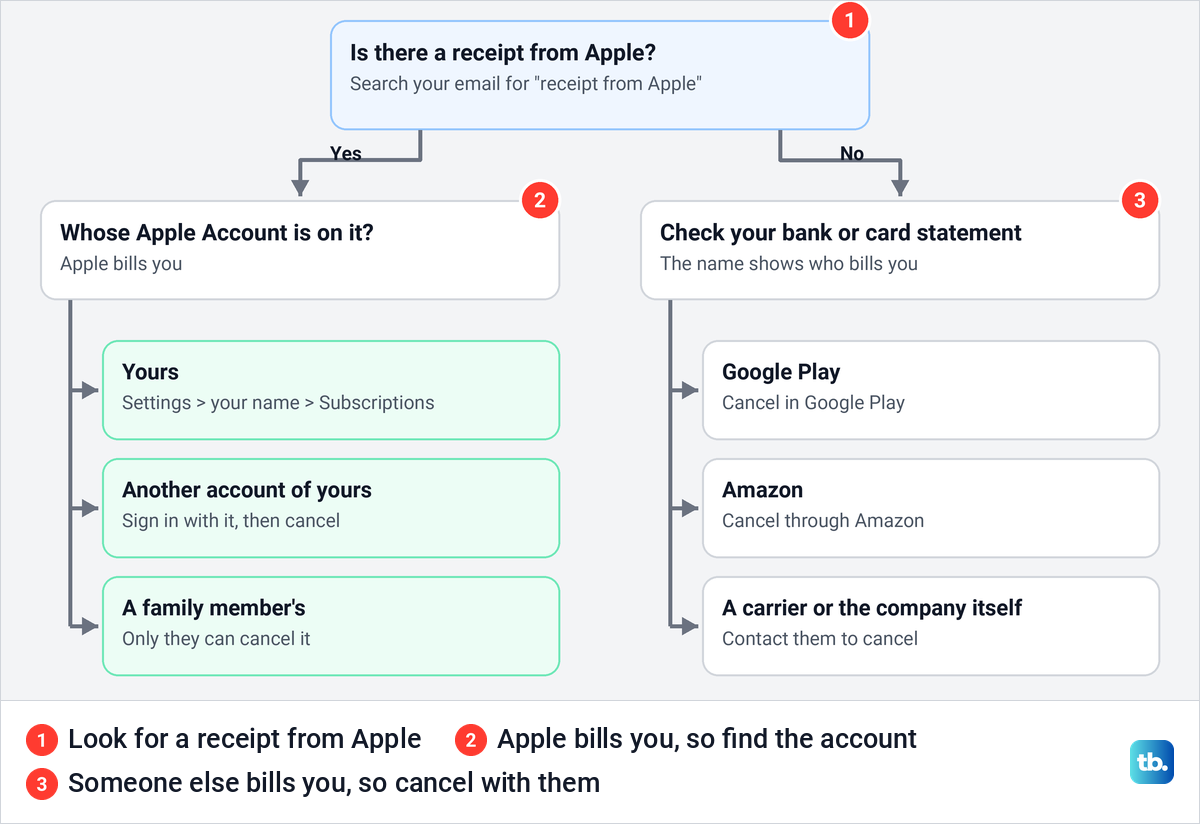
No Apple receipt usually means someone else bills you, so find recurring subscriptions on your bank statement and look for the company's name. A subscription that came with your phone plan is your wireless carrier's to cancel. Apple also says an AppleCare plan might not appear until you finish its setup and link it to your Apple Account.
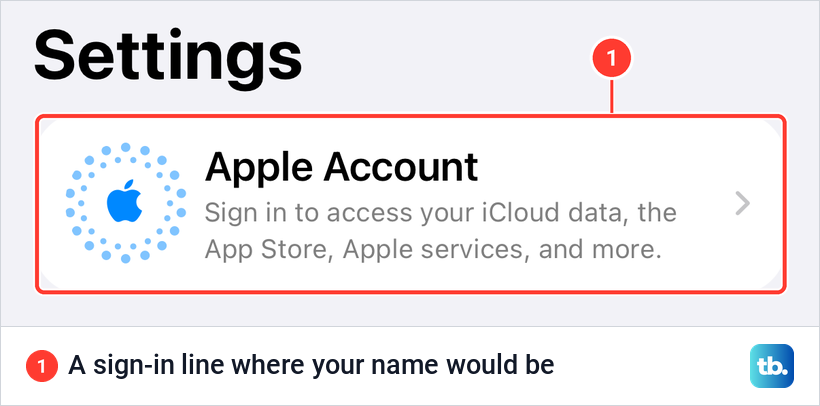
Check that you are signed in at all. On iOS 26.5 with no Apple Account signed in, the top of Settings showed a sign-in line instead of a name, and there is no Subscriptions list to open until you sign in.
Subscriptions billed by another company
Apple can only cancel what Apple bills. A plan you started on a company's own website is cancelled in your account on that website.
Some apps take payment outside Apple's system. Apple says it cannot support those purchases, so billing questions and refunds go to the developer. In Brazil, Japan and the European Union, a banner on the app's App Store page shows when it offers purchases outside the App Store.
Apple's own services can be billed by others too. Apple Music or Apple TV paid through Google Play is cancelled in Google Play or in the Apple Music or Apple TV app on the Android phone, and Apple says Apple TV billed by Amazon can be cancelled only through Amazon. For charges from Google, PayPal or your bank rather than Apple, see how to cancel unwanted subscriptions and stop recurring charges.
Cancel a subscription without your iPhone
You can cancel from any web browser. Sign in at account.apple.com with your Apple Account and follow the onscreen instructions, which is also Apple's route from an Android phone. Apple Music has its own page at music.apple.com, and Apple TV has one at tv.apple.com.
On a Mac, open the App Store, click your name at the bottom of the sidebar, click Subscriptions, choose the subscription and click Cancel Subscription. On a Windows PC, open the Apple Music or Apple TV app, click your name at the bottom of the sidebar, choose View My Account, then click Manage next to Subscriptions in the Settings section.
For iCloud+ with no Apple device at all, Apple has a separate route through its refund site. Sign in at reportaproblem.apple.com, choose Request a refund from its menu, pick a reason, and choose your latest iCloud+ charge or the iCloud subscription at the top before you select Submit.
Get a refund from Apple
Cancelling stops the next charge, and a refund is a separate request. Apple says some purchases from the App Store and its other services might be eligible, and eligibility varies by country or region.
Sign in at reportaproblem.apple.com and choose Request a refund from the menu. Choose a reason, tap Next, choose the subscription or other item, then tap Submit. If the charge is still pending, Apple says you have to wait for the email receipt before you can ask.
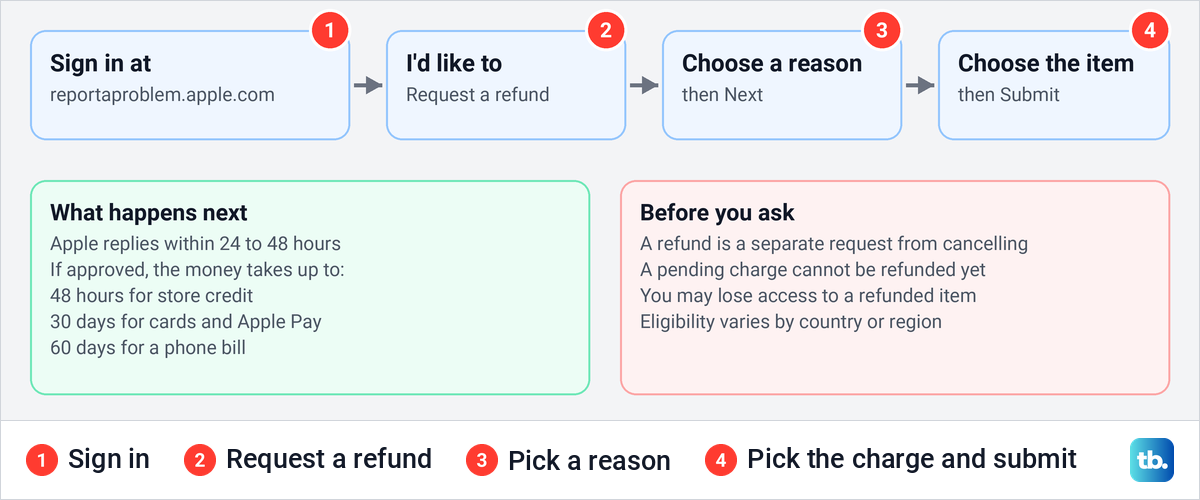
Apple says to allow 24 to 48 hours for an answer, and you can follow it with Check Status of Claims. If the refund is approved, store credit can take up to 48 hours, a card or Apple Pay up to 30 days and a phone bill up to 60 days, and you may lose access to the refunded item.
A family organizer can ask for refunds on purchases charged to the shared payment method, by choosing the Apple Account button on the site and then All. In Germany, Israel, South Africa and Türkiye, Apple says you can cancel with immediate effect and get a prorated refund at any time by contacting Apple Support. For iCloud+, Apple says to contact it within 14 days of a plan change for a refund.
Stop surprise charges and new subscriptions
Deleting an app does not cancel its subscription. Apple says to cancel any in-app subscriptions you do not need first, because deleting the app does not do it for you. After that you can uninstall apps on any device as usual.
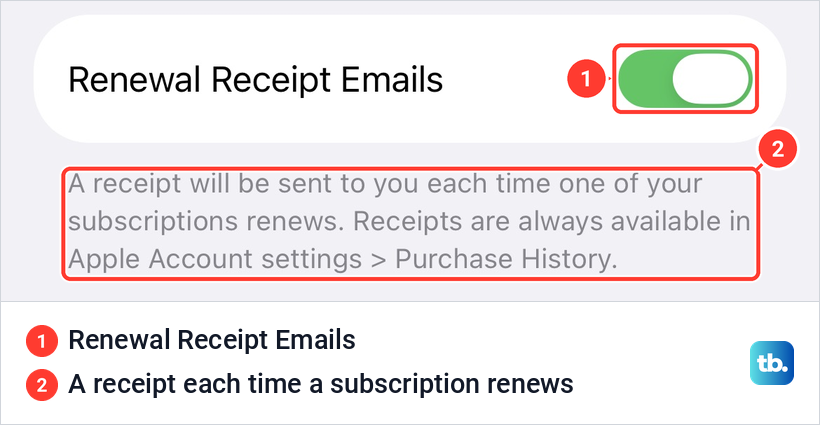
Do not count on a reminder before a renewal. Our subscription page had no reminder or alert switch, and the only switch on our Subscriptions list was Renewal Receipt Emails. Its note says a receipt will be sent each time one of your subscriptions renews, so it tells you after the charge, not before. Put renewal dates in your calendar instead.
To approve a child's purchases, use your own iPhone. Apple's current steps for Ask to Buy are Settings > Family, your child's name, Apps & Websites, Restrictions, then Ask to Buy and the Require Purchase Approval switch. You then get a request each time the child wants to make an eligible purchase, including in-app purchases.
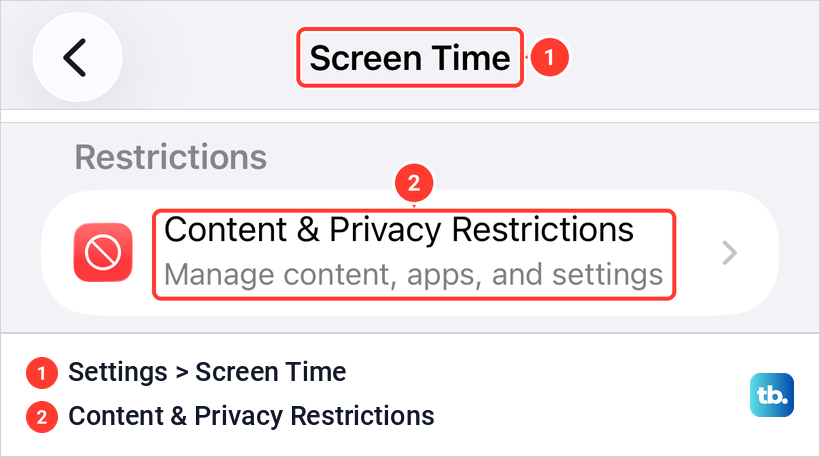
On any iPhone, Screen Time can restrict store purchases. Apple's steps are Settings > Screen Time > Content & Privacy Restrictions, turn on Content & Privacy Restrictions, then tap iTunes & App Store Purchases to set what is allowed.
If a charge appears that nobody in your family made, check Purchase History first, then tell if your Apple Account was hacked and lock it down. Apple also warns that an email about a purchase might not be from Apple at all, so open the App Store or Settings yourself instead of tapping a link in the message.
How we tested this guide
We tested this on an Apple Account with real Apple and App Store subscriptions, going through an Apple Music Family subscription, stopping at the Confirm Cancellation prompt.
Frequently Asked Questions
Will I lose access as soon as I cancel?
No, not for a paid subscription. Apple says you can keep using it until the next billing date, and the subscription page and the confirmation sheet both show that date before you finish.
Why was I charged after I cancelled?
Apple bills the next period unless you cancel more than 24 hours before the current one ends, so a late cancellation can still renew once. Apple accepts a refund request only once the email receipt for the charge arrives.
What happens if I cancel a free trial?
It depends on the service, because some trials stop as soon as you cancel and others run to their end date. Cancel at least 24 hours before the trial ends to avoid the first charge, and read the Confirm Cancellation sheet before you tap.
Does deleting the app cancel the subscription?
No. Apple says deleting an app does not cancel its in-app subscriptions, so cancel in Settings first and delete the app afterwards.
Can I cancel a family member's subscription?
No. The person whose Apple Account is on the receipt has to cancel it, even when the organizer's payment method pays for shared subscriptions.
Can I get my money back for a subscription I forgot to cancel?
You can ask. Sign in at reportaproblem.apple.com, choose Request a refund, pick the charge, and expect an answer within 24 to 48 hours, although eligibility varies.
What is apple.com/bill on my bank statement?
It is a charge from Apple for apps, subscriptions, music, movies or other purchases. Find it in Purchase History in the App Store, where you can search for the amount, and cancel it in Settings if it is a subscription.