




Count the cables running off the back of your desk right now. Monitor power, PC power, the desk's own motor cable, whatever else got plugged into a strip on the floor. Every one of them is a thing that dangles, tangles, and pulls tight the moment you raise the desk to standing height. The DXRacer Tidal has exactly one cable going to the wall, and after a month of using it, going back to anything else feels like a downgrade.
Technobezz is supported by its audience. We may get a commission from retail offers. Reviews ethics statement.
DXRacer Tidal Series Standing Desk Review
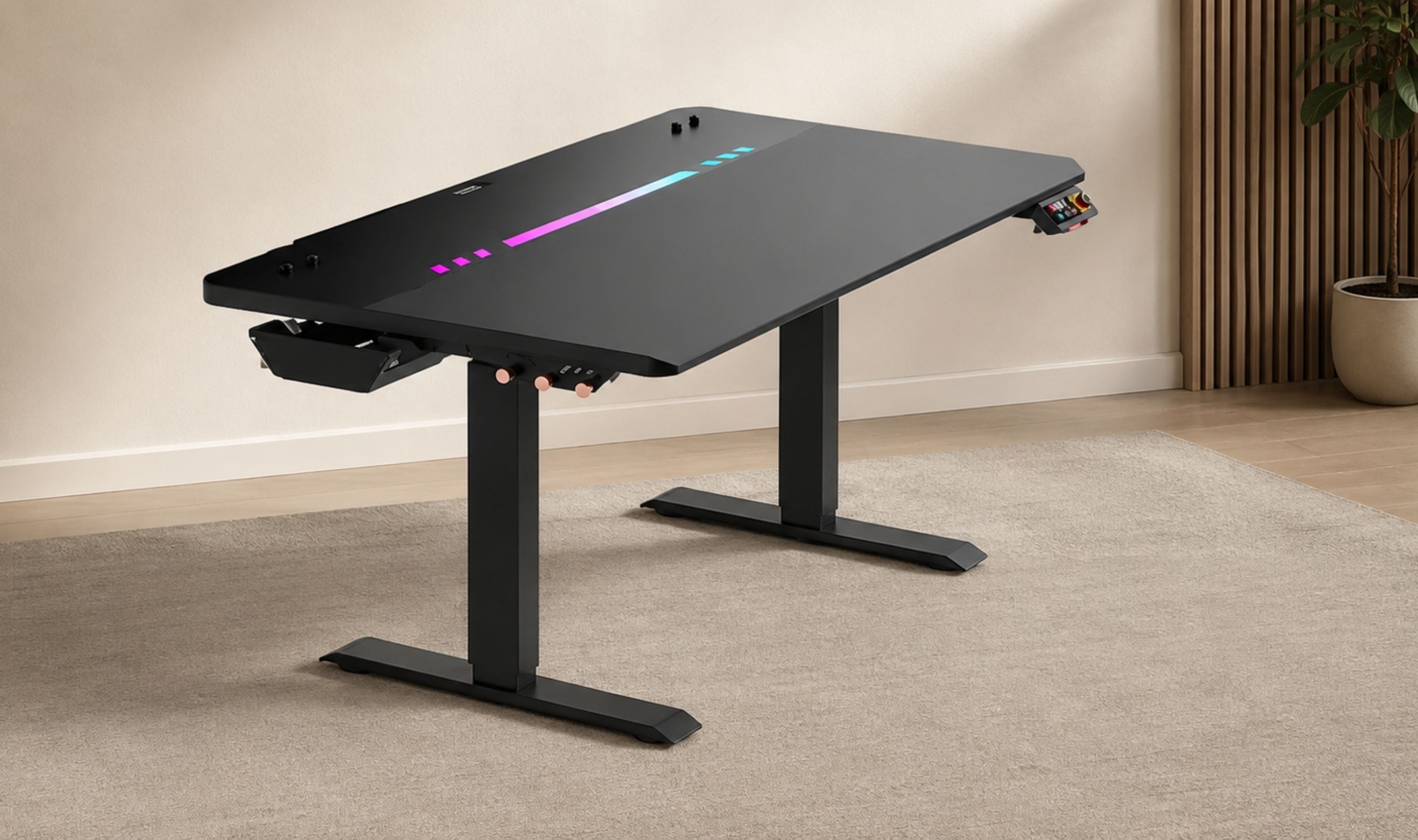
The DXRacer Tidal builds a power supply column into the leg, so the whole desk runs off one wall cable.
Updated August 2, 2026Aug 2, 2026
•17 min read

Credit: Technobezz
Get Deals Like These in Your Inbox
The best prices, straight to your inbox.
Add Technobezz on Google:Add as preferred source
9.5/ 10

Best for Anyone building a setup in a room where the desk is on display and cable clutter is the problem, especially in tight spaces. Built-in power column, deep cable tray, magnetic anchors, and a mechanical control panel.
DXRacer Tidal Series Gaming Desk (Regular/L)
TypeElectric height-adjustable sit-stand gaming desk
Size TestedRegular/L
Desktop Dimensions (L)47 x 30 inches (120 x 75 cm)
Other Size AvailablePlus/XL, 55 x 30 inches
Height Range26.2 to 40.9 inches (666 to 1040 mm)
Height PrecisionMillimeter-level, with two memory presets
That is the feature nobody puts on the front of the box. The Tidal has a power supply column built into the leg, so your monitor, your PC, and your peripherals all plug into the desk itself. I tested the Regular/L, the 47-inch version rather than the 55-inch XL, in a room where floor space is genuinely tight. The build quality is the best I have handled at this size, the control panel is the nicest one on any desk I have used, and the cable situation went from an ongoing chore to something I stopped thinking about entirely.
DXRacer Tidal Series Gaming Desk (Regular/L) - Best Standing Desk for Clean Cable Management
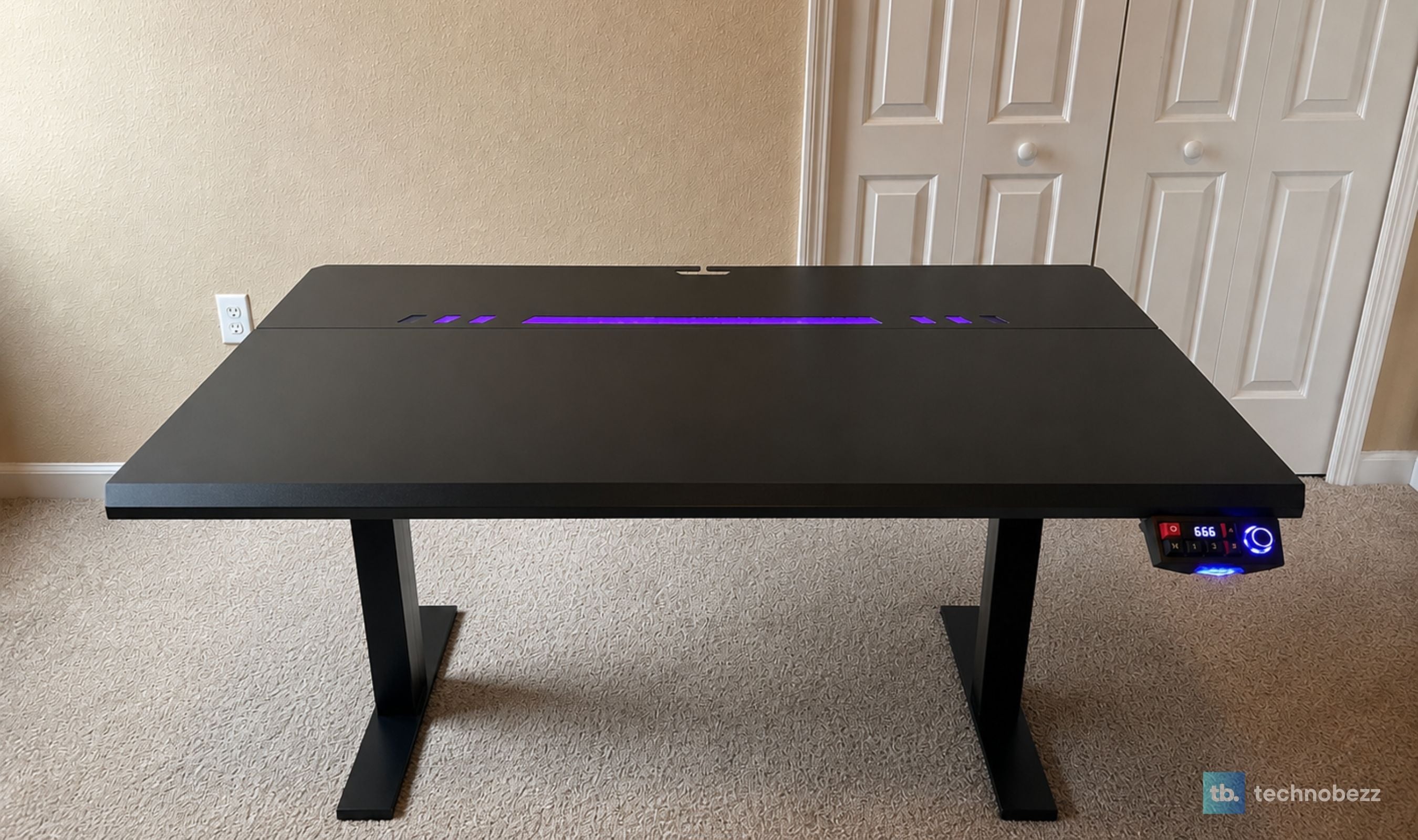
The Tidal is DXRacer's electric sit-stand desk, built on a 1.5mm SPCC steel frame with a split desktop that pairs a 25mm high-density fiberboard front section with a magnetically attached steel plate along the back. That steel plate is where the RGB strip lives and where the included magnetic cable anchors grip. It lifts from 26.2 to 40.9 inches at under 40 decibels, holds two height presets, and pairs to your phone over Bluetooth for height and lighting control.
It lists at $699 and has been selling for $599 direct from DXRacer. That is real money for a 47-inch desk, and I will come back to whether it earns it.
Key Highlights
- Integrated power supply column, so the desk and everything on it run from one wall cable
- 26.2 to 40.9 inch height range with millimeter-level positioning and two memory presets
- Under 40 dB lift, quiet enough to adjust mid-call without anyone noticing
- 25mm high-density fiberboard top with a textured shark skin surface, E0 certified
- 1.5mm SPCC high-carbon steel frame with a magnetically mounted steel rear plate
- Backlit control panel with mechanical keys, swappable keycaps, a lighting knob, and an LED height readout
- Full-width under-desk cable tray big enough to swallow a power strip and its adapters
- Four magnetic cable holders that grip the steel rear plate, no adhesive required
- Eight RGB lighting effects on the panel plus a full color picker in the app
- Sound-reactive pickup modes that pulse with music or game audio
- Child lock and three-level auto-reverse collision sensitivity
- 47 x 30 inch footprint in Regular/L, with a 55 x 30 inch XL available
Pros
- The integrated power column genuinely solves cable clutter instead of relocating it
- Build quality is a clear step above most desks in this bracket, with zero wobble at full height
- The control panel is the best I have used on a desk, with real mechanical key feel and swappable caps
- Magnetic cable anchors hold firmly and leave no adhesive residue when you move them
- The under-desk tray is deep enough to be useful rather than decorative
- RGB is positioned along the back where it washes the wall instead of glaring at you
- Lighting, height, presets, and lock sensitivity are all adjustable from the app
- Child lock is a feature more standing desks should have and most do not
- The 47-inch size fits rooms where a full-size standing desk simply will not
- Lift is quiet and smooth enough that nothing on the surface shifts
- Available in white as well as black
Cons
- The side hooks are small and set close together, so a headset wants two of them rather than one
- The mobile app is a white-label third-party platform rather than something DXRacer built
Who It's For
Anyone building a setup in a room where the desk is visible, which for most people means a bedroom, a studio apartment, or a corner of a living space. The Tidal is engineered around the idea that a desk should look finished from every angle, and it delivers that in a way I have not seen from a desk at this size. It also suits people who genuinely alternate between sitting and standing, since the presets and the quiet lift remove the friction that makes most people stop bothering after a week.
Skip if
You are loading the surface heavily. Between a large monitor, a monitor arm, a full tower on top, and a laptop dock, 110 pounds disappears faster than you would think, and there are gaming standing desks rated past 350 pounds for less money if raw capacity is your priority. Skip it too if you need drawers or a keyboard tray, or if you want a wide surface, because 47 inches by 30 is comfortable for a single-monitor setup and tight for a triple.
The Power Column Removes the Cable Problem Instead of Managing It
Cable management on a standing desk is a specific headache, not a general one. The desk moves, which means every cable has to be long enough for the highest position and tidy enough at the lowest. Most desks answer this with a tray and a bag of velcro ties and wish you luck.
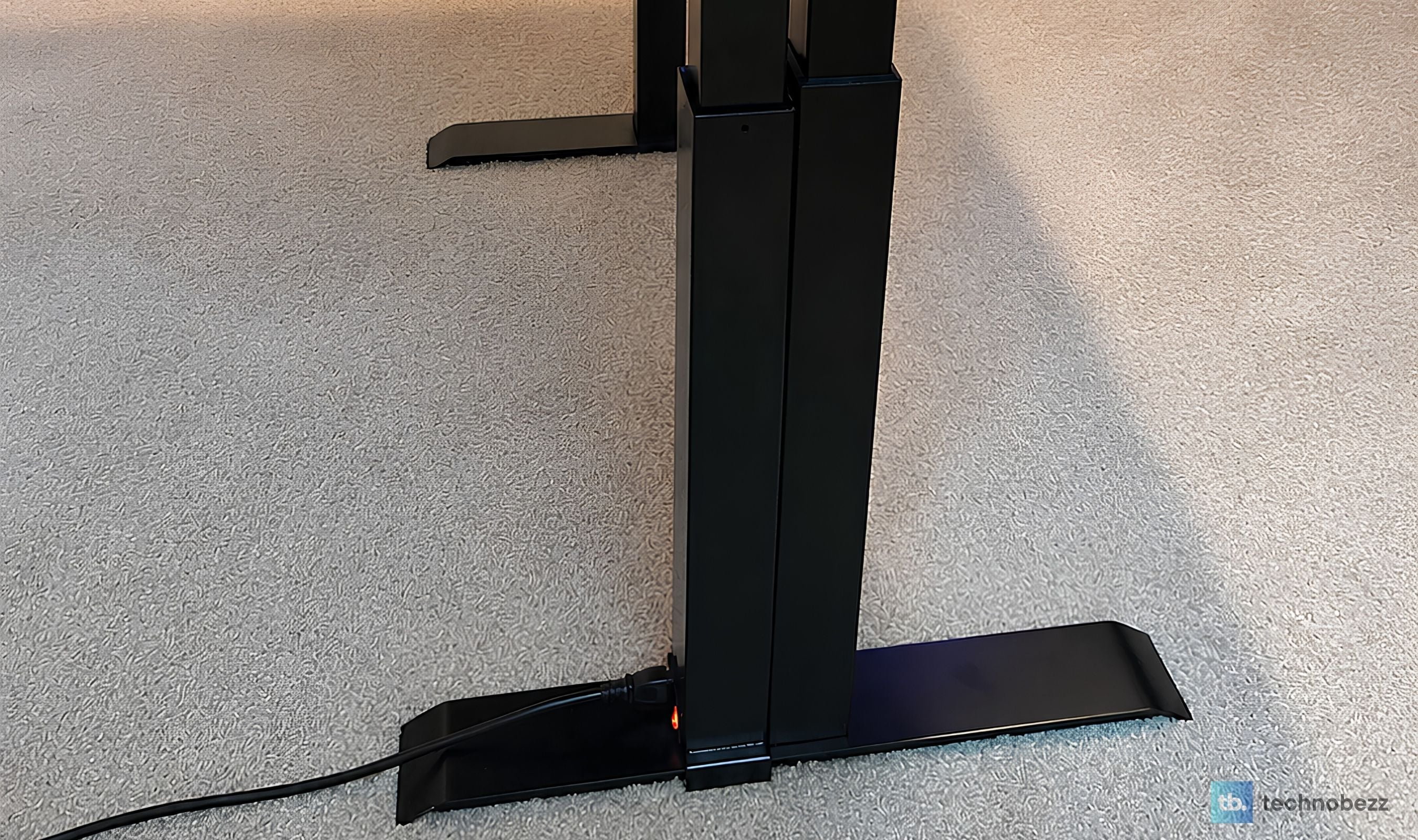
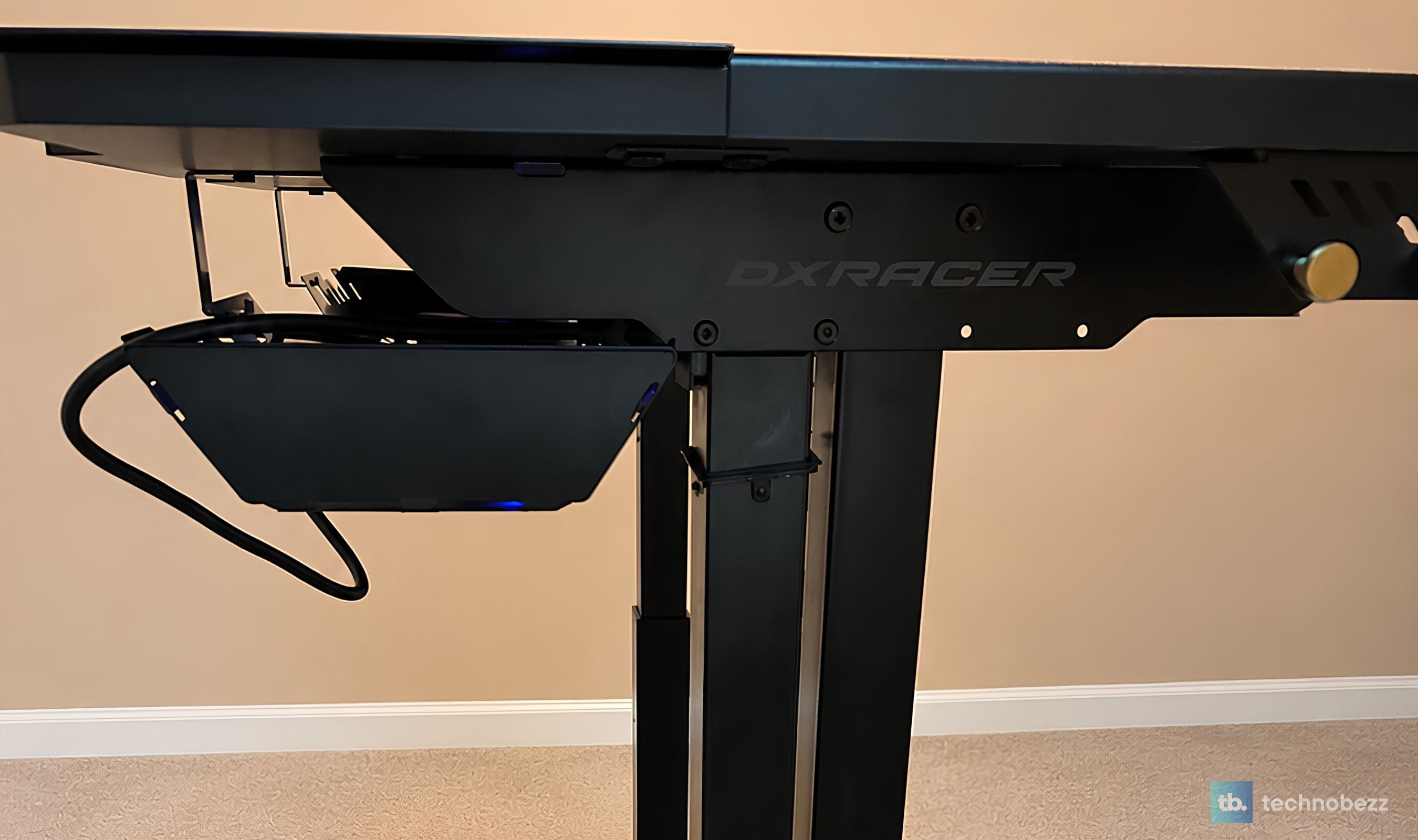
DXRacer put an actual power supply column inside the leg. It is a mains extension integrated into the desk structure, so your monitor and PC plug into the desk, and the desk plugs into the wall. One cable leaves the assembly. That is it.
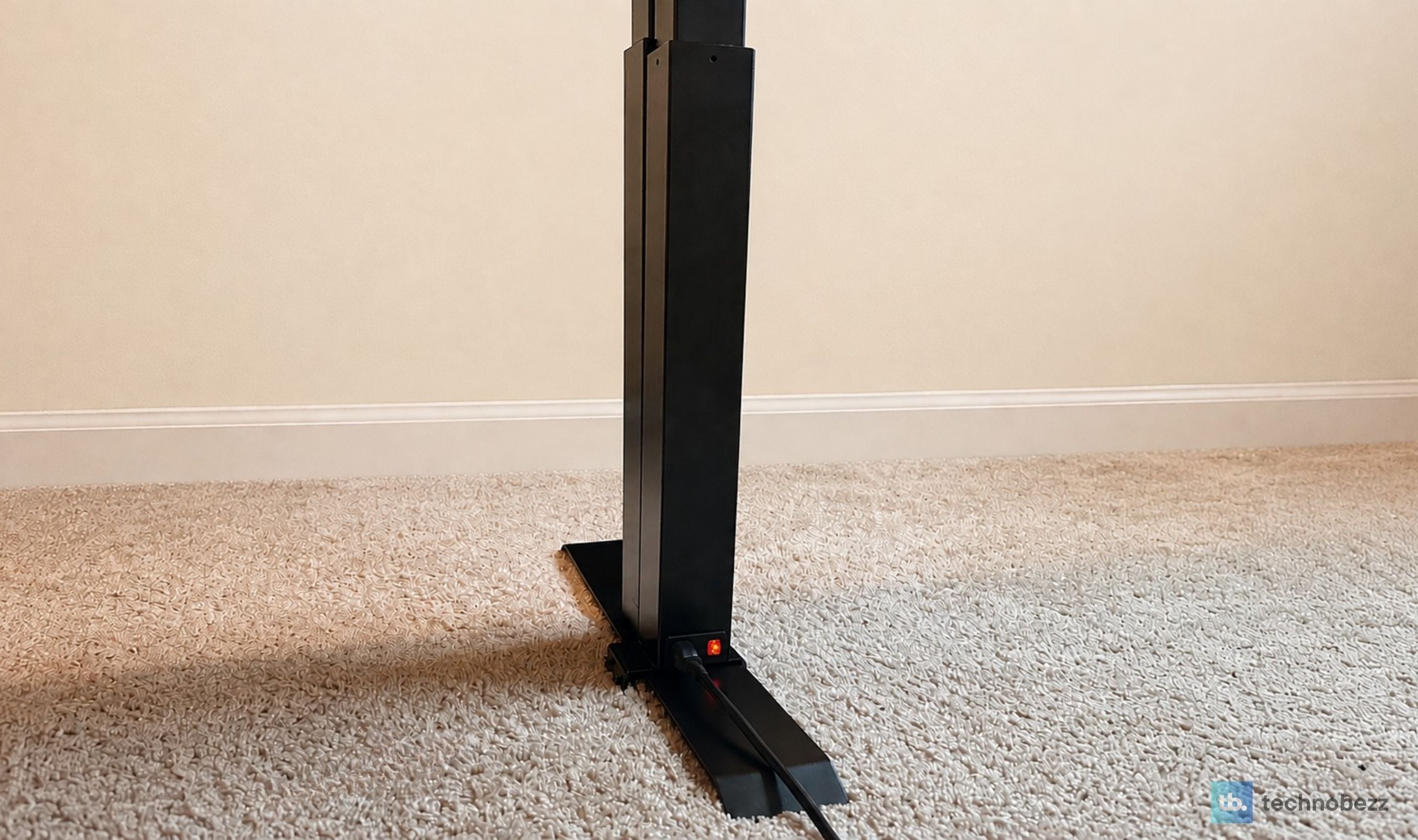
What this changes in daily use is bigger than it sounds. There is no cable slack calculation when you raise the desk, because everything powered is travelling with the desk rather than tethered to the floor. Nothing gets yanked. Nothing gets caught on a chair arm on the way up. And because power runs inside the leg rather than down the back, the desk looks the same from behind as it does from the front, which matters if it is not pushed against a wall.
I have used standing desks with good cable trays and I have used standing desks with clever channels, and none of them solved this. They organized the mess. The Tidal removes the reason for the mess. If DXRacer never built another feature into this desk, this one would still be the reason I would recommend it.
Under the Desk, Where the Tray Does the Rest
The cable tray runs most of the width of the desk and hangs underneath on copper side hooks. It is a shaped metal piece you bend to the profile you want during assembly, which sounds fiddly and takes about two minutes.
Its actual advantage is depth. Most under-desk trays are shallow enough to hold cables and nothing else, which leaves your power strip and every wall wart sitting on the floor. This one takes a full power strip and the adapters plugged into it, and closes up with all of that hidden. Combined with the power column, my floor under the desk is empty. Not tidy, empty.
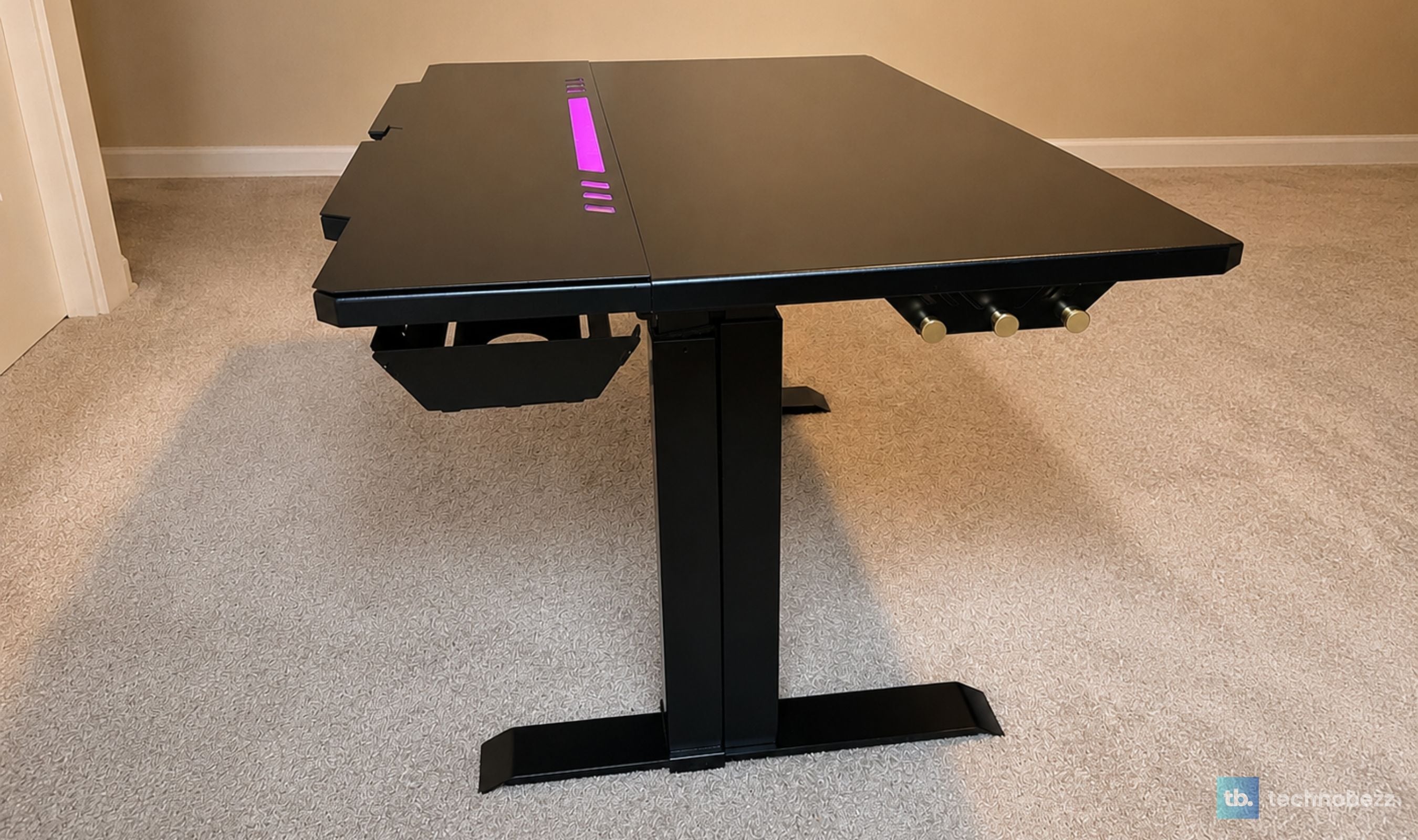
Up top, the rear steel plate has a pass-through opening in the middle for anything that needs to reach the surface, and four magnetic cable anchors come in the box. They stick to the steel plate hard enough that a USB-C charging cable stays put when you pull the phone off it, and they move without leaving adhesive behind. Anyone who has tried to scrape a 3M-backed cable clip off a desktop finish will understand why this is worth calling out.
A Control Panel With Keycaps You Can Actually Swap
Desk controllers are usually an afterthought. A strip of mushy rubber buttons and a seven-segment display, screwed to the underside where you cannot see it. The Tidal's panel is the opposite, and it is the part of this desk I show people first.
You get seven controls: lock and unlock, a multi-function key, two memory presets, up, down, and a rotary knob for lighting. The keys are mechanical with genuine tactile feedback and an audible click, and the caps pull off and swap like a keyboard's, because they are keycaps. The panel is backlit, so it reads in a dark room, and the LED display shows current height in millimeters or inches depending on what you set.
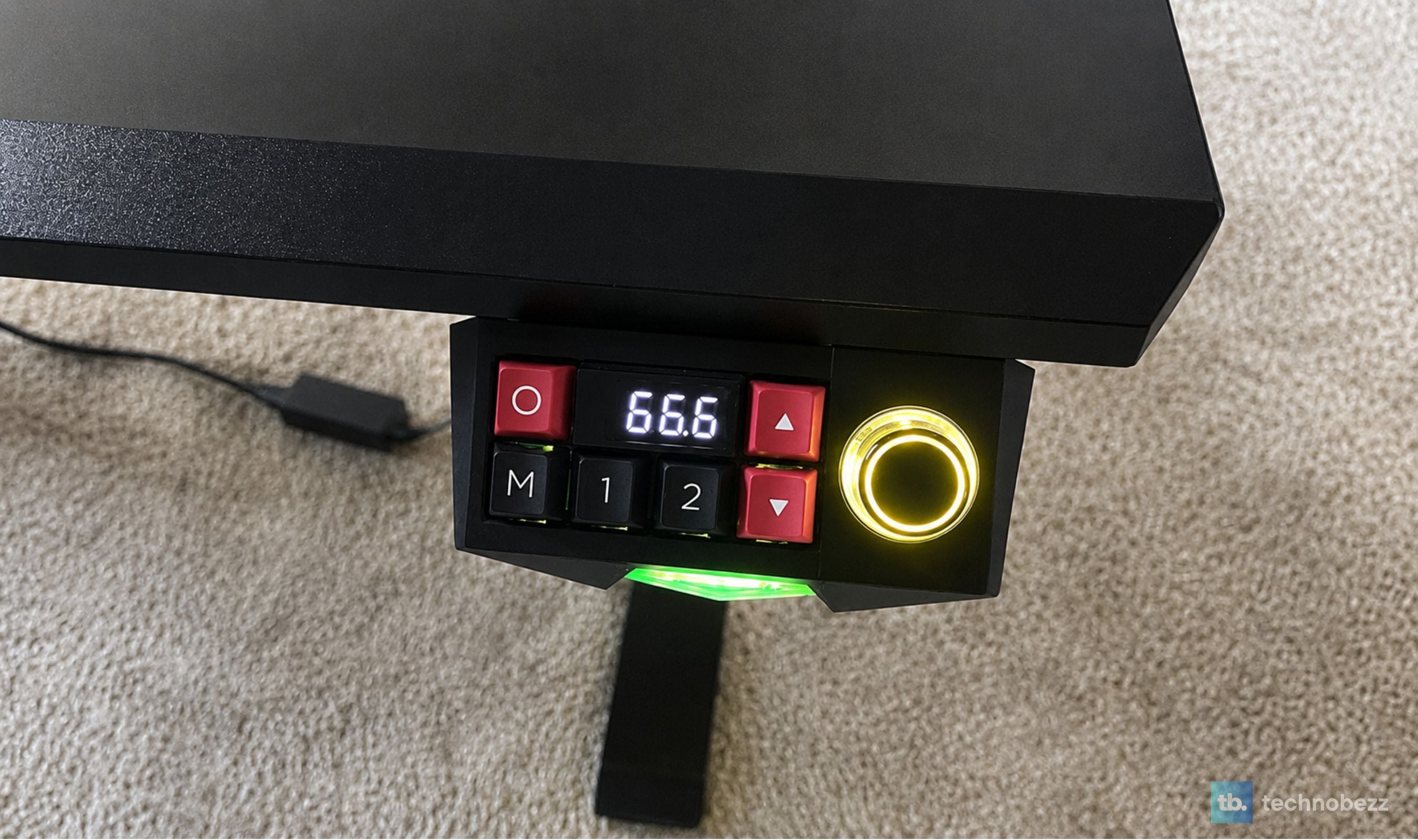
In practice I use the two preset keys and nothing else, which is how it should be. Press 1 for sitting, press 2 for standing, and the desk goes. But the multi-function key is where the depth is, letting you change auto-reverse sensitivity across three levels and get at the settings without pulling out your phone.
The lock key deserves its own mention. Press it and the panel goes red and stops accepting input. If you have kids, pets, or anyone who touches things while walking past, this solves a problem I have run into on every other standing desk I have tested, where an accidental brush against the controller sends the desk somewhere you did not ask it to go. Every desk in this category should ship with it.
Lighting You Can Aim, Dim, or Delete
The RGB strip sits along the back edge under the steel plate, pointing away from you. That placement is the whole difference between lighting that looks premium and lighting that looks like a toy. Rather than shining in your eyes or up from under the surface, it throws color onto the wall behind the desk, and the effect reads as ambient backlighting rather than gamer decoration.
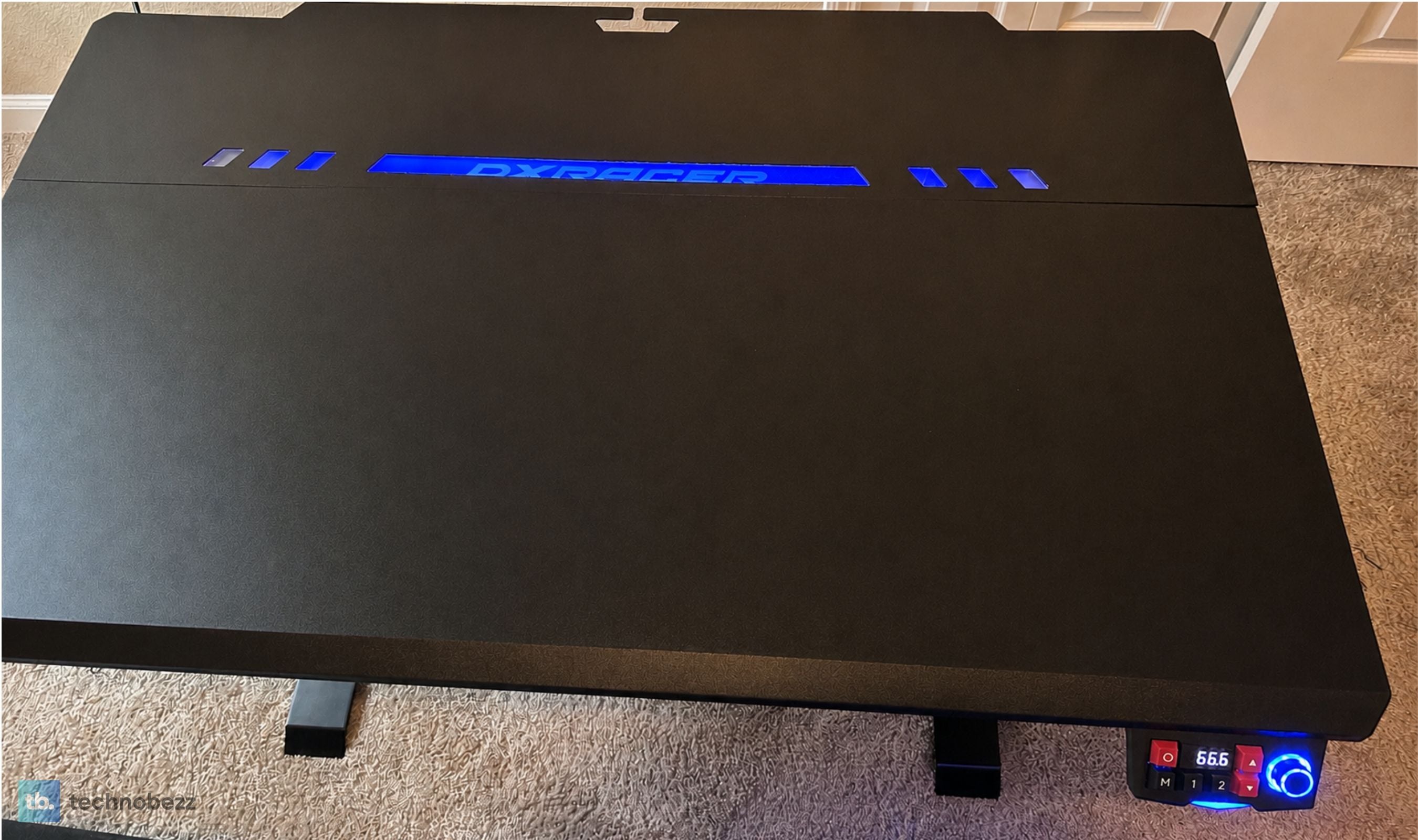
Eight effects live on the panel knob: breathing, rainbow, two sound-reactive pickup modes, daylight, rogue, galaxy, and firefly. Brightness is stepless, so a dim warm setting for evening work is as easy as a saturated one for gaming. The app adds a full color picker on top of that, effectively a ninth mode where you choose any color you want rather than cycling presets.
The pickup modes react to sound in the room, so music and game audio drive the lighting. It is a gimmick, and it is a good one, and I turned it off after two days and switched to a static color. What matters more is that the strip is an optional part during assembly. If you do not want lighting at all, you do not install it, and nothing about the desk looks unfinished as a result.
Height, Speed, and the 110 Pound Ceiling
The lift travels from 26.2 to 40.9 inches, which is just under 15 inches of range, and it stops anywhere in between with millimeter precision. The bottom of that range is genuinely low, which is useful if you are short or use a low chair. The top handled standing work comfortably for me at average height, though anyone over about six foot three should measure their standing elbow height against 40.9 inches before ordering.
Motion is quiet, rated under 40 decibels, and that number matches what I experienced. I have raised the desk mid video call without a single person mentioning it. Movement is smooth rather than jerky, and I have never had a drink shift on the surface.
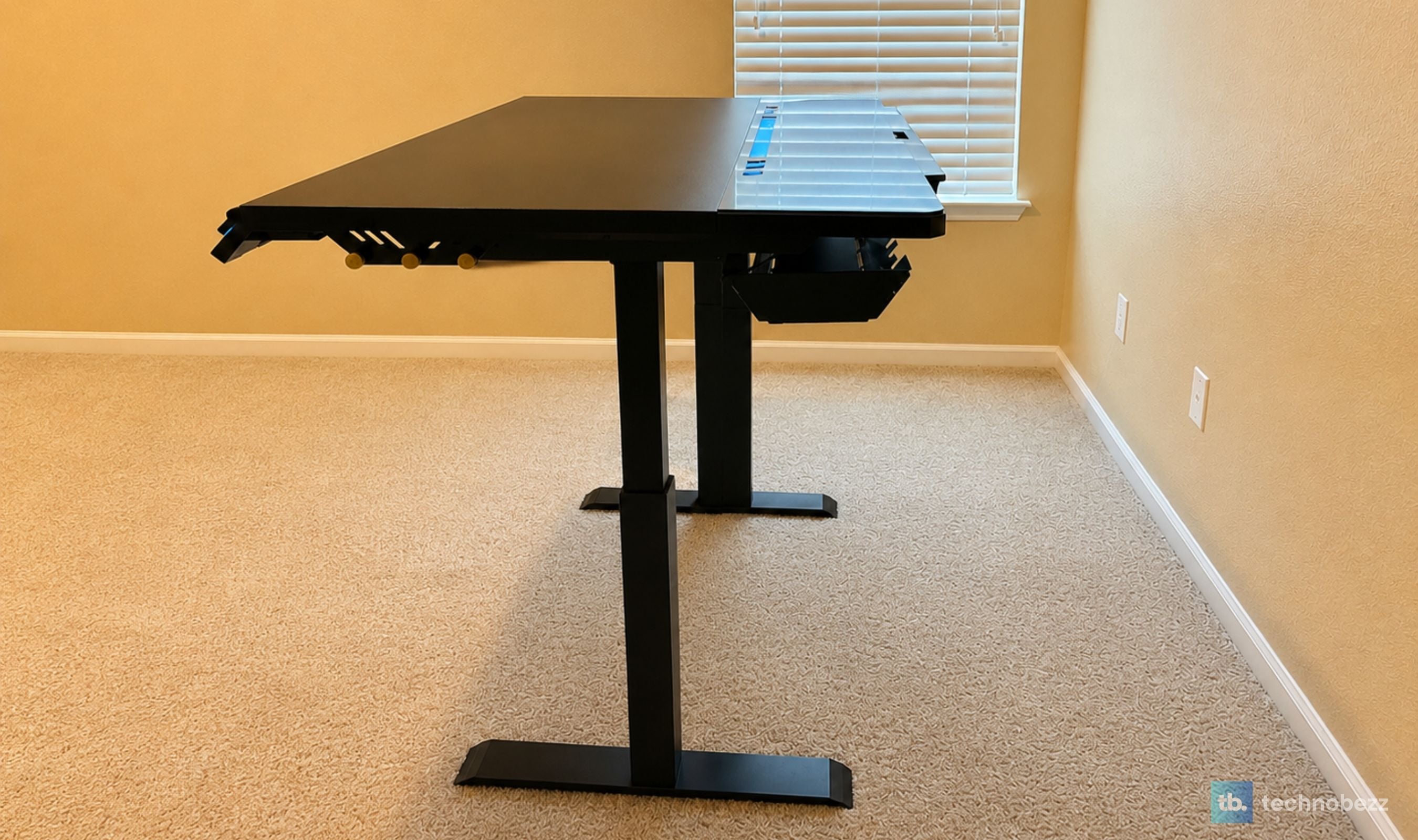
Stability at full extension is where cheaper desks give themselves away, and the Tidal does not. There is no perceptible wobble typing at standing height, no rocking when you lean on the front edge. The steel frame and the 25mm top are doing real work here.
Now the honest limitation. Load capacity is 50 kg, which is 110 pounds. For a single large monitor, a keyboard, a mouse, and the usual desk clutter, that is plenty and you will never think about it. But it is a modest figure for the category. Add a heavy monitor arm, a second display, a full tower sitting on the desktop, and an all-in-one, and you are doing arithmetic you would rather not do. Plenty of standing desks in this price range carry three times as much. If your setup is heavy, this is the spec that should decide your purchase, not the lighting.
Building It Takes Two People and About an Hour
The Tidal shows up in multiple boxes and it is heavy. This is not a solo assembly, and trying to make it one is how you hurt your back or scratch the finish. Get a second person for the top.
Beyond the weight, the process is well handled. Everything is packed properly, the hardware and the tools you need are included, and the instructions are a single clear sheet rather than a booklet of ambiguous diagrams. It took me about an hour working at a deliberate pace. It is a more involved build than a basic two-leg desk because there is more in it, the power column and the tray and the lighting all need routing, but nothing about it is confusing.
Two components are optional at build time, which I appreciated more than I expected. The RGB strip does not have to go on, and the side hooks do not have to go on. You are deciding what this desk is during assembly rather than living with someone else's choices.
One thing that is not in the box despite showing up in the product photography: the adjustable PC case holder. That is a separate purchase. If you were counting on hanging your tower under the desk to reclaim surface space, budget for it separately and check availability, because the desk arrives without it.
Living With 47 Inches and What It Fits
The Regular/L is 47 inches wide by 30 deep. The XL takes that to 55 wide at the same depth. Take that difference seriously, because it changes what the desk can do.
At 47 inches, one large monitor, a full-size keyboard, and a mouse fit with comfortable margins. A laptop next to the keyboard fits. A second monitor fits if they are both reasonably sized and you are not precious about spacing. A triple-monitor setup does not, and pretending otherwise would be doing you a disservice. The 30-inch depth is generous and is what makes the surface feel bigger than the width suggests, since you get real distance between your eyes and the screen.
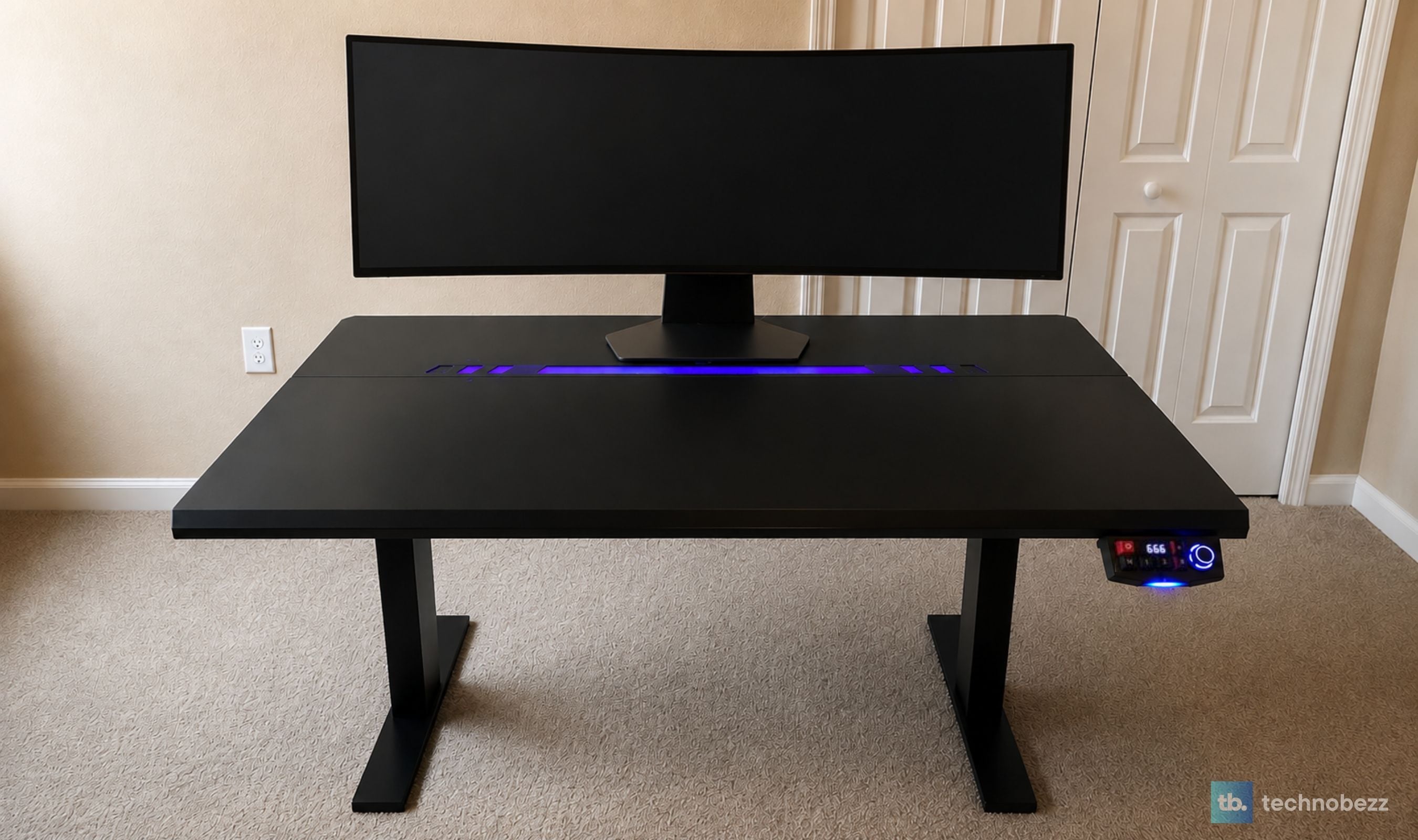
The finish is worth its own sentence. The shark skin texture on the front section is smooth enough to track a mouse on directly, which I tested and which works, though I still use a pad. It resists fingerprints in a way glossy tops do not, and it has held up to a month of daily use with a metal water bottle, a mug, and everything else that lives on a desk without marking. The one caution I would give is on impacts. A textured fiberboard top will take a dent from a sharp knock the way any fiberboard top will, so treat the edges with normal care.
This is also where I will say the thing about DXRacer's finishing that keeps holding up. The attention to how components meet, how the panel sits in the desktop, how the steel plate lines up with the fiberboard, is the same standard we found on their electric gaming chair with heating and massage. It is a brand that finishes products, and that shows up in ways a spec sheet cannot capture.
What the App Adds, and What It Does Not
The app connects over Bluetooth and gives you the two memory presets, manual up and down, the lock function, auto-reverse sensitivity, and the full lighting control set including the color picker that the panel knob cannot reach.
Two honest notes. First, this is not software DXRacer wrote. It is a white-label smart-home platform of the kind a lot of connected hardware ships with. It works, it is simple, and it is not going to win any design awards. Second, and more practically, you will not use it much for height. The panel is right there under your hand, and reaching for a phone to raise a desk you are sitting at is objectively slower.
Where the app earns its place is lighting. Dialing in an exact color is much easier on a phone than through a knob and eight presets, and the sensitivity and lock settings are more legible on a screen than on an LED readout. Set it up once, adjust the lighting when the mood changes, and otherwise leave your phone in your pocket.
This product was provided to Technobezz for review. We independently select what we review. The manufacturer had no input on this article and did not see it before publication. All opinions are our own.
FAQ
What is the difference between the Regular/L and the Plus/XL?
Width, and only width. The L is 47 inches wide, the XL is 55, and both are 30 inches deep with the same height range, the same frame, the same power column, and the same control panel. Choose the L if your space is limited or you run a single monitor. Choose the XL if you want room for dual displays with proper spacing.
How much weight can it actually hold?
50 kg, or 110 pounds. That covers a normal setup comfortably, but it is a modest ceiling for the category. If you are mounting a heavy monitor arm, running dual large displays, or putting a full tower on the desktop, add up the weights before you commit.
Do I have to install the RGB lighting?
No. The light strip is an optional component during assembly, as are the side hooks. Skip both and you have a clean, unlit desk that looks like it was designed that way.
Does the PC case holder come with it?
No, despite appearing in the product imagery. It is sold separately, so check availability before you plan your setup around it.
Is the desk stable at full standing height?
Yes. Typing at 40.9 inches produced no wobble, and leaning on the front edge did not rock it. The steel frame and 25mm top handle the extension well.
What is the warranty?
DXRacer's European listing for the Tidal L shows a one-year warranty. Confirm the exact term for your region before buying, because that is shorter than what some standing desk brands offer on frames and motors.
Can I use the desk without the app?
Completely. Everything except the custom color picker is available from the control panel, including both presets, the lock, and the lighting effects. The app is a convenience layer, not a requirement.
A Month In, the Cables Are Still Invisible
The Tidal is not the biggest desk, not the strongest, and not the cheapest. Its 110-pound ceiling is a real constraint, it has no storage, and $599 buys a lot of standing desk elsewhere if you are shopping on specifications alone.
What it does, better than anything else I have put in a room, is make a desk look finished. The power column means one cable. The tray means the floor stays empty. The magnetic anchors mean the surface stays clean. The lighting points at the wall instead of at you. The panel feels like a piece of hardware someone cared about rather than a switch. Individually these are small decisions, and together they add up to a desk that looks the same on day thirty as it did the hour I finished building it, which has never been true of any other desk I have owned.
If your setup is heavy or you need width, buy something else and do not feel bad about it. If your desk lives somewhere you look at it every day, and you are tired of the tangle behind it being a permanent feature of the room, the Tidal is the one I would put my own money on. Get the L if space is tight, the XL if it is not, and enjoy not thinking about cables again.
Add Technobezz on Google:Add as preferred source
More reviews
Review
Ricoh SP-2240N Review, the Network Scanner My Whole Family Uses Without a PC

Review
Tribit PocketGo Review, a Small Speaker With Big Sound

Review
The Baseus Bowie MC2 Is the Open-Ear Pair I Keep Forgetting to Take Off
Review
The Dreame AirPursue PM20 Purifies, Heats, Cools and Follows You Around the Room
ReviewI Spent Weeks Looking for a Flaw in the HHKB Professional HYBRID Type-SReviewiPhone 18 Pro Max vs iPhone 17 Pro Camera Comparison in DaylightReviewDreame D20 Air Plus Review, Built Like a Robot That Costs Three Times as MuchReviewThe Boulies EP600 Moves in More Directions Than Any Chair We Have TestedReviewNarwal Freo 20 Edge Review, Reaching the Corners Without Dragging the DirtReviewHisense M7SR Review, an Easy First Step Into MiniLEDReviewKYY X90D Review, Two Extra Screens From One USB-C CableReviewI've Used the 15-inch MacBook Air M5 for Months, and It's the Best Laptop I've Ever Owned