Buying a RAM kit comes down to three questions: which memory generation your motherboard takes, how much capacity your work needs, and whether the kit's speed, timings and memory profiles suit your platform. This guide is for US desktop builders and upgraders, from a first 32GB gaming PC to a 96GB workstation, with one DDR4 kit for older systems.
Technobezz is supported by its audience. We may get a commission from retail offers.
5 Best RAM Kits in 2026
Our top pick is the G.SKILL Trident Z5 Neo RGB 32GB DDR5-6000 CL30 kit, plus DDR5 kits from 32GB to 96GB and a DDR4 option for older Intel and AMD builds.
T
Technobezz
Editorial Team
Updated November 8, 2026Nov 8, 2026
•12 min read

Get Deals Like These in Your Inbox
The best prices, straight to your inbox.
Add Technobezz on Google:Preferred SourceGoogle Discover
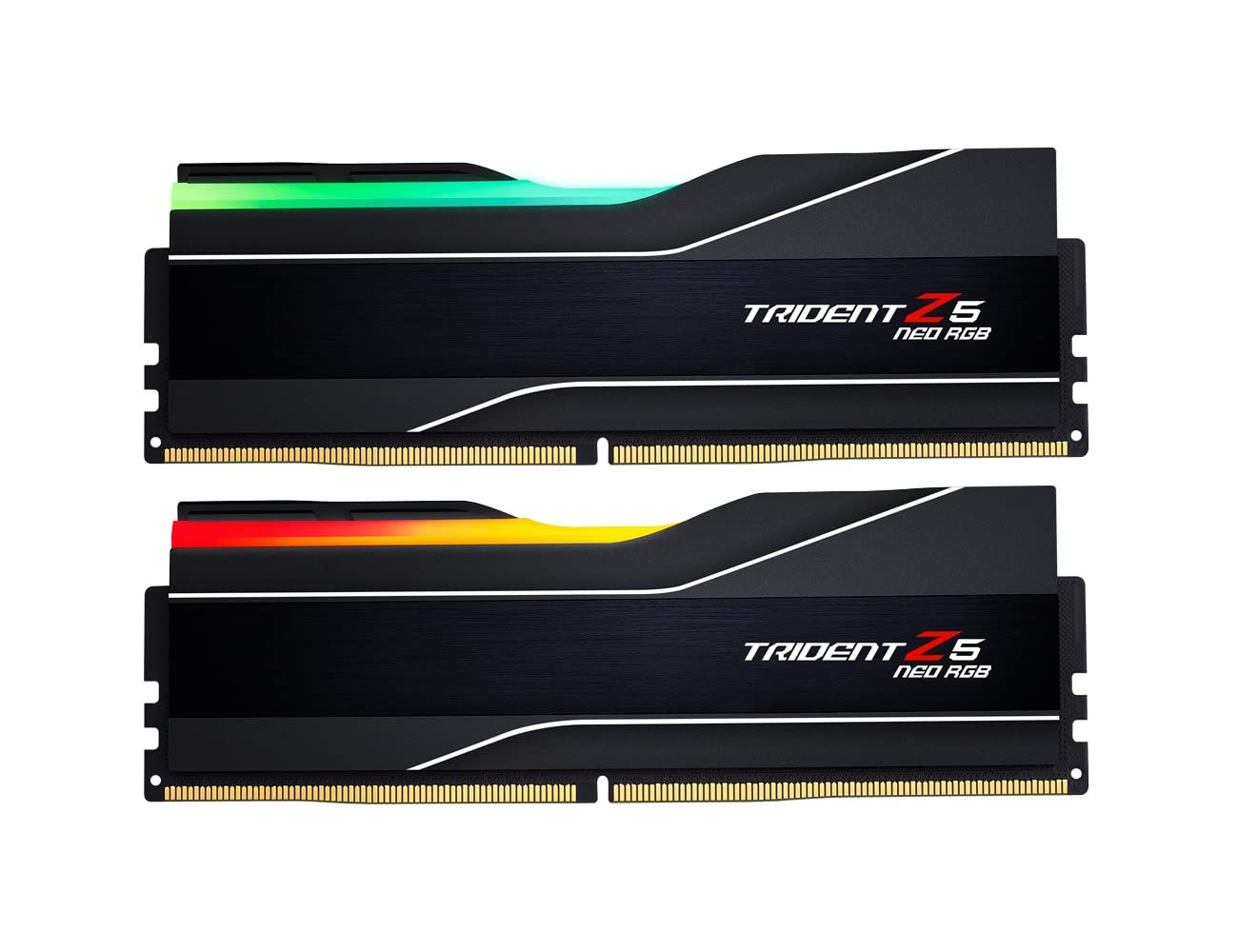
The G.SKILL Trident Z5 Neo RGB 32GB DDR5-6000 CL30 kit is the best overall pick. It pairs two 16GB modules rated at 1.35V with both Intel XMP 3.0 and AMD EXPO profiles, which makes it a sensible fit for most new DDR5 gaming and everyday builds.
The rest of the list covers clear use cases: a lower-latency white 32GB kit, a premium 64GB kit, a 96GB kit for heavy workloads, and a DDR4 kit for upgrading an existing system.
At a Glance
| Category | Product | Why We Picked It |
|---|---|---|
| Best overall | G.SKILL Trident Z5 Neo RGB DDR5-6000 CL30 32GB | 32GB DDR5 at 1.35V with both XMP 3.0 and EXPO profiles |
| Best low-latency 32GB kit | TEAMGROUP T-Force Delta RGB DDR5 White 32GB 6000 CL28 | CL28 at 6000MHz in a white RGB design |
| Best 64GB kit | Corsair Dominator Titanium RGB DDR5 64GB 6000 CL30 | 64GB in two modules with a die-cast aluminum heat spreader |
| Best high-capacity kit | G.SKILL Trident Z5 Royal Neo DDR5-6000 CL28 96GB | 96GB at DDR5-6000 CL28 for large AMD workloads |
| Best for DDR4 upgrades | Corsair Vengeance LPX DDR4 32GB 3200 CL16 | 32GB DDR4 in a small form factor for older desktops |
How we chose
We compared each maker's published specifications for capacity, speed, CAS latency, voltage, memory profiles, platform support and module height. We then checked that every pick is sold new on Amazon and matched each kit to the kind of build its specifications suit best.
The best RAM kits right now
G.SKILL Trident Z5 Neo RGB DDR5-6000 CL30 32GB - Best overall
The G.SKILL Trident Z5 Neo RGB kit pairs two 16GB DDR5 modules for 32GB total, rated up to DDR5-6000 at CL30-38-38-96 and 1.35V. G.SKILL designs it for compatible AMD platforms and says it is "engineered for high memory performance with customizable RGB lighting."
The kit is programmed with both Intel XMP 3.0 and AMD EXPO profiles, and G.SKILL notes that one of them must be enabled in BIOS to reach the rated speed. Maximum speed depends on the motherboard and CPU, so it is worth checking G.SKILL's RAM Configurator or your board's QVL first. This part number has a matte black body with a black brushed-aluminum inset and a translucent light bar; the series also comes in a white body.
Key highlights
- 32GB (2x16GB) DDR5 kit
- Up to DDR5-6000, CL30-38-38-96
- 1.35V
- Intel XMP 3.0 and AMD EXPO profiles
- Black brushed-aluminum inset with a translucent RGB light bar
- Limited lifetime warranty
Pros
- Both XMP 3.0 and EXPO profiles on one kit
- 1.35V rating is lower than the 1.4V TEAMGROUP and Corsair Dominator kits on this list
- Two-module kit leaves two slots open on four-slot boards
- Limited lifetime warranty
Cons
- Rated speed needs a BIOS profile and depends on the motherboard and CPU
- CL30 is looser than the CL28 TEAMGROUP kit at the same speed
- 32GB is less headroom than the 64GB and 96GB kits here
Who it is for: Builders putting together a new AMD or Intel DDR5 desktop for gaming and everyday work who want a 32GB RGB kit.
Skip if
Your projects need more than 32GB, or your motherboard takes DDR4.
TEAMGROUP T-Force Delta RGB DDR5 White 32GB 6000 CL28 - Best low-latency 32GB kit
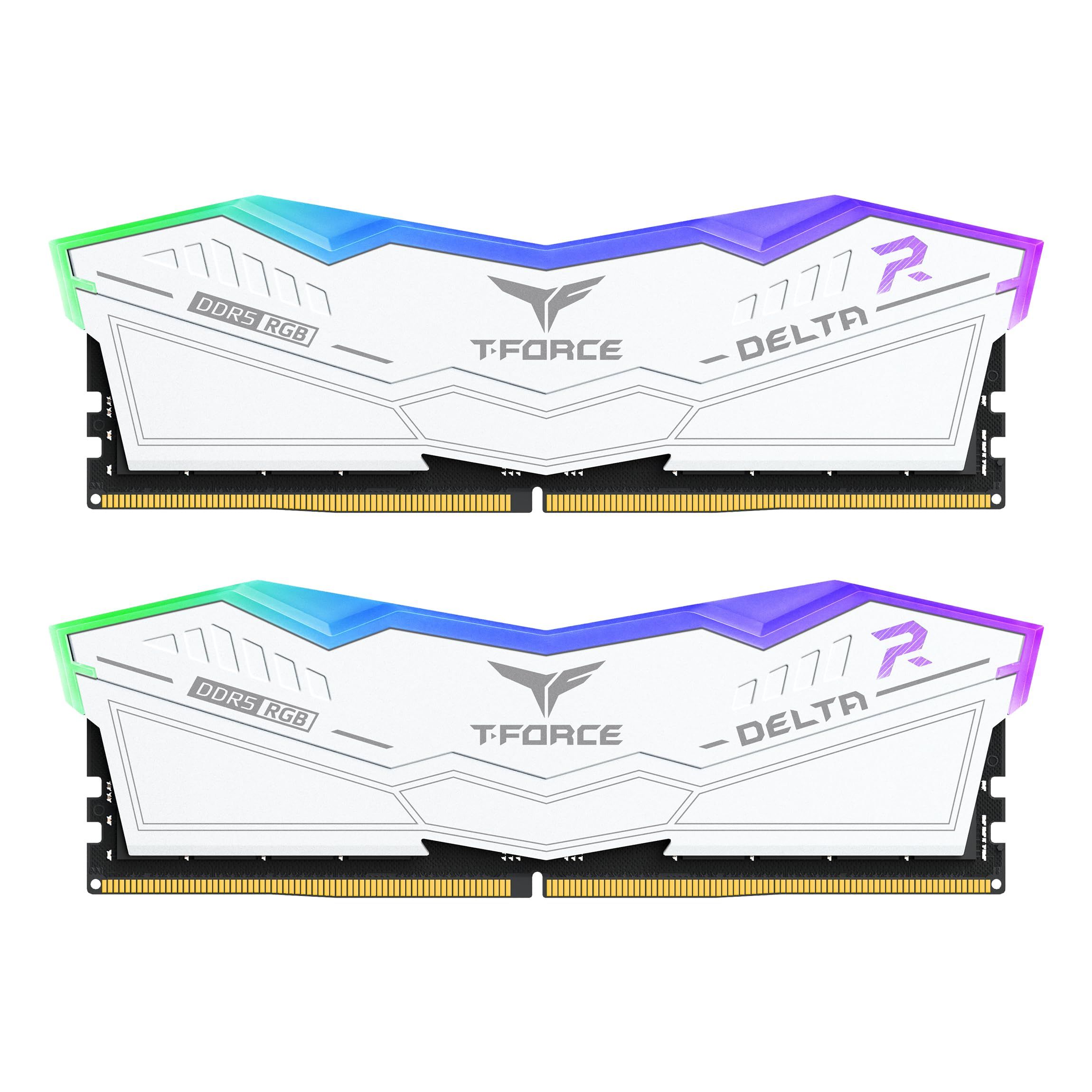
TEAMGROUP's T-Force Delta RGB DDR5 White kit uses two 16GB modules rated at 6000MHz with CL28 latency, the tightest CAS latency among the 32GB DDR5 kits on this list. It is rated at 1.4V and supports Intel XMP 3.0 and AMD EXPO.
TEAMGROUP lists support for Intel 800 and 700 series and AMD 800 and 600 series boards, and notes that without XMP or EXPO enabled the memory runs at its SPD default, such as DDR5-4800 or lower. The white modules use wide-angle RGB lighting in a design modeled after a stealth aircraft, and the maker says the memory "supports on-die ECC, which offers error correction and detection." Each module also carries a PMIC for power delivery.
Key highlights
- 32GB (2x16GB) DDR5 kit
- 6000MHz, CL28
- 1.4V
- Intel XMP 3.0 and AMD EXPO support
- 46.1mm module height
- On-die ECC and PMIC
- Lifetime warranty
Pros
- CL28 at 6000MHz is tighter than the CL30 32GB pick
- White finish suits white or light-themed builds
- Listed support for both current Intel and AMD platforms
- 46.1mm height is lower than the 57mm Corsair Dominator
Cons
- 1.4V rating is higher than the 1.35V G.SKILL kits
- Runs at DDR5-4800 or lower until XMP or EXPO is enabled
- Platform list covers only Intel 700/800 and AMD 600/800 series boards
Who it is for: Builders of white or light-themed DDR5 PCs who want 32GB with lower CAS latency.
Skip if
Your build has a dark theme, or your motherboard is older than the series TEAMGROUP lists.
Corsair Dominator Titanium RGB DDR5 64GB 6000 CL30 - Best 64GB kit
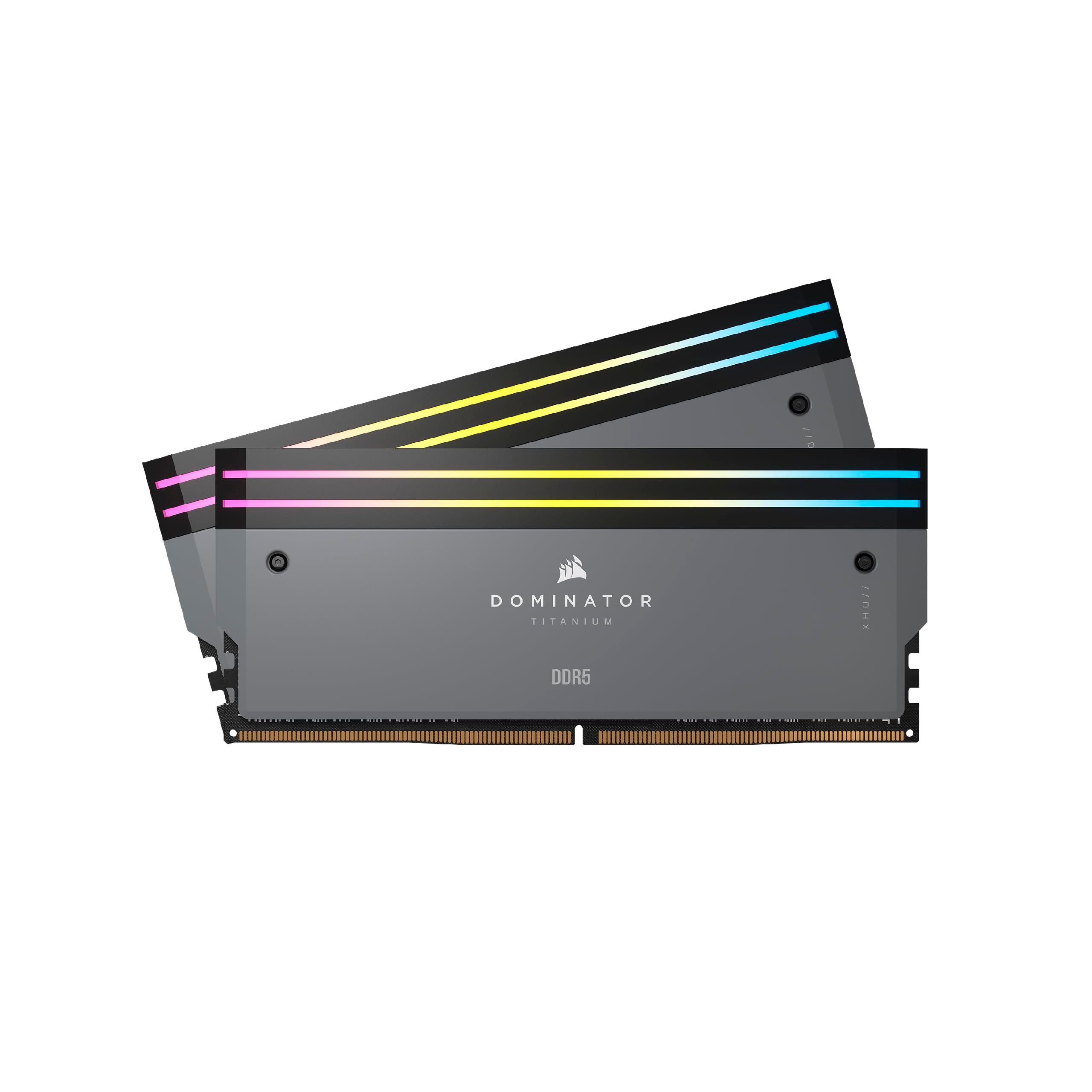
The Corsair Dominator Titanium RGB kit puts 64GB into two 32GB modules, rated by Corsair at 6000 MT/s with CL30 timings of 30-36-36-76 at 1.40V. It carries AMD EXPO and Intel XMP profiles, and Corsair lists support for AMD 600 and 800 series and Intel 600, 700 and 800 series platforms.
Corsair describes "Clean, refined styling combined with premium forged aluminum construction, for quality you can feel." The grey modules use a die-cast aluminum heat spreader with Corsair's DHX cooling, 11 addressable RGB LEDs controlled through iCUE, and a user-replaceable top bar that can be swapped for Corsair fin kits. Until a profile is enabled, the kit runs at its SPD setting of 4800MHz CL40 at 1.1V.
Key highlights
- 64GB (2x32GB) DDR5 kit
- 6000 MT/s, CL30, Corsair-listed timings 30-36-36-76
- 1.40V, Corsair's listed voltage
- AMD EXPO and Intel XMP profiles
- 11 addressable RGB LEDs with iCUE control
- 57mm tall with the top bar installed
- Limited lifetime warranty
Pros
- 64GB in two modules leaves slots free on four-slot boards
- Profiles for both AMD and Intel
- Replaceable top bar allows a different look later
- Overclock PMIC rated up to 1.435V
Cons
- 57mm height may clash with large air coolers
- 1.40V is higher than the 1.35V G.SKILL kits
- RGB control relies on Corsair's iCUE software
Who it is for: Creators, streamers and heavy multitaskers building a DDR5 PC who want 64GB with a premium heat spreader.
Skip if
You run a tall tower air cooler, or 32GB covers what you do.
G.SKILL Trident Z5 Royal Neo DDR5-6000 CL28 96GB - Best high-capacity kit
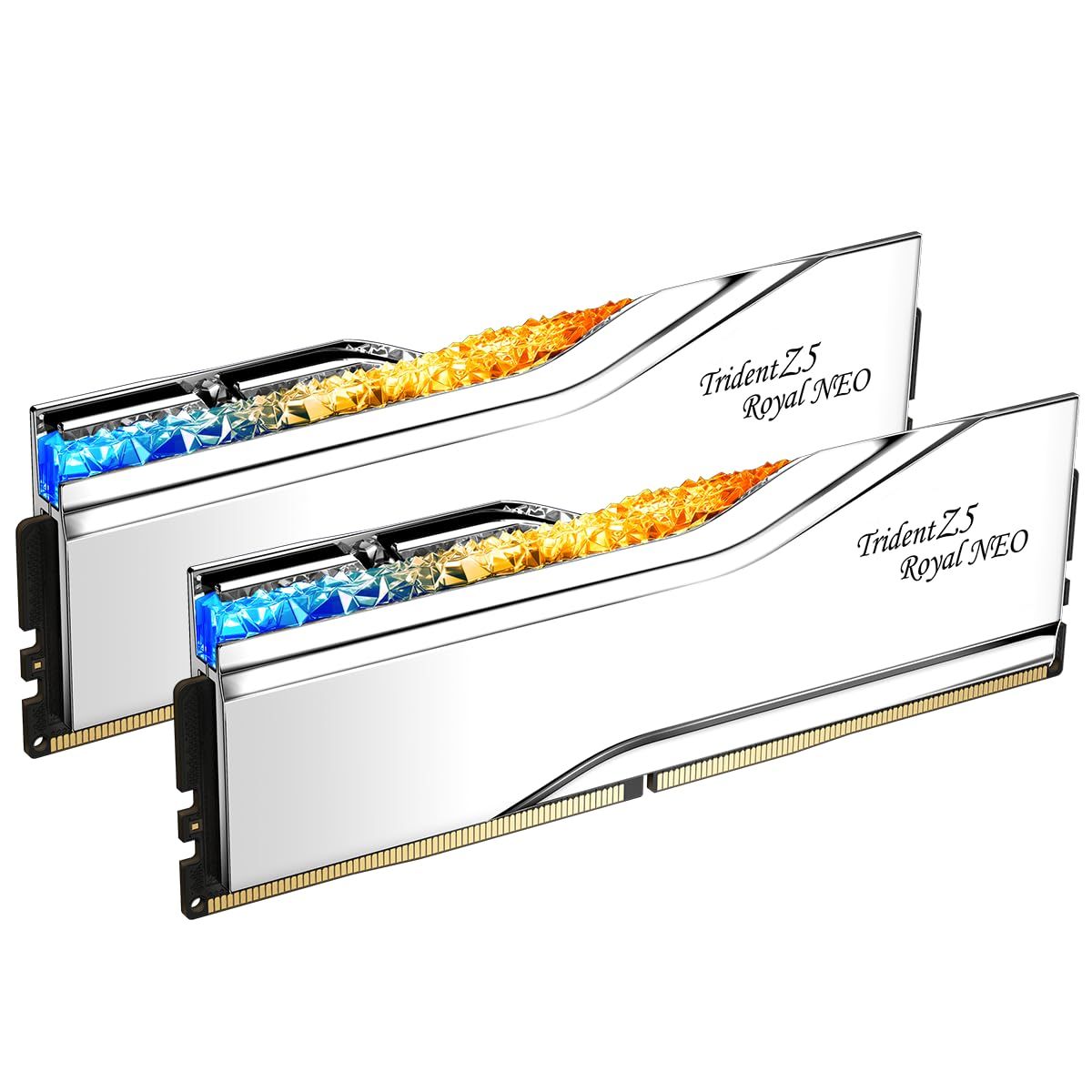
The G.SKILL Trident Z5 Royal Neo kit holds 96GB across two 48GB modules, rated at DDR5-6000 CL28-36-36-96 and 1.35V with an AMD EXPO profile. G.SKILL calls it "the luxury-class of overclock performance DDR5 memory" designed for compatible AMD platforms.
This part number has a silver finish; the series also comes in gold. The aluminum heat spreader has a mirrored electroplated finish and a crystalline light bar, and its RGB works with ASUS Aura Sync, Gigabyte RGB Fusion, MSI Mystic Light and ASRock Polychrome Sync. G.SKILL notes that the rated speed requires overclocking or BIOS adjustments, and that maximum speed depends on the motherboard and CPU.
Key highlights
- 96GB (2x48GB) DDR5 kit
- DDR5-6000, CL28-36-36-96
- 1.35V
- AMD EXPO profile
- Mirrored electroplated aluminum heat spreader with crystalline light bar
- Limited lifetime warranty
Pros
- Largest capacity on this list in just two modules
- CL28 at DDR5-6000 with a 1.35V rating
- RGB works with four major motherboard lighting tools
- Limited lifetime warranty
Cons
- G.SKILL lists an AMD EXPO profile and targets AMD platforms, so Intel builders should check the QVL
- Rated speed needs BIOS adjustments and depends on the motherboard and CPU
- 96GB is far more than a gaming-only build needs
Who it is for: AMD builders who edit video, work with large datasets or run virtual machines and want 96GB without filling all four slots.
Skip if
Your PC is mainly for gaming, or you are building on Intel and your board is not on the QVL.
Corsair Vengeance LPX DDR4 32GB 3200 CL16 - Best for DDR4 upgrades
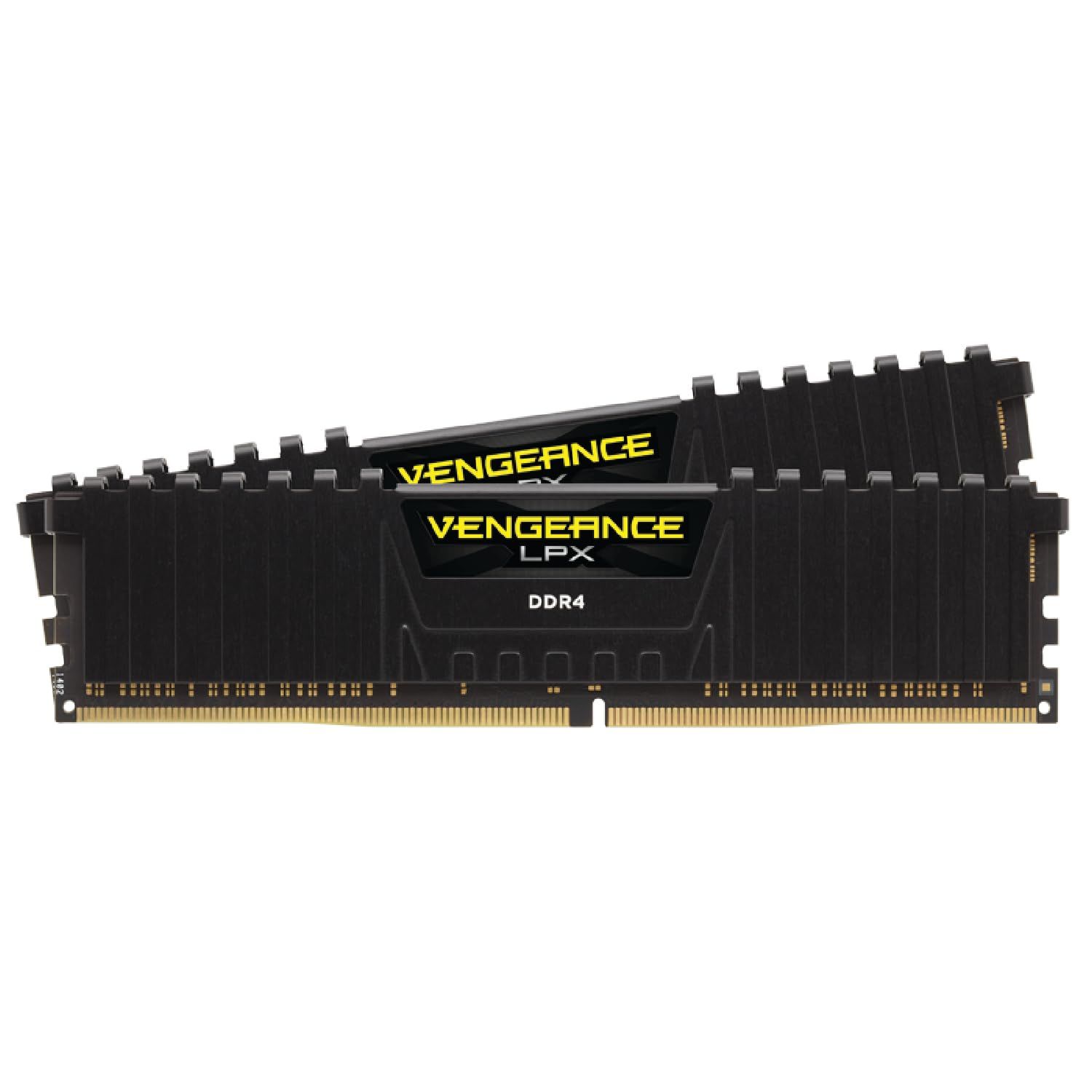
The Corsair Vengeance LPX kit is the pick for DDR4 systems. It pairs two 16GB DDR4 modules rated by Corsair at 3200 MT/s with CL16 latency at 1.35V, using an XMP 2.0 profile, with a black anodized aluminum heat spreader.
Corsair lists compatibility with Intel 300, 400, 500 and 600 series and X299 boards, plus AMD 300, 400 and 500 series and X570 boards. The maker notes that "The small form factor makes it ideal for smaller cases," which also helps around large CPU coolers. Without XMP enabled, the kit runs at its SPD speed of 2133MHz at 1.2V.
Key highlights
- 32GB (2x16GB) DDR4 kit
- 3200 MT/s, CL16
- 1.35V, Corsair's listed voltage
- XMP 2.0 profile
- Anodized aluminum heat spreader
- Limited lifetime warranty
Pros
- Wide list of supported Intel and AMD DDR4 chipsets
- Small form factor suits compact cases
- One XMP setting sets the rated speed
- Limited lifetime warranty
Cons
- DDR4 only, so it will not fit a DDR5 motherboard
- Corsair lists XMP 2.0 only, with no EXPO profile
- Runs at 2133MHz until XMP is enabled
Who it is for: Owners of an existing DDR4 Intel or AMD desktop who want to move to 32GB.
Skip if
You are building a new PC on a DDR5 platform.
How to Choose
- Match the memory generation. DDR5 kits only work in DDR5 motherboards and DDR4 kits only in DDR4 boards, so check your board's specification before anything else.
- Size capacity to your workload. 32GB suits most gaming and everyday builds, while 64GB or 96GB makes more sense for video editing, large projects and virtual machines.
- Read speed and latency together. At the same 6000 speed, a CL28 kit has tighter timings than a CL30 kit, so compare both numbers rather than speed alone.
- Plan to enable XMP or EXPO. Without a profile, kits run at their default SPD speed, such as DDR5-4800 for the Corsair Dominator or 2133MHz for the DDR4 Vengeance LPX.
- Check height against your CPU cooler. Where makers list it, module height runs from 46.1mm on the TEAMGROUP Delta to 57mm on the Corsair Dominator with its top bar, which matters under large air coolers.
- Check the QVL. Makers point buyers to the motherboard QVL because the rated speed depends on the board and CPU.
FAQ
Is 32GB of RAM enough for a gaming PC?
For most gaming and everyday use, a 32GB kit in two modules is a sensible target. Step up to 64GB or 96GB if you also edit video, run virtual machines or work with very large files.
Can I put DDR5 RAM in a DDR4 motherboard?
No. DDR4 and DDR5 modules are keyed differently and are not interchangeable, so buy the generation your motherboard supports.
Why is my new RAM running below its rated speed?
Kits start at a default SPD speed until you enable the XMP or EXPO profile in BIOS. Even then, the maximum stable speed depends on your motherboard and CPU.
What is the difference between XMP and EXPO?
XMP is Intel's memory profile format and EXPO is AMD's. Both store the kit's rated speed, timings and voltage so the BIOS can apply them, and some kits, such as the G.SKILL Trident Z5 Neo RGB, include both.
Should I buy one kit or combine two smaller kits?
Buy one kit with all the capacity you need. Makers rate and validate modules as a matched set, so two separate kits are not guaranteed to run together at the rated speed.
Published November 8, 2026 Last updated November 8, 2026
Add Technobezz on Google:Preferred SourceGoogle Discover
More buying guides
Buying guide
6 Best Microwaves in 2026
Buying guide
7 Best Microphones for Recording Vocals in 2026
Buying guide
7 Best Samsung Phones in 2026
Buying guide
6 Best In-Ceiling Speakers in 2026
Buying guide7 Best Headsets for Work in 2026Buying guide6 Best 85-Inch TVs in 2026Buying guide7 Best Tablets in 2026Buying guide4 Best Tablets for Kids in 2026Buying guide9 Best Bookshelf Speakers for 2026Buying guide3 Best Rolling TV Monitors You Can Buy Right NowBuying guide8 Best Blood Pressure Monitors for Home Use in 2026Buying guide5 Best Wi-Fi Routers for 2026