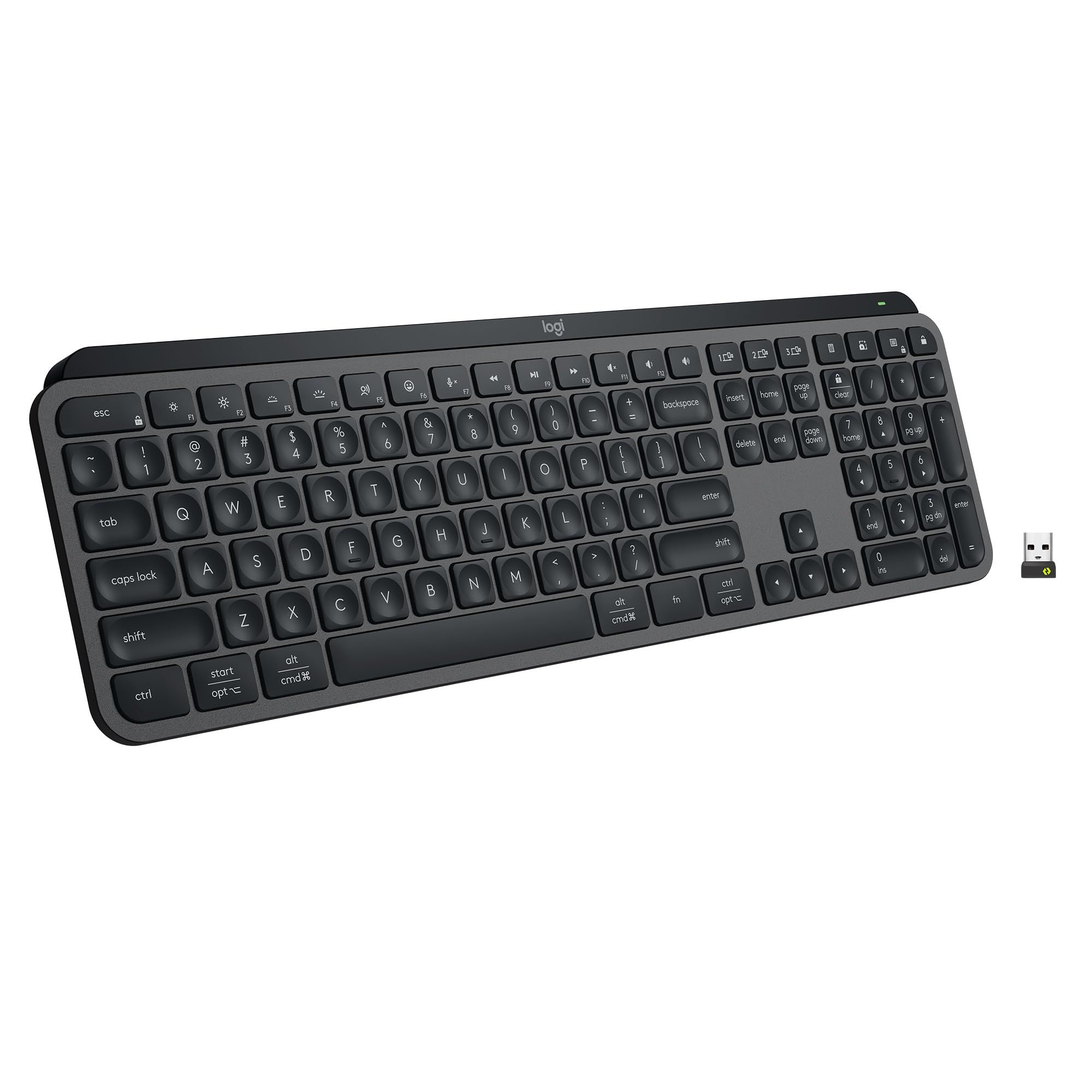
The MX Keys S is our top pick for typing in 2026. It is a low-profile keyboard angled for a natural wrist position, and its keys are spherically dished and shaped for fingertips, which Logitech says reduces the chances of a mistype. The backlight turns on when your hands approach and adjusts to the room lighting.
Technobezz is supported by its audience. We may get a commission from retail offers.
5 Best Keyboards for Typing in 2026
The MX Keys S is our top pick for typing in 2026, with spherically dished keys and a low-profile angle built for a natural wrist position. See the other picks.
T
Technobezz
Editorial Team
Updated November 15, 2026Nov 15, 2026
•12 min read

Get Deals Like These in Your Inbox
The best prices, straight to your inbox.
Add Technobezz on Google:Preferred SourceGoogle Discover
This guide is for people who type for a living or for school: writers, developers, support agents and students who want a keyboard chosen for hand comfort and daily use. Some typists want mechanical switches, some want a split board, and some want a palm rest under their wrists. The five picks below cover those needs, and each one is sold new on Amazon.
At a Glance
| Category | Product | Why We Picked It |
|---|---|---|
| Best overall | Logitech MX Keys S | Low-profile board with dished keys, auto backlight and a three-device switch. |
| Best mechanical | Logitech MX Mechanical Wireless Illuminated Performance Keyboard | Low-profile mechanical switches, three switch options and a three-device switch. |
| Best ergonomic | Logitech Wave Keys | Wave-shaped body with a three-layer memory foam palm rest. |
| Best split | Kinesis Freestyle2 for PC | Split halves that separate up to 9 or 20 inches, with a zero-degree slope. |
| Best compact | AULA F75 Pro Knob Side-Printed Mechanical Keyboard | 75% mechanical board with hot-swappable switches and a metal knob. |
How we chose
We compared the specifications each maker publishes for every keyboard in this guide, including layout, switch type, connectivity, compatibility and comfort features. We also checked that each pick is sold new on Amazon.
The best keyboards for typing right now
Logitech MX Keys S - Best overall
The MX Keys S is a low-profile keyboard angled for a natural wrist position. Its keys are spherically dished and shaped for fingertips, which Logitech says minimizes the chances of a mistype. The backlight turns on when your hands approach and brightens or fades to suit the room.
It switches between up to 3 devices with a single key press, and it works with Windows, macOS, ChromeOS, Linux and iPadOS. In the Logi Options+ app, Smart Actions can run several tasks from one keystroke. The body is made with recycled plastic.
Key highlights
- Low-profile design angled for a natural wrist position
- Spherically dished keys shaped for fingertips
- Backlight reacts to hand proximity and room lighting
- Switches between up to 3 devices with one key press
- Works with Windows, macOS, ChromeOS, Linux and iPadOS
Pros
- Dished keys are shaped to reduce mistypes
- Backlight turns on as your hands approach
- One board switches across up to three devices and five operating systems
Cons
- Smart Actions run through the Logi Options+ app
- Device switching covers up to 3 devices
Who it is for: This is the pick for someone who wants a slim desk keyboard that can drive up to three devices and works across five operating systems.
Skip if
Skip it if you need to pair more than three devices, because it switches between up to 3.
Logitech MX Mechanical Wireless Illuminated Performance Keyboard - Best mechanical
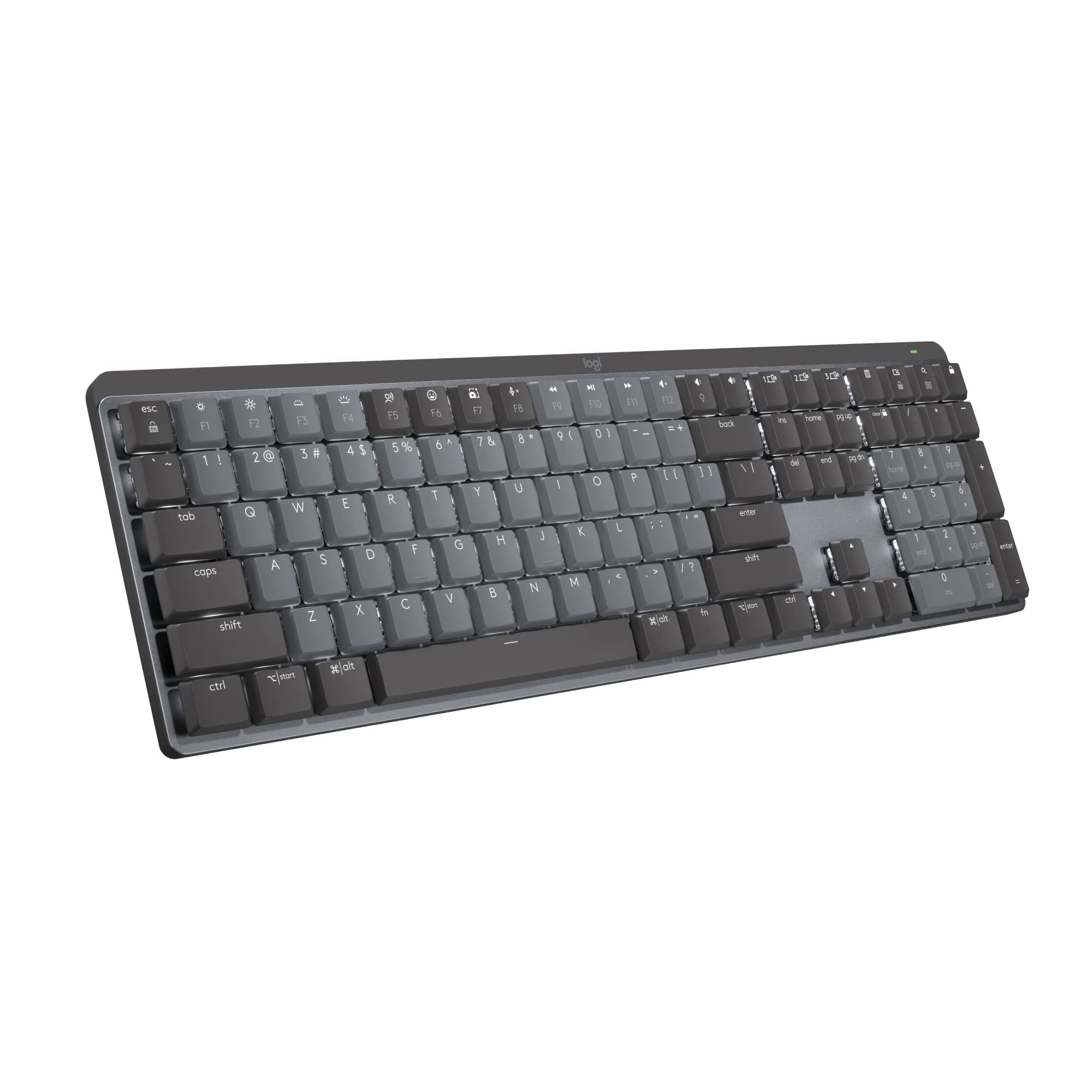
The MX Mechanical Wireless Illuminated Performance Keyboard is a wireless keyboard with low-profile mechanical switches, which Logitech describes as offering a deep and reassuring typing feel. The switch type depends on the configuration you buy: it comes with one of three switches, Tactile Quiet, Clicky or Linear. The full-size version has a built-in number pad, and a smaller Mini version is sold separately.
Two-color keycaps help you find your finger position, and the backlight turns on when your hands approach and adjusts to the lighting conditions. One button switches between up to 3 devices, and the board works with Windows, macOS, ChromeOS, Linux and iPadOS. In Logi Options+, you can remap Fn keys, change backlight effects and set per-app profiles.
Key highlights
- Low-profile mechanical switches
- Tactile Quiet, Clicky or Linear switch options
- Full-size version includes a built-in number pad
- Backlight reacts to hands and room lighting
- Switches between up to 3 devices with one button
Pros
- Mechanical feel in a low-profile body
- Three switch types to match your taste
- Per-app profiles and remappable Fn keys
Cons
- Switch feel and sound depend on which of the three switch types you choose
- The Mini version is sold separately if you want a smaller footprint
Who it is for: This is for typists who want mechanical feedback without a tall, chunky board.
Skip if
Skip it if you need to switch between more than three devices, because it switches between up to 3.
Logitech Wave Keys - Best ergonomic
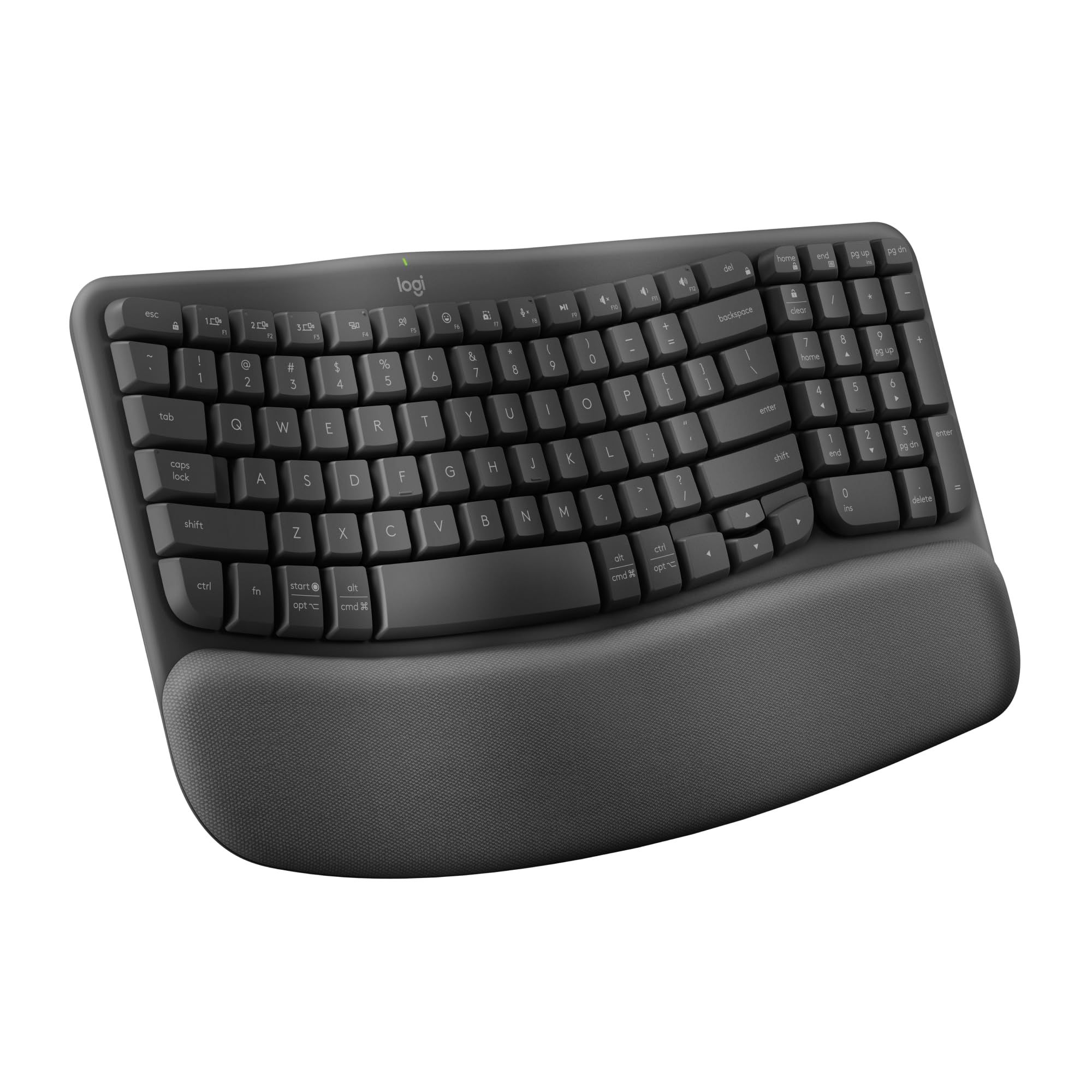
Wave Keys is a wave-shaped ergonomic keyboard with a cushioned palm rest made from 3 layers of memory foam. Its compact, wavy layout places your hands, wrists and forearms in a natural typing position, and it is certified ergonomic by United States Ergonomics.
It connects over Bluetooth or with the included Logi Bolt receiver. Easy-Switch keys move between a laptop, tablet or phone, and it works with Windows, macOS, ChromeOS, iPadOS, iOS and Android. Keys can be customized in the Logi Options+ app, and it runs on two included AAA batteries rated for up to 3 years.
Key highlights
- Wave-shaped ergonomic layout
- Cushioned palm rest with 3 layers of memory foam
- Certified ergonomic by United States Ergonomics
- Bluetooth or included Logi Bolt receiver
- Up to 3 years on two included AAA batteries
Pros
- Palm rest is built into the board
- Certified ergonomic by United States Ergonomics
- Wide device and operating system support
Cons
- It runs on two AAA batteries, so you will need to replace them
- Key customization depends on the Logi Options+ app
Who it is for: This is for someone who wants a built-in palm rest and a wavy layout that places hands, wrists and forearms in a natural typing position.
Skip if
Skip it if you need a wired connection, because it connects over Bluetooth or the included Logi Bolt receiver.
Kinesis Freestyle2 for PC - Best split
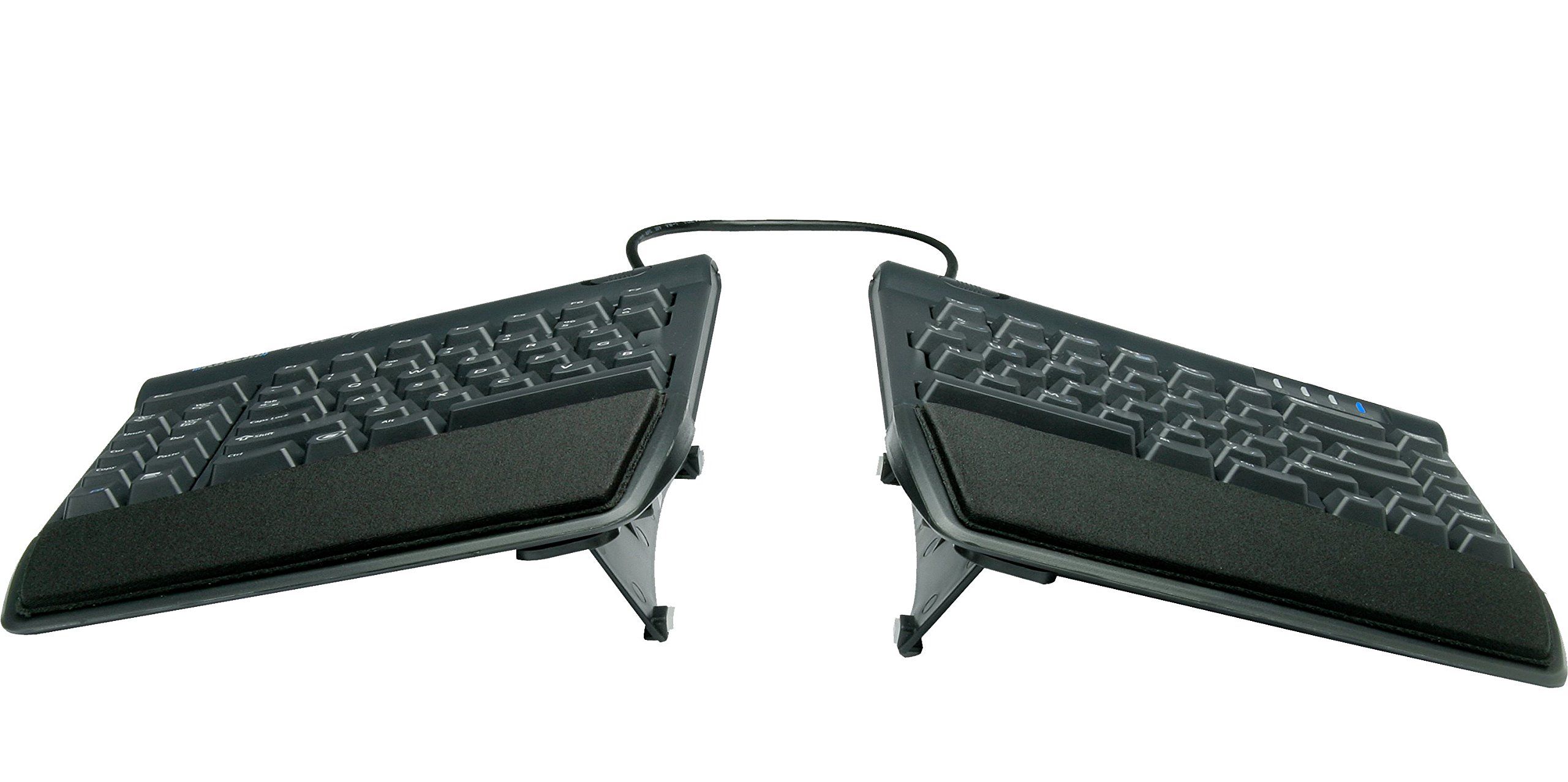
Freestyle2 for PC is a split keyboard whose halves can sit up to 9 or 20 inches apart, depending on the link cable. It has a zero-degree slope that keeps it low and reduces wrist extension. The VIP3 version (KB820PB-us) has built-in palm supports.
The keys are membrane rubber domes with 35 grams of activation force and 3.9 mm of travel, and the board connects with a 6-foot USB Type-A cable. It supports Windows 7 to 11; on Linux, the multimedia and calculator keys do not work. Driverless hot keys handle common mouse actions, and it has a 2-year warranty. Depth depends on the version: the standard version is 7.125 inches deep, or 10 inches with palm supports fitted, and the standard version weighs 2 lbs.
Key highlights
- Split halves up to 9 or 20 inches apart
- Zero-degree slope for a low position
- Membrane rubber dome keys, 35 grams of activation force, 3.9 mm travel
- 6-foot USB Type-A cable
- Built-in palm supports on the VIP3 version
Pros
- Separation adjusts to where your arms naturally land
- Low slope reduces wrist extension
- Driverless hot keys cover common mouse actions
- 2-year warranty
Cons
- It is a wired board with a 6-foot USB Type-A cable
- On Linux, the multimedia and calculator keys do not work
- The standard version is 7.125 inches deep, or 10 inches with palm supports fitted
Who it is for: This is for typists who want each half of the board to sit where their hands fall and who want a low slope to reduce wrist extension.
Skip if
Skip it if you need wireless connectivity, because it connects with a 6-foot USB Type-A cable.
AULA F75 Pro Knob Side-Printed Mechanical Keyboard - Best compact
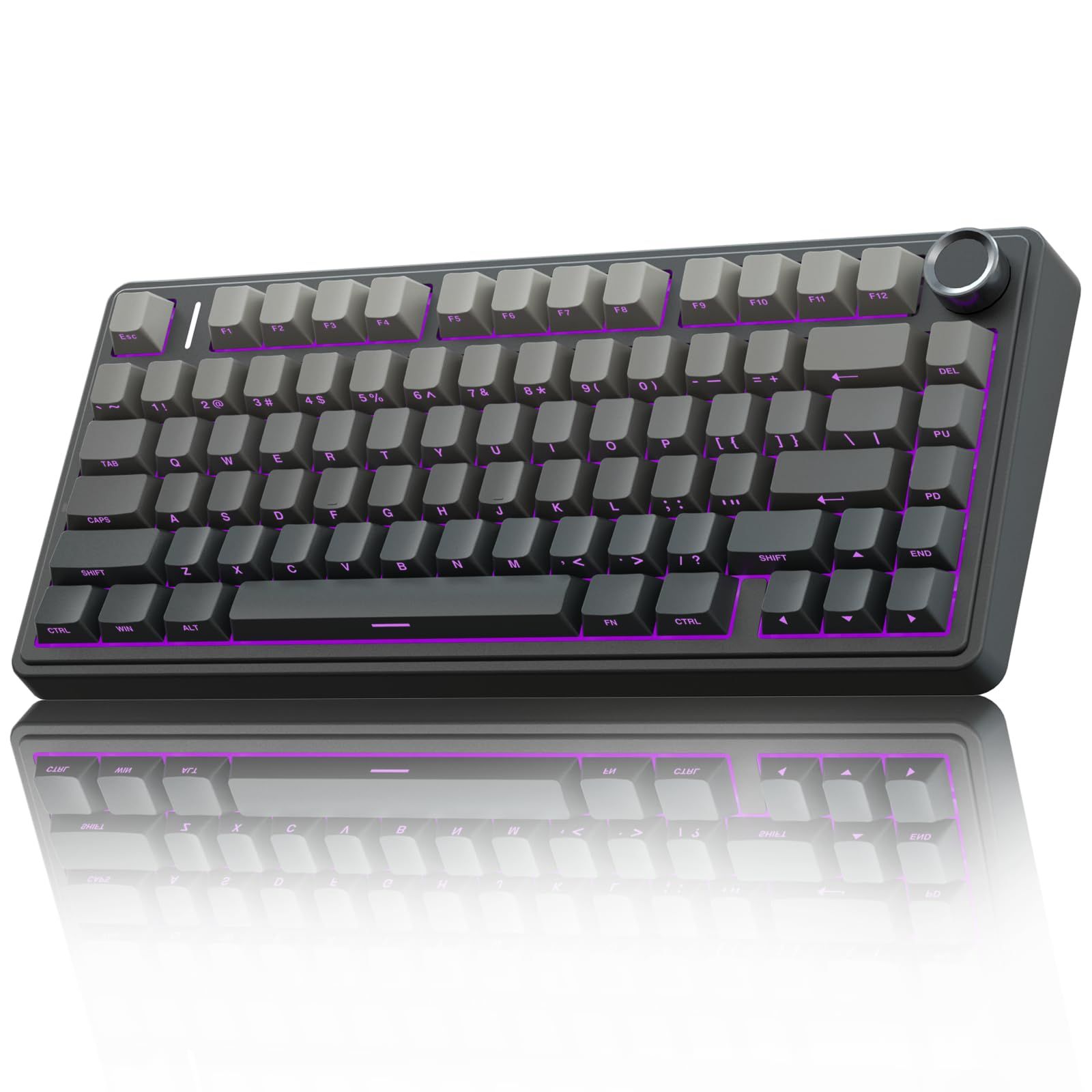
The AULA F75 Pro Knob Side-Printed Mechanical Keyboard is a 75% mechanical keyboard with 81 keys and pre-lubed Reaper switches. The switches are hot-swappable and accept 3-pin and 5-pin switches, so you can change them later. It is gasket-mounted for a softer typing feel and has five layers of sound dampening.
A multifunction metal knob sits on the board, and it connects three ways: 2.4GHz wireless, Bluetooth or USB-C. The south-facing RGB lighting has 16 effects. It has a 1-year warranty, and a unit that stops working within 365 days of delivery is replaced with a new one.
Key highlights
- 75% layout with 81 keys
- Pre-lubed, hot-swappable Reaper switches accept 3-pin and 5-pin
- Gasket mount with five layers of sound dampening
- 2.4GHz, Bluetooth or USB-C
- Multifunction metal knob
Pros
- Hot-swap sockets let you change the switch feel later
- Three connection modes for different setups
- Gasket mount gives a softer typing feel
Cons
- Warranty runs 1 year
- The 75% layout uses 81 keys, so the key set is compact
Who it is for: This is for typists who want a small mechanical board they can tune with their own switches.
Skip if
Skip it if you want a larger key set, because this is a 75% layout with 81 keys.
How to Choose
- Decide what key feel you want. The MX Keys S uses spherically dished keys, the MX Mechanical Wireless Illuminated Performance Keyboard uses low-profile mechanical switches, and the AULA F75 Pro Knob Side-Printed Mechanical Keyboard uses pre-lubed Reaper switches. Match the construction to how you like to type.
- Match the layout to your work. The MX Mechanical Wireless Illuminated Performance Keyboard comes in a full-size version with a built-in number pad, and a smaller Mini version is sold separately. The AULA F75 Pro Knob Side-Printed Mechanical Keyboard uses a 75% layout with 81 keys, while the Freestyle2 for PC splits into two halves.
- Check device switching and operating system support. The MX Keys S and the MX Mechanical Wireless Illuminated Performance Keyboard each switch between up to 3 devices, and Wave Keys has Easy-Switch keys for a laptop, tablet or phone. Check the supported operating system list for each board before you buy.
- Look at wrist support and slope. Wave Keys has a built-in palm rest with three layers of memory foam. The Freestyle2 for PC uses a zero-degree slope to reduce wrist extension, and the VIP3 version (KB820PB-us) adds built-in palm supports.
- Think about switch type and whether it can be changed. The MX Mechanical Wireless Illuminated Performance Keyboard comes in Tactile Quiet, Clicky or Linear, so pick the feel at purchase. The AULA F75 Pro Knob Side-Printed Mechanical Keyboard is hot-swappable and accepts 3-pin and 5-pin switches if you want to change them later.
- Consider power and connection. Wave Keys connects over Bluetooth or the included Logi Bolt receiver and runs on two included AAA batteries rated for up to 3 years. The Freestyle2 for PC connects with a 6-foot USB Type-A cable, and the AULA F75 Pro Knob Side-Printed Mechanical Keyboard offers 2.4GHz, Bluetooth or USB-C.
FAQ
What makes a keyboard good for typing?
Key shape, key feel, board angle and wrist support all matter. The MX Keys S uses spherically dished keys shaped for fingertips at an angle Logitech describes as optimum for a natural wrist position, while the MX Mechanical Wireless Illuminated Performance Keyboard focuses on low-profile mechanical switch feel.
Is a split keyboard better for typing?
A split keyboard lets each half sit where your arms land. The Freestyle2 for PC separates up to 9 or 20 inches depending on the link cable and uses a zero-degree slope to reduce wrist extension. Whether it suits you depends on your posture and desk.
Can I change the switches on a mechanical keyboard?
On the AULA F75 Pro Knob Side-Printed Mechanical Keyboard, the switches are hot-swappable and accept 3-pin and 5-pin switches. On the MX Mechanical Wireless Illuminated Performance Keyboard, you choose one of three switch types, Tactile Quiet, Clicky or Linear, when you buy the board.
How long do wireless keyboards last on batteries?
It depends on the model. Wave Keys runs on two included AAA batteries rated for up to 3 years. The AULA F75 Pro Knob Side-Printed Mechanical Keyboard connects by 2.4GHz wireless, Bluetooth or USB-C, and the MX Keys S and the MX Mechanical Wireless Illuminated Performance Keyboard each switch between up to 3 devices.
Do I need a palm rest for typing?
A palm rest supports the base of your hands while you type. Wave Keys has one built in with three layers of memory foam, and the VIP3 version of the Freestyle2 for PC adds built-in palm supports. Whether you want one depends on how you position your wrists.
Published November 15, 2026 Last updated November 15, 2026
Add Technobezz on Google:Preferred SourceGoogle Discover
More on keyboards
Buying guide
8 Best MIDI Keyboards in 2026
Buying guide
8 Best Wireless Gaming Keyboards in 2026

Buying guide
5 Best Wireless Keyboard and Mouse Combos 2026
Buying guide
Best Low Profile Mechanical Keyboards in 2026
More buying guides
Buying guide5 Best MP3 Players in 2026Buying guide6 Best iPhone 17 Pro Cases in 2026Buying guide5 Best Apple Watch Bands in 2026Buying guide5 Best Robotic Pool Cleaners in 2026Buying guide7 Best Smart Home Hubs in 2026Buying guide6 Best Thermal Pastes in 2026Buying guide5 Best Laptops for Seniors in 2026Buying guide5 Best Earbuds for Calls in 2026