
To charge an Apple Watch, take it off, plug its magnetic charging cable into a USB power adapter and the adapter into an outlet, then set the back of the watch on the concave side of the charger. The magnets snap it into place, a charging symbol appears on the watch face, and a chime plays unless Silent Mode is on. The screens shown come from an Apple Watch with watchOS 26.5 and a paired iPhone with iOS 26.5.
The short version
- Charge: plug the Watch charger into power, then set the back of the watch on its concave side.
- Check: a green bolt means charging, yellow means Low Power Mode, and a red bolt in a ring means a drained watch is connected.
- Fast charging: Series 7 and later, SE 3 and every Ultra need the USB-C magnetic fast charging cable and a USB-PD adapter.
- No original charger: an Apple or Made for Apple Watch charger that suits your model works, and an iPhone 15 or later can power the cable.
- Not charging: use the Apple cable, check the plugs, reseat the watch, clean both surfaces, swap the cable and adapter, wait 30 minutes, then force restart.
How to put Apple Watch on its charger
Apple's steps start with the charger, not the watch. Place the charger on a flat surface in a well ventilated spot, plug its cable into a USB power adapter, and plug the adapter into an outlet. Apple lists the power adapter as sold separately, so you may need to supply your own.
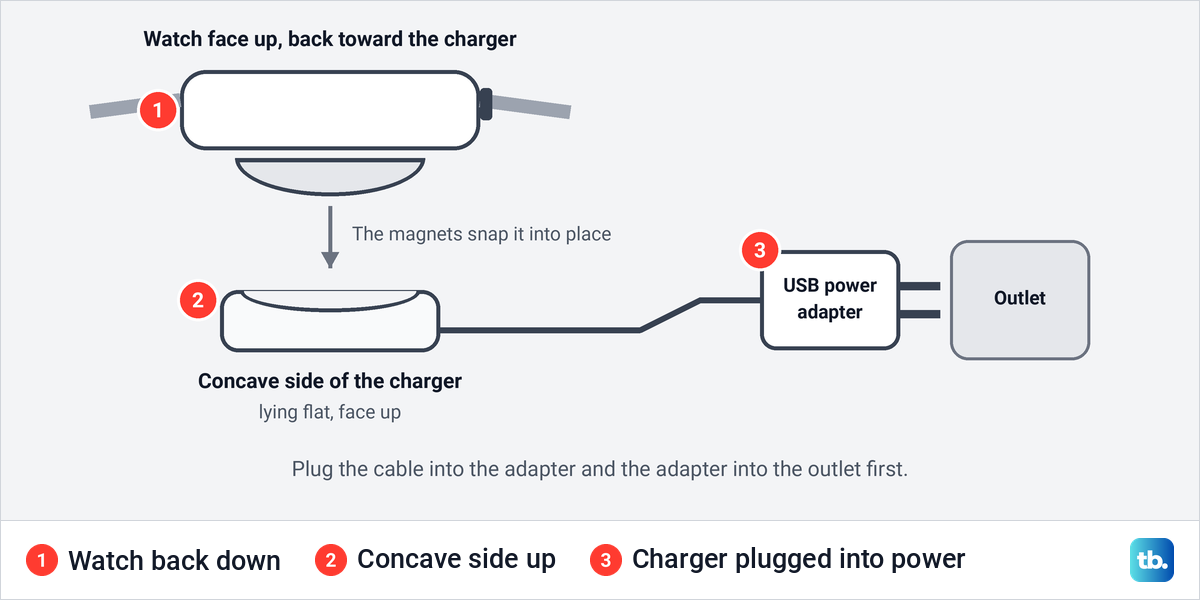
Take the watch off your wrist and set its back on the concave side of the charger. Apple says the magnets snap the watch to the charger and align it properly, so there is nothing to line up by hand. Opening the band lets the watch lie flat, which is the position Apple describes for its MagSafe Duo charger.
On the Apple Watch Magnetic Charging Dock or a MagSafe Duo, Apple says a larger watch, which it lists as 44mm, 45mm or 49mm, may need the charger tilted to another angle or laid completely flat before the magnets line up. If an Apple Watch Ultra still will not connect reliably while lying flat, Apple suggests removing its band before you place it on the charger.
How to tell Apple Watch is charging
When charging starts, a charging symbol appears on the watch face and the watch plays a chime. Apple's guide says the symbol is yellow when the watch is in Low Power Mode. Check the battery percentage a few minutes later as well, because a rising number tells you power is really getting through.
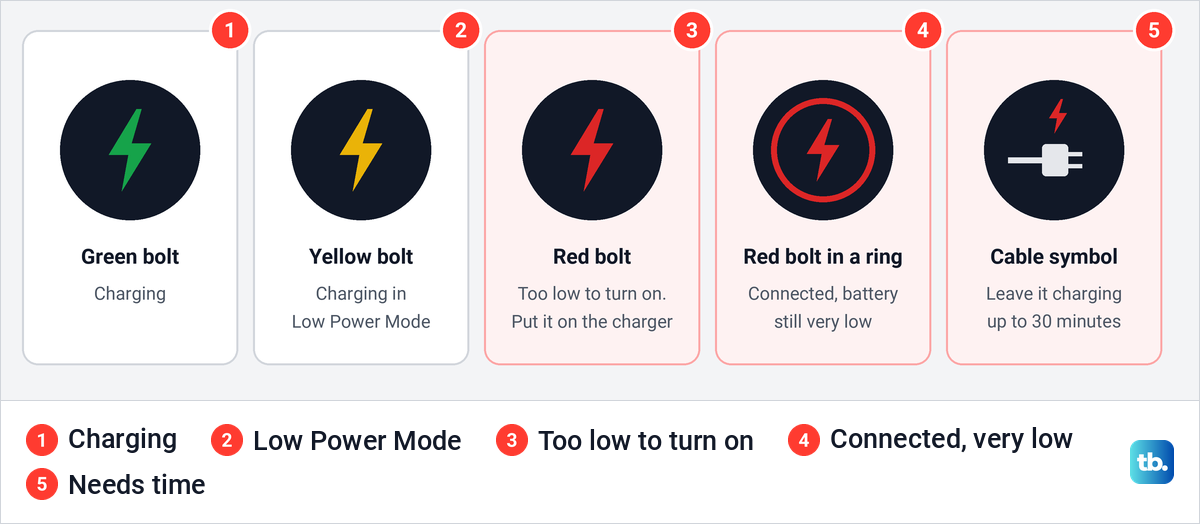
Red symbols mean the battery is nearly empty. Apple says a red lightning bolt on its own means the watch does not have enough power to turn on, and once you connect the charger it changes to a red lightning bolt inside a ring. If the screen stays blank or shows a charging cable symbol, Apple says the watch may need up to 30 minutes on the charger before it turns on.
That ring is the detail a lot of charging advice gets wrong. A red bolt inside a ring is not a failed charge. It means the charger is connected and the battery is still too low to start, so leave the watch on a powered charger before you try any fix.
No chime does not mean no charge either. Apple skips the chime when the watch is in Silent Mode. When we opened Settings > Sounds & Haptics on watchOS 26.5, the page also carried this note under the volume slider: "Silent mode will not silence alarms and timers when Apple Watch is charging."
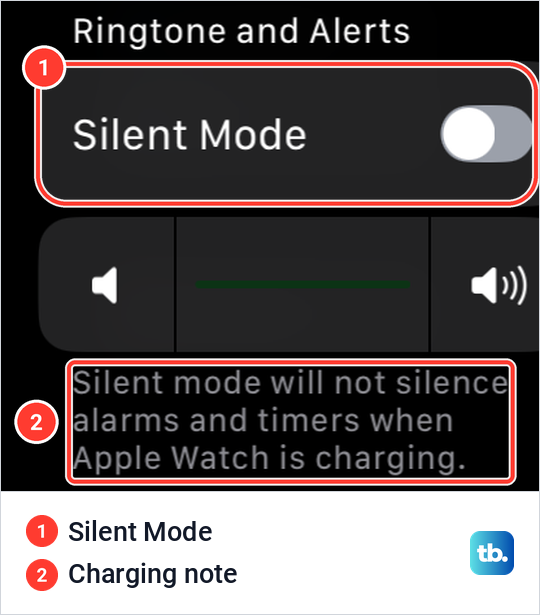
So a morning alarm still sounds while the watch charges on your nightstand. Our guide on how to turn on Silent Mode on Apple Watch covers the other ways to quiet the watch. The same Settings page holds the slider to adjust the Apple Watch alert volume if alerts are too quiet once it is back on your wrist.
Which chargers and cables work with Apple Watch
Apple recommends charging only with a charger made by Apple or one that has completed Apple's MFi certification and carries the Made for Apple Watch badge. It warns that a counterfeit or uncertified charger can cause slow charging, repeated chimes and reduced battery lifespan. Apple's own charging connectors are white, and each carries an Apple model number such as A2515 or A3277.
| What you have | Does it charge Apple Watch? | What to expect |
|---|---|---|
| Apple Watch Magnetic Charging Cable | Yes | Charges at standard speed from a USB power adapter or a USB port |
| Apple Watch Magnetic Fast Charger to USB-C Cable | Yes | Fast charging on Series 7 and later, SE 3 and Ultra models with a USB-PD adapter |
| Made for Apple Watch dock or charger | Yes | Check for the Made for Apple Watch badge before you buy |
| MagSafe Duo Charger | Yes, on its Watch side | No fast charging for Series 7, Series 8 or Apple Watch Ultra, so use the fast charging cable for speed |
| Computer or other USB port | Yes, as power for a Watch cable | Can be slower than a dedicated USB-C charger |
| iPhone 15 or later | Yes, through a Watch cable in its USB-C port | Up to 4.5 watts |
| iPhone MagSafe Charger or Qi phone pad | Not in Apple's Watch instructions | Use a Watch charger instead |
| WPT charger from China mainland or Indonesia | Only with the models it was sold for | No fast charging, and other watches show Unable to charge |
For fast charging, Apple's support page lists its own 18W, 20W, 29W, 30W, 35W, 61W, 87W, 96W and 140W USB-C adapters, or a comparable third-party USB-C adapter that supports USB Power Delivery at 5W or greater. Apple's user guide words the rule as an 18W or greater USB-C adapter, so an Apple adapter of 18W or more meets both. You can spot the fast cable by its USB-C plug and the aluminum around the puck.
Apple also says the charger that came in the box is the fastest for your model. The cable sold with Series 12 and Ultra 4 charges those watches faster than older cables, and it has the model number A3277 printed on its USB-C plug. A cable from an earlier watch still works, but Apple says it may charge more slowly.
How to charge Apple Watch without its original charger
You still need a charger made for the watch, but it does not have to be the one from the box. An Apple Watch charging cable, an Apple Watch Magnetic Charging Dock, the Watch side of a MagSafe Duo, or a Made for Apple Watch charger from another brand will do, as long as it suits your watch. Apple notes that MagSafe Duo does not fast charge Series 7, Series 8 or Apple Watch Ultra.
A WPT charger sold in China mainland or Indonesia works only with the models it was sold for. Check the model before you use one, because Apple says other watches show an Unable to charge message instead.
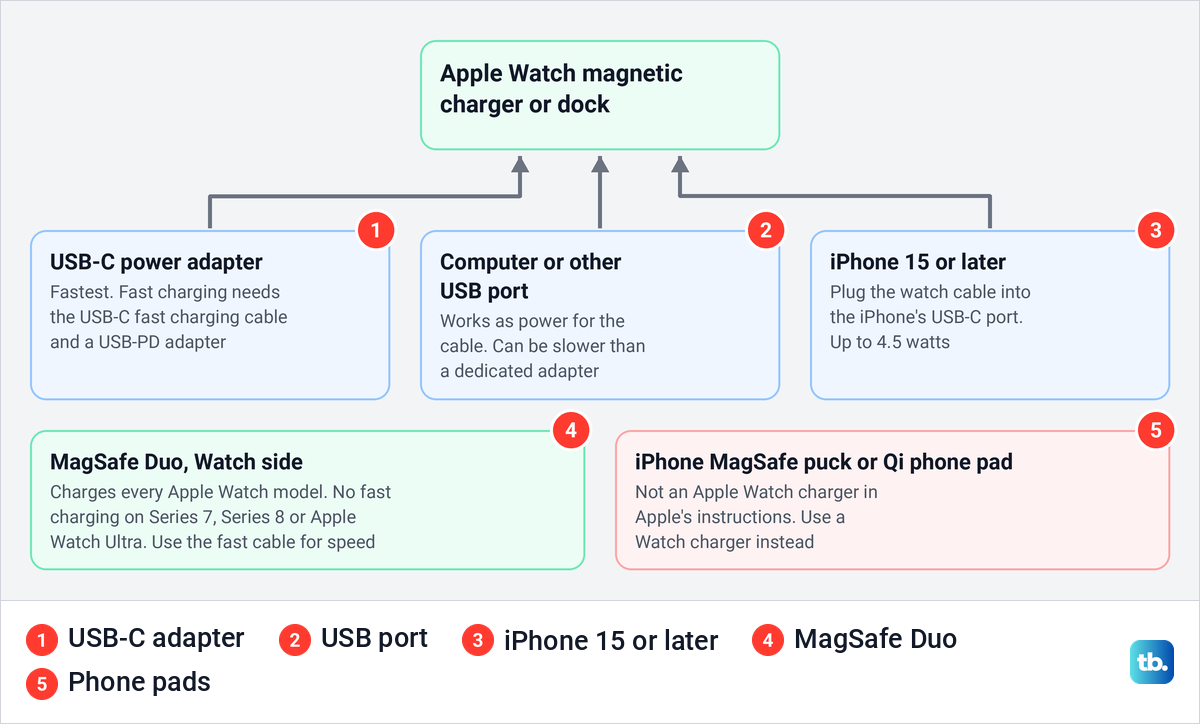
The power can come from more places than a wall adapter. Apple says you can plug the charging cable into a USB port, so a computer works. Expect it to be slower, because Apple notes that computers, hubs, car ports and multiport chargers can deliver less power than a dedicated USB-C charger.
An iPhone 15 or later can be the power source too. Apple says these iPhones can charge an Apple Watch at up to 4.5 watts when you connect an Apple Watch Magnetic Fast Charger to USB-C Cable directly to the iPhone. An older Magnetic Charging Cable also works through Apple's USB-C to USB Adapter.
Apple describes its iPhone MagSafe Charger as a charger for iPhone and AirPods, and its Watch charging always runs through a Watch charging puck or the separate Watch connector on MagSafe Duo. A generic Qi phone pad is not one of Apple's Watch chargers either. Nothing in Apple's guides describes charging a watch by resting it on the back of an iPhone, so skip reverse charging tricks and use the cable.
How long Apple Watch takes to charge
With fast charging, Apple says Series 10 and later go from 0 to 80 percent in about 30 minutes. Series 7, 8 and 9, SE 3 and Ultra 3 and later take about 45 minutes, and the first Ultra and Ultra 2 take about an hour. For a full charge, Apple gives about 1 hour for Series 12 and about 75 minutes for SE 3 and Ultra 4.
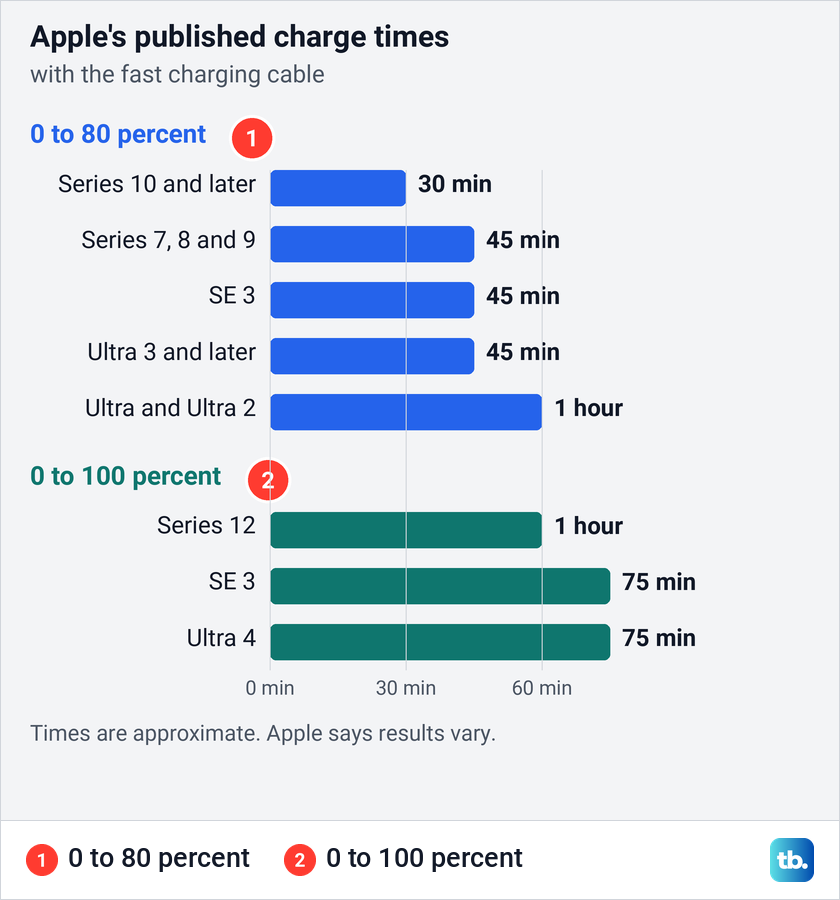
These are Apple's numbers from its own tests with its fast charging cable and a 20W USB-C adapter, and Apple says actual results vary. The last stretch is the slowest: on SE 3, Apple's figures leave about 30 minutes between 80 percent and full. A watch on a slower cable or power source will take longer.
Short top-ups go a long way. Apple says 15 minutes of charging gives Series 12 up to 12 more hours, Ultra 4 up to 18 hours and SE 3 up to 8 hours of battery life. Charging takes longer if you keep the display on, install updates or transfer media while the watch is on the charger, so leave it alone.
How to check the battery level on Apple Watch
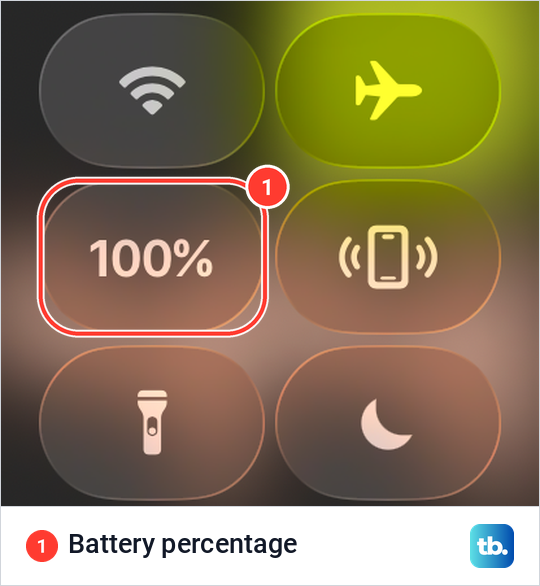
The quickest check is Control Center. Apple's step is to press the side button, and on watchOS 26.5 that one press opened Control Center for us with the battery percentage among the first tiles. Apple says tapping the percentage shows a larger charge ring and the button that turns on Low Power Mode.
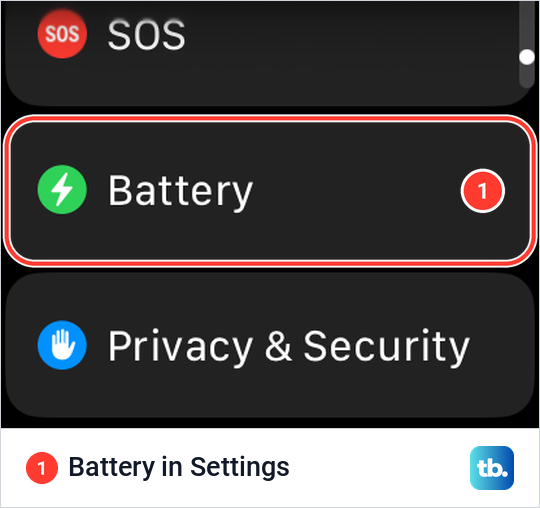
For more detail, open the Settings app on the watch and tap Battery. On watchOS 26.5 we found Battery below SOS and above Privacy & Security in the Settings list. Apple says this page shows the current charge level with a detailed charging graph, and Battery Health and Low Power Mode sit inside it.
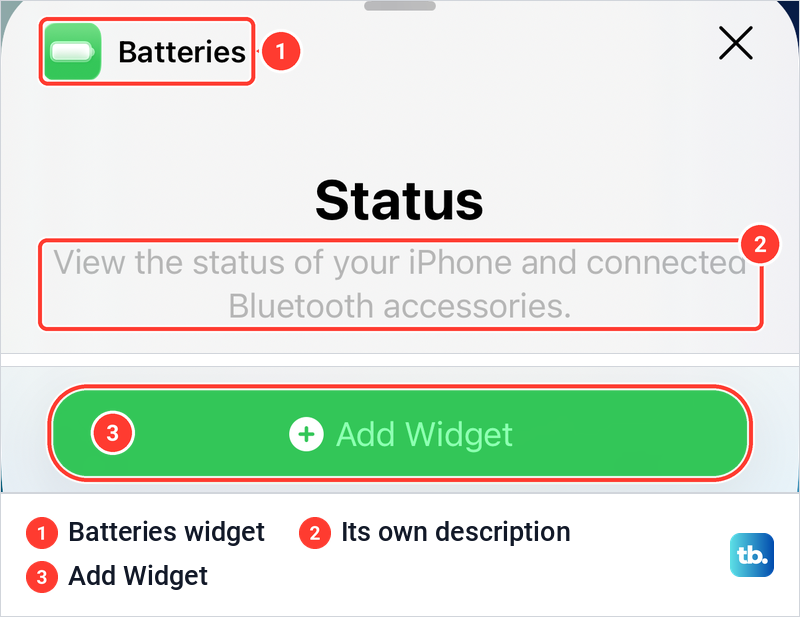
Two more places save you a step. You can add a battery complication to your watch face so the level is always on screen. Apple also says a Batteries widget on your iPhone shows the charge level of your connected Apple Watch, though a level on its own does not prove the watch is charging right now.
To add the widget, touch and hold an empty part of the Home Screen, tap Edit, then Add Widget. On iOS 26.5 the widget gallery found it as soon as we typed Batteries into its search field, and its own description reads "View the status of your iPhone and connected Bluetooth accessories." Tap Add Widget to place it.
Use Nightstand Mode while Apple Watch charges
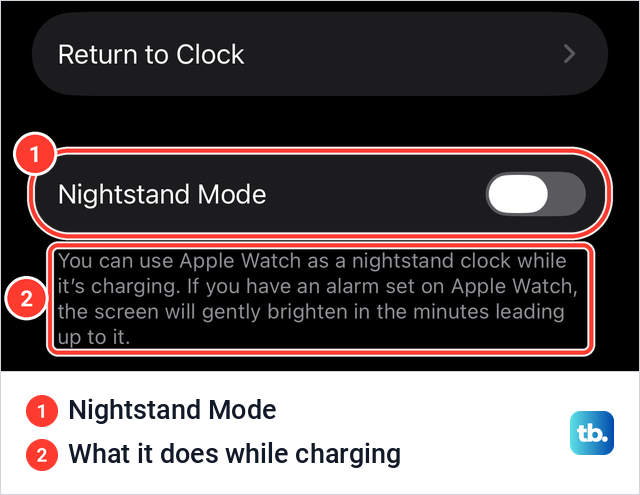
Nightstand Mode turns a charging watch into a bedside clock. Apple says that with it on, the watch shows charging status, the time and date, and any alarm you have set while it sits on the charger. A tap on the display or a light nudge of the watch shows the time, and Apple says even tapping the table might work.
On the watch, Apple's route is Settings > General > Nightstand Mode. The paired iPhone has the same switch: in the Watch app on iOS 26.5 we found Nightstand Mode under My Watch > General, with a note that the screen will gently brighten in the minutes leading up to an alarm. Apple's watchOS 27 guide adds that the watch should be connected to its charger facing up.
If you charge in the evening so the watch is ready for the night, set up sleep tracking on Apple Watch as well. Apple's figures say a 5 minute charge gives Series 12 or Ultra 4 up to 10 hours of sleep tracking, and 8 minutes gives SE 3 up to 8 hours.
Why Apple Watch stops charging at 80 percent
A watch that sits near 80 percent overnight may have an optimized charging hold active. Optimized Battery Charging learns your daily routine and, when it expects the watch to stay on the charger for a long time, holds the battery between 75 and 80 percent. It then aims to finish charging by the time you take the watch off.
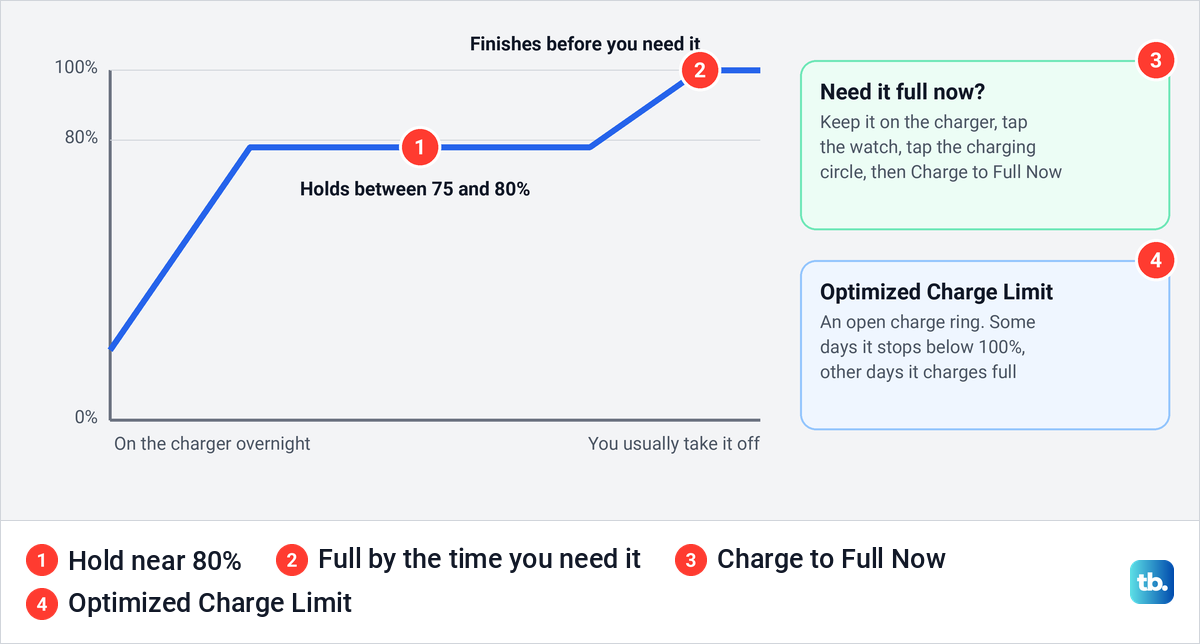
Some models add Optimized Charge Limit, which Apple says needs watchOS 10 or later on Apple Watch SE and later, Series 6 and later, and every Ultra. When it is active, an open charge ring appears as you connect the charger. The limit changes with your use, so the watch may charge to 100 percent on some days and less on others.
To charge to full now, keep the watch on the charger, tap it to show the charging screen, tap the circle with the green or yellow charging icon, then tap Charge to Full Now. A new watch shows Charging to full instead, because Apple says it needs time to learn your charging pattern first.
Both controls are in Settings > Battery > Battery Health. Turn off the Optimized Charge Limit switch, or the Optimized Battery Charging switch, then choose Turn Off Until Tomorrow or Turn Off.
Apple says Optimized Battery Charging is always on for Series 9 and later and every Ultra, so on those models only the charge limit can be turned off. On SE, Series 6, Series 7 and Series 8, Apple says turning off Optimized Battery Charging also turns off Optimized Charge Limit. Apple also warns that turning off Optimized Charge Limit can increase wear on the battery.
Use Low Power Mode until you can charge
Low Power Mode stretches the remaining charge when no charger is near. Apple's steps are to press the side button, tap the battery percentage and turn on Low Power Mode, or to go to Settings > Battery. An information screen appears each time, and you finish with Turn On, or Turn On For to keep it on for 1, 2 or 3 days.
Apple says the mode turns off the Always On display, background heart rate and blood oxygen readings, heart rate notifications and the double tap and wrist flick gestures. It switches itself off once the battery charges to 80 percent, unless you chose a number of days. A yellow charging symbol on the charger means the mode is still on.
How to fix an Apple Watch that will not charge
If no lightning bolt appears with the watch on the charger, work through Apple's checks in order. The first ones cost nothing and take a minute each, and the force restart comes last.
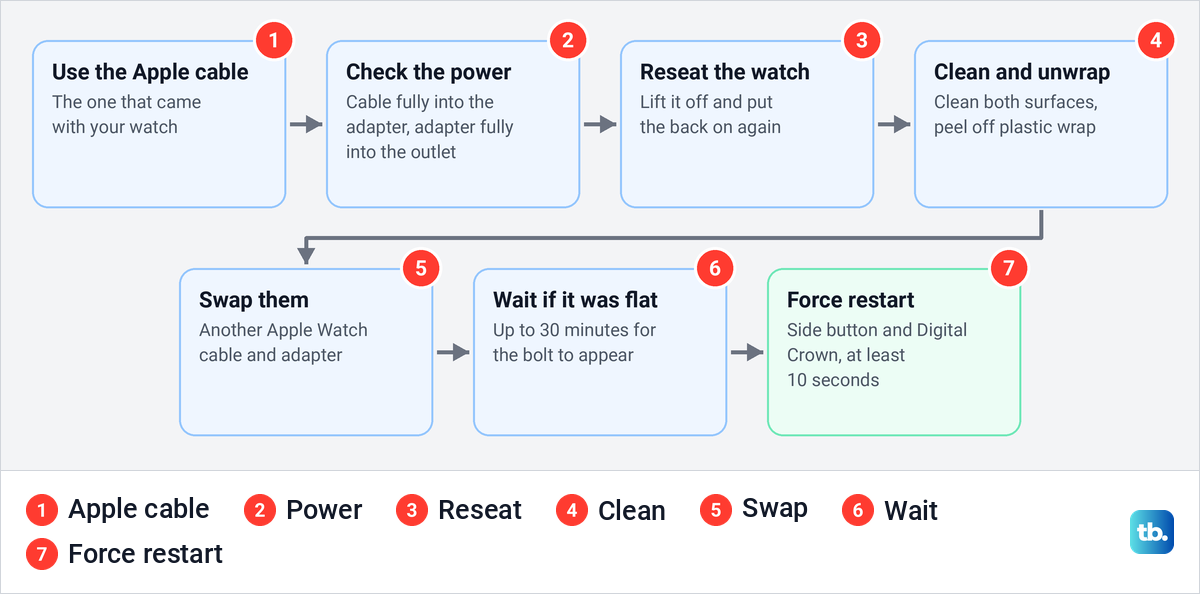
Start with the cable and the power. Apple's first check is to use the Apple Magnetic Charging Cable or USB-C Magnetic Fast Charging Cable that came with your watch, not a third-party charger. Then push the cable all the way into the USB power adapter and the adapter all the way into the outlet.
Next, lift the watch off and set its back on the charger again, because Apple says the bolt should appear once the magnets align correctly. If a case covers the back of the watch, take it off so the back sits directly on the charger.
Then check both surfaces. Apple says the back of the watch and the charger must be clean, and any plastic wrap must come completely off both sides of the charger. To clean the watch, Apple's steps are to turn off your Apple Watch, take it off the charger, wipe it with a nonabrasive, lint-free cloth lightly dampened with fresh water, and dry the back crystal. Apple says soap and cleaning products should not be used.
After that, try a different Apple Watch charging cable and a different USB power adapter. If the watch ran completely flat, leave it on the charger for a while, since Apple says the bolt can take up to 30 minutes to appear. Only after that, force a restart by pressing and holding the side button and the Digital Crown together for at least 10 seconds, or until the Apple logo appears.
Our steps to restart Apple Watch or force restart it show both buttons in detail. If the screen stays dark after every charging check, see how to fix an Apple Watch that will not turn on, and if it still will not charge, Apple's advice is to get it serviced.
One message has a simple cause. If the watch says Unable to charge and calls the charger country-specific, Apple says a WPT charger sold in China mainland or Indonesia is being used with a watch it does not support. Use a standard Apple Watch charger instead.
How to fix slow Apple Watch charging
With watchOS 26 and later, the watch can show a Slow Charger message in the Battery section of Settings. Apple says it does not mean anything is wrong with the watch or charger, only that a higher wattage charger would charge it faster. Plug the cable straight into a dedicated USB-C Power Delivery charger, ideally with the cable that came with the watch.
Multiport chargers, computers and USB hubs can share their output, and car ports can be slower too. Apple says the watch charges fastest at room temperature and slows down in heat or cold to protect the battery. Apple adds that the first fast charge after pairing with an iPhone can take longer.
Keep watchOS current once the watch is running normally. Apple's update steps ask for at least 50 percent charge and for the watch to stay on its charger until the update finishes. Expect that charge to be slower while the update installs, as Apple notes for software updates.
How we tested this guide
We tested this on an Apple Watch with watchOS 26.5, checking the battery percentage in Control Center and the Battery row in Settings.
Frequently Asked Questions
Can I charge Apple Watch without the original charger?
Yes. An Apple Watch charging cable or dock, the Watch side of a MagSafe Duo, or a Made for Apple Watch charger works if it suits your model, and a WPT charger from China mainland or Indonesia works only with the models it was sold for. The cable can draw power from a USB adapter, a computer or an iPhone 15 or later.
Can I charge Apple Watch with my iPhone?
An iPhone 15 or later can, through a Watch charging cable plugged into its USB-C port, at up to 4.5 watts. Apple does not describe charging the watch by placing it on the back of an iPhone.
Will an iPhone MagSafe charger or a Qi pad charge Apple Watch?
Apple's instructions use Watch chargers only. MagSafe Duo works because it has a separate Watch connector, while the ordinary iPhone MagSafe Charger is described for iPhone and AirPods.
How long does Apple Watch take to fully charge?
Apple says about 1 hour for Series 12 and about 75 minutes for SE 3 and Ultra 4 with fast charging. Getting to 80 percent takes about 30 minutes on Series 10 and later, and 45 minutes to an hour on the other fast charging models.
Why is a red lightning bolt showing on my Apple Watch?
The battery is too low for the watch to turn on. On the charger the bolt sits inside a ring, and Apple says the watch can need up to 30 minutes before it starts.
Why does my Apple Watch stop charging at 80 percent?
Optimized Battery Charging or Optimized Charge Limit may be holding it there. Tap the charging circle and choose Charge to Full Now if it appears, and if no optimized hold shows, work through the fixes for a watch that will not charge.
Do I need to turn off Apple Watch to charge it?
No. Apple's charging steps never ask you to turn the watch off, and the watch shows the charging symbol and plays a chime as charging begins. Apple asks you to turn it off only when you clean it.