


To troubleshoot Discord’s unable to load parts of profile message, reload Discord, check its service status, then compare the affected profile in another supported client. If only one person’s details are missing, check profile visibility before clearing data or reinstalling. Retry the same profile after each relevant change.
The short version
- Refresh first: Reload or fully restart Discord before changing settings.
- Check the pattern: Compare affected profiles and try a supported desktop browser.
- Respect visibility: Your privacy settings cannot reveal someone else’s private profile details.
- Reset selectively: Clear the affected app’s cache before considering a reinstall.
| Fix or check | When to use it | What to do next |
|---|---|---|
| Reload Discord | The client stops loading normally | Fully close and reopen it |
| Restart the app | Reloading does not help | Check service status |
| Service status | Loading failures persist | Wait for recovery if an incident applies |
| Profile privacy | Bios or badges are missing | Check the owner’s selected audience |
| Friend request | The owner wants to share private details | Wait for the recipient to accept |
| Mobile app update | An update is available | Reopen Discord |
| Another supported client | You need to isolate the failing app | Focus on the client that fails |
| Desktop or Android cache | The installed app keeps failing | Reopen it after clearing temporary files |
| Chrome Incognito | The browser client fails | Investigate extensions and stored data |
| Chrome extensions | Discord works in Incognito | Disable suspected extensions individually |
| Chrome cached files | The regular browser session still fails | Reload Discord after clearing the cache |
| Discord site data | A browser session reset is needed | Sign in again |
| Another connection | Network interference is possible | Investigate the connection that fails |
| Router and modem restart | Other sites also fail at home | Contact your provider if problems continue |
| Security filtering | Security software blocks Discord assets | Ask its provider to help allowlist Discord |
| Your global profile | Your own stored content needs checking | Preview it and save intended edits |
| Your server profile | Your content differs inside one server | Review the server-specific profile |
| Hardware acceleration | Loading failures accompany rendering problems | Restart Discord after changing the setting |
| Clean reinstall | Relevant local fixes fail | Sign in and retry the profile |
| Support ticket | The error persists | Supply affected clients and attempted fixes |
| Bug report | You can reproduce the problem | Include reproduction steps and results |
Reload Discord and check service status
With the Discord desktop app focused, press Ctrl + R on Windows or Command + R on macOS, then reopen the profile. In desktop Chrome, select Reload this page. If refreshing changes nothing, fully quit the desktop app, end remaining Discord processes in Windows Task Manager, wait 30 seconds, and reopen it. Closing the window alone may leave Discord running.
On Android, open Settings > Apps > See all apps > Discord > Force stop, then tap OK and reopen Discord. Manufacturer labels can differ. On an iPhone without a Home button, swipe up from the bottom and pause in the middle; on a supported Home-button iPhone, double-click the Home button. Swipe Discord’s preview upward, then reopen the app.
Next, open Discord Status and inspect API, Media Proxy, Gateway, and Client, including your platform. Open any relevant incident and follow its updates. If Discord reports an outage, retry after recovery before changing local data.
Check whether profile privacy explains missing details
Compare the affected profile with several others. Discord’s profile privacy controls can hide bios and badges, but banners remain visible. A missing banner therefore needs a different check from details hidden by the owner’s profile audience.
Only the profile owner can change that profile’s audience. If you own the affected profile, open the bottom-left cogwheel on desktop or the web, then User Settings > Data & Privacy > Profile Privacy. Choose Friends & All Servers, Friends & Small Servers Only, or Friends Only; changes save automatically.
On mobile, tap You, the upper-right cogwheel, then Data & Privacy > Profile Privacy. After choosing an audience, leave Settings to save. Changing your own audience cannot reveal somebody else’s private information.
If the person wants to share their profile with you, open their profile from a message avatar in the mobile app and tap Add Friend. They must accept; a pending request does not provide friend access. A shared server helps only when their selected audience includes that server, and it cannot override Friends Only. These relationship checks address visibility, so continue with client troubleshooting if the loading error remains.
Update Discord and compare another client
Install any available mobile update before clearing app data. On Android with Google Play Services, open Google Play Store, tap the profile icon, and choose Manage apps & device. Under Updates available, tap See details, then Update beside Discord. On iPhone or iPad, open App Store, tap the profile icon, select App Updates, and install the available Discord update.
Open the Discord web client in a supported desktop browser, sign in, and inspect the same profile. Use the latest supported release of Chrome, Firefox, Opera, Edge, or Safari. If you already use the web client, compare another supported desktop browser; Discord does not support mobile browsers.
If the profile works in another client, focus subsequent changes on the failing app or browser. If the same details remain missing everywhere, return to visibility and service checks before reinstalling. Switching clients does not bypass profile privacy.
Clear the affected app or browser cache
Quit the desktop app before removing its cache contents. On Windows, open File Explorer, enter %appdata%/discord/Cache in its address bar, and press Enter. Remove the contents of that cache folder, reopen Discord, and retry the profile.
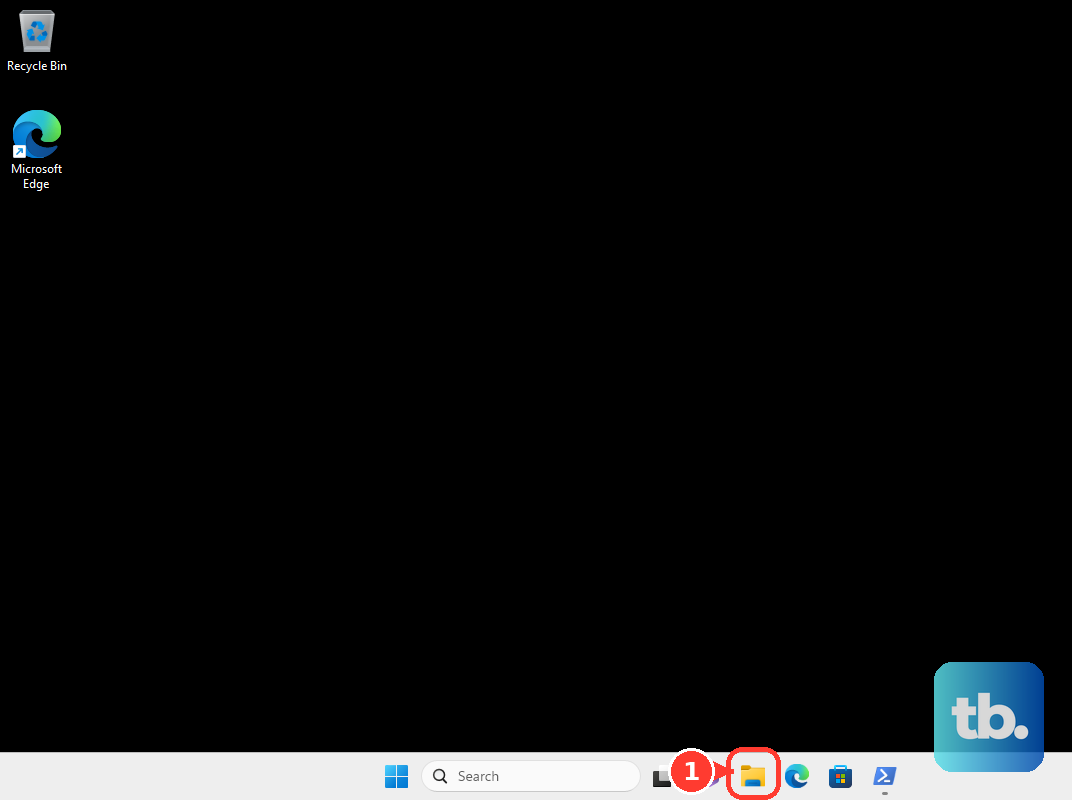
On macOS, open Finder and select Go > Go to Folder, then enter ~/Library/Application Support/discord/Cache. Remove the cache contents, reopen Discord, and retry the profile. On a Pixel, open Settings > Apps > See All Apps > Discord > Storage & cache, tap Clear cache, and reopen Discord. Other Android manufacturers can use different storage labels.
For desktop Chrome, first select More > New Incognito window, sign in to Discord, and compare the profile. If it works there, open the regular browser’s More > Extensions > Manage extensions. Turn off suspected blocking or Discord-modifying extensions, reload Discord, and re-enable them individually to identify interference.
To clear Chrome’s cached files, open More > Delete browsing data, choose All time, and select Cached images and files. Leave unrelated categories unselected, then select Delete data and reload Discord.
If a session reset is still needed, open More > Settings > Privacy and security > Third-party cookies > See all site data and permissions. Search for Discord, select Delete beside its entry, then confirm with Delete. Reopen Discord and sign in again, since this removes the site’s local session and preferences.
Compare connections and investigate filtering
Connect to another available network and retry the same profile. On mobile, compare Wi-Fi with cellular data. Success on the second connection points toward the original network or its filtering, so concentrate further troubleshooting there.
When multiple websites also fail, check your Wi-Fi or Ethernet connection. Complete the network’s sign-in portal on public Wi-Fi before retrying Discord. At home, restart the modem and router using their manufacturer’s controls, then reconnect and retry. Contact your internet provider if the connection remains unreliable.
Discord says antivirus and family-security filtering can block its assets. If that matches your connection problem, ask the security-software provider to help allowlist Discord, then retry. The correct controls depend on the product, so follow its instructions for the exception.
Inspect your own profile or rendering settings
If your own profile content is affected, open the desktop cogwheel, then User Settings > Profiles. On mobile, tap the bottom-right avatar, then Edit Profile. Check About Me, select View Full Profile to inspect the preview, and select Save after an intended text edit. Use this to check your stored content; Discord does not document re-saving as a cure for the loading error.
A different profile inside one server can be intentional. On desktop or the web, right-click your avatar in a server text channel and select Edit Per-server Profile. Review the server-specific content and select Save Changes after an intended edit. Nitro’s server-specific avatars, banners, and bios can differ from your global profile.
When loading failures accompany desktop rendering problems or lag, open User Settings > Advanced and turn off Hardware Acceleration. Restart Discord and retry the profile. This checks rendering performance without changing profile permissions.
Reinstall the app if local fixes fail
A clean reinstall is a later step because it removes local installation or app data. On Windows, quit Discord from the system tray and end its remaining processes. Press Windows + R, enter the following location, and press Enter.
%appdata%Delete the Discord folder there. Open Run again, enter the following location, and press Enter.
%localappdata%Delete its Discord folder too, then restart Windows. Get the installer from Discord’s official download page and install Discord again. The same page provides the official mobile store listings for the reinstalls below.
On Android, open Settings > Apps > See all apps > Discord > Uninstall, then tap OK. Reinstall from Google Play, sign in, and retry the profile. Manufacturer labels can differ.
On iPhone or iPad, touch and hold Discord, then select Remove App > Delete App and tap Delete. Reinstall through the App Store, sign in, and retry the profile. Removing only the Home Screen icon does not perform this reinstall.
Send Discord the details of a persistent error
If relevant checks fail, take a screenshot of the error and note which profiles, clients, and connections are affected. Include when it happens and the fixes already attempted. Use those details in your support request.
Open Discord’s Help Center and select Sign in. The Help Center uses credentials separate from your Discord app login. If needed, select Sign Up, enter your name and email, select Sign up, then select Activate account in the welcome email to create that login.
Once signed in, choose Submit a request > Help & Support. Supply the error details and screenshot, then select Submit.
For a reproducible bug, under What can we help you with?, select Bug Reporting instead. Include reproduction steps, expected and actual results, client information, and relevant attachments. Select Submit to send the report.
Frequently Asked Questions
Does this message mean someone blocked you?
You cannot determine whether someone blocked you from this message alone. Reaction or direct-message tests also should not be treated as proof of what caused the profile error.
Do you need Nitro to troubleshoot profile loading?
You can reload Discord, clear its cache, and compare supported clients without Nitro. Basic profile editing is also available without a subscription, while custom personal banners and custom per-server profile features require Nitro.
What should you check when your own banner will not upload?
With full Nitro that includes custom banners, select Change Banner in your profile editor. Upload a PNG, JPG, or animated GIF under 10 MB and at least 680 × 240 pixels, crop it, then select Apply.
Should you verify your phone number to fix the error?
Complete phone verification when Discord displays Verification Required. Select Start Verification, enter a valid mobile number that is not attached to another Discord account, then enter the SMS code. This addresses the account requirement; if that process fails, follow the steps to fix Discord phone verification problems.
What should you use if your Mac cannot run the current Discord app?
Current Discord desktop updates require macOS 13 or later. If your Mac is on macOS 12 and cannot upgrade, use Discord in a desktop browser that meets its browser requirements.
Can moderators see private profile details?
You do not receive special access to private profile details as a moderator. Profile privacy and Activity Sharing are separate controls, so check the profile audience when deciding who can see private details.