Picking a KVM switch comes down to a few plain questions: how many computers you want to control from one keyboard and mouse, how many monitors they share, and which video ports those computers have. This page is for US buyers who run two or more computers at one desk, plus anyone who needs to reach a computer from another location.
Technobezz is supported by its audience. We may get a commission from retail offers.
7 Best KVM Switches in 2026
The TESmart HKS0202A2U Dual-Monitor HDMI KVM leads our 7 best KVM switches for 2026, with picks for HDMI, DisplayPort, USB-C laptop and remote access setups.
T
Technobezz
Editorial Team
Updated November 24, 2026Nov 24, 2026
•16 min read

Get Deals Like These in Your Inbox
The best prices, straight to your inbox.
Add Technobezz on Google:Preferred SourceGoogle Discover
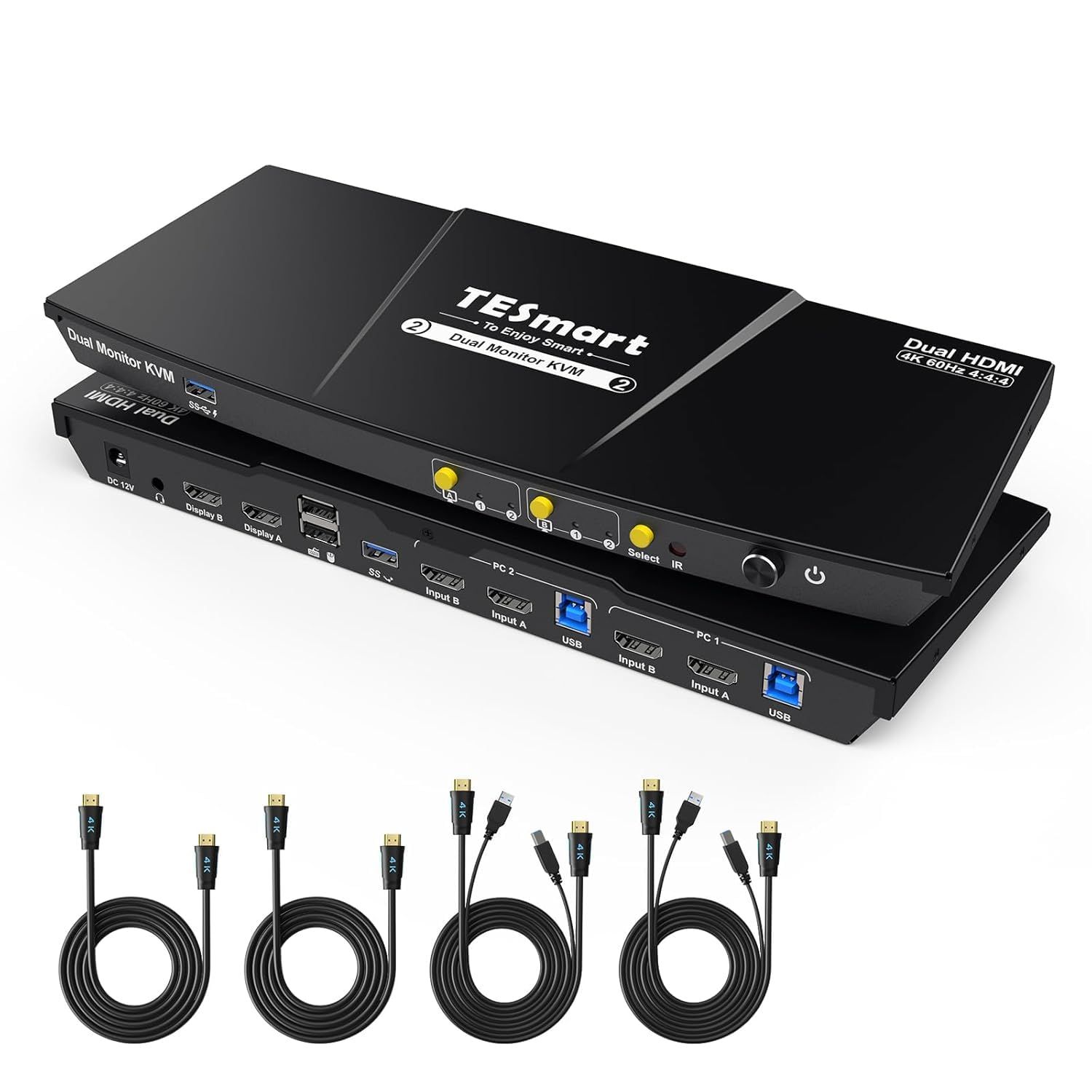
The TESmart HKS0202A2U Dual-Monitor HDMI KVM is the best overall pick. It connects two HDMI computers to two HDMI monitors at up to 4K@60Hz, has EDID emulators in each input port, and switches by IR remote, button or hotkeys.
The other six picks each cover a specific setup: a single HDMI monitor, four DisplayPort computers, three monitors, two USB-C or Thunderbolt laptops, one laptop plus one desktop, and remote control over the internet.
At a Glance
| Category | Product | Why We Picked It |
|---|---|---|
| Best overall | TESmart HKS0202A2U Dual-Monitor HDMI KVM | Two HDMI computers share two HDMI monitors at up to 4K@60Hz, with EDID emulators and hotkey switching |
| Best value | UGREEN 75246 HDMI KVM Switch | Two computers share one HDMI monitor and four USB 3.0 ports at up to 4K@60Hz |
| Best premium / for four computers | TESmart DKS402-M24 | Four computers on two DisplayPort monitors with dual 4K@144Hz and VRR |
| Best for three monitors | UGREEN AK704 Triple-Monitor KVM Switch | Two computers share three monitors through two DisplayPort 1.4 outputs and one HDMI 2.1 output |
| Best for USB-C and Thunderbolt laptops | Cable Matters 40Gbps USB-C KVM Switch (201342) | Shares one USB-C, USB4 or Thunderbolt 4 monitor or dock between two laptops at up to 40Gbps |
| Best for one laptop plus one desktop | Anker KVM Switch (4K, For Desktop and Laptop) | Switches between one laptop and one desktop with 4K@60Hz HDMI and five USB 3.0 ports |
| Best remote (IP) KVM | GL.iNet Comet GL-RM1 | Remote control of a PC or server over the internet with BIOS-level access |
How we chose
We compared the specifications on each product's Amazon page. We also checked that each pick is sold new by Amazon or the brand.
The best KVM switches right now
TESmart HKS0202A2U Dual-Monitor HDMI KVM - Best overall
The TESmart HKS0202A2U Dual-Monitor HDMI KVM is built for two HDMI computers and two HDMI monitors. Each connected computer must provide two HDMI outputs, and the monitors connect through HDMI only. Resolution goes up to 3840x2160 (4K) @60Hz or 3440x1440@100Hz, with support for 3D, HDR10, HDCP2.2 and Dolby Vision.
EDID emulators in each input port keep the computers receiving the correct display information and prevent display settings from changing while switching inputs in display mode 1. Separate toggle buttons on the panel switch the image on each display separately in display mode 2. You can switch with the IR remote, the buttons or hotkeys, and two USB 3.0 ports share peripherals such as a printer, scanner, webcam or hard disk between the two computers at up to 5Gbps.
Key highlights
- For two HDMI computers and two HDMI monitors
- Up to 3840x2160 (4K) @60Hz and 3440x1440@100Hz
- EDID emulators in each input port
- 2 USB 3.0 ports with data transfer up to 5Gbps
- Integrated microphone and L/R audio output
- IR remote, button and hotkey switching
Pros
- Kit includes two 5ft HDMI+USB-B cables, two 5ft HDMI cables, an IR remote and a DC 12V power adapter
- Plug and play, with no additional software or drivers needed
- Supports Unix, Windows, Debian, Ubuntu, Fedora, Mac OS X and Raspbian
- The USB 3.0 ports on the front panel can charge a phone
- 1-year warranty
Cons
- HDMI only: it does not include DisplayPort or USB-C video ports
- Each connected computer must provide two HDMI outputs
- Bluetooth keyboards and mice are not supported
- AAA batteries for the IR remote are not included
- Works with two computers, against four on the TESmart DKS402-M24
Who it is for: People with two desktops or laptops that each have two HDMI outputs and who want both computers on the same pair of HDMI monitors.
Skip if
You need DisplayPort connections or more than two computers. The TESmart DKS402-M24 is a DisplayPort switch for four computers and two monitors.
UGREEN 75246 HDMI KVM Switch - Best value
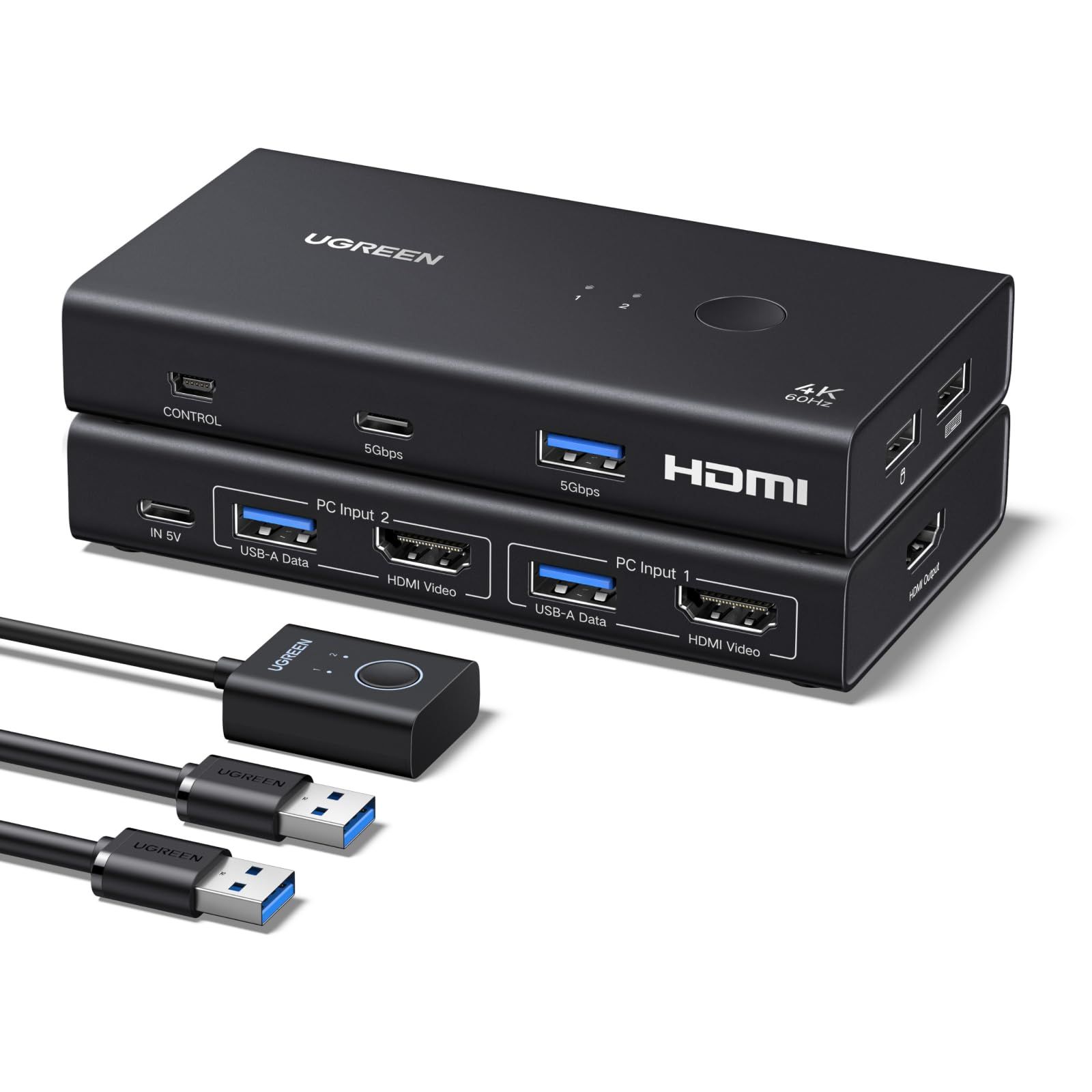
The UGREEN 75246 HDMI KVM Switch lets two computers share one HDMI monitor and four USB 3.0 devices, such as a keyboard, mouse, hard drives and a printer. The four USB 3.0 ports are three USB-A and one USB-C, with data transfer speeds of up to 5Gbps. It supports resolution up to 4K@60Hz and is backward compatible with 4K@30Hz and 1080P240Hz.
Switching is done with a button on the switch or with the desktop controller, which lets you place the switch out of sight or farther away. It supports Windows, MacOS and Linux systems and is plug and play without any installation. Each computer must be connected with an HDMI cable for video and a USB cable for data, and the switch must be connected to a power source when in use.
Key highlights
- For two computers and one HDMI monitor
- 4 USB 3.0 ports: 3 USB-A and 1 USB-C
- Up to 4K@60Hz, backward compatible with 4K@30Hz and 1080P240Hz
- Supports HDMI 2.0, HDCP2.2/1.4, 3D and HDR
- Button and desktop controller switching
- Supports Windows, MacOS and Linux systems
Pros
- Four USB 3.0 ports for sharing flash drives, printers, hard drives, webcams and other USB devices
- The desktop controller lets you place the switch out of sight or farther away
- Plug and play without any installation
- Compatible with most HDMI source devices, such as PS5/4/3, Switch/Switch 2, Xbox One, TV Box, PC and laptop
- Comes with two USB cables and the controller
Cons
- Supports only one HDMI monitor
- Does not support hotkey switching or EDID emulation
- An HDMI cable is not included
- Not supported for use with a docking station
Who it is for: Anyone with two computers and a single HDMI monitor who wants a simple value pick with a desktop controller.
Skip if
You run two monitors or want hotkeys. The TESmart HKS0202A2U Dual-Monitor HDMI KVM works with two HDMI monitors and supports hotkey switching, with EDID emulators in each input port.
TESmart DKS402-M24 - Best premium / for four computers
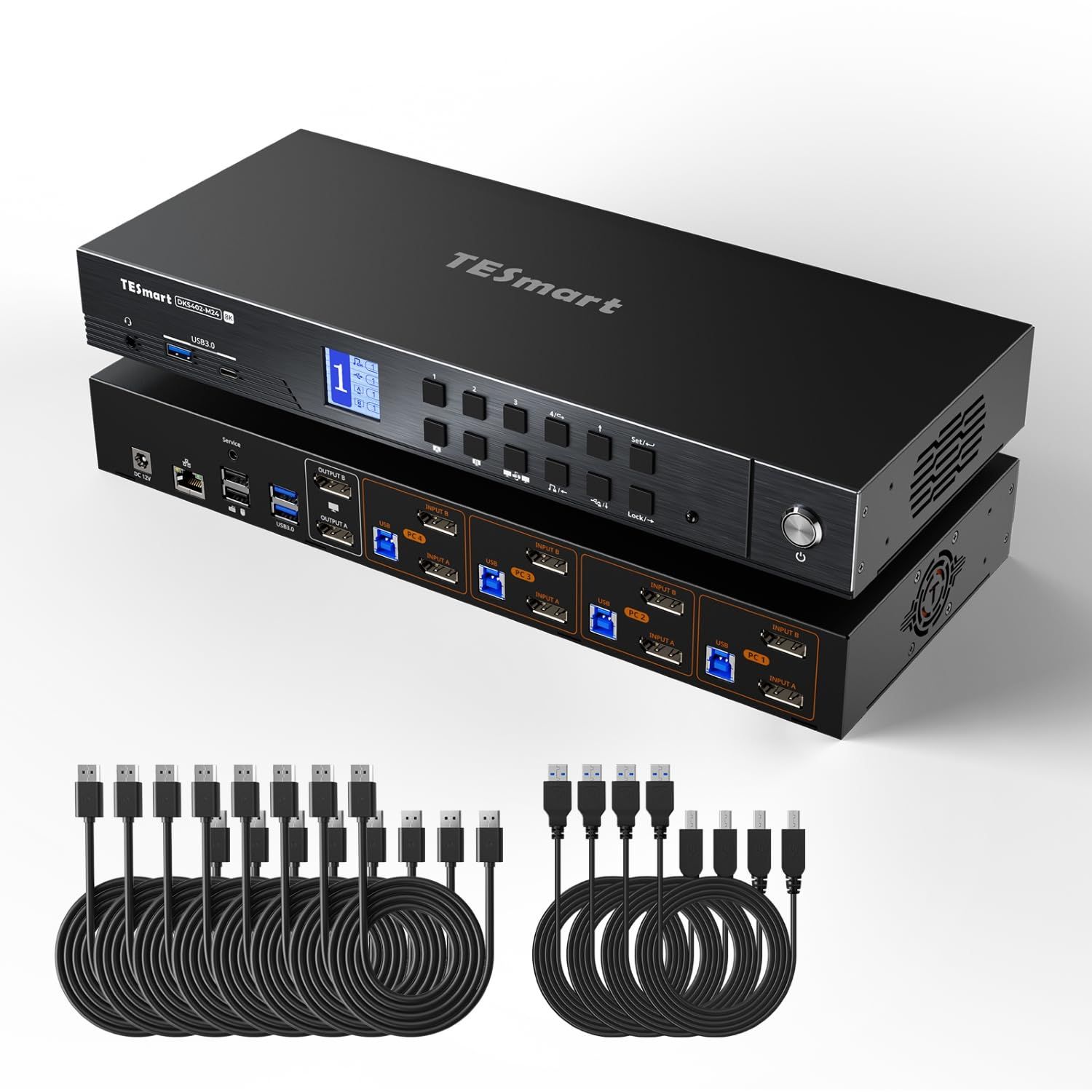
The TESmart DKS402-M24 is the premium pick: a dual-monitor DisplayPort KVM that uses one keyboard and mouse to control four computers with two monitors, in extended or mirrored mode. Resolution goes up to 8K@60Hz 4:4:4, and it delivers dual 4K@144Hz with HDR10, 12-bit color, Dolby Vision, VRR (G-Sync, FreeSync) and ALLM. It is backward compatible with 4K@60Hz/120Hz, 2560x1440@144Hz and 1080P@240Hz.
The port selection covers four USB 3.2 Gen1 5Gbps ports with 7.5W (5V 1.5A) power, two USB 1.1 ports for keyboard and mouse input with pass-through, 1G Ethernet and one integrated 3.5mm audio/mic port. Built-in EDID emulators prevent resolution changes or icon rearrangements during switching. There are four switching options, which are customizable keyboard hotkeys, mouse wheel, IR remote and panel buttons, and three focus locks (KVM, audio, USB) can hold the current audio or USB focus so that only the screen switches.
Key highlights
- DP 1.4 KVM for four computers and two monitors
- Up to 8K@60Hz 4:4:4, with dual 4K@144Hz
- HDR10, 12-bit color, Dolby Vision, VRR (G-Sync, FreeSync) and ALLM
- 4 USB 3.2 Gen1 5Gbps ports with 7.5W (5V 1.5A) power
- 1G Ethernet and one integrated 3.5mm audio/mic port
- Built-in EDID emulators
- Hotkey, mouse wheel, IR remote and panel button switching
Pros
- Controls four computers with one keyboard and mouse
- Dual 4K@144Hz with VRR (G-Sync, FreeSync)
- Three focus locks for KVM, audio and USB
- 1G Ethernet for network sharing
- Input cables are included
Cons
- Works with two monitors, against three on the UGREEN AK704 Triple-Monitor KVM Switch
- The two keyboard and mouse ports are USB 1.1
Who it is for: Multi-PC workflows and professional workstations with up to four computers and two DisplayPort monitors, particularly monitors that run at 4K@144Hz.
Skip if
You have three monitors. The UGREEN AK704 Triple-Monitor KVM Switch shares three monitors between two computers.
UGREEN AK704 Triple-Monitor KVM Switch - Best for three monitors
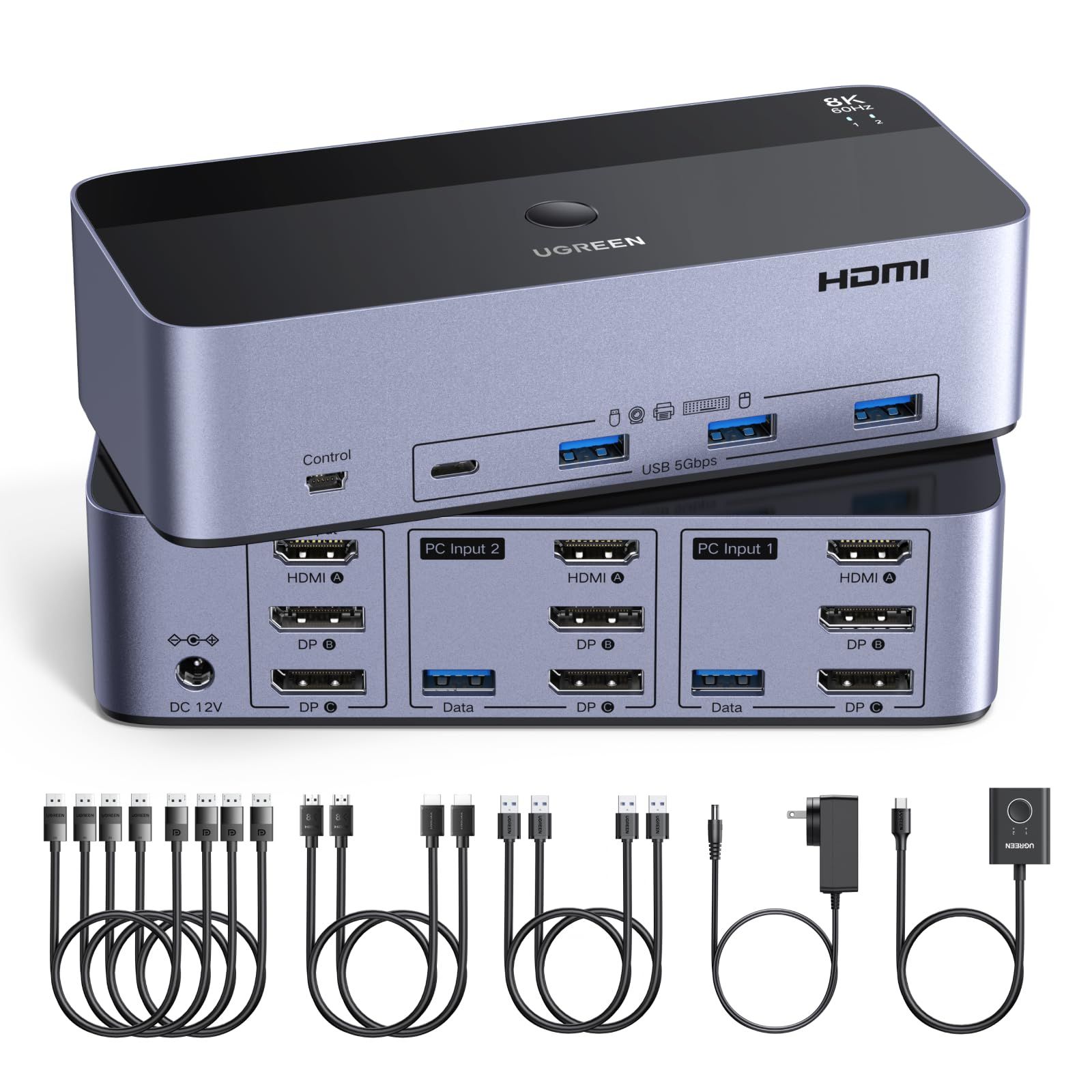
The UGREEN AK704 Triple-Monitor KVM Switch lets two computers share three monitors and four USB 3.0 ports. Its output has two DisplayPort 1.4 ports and one HDMI 2.1 port, each supporting up to 8K@60Hz, and it is backward compatible with 8K@30Hz and 4K@240Hz/144Hz/120Hz/60Hz/30Hz. It also supports HDR10+, HDCP 2.3/1.4, VRR, FreeSync and G-Sync.
The setup has firm requirements. To display content across three screens at once, each computer needs two DisplayPort ports and one HDMI port, connected with two DP cables, one HDMI cable and one USB cable. Both computers must support triple-monitor output, and if either one supports only one or two displays, the extra monitor or monitors will not activate. Switching is by button or desktop controller, and the three monitors can run in Mirror mode or Extend mode.
Key highlights
- For two computers and three monitors
- Output: two DisplayPort 1.4 ports and one HDMI 2.1 port, each up to 8K@60Hz
- Backward compatible with 8K@30Hz and 4K@240Hz/144Hz/120Hz/60Hz/30Hz
- HDR10+, HDCP 2.3/1.4, VRR, FreeSync and G-Sync
- 4 USB 3.0 ports
- Mirror mode and Extend mode
- Supports Windows and Linux systems
Pros
- Package includes 4 DP cables, 2 HDMI cables, 2 USB A cables, a power adapter and a desktop controller
- The desktop controller lets you place the switch outside your work area
- Driver-free and plug and play
- Each of the three outputs supports up to 8K@60Hz
Cons
- Does not support keyboard shortcut (hotkey) switching
- Does not support EDID emulation
- Each computer needs two DisplayPort ports and one HDMI port to display across three screens
- For 8K, the computers and monitors both need to support 8K@60Hz, with cables within 2 meters 28AWG
- A signal converter or docking station may cause compatibility issues
Who it is for: Home offices, content creators and IT professionals with three monitors and two computers that each support triple-monitor output.
Skip if
You want hotkey switching and EDID emulation. The TESmart DKS402-M24 has both, for two monitors and four computers.
Cable Matters 40Gbps USB-C KVM Switch (201342) - Best for USB-C and Thunderbolt laptops
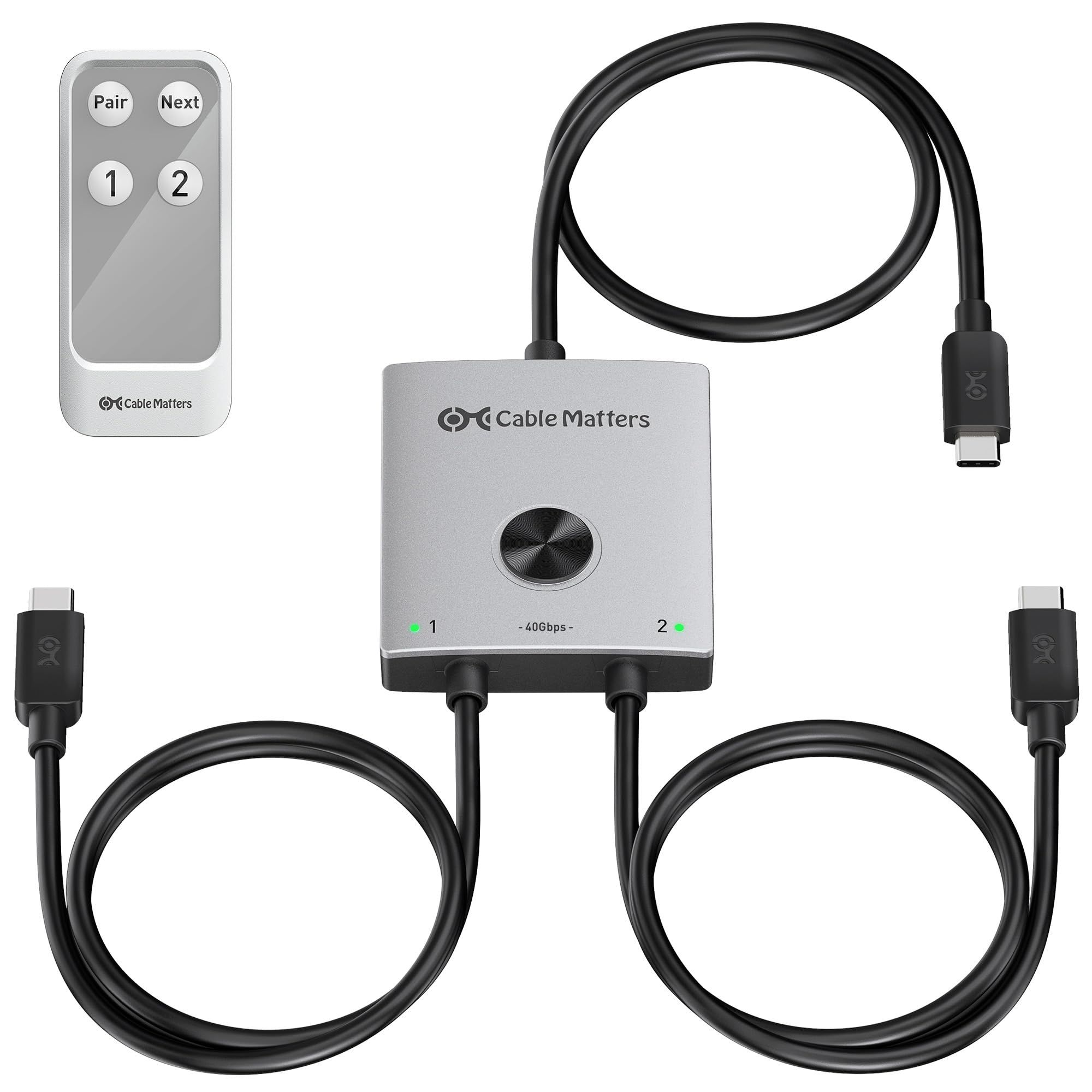
The Cable Matters 40Gbps USB-C KVM Switch (201342) shares one compatible monitor or docking station between two MacBook Pro, MacBook Air or Windows laptops. It provides connection bandwidth of up to 40Gbps for external storage, dock peripherals, video conferencing equipment and other connected USB devices. Video goes up to 8K@60Hz, 6K@60Hz or 4K@240Hz with compatible equipment and DSC where required, and the maximum resolution and refresh rate depend on the complete setup.
Two built-in input cables connect to the laptops, and a built-in output cable connects to the shared monitor or dock. It supports USB-C and Thunderbolt monitors, including the Apple Studio Display and Dell U2725QE, and compatible docks with a detachable host cable, including the CalDigit TS4 and Anker 778. The selected laptop can charge at up to 140W when the connected monitor or docking station provides compatible USB Power Delivery.
Key highlights
- For two laptops sharing one USB-C, USB4 or Thunderbolt 4 monitor or dock
- Connection bandwidth of up to 40Gbps
- Video up to 8K@60Hz, 6K@60Hz or 4K@240Hz with compatible equipment and DSC where required
- 140W Power Delivery pass-through
- RF remote and a button on the switch
- Two built-in input cables and one built-in output cable
- 1 year warranty
Pros
- The RF remote switches between laptops without direct line of sight
- Shares a dock's displays, keyboard, mouse, storage, Ethernet connection and other peripherals between two laptops
- Charges the selected laptop at up to 140W when the monitor or dock provides compatible USB Power Delivery
- Built-in cables for both laptops and for the monitor or dock
Cons
- Docks with built-in, non-detachable host cables are not supported
- A connection to an 80Gbps dock is limited to 40Gbps through the switch
- The built-in cable path already reaches 1.8m (1m + 0.8m), and a USB-C extension cable should not be used
- Charging power passes to the active laptop only
Who it is for: Owners of two USB-C or Thunderbolt laptops, such as MacBook Pro, MacBook Air or Windows models, who share one USB-C or Thunderbolt monitor or one dock.
Skip if
Your dock has a built-in, non-detachable host cable, since those docks are not supported, or you need more than two computers. The TESmart DKS402-M24 controls four.
Anker KVM Switch (4K, For Desktop and Laptop) - Best for one laptop plus one desktop
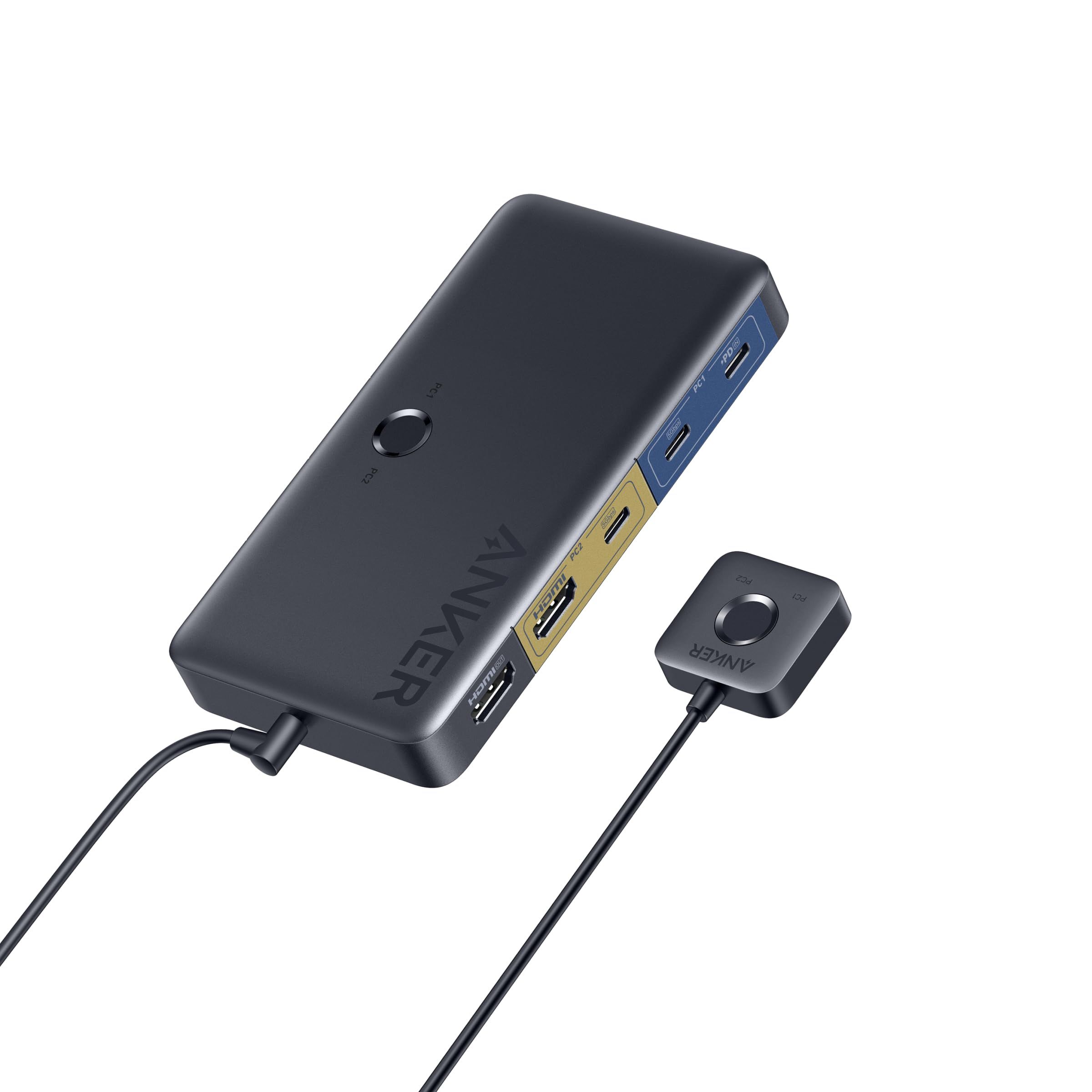
The Anker KVM Switch (4K, For Desktop and Laptop) is intended for use with one laptop and one desktop computer, and its two-way switch manages both with no re-plugging. It has 4K@60Hz HDMI, five USB 3.0 ports and 5Gbps transfer speeds. A magnetic remote gives one-click switching between laptop and desktop.
It can keep a laptop charged while the other hub functions are in use, and only the PC1 laptop is charged. The USB-C port on your laptop must support DP alt mode and Power Delivery. In the box are a 3.3 ft USB-C to USB-C cable, a 4.9 ft USB-A to USB-C cable, a 4.9 ft HDMI cable and the magnetic remote button, and it has an 18-month warranty.
Key highlights
- For one laptop and one desktop computer
- 4K@60Hz HDMI
- 5 USB 3.0 ports with 5Gbps transfer speeds
- Charges the PC1 laptop
- Magnetic remote button
- Weight: 0.33 pounds
Pros
- Cables are included: a 3.3 ft USB-C to USB-C cable, a 4.9 ft USB-A to USB-C cable and a 4.9 ft HDMI cable
- One-click switching between laptop and desktop with the magnetic remote
- Keeps a laptop charged while the other hub functions are in use
- 18-month warranty
Cons
- Not compatible with two USB C laptops
- Only the PC1 laptop is charged
- The USB-C port on the laptop must support DP alt mode and Power Delivery
Who it is for: Someone with one USB-C laptop and one desktop who wants to move between them with a single click.
Skip if
You have two USB-C laptops. The Cable Matters 40Gbps USB-C KVM Switch (201342) is made for two laptops.
GL.iNet Comet GL-RM1 - Best remote (IP) KVM
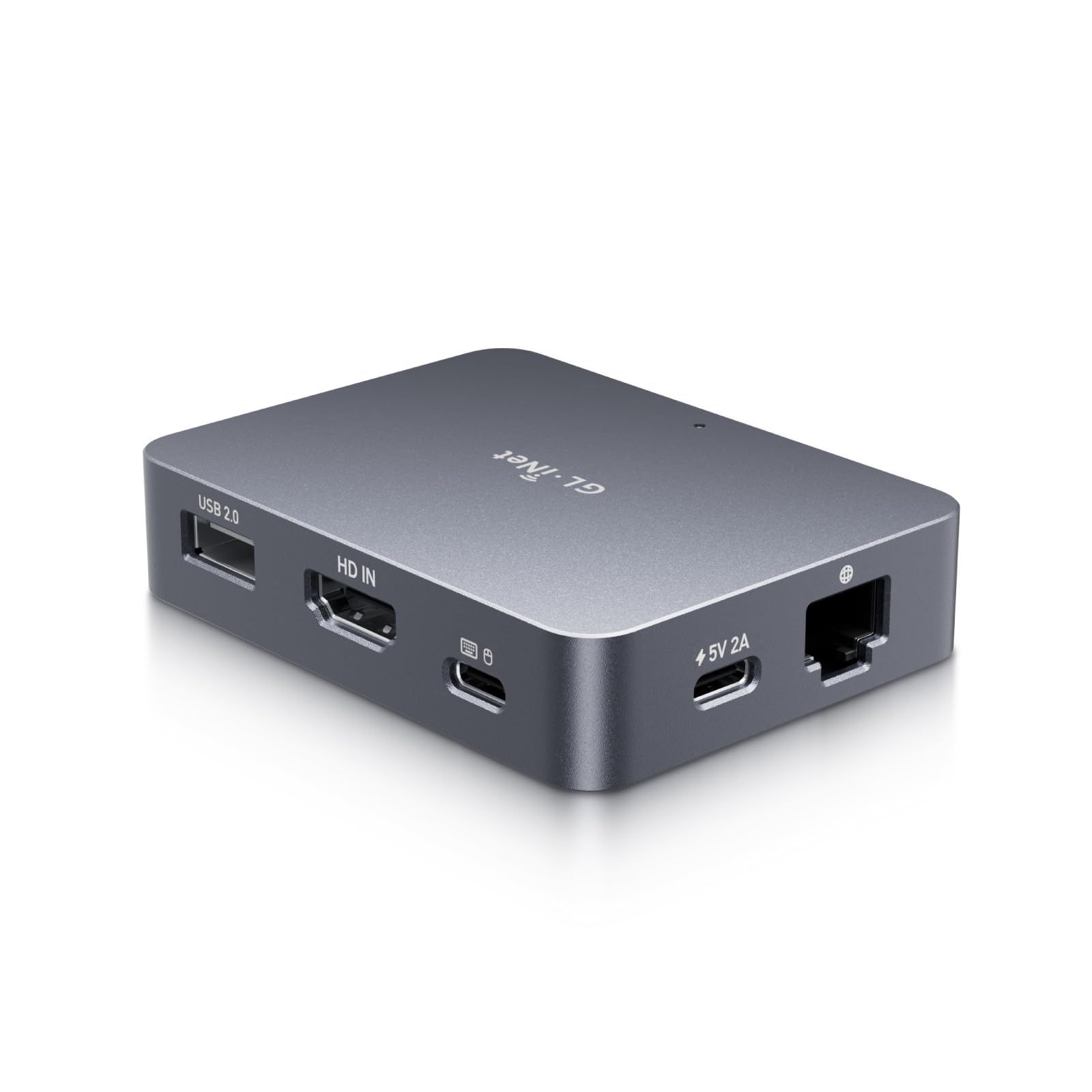
The GL.iNet Comet GL-RM1 is a remote KVM: a hardware device for remote control of a PC or server over the internet, with BIOS-level access. You can remotely reboot a computer, install operating systems via the BIOS interface and power on computers. The computer being controlled requires no additional software, and connection is one click through an app.
Remote video is 3840x2160@30Hz with remote audio output, and the device uses H.264 hardware encoding. It can transfer files between computers and connects to laptops, desktops and servers. Tailscale is part of its feature set, PD adapters cannot be used with it, and the warranty is a 2 Year Guarantee.
Key highlights
- Remote KVM with BIOS-level access
- 3840x2160@30Hz resolution
- Remote audio output
- H.264 hardware encoding
- File transfer between computers
- Tailscale
- 2 Year Guarantee
Pros
- Remotely reboot, install operating systems via the BIOS interface and power on computers
- No software needed on the host computer
- One-click connection via app
- Connects to laptops, desktops and servers
Cons
- 3840x2160@30Hz, against 4K@60Hz on the TESmart HKS0202A2U Dual-Monitor HDMI KVM
- PD adapters cannot be used
Who it is for: IT professionals and smart home users who need to reboot, power on or reinstall a computer or server without being in front of it.
Skip if
You want 4K at 60Hz at your own desk. The TESmart HKS0202A2U Dual-Monitor HDMI KVM supports 4K@60Hz.
How to Choose
- Count computers and monitors first. The picks here run from two computers on one HDMI monitor (UGREEN 75246 HDMI KVM Switch) to two computers on three monitors (UGREEN AK704 Triple-Monitor KVM Switch) and four computers on two monitors (TESmart DKS402-M24). Buy for the desk you will have, and if you are adding a screen, see our best monitors for home office guide.
- Match the video ports on your computers. The TESmart HKS0202A2U Dual-Monitor HDMI KVM needs two HDMI outputs on each computer, and the UGREEN AK704 Triple-Monitor KVM Switch needs two DisplayPort ports and one HDMI port on each computer to run three screens. Check the ports on every computer before you order.
- Treat laptops as their own case. The Cable Matters 40Gbps USB-C KVM Switch (201342) is for two laptops sharing one USB-C, USB4 or Thunderbolt 4 monitor or dock, and the Anker KVM Switch (4K, For Desktop and Laptop) is for one laptop and one desktop. If you also need a dock, start with our best docking stations guide, and keep in mind that the Cable Matters 40Gbps USB-C KVM Switch (201342) needs a dock with a detachable host cable.
- Decide how you want to switch. The TESmart HKS0202A2U Dual-Monitor HDMI KVM and the TESmart DKS402-M24 support keyboard hotkeys along with an IR remote and buttons. The UGREEN 75246 HDMI KVM Switch and the UGREEN AK704 Triple-Monitor KVM Switch use a button or a desktop controller, the Cable Matters 40Gbps USB-C KVM Switch (201342) uses an RF remote or a button, and the Anker KVM Switch (4K, For Desktop and Laptop) has a magnetic remote button.
- Check EDID emulation if you switch often. The TESmart HKS0202A2U Dual-Monitor HDMI KVM and the TESmart DKS402-M24 both have EDID emulators, and on the TESmart DKS402-M24 they prevent resolution changes or icon rearrangements during switching. The UGREEN 75246 HDMI KVM Switch and the UGREEN AK704 Triple-Monitor KVM Switch do not support EDID emulation.
- Look at what comes in the box. The TESmart HKS0202A2U Dual-Monitor HDMI KVM comes with two 5ft HDMI+USB-B cables and two 5ft HDMI cables, and the UGREEN AK704 Triple-Monitor KVM Switch comes with four DP cables, two HDMI cables and two USB A cables. The UGREEN 75246 HDMI KVM Switch does not include an HDMI cable, so plan to supply your own.
FAQ
Can a KVM switch work with two or three monitors?
Yes, if you choose a model built for that number of screens and your computers have enough video outputs. The TESmart HKS0202A2U Dual-Monitor HDMI KVM and the TESmart DKS402-M24 each work with two monitors, and the UGREEN AK704 Triple-Monitor KVM Switch works with three. With the UGREEN AK704 Triple-Monitor KVM Switch, both computers must support triple-monitor output to use all three displays at once.
Which of these picks support keyboard hotkey switching?
The TESmart HKS0202A2U Dual-Monitor HDMI KVM switches by IR remote, button or hotkeys. The TESmart DKS402-M24 switches by customizable keyboard hotkeys, mouse wheel, IR remote or panel buttons.
Do I need to install drivers or software?
The TESmart HKS0202A2U Dual-Monitor HDMI KVM is plug and play with no additional software or drivers. The UGREEN 75246 HDMI KVM Switch is plug and play without any installation, and the UGREEN AK704 Triple-Monitor KVM Switch is driver-free and plug and play. With the GL.iNet Comet GL-RM1, the computer being controlled requires no additional software.
Which picks support refresh rates above 60Hz?
The TESmart DKS402-M24 supports dual 4K@144Hz, and the UGREEN AK704 Triple-Monitor KVM Switch is backward compatible with 4K@240Hz/144Hz/120Hz. The Cable Matters 40Gbps USB-C KVM Switch (201342) supports up to 4K@240Hz with compatible equipment and DSC where required. The UGREEN 75246 HDMI KVM Switch supports 1080P240Hz, and the TESmart HKS0202A2U Dual-Monitor HDMI KVM supports 3440x1440@100Hz.
Can I connect a laptop to a KVM switch?
It depends on the laptop's ports. The Cable Matters 40Gbps USB-C KVM Switch (201342) is made for two MacBook Pro, MacBook Air or Windows laptops, and the Anker KVM Switch (4K, For Desktop and Laptop) needs a laptop whose USB-C port supports DP alt mode and Power Delivery. With the TESmart HKS0202A2U Dual-Monitor HDMI KVM, laptop users may need a USB-C to HDMI adapter or cable, and the laptop must be capable of dual monitors.
Published November 24, 2026 Last updated November 24, 2026
Add Technobezz on Google:Preferred SourceGoogle Discover
More buying guides
Buying guide
6 Best microSD Cards in 2026
Buying guide
7 Best PC Case Fans in 2026
Buying guide
6 Best MacBooks in 2026
Buying guide
7 Best USB-C Cables in 2026
Buying guide6 Best CPUs for Gaming in 2026Buying guide7 Best 32-Inch Monitors in 2026Buying guide5 Best Wireless CarPlay Adapters in 2026Buying guide6 Best Ethernet Cables in 2026Buying guide5 Best TV Antennas in 2026Buying guide5 Best Karaoke Machines in 2026Buying guide7 Best Radar Detectors in 2026Buying guide6 Best Portable Tire Inflators in 2026