Google Workspace Studio is rolling out a new Wait until step that lets users pause automated workflows and schedule their restart, with duration-based pauses capped at 14 days. Users can insert the step anywhere in a flow, including within Check if conditional branches and Repeat for each loops.
The rollout began November 9 for both Scheduled Release and Rapid Release domains, with visibility expected within one to three days. Eligible editions include Business Plus, Business Starter and Business Standard; Enterprise Plus and Enterprise Standard; and Education Plus, Education Fundamentals and Education Standard. The feature is also available through AI Expanded Access and the education add-ons Teaching and Learning and Google AI Pro for Education.
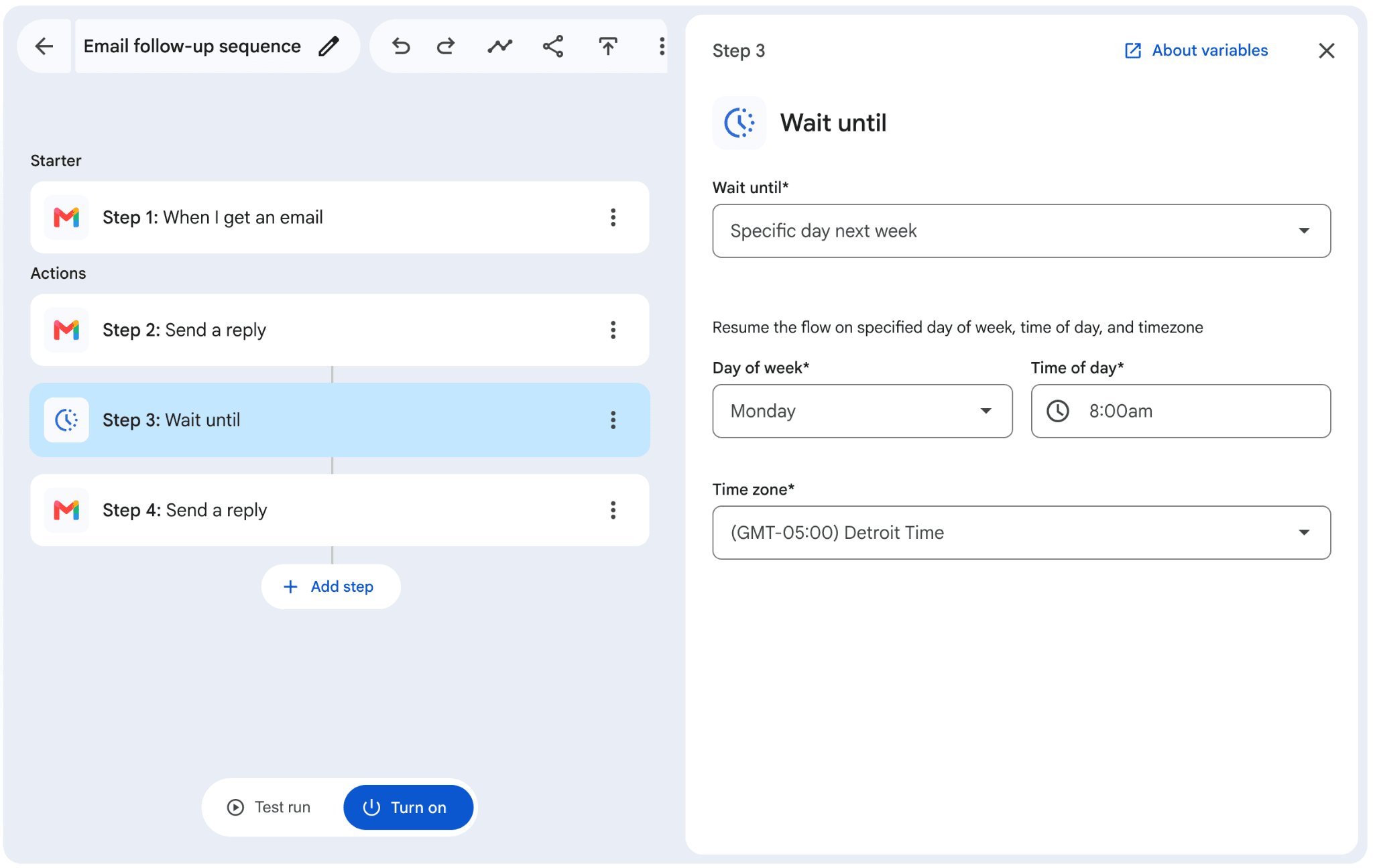
Users can choose a future date and time, defer work to a particular day the following week, or specify a delay using seconds, hours and minutes. For example, a flow could restart at 8 a.m. the following Monday, pause for 30 minutes, or wait three days before continuing at 5 p.m. While it waits, users can check the Activity tab for live progress, including the planned restart time and its time zone, and see when execution resumes.
Previously, adding delays to a sequence required separate scheduled flows; Wait until lets users keep those stages together in one flow without coding. That supports tasks such as delaying a customer follow-up email after a meeting, spreading out onboarding reminders or holding a Google Chat team digest until Monday morning. Administrators have no control setting for the feature.