Google Calendar is rolling out per-calendar controls for default meeting lengths and five-minute buffers, letting new events begin later or finish earlier automatically. The settings cover all Google Workspace customers, Workspace Individual subscribers and people using personal Google accounts.
The user controls began reaching Rapid Release domains on November 16, with visibility taking up to 15 days. Scheduled Release domains are due to begin receiving them on December 11, while administrator controls are scheduled to start reaching both groups that day, also over up to 15 days.
Read more: Google Adds Automatic Meeting Recaps to Google Chat
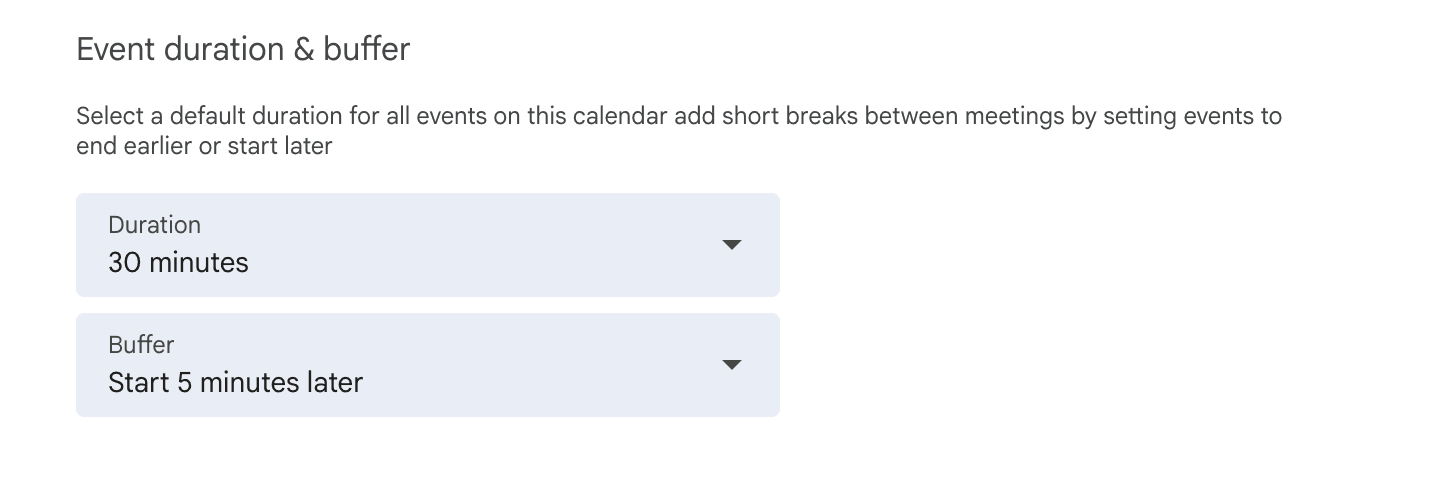
Choosing Start 5 minutes later turns a half-hour slot at 9:00 AM into a 25-minute meeting beginning at 9:05 AM; an hour-long slot becomes 55 minutes and still finishes at 10:00 AM. With End 5 minutes earlier, those slots instead run from 9:00 AM until 9:25 AM or 9:55 AM, while None preserves the full default length.
Previously, Speedy meetings applied across an account and could only shorten events at the end; the new controls allow different defaults for individual calendars. Existing Speedy meetings users move automatically to End 5 minutes earlier.
On the web, users can select a calendar in Settings under Settings for my calendars, then open Event duration & buffer, provided they have Make changes and manage sharing permissions. Administrators can set an organization-wide or Organizational Unit default through Default event buffer in the Admin console’s Calendar Interop management area. Calendars inherit that choice, or None without an administrator default, and owners can override it individually.
Google also expanded meeting tools in August, when Google Meet began rolling out note capture for in-person discussions from its web and mobile home screens. That feature creates a Google Doc containing notes, action items and a transcript.