

To fix No location found on iPhone, restore the internet connection, enable Location Services, and confirm sharing settings on the iPhone supplying the missing location. If you cannot see a friend's location, ask them to check their phone. Changing settings on your viewing iPhone alone may not resolve the problem.
In the app named Find My, this message under People means the app cannot locate that person. It does not establish that they blocked you or deliberately stopped sharing. Check whether the missing location is under People or Devices, because the fixes differ.
The short version
- Check the right phone: The person supplying the missing location needs to review their connection and sharing settings.
- Restore connectivity: Check power and Wi-Fi or cellular access on both the sharing and viewing phones.
- Review sharing: Enable location access, turn on Share My Location, and confirm which device supplies your location.
- Match the fix to the problem: Restart an unresponsive app or phone, and reserve resets for persistent permission or connection problems.
| Check or fix | When to use it |
|---|---|
| Identify the missing location | Choose the checks for a person or your device |
| Restore Wi-Fi | Either phone has a connection problem |
| Enable cellular access | When Wi-Fi is unavailable and the phone needs mobile data |
| Charge and power on | The sharing phone has a depleted battery |
| Improve GPS reception | Positioning is unreliable |
| Enable Location Services | The sharing phone has location access disabled |
| Allow the app to access location | Others cannot see your shared location |
| Turn on Share My Location | Your location sharing is disabled |
| Check the sharing device | An old iPhone or iPad supplies your location |
| Review parental restrictions | A child cannot change privacy settings |
| Renew recipient sharing | Sharing expired or was stopped |
| Respond to a sharing request | A recipient has requested your location |
| Share or request through Messages | You need to establish sharing in a conversation |
| Review Family Sharing | A family member cannot see your location |
| Enable device finding | You still have the iPhone and need to configure finding |
| Cycle Airplane Mode | A connected device still does not appear |
| Correct date and time | Device finding remains unreliable |
| Check another Apple device | Your missing iPhone is out of reach |
| Enable Notify When Found | You need an alert when a device location becomes available |
| Close and reopen the app | The app is unresponsive |
| Restart the iPhone | The phone needs an ordinary restart |
| Force restart | A frozen phone prevents an ordinary restart |
| Check app updates | The affected app malfunctions |
| Update iOS | A compatible system update is offered |
| Reset location and privacy permissions | Permission problems persist after the earlier checks |
| Reset network settings | Connectivity problems persist after other network fixes |
| Send a static pin | You need to share a position while troubleshooting |
| Contact Apple Support | The applicable checks have failed |
Check whose location is missing
Open Find My, select People, then tap the person's name. If you see No location found, contact them and ask them to check the connection and sharing settings on their phone. The sharing instructions below use iOS 27 menus.
A different label, Can see your location, means you are not following that person's location. Request their location using the Messages steps below. If you are looking for your own iPhone, select Devices and use the device checks instead.
Restore power and an internet connection
Check connectivity on both the phone sharing the location and the phone viewing it. Open Settings, make sure Airplane Mode is off, then open Wi-Fi, enable it, and select a working network. If only one network fails, try another network or restart the router and modem.
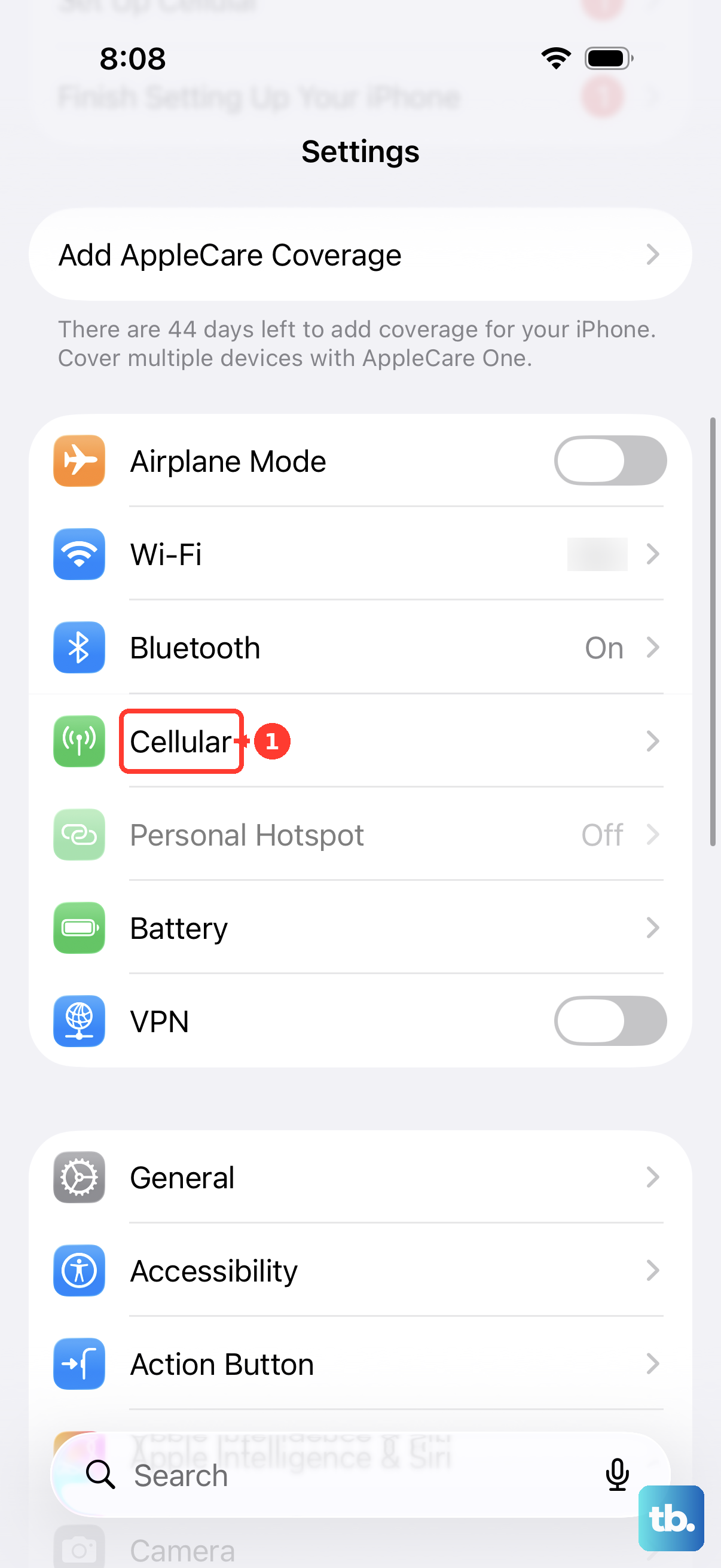
If Wi-Fi is unavailable on an iPhone with active cellular service, open Settings > Cellular and enable Cellular Data; carrier charges may apply. Review the app list, tapping Show All when needed, and enable cellular access for the affected app if it is listed. The available cellular options depend on your carrier and SIM configuration.
A phone with a depleted battery needs charging before you can check its settings. Charge it, then hold the Side button until the Apple logo appears and reconnect it to Wi-Fi or cellular service. You cannot supply power remotely to someone else's unavailable phone.
When positioning itself is unreliable, move somewhere with a clearer view in several directions and allow several minutes for positioning. Buildings, vehicle roofs, mountains, and other obstructions can block satellite signals. Check the location again after allowing that time.
Check location permissions and the sharing device
On the iPhone supplying the missing location, open Settings > Privacy & Security > Location Services and turn on Location Services. On iOS 27, select Find My on that screen and enable location access using the permission options shown. Apple recommends checking this permission when other people cannot see your shared location.
Next, open Find My, select Me, and turn on Share My Location. Check Sharing From to confirm which device supplies your location. If you need to switch to the iPhone you carry, tap Use This iPhone as My Location.
Check the source especially if you recently replaced your iPhone or previously shared from an iPad. Once the source is correct, you can share your location on iPhone with the intended recipient using the steps below.
If parental restrictions prevent changes, ask the parent to review them on their device. In the iOS 27 parental controls, open Settings > Family, select the child, then open Content & Privacy Restrictions and enter the Screen Time passcode when requested. Open Privacy Restrictions, review the applicable category, and choose Allow where changes should be permitted. These redesigned controls require every device in the Family Sharing group to run version 27 or later; devices that can't be updated still use the earlier Screen Time and Family Sharing settings.
Renew sharing with the intended person
When sharing has expired or was stopped, start it again with the intended recipient. On iOS 27, open Find My, select People, tap Add, then tap Share My Location. Enter the recipient in With, tap Done, and choose a duration.
For an incoming request, open People, tap Share below the requester, and choose a duration. These steps establish sharing when it needs to be started again. They are not a guaranteed repair for sharing that is already active.
Messages provides another way to request a friend's location. On iOS 27, open a one-to-one conversation, tap Add > Location > Request, then tap Send. To share through a supported conversation, open it, tap Add > Location > Share, choose the duration, then tap Send.
For Family Sharing, open Settings > Family > Location Sharing. Under Share Your Location With, select the relevant family members. Check this control when a relative cannot see your location.
Use the device checks for a missing iPhone
If the problem is under Devices and you have the affected iPhone, open Settings, select your name, then open Find My and select Find My iPhone. Turn on Find My iPhone, then turn on Find My network for offline discovery and Send Last Location for low-battery reporting. Configure these settings before the phone becomes inaccessible; offline capabilities vary by model.
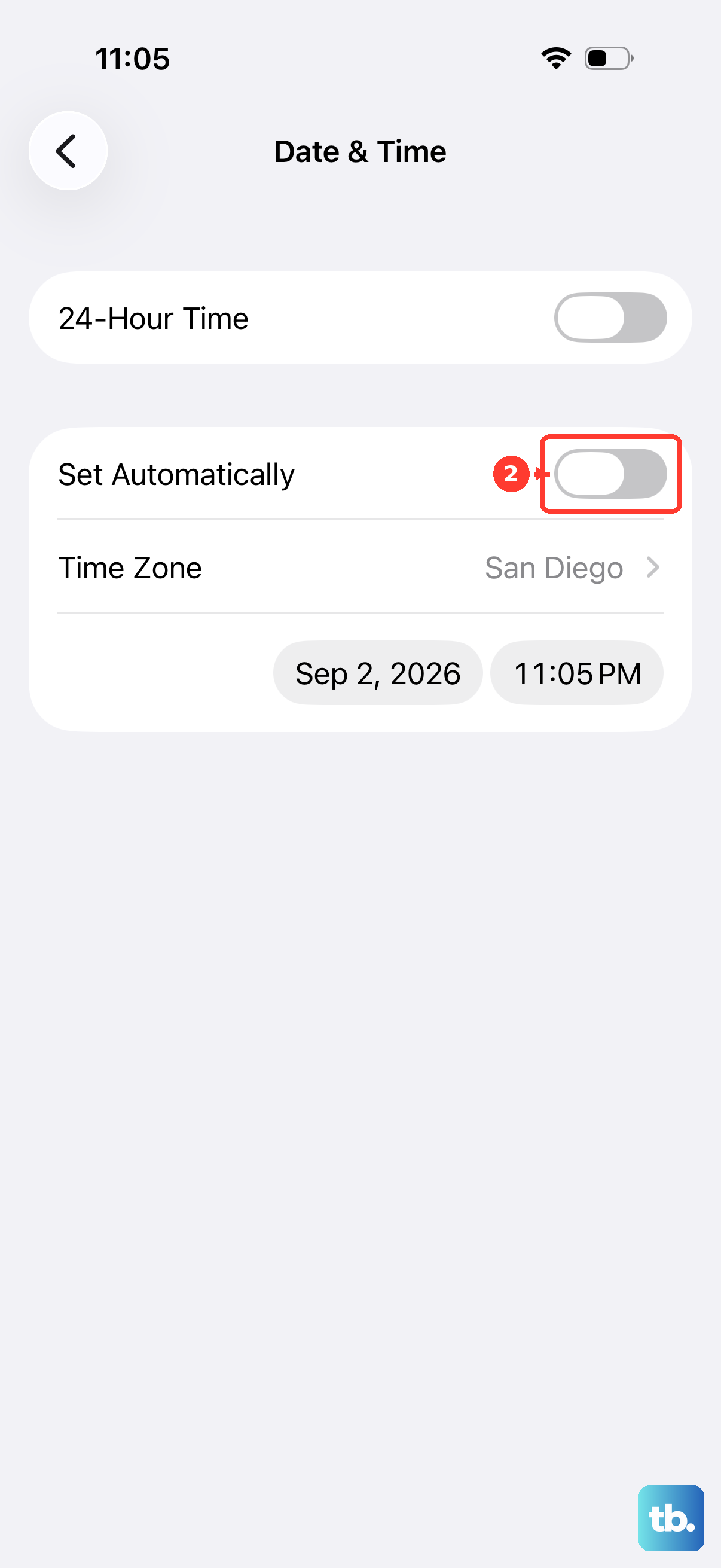
For a connected device that still does not appear, open Settings, turn Airplane Mode on, then off, and retry after connectivity returns. Also open Settings > General > Date & Time and turn on the option that sets the date and time automatically. Apple recommends these checks for device-finding problems.
When the iPhone is already out of reach, open Find My on another Apple device signed in to your account, choose Devices, and select the iPhone. Under Notifications, enable Notify When Found and ensure notifications are allowed for the app named Find My. This alerts you when a location becomes available; it does not force an offline phone to report.
Restart an unresponsive app and update the iPhone
If the app named Find My is unresponsive, close and reopen it. On a Face ID iPhone, swipe up from the Home Screen and pause; on an iPhone with a Home button, double-click the Home button. Find the app preview, swipe it upward, then open Find My again.
To restart the phone normally, open Settings > General > Shut Down and drag the slider. Turn it back on by holding the Side button. If the phone is frozen and prevents an ordinary restart, force restart your iPhone using the sequence for its model.
On current iPhone hardware that uses this sequence, quickly press and release volume up, then quickly press and release volume down. Hold the Side button and release it when the Apple logo appears. Reserve this procedure for an unresponsive phone.
For an app malfunction, open App Store, tap the profile icon, then select App Updates to check for an update to the affected app. Follow the steps to update apps on your iPhone if you need help with that screen. If an app update is not available, check for an iOS update.
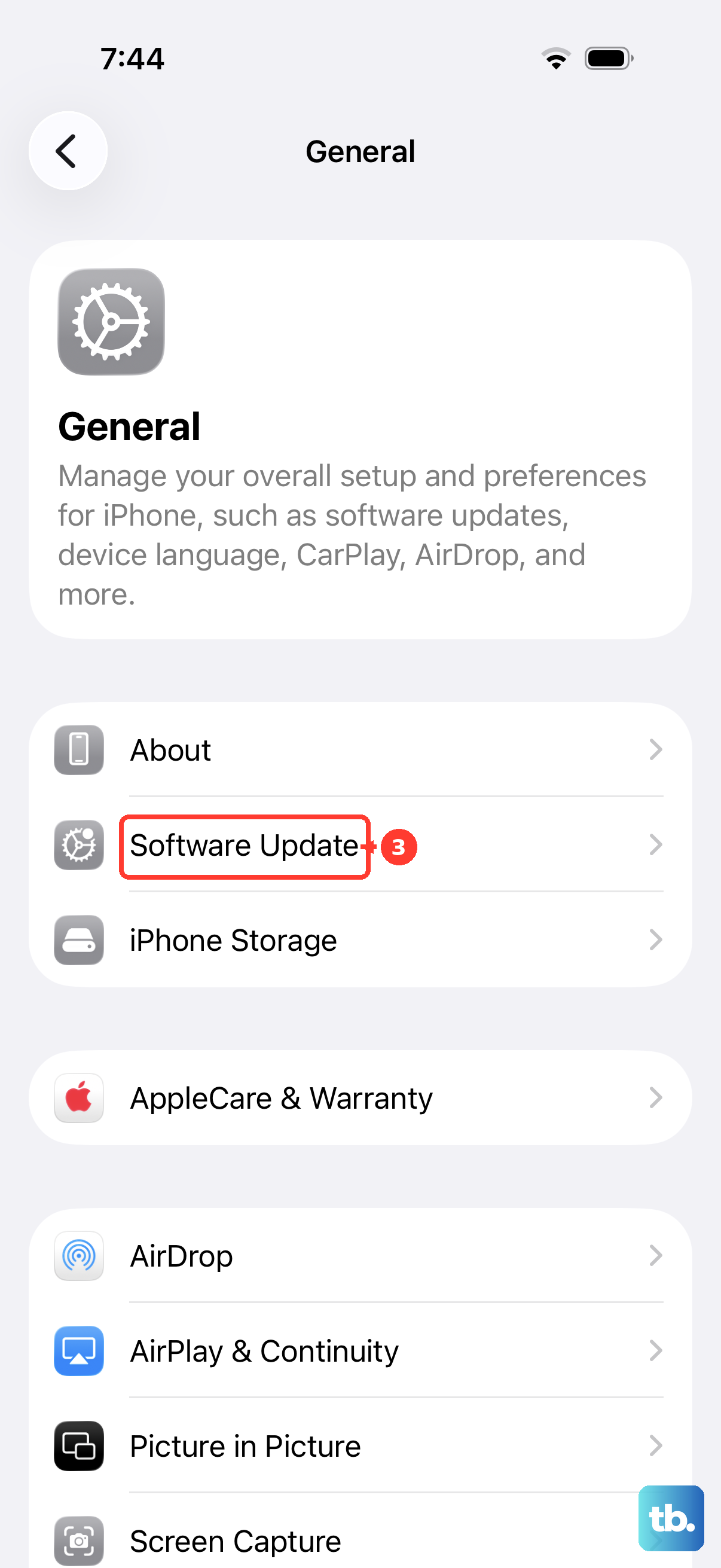
Back up the iPhone, connect it to power and Wi-Fi, then open Settings > General > Software Update. When an update is offered, tap Download and Install and complete the displayed instructions. Install the compatible release offered for your particular iPhone.
Reserve resets for persistent problems
A location and privacy reset clears existing permission choices for all affected apps, so you will need to grant permissions again. If permission problems persist, open Settings > General > Transfer or Reset iPhone > Reset > Reset Location & Privacy. Grant location access again when requested; this reset is not a guaranteed fix for the message.
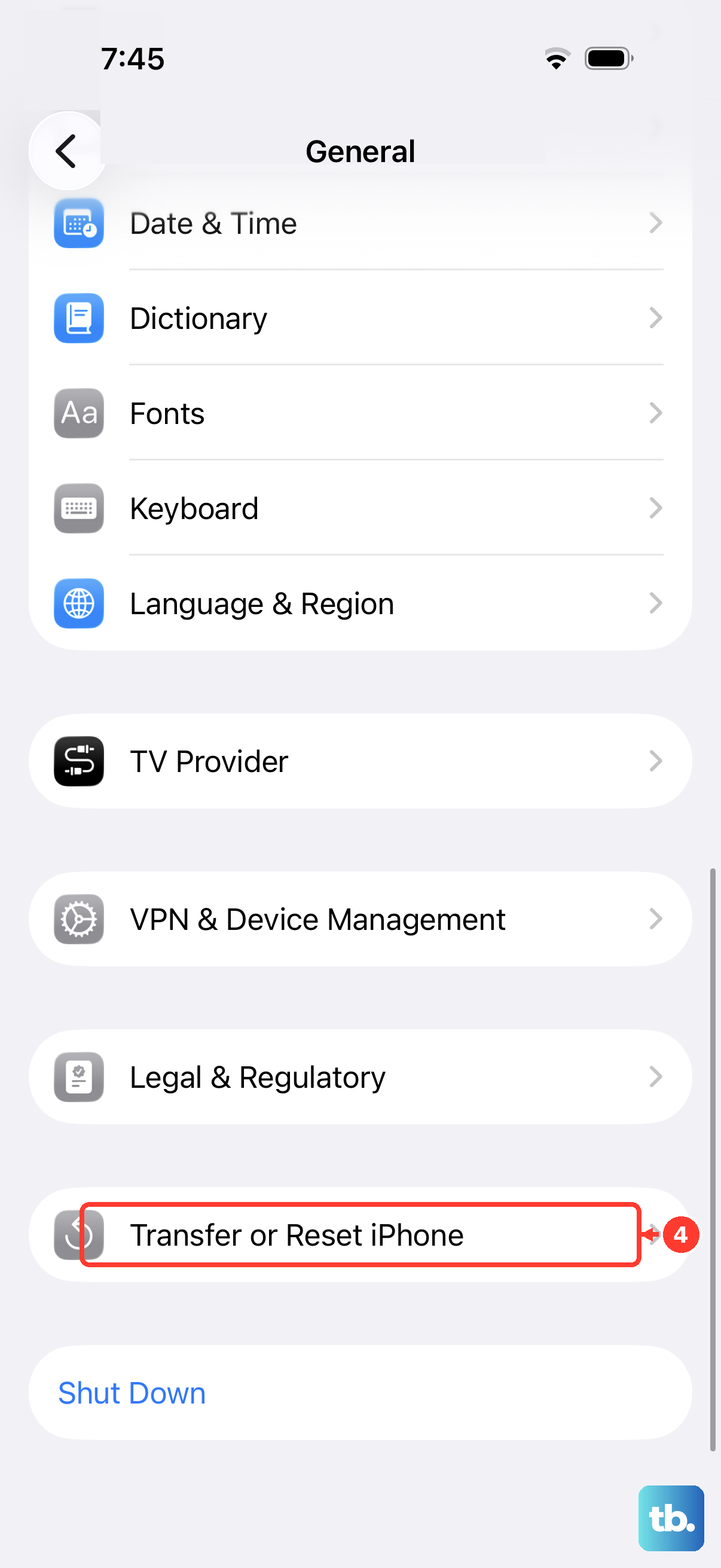
For persistent connectivity problems, consult your administrator before resetting settings used for school or business networks. Resetting network settings removes saved Wi-Fi networks and passwords and resets cellular, VPN, and APN settings. After the earlier network checks fail, open Settings > General > Transfer or Reset iPhone > Reset > Reset Network Settings.
Send a location pin or contact Apple
If you need to send your position while ongoing sharing remains unresolved, open a Messages conversation and tap Add > Location. Tap Map Pin, position the map, tap Send Pin, then tap Send. This works in current iOS, including SMS conversations, but the pin does not update as you move or repair the app named Find My.
If the applicable checks still fail, open Apple's device-finding support page and select Get suggestions. Describe whether the problem affects People or Devices, one recipient or everyone, and one viewing device or several.
Frequently Asked Questions
Does turning on Precise Location fix No Location Found?
Apple documents Precise Location for seeing your distance from friends, rather than as a guaranteed fix for this message. If distance or precise positioning is missing, open Settings > Privacy & Security > Location Services, select Find My, and turn on Precise Location.
How long can you see an offline device's last known location?
When you open Find My to locate a device, its last known location can remain available for up to seven days, compared with up to 24 hours on iCloud.com. These device-location limits do not describe how long you can see a friend's location under People.
Can you share your iPhone location without Wi-Fi or cellular coverage?
Supported iPhone 14 and later models can send a satellite location with an active SIM in supported countries and regions. Before losing coverage, enable sharing with your contacts and select that iPhone as the location source. Outdoors with a clear sky view, open Find My, select Me, find My Location via Satellite, tap Send My Location, and follow the directional guidance until sent. Recipients need iOS 16.1 or later, and you can send updates every 15 minutes.
What should you do if you deleted Apple's location app?
On iOS 14 or later, open App Store, find Find My, confirm that the developer is Apple, and tap Redownload. Open Find My after it downloads to restore access to the viewing interface. Deleting the app does not stop sharing your location with people who could already see it.
Can you check a friend's location from a Mac?
Yes, open Find My on your Mac, select People, and choose the person to check an existing sharing relationship. If their location is unavailable there too, ask them to review sharing and Location Services on the device supplying their location.