Gemini can import preferences and chat history from another AI assistant, giving people switching apps a way to carry their existing context into Google's assistant. Google's instructions cover a summary of preferences generated by the previous AI tool, along with an archive upload for past conversations.
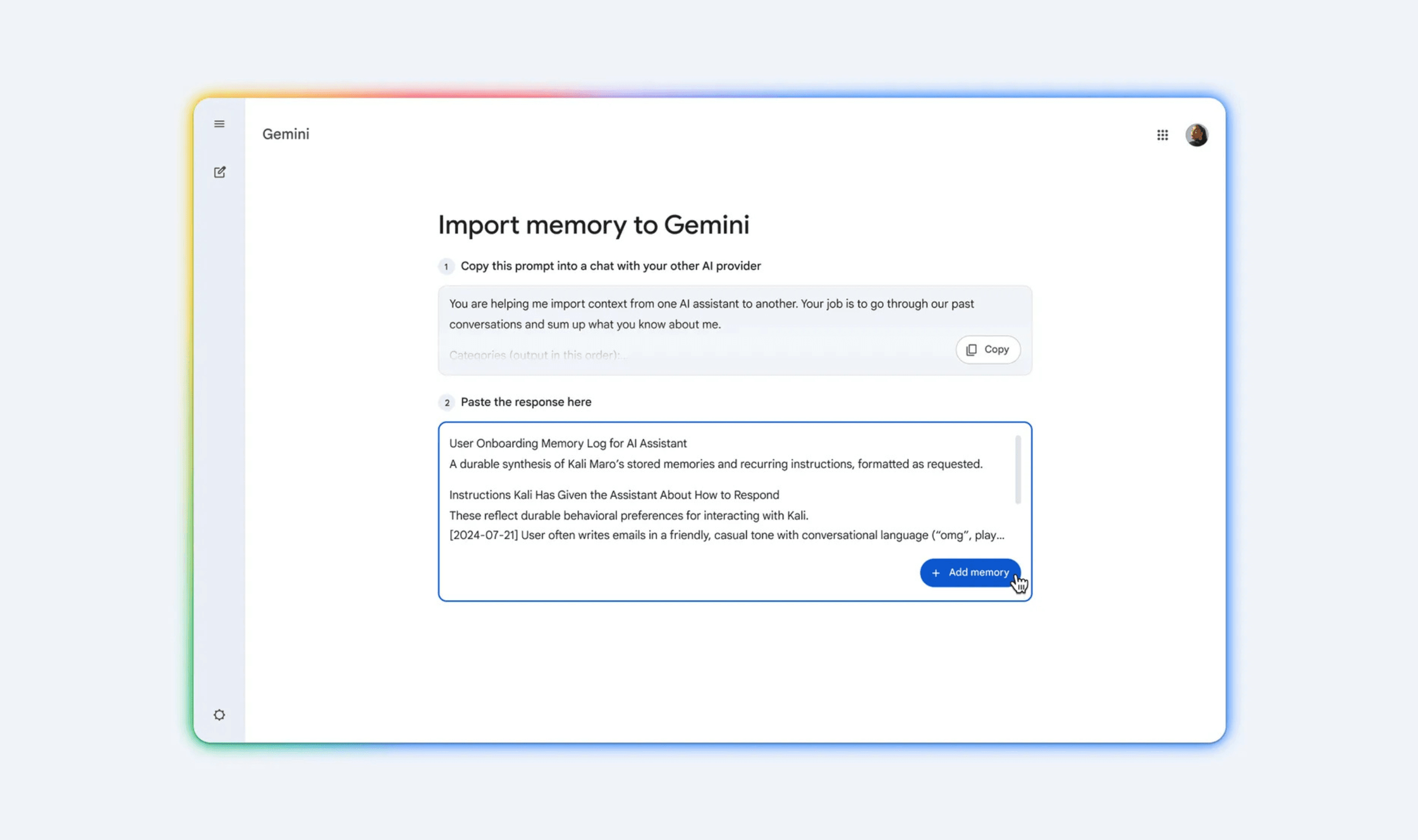
For preferences, begin in Gemini's import settings and copy the prompt supplied there. Paste that prompt into the AI tool you were using before Gemini, where it is used to produce a summary of your preferences. This part of the process starts in Gemini, then moves to the previous assistant to generate the information being transferred.
Take the response produced by that previous tool and paste it into Gemini. The information brought across in this step is the preference summary: Google's directions have the earlier assistant generate it before the response is entered into Gemini. Chat history uses an exported file instead.
For those earlier conversations, open the account settings of the provider you are leaving and export your chat history as a ZIP file. Google specifies ZIP as the archive format in its directions. The export comes from the previous provider, while the place to upload the resulting archive is in Gemini's settings.
Upload that ZIP archive through Gemini's settings to bring the conversation history over. Google describes the upload as a way to resume conversations you began with the previous assistant. Its official walkthrough covers carrying preferences into Gemini through the generated response and bringing earlier chats across through the exported archive.