Claude is rolling out a beta that turns artifacts into desktop apps for Mac and Windows users across all plans, with each app getting a separate window and icon. Anthropic introduced the feature on November 24, letting users build tools they can run and share beyond the Claude window.
The apps can draw on Claude and connected services, but their requests use up part of the allowance attached to your Claude plan. Opening an installed app also requires an internet connection and an active Claude sign-in.
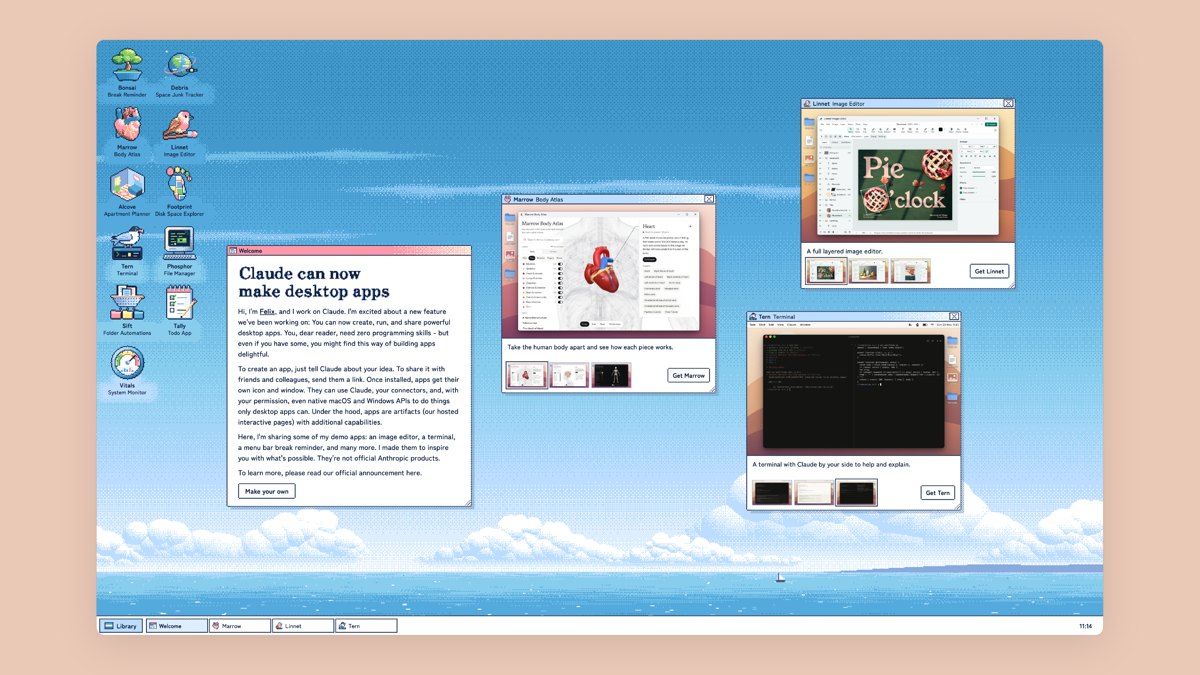 Image: Claude
Five Apps Built at Anthropic
- Linnet provides image editing with layers.
- Phosphor manages files with a movie-set-inspired appearance.
- Sift organizes files using folder rules and Claude.
- Tern pairs a terminal with assistance and explanations from Claude.
- Vitals displays computer performance through the menu bar or system tray.
To build one, describe the tool you want to Claude and test the resulting artifact before installing it. With an updated Claude desktop client, open the artifact's Share menu and select "Install as app"; no packaging, signing, API key or additional login is required.
Anthropic describes artifacts' progression from shareable outputs, such as charts and webpages, into tools people use repeatedly for work. Its examples include a meeting preparation tool drawing from email and calendar information, plus a tracker for orders awaiting shipment.
Installed tools can deliver notifications and place controls in the system tray or menu bar. Editing the artifact behind an app automatically updates its installed version, connecting ongoing maintenance to the same tool used to create it.
Permissions Reach Into Your Files
The default permission level restricts an installed app to browser-level capabilities. A separate level, App permissions, lets it request controlled features, including windows that stay above others, notifications and shortcuts that work globally.
Full computer access allows an app to execute programs and read, modify or remove files without requesting approval for every action. Anthropic does not vet apps before installation, and this highest access level is limited to apps you created or, for Team and Enterprise users, apps created within your organization.
Approval applies to a particular version, so an update triggers another permission request, including when you made the edits yourself. Embedded material supplied by another website can change without triggering that renewed request.
Team organizations start with the feature enabled and full access disabled; Enterprise organizations need an owner to enable it first. Administrators on both plans can control whether their organization permits app permissions and full access.
HIPAA-ready organizations and hybrid deployments are excluded from the beta, while Claude Docs, Slides, and Sheets are among the artifacts that cannot become installed apps. The rollout remains in beta, and Anthropic's support information also excludes Linux, browser-based Claude and mobile devices.