
To unblock someone on Facebook on an iPhone or Android phone, tap Menu in the top left, go to Settings and privacy > Settings > Audience and visibility > Blocking, tap Unblock next to the person, then tap Unblock again to confirm. On facebook.com in a browser, the same list sits under Settings, Blocking and the Block profiles and Pages section.
Think before you tap, because an unblock is hard to take back quickly. Facebook's help says the person can see the posts you share with the public again, but they are not your friend again, and you do not follow an unblocked Page again. You also can't block them again straight away, as the section on the wait explains.
We followed these screens in the Facebook app on our iPhone 17 Pro with iOS 26.6. The confirmation after Unblock and the Android steps follow Meta's instructions.
The short version
- App: Menu > Settings and privacy > Settings > Audience and visibility > Blocking > Unblock, then Unblock again.
- Computer: profile picture > Settings & privacy > Settings > Blocking > Edit > See your blocked list > Unblock > Confirm.
- Afterwards: they can see your public posts, but they are not your friend and you do not follow their Page again.
- The wait: Facebook says a few days before you can block them again. Messenger says 48 hours.
- Not on the list: switch to the profile you blocked them from, then check Messenger, group bans and Dating.
How to unblock someone in the Facebook app
On our iPhone, the Facebook app's bottom bar had no Menu tab. Menu is the three-line button in the top left of the Home screen, which matches Meta's instructions for iPhone and Android.
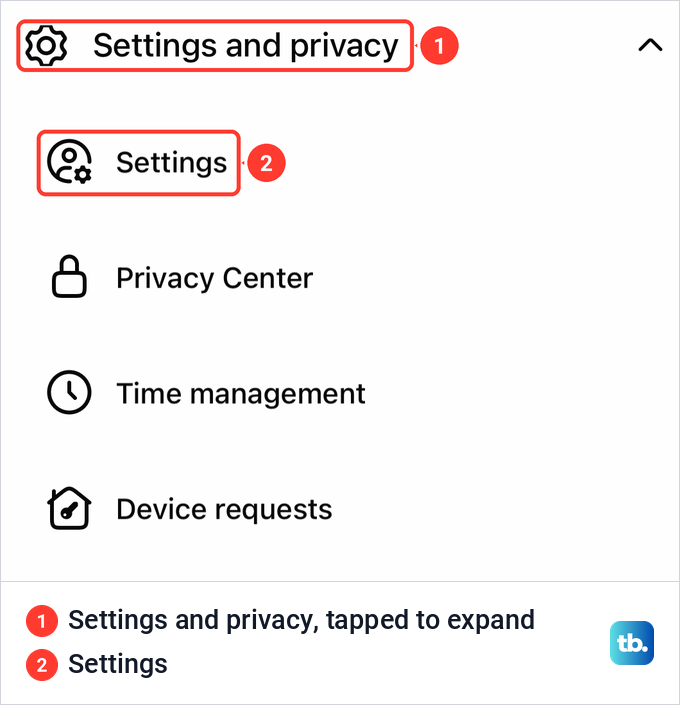
Tap Menu, scroll down and tap Settings and privacy to open it, then tap Settings, the first entry under it. On our iPhone the open section also listed Privacy Center, Time management and Device requests, among others. The row reads Settings and privacy with the word "and", while Meta's help writes Settings & privacy, so do not worry when the name changes.
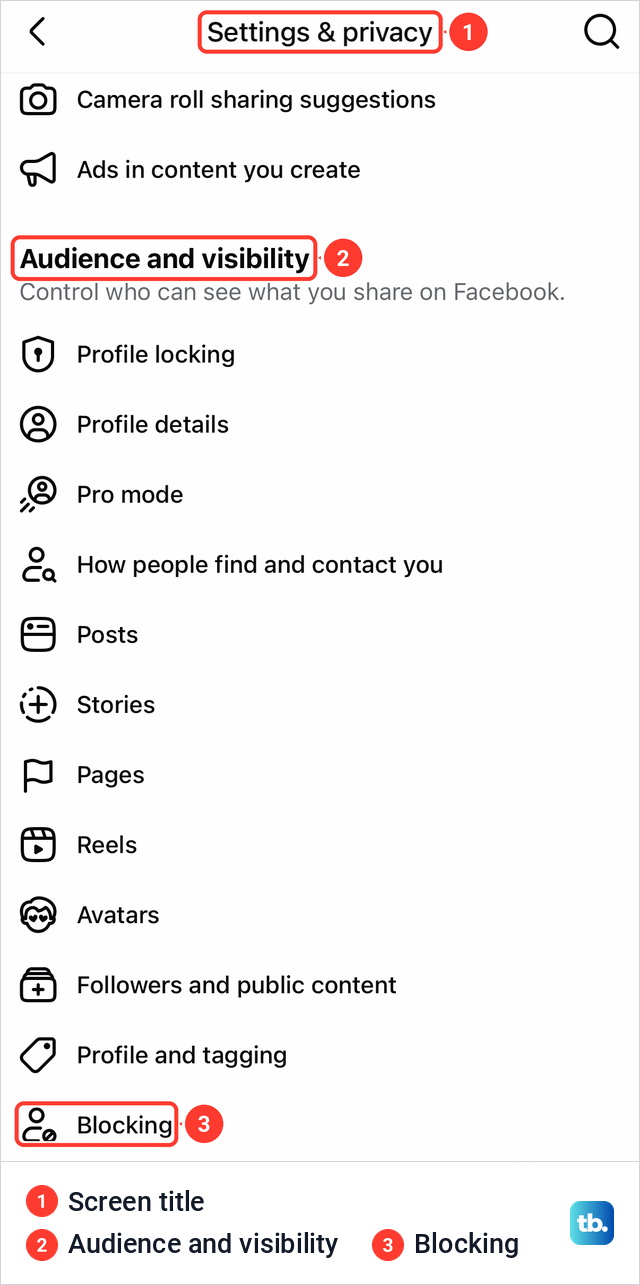
Settings opens a long screen titled Settings & privacy, with a Search settings field and Meta Account (still called Accounts Center on some accounts) at the top. Blocking is not on the first part of the screen. Scroll down to the section called Audience and visibility, where on our iPhone Blocking was the last row, below Profile and tagging.
Tap Blocking. Our screen opened with a Blocked People heading and Facebook's own reminder: "Once you block someone, that person can no longer see things you post on your Timeline, tag you, invite you to events or groups, start a conversation with you, or add you as a friend." Below it came an Add to blocked list row and one row per blocked profile, each with a grey Unblock button.
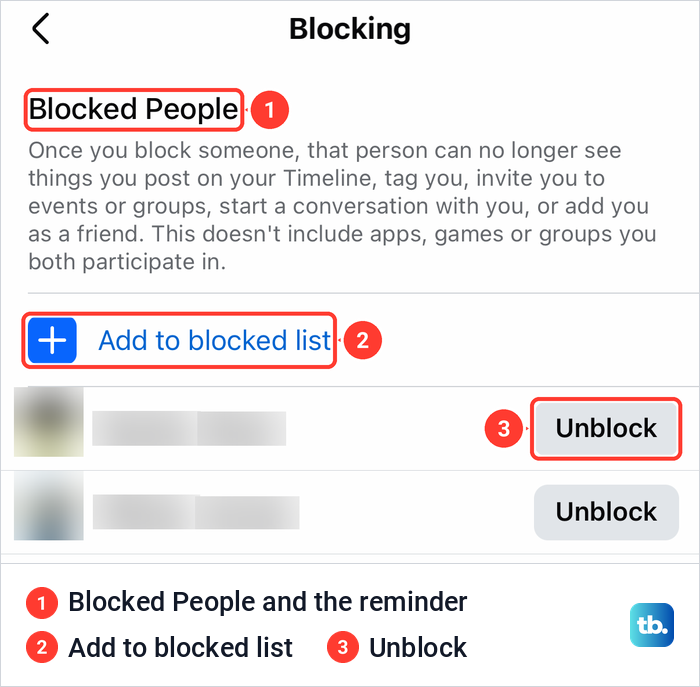
Tap Unblock next to the person you want back. Meta's instructions then ask you to tap Unblock once more to confirm that you want to unblock the profile or Page.
On Android, Meta's steps are word for word the same, with Menu in the top left. In the iPad app, Meta puts Menu in the bottom right. In a phone's web browser, Menu sits in the top right, and the path through Settings & privacy, Settings and Blocking is the same after that.
How to unblock someone on facebook.com
The computer steps follow Meta's Help Center. Click your profile picture in the top right of Facebook, select Settings & privacy, then click Settings. In the left column, below Audience and visibility, click Blocking.
In the Block profiles and Pages section, click Edit, then See your blocked list. Click Unblock next to the profile or Page, then click Confirm to finish. Older guides send you to a section called Block users, and Meta's own archived instructions used that name too.
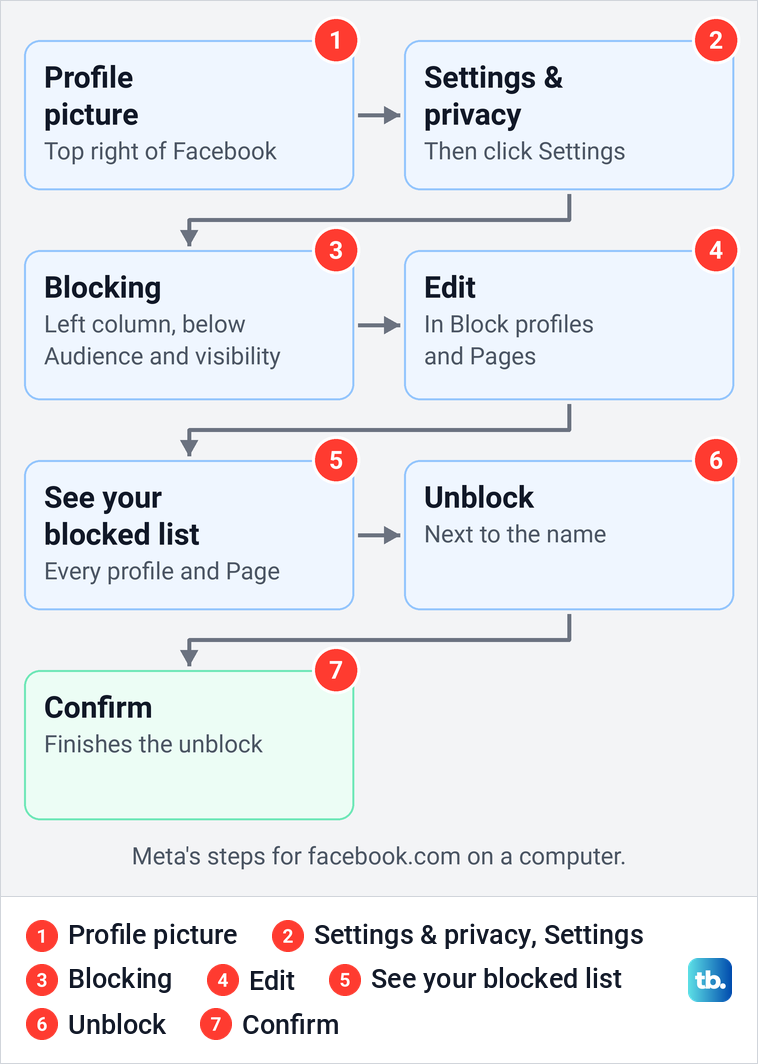
The same Blocking page also holds a Block messages section, which is the list Messenger uses for messages-only blocks. On messenger.com, Manage blocking sends you here, as the Messenger section below explains.
Where to find blocks and restrictions
A block can sit in more than one place, and each kind is lifted where it was made. This table covers these cases, where to remove each one and what changes when you do.
| Kind of block | Where to remove it | What changes when you do |
|---|---|---|
| A profile or Page you blocked on Facebook | App: Menu > Settings and privacy > Settings > Blocking. Web: Settings > Blocking > Block profiles and Pages | They can see your public posts. No friendship, no follow. Facebook's help page says you can't block them again for a few days |
| A profile you blocked from Messenger | Messenger: Menu > Settings > Privacy & safety > Blocked Accounts | Meta says it lifts the Facebook block too. Messenger's help page says you can't block them again for 48 hours |
| Messages and calls only | Messenger Blocked Accounts, the Block messages section of Facebook's Blocking page, or Facebook Lite: Messenger > Settings > Privacy & safety > Blocked accounts | They can message and call you again. Meta says this kind of block can't be placed again |
| A nickname in a group | Settings > Blocking, next to the nickname | They can tag you and interact with your content in that group. No waiting period |
| A ban from a group you manage | Group > Manage > Members or People > Banned | They can find the group and be invited to it again |
| A Dating block | Dating > Profile > Settings > Privacy Settings > Block people in Dating | They are unblocked in Dating only |
| The Restricted list | Friends > Custom Lists > Restricted > Remove (computer) | Not a block. While they are on it, Meta says they see only your public information and posts you tag them in |
| Restrict in Messenger | Messenger settings, the list of people you restricted | Not a block. While it is on, Meta says you can't call or message them |
The first three rows are about a person's whole profile or their messages. A group nickname, a group ban, a Dating block, the Restricted list and restrict in Messenger are separate tools, each with its own list.
Check that you are on the right profile
The blocked list belongs to the profile you were using when you blocked someone. Meta says that if you have additional Facebook profiles, you manage blocking from each of them separately, and blocking on one does not carry over to the others. You can no longer create new additional profiles, Meta adds, but existing ones were not affected.
Pages are the other trap. When the app on our iPhone was switched to a Page, the Account part of Settings & privacy read "Switch to your main profile to change these settings." with a Switch profiles button. Further down, the Page's own settings, with rows such as Page details and Page setup, had a Blocking row of its own.
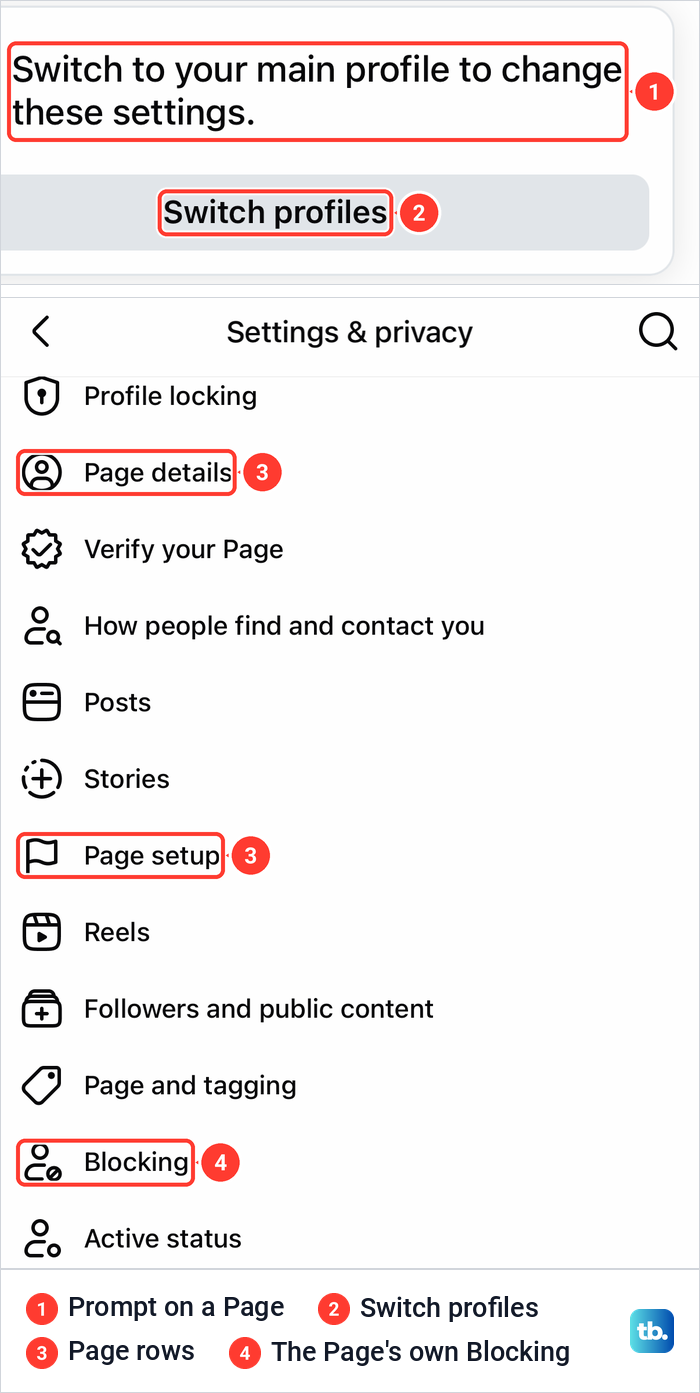
So if you blocked someone while using Facebook as a Page, check that Page's Blocking row too. If you blocked them from your main profile or an additional profile, switch back to that profile first, then follow the app steps above.
Facebook blocks and Messenger blocks are not the same
Messenger can place two different blocks, and Meta treats them differently. Blocking someone's Facebook profile from Messenger also blocks that profile on Facebook. They can't message, call or find your profile on Messenger or Facebook chat, and if you were friends, the block unfriends you.
The other kind blocks only messages and calls. Meta says the person then can't message or call you on Messenger or Facebook chat, but you can still see their Facebook profile. They can still see your profile, comment on your posts and see your messages in a group chat you share.
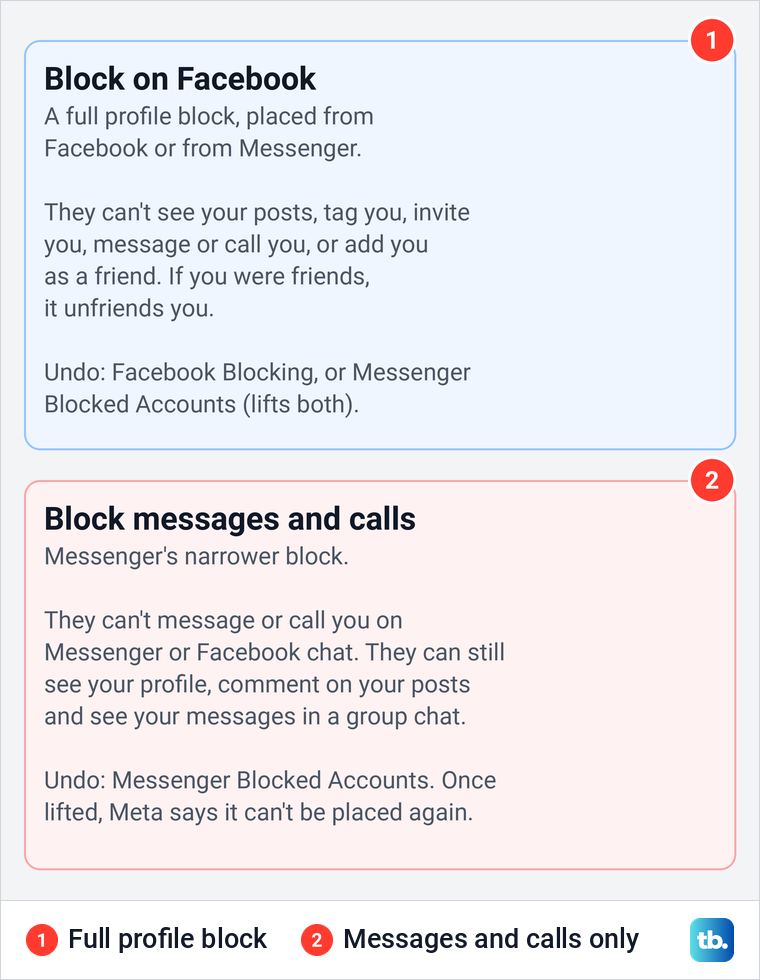
On messenger.com, Meta's steps still offer both choices, Block messages and calls or Block on Facebook. Meta's steps for the Messenger app show a single Block button. Once you lift a messages and calls block, Meta says you can't place that kind of block again.
How to unblock someone in Messenger
In the Messenger app, Meta's steps are to tap Menu, then Settings, tap Privacy & safety and then Blocked Accounts. Tap the name of the person and tap Unblock. For a profile block, Meta is clear about what that does: you also unblock them on Facebook, they are not added back as a friend, and you can't block them again for 48 hours.
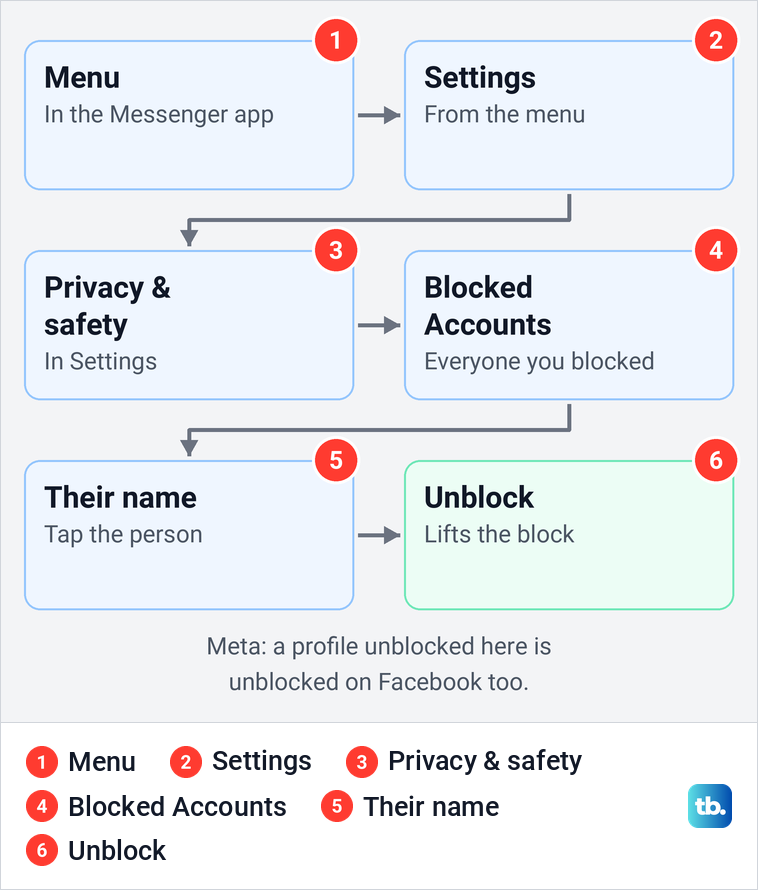
Some guides say Messenger keeps its own block list that never touches Facebook. That is wrong for a profile block, because one you unblock in Messenger is unblocked on Facebook too. A messages and calls block is narrower: it covers only messages and calls on Messenger and Facebook chat, and it sits in the Block messages section of Facebook's Blocking page.
On messenger.com in a browser, click your profile picture in the bottom left, then Preferences and Manage blocking. That opens your Facebook settings, where you click Blocking, scroll down to Block messages, click Edit and See your blocked list, then click Unblock next to the name. On facebook.com you reach the same section through Settings and Blocking, then scroll down to Block messages.
In Facebook Lite, select Messenger at the top of the app, tap Settings in the top right, then Privacy & safety and Blocked accounts, and tap Unblock next to the profile. Meta also gives a shortcut in Lite: open an old conversation with them and select Unblock [Name] at the bottom of the chat.
What the other person sees after you unblock them
Meta's list is short. An unblocked profile or Page can see the posts you share with the public, it does not automatically become your friend again, and you do not automatically like or follow a Page you unblock. If you do not want them to see a post, share it with an audience other than Public.
Meta says profiles aren't notified when you block them, but its help pages do not say whether an unblock sends a notice. Either way, they may notice once your public posts start showing up for them again.
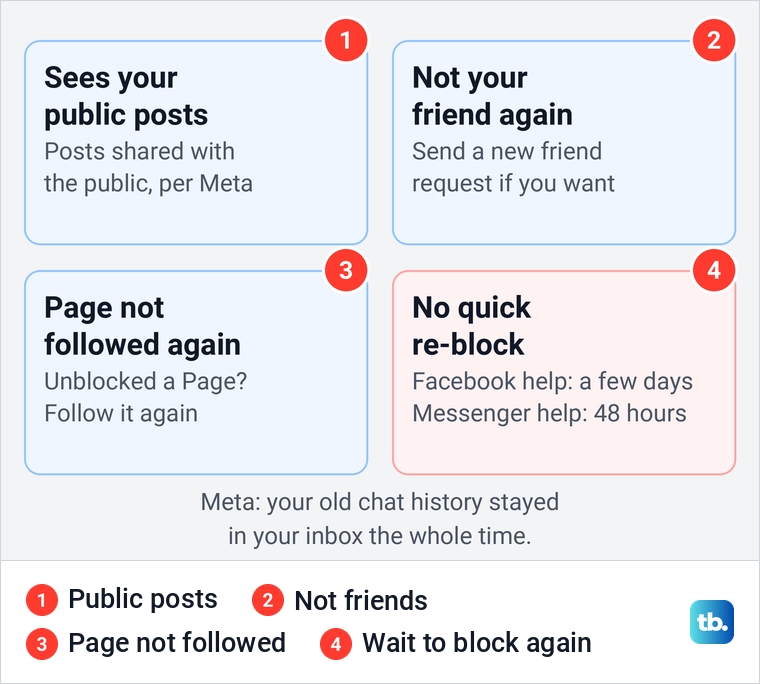
Your old chats were never removed. Meta says your message history with a blocked profile stays in your inbox, so the conversation is still there after the unblock. If an old conversation seems to be gone, it may have been archived, and you can find archived chats in Messenger to bring it back.
The wait before you can block them again
Plan for this before you unblock, because you can't change your mind straight away. Facebook's help page for unblocking says that after you unblock a profile or Page, you won't be able to block it again for a few days, and it has used those words since at least 2023. Messenger's help page, describing the same kind of unblock, says 48 hours.
Many guides quote 48 hours as the rule for Facebook too, but Facebook's own page never gives a number. The waiting rule does not apply to nicknames blocked in a group, which you can block again at once.
Once the wait is over, the Add to blocked list row on the Blocking screen blocks them again. Meta's steps are to tap it, enter the profile or Page's name, find the right profile or Page in the search results and tap Block, then tap Block again to confirm. You can also block someone in Messenger again from your chat with them.
While you wait, softer tools help. Meta suggests restrict in Messenger to stop seeing their messages and calls without blocking their profile. Our guide on how to restrict someone on Facebook covers it, along with the Restricted list, which works only for friends, so it helps only if you become friends again. To hide when you are online, turn off your active status as well.
Another option is to lock your Facebook profile so only friends see your photos and posts. On our iPhone, the Profile locking screen said that profiles in professional mode can't turn on locked profile, so turn off professional mode first if you use it.
Send a friend request again
Unblocking does not restore a friendship. Meta says that if you block a profile and then unblock it, you need to send that profile a new friend request, and if you unblocked a Page, you need to follow it again. The other person still has to accept the request.
You can check the friend requests you have sent to see whether yours is still waiting. If the Add friend button is missing after you unblock them, our guide on why you cannot send a friend request covers the usual causes.
Unban someone from a Facebook group you manage
A group ban is not a profile block, and only the group's admins and moderators can lift it. Meta's iPhone steps are to tap Menu in the top left, tap Groups, then Your groups, and select the group, tapping See more if Groups is not listed. Then tap Manage in the top right, tap Members or People, and open the Banned tab.
Tap the person's profile and select Unban [name]. On a computer, go to facebook.com/groups, select your group, click Members or People below the cover photo, click Unban next to the name and click Unban again to confirm. Meta says banned people can't find the group in search or be invited to it again, so lift the ban before you send a new invite.
Unblock someone in Facebook Dating
Dating keeps its own block list. Meta says blocking someone in Dating doesn't block them on Facebook or Messenger, while profiles you have blocked on Facebook are automatically blocked in Dating. Facebook Dating isn't available to everyone, Meta notes.
To unblock someone there, Meta's steps are to tap Menu in the top left of the Facebook app and tap Dating. Tap Profile in the top right, then Settings, Privacy Settings and Block people in Dating, and tap Unblock next to the person. If Dating is not showing in your menu, the feature may not be available to you.
When the name is not on your blocked list
Facebook's list shows only the blocks made from the profile you are on, so start there. If the name is missing, work through these places in order, and our guide on how to see everyone on your blocked list shows where each list lives.
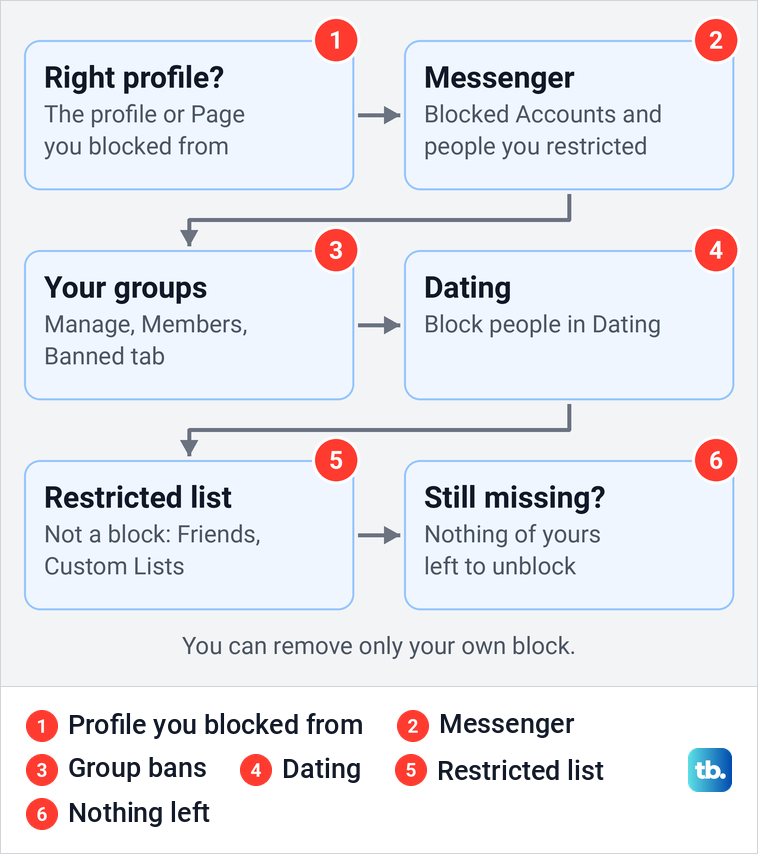
First, switch to the profile you blocked them from, whether that is your main profile or an additional one, and check a Page's Blocking row if you blocked them while acting as that Page. Next, open Messenger's Blocked Accounts and the people you restricted in Messenger's settings.
Then check the Banned tab of any group you manage and the Dating block list. Last, look at the Restricted list, which is not a block at all: someone on it is still your friend and sees your public posts and posts you tag them in.
To take someone off the Restricted list on a computer, Meta's steps are to click Friends in the left menu of your Feed, then Custom Lists and Restricted, and click Remove next to their name. If you do not see Friends, click See More.
If none of those lists has them, you have nothing left to unblock. You can remove only your own block, never one they placed on you. If you still cannot reach them, their account may be unavailable, or a sending restriction or an app problem may be in the way. Our guide to the user unavailable message in Messenger works through those causes one by one.
How we tested this guide
We tested this in the Facebook app on an iPhone 17 Pro with iOS 26.6, going through Settings & privacy to the Blocking screen.
Frequently Asked Questions
Will someone know if I unblock them on Facebook?
Meta's help pages do not say whether an unblock sends a notice. They say only that profiles aren't notified when you block them, and the person may notice once your public posts become visible to them again.
How long do I have to wait to block someone again after unblocking them?
Facebook's help page says a few days, and Messenger's help page says 48 hours. A nickname blocked in a group can be blocked again at once.
Are we friends again after I unblock someone?
No. You need to send them a new friend request, and if you unblocked a Page, you need to follow it again.
Does unblocking someone in Messenger unblock them on Facebook?
Yes, if you blocked their profile. Meta says unblocking a profile in Messenger also unblocks it on Facebook, while a messages and calls block only ever covered messages and calls.
Why isn't the person on my blocked list?
You may be on a different profile. Meta says each additional profile keeps its own blocked list, and a Page has a Blocking row of its own in its settings. The block may also be in Messenger, a group's Banned tab or Dating, or it may be theirs, not yours.
Do old messages come back after I unblock someone?
Meta says your message history with a blocked profile stays in your inbox the whole time, so old chats never left. Meta's help pages do not say that messages sent during the block are delivered later.
Someone is unblocked and I did not do it. What should I do?
Unblocking a profile in Messenger also unblocks it on Facebook, so an unblock made in Messenger may explain it. Also check that you are on the profile you blocked from, because each profile keeps its own list. If neither explains it, change your password and check whether your account was hacked.