

When the YouTube pop out player is not working, the fix depends on whether you mean YouTube Miniplayer inside the site or Picture-in-Picture floating outside the app or browser. The usual causes are blocked video types, disabled PiP settings, stale app data, outdated apps, or browser extensions. Start with the fastest checks, then use the section for your device.
Start with the quickest YouTube checks
These checks separate a broken player from a video or account limitation.
- 1.Open a regular long-form YouTube video instead of a Short or a video marked as made for kids.
- 2.On a computer, start the video on youtube.com, right-click the player, and choose Miniplayer.
- 3.Click inside the YouTube video player, then press i to open Miniplayer from the keyboard.
- 4.On mobile, start the video, then leave the YouTube app while it keeps playing.
- 5.If the video is music content, test a non-music video before changing device settings.
Check whether the video is blocked
The most common cause is YouTube content eligibility, especially Shorts, videos marked as made for kids, and music content on mobile.
YouTube Miniplayer does not work for Shorts or videos marked as made for kids. Open a normal long-form video and try Miniplayer again; if it works there, the original video type is the reason.
On Android, iPhone, and iPad, Picture-in-Picture for music content is a YouTube Premium benefit. This covers official music videos, Art Tracks, children's songs, and user-generated song covers, so use a non-music video or sign in with a YouTube Premium account when PiP only fails on music.
Turn on Picture-in-Picture on Android
This fixes YouTube videos that play normally but stop floating when you leave the app.
Open Android Settings, tap Apps, and choose YouTube. Open Advanced, then tap Picture-in-picture.
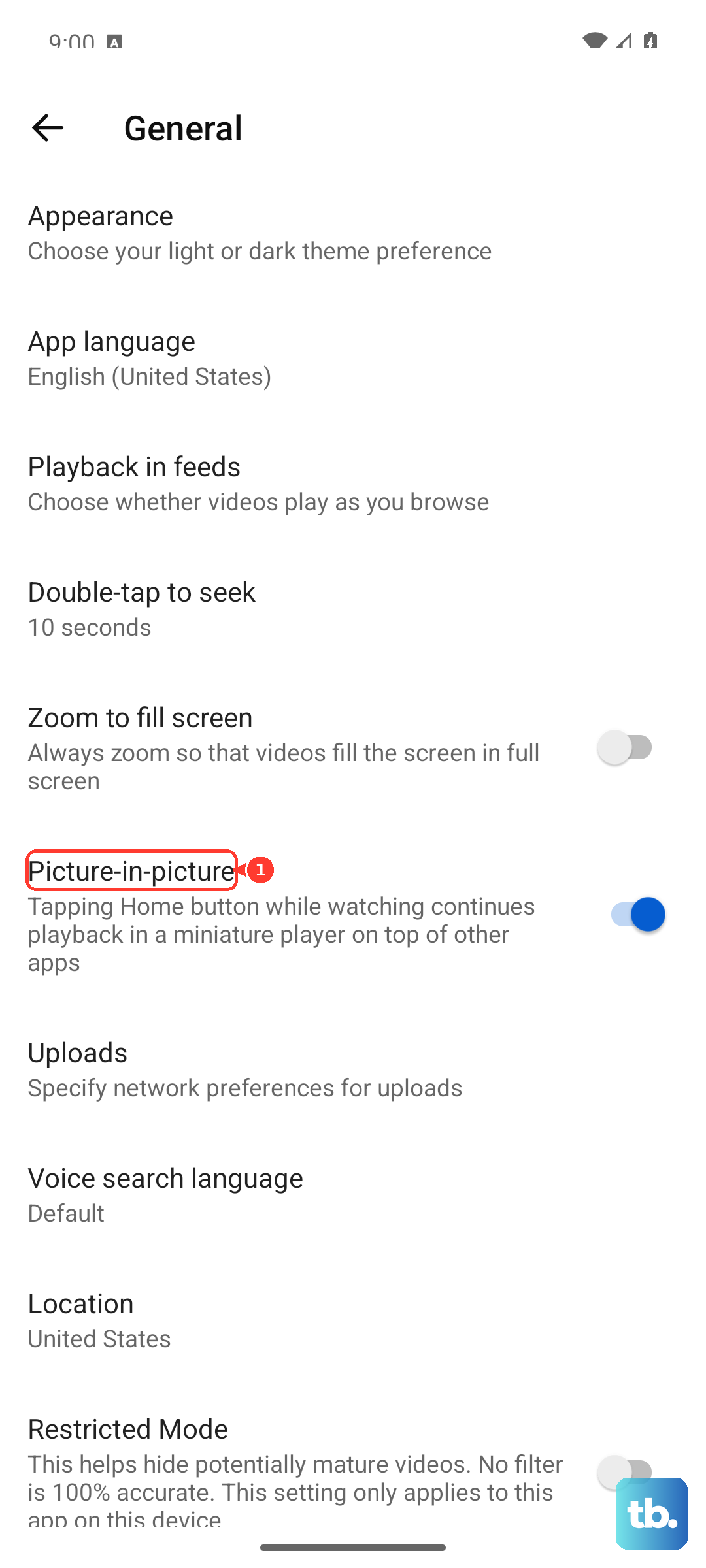
Turn Allow picture-in-picture on. Open YouTube, open YouTube app settings, tap Playback, and turn Picture-in-Picture on. Start a video, then exit the YouTube app while it plays.
Enable Picture-in-Picture on iPhone or iPad
Apple devices need both the system PiP setting and YouTube's playback setting turned on. YouTube Picture-in-Picture works in the YouTube app on iPhone and iPad running iOS or iPadOS 15.0 or later.
Open Settings, tap General, open Picture-in-Picture, and turn Start PiP Automatically on. Open YouTube, go to YouTube app settings, tap Playback, and turn Picture-in-Picture on.
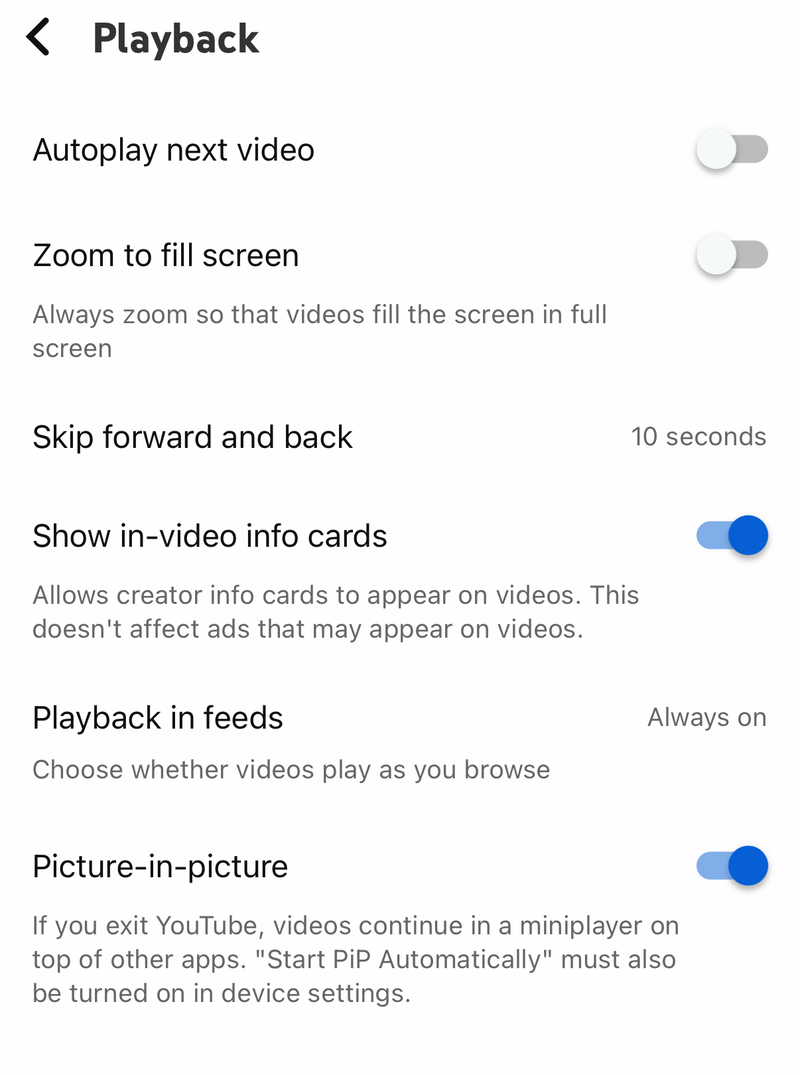
While a supported video is playing, tap Apple's Minimize Video button. On an iPad with a Home button, press the Home button while the video plays.
If this method fails, update the YouTube app and test with a regular non-music long-form video.
Update or reinstall the YouTube app
Close YouTube and reopen it. Restart your phone or tablet if the pop out player still fails.
On Android, open the Google Play Store app, then tap your profile picture. Choose Manage apps & device and open Updates available. Find YouTube and tap Update, or tap Update all.
On iPhone or iPad, open the App Store, then tap the My Account button or your photo. Open App Updates and tap Update next to YouTube, or tap Update All.
If updating does not help, uninstall YouTube and reinstall it from Google Play or the App Store.
On Android, YouTube is often a preinstalled system app that you cannot delete. If there is no Uninstall option, turn the app off and then turn it back on instead; the exact steps vary by phone, so check your device manufacturer's instructions.
Use the official YouTube app listing only, and skip third-party app download sites.
Clear stuck app or browser data
Bad local data leaves the player controls stuck even when YouTube playback still works. Android has a direct YouTube cache button; iPhone and iPad rely on restart, update, or reinstall for the YouTube app.
On Android, open Settings, go to Apps or Applications, choose YouTube, open Storage, tap Clear cache, then replay the video.
On Chrome desktop, open More, choose Delete browsing data, pick a time range such as Last hour or All time, select the data types you want to remove, and click Delete data.
If this method fails, test YouTube in a private or incognito window and check your browser extensions next.
Disable browser extensions that block PiP
This fixes pop out problems that happen in one desktop browser profile but not in another browser or private window.
Open YouTube in an incognito or private window with extensions disabled and test the same video. If the pop out player works there, remove extensions that affect YouTube, video playback, or ads.
In Chrome, open More, go to Extensions, and choose Manage extensions. Select the extension, click Remove, and confirm Remove.
In Firefox, open the menu, choose Help, and select Troubleshoot Mode.... Click Restart, choose Open, then test YouTube Picture-in-Picture again.
Use your browser's own pop out feature
In Firefox, hover over the YouTube video and click the Picture-in-Picture toggle. On pages with a single video in Firefox, click the PiP icon on the right side of the address bar.
If YouTube's right-click menu gets in the way in Firefox, use Shift + right-click or double right-click, then choose Picture-in-Picture. In Firefox, press Ctrl + Shift + ] on Windows or Linux, or Command + Shift + Option + ] on macOS.
In Microsoft Edge, start the YouTube video, right-click the video twice, choose picture in picture, then drag the floating window where you want it. In Chrome, install Google's official Picture-in-Picture Extension, then press Alt + P on Windows, Linux, and ChromeOS, or Option + P on macOS.
Firefox's hover toggle does not appear on full-screen video, videos shorter than 45 seconds, or videos without audio.
Handle work or school restrictions
Managed-browser policies can block Picture-in-Picture features, extension installs, and update controls. The giveaway is simple: the same YouTube video pops out on your personal device but not on your work or school computer.
In Edge, open Settings and more, go to Help and feedback, then open About Microsoft Edge. If update controls are dimmed or missing, your organization manages them.
Chrome extension policies block extension installs, including Google's Picture-in-Picture Extension. Firefox enterprise policies also control PictureInPicture, so an administrator has to change that setting on managed devices.
Skip old fixes that tell you to turn on a YouTube Miniplayer setting or reinstall Adobe Flash Player. Current YouTube troubleshooting uses app updates, browser updates, cache clearing, extension checks, restart, and reinstall.
Frequently Asked Questions
Why is the YouTube pop out player missing on desktop?
Try a normal long-form video first. YouTube Miniplayer is unavailable on Shorts and videos marked as made for kids, and desktop browser extensions can also block player controls.
What shortcut opens YouTube Miniplayer?
Click the YouTube video player, then press i. To view all YouTube shortcuts, select your profile picture, choose Keyboard Shortcuts, or press Shift+?.
Does YouTube Picture-in-Picture require Premium?
For music content on Android, iPhone, and iPad, yes. Non-music long-form videos and Shorts PiP are available to all users where the current YouTube app supports PiP.
Why does PiP work in private browsing but not my normal browser?
That points to a browser profile issue. Update the browser, clear cache and cookies, then remove extensions that affect YouTube, video playback, or ads.