

To fix RCS chat not working on Android, check your internet connection and SMS reception, make Google Messages your default SMS app, then enable RCS chats and verify your number if prompted. Check the RCS connection status before choosing the next fix.
These steps use Google Messages unless a different app or phone model is named. RCS availability depends on your phone, carrier, and region, and everyone in the conversation needs compatible RCS service.
The short version
- Check both connections: You need working internet for RCS and ordinary SMS reception for number verification.
- Confirm the app: Make Google Messages your default SMS app and turn on RCS chats.
- Read the status: Connected means RCS is connected, while Connecting means number verification is underway.
- Keep messages moving: SMS/MMS fallback can deliver messages while RCS is unavailable, but it does not repair RCS.
| Fix | When to use it | Where to focus |
|---|---|---|
| Restore connectivity | RCS cannot connect or send | Internet access, SMS reception, and SIM settings |
| Choose Google Messages | Another app handles your texts | Your default SMS app |
| Enable RCS and verify your number | Activation remains incomplete | RCS chats status and number verification |
| Update Google Messages | Problems continue after setup checks | Available updates on both participants' phones |
| Restart your phone | Connection problems persist | The restart controls for your model |
| Check the recipient | Only certain conversations fail | RCS support, phone number, and blocking |
| Reset RCS registration | Incoming messages or synchronization fail | The RCS toggle on your current or previous phone |
| Deactivate an old registration remotely | Your previous phone is unavailable | Google's RCS deactivation portal |
| Clear the app cache | Google Messages malfunctions on Galaxy | Clear cache in the app's storage settings |
| Resolve carrier restrictions | Your status reports carrier-disabled RCS | Carrier support, then Retry |
| Enable automatic SMS/MMS fallback | You want another delivery route when RCS fails | The resend options under RCS chats |
| Resend one message as SMS/MMS | An individual message remains undelivered | The message's timestamp and resend action |
Check internet access and ordinary texts
Check that your phone has working Wi-Fi or mobile internet and can receive an ordinary SMS. A Wi-Fi connection alone does not confirm that the SMS verification needed to activate RCS can reach your number.
On a current Pixel, open Settings > Network & internet and turn off Airplane mode. You can also swipe down from the top of the screen and turn it off using the Airplane mode control. For missing mobile connectivity, open Settings > Network & Internet > SIMs and enable Mobile data, then select your carrier and enable Use SIM.
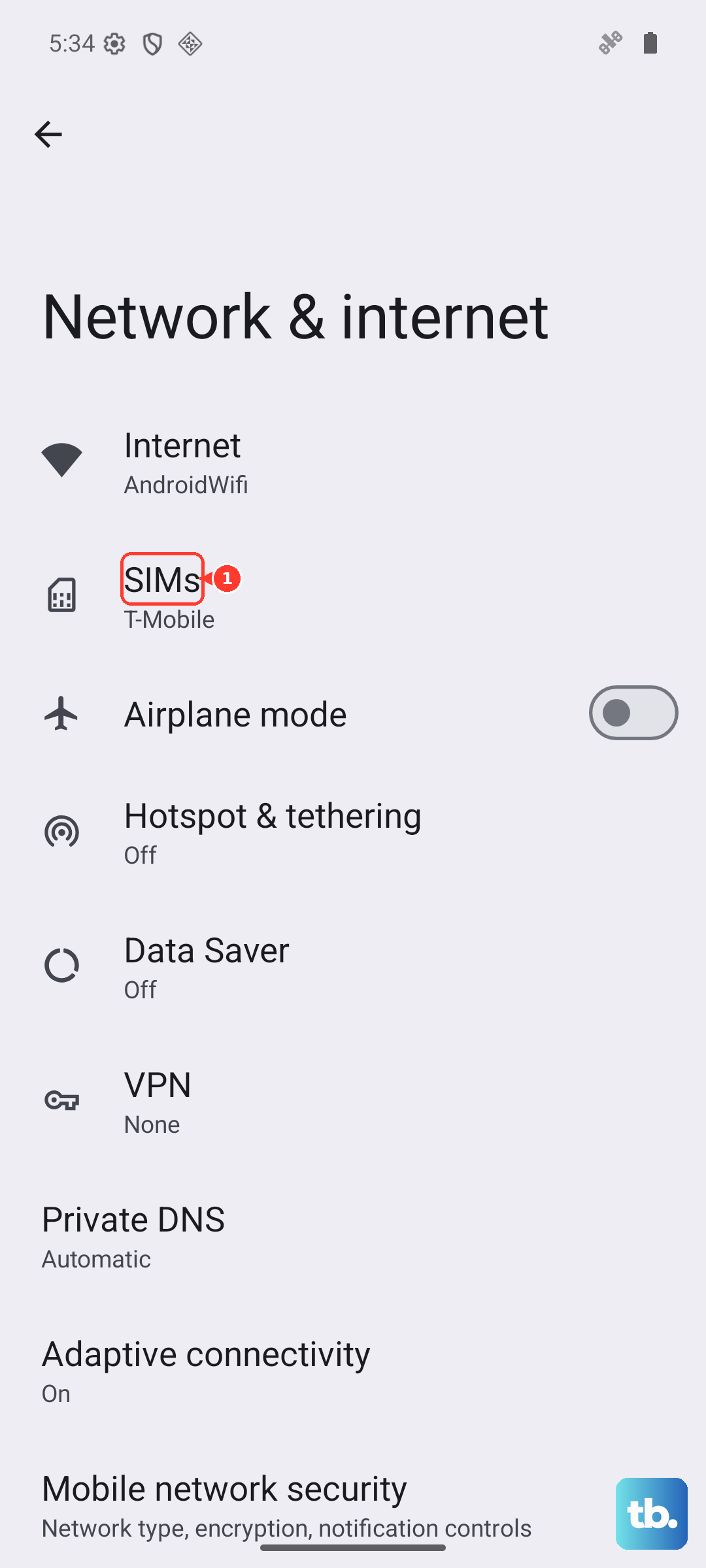
With two SIMs inserted, open Settings > Network & Internet and configure the SIM used for calls as your data SIM. The deeper menu depends on your phone, and dual-SIM RCS support varies. If ordinary texts also fail, check your signal, SIM insertion, plan allowance or prepaid credit, and carrier messaging support.
Make Google Messages your default app
Open Settings > Apps > Google Messages > SMS, then select Google Messages. Alternatively, open Google Messages and follow its default-app setup prompt. If you need the app, install it from the official Google Messages listing published by Google LLC.
On US Galaxy devices running Android 12 or later, Samsung directs you to switch from discontinued Samsung Messages to Google Messages. Open Settings > Apps > Choose default apps > SMS app, then select Google Messages. You can also tap Open Google Messages in the Samsung Messages migration notification.
Samsung Messages remains functional on US Galaxy devices running Android 11 or earlier. Samsung's discontinuation guidance applies to the US, so do not apply that migration requirement to every region.
Enable RCS and verify your number
In Google Messages, tap your profile picture or initial, then open Messages settings > RCS chats and turn on RCS chats. If your app shows Chat features instead, open that menu. Check the connection status on that screen.
A status of Connected means RCS is connected, while Connecting means phone-number verification is underway. When Verify your number appears, tap it and supply the correct phone number. Make sure that number can receive SMS so verification can finish.
If Trouble connecting. Awaiting retry persists for more than 30 minutes, open the RCS status details, tap Details, then tap Submit feedback. If the status reports that your carrier disabled RCS, contact your carrier using its official support channel. After the carrier resolves the restriction, tap Retry; if that fails, tap Details > Submit feedback.
Send undelivered messages using SMS or MMS
SMS/MMS fallback can deliver messages while RCS is unavailable, provided ordinary messaging works. SMS/MMS lacks RCS end-to-end encryption and may incur carrier charges. It gives you another delivery route while you resolve the RCS connection.
For automatic fallback, open Google Messages, tap your profile picture, then open Messages settings > RCS chats and enable Automatically resend as text (SMS/MMS). If your app exposes Resend messages, open it and choose the available resend behavior. The RCS settings menu may be labeled Chat features.
To resend an individual undelivered message, open its conversation and tap the message's timestamp. If the action appears, tap Switch to text (SMS/MMS). This resends the message without fixing the underlying RCS problem.
Check a contact or group that cannot use RCS
When only one conversation fails, check the recipient's phone number and required country code. Ask the other person to enable RCS and establish an internet connection. For a group conversation, every participant needs compatible RCS service.
If you have blocked the affected contact, you can unblock a phone number on Android through Google Messages. Tap your profile photo or icon, open More options > Spam & blocked, select the contact, then tap Unblock.
For an iPhone recipient, RCS requires iOS 18 or later and a carrier plan that supports it. Ask them to open Settings > Apps > Messages > RCS Messaging and turn on RCS Messaging. If that setting is absent, they need to check carrier support.
Update Google Messages and restart your phone
Open Google Messages' Android app-information screen, scroll to App details, and tap Update if offered. Ask the other participant to update Google Messages too if they use it.
A restart is a general connection troubleshooting step, without a guarantee that it will repair RCS. On Pixel 6 and later, hold Power + Volume up for a few seconds, then tap Restart. After the phone restarts, return to RCS chats and check its status.
On current Galaxy devices with the newer Quick panel layout, swipe down from the screen's top-right corner, tap the Power off icon, then tap Restart. If a second confirmation appears, tap Restart again. Older Galaxy Quick panel layouts vary.
Samsung also provides a button method for supported Canadian Galaxy devices: hold Side + Volume down until the power menu appears. Tap Restart, then tap Restart again.
Reset registration for missing incoming messages
For missing incoming messages or RCS synchronization problems, Google provides a registration reset through the app toggle. Use it for those symptoms and avoid repeatedly switching RCS off and on during routine troubleshooting.
Turning off RCS suspends the service, and leaving it deactivated for 30 days can remove you from RCS groups. Open Google Messages, tap your profile picture, then open Messages settings > RCS chats and turn off RCS chats, then turn it back on. If you recently changed phones, your old phone may also need RCS turned off.
If your previous phone is lost or unavailable, open the Google RCS deactivation portal, provided you can receive verification SMS at the retained number. Sign in only through Google’s own app or website, and never share a code, password, or remote access with someone who contacts you.
Deactivation suspends RCS and can remove you from RCS groups after 30 days without reactivation. Enter your number in Phone number, select Send code, enter the received six-digit code in Verification code, then select Deactivate. Return to your current phone's RCS chats settings and turn on RCS chats.
Clear the cache when Google Messages malfunctions
On a Galaxy phone with an unresponsive or malfunctioning Google Messages app, clearing its cache is a general app troubleshooting step. It does not guarantee a fix for RCS registration or carrier restrictions.
Clearing the cache removes the app's cached data. Open Settings > Apps > Google Messages > Storage, then tap Clear cache.
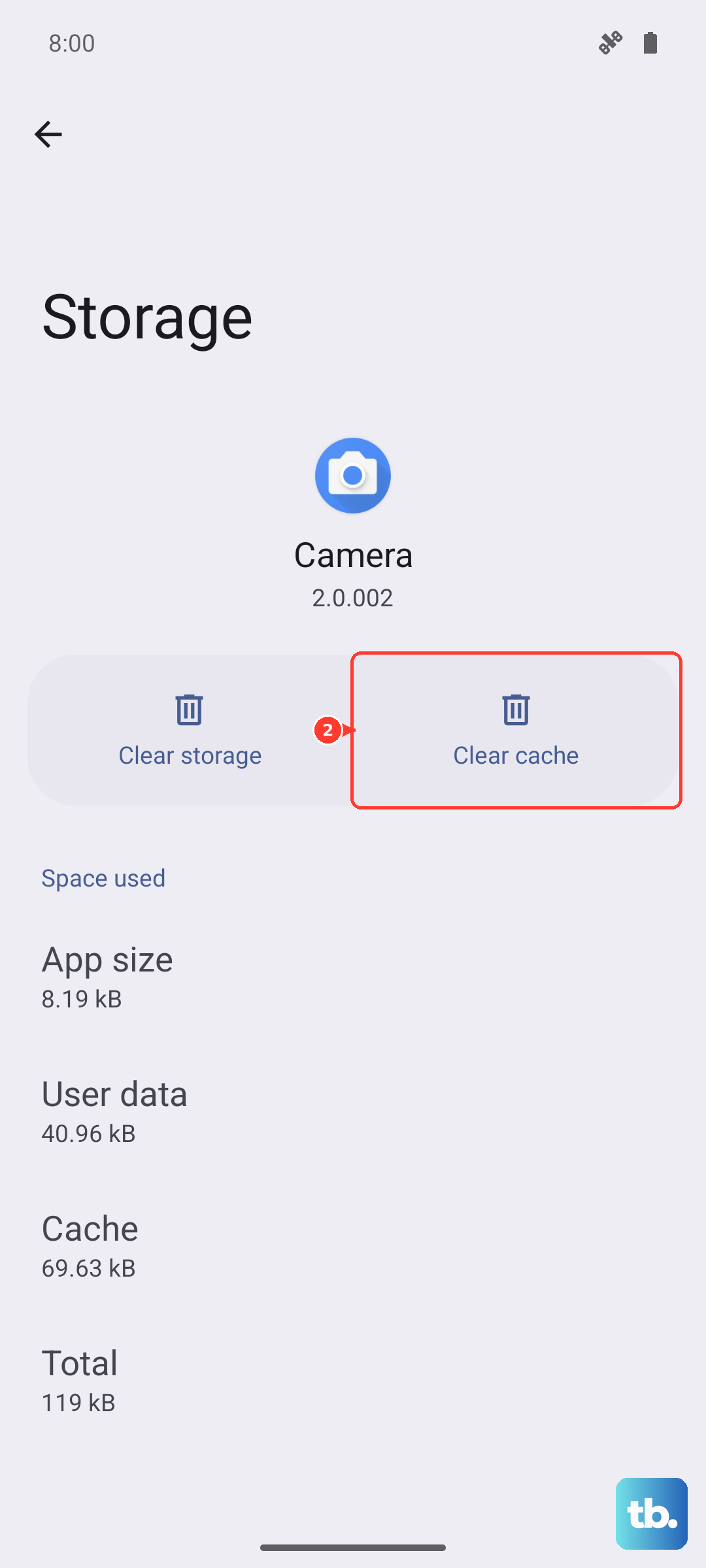
Keep Clear cache separate from Clear data. Clearing app data resets the app and can remove app-held data and settings, so reserve that reset for persistent app problems after preserving important messages. If the app works but RCS remains disconnected, use the connection status to decide whether verification or carrier support needs attention.
Resolve carrier restrictions and persistent failures
Return to Google Messages, tap your profile picture or initial, and open Messages settings > RCS chats. If the status reports carrier-disabled RCS, your carrier needs to resolve the restriction before you tap Retry. A local toggle cannot add service that your carrier does not support.
If ordinary messages or verification texts also fail after your signal, SIM, and allowance checks, contact your carrier through its official help or account support channel. Once the carrier resolves the service problem, check RCS again. If it still cannot connect, tap Details > Submit feedback.
Frequently Asked Questions
Why are read receipts or typing indicators missing when RCS is connected?
These indicators have separate settings. Open Google Messages, tap your profile picture, then open Messages settings > RCS chats and enable Send read receipts or Show typing indicators. To see when others have read your messages, they must turn on read receipts too.
Why did an RCS group split into individual messages?
A group can temporarily split into individual messages when an affected sender loses RCS connectivity. It can recover after that sender reconnects to RCS.
Could my old iPhone explain missing messages on Android?
Yes, old iMessage routing can cause you to miss messages from iPhone contacts after switching to Android. With the old iPhone and active cellular service, open Settings > Apps > Messages and turn off iMessage, then open Settings > Apps > FaceTime and turn off FaceTime. Without the old phone, open Apple's iMessage deregistration portal, enter your phone number and the image challenge, select Send Code, then enter the code in Confirmation Code. This addresses iMessage routing rather than Android RCS provisioning.
Should I check for an Android update too?
You can check your installed version under Settings > About phone > Android version. For available updates, open Settings > System > Software updates and follow your device's installation prompts. Manufacturer-customized Android menus can differ.