

To cancel Paramount Plus, cancel it with whoever bills you. If Paramount bills you directly, go to paramountplus.com, click your username in the upper right corner, click Account, scroll down and click Cancel subscription, then finish what the next screen asks. If Apple, Google Play, Roku, Amazon or another partner bills you, the cancel button is in that company's subscription settings, not on Paramount's site.
Paramount's own help sorts its cancel steps by where you signed up. Start by finding the company on your receipt, because the TV or phone you watch on does not decide who bills you.
The short version
- Paramount bills you: paramountplus.com > your username > Account > Cancel subscription.
- Apple bills you: Settings > your name > Subscriptions > Paramount+ > Cancel Subscription.
- Google Play, Roku or Amazon bills you: cancel in that company's subscription list, not on Paramount's site.
- Not sure: the receipt or the name on your card statement tells you who bills you.
- After you cancel: a direct plan runs to the end of the billing period or free trial, a partner's plan to the end date it shows, and deleting the account ends access at once.
Find out who bills your Paramount Plus
The company that takes your money is the only one that can stop the charge. Paramount's terms say that if you pay through a third party, such as an app store or a partner, you cancel or change payment through that third party. Search your email for the receipt, or read the name next to the charge on your card statement.
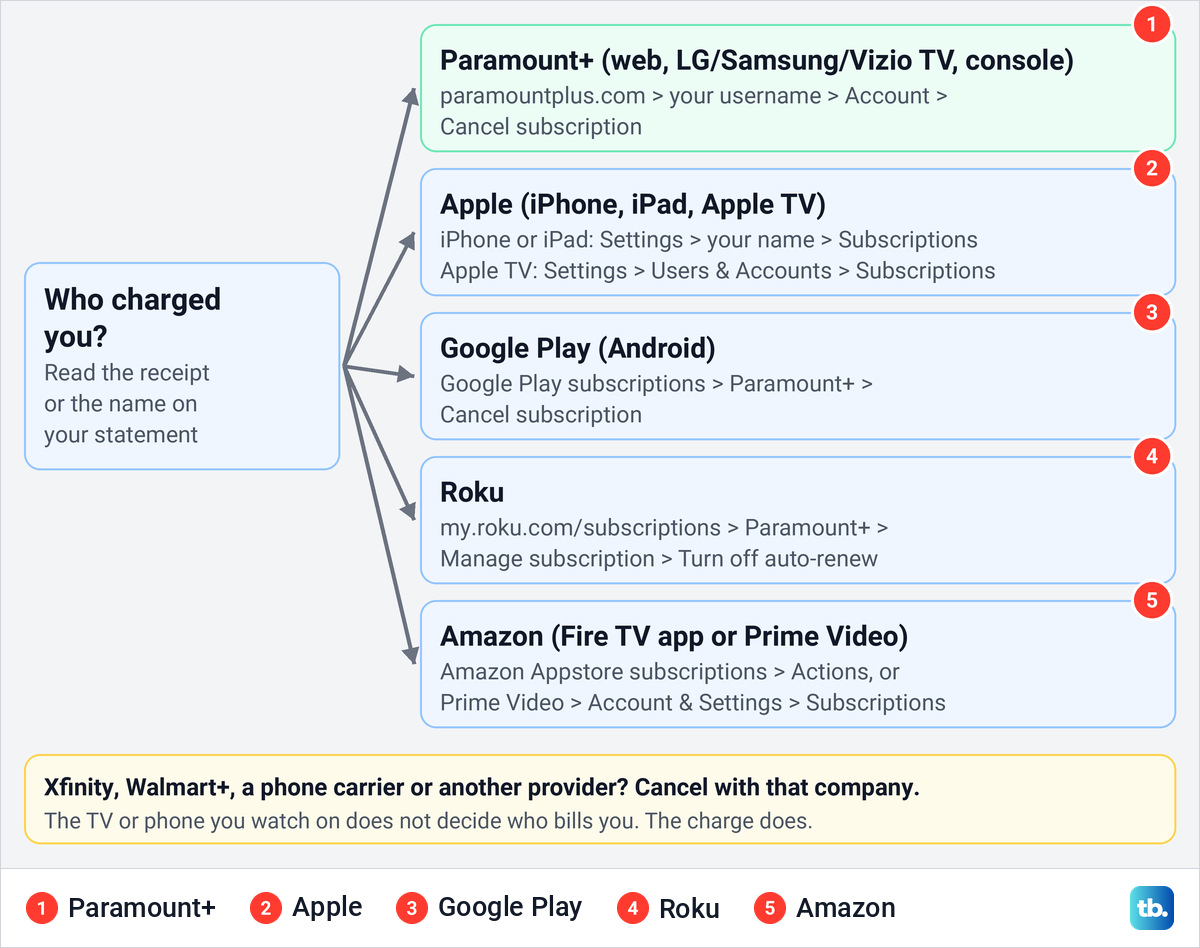
A receipt from Apple means Apple bills you, and Apple's help suggests searching your email for "receipt from Apple" if you are not sure. Roku says its charges appear as "Roku", "Roku for" followed by a name, or "The Roku Channel". A charge from Paramount+ itself means you cancel on Paramount's website, which Paramount's help says also covers sign-ups on LG, Vizio and Samsung smart TVs and on Xbox and PlayStation consoles.
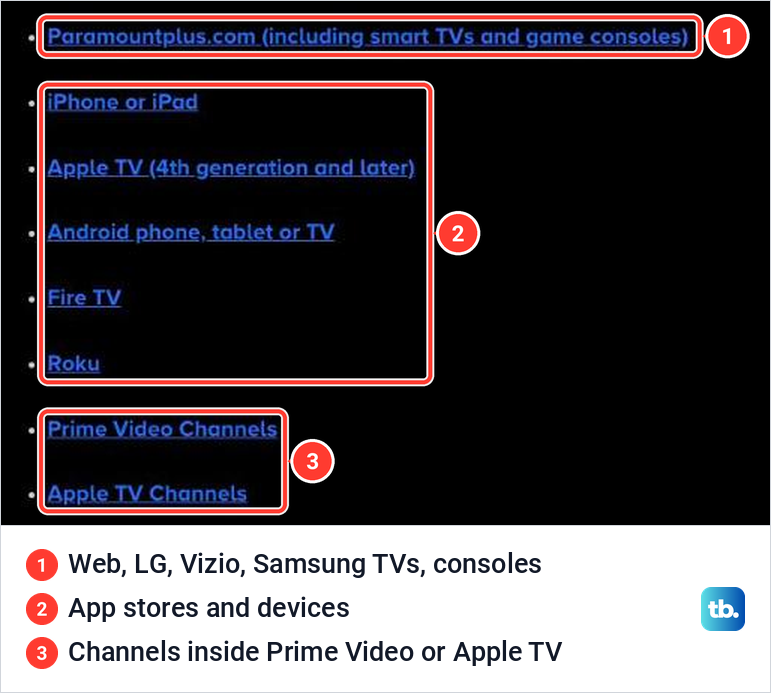
If the name on the statement means nothing to you, find recurring subscriptions on your bank statement first and match the merchant name to a company. Paramount's help page lists the places people sign up, and each one has its own steps.
Where to cancel Paramount Plus at a glance
Find the row that matches the company on your receipt, then use the section below it for the full steps. The last column says where to check the result afterwards, either a canceled state the company documents or the plan's renewal status.
| Who bills you | Where to cancel | What to select | How to check |
|---|---|---|---|
| Paramount+ directly, including sign-ups on an LG, Samsung or Vizio TV, an Xbox or a PlayStation | paramountplus.com > your username > Account | Cancel subscription, then finish the next screen | Reopen Account and check the plan's renewal status |
| Apple on iPhone or iPad | Settings > your name > Subscriptions > Paramount+ | Cancel Subscription, then confirm on the next sheet | No Cancel button, or an expiration message in red |
| Apple on an Apple TV box | Apple TV Settings > Users & Accounts > your account > Subscriptions | Paramount+, then Cancel Subscription | No Cancel Subscription option left |
| Apple TV Channels | Apple TV Settings > Users and Accounts > your name > Subscriptions | Paramount+, then the on-screen steps | Reopen the subscription and check its expiration or renewal status |
| Google Play | g.co/play/subscriptions > Paramount+ | Cancel subscription, then follow the instructions | A Resubscribe button on the Paramount+ subscription |
| Roku | my.roku.com/subscriptions, or Apps > Paramount+ > Star button | Manage subscription, then Turn off auto-renew | Reopen Manage subscription and check the renewal status |
| Amazon, for the Fire TV app | amazon.com/appstoresubscriptions > Paramount+ | Actions, then Cancel your subscription | Check the renewal status next to Paramount+ on that page |
| Amazon, for a Prime Video channel | Prime Video > Account & Settings > Subscriptions | Unsubscribe, then confirm | The end date on the confirmation screen |
| Xfinity | X1 or Xumo Settings > Apps & Subscription Management | Unsubscribe, then Unsubscribe again | The end date shown on the screen and a Resubscribe option |
| Walmart+, for a Premium upgrade | Walmart account > Walmart+ > your streaming service | Manage plan, then the included plan | Walmart+ shows the included plan as your streaming plan |
| A phone carrier or other provider | That company's account or customer support | Whatever that company asks for | The charge gone from that company's bill |
Cancel Paramount Plus on the website
This is the route for anyone Paramount bills directly. Paramount's help says it applies if you signed up on the web, on an LG, Vizio or Samsung smart TV, or on an Xbox, PS4 or PS5. Even if you watch on a TV, you cancel this kind of plan in a web browser.
Go to paramountplus.com and sign in with the email address and password you subscribed with. Opening the account page while signed out takes you to the Sign In form first.
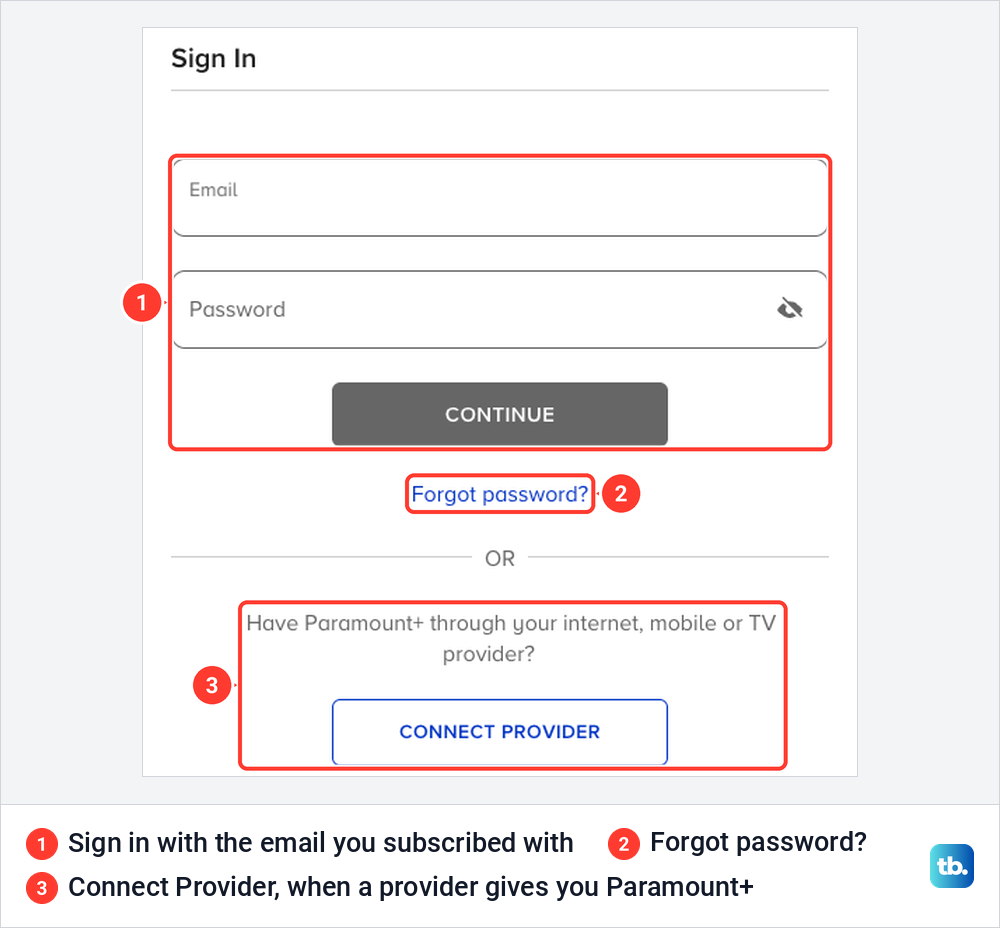
The form has Forgot password? under the Continue button. Below it, Connect Provider is for people who have Paramount+ through an internet, mobile or TV provider, and Paramount's terms say a plan paid through a provider or bundle is canceled with that provider, so skip ahead to the provider section.
Once you are signed in, Paramount's steps are short. Click your username in the upper right corner, click Account, then scroll down and click Cancel subscription.
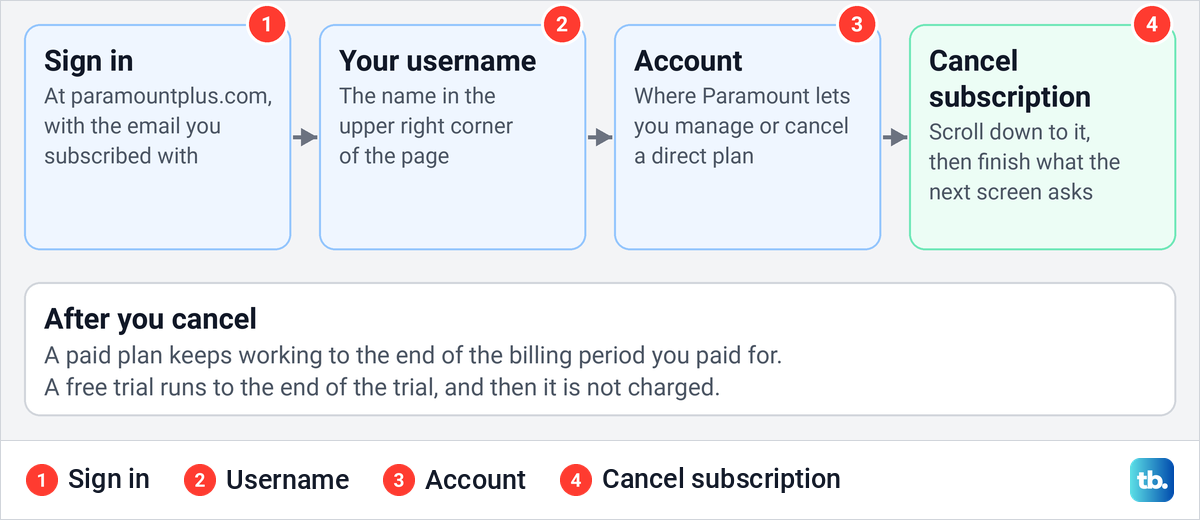
Paramount's help stops at that button and does not describe the screens after it, so read each one before you click and finish every step it asks for. If you close the tab halfway, open Account again and read what it says about your plan before you assume it is canceled.
The same page also covers two common snags. If you cannot sign in, Paramount says to open its Help Center homepage, click the blue chat bubble at the bottom of the screen and type "Agent". If another platform bills you, the page says you have to return to that platform to cancel.
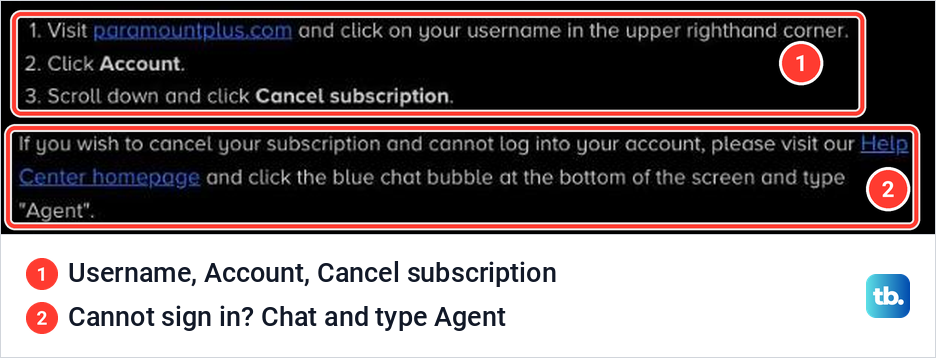
Paramount's terms say a direct plan keeps working until the cancellation takes effect. For a free trial that is the end of the trial, and for a paid plan it is the end of the current billing period.
Cancel through Apple on iPhone, iPad or Apple TV
If your receipt or statement shows that Apple bills you, Paramount's help sends you to Apple's settings, and an iPhone or iPad works for that. Open the Settings app, tap your name, tap Subscriptions, tap Paramount+, tap Cancel Subscription and confirm the cancellation on the sheet that appears.
If you do not see Cancel Subscription, Paramount says the subscription is already canceled and won't renew. Apple adds that an expiration message in red text means the same thing. For the full walkthrough, including missing subscriptions and family members' accounts, see how to cancel subscriptions on your iPhone.
Paramount+ will not appear in that list if a different Apple Account paid for it. Apple says to check which Apple Account is named on the receipt and sign in to that one, and if you have lost access to it, reset your Apple Account password before trying again.
On an Apple TV (4th generation and later), Paramount's steps are to open Settings on your Apple TV, select Users & Accounts and your account, then Subscriptions, choose Paramount+ and select Cancel Subscription. Paramount notes that an Apple TV only lets you edit subscriptions for tvOS apps installed on that box.
Apple TV Channels is a different purchase, a Paramount+ channel added inside the Apple TV app. Paramount's help says to go to Settings > Users and Accounts > your name > Subscriptions, select Paramount+ and follow the on-screen instructions.
Cancel through Google Play on Android
If your receipt or your Google Play subscriptions show that Google Play bills you, use Google's controls. Paramount's help says you need a phone or computer to change or cancel it, even if you signed up on an Android TV. Go to g.co/play/subscriptions, select Paramount+, select Cancel subscription and follow the instructions.
On a computer, Google's own steps add one click: open your Play subscriptions, choose Paramount+, click Manage and then Cancel subscription. Sign in with the Google account that pays, because Google says a missing subscription may simply be on another account. If that account will not let you in, fix Google Play Store login problems first.
Removing the app does nothing to the bill. Paramount's help says uninstalling the app on an Android TV will not cancel the subscription, and Google says the same for any app. After you cancel, Google says you can keep using the subscription for the time you have already paid, and a canceled subscription shows a Resubscribe option in Google Play.
Google also says some apps let you pause a subscription instead, starting at the end of the current billing period. Paramount does not say whether its plan is one of them, so look for Pause payments on the Paramount+ subscription in Google Play, and if it is not there, canceling is the option.
Cancel Paramount Plus on Roku
A Roku-billed plan can be canceled on the Roku website or on the device. Roku's help gives the web route as my.roku.com/subscriptions, then Paramount+ under Active subscriptions, Manage subscription and Turn off auto-renew. You do not need the Roku you signed up on, which helps if the old stick is gone.
On the device, press Home, highlight the Paramount+ app and press the Star button on the remote. Choose Manage subscription to see the renewal date, then select Turn off auto-renew, and enter your Roku PIN if you set one for purchases. Paramount's help calls the last option Cancel Subscription, so either label is the one you want.
If Manage subscription is missing, Roku says some options are not available from Quick Access. Scroll down to the Apps section, highlight Paramount+ there and press Star again. If the website shows no Paramount+ subscription either, check that you signed in with the Roku account that made the purchase, then compare the name on the charge with your receipt.
Roku says the subscription stays active until the end of the billing cycle, and it does not give partial-term refunds. Free trials have to be canceled before they end to avoid the first charge.
Cancel Paramount Plus on Amazon or Fire TV
Amazon sells Paramount+ in two different ways, and each has its own cancel page. If Amazon bills a purchase made in the Paramount+ app on a Fire TV, it is an Amazon Appstore subscription. If you added Paramount+ as a channel while browsing Prime Video, it is a Prime Video add-on.
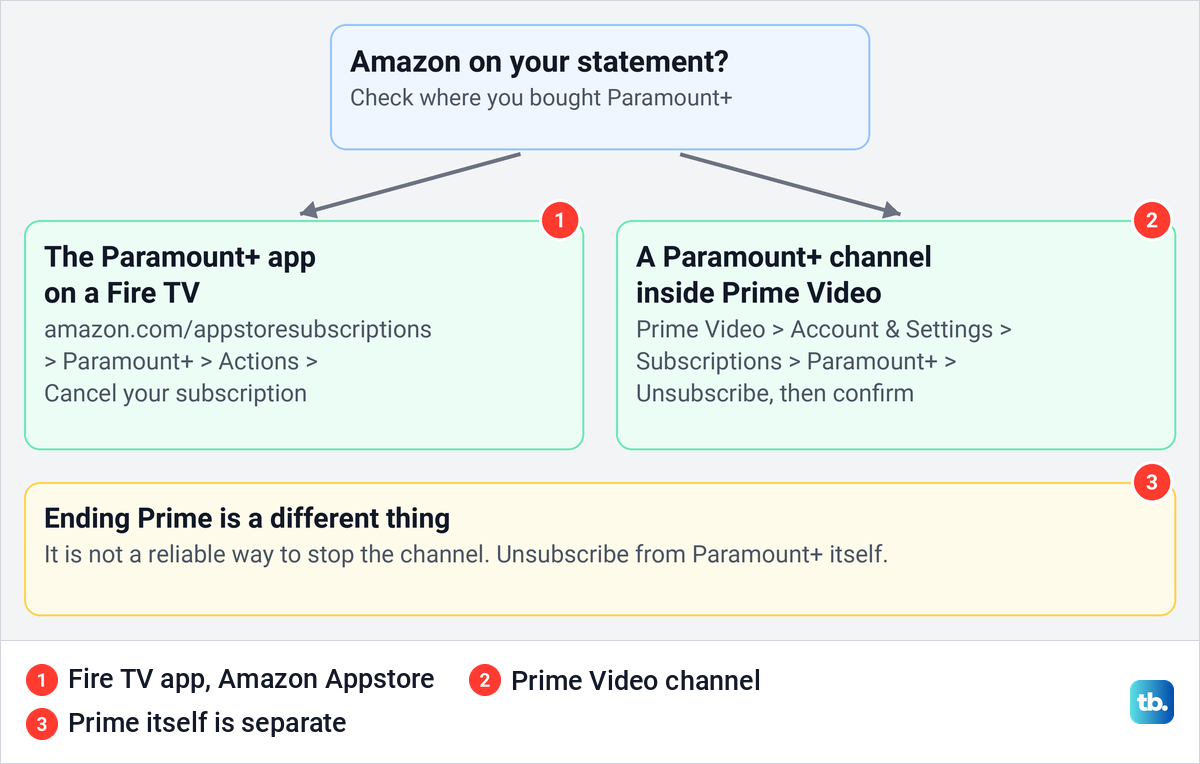
For the Fire TV app, Paramount's help says to go to amazon.com/appstoresubscriptions and sign in with your Amazon account. Next to the Paramount+ subscription, select Actions, then Cancel your subscription. If the wording in the Actions menu does not match exactly, choose the option that cancels the subscription or turns off its renewal.
For a Prime Video channel, Amazon's steps are to open Account & Settings from the profile icon in Prime Video, select the Subscriptions tab, find Paramount+, select Unsubscribe and confirm. Amazon notes that the button may read Withdraw instead.
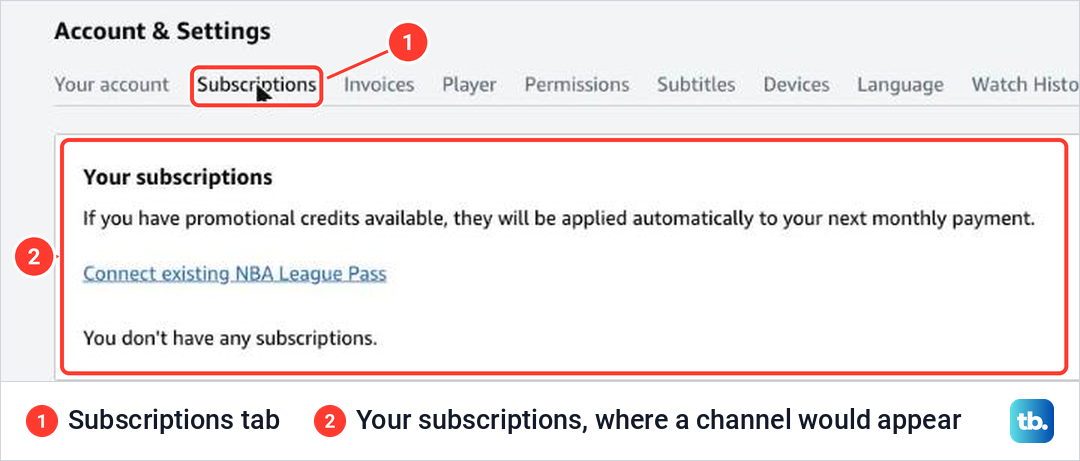
The Subscriptions tab is the list of channels on your Prime Video account. On the Prime Video account we used, with no channel added, the Subscriptions tab read "You don't have any subscriptions".
Amazon says the channel's end date appears on the confirmation screen and that you can reverse the cancellation until then. After that date you are not charged and lose access to the channel, and canceling does not refund earlier charges. The full Amazon walkthrough, with the screens for Prime itself, is in the guide to cancel Prime Video channels.
Do not end Prime to get rid of the channel. Amazon's help pages disagree on whether channels continue once Prime ends, so unsubscribe from Paramount+ itself. If a channel is paid through Apple, Amazon says to cancel at least 24 hours before it renews.
Cancel through Xfinity or another provider
Xfinity bills you if you signed up for Paramount+ on an X1 TV Box or Xumo Stream Box. Xfinity's steps are to open Settings on the box, go to Apps & Subscription Management, select Unsubscribe, then select Unsubscribe again on the next screen to confirm. Saying "Manage Paramount Plus" into the Xfinity Voice Remote opens the same page.
Xfinity says you keep access until the date shown on the screen and are not charged again. Without an X1 or Xumo box, Xfinity says to contact it to cancel. If you already paid Paramount before you started watching on the box, Xfinity says Paramount still bills you, so use the website steps.
Any other phone carrier, internet company or TV provider works the same way. Paramount's terms say that if you pay through a third party or as part of a bundle, you cancel through that company, and if you sign in to Paramount+ with the Connect Provider button, a provider supplies your access, so start with that provider's account.
Paramount Plus with Walmart Plus
Walmart+ members can choose Paramount+ Essential as their streaming benefit at no additional cost, so that plan has no charge of its own. Walmart says members can cancel the streaming benefit at any time, or switch it to Peacock once every 90 days from the Video Streaming Choice tile under See all your Walmart+ Benefits.
The ad-free Premium upgrade is a paid add-on that Walmart bills. To drop it, Walmart's steps are to sign in, open Account > Walmart+, select the upgraded streaming plan, choose Manage plan, pick the included plan and confirm. Walmart says no refund is issued for the downgrade, and you keep the upgrade until the end of the billing cycle.
A free promotional upgrade trial is the exception, because Walmart says you lose the promotion immediately if you downgrade or cancel it. Ending Walmart+ itself is a separate step under Manage membership, then Manage beside your Walmart+ plan and Cancel, and since the benefit needs an active Walmart+ membership, the included Paramount+ goes with it.
What happens after you cancel
For a plan Paramount bills directly, canceling stops the next renewal, not your access today. Paramount's terms say a direct paid plan runs to the end of the current billing period and a direct free trial runs to the end of the trial. If a partner bills you, go by the end date that partner shows, because the rules differ, and Walmart says a free promotional upgrade trial ends immediately.
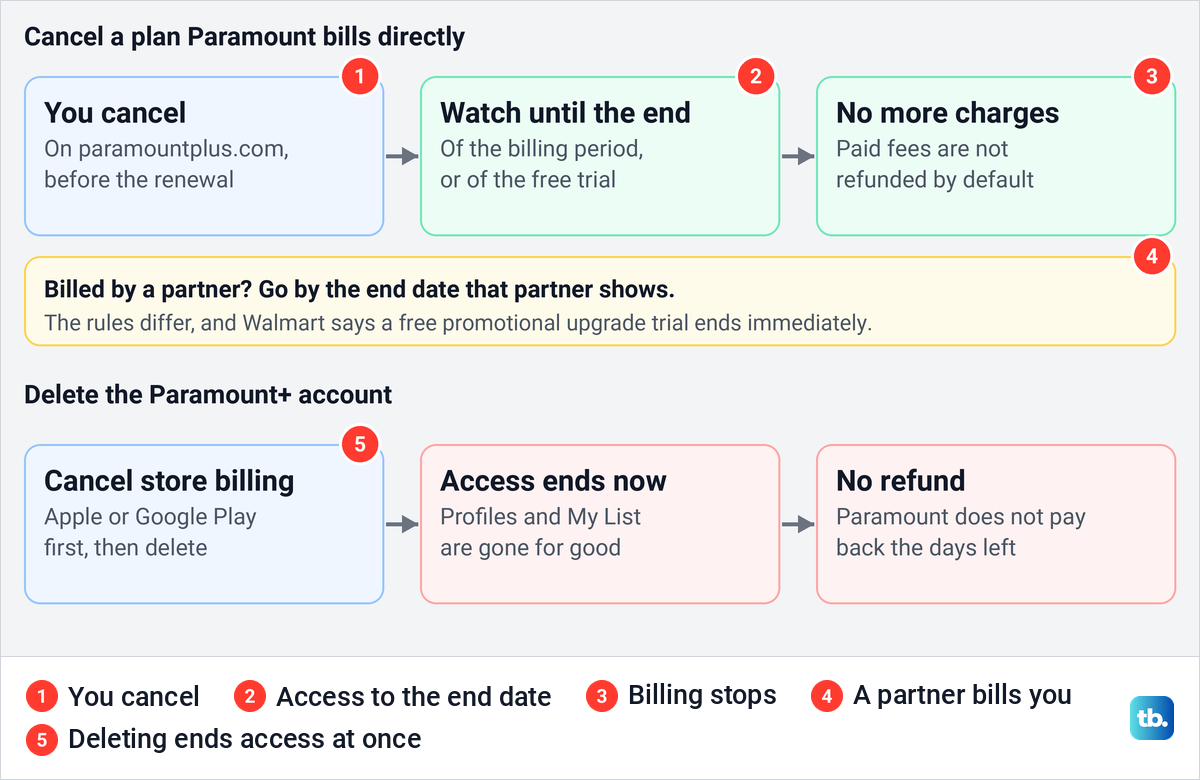
Paramount's terms say you will not be refunded fees you have already paid, with exceptions where the law gives you a right to a refund. If you have an add-on on top of a direct plan, the terms say its access may end when the main subscription expires.
If a show stops playing before your end date, fix Paramount Plus playback problems before assuming the cancellation cut you off early. Paramount says you can resubscribe at any time by signing in with the same email address, choosing a plan and entering billing details.
Free trials, refunds and pausing
Paramount's terms say the trial's length is shown when you sign up and that you are charged automatically when it ends unless you cancel before then. Check the sign-up email or your biller's subscription page for the exact date rather than assuming a set number of days. A direct trial canceled early still runs to its end date.
Store trials have their own deadlines. Apple says to cancel a trial at least 24 hours before it ends, and Roku says trials must be canceled before they end to avoid recurring charges.
For refunds, ask the company that charged you. Apple says some purchases might be eligible and handles requests at reportaproblem.apple.com under Request a refund, and Google's refund policy says you may be able to get one within 48 hours of a purchase, after which it points you to the app's developer.
Paramount's help documents no pause for a plan it bills directly, so canceling is the way to stop that charge. Walmart lets members pause Walmart+ itself for a month at a time, which Walmart says is not available for a trial or a Paramount+ Premium upgrade.
Check that it worked or find a missing subscription
Each biller shows the result in its own place. Apple removes the Cancel button or shows the expiration in red, Google Play shows Resubscribe, Prime Video shows the channel's end date on the confirmation screen and Xfinity shows the end date on the TV. On Roku, the Amazon Appstore page and paramountplus.com, reopen the subscription and check its renewal status.
Paramount's help does not promise a cancellation email, so keep one if it arrives but do not wait for it as proof. The next statement after your end date is the final check, because no new Paramount+ charge should appear on it.
If you cannot find the subscription anywhere, you may have two Paramount+ accounts. Paramount says people sometimes create a second account by signing up with a different email address or a typo, and asks you to contact it through its contact page. If you suspect the charge is fraud, Paramount asks you to include the last four digits of the card, the transaction date and the amount when you contact it.
If this charge is one of several you do not recognize, it helps to find and cancel unwanted subscriptions in one sitting. Start with the card or account that showed the Paramount+ charge.
Deleting your account is a separate step
Canceling and deleting are not the same. Paramount's terms say deleting your account ends access to the service immediately and permanently removes your profiles and viewing preferences, and Paramount's deletion help adds that you get no refund for the days left on the subscription.
If an app store bills you, Paramount says to cancel the store's auto-renewing payment first, then delete the account. Its steps for Google Play subscribers on a phone or tablet are to open the Paramount+ app, switch away from a Kids profile, tap More, choose Support and select Delete Account. On an Android TV it is Settings on the left of the Home page, then Support and Delete Account. For other plans, ask Paramount's Help Center.
Frequently Asked Questions
Can I cancel Paramount Plus in the Paramount+ app?
Not in the steps Paramount publishes. A plan Paramount bills is canceled at paramountplus.com under Account, and a plan bought through an app store is canceled in that store's settings, such as Settings > your name > Subscriptions on an iPhone.
How do I cancel Paramount Plus on Amazon?
First check which Amazon purchase you have. A Fire TV app subscription is canceled at amazon.com/appstoresubscriptions under Actions, and a Prime Video channel under Prime Video's Account & Settings > Subscriptions > Unsubscribe.
Why is there no Manage subscription option on my Roku?
Roku says the option is not available from Quick Access. Scroll to the Apps section, highlight Paramount+ and press Star, or check my.roku.com/subscriptions, and if Paramount+ is not listed there, make sure you are signed in to the Roku account that made the purchase, then check the name on the charge.
Do I lose access as soon as I cancel?
Not with a plan Paramount bills directly, which runs to the end of the billing period, or of the trial. A partner-billed plan follows the end date that partner shows, and Walmart says a free promotional upgrade trial ends immediately. Deleting the Paramount+ account is different and ends access at once.
Will Paramount refund the rest of my plan?
Not by default. Paramount's terms say paid fees are not refunded except where the law gives you a right to one, and if Apple or Google billed you, ask that company, since each has its own refund request.
Can I pause Paramount Plus instead of canceling?
Paramount documents no pause for a plan it bills directly. If Google Play bills you, look for Pause payments on the subscription, and a Walmart+ membership pause does not apply to a Paramount+ Premium upgrade.
Does uninstalling the Paramount+ app cancel my subscription?
No. Paramount and Google both say uninstalling the app does not cancel the subscription, so cancel with your biller first.