


To add a clickable link to your TikTok bio, open the TikTok app, tap Profile, choose Edit profile, then tap Add beside Links and follow the website link prompts. You need at least 1,000 followers or a Verified Business Account. You can add a website, an Instagram or YouTube website URL, or a published landing page containing multiple destinations.
Use the mobile app on iPhone or Android to add your clickable website link. If you do not qualify, you can enter an address as plain text in your bio through TikTok’s desktop website, but this edits your bio description rather than adding a website link through Links.
The short version
- Add your link: Open Profile, select Edit profile, then tap Add beside Links.
- Meet the requirement: You need at least 1,000 followers or a Verified Business Account.
- Choose a destination: Use a direct website address or a published landing page containing multiple destinations.
- Use the fallback: A website address entered in Bio on desktop becomes part of your description, not a website link.
| Option | What it provides | Requirement or limit |
|---|---|---|
| Website link in the app | Clickable website or social profile URL | 1,000 followers or Verified Business Account |
| Link landing page | One address leading to multiple destinations | Same website link eligibility |
| Lemon8 account link | Supported account connection | Where available; no separate follower requirement specified |
| Desktop bio text | Website address as bio text | 80-character bio limit; desktop procedure |
| Mobile business verification | Business eligibility below 1,000 followers | Age 18 or older, qualifying documents and supported market |
| Web Business Suite verification | Business verification submission | Advanced Access or Verified Business Account access |
| Business Center shared verification | Verification for an existing linked account | Verified Business Center and administrator access |
| Business Center account linking | Preparation for shared verification | Account holder permission; linking to an unverified Business Center alone does not enable display |
| Organization Account creation | New account with inherited business access | Admin access, verified company and legal representative, contact and billing information |
| Business verification banner | Route to regain business eligibility | Approval after submitting business documents |
| Business Page | Website on a separate profile tab | Verified business, over 18, no TikTok Shop |
| Donation Link | Link to an approved nonprofit | Age 18 or older and Donations availability |
| Series link | Access to published premium content | Approved, eligible Series creator |
| Official app download | Mobile app needed to add the website link | iOS or Android device |
Add your clickable website link
In the TikTok mobile app, open the account whose profile you want to change. Tap Profile, choose Edit profile, and select Add beside Links. Follow the website link prompts to enter your destination and finish adding it.
If you need the app, open TikTok’s official download page and scan the QR code shown there. Use the iOS or Android app for the clickable website link procedure; desktop bio editing changes the description instead.
Choose between a direct link and multiple destinations
Use a direct website address when you want visitors to reach a particular destination, including your Instagram or YouTube profile. TikTok recommends direct destinations because external link chains may trigger a prompt to open the device browser.
To offer several destinations, use the address of a published landing page. For an existing Linktree, open My Linktree, select Links, choose Share, then select Copy beside your URL. Return to TikTok and add that address through Profile > Edit profile > Add beside Links, then follow the website link prompts.
You can use another published landing page through the same website link option. Whichever landing page you choose, you still need 1,000 followers or a Verified Business Account.
Put an address in your bio without a clickable link
If you do not qualify for a clickable website link, you can display your address as bio text. Log in at TikTok’s desktop website, select your profile picture, choose View Profile, then open Edit profile. Select Bio, enter the address as text, and choose Save.
Your bio has an 80-character limit, including any description you keep alongside the address. This changes the description and does not create a clickable website link. TikTok excludes mobile web from this bio editing feature, so use the desktop website for these steps.
Verify an eligible business below the follower threshold
If you have fewer than 1,000 followers, qualifying business verification can give you access to a clickable website link. You must be at least 18, have the required business documentation and be in a supported market. Simply changing to an ordinary Business Account does not bypass the requirement.
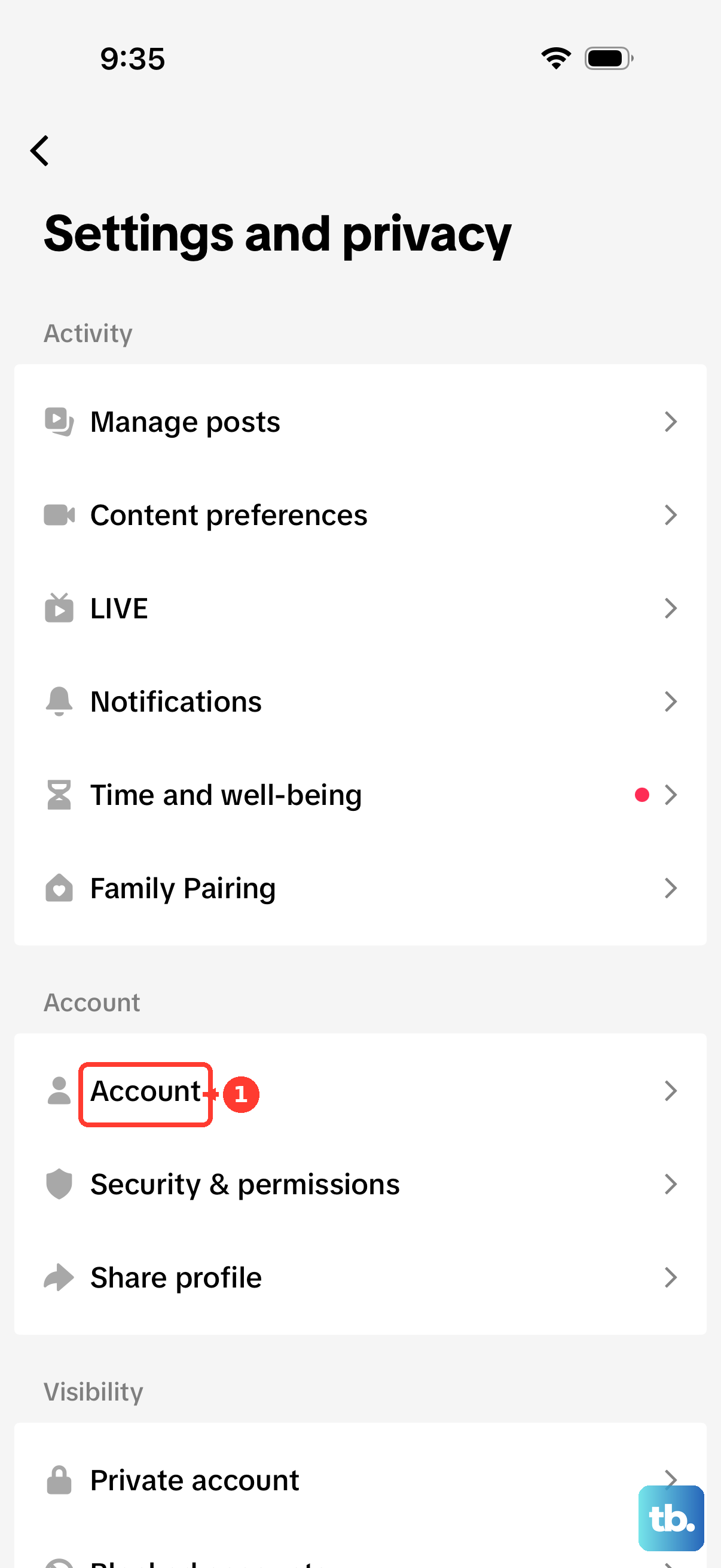
Open Profile, select Menu, then go to Settings and privacy > Account > Business verification. Accept the terms and tap Get started. Enter the requested business information, then select Next.
Upload your verification documents and enter your Legal business name and Business license ID. Select Next, choose SMS or Voice Call for identity verification, and tap Submit. After approval, return to Profile > Edit profile and use Add beside Links to complete the website link prompts.
If your account has Advanced Access or Verified Business Account access, Web Business Suite provides another verification submission route. Log in at TikTok’s desktop website, select your profile picture, open Business Suite, then choose Settings. Submit the requested business information and qualifications, then add your website link through the mobile app after approval.
Advanced Access alone does not enable public display of your bio link, even if you can edit it. If you rely on business status instead of the follower threshold, you need qualifying business verification.
Share verification with an existing business account
If you administer a verified Business Center, you can share its verification with an existing TikTok account linked for account management. Start by linking the account with its holder’s permission. Linking to an unverified Business Center alone does not enable public bio link display.
In Business Center, open Accounts > TikTok accounts > Add a TikTok account > Link an existing TikTok account. Choose Send a QR code, select Next, choose Manage account, then select Copy QR code.
Have the account holder open TikTok, select Profile, open the three-dashes menu, then choose Your QR code > Scan. They must scan the code and grant the requested permissions before you complete shared verification.
In the verified Business Center, open Verification and confirm that it shows Verified. Select Share verification, choose Business Account, select the TikTok account, then choose Confirm.
Under Business Account verification, open View detail and confirm that Verification status shows Verified. Then open the TikTok mobile app and add your website through Profile > Edit profile > Add beside Links.
Create an Organization Account through Business Center
If you need a new organizational profile, you can create an Organization Account that inherits verified business access. You need Admin access to the Business Center, and it must have completed company and legal representative verification and supplied the required contact and billing information. Agencies must first create a verified ad account for the client. This creates a new account rather than adding verification to your existing profile.
In the verified Business Center, open Accounts > TikTok accounts > Add a TikTok account > Create a new TikTok account, then select Create new. If you are an agency creating the account for a client, select an eligible client and choose Confirm. Supply a nickname and operating region, then select Create.
To enter the account, select Get login code in Business Center. In TikTok, choose Log in > Use phone / email / username > Email / Username, then enter the generated credentials. Once signed in, open Profile > Edit profile, tap Add beside Links, and complete the website link prompts.
Fix missing or lost website link access
If you cannot use the website link option, check your follower count and business verification status first. Below 1,000 followers, an unverified account does not meet the website link requirement. A landing page or a change to an ordinary Business Account does not bypass it.
If your Business Account was converted to a General TikTok Account after failing to verify, look for a business verification prompt or banner on Profile. Select Verify and submit the requested business information and documents. Approval can take up to five business days, after which you can add your website through Edit profile and Add beside Links.
TikTok can revoke business verification, restricting business features, and switching back to a General account does not preserve verification. If your access depended on business verification, you need qualifying status again to use that route. Otherwise, you need to meet the follower threshold or use the desktop bio text fallback.
Skip older instructions that promise link access by switching to a Pro or Creator Account. TikTok says it is removing those account types and providing creator tools through Personal Accounts instead.
Add a specialized profile link
For a nonprofit donation link, open Profile, choose Edit profile, then select Add nonprofit to your profile. Choose an approved organization, and TikTok automatically adds its Donation Link. You must be at least 18 with Donations available, and you can only choose TikTok-approved nonprofits.
You can also publish a website on a separate Business Page tab if you have a Verified Business Account, are over 18 and do not have TikTok Shop enabled. In the app, open Profile, select the three-dashes menu, then choose Business Suite > Business Page > Join. Add your website under Business information and, after adding at least one section, turn on the Business Page toggle to publish it.
TikTok also supports linking your Lemon8 account where that connection is available. TikTok does not specify a separate follower requirement or publish a complete menu path for this connection.
Publish a Series for a profile content link
If you qualify for Series, published Series are accessible through your profile’s Series link. This option gives visitors access to your premium content rather than an outside website. To apply in the app, open Profile > Menu > TikTok Studio > Series, or open TikTok’s Series page on desktop and select Continue.
Once admitted, open Series in the Monetization section and choose New Series. Supply the details and select Next, then choose New video and upload your video. Select Next, supply the video title, select Next again, then choose Submit.
For desktop creation, open TikTok’s Series page, select your profile picture, then choose Series > New Series. Supply the details, upload your videos and select Submit. Your Series becomes accessible from the profile link once published.
Frequently Asked Questions
Can you still connect Instagram or YouTube through an account login?
TikTok no longer supports the former social app opening and login links. Use your Instagram or YouTube website URL through the eligible website link field instead.
Do you need a blue checkmark to qualify through business verification?
No, business verification is separate from TikTok’s public blue checkmark badge. To qualify below 1,000 followers through the business route, you need a Verified Business Account.
Can you change the nonprofit linked to your profile?
Yes, select the organization’s name in Edit profile to change it. The replacement must also be a TikTok-approved nonprofit.
Do you need 10,000 followers to apply for Series?
Normally, Series eligibility requires 10,000 followers, but qualifying smaller creators can apply using previously sold premium content. You also need an eligible public account, original content, good standing, an account at least 30 days old, three public posts and 1,000 views in the last 30 days. The minimum age is 18, or 19 in South Korea.
Can a Business Page include an app download link?
Yes, you can also supply an app download link during Business Page setup. It appears through the separate Business Page profile tab rather than the regular bio website field.