Your password suddenly stops working, Netflix emails you about a sign-in from a country you have never visited, a new profile appears, your viewing history fills with shows you never picked, or you get a notice that your email address was changed when you never asked for it. These are the classic signs that someone else is inside your account. The good news is that Netflix recovery is mostly self-serve and quick, and in most cases you can take back control in a few minutes by resetting your password and forcing every other device to sign out.
When you reset credentials, use a strong password generator rather than inventing a variation of the old password. Random passwords generated locally in the browser are far harder to crack or guess.
Work through the actions below in order. Start on a device, browser, and network you have used to sign in to Netflix before, since a familiar setup avoids extra verification prompts. Do not create a brand-new Netflix account to report the hacked one; you recover the existing account directly. Before you type a password or upload anything, confirm you are on the genuine netflix.com domain.
Confirm the Compromise Before You Touch Anything
Verify what you are dealing with so you fix the right problem. A login alert from an unfamiliar location, a password that no longer works, profiles or viewing activity you do not recognize, or billing changes all signal that someone else has access.
One signal deserves special caution, an unexpected "Reset your password" email. If you requested it, reset at netflix.com/password. If you did NOT request it, treat it as a warning and follow the full security steps below: change your password, sign out of all devices, and review your devices and payment details. The same applies to an unexpected "Password updated" notice you did not trigger; update your password yourself, or contact Netflix if you cannot.
One more rule before you start. Netflix will never ask you for your card numbers, bank details, or your Netflix password by text or email. No genuine support agent needs your password or a sign-in code, so never share those with anyone, however official the message looks.
Reset Your Password If You Are Locked Out
If the attacker already changed your password and you cannot sign in, this is your fastest path back. Go to netflix.com/loginhelp and choose Email or Text Message (SMS), depending on what is on the account.
- 1.For the Email option, enter your account email and click "Email Me." Open the message, checking your spam folder if needed, and click "Reset your password." That link expires in 24 hours. Enter your new password twice, then Save.
- 2.For the Text Message (SMS) option, enter the phone number on the account and click "Text Me." Enter the code that is sent, which expires after 20 minutes, click Verify, and set a new password.
- 3.Leave the "Sign out of all devices" box checked, as Netflix recommends, so any session the intruder still has is cut off.
Recovery hinges on retaining access to your account email or phone number, so this works only if those still belong to you. If the email was changed without your permission, skip ahead to the section on recovering an account whose email was changed.
Change Your Password and Force Every Session to Sign Out
If you can still sign in, lock the intruder out. Go to netflix.com/password to change your password right away.
After you set the new password, check the box labeled "Sign out of all devices." This forces every signed-in session, including the attacker's, to sign back in with your new password, which they will not have.
Choose a password that is unique to Netflix and not reused anywhere else. Netflix recommends at least 8 characters that mix upper and lowercase letters, numbers, and symbols. Reusing a password across sites is a common way accounts get taken over in the first place.
Kick Out Devices You Do Not Recognize
Changing your password does not always end an active stream on a device the attacker is using, so review your signed-in devices on the Manage Access and Devices page at netflix.com/manageaccountaccess. The page shows the device type, the most recent profile used to stream on it, and the last watched date and time. Look for anything unfamiliar.
- 1.To remove a single device, tap or click the down arrow next to it and select Sign Out.
- 2.To clear everything at once, scroll to the bottom and select "Sign Out of All Devices," then confirm.
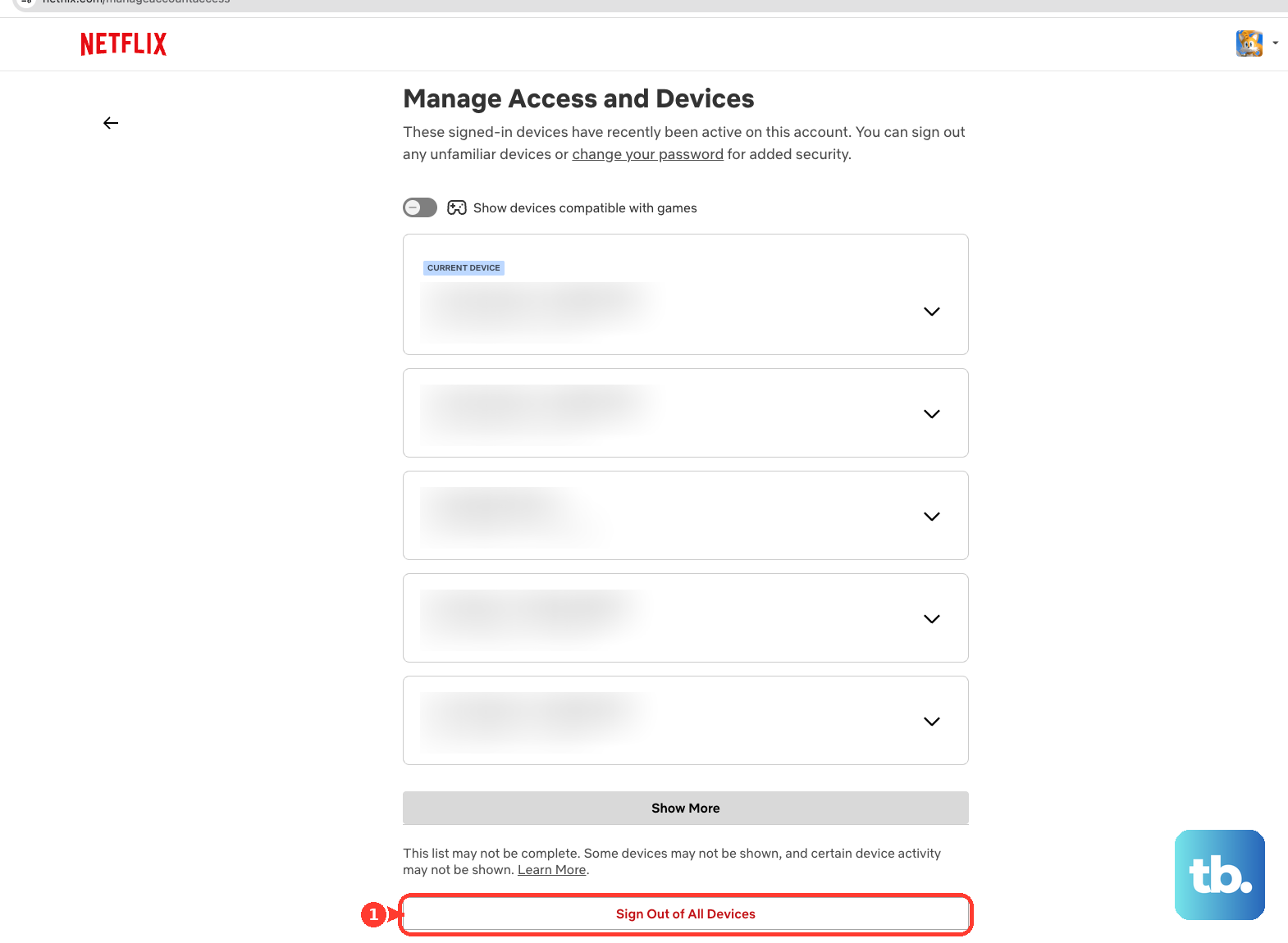
Keep two limits in mind. It may take up to 48 hours for a device to appear on this list, and devices inactive for 90 or more days are not shown at all. So a missing device does not mean the threat is gone; rely on having changed your password and signed out of all devices as your backstop.
Review Your Payment and Account Details for Damage
Once you have locked the door, check whether anything was altered while the intruder had access. Review your membership and watch for unauthorized charges.
You can remove or update your payment information at any time from your Account page at netflix.com/account. If you discover you never signed up for Netflix at all, or you suspect someone is using your payment information for a Netflix account without your consent, contact Netflix immediately rather than sorting it out on your own.
Recover an Account Whose Email Was Changed Without Permission
The hardest case is when the attacker changed the account email so you can no longer receive reset links. If you get an email from Netflix saying your email address was changed and you did not request it, Netflix instructs you to contact Netflix to resolve it.
There is no published self-serve button to revert the email change yourself, so do not hunt for one. Reach out through the official Contact Us page covered below and let support restore access. Never pay a third-party "account recovery service" that promises a faster fix; legitimate recovery goes through Netflix directly and costs nothing.
Why There Is No 2FA Switch and What Protects You Instead
If you went looking for a two-factor authentication toggle, you did not miss it. Netflix does not offer a traditional user-enabled 2FA setting, and there are no backup codes. Its official security page makes no mention of 2FA, MFA, or backup codes.
What Netflix does use is one-time sign-in codes and links during normal sign-in. A 4-digit sign-in code, which expires in 15 minutes, or a sign-in link can be sent by email or text, and a sign-in code is still sent even if you sign in with a password. These are routine, not an optional protection you switch on, which is why keeping control of your account email and phone number matters so much.
So the most useful thing you can do for future recovery is to add and keep a valid phone number on the account. With a number on file, you can reset your password by Text Message (SMS) at netflix.com/loginhelp, where the code expires after 20 minutes; the email reset link expires in 24 hours.
Lock the Account Down for Good
With access restored, apply Netflix's full security checklist so this does not recur.
- 1.Use a password that is unique to Netflix and not reused on any other site.
- 2.Sign out of unused or unrecognized devices through the Manage Access and Devices page at netflix.com/manageaccountaccess.
- 3.Never share card numbers, bank details, or your Netflix password by text or email, because Netflix will never ask you for these.
- 4.Stay alert to phishing messages that imitate Netflix and try to harvest your login or payment details.
- 5.Add a phone number to the account so you can recover your password if you ever forget it.
- 6.Keep your devices free of malware, since an infected device can leak whatever you type, including a brand-new password.
Always begin recovery on a device and network you already trust, and double-check that you are on the real netflix.com before entering credentials. Phishing pages are built to look identical to the genuine login, so a careful glance at the address bar is your best defense.
When to Hand It Over to Netflix Support
Some situations are beyond self-serve fixes. Contact Netflix if you cannot reset your password, if the email was changed without your permission, or if suspicious activity continues after every step above.
Reach support through the official Contact Us page at help.netflix.com/contactus. That page provides quick links for common needs, including Reset password, Update email, Get help signing in, and Update payment method. Use these official channels only, and remember that no legitimate agent will ever ask you to read out a sign-in code or your password.
Frequently Asked Questions
How do I reset my Netflix password if I am completely locked out?
Go to netflix.com/loginhelp and choose Email or Text Message (SMS). With Email, click "Email Me," open the message, and click "Reset your password" within 24 hours. With SMS, click "Text Me," enter the code, which expires after 20 minutes, click Verify, then set a new password. Keep the "Sign out of all devices" box checked.
Does Netflix have two-factor authentication or backup codes?
No. Netflix does not offer a user-enabled 2FA setting, and there are no backup codes. It does send one-time 4-digit sign-in codes or sign-in links by email or text during normal sign-in, so the best protection is keeping a valid email and phone number on the account.
Someone changed my Netflix email without my permission. What do I do?
If you receive a Netflix email saying your address was changed and you did not request it, contact Netflix directly through help.netflix.com/contactus. There is no published self-serve step to revert the change, and support will restore access. Do not pay any third-party recovery service.
I got a Netflix password-reset email I never requested. Is my account hacked?
Treat it as a warning sign rather than a routine email. If you did not request it, change your password, check "Sign out of all devices," and review your devices and payment details. If you did request it, complete the reset safely at netflix.com/password.
Why does a device I do not recognize still not show up on my account?
On the Manage Access and Devices page at netflix.com/manageaccountaccess, it can take up to 48 hours for a device to appear, and devices inactive for 90 or more days are not listed. Because of this delay, rely on changing your password and signing out of all devices as your main safeguard.
Will Netflix ever ask me for my password or a sign-in code to help recover my account?
No. Netflix will never ask for your card numbers, bank details, or password by text or email, and no genuine agent needs your sign-in code. If anyone asks for these, it is a scam, so never share them and use only the official Contact Us page at help.netflix.com/contactus.