
Unlock your iPhone 15 from carrier restrictions and use any network provider
What to Know
- SIM Network Unlock PIN is an 8-16 digit code that removes carrier restrictions from your iPhone 15
- Contact your carrier first - most will provide the code for free if you meet their requirements
- Your IMEI number is essential - you'll need this unique device identifier to get the unlock code
- Third-party services exist for when carriers can't or won't provide the code
- Be careful with attempts - too many wrong codes can permanently lock your device
Getting your iPhone 15 unlocked is a straightforward process, but it starts with understanding what you need. The SIM Network Unlock PIN is a special code tied to your phone's unique IMEI number. It tells the device it's allowed to connect to networks other than the one it was originally sold with.
I'd always recommend starting with your carrier. If your phone is paid off and you're in good standing, they're obligated to provide this code. It's the safest and usually the fastest official route.
How to Get Your Unlock Code from Your Carrier
The first step is checking if you're eligible. Carriers have standard requirements you'll need to meet. Your iPhone 15 must not be reported lost or stolen, and any financing plan or contract must be fully paid off.
All outstanding bills need to be cleared too. The device also typically needs to have been active on the carrier's network for a minimum period, often 60 days. These rules are in place to prevent fraud and ensure contracts are honored.
Once you've confirmed eligibility, contact your carrier's customer service. You can call, use online chat, or visit a store. Clearly request a "SIM Network Unlock PIN" or "Network Unlock Code" for your iPhone 15.
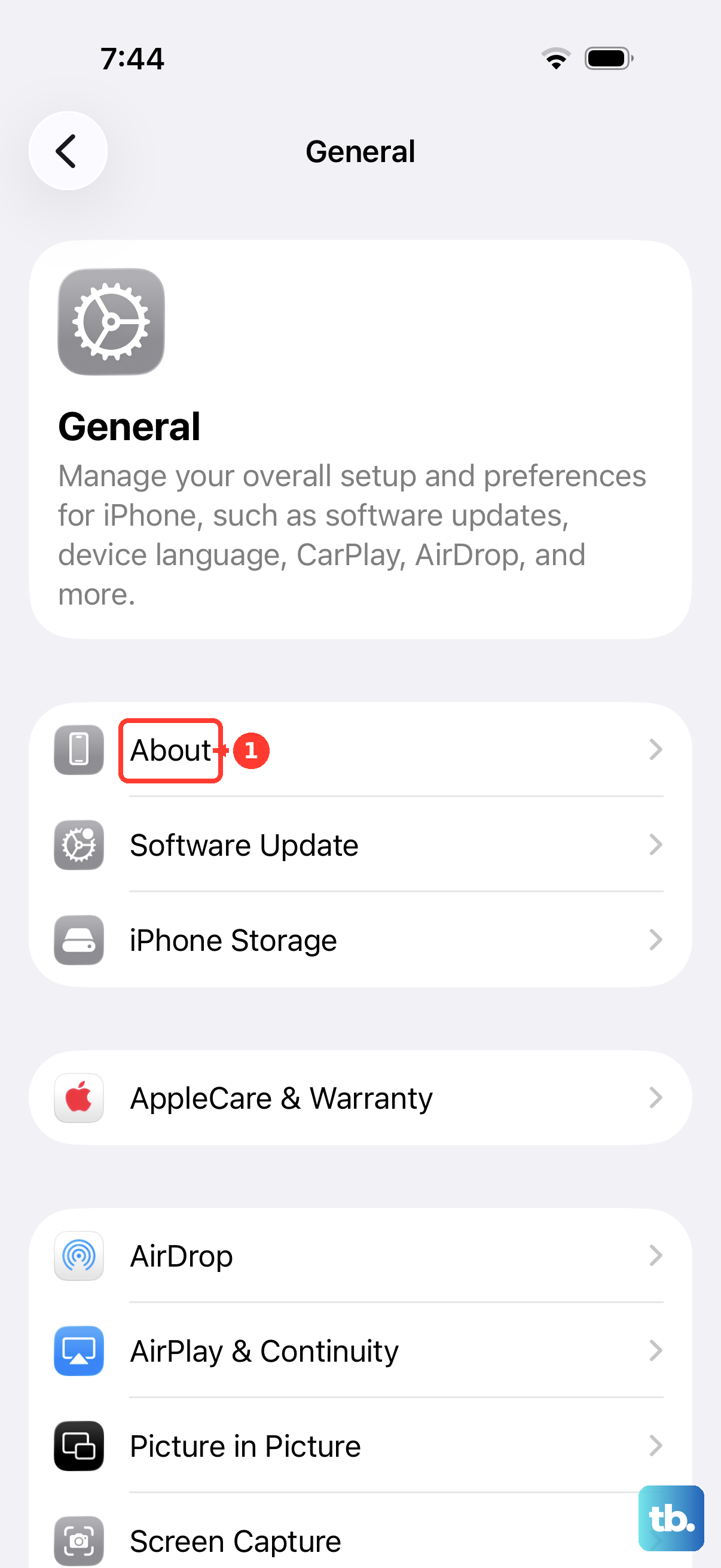
They will ask for your device's IMEI number. You can find this by going to Settings > General > About and scrolling down. You'll also need to verify you're the account owner, so have your account details handy.
After submitting the request, there's a processing wait. This can take anywhere from a few hours to several business days. The carrier will email or text you the unlock code once it's ready. Make sure to save this code in a secure place, as you'll only get one chance to enter it correctly later.
Using the Unlock Code on Your iPhone 15
Using the code is simple. First, power down your iPhone 15 completely. You can do this by holding the Side button and either volume button, then sliding to power off.
Next, remove your current SIM card. The iPhone 15 uses a nano-SIM tray located on the left side of the device. You'll need a SIM ejector tool or a small paperclip to open it.
Insert a SIM card from a different carrier. This is a crucial step. The phone needs to detect a new network to trigger the unlock prompt. Turn your iPhone 15 back on.
If the phone is still locked, you should see a message asking for the "SIM Network Unlock PIN" or "Network Unlock Code." Carefully enter the code you received from your carrier. Take your time, as too many incorrect attempts can cause problems.
After a successful entry, you'll see a confirmation message like "Network Unlock Successful." Your iPhone 15 is now unlocked. You can swap SIM cards freely from this point on.
Carrier-Specific Unlock Processes
While the general steps are the same, some major carriers have their own specific portals or requirements for the iPhone 15.
For AT&T, you can often submit an unlock request directly through their online device unlock portal. You'll need your iPhone 15's IMEI, your AT&T phone number, and your account information. They usually email the code within 24 to 48 hours.
T-Mobile requires the device to be fully paid for and active on their network for 40 days. You can request the unlock through the T-Mobile app or their website. They sometimes push the unlock remotely, so you might not even need to enter a code.
Verizon iPhones are typically unlocked automatically 60 days after purchase. If you need it unlocked sooner, you'll need to contact customer service. Since the iPhone 15 uses an eSIM, they may handle the unlock entirely on their end without providing you a code.
Using a Third-Party Unlocking Service
If your carrier won't provide an unlock code, perhaps because you bought the phone second-hand, third-party services are an option. I've seen these work, but you need to choose carefully.
Look for services with strong, verifiable reviews and clear guarantees. Be very wary of any service promising "instant" or "free" unlocks, as these are almost always scams. A legitimate service will ask for your iPhone 15's IMEI number and your current carrier.
You'll provide that information and make a payment, which usually ranges from $20 to $60. The service then uses industry databases or contacts to procure your unique unlock code. Processing times can vary from a few hours to a couple of days.
Once you receive the code, you use it exactly as you would a carrier-provided code. Insert a new SIM card and enter the PIN when prompted. A good service will offer support if the first code doesn't work.
Troubleshooting Unlock Problems
Sometimes, you might run into a "SIM Not Supported" or "Invalid SIM" message even after entering a code. First, double-check that you're using a SIM card from a truly different carrier. The phone won't prompt for an unlock if it detects its home network.
If you enter a wrong code too many times, you might see a "SIM Locked" or "PIN Blocked" error. This is a security lockout. Don't keep guessing. You'll need to contact whoever gave you the code, your carrier or the third-party service, for help. They may need to provide a PUK or "unfreeze" code.
In rare cases, an iPhone 15 might not prompt for a code at all. Make sure you've completely powered the device off and on with the new SIM inside. If that doesn't work, try connecting to Wi-Fi and checking for a carrier settings update in Settings > General > About.
Remember, unlocking your iPhone 15 is a software modification, not a hardware one. It doesn't affect your warranty, your data, or the phone's performance. It simply removes the software restriction tying it to one network.











