Minecraft updates are handled by the launcher, the device's app store, the console update menu, or an admin tool for managed devices. If Minecraft is not on the current release, start with the exact platform you use and install the update from the official update surface. The steps below keep you on current Java, Bedrock, and Education versions without using old console or discontinued update paths.
1. Pick Latest Release for Java Edition
This fixes Java Edition when the launcher opens an older release. Open the Minecraft Launcher and look to the left of the Play button. Select the arrow beside Play, then choose Latest Release. Select Play to download and launch the current release.
2. Refresh Minecraft for Windows from Microsoft Store
Open Microsoft Store, then select Library. Select Get updates and install the available update for Minecraft or Minecraft Launcher. After the update finishes, open Minecraft Launcher. To stop checking manually, turn on Microsoft Store > Profile > Store Settings > App updates.
3. Repair a stuck Minecraft Launcher on Windows
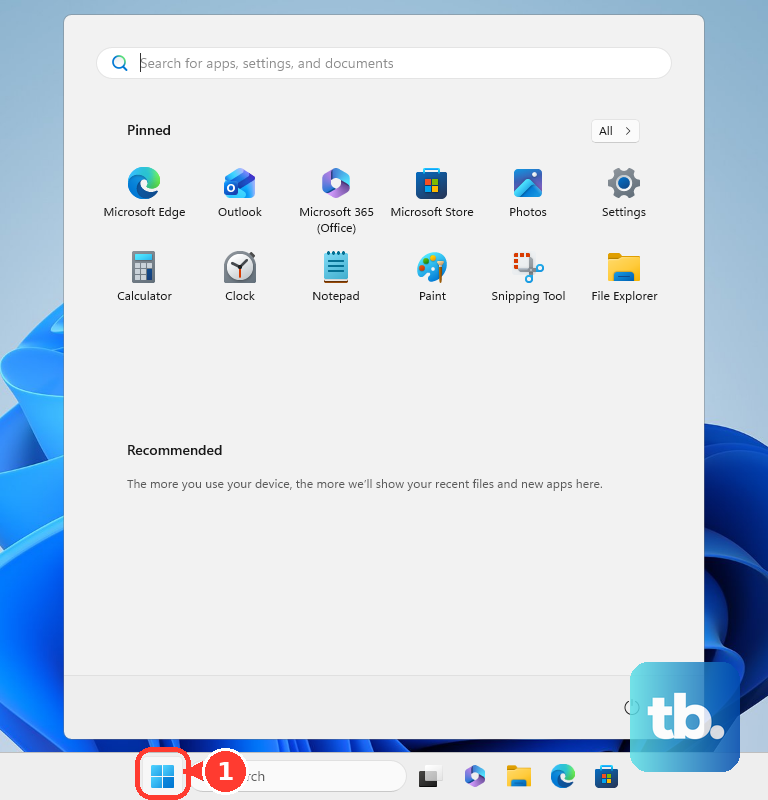
This fixes the launcher when its own update is broken. Open the Start Menu and search for Minecraft Launcher. Right-click Minecraft Launcher, then select App Settings. Select Repair, then open Minecraft Launcher again.
If the launcher still will not update, return to App Settings and select Reset. If the installation remains damaged, reinstall Minecraft Launcher from Microsoft Store or the official Minecraft download page.
4. Install the iPhone or iPad update
Open the App Store, then tap the My Account button or your photo at the top of the screen. Tap App Updates. Tap Update next to Minecraft, or tap Update All. If Minecraft is waiting in the download queue, touch and hold the app on the Home Screen and choose Prioritize Download.
5. Pull the Android update from Google Play
This updates Minecraft Bedrock installs that came from Google Play. Open Google Play Store and tap your profile icon at the top right. Tap Manage apps & device. Under Updates available, tap See details.
Next, tap Update next to Minecraft, or tap Update all. For Minecraft-only automatic updates, open Manage apps & device > Manage > Minecraft > More, then turn on Enable auto update.
6. Grab the Xbox update
Open My games & apps, then open Manage. Select Updates. Select Minecraft, or choose Update All. For automatic updates, press the Xbox button and open Profile & system > Settings > System > Updates.
Select Keep my games & apps up to date.
7. Check console updates on PlayStation and Nintendo Switch
On PS5 or PS4, highlight Minecraft, then press the Options button. Select Check for Update. Follow the on-screen instructions when an update is available.
On Nintendo Switch, select the Minecraft icon from the HOME Menu without starting the game. Press the + Button or - Button. Select Software Update, then choose Via the Internet.
Skip old Xbox 360, PS3, PS Vita, Wii U, and New Nintendo 3DS update guides because those editions do not receive current Minecraft updates.
8. Handle Minecraft Education and managed devices
Minecraft Education uses its own download page for Windows, ChromeOS, macOS, and iOS. On Windows, the desktop app checks for updates when a user signs in, as long as https://downloads.minecrafteduservices.com is not blocked by the network. When automatic updating is unavailable, back up your worlds, uninstall the current version, then install the latest version from the Minecraft Education download page.
On iPad, update through App Store > My Account > App Updates > Update.
Frequently Asked Questions
Why does Minecraft say my client is outdated?
The installed app is behind the release required by the world, server, or realm. Update Minecraft through the launcher, app store, or console update menu for that device.
Does Minecraft Java update automatically?
The Minecraft Launcher checks for its own updates when it starts. Java Edition still needs the Latest Release profile selected beside the Play button to launch the current game release.
How do I update the Minecraft Launcher itself?
Start the launcher first. If it does not update, open Microsoft Store, go to Library, select Get updates, and install the Minecraft Launcher update.
Can old console editions get the latest Minecraft update?
No. Xbox 360 Edition, PlayStation 3 Edition, PlayStation Vita Edition, Wii U Edition, and New Nintendo 3DS Edition do not receive current Minecraft updates.