

Microsoft Edge can be removed on some devices, but Windows blocks removal on many PCs. The key is knowing which supported path applies to your device.
Start with Windows, since that is where most people hit the wall. Then jump to the Mac, iPhone, Android, or Linux steps if Edge is installed somewhere else.
Check whether Windows lets you uninstall Edge
On current Windows PCs outside the European Economic Area, Microsoft says Edge is the default browser in Windows and a core operating-system component. That means there is no supported consumer uninstall path on those PCs.
Eligible EEA PCs are different. On Windows 10 version 22H2 and Windows 11 version 23H2 or later, PCs identified as EEA during device setup can remove Edge from Settings.
On retail PCs, Microsoft says the DMA region is chosen during device setup and can only be changed by resetting the PC. If you do not see the uninstall option, make another browser the default and stop Edge from reopening after sign-in instead.
Uninstall Edge in Windows Settings on eligible EEA PCs
Use this only when your PC has the EEA uninstall option. These steps follow the Windows 11 Settings layout.
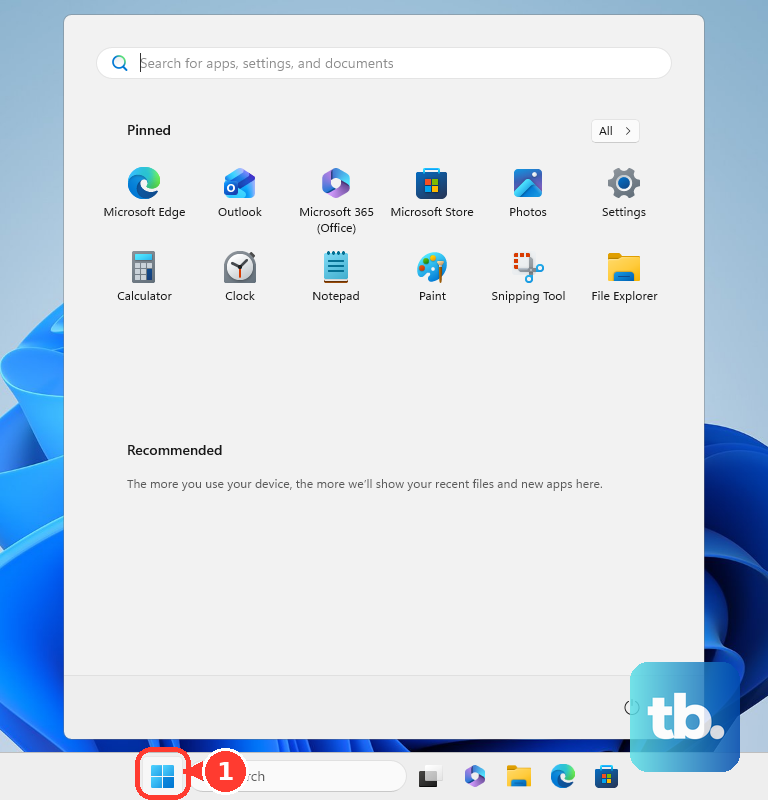
- 1.Open Start, then choose Settings.
- 2.Select Apps, then open Installed apps. On Windows 10 version 22H2, open Apps & features instead.
- 3.Find Microsoft Edge.
- 4.Select More. On Windows 10, click Microsoft Edge in the list to reveal its buttons instead.
- 5.Choose Uninstall and confirm.
- 6.Restart the PC if Windows asks you to.
Make another browser the default
This makes Windows open web links and supported file types in the browser you choose. Microsoft notes that apps decide how to open content, so a few Microsoft apps still open web content in Edge.
Open Settings.
Select Apps.
Choose Default apps.
Under Set defaults for applications, select the browser you want to use.
Choose Set default.
Use the same Default apps page to set individual file or link types such as http and https when you need tighter control.
Stop Edge from reopening after sign in
Edge can look like it is launching by itself when Windows restores restartable apps after you sign in. Turning that off does not remove Edge, but it stops that Windows restore behavior.
Go to Start, open Settings, select Accounts, then open Sign-in options. Turn off Automatically save my restartable apps and restart them when I sign in.
If Edge still opens after that, keep Edge installed and use Default apps to make your preferred browser handle links and web files.
Remove Edge from a Mac
Open Finder.
Select Applications.
If Microsoft Edge has an uninstaller, open it and follow the onscreen instructions.
If there is no uninstaller, drag Microsoft Edge from Applications to Trash.
Or select Microsoft Edge, choose File, then choose Move to Trash.
Open Finder and choose Empty Trash.
Use Microsoft’s official Edge download page if you need to reinstall it later.
Delete Edge on iPhone or iPad
This applies when Microsoft Edge was installed from the App Store. If deletion is blocked, check Screen Time or device-management restrictions.
On the Home Screen, touch and hold Microsoft Edge, tap Remove App, choose Delete App, then tap Delete.
From the App Library, touch and hold Microsoft Edge, tap Delete App, then confirm with Delete.
On iPhone, you can also open App Library, tap the search field, touch and hold Microsoft Edge in the list, then tap Delete App and Delete.
Uninstall or disable Edge on Android
Use Google Play first when Edge was installed by you and is removable.
- 1.Open Google Play Store.
- 2.Tap your Profile icon.
- 3.Choose Manage apps & device.
- 4.Open Manage and select Microsoft Edge.
- 5.Tap Uninstall.
- 6.If Uninstall is not available, open Settings, go to Apps, select Microsoft Edge, then use Disable or Turn off if your phone maker shows that option.
Remove Edge on Linux
Linux removal depends on how Edge was installed. These commands apply when Edge came from Microsoft’s .deb or .rpm packages.
On Debian or Ubuntu, run sudo apt remove microsoft-edge-stable. Use sudo apt purge microsoft-edge-stable when you also want to remove package configuration.
On Fedora, RHEL, or openSUSE-style systems, remove the RPM with your system package manager. Common commands include sudo dnf remove microsoft-edge-stable, sudo yum remove microsoft-edge-stable, and sudo zypper remove microsoft-edge-stable.
Skip old force uninstall workarounds
Use this section when you see older guides recommending Command Prompt setup.exe force-uninstall commands, PowerShell package-removal commands, registry edits that reveal an uninstall button, third-party uninstallers, debloat scripts, or region-spoofing tools. Those are not currently supported consumer methods.
The supported Windows path is the EEA Settings uninstall option. Outside that path, change the default browser and turn off restartable-app behavior instead.
Handle Edge on work or managed PCs
This applies when a school, employer, family admin, or small-business setup manages the PC. Managed Windows devices can have policies that uninstall Edge on eligible EEA devices, block users from uninstalling it, prevent visible Edge launch at startup, or block future Edge installation through Edge Update. On a domain-joined PC where that uninstall policy is left unconfigured, Microsoft says the user’s Windows region setting decides whether Edge can be uninstalled.
Do not fight those settings from a standard user account. Ask the device administrator whether the PC is eligible for Edge removal or whether they can set your preferred browser defaults for you.
Frequently Asked Questions
Can I uninstall Microsoft Edge from Windows 11 outside the EEA?
Not through a current Microsoft-supported consumer method. Microsoft says Edge is a Windows component, so use another browser as the default instead.
Why do I not see the Uninstall button for Edge in Windows Settings?
Your PC is outside the eligible EEA scope, or an administrator has blocked removal. Microsoft says EEA eligibility on retail PCs comes from the region chosen during device setup, and that an organization can set the Edge Update uninstall policy to Disabled to stop EEA users from uninstalling Edge. On a managed PC, ask your administrator.
Does changing the default browser disable Microsoft Edge?
No. It leaves Edge installed, but it makes Windows open web links and supported file types in the browser you choose.
Can I reinstall Microsoft Edge after removing it?
Yes. Microsoft provides an official Edge download page for Windows, macOS, Linux, iOS, and Android.