


To log out of Yahoo Mail, select Sign Out on the desktop website, remove your account from the Yahoo Mail app, or disconnect a listed device through Yahoo Account security. The right steps depend on where you read your mail, so choose your browser or app below.
The short version
- Desktop website: Hover over your name at the top of a Yahoo page and click Sign Out.
- Yahoo Mail app: Open Manage Accounts through your profile, tap Edit, and remove the account.
- Another device: Open Yahoo Account security and disconnect the device under Current sign-ins.
- Other mail apps: Remove Yahoo from the app where you added it to stop using the account there.
| Where or how | Action | Scope or catch |
|---|---|---|
| Desktop Yahoo website | Select Sign Out | Current browser session |
| Mobile Yahoo website | Open the profile menu and select Sign out | Use the same mobile browser |
| Yahoo Mail app | Remove the account | Repeat for each account |
| Remote device through a browser | Use Current sign-ins | Disconnect listed devices individually |
| Remote device through a Yahoo app | Open Security through privacy controls | Available in most Yahoo mobile apps |
| Client using an app password | Select Delete app password | Removes that app’s access |
| Yahoo app with an account slider | Turn off the account slider | Controls account accessibility |
| Apple Mail on iPhone | Tap Delete Account | Path below uses iOS 27 |
| Apple Mail pause on iPhone | Turn off Mail | Keeps the account configuration |
| Apple Mail on iPad | Delete the account or turn off Mail | Choose removal or a temporary pause |
| Apple Mail removal on Mac | Click Remove | Preserve messages stored only locally |
| Apple Mail pause on Mac | Uncheck Enable this account | Keeps the account configuration |
| Apple Vision Pro Mail | Turn off Mail or tap Delete Account | Mail only or all headset apps |
| Gmail on Android | Remove Yahoo through device account management | Removal label can vary |
| Gmail on iPhone or iPad | Tap Remove from this device | Confirm with Remove |
| Samsung Galaxy account settings | Tap Remove account twice | Yahoo must be listed there |
| Outlook mobile | Tap Remove Account | Android and iOS |
| New Outlook for Windows | Remove Yahoo through account management | Choose device-only or all-device removal |
| Classic Outlook for Windows | Select Remove, then Yes | Microsoft 365 subscription version |
| Current Outlook for Mac | Select Manage > Remove Account | Confirm with Continue |
| Thunderbird | Select Remove Account | Start in Yahoo account settings |
| Yahoo Mail deletion on iPhone or iPad | Delete the app | Local app removal |
| Yahoo Mail uninstall on Android | Tap Uninstall | Local app removal |
| Desktop Chrome cookies | Delete Yahoo site entries | Local website login data |
| Edge cookies for Yahoo | Delete matching site cookies | Local website login data |
| Edge cleanup shortcut | Press Ctrl + Shift + Delete | Affects other sites in the selected period |
| Edge cleanup on closing | Enable automatic cookie clearing | Signs you out of most sites |
| Desktop Firefox cookies | Clear Cookies and site data | Affects all sites |
| Safari website data on Mac | Remove Yahoo entries | May also affect other apps |
| Safari website data on iPhone | Tap Remove All Website Data | Affects all sites |
| Desktop Chrome Incognito | Close every Incognito window | Normal-window sessions stay separate |
| Account supplied by a configuration profile | Delete the relevant profile | Also removes its other settings, apps, and data |
Sign out of Yahoo Mail in a browser
On a computer, open the signed-in Yahoo Mail page and hover over your name at the top. Click Sign Out to end that browser session. These steps apply to desktop browsers on Windows, macOS, Linux, and ChromeOS.
For a browser on an iPhone, iPad, or Android device, open Yahoo’s mobile website in the browser where you use Yahoo Mail. Tap the Profile icon, then tap Sign out.
Remove your account from the Yahoo Mail app
In Yahoo Mail on Android, iPhone, or iPad, tap the Profile icon and open Manage Accounts. Tap Edit, then tap Remove beside the Yahoo account you want to sign out of. Tap Remove again to confirm.
Repeat those steps for each account you want signed out of the app. Removing an account from a mail app does not close the Yahoo account itself.
Sign out a device remotely
To disconnect a device remotely, sign in to Yahoo’s Account security page from a desktop or mobile browser. Find Current sign-ins and select the device you want to disconnect. Select Sign out, then repeat for other listed devices as needed.
Most Yahoo mobile apps also provide a route to these controls. Tap the Profile icon, then open Settings > Manage account privacy > Your privacy controls > Security. Under Current sign-ins, select the device and choose Sign out. If your app does not offer that route, open Account security in a browser.
For a mail client using a Yahoo-generated app password, open Account security, find External connections, and select App passwords. Select the app, then choose Delete app password to remove that app’s access to your account.
Remove Yahoo from Apple Mail
On an iPhone using iOS 27, open Settings > Apps > Mail > Mail Accounts. Select your Yahoo account, tap Delete Account, and confirm the deletion when prompted. On iPad, open Settings > Apps > Mail > Mail Accounts, select Yahoo, tap Delete Account, and confirm the deletion.
On either device, deleting the account removes it from Mail and from every other app that uses it on that device. For a Mail-only temporary pause, turn off Mail on that account screen instead. This keeps the account configuration while stopping its email in Apple Mail. On iPhone, that switch does not sign you out of the separate Yahoo Mail app or browser.
On a Mac, preserve any messages that exist only locally before removing the account; copies stored on the mail server remain available. Open Mail and choose Mail > Settings > Accounts. Select Yahoo and click the Remove button.
If other Mac apps also use the account, open the Apple menu > System Settings > Internet Accounts. Select Yahoo and turn off Mail to stop using it in Mail. For a temporary pause within Mail itself, open Mail > Settings > Accounts, select Yahoo, and uncheck Enable this account.
Remove Yahoo from Gmail or a Samsung Galaxy
In Gmail on Android, tap your Profile icon and select Manage accounts on this device. Select the Yahoo account, then tap Remove. The system account-management screen may label the control Remove account.
In Gmail on iPhone or iPad, tap the Profile icon and open Manage accounts on this device. Beside Yahoo, tap Remove from this device, then tap Remove.
On a Samsung Galaxy with Yahoo listed in system account settings, open Settings > Accounts and backup > Manage accounts. Select the Yahoo email account, tap Remove account, and tap Remove account again. Samsung’s menus can vary by model and software.
Remove Yahoo from Outlook or Thunderbird
In Outlook for Android or iOS, open Settings > Accounts. Select your Yahoo email account and tap Remove Account.
In new Outlook for Windows, open View > View settings, or File > Account info, then open Accounts > Your accounts. Under Email accounts, select Manage beside Yahoo. Under Account details, select Remove to open the removal choices.
Choose the option to remove the account only from that device if that is your intended scope. Selecting Remove from all devices removes the account and its Microsoft Cloud data across Outlook clients. Microsoft warns that items stored only in Microsoft Cloud may be permanently lost, so preserve anything you need before choosing that wider removal.
In the Microsoft 365 subscription version of classic Outlook for Windows, open File > Account Settings > Account Settings. Select Yahoo, choose Remove, and select Yes. This removes offline cached content, and removing your only account may first require a new data-file location.
In current Outlook for Mac, open Tools > Accounts and select Yahoo. Choose Manage > Remove Account, then select Continue.
For Thunderbird, open Account Settings from Tools, or from Edit on platforms that place it there. Select the Yahoo account, then open Account Actions > Remove Account.
Clear browser login data when needed
Deleting cookies removes local website login data, so it can help clear a Yahoo browser session. It does not revoke sessions on other browsers or devices. Use Current sign-ins when you need to disconnect a remote device.
In desktop Chrome, open More > Settings > Privacy and security > Third-party cookies > See all site data and permissions. Search for Yahoo and select Delete beside the matching site. Select Delete again, and repeat for the applicable Yahoo entries.
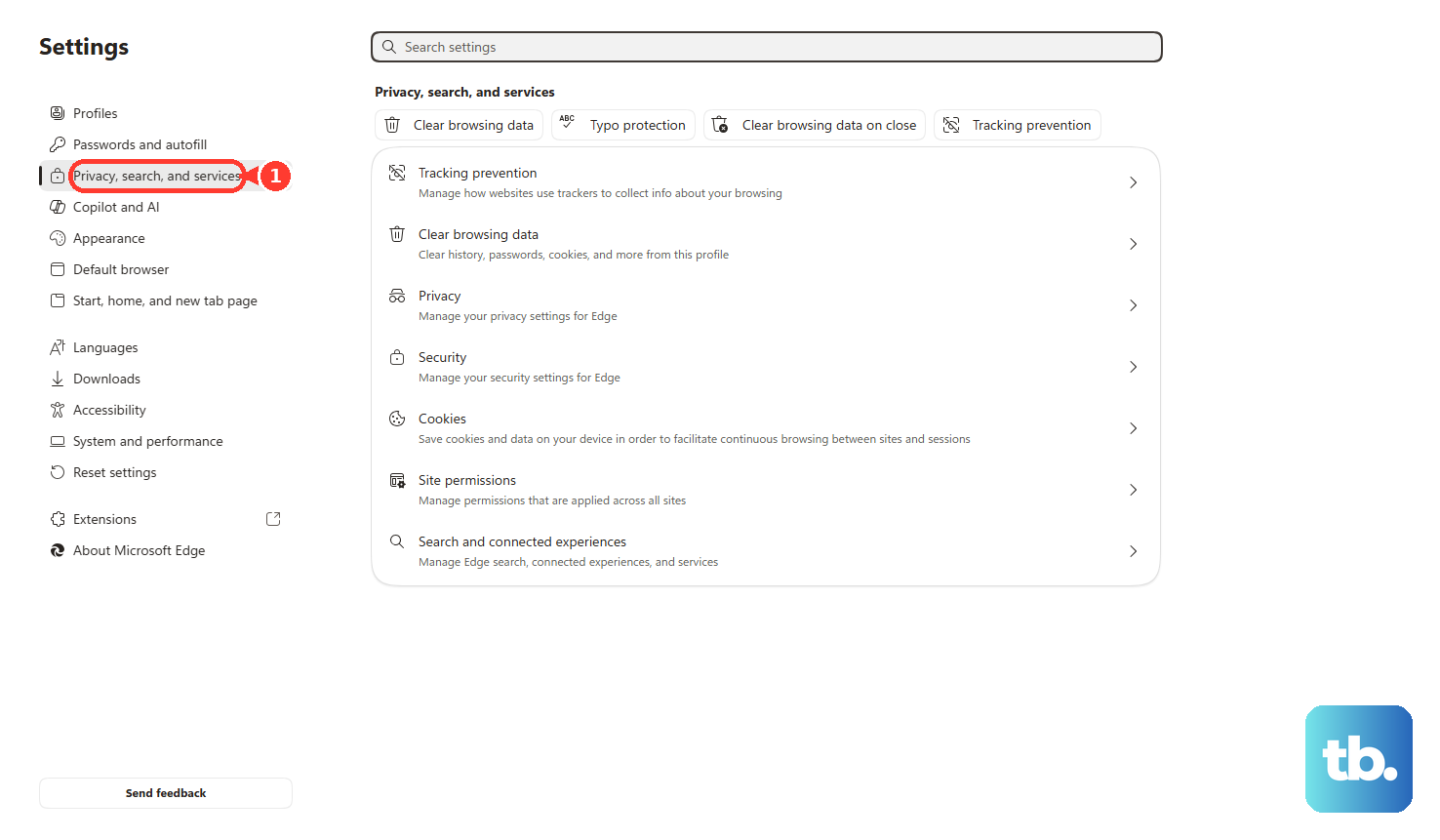
In Microsoft Edge on Windows 10 or Windows 11, open Settings and more > Settings > Privacy, search, and services > Cookies > See all cookies and site data. Search for Yahoo and expand each relevant site using the down arrow. Select Delete to remove its cookies.
In desktop Firefox, open the menu and select History > Clear Recent History…. Set When: to Everything, select Cookies and site data, and leave other categories unselected to retain them. Click Clear; this clears cookies for all sites.
In Safari on Mac, open Safari > Settings > Privacy > Manage Website Data. Select the Yahoo website entries and click Remove. Apple says deleting website data can sign you out and may also affect other apps.
For Safari on iPhone, open Settings > Apps > Safari > Advanced > Website Data. Tap Remove All Website Data, then Remove Now. This clears website login data for all sites, so use Yahoo’s mobile website sign-out when you only want to log out of Yahoo.
Delete the Yahoo Mail app if you no longer need it
On iPhone or iPad, touch and hold Yahoo Mail, then tap Remove App > Delete App and tap Delete. Alternatively, while the icons jiggle, tap the Remove icon, then Delete App. Tap Delete, then tap Done.
On Android, open Settings > Apps > Yahoo Mail, tap Uninstall, then tap OK. Yahoo notes that device-specific steps can vary. App deletion removes the app locally; to disconnect a listed Yahoo session as well, use Account security > Current sign-ins.
Frequently Asked Questions
Does closing a Chrome Incognito tab end my Yahoo session?
Close every Incognito window using its Close control to end a Yahoo session used only in desktop Chrome Incognito. Closing just the Yahoo tab is insufficient while another Incognito window remains open. Yahoo sessions in normal Chrome windows are separate.
How do I temporarily turn off an account in a Yahoo app with a slider?
In Yahoo apps that expose this interface, tap the Sidebar icon, open Manage Accounts, and turn off the slider beside the account. Yahoo describes this as controlling account accessibility and does not document it as equivalent to account removal.
Is there a keyboard shortcut for clearing Yahoo login cookies in Edge?
In Edge on Windows, press Ctrl + Shift + Delete and set Time range to cover the Yahoo sign-in. Select Cookies and other site data, then select Clear now. This browser cleanup shortcut clears cookies for other sites in the chosen period too.
Can Edge clear login cookies whenever I close it?
In Edge on Windows 10 or Windows 11, open Settings and more > Settings > Privacy, search, and services > Clear browsing data > Choose what to clear every time you close the browser. Turn on Cookies and other site data, then close Edge when finished. Microsoft says this signs you out of most sites, so it affects more than Yahoo.
How do I remove Yahoo from Mail on Apple Vision Pro?
On Apple Vision Pro with visionOS 27, open Settings > Apps > Mail > Accounts and select Yahoo. Turn off Mail to stop using it in Mail, or tap Delete Account to remove the account from all apps on the headset.
How do I remove a Yahoo account supplied by a configuration profile?
Only if the account comes from a configuration profile, open Settings > General > VPN & Device Management on iPhone or iPad. Select the relevant profile, tap Delete Profile, follow the onscreen instructions, and then restart your iPhone or iPad. Removing the profile also removes its other settings, apps, and data. If removal is restricted on a managed device, ask the administrator to remove the account-bearing profile.