

To sign in to Hotmail, go to Outlook.com, select Sign in, and enter your Microsoft account username and password. Your Hotmail address still works, but the mailbox now opens through Outlook.com with a Microsoft account sign-in. That means an @hotmail.com address signs in the same way as Outlook.com, Live, MSN, or another Microsoft account username. Start with the web sign-in, then use the app, security, or recovery route that matches where you are stuck.
Use Outlook.com for normal Hotmail sign in
The most common mistake is looking for a separate modern Hotmail page, because Microsoft now sends Hotmail users through Outlook.com.
Open https://www.outlook.com or https://outlook.live.com in a supported browser.
Select Sign in, enter your Hotmail or Microsoft account username, then select Next.
Enter your password or the approved sign-in method shown for your account, then select Sign in.
If the wrong mailbox opens, select your account initials or account picture at the top corner of the Inbox, select Sign out, then return to Outlook.com and sign in with the Hotmail account you want.
Sign in from the Microsoft account page
Use https://account.microsoft.com when you want account, security, billing, or profile settings instead of opening the Inbox first.
Enter your Hotmail email address or phone number, select Next, enter your password, and select Sign in.
A Hotmail address can be an alias on a Microsoft account. Microsoft says any email address alias on that account can be used, and all aliases share the same password.
If this signs you into account settings but not mail, go to Outlook.com, or open Microsoft365.com and select Outlook from the app launcher.
Open Hotmail through Microsoft 365
Microsoft365.com also gets you to a Hotmail mailbox from the browser. Go to Microsoft365.com and sign in with the correct Microsoft account.
If another account is already active, select Sign out, then sign in again with your Hotmail account. After the right account is active, select Outlook from the app launcher.
This route fits best when you already use Microsoft 365 in the browser and want to move into mail from the same Microsoft surface.
Add Hotmail to new Outlook for Windows
Use this flow when you want Hotmail in the new Outlook app on Windows.
- 1.Open new Outlook for Windows and select View then View settings, or select File then Account info.
- 2.Select Accounts, then Your accounts.
- 3.Under Email accounts, select Add Account.
- 4.Choose a suggested account or enter your Hotmail address, then select Continue.
- 5.Enter your password when prompted, then select Done.
Use Outlook on iPhone or Android
The usual mobile issue is adding Hotmail as an old manual mail account instead of using the Outlook app sign-in.
Install or open Microsoft Outlook. If this is your first time using the app, select Get Started.
On iPhone or iPad, tap Inbox at the top if Outlook is already set up, then open Settings, Accounts, Add Account, and Email Account. Enter the Hotmail address, select Add Account, enter the password, then select Sign in.
On Android, open Settings, Accounts, Add Account, and Add an email account. Enter the Hotmail address, select the Continue check mark, enter the password, then select Sign in.
Approve two-step verification when prompted. When Outlook asks Let this app access your info?, select Yes, then select Maybe Later if you are not adding another account.
Use your phone or computer mail app
On iPhone or iPad, open Settings, Apps, Mail, Mail Accounts, and Add Account. Select Outlook.com, enter your Hotmail address and password, then select Sign in.
Approve two-step verification when prompted and select Yes for Let this app access your info?. Leave Mail, Contacts, Calendars, and Reminders enabled, or turn individual sliders off, then select Save.
On a Mac, open Mail, choose Mail, then Add Account. Enter your Hotmail address, or choose from the account-provider list, select Continue, then follow the prompts to enter the account information.
In Gmail for Android, tap your Profile picture, select Add another account, choose Outlook, Hotmail and Live, then sign in with your Microsoft account.
Handle verification prompts correctly
Some Hotmail sign-ins ask for more than a password, especially when two-step verification, Microsoft Authenticator, a passkey, or a security key is enabled. Follow the verification prompt shown after you enter your Hotmail username.
For Microsoft Authenticator, select Send notification, or choose Other ways to sign in and Approve a request on my Microsoft Authenticator app, then approve the request in Authenticator.
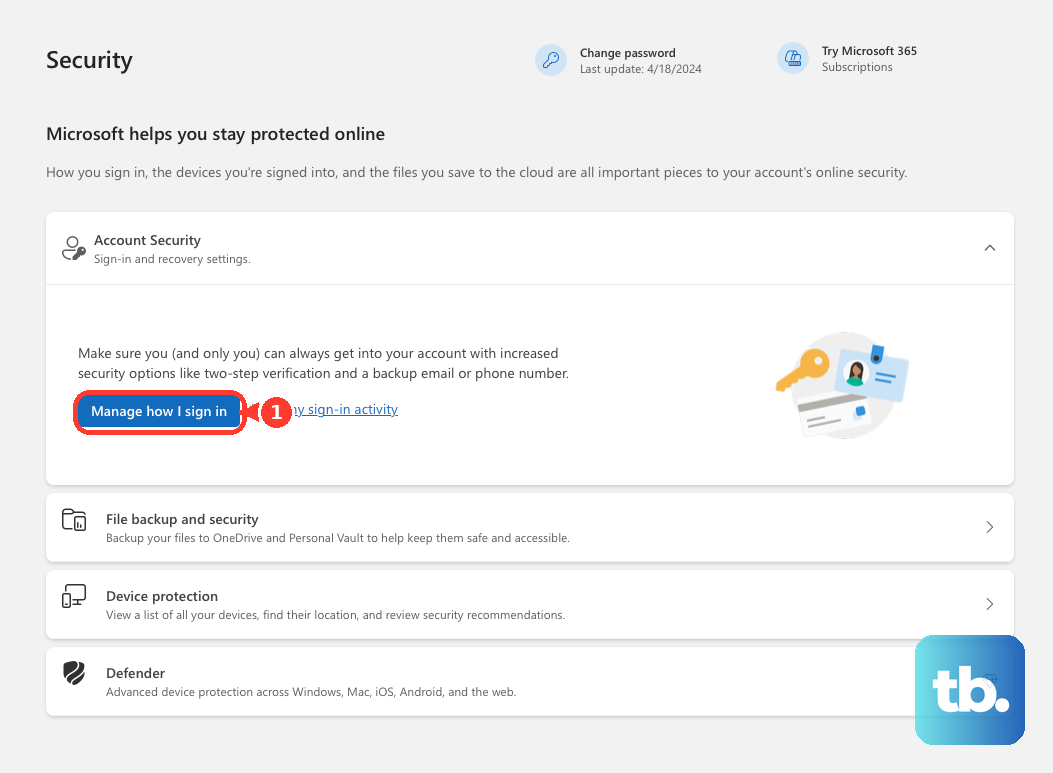
For two-step verification, enter the security code sent to the registered email, phone, or authenticator app. If verification fails, use another approved sign-in method shown on the Microsoft prompt, or open the Microsoft account security page and select Manage how I sign in.
Protect Hotmail on a shared device
This applies when you check Hotmail on a shared computer, borrowed phone, tablet, or any browser another person can access. Microsoft says that starting in February 2025, Microsoft account web sign-in stays signed in automatically unless you sign out or use private browsing.
Open a private browsing window before going to Outlook.com.
Select Sign in, use your Hotmail account, then read or send your mail.
When you are finished, select your profile picture and select Sign out.
Close all browser windows after signing out so the private browsing session ends.
Fix a Hotmail sign in that fails
The most common reason a working Hotmail address still will not sign in is a wrong password, blocked account, old account, or outdated mail app setup.
Use Microsoft’s sign-in troubleshooter from the Hotmail sign-in help page when you forgot the username or password or cannot sign in.
If Microsoft says the account is blocked, use the official unblock path for Outlook.com accounts.
For an old Hotmail account, go to www.outlook.com and select Sign in. Microsoft notes that accounts not signed into for more than two years may have been deleted.
Do not use normal-password POP, IMAP, or SMTP sign-in as a current Hotmail fix. Microsoft says Basic Authentication is no longer available for Outlook accounts after September 16, 2024, so reconfigure the account with Outlook.com or Exchange syncing, OAuth2 Modern Authentication, or a newer Outlook app.
Do not use Windows Mail and Calendar as the primary Hotmail sign-in route. Microsoft says those apps are no longer supported, so use Open Outlook, new Outlook, or export local data before moving.
Frequently Asked Questions
Can I still use an @hotmail.com email address?
Yes. A Hotmail address still works as a Microsoft account username, but the current mail service is Outlook.com.
Is my Hotmail password different from my Microsoft account password?
No. Microsoft says aliases on the same Microsoft account share the same password.
Can I sign in to Hotmail with Gmail on Android?
Yes. In the Gmail app, tap your profile picture, add another account, choose Outlook, Hotmail and Live, then sign in with your Microsoft account.
Why should I use private browsing for Hotmail on a shared computer?
Microsoft says web sign-in stays signed in automatically unless you sign out or use private browsing, so a private window helps keep a shared device from retaining access.