Windows Setup is on screen, but you need Command Prompt. The quickest route is Shift+F10 when diagnostic access is enabled. If the shortcut does nothing, try the laptop keyboard fix below, then use recovery to reach a troubleshooting console.
Press Shift+F10 during Windows Setup
With Windows Setup displayed, hold Shift and press F10. Command Prompt opens when the installation image and setup configuration allow diagnostic command access.
This shortcut applies to Windows 11, but manufacturer and managed images control its availability. No response does not mean you pressed it incorrectly.
If Shift+F10 fails, try Fn+Shift+F10 on a laptop. If that also fails, use the installation media's recovery menus below.
Open the console during first-run setup
Setting up a new PC? The same shortcut works during Windows 11's first-run setup, called OOBE, when the configuration permits Command Prompt. Microsoft specifically documents its use at the network connection stage to install missing network drivers.
While the first-run setup screen is displayed, hold Shift and press F10.
There is no need to reach the desktop first. The device's setup configuration still determines access.
Try the Fn key on a laptop
On keyboards that default to multimedia controls, pressing F10 sends a media command instead of the function key Windows Setup needs.
If your keyboard uses Fn+F10 to send F10, hold Fn and Shift, then press F10.
Dell documents this function-key mapping for the Latitude 7410. Combining it with Microsoft's Setup shortcut gives you Fn+Shift+F10.
On that Dell model, an alternative is to press Fn+Esc to switch to function-key behavior.
Then press Shift+F10. Fn-lock combinations vary by model, so use your laptop's documented combination.
Use installation media to reach recovery
Boot your PC from Windows installation media. This opens a recovery command prompt, separate from the active installation screen.
Select your language and keyboard preferences, advancing with Next.
Select Repair my PC, then Next. The older repair-option label is Repair your computer.
Follow Troubleshoot > Advanced options > Command Prompt. Have your BitLocker recovery key ready for recovery configurations that require it.
Enter recovery from the Windows desktop
Still able to reach the desktop? You can enter recovery from Windows before or after attempting Setup.
In Windows 11, open Settings > System > Recovery.
Under Advanced startup, select Restart now.
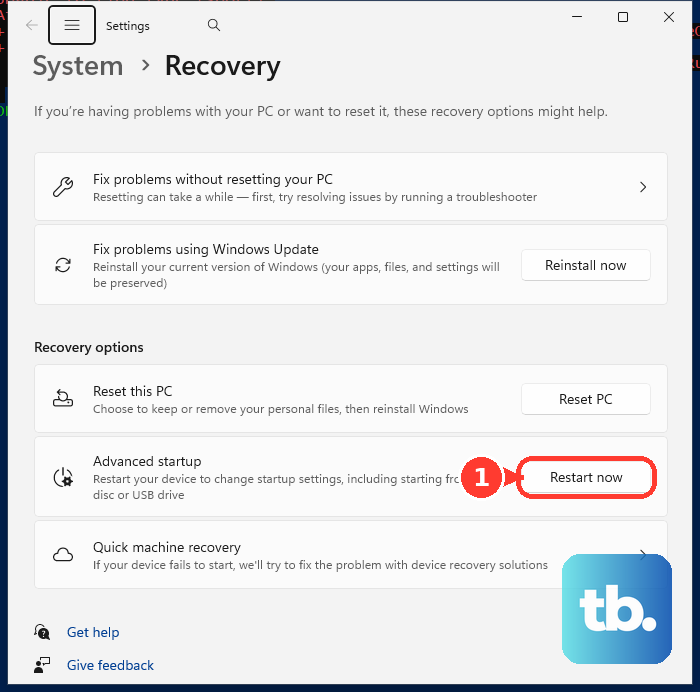
Once recovery opens, select Troubleshoot > Advanced options > Command Prompt.
If the Settings route fails, hold Shift while selecting Power > Restart, then follow the same recovery menu path. If that fails too, boot from an existing USB recovery drive or use the installation-media route above.
Enable diagnostic access when launching Setup
Administrators who control how Setup starts can explicitly enable the shortcut. From the installation-media directory, run setup.exe /DiagnosticPrompt Enable.
During the resulting setup session, press Shift+F10.
This option supports launching Setup from Windows 10 version 1703 or later, including Windows 11. Launching it from Windows PE is supported starting with Windows 11 version 24H2.
The option must be set when launching Setup; an already displayed first-run setup screen has no toggle for it. Use the recovery route above for a separate troubleshooting console.
Frequently Asked Questions
Does opening Command Prompt let me skip account setup?
Opening Command Prompt does not itself skip account setup. OOBE\BYPASSNRO and start ms-cxh:localonly are build-dependent account-setup workarounds, and Microsoft has removed local-account setup mechanisms, including the bypassnro.cmd script, in some Windows 11 Insider builds. Where they still work, they require an already-open console; they are not methods for opening one.
Can I use F8 instead of Shift+F10?
F8 opens a command prompt in Configuration Manager deployment images specifically configured with Enable command support (testing only). It is not a general shortcut on ordinary Windows installation media, and Microsoft recommends that setting for testing rather than production deployment.
Should I use Ctrl+Shift+F3 to get Command Prompt?
Ctrl+Shift+F3 restarts Windows into Audit Mode for deployment and image customization. It changes the setup state and persists until configured to return to first-run setup. Use it for those deployment workflows, not as an ordinary consumer shortcut to a console.
Where can I get Windows 11 installation media?
Open Microsoft's Windows 11 download page. Under Create Windows 11 Installation Media, select Download Now. Use the downloaded tool to create installation media. For an Arm64 device, use the page's Arm64 image link; the x64 Media Creation Tool does not create Arm64 installation media.