Your Epic Games Library can look empty when the launcher hides it, filters narrow the view, or you are signed in to the wrong Epic account. Start with the visibility checks inside the launcher, then confirm ownership before moving into cache, update, and connection fixes. Every step below follows Epic support guidance verified in July 2026.
1. Turn the Library back on
Start here when the Library tab itself is missing or the launcher looks unusually bare.
- 1.Open the Epic Games Launcher.
- 2.Click your profile icon in the top-right corner.
- 3.Open Settings.
- 4.Clear the checkbox next to Hide Game Library.
- 5.Restart the Epic Games Launcher.
Epic says the Library is available only on PC and Mac, so this setting applies to the desktop launcher.
2. Reset filters and refresh the view
Open Epic Games Launcher.
Go to Library.
Select Filters in the top-right of the Library view.
Uncheck Installed.
Click Reset to clear active filters.
Use the Title search field to search for the game. Partial words work, so part of the title is enough.
Finally, click the Refresh icon next to the Library heading.
If the game appears after this, the problem was a filtered Library view rather than a missing purchase.
3. Sign in with the buying account
A game claimed on one Epic account will not appear when the launcher is signed in to another. Sign out of the Epic Games Launcher, then sign back in with the account that purchased or claimed the game.
Use the same sign-in method you used before. If you originally used Facebook, Google, a console login, or another external login, use that same option again.
Then verify ownership on the Epic website: click your profile icon, log in, click your profile icon again, open Account, choose Transactions, and check the Purchase tab.
4. Confirm the purchase completed
Check your email for an Epic receipt, then check Transaction History. If there is no receipt and no Transaction History entry, Epic says the purchase did not complete.
If money was taken but no receipt appears, contact your bank or payment provider.
If payment went through but the content is missing, submit a support request with the order number and content name.
If you paid with cash, allow up to 5 business days.
Also check whether the item was refunded, gifted, time-limited, or revoked. Refunded games are removed from the Library. For gifts, open Account, Transactions, Purchase, then expand the transaction with the arrow icon and look for Gifted to under the item title.
5. Check DLC, unreleased games, and platform support
DLC does not always appear as a separate game. Manage it from the base title instead.
Open Library.
Find the base game.
Click the three dots next to the title.
Choose Manage Add-Ons.
Move the slider to the right for each DLC or add-on you want to install.
Manage Add-Ons may appear only when the game is installed or needs an update. For titles that use EA App, Ubisoft Connect, or Paradox Launcher, manage the DLC in that secondary launcher.
For unreleased offers, open the game’s Store Page and check the offer status. Pre-Purchase means the game is available to buy but cannot be downloaded or played until it officially releases, Coming Soon means not available to purchase, download, or play, and Owned means you own the game and can download and play it from the Library. A Pre-Purchase badge on the Store Page is not confirmation that you bought it. Publishers can also switch on Preload during the pre-purchase period, and titles that support it show an indicator on the Store Page.
Also check the Store Page for supported platforms. Epic lists launcher support for Windows 10 64-bit, Windows 11, and macOS 13.5 or higher, and says unsupported OS games cannot be downloaded or launched.
6. Restart, update, and clear cache
Close the launcher fully before deeper troubleshooting. On Windows, click the system tray chevron in the lower-right corner, right-click the Epic Games icon, choose Exit, and reopen the launcher.
Next, update the launcher from profile icon, Settings, then RESTART AND UPDATE if that option appears. On Windows, accept the User Account Control prompt.
To clear cache on Windows, exit the launcher, press Windows + R, enter %localappdata%, open EpicGamesLauncher, open Saved, then delete webcache, webcache_4147, and webcache_4430 if present.
On Mac, exit the launcher, open Finder, choose Go, choose Go to Folder..., enter ~/Library/Caches/com.epicgames.EpicGamesLauncher, move webcache to Trash, empty Trash, and relaunch.
7. Fix unavailable games
If a visible game is marked Unavailable, sign out of the Epic Games Launcher, then sign back in.
If Unreal Engine is installed, switch from Library to Unreal Engine, then return to Library.
After that, open profile icon, Settings, and the Language drop-down menu, select your preferred language, then choose Restart Now.
On Windows, right-click the Epic Games Launcher shortcut and choose Run as administrator.
Also confirm the purchase or redemption matches the platform you are using. Epic says Store purchases, redemptions, and downloads are platform-specific. For console, Epic lists Fortnite, Rocket League, and Fall Guys as the only exceptions, so anything else bought on the Epic Games Store has to be bought again on the console store. For mobile, Epic says only Fortnite and Fall Guys are full mobile versions with cross-platform play and account progression.
8. Repair connection and launcher problems
When the Library will not load, the launcher will not update, or sign-in fails, use Epic’s connection path before reinstalling. Restart your modem or router, switch to public DNS, sync the device clock, update Windows, disable proxy servers, flush DNS, reset the Windows hosts file, and disable background applications.
On Windows, disable a manual proxy from Start, Proxy Settings, Proxy Settings (System Settings), then set Manual Proxy Setup to OFF. To flush DNS, open Windows search, type CMD, right-click Command Prompt, choose Run as Administrator, enter netsh winsock reset, restart the computer, reopen elevated Command Prompt, enter ipconfig /release, wait for the output to finish, enter ipconfig /renew, wait again, then enter ipconfig /flushdns. Close Command Prompt and reopen the Epic Games Launcher.
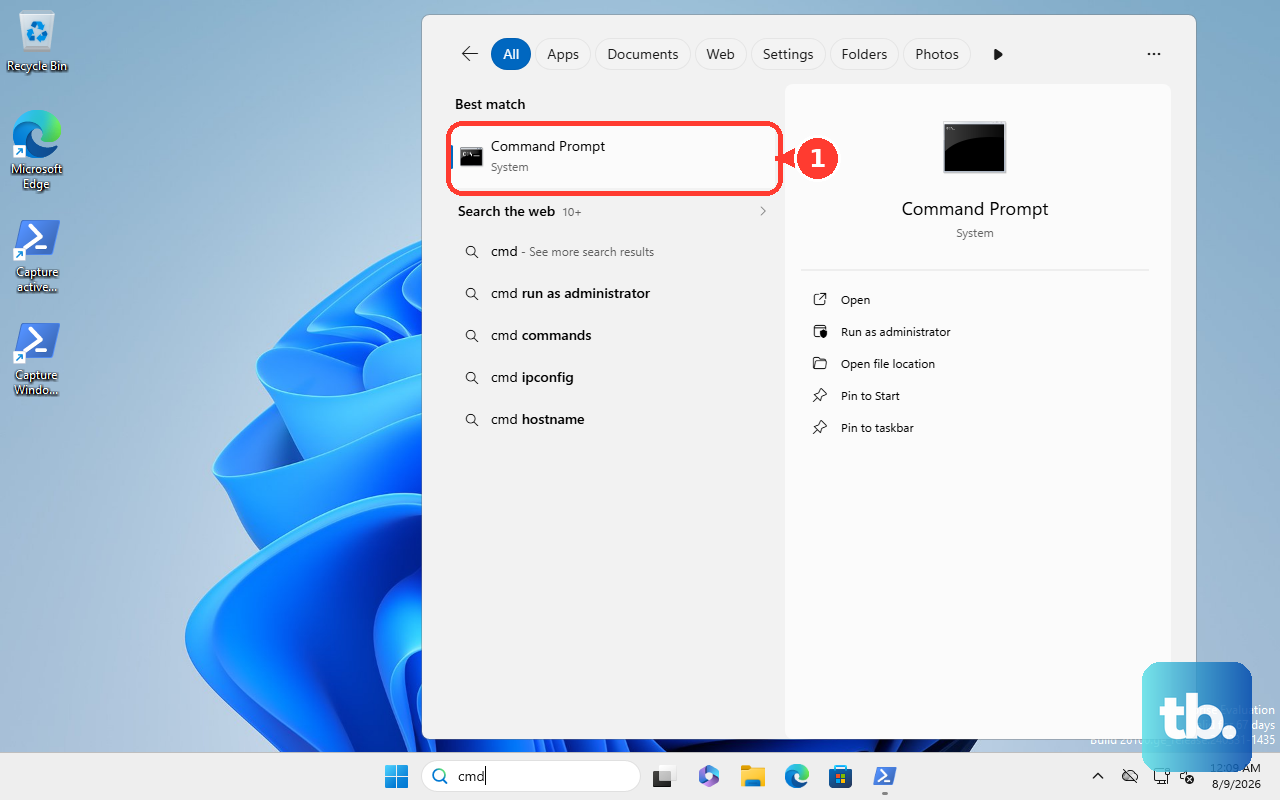
On restricted enterprise, college, university, school, work, or family networks, ask the administrator or IT department to allow the Epic domains required for Epic services.
For launcher corruption, download the installer from the Epic Games Store, run the downloaded file, and choose Repair. If Repair is absent, Epic says an earlier version is being updated. Reinstall the launcher only after the visibility, account, cache, update, and connection checks are done.
9. Avoid unsupported Library shortcuts
Do not rely on old detect-or-import tricks after removing the launcher or reinstalling Windows. Epic says games need to be reinstalled through the Library tab in that situation.
Do not manually delete game folders as a replacement for uninstalling through the launcher. Use Library, the three dots menu next to the game, and Uninstall. If that option is missing on Windows, use Microsoft’s Windows 10 or Windows 11 app uninstall flow.
Frequently Asked Questions
Why is my Epic Games Library empty even though I own games?
The usual causes are the Hide Game Library setting, active Library filters, or signing in with a different Epic account than the one that purchased or claimed the games.
Why does Epic show my game as Unavailable?
Sign out and back in first. Epic also supports switching between the Library and Unreal Engine tabs, changing the launcher language, and running the launcher as administrator on Windows.
Does Epic Games Launcher show DLC as separate games?
DLC is managed from the base game through Library, the three dots menu, and Manage Add-Ons. Some games handle DLC in EA App, Ubisoft Connect, or Paradox Launcher.
Can Epic detect games I already installed before reinstalling Windows?
Epic says there is no supported direct detect or import flow. After removing the launcher or reinstalling Windows, reinstall games through the Library tab.











