Your friends are messaging to ask why you sent them a strange link, a login alert just popped up from a country you have never visited, and the password you have typed a hundred times suddenly does not work. That sinking feeling is real, but so is the good news. Instagram has dedicated recovery paths for this situation, and people who act quickly often get their accounts back. The key is to move through the right steps in the right order rather than trying everything at once.
Before you touch anything, one rule keeps you safe through this whole process. Start your recovery on a device, browser, and network you have used to sign in to this account before. A familiar phone on your home Wi-Fi looks trustworthy to Instagram and makes it easier to prove the account is yours. And throughout everything below, never share a verification code, password, or two-factor code with anyone who contacts you. Real Instagram support never asks for it.
Before you enter your username, password, or any identity document, confirm you are on the genuine Instagram or Meta address and not a lookalike page built to steal credentials.
Confirm the Account Is Actually Compromised
Read the signs first, because the right recovery path depends on what happened. A hijacked account usually shows several symptoms at once: strange direct messages sent from your profile, login notifications from unfamiliar locations or devices, your email or phone number quietly changed, or a password that no longer works.
One symptom deserves special attention. If you receive an email saying your account's email address was changed and you did not do it, look closely at it. Instagram often includes a revert option inside that email, and using it can undo the change before the attacker locks you out completely. Act on it fast, because it is one of the simplest ways to reclaim control.
This guide focuses on a hacked or compromised account. If yours was instead disabled by Instagram for a suspected policy violation, skip ahead to the section on appealing a disabled account, a different process.
Change Your Password and Lock Out the Intruder
If you can still log in at all, do this immediately, because it is the fastest way to push an attacker out. Instagram's official hacked-account guidance is to change your password or send yourself a password reset email right away when you think the account is compromised but can still get in.
Choose a brand-new password you have never used on any other site. Reusing an old one, especially one that may already be exposed, defeats the purpose. Once the new password is set, anyone holding the old one is locked out.
If you already undid an email change with the revert option above, reset the password at the same time. Locking the door only helps once you are sure no spare key is still floating around.
If You Are Locked Out Use Get Help Signing In
When the password no longer works and you cannot get into the account at all, Instagram's main recovery door is built into the login screen. Follow these prompts in order.
- 1.Open Instagram and go to the login screen, then tap 'Get help signing in' (it appears below the Log In button).
- 2.Enter the username, email, or phone number associated with the account, then tap Next.
- 3.If the standard reset options do not work, tap 'Need more help?' and follow the on-screen instructions.
- 4.When asked where to send recovery information, use a secure email only you can access. The attacker may have changed your old contact details, so pick an inbox you fully control.
The 'Need more help?' branch escalates your request toward identity verification when simple resets fall short.
Use a Backup Code When Two-Factor Blocks You
If you had two-factor authentication switched on and now cannot complete it, perhaps because you lost your phone or cannot reach your SMS or authenticator app, do not assume you are stuck. Instagram's documented method is to use a backup code in place of the security code.
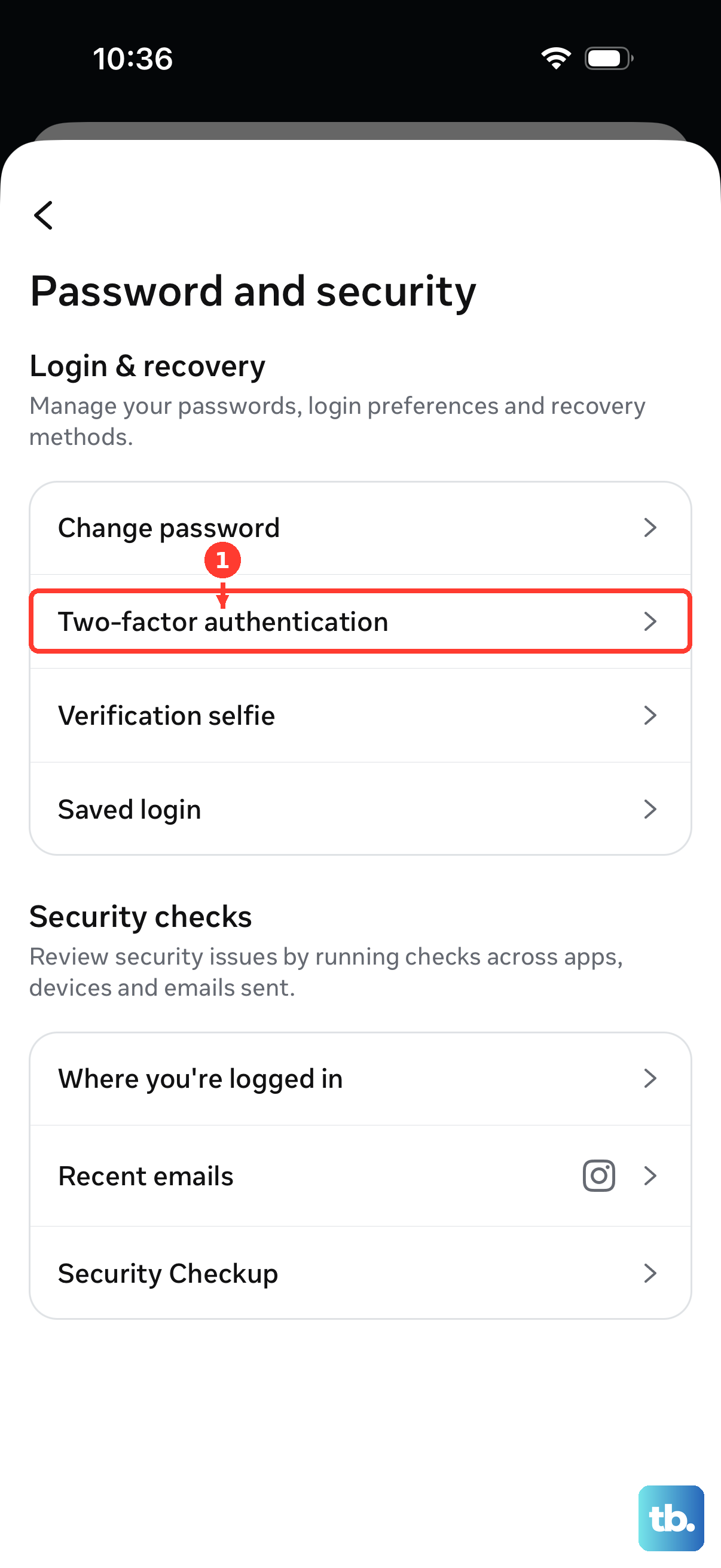
When the prompt requests your two-factor security code and you cannot receive it, enter one of your saved backup codes instead. These codes are tied to your two-factor settings and were generated when you set up 2FA. The two-factor overview is at help.instagram.com/566810106808145, and the guidance on using these codes is at help.instagram.com/1006568999411025.
If you have no backup code and no access to your 2FA method at all, there is no separate bypass tool to hunt for. The official fallback is the regular login-recovery route above, 'Get help signing in' then 'Need more help?', which leads into the Security Team identity verification covered next.
Open the Dedicated Hacked-Account Flow
Instagram maintains a recovery entry point built specifically for compromised accounts, and it is often the cleanest way to start when the login screen options have not been enough. Go to instagram.com/hacked, the dedicated hacked-account support flow, which is also reachable through facebook.com/help/instagram/hackedaccount/.
From there you can start a recovery request and ask Instagram for help directly. Never create a brand-new account to report the hacked one, because it does not speed anything up and can muddy the verification process. Work only through the official recovery flow tied to the account you are saving, and confirm you are on the genuine domains shown above, instagram.com and facebook.com, before you type anything sensitive.
Pass the Instagram Security Team Identity Check
After you submit a recovery request, keep a close eye on your inbox for an email from the Instagram Security Team asking you to verify your identity. This is the step that proves you, not the attacker, own the account.
You may be asked to send a photo of yourself holding a piece of paper with a handwritten code that Instagram provides. In some cases you may instead be asked for the email or phone number you signed up with and the device you used at sign-up, and a short video selfie may also be requested. Follow the exact instructions in the email.
Once your identity checks out, Instagram sends recovery instructions to the secure email you provided earlier, which is why that inbox mattered so much. Remember that no legitimate part of this process involves handing a code or password to another person, and you should never pay a third-party account recovery service that promises to speed it up. Those services cannot do anything the official Instagram channels cannot, and they put your account at further risk.
Appeal a Disabled Account and Request a Review
If your account was not hacked but disabled by Instagram, and you believe that happened by mistake, the path is different. You request a review from inside the app rather than through hacked-account recovery.
Open the Instagram app, enter your username and password, and follow the on-screen instructions to request a review of the decision. The flow walks you through submitting your appeal so a person can reconsider whether the account should be restored. Provide accurate information and be patient while it is processed.
Lock the Account Down Once You Are Back In
Regaining access is only half the job. An attacker who got in once will try again, so spend a few minutes hardening the account.
- 1.Confirm or reset your password to something strong and unique you have not used anywhere else.
- 2.Review your login activity to spot sessions you do not recognize, and remove devices that are not yours.
- 3.Turn on two-factor authentication so a stolen password alone is not enough, and save the backup codes it generates somewhere safe and offline.
- 4.Check the email address and phone number on the account to make sure they are still yours and not something the attacker slipped in.
With two-factor authentication active and your contact details verified, a future hijack attempt hits a wall instead of an open door, and saving those fresh backup codes means that if you are ever locked out again, you already hold the key.
One Recovery Hub for Facebook Instagram and Threads
If you use more than one Meta service, or you are not sure which entry point fits your situation, Meta operates an Account Recovery Hub that covers Facebook, Instagram, and Threads together, pointing you toward the right steps whether you are locked out or hacked. You can reach it at meta.com/account-recovery-support.
It is a useful map when your accounts are linked, since a compromise on one may touch the others. Treat it as a directory that routes you back into the flows described above rather than a separate fix.
Frequently Asked Questions
How long does it take to recover a hacked Instagram account?
Instagram does not publish a fixed timeline for recovery or identity verification. Its guidance is to submit your request and then watch for a follow-up email from the Security Team. Respond to that email promptly and keep checking the secure inbox you provided.
What if I do not have any backup codes and cannot use two-factor authentication?
There is no separate tool to bypass two-factor authentication. Use the regular login-recovery route instead: tap 'Get help signing in' on the login screen, then 'Need more help?', and complete the Instagram Security Team identity verification when it is requested. That is the documented fallback when both your 2FA method and backup codes are unavailable.
Will Instagram ever ask me for my password or a verification code?
No. Real Instagram support will never ask you to share your password, a verification code, or a two-factor code with anyone. If someone contacts you asking for any of these, it is a scam, even if they claim to be from Instagram. The genuine identity check uses things like a photo holding a handwritten code, never your codes.
Should I make a new account to report that my account was hacked?
No. Do not create a brand-new account to report the compromised one. Work through the official recovery flow at instagram.com/hacked tied to the account you are recovering, and start the process on a device and network you have signed in from before so the request looks trustworthy.
Are paid third-party recovery services worth it?
No. Avoid any paid third-party account recovery service. They cannot access anything beyond the official channels you already have, and handing them your details puts your account at greater risk. Stick to Instagram's own recovery flows, the Meta Account Recovery Hub, and the Security Team verification.
My account was disabled, not hacked. Is the process the same?
No, it is a different path. If you think your account was disabled by mistake, open the app, enter your username and password, and follow the on-screen instructions to request a review. The hacked-account flow is for compromised accounts, while the in-app appeal is for disabled ones.