Your Instagram account is locked when Instagram needs a security check, password recovery, identity confirmation, hacked-account review, or appeal before letting you back in. The right fix depends on the screen Instagram shows when you try to log in. Start with the official path on your account, then move through the recovery options below.
1. Read the Lock Screen First
Instagram's sign-in prompt tells you what kind of unlock the account needs before you try password resets, appeals, or support requests.
Open the Instagram app or go to instagram.com.
Log in with your Instagram username and password.
Complete the challenge shown on screen.
Enter the code sent to the account email address or phone number when Instagram asks for it.
Change the password, upload ID, or complete a video selfie only when that option appears in the official flow.
If the app does not load the recovery screen correctly, sign in through instagram.com and complete the same prompt there.
2. Reset Your Password
Open the Instagram login screen.
Tap Forgot password?.
Enter your username, email address, or phone number.
Tap Continue.
Follow the on-screen instructions to finish the reset.
Use this route when you still control the email address, phone number, or linked Facebook account on the Instagram account. After the password reset finishes, sign in again and complete any extra verification Instagram displays.
3. Request Another Login Option
Choose another recovery route when the code goes to an email inbox or phone number you no longer have access to.
Open the Instagram app.
At the bottom of the login screen, tap Forgot password?.
Enter your username.
Tap Continue.
Tap Try another way.
Follow the on-screen instructions to submit the support request.
Some accounts show Get help logging in, Send security code, or an unavailable email or phone number option. Pick the label Instagram shows on your screen and stay inside that recovery path.
4. Recover a Hacked Account
Go to https://www.instagram.com/hacked/.
Choose the option that matches the problem, such as My account was hacked or I forgot my password.
Enter your username, email address, or phone number.
Follow the recovery flow Instagram gives you.
Use Instagram's hacked-account page when someone changed your login details or the normal reset flow does not restore access.
If the attacker changed your Instagram email address and you still have the old inbox, open the message from [email protected] about that change.
Use the recovery link or deny/revert option in that email, then secure the account after access returns.
5. Complete the Identity Check
Video selfie Follow the head-turn instructions exactly when Instagram asks for a video selfie.
ID upload Upload an accepted ID type only when Instagram prompts you to confirm identity.
Two-factor backup code At the two-factor login screen, enter a saved backup code instead of the SMS or authenticator-app code.
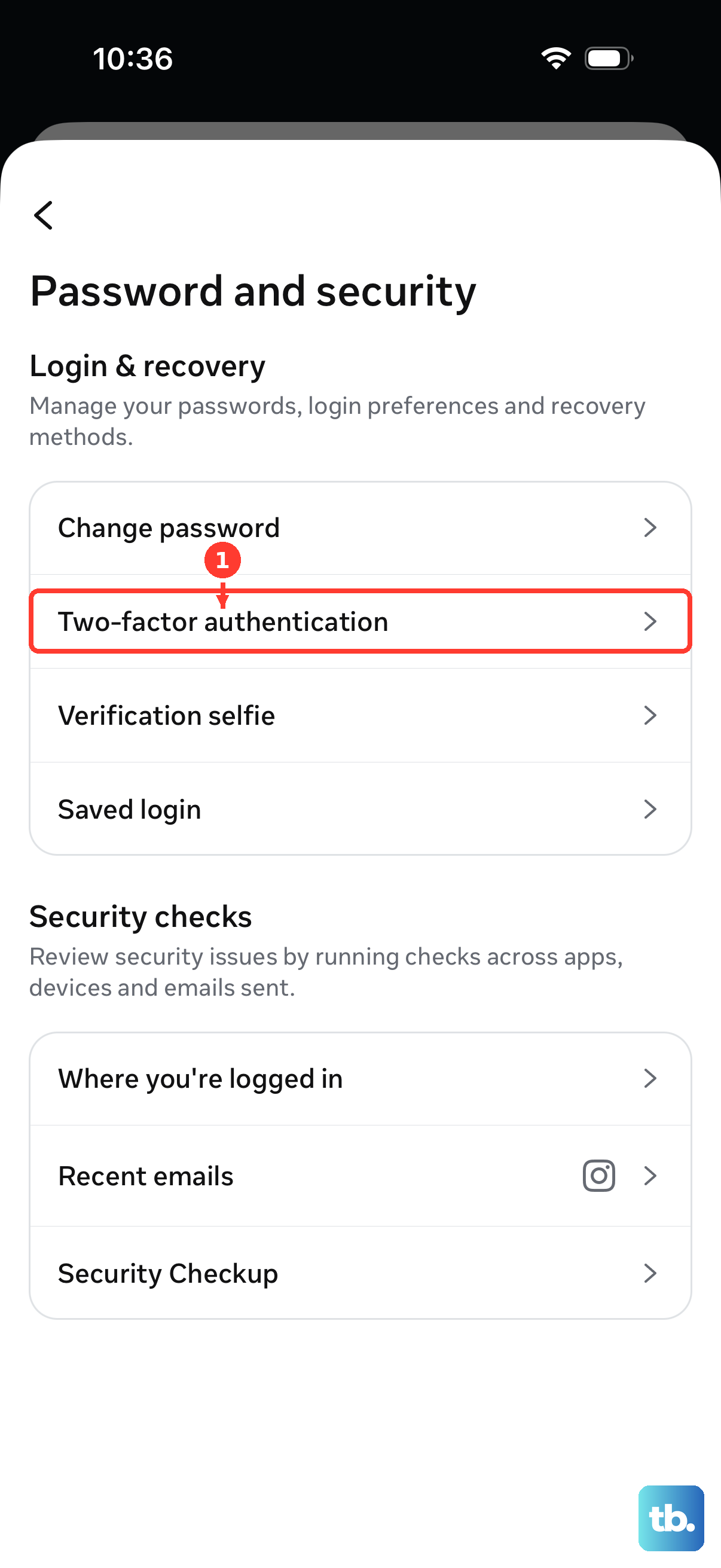
Instagram uses identity checks when Meta needs to confirm the person trying to recover the account. To find backup codes while logged in later, go to Profile, Menu, Accounts Center, Password and security, Two-factor authentication, choose the account, then open Additional methods and Backup codes.
6. Appeal a Disabled Account
A disabled or suspended Instagram account needs an appeal, not a password reset.
Open the Instagram app or go to instagram.com.
Log in to the disabled or suspended account.
Follow the on-screen instructions to request a review or submit an appeal.
If you can still open the app, check the account status inside Instagram.
Go to Profile or tap your profile picture.
Tap Menu.
Open Account Status.
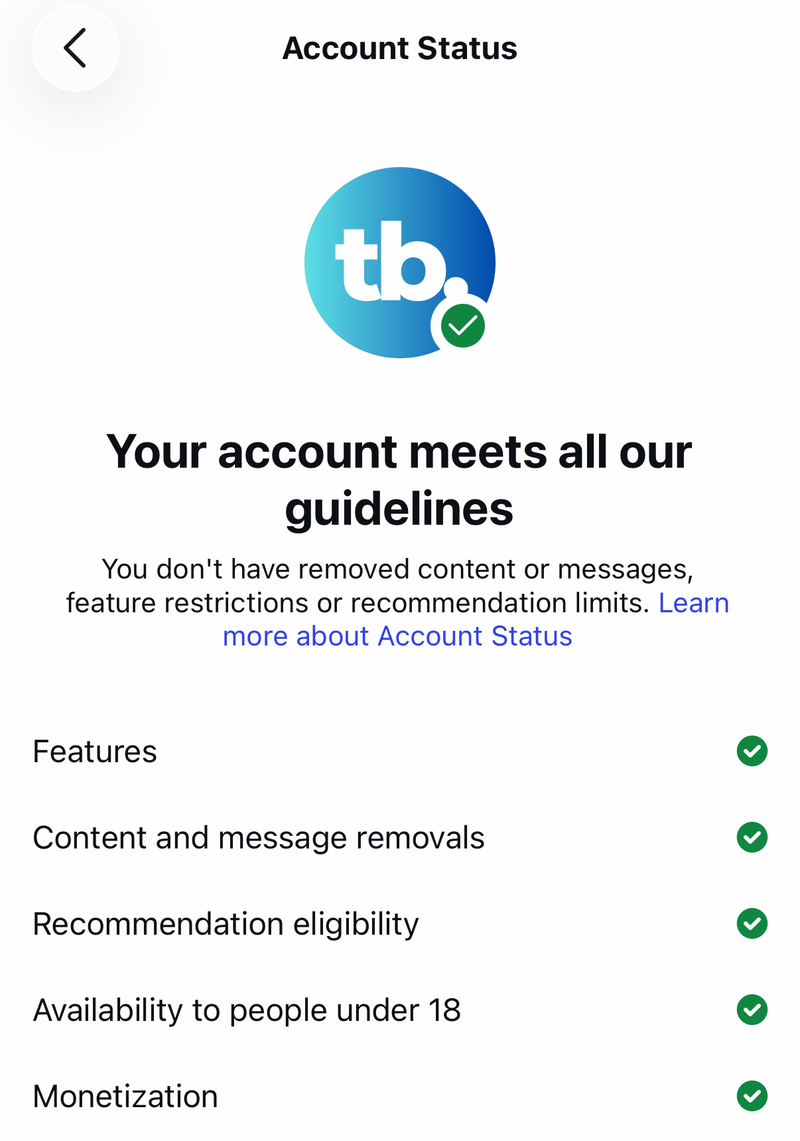
Select the affected content, feature, strike, or restriction.
Tap Request a review or follow the action shown.
For review history, go to Profile, Menu, Help, then Reports and violations or Support Requests.
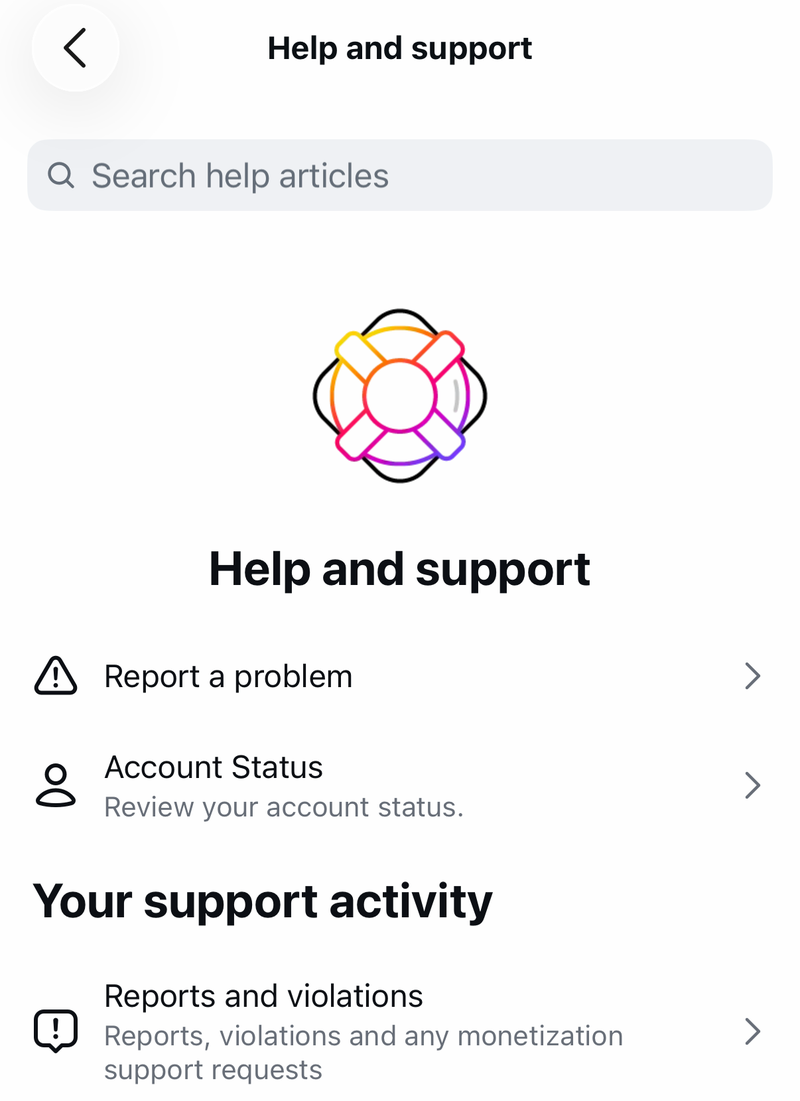
Open Reports, select the relevant decision, and tap Request a review when Instagram offers it.
7. Use Official Support Channels
Meta AI support assistant Open the Instagram Help Center or the Instagram app support entry point, choose Chat with Meta AI support assistant or the support hub option, then ask for help with login, account access, appeal options, or password reset.
Its hands-on login recovery is starting with select cases in the US and Canada, and direct password resets run on Facebook first, with Instagram to come, so complete the reset through Instagram's normal flow if the assistant cannot.
Meta Verified support If the locked account already has eligible Meta Verified support, open the Meta Verified support entry point and create a chat or email request for account access.
Report a problem If the recovery screen itself is broken while you are logged in, shake your phone, tap Report a problem, and follow the prompts.
When the normal recovery screens do not solve it, use the official support paths tied to Instagram and Meta. To control shake reporting, go to Profile, Menu, Help, Report a problem, then Shake phone to report a problem.
8. Secure the Account After Recovery
Do this immediately after a hacked-account recovery, suspicious-login challenge, or account-risk lock.
Change the password from Profile, Menu, Accounts Center, Password and security, Change password.
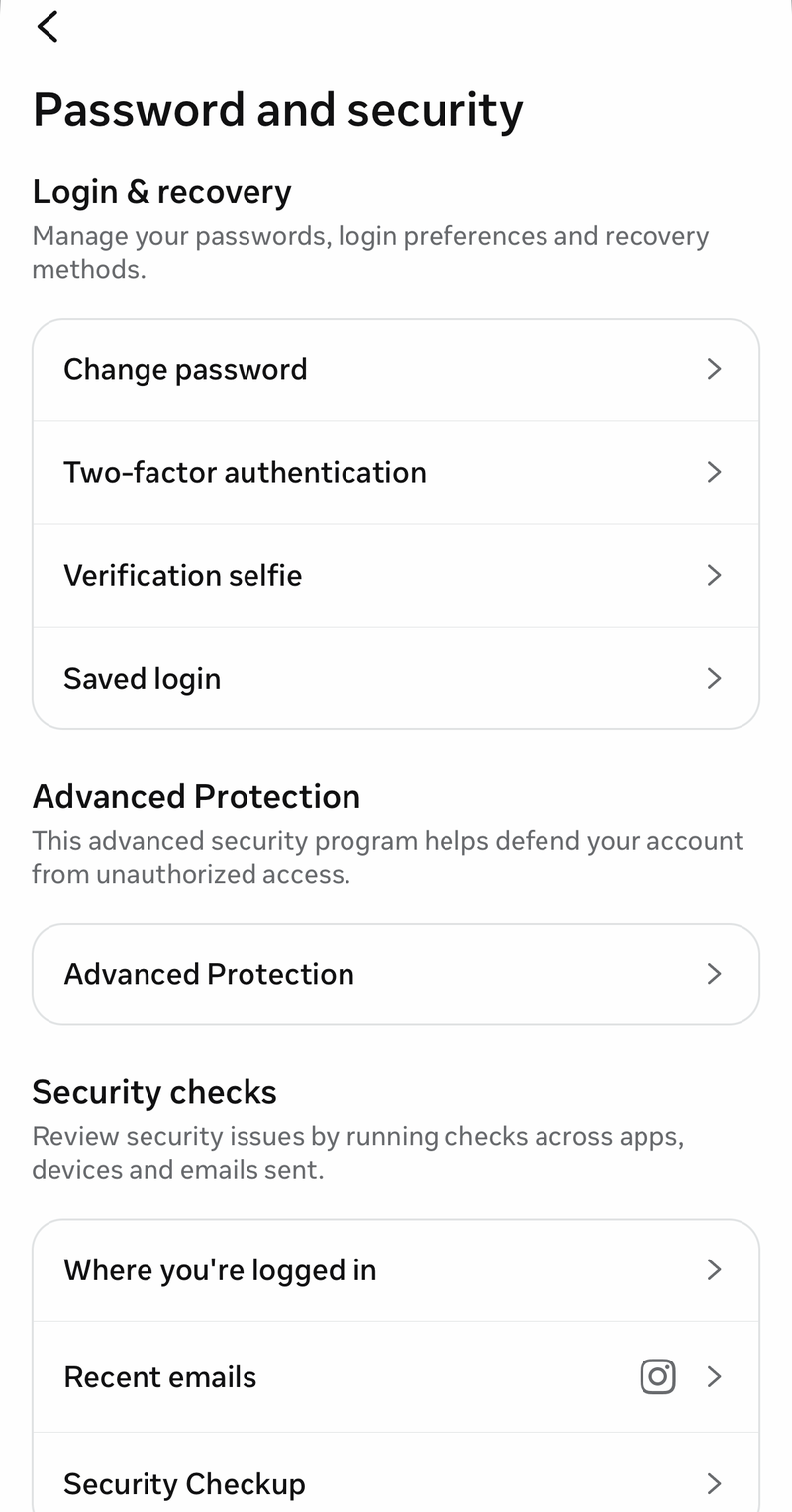
Remove unknown sessions from Profile, Menu, Accounts Center, Password and security, then Where you're logged in or Login activity.
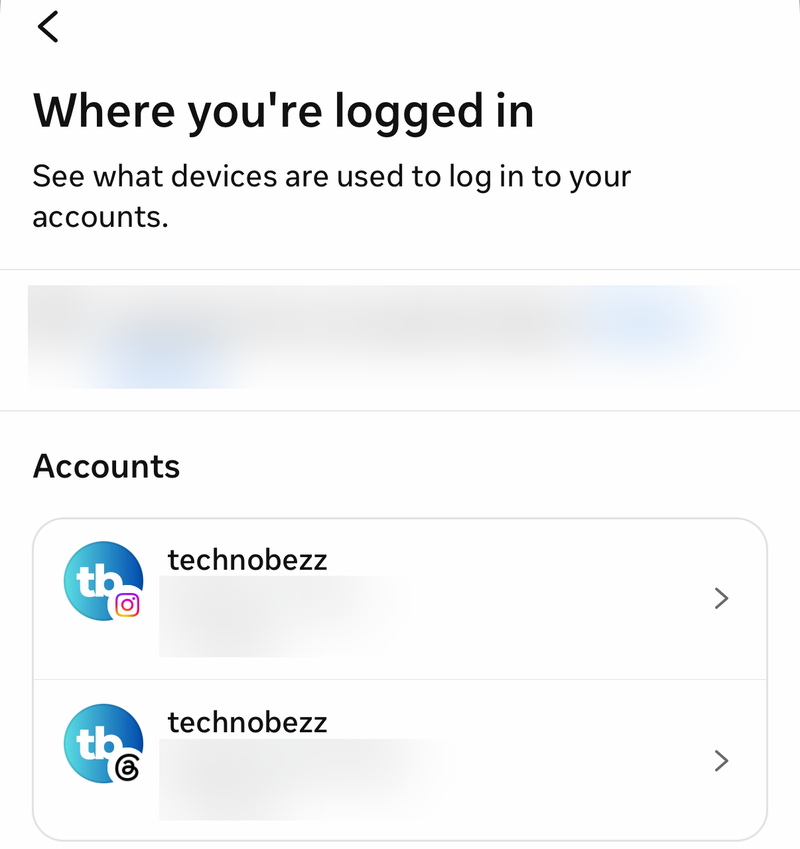
Revoke suspicious services from Profile, Menu, Account, Website permissions, Active, then tap Remove next to anything you do not trust.
Turn on two-factor authentication from Profile, Menu, Accounts Center, Password and security, Two-factor authentication.
Skip old unlock advice that sends you to standalone disabled-account forms, public support emails, phone numbers, or third-party APK downloads. Current recovery belongs in Instagram login prompts, Account Status, Support Requests, instagram.com/hacked, the Help Center support hub, Meta AI support assistant, or Meta Verified support for eligible subscribers. Update Instagram only through the App Store, Google Play, Microsoft Store, or use instagram.com.
Frequently Asked Questions
Why is my Instagram account locked?
Instagram locks or challenges an account when it needs suspicious-login verification, password recovery, identity confirmation, hacked-account recovery, or an appeal for a disabled or restricted account.
How do I unlock Instagram without my old email or phone number?
Open the app login screen, tap Forgot password?, enter your username, tap Continue, choose Try another way, and follow the support request flow.
Can backup codes get me past a two-factor lockout?
Yes. At the two-factor login screen, enter a saved backup code instead of the SMS or authenticator-app code.
Does Meta Verified support unlock Instagram accounts?
Meta Verified support helps eligible current subscribers with account-access requests by chat or email. It is a subscriber support benefit, not a general unlock channel for every account.
Should I email Instagram support or use an old appeal form?
No. Use Instagram login recovery, Account Status, Support Requests, instagram.com/hacked, the Help Center support hub, or eligible Meta Verified support.