


To configure a Wi-Fi proxy on your iPhone, open Settings > Wi-Fi, tap your connected network’s ⓘ info button, open Configure Proxy, choose Manual or Automatic, enter the server details or PAC URL, and tap Save. This setting applies to the selected Wi-Fi network, not to your cellular connection.
The short version
- Manual setup: Enter the proxy server address and port, adding authentication details when required.
- Automatic setup: Enter a usable proxy auto-configuration file address in URL.
- Network scope: Your proxy configuration applies to the Wi-Fi network you select.
- Turn it off: Choose Off in Configure Proxy and tap Save where editing is permitted.
| Option | What you need | Where to act |
|---|---|---|
| Manual proxy | Server address, port, and any required credentials | Configure Proxy > Manual |
| Automatic proxy | A usable PAC file address | Configure Proxy > Automatic |
| Disable a manual proxy | Permission to edit the network settings | Configure Proxy > Off |
| Proxy during initial setup | Access to Setup Assistant | Wi-Fi Settings on the network selection screen |
| Supplied proxy profile | An organization’s profile containing Wi-Fi proxy settings | Profile Downloaded in Settings |
| Create and install a profile | Apple Configurator on a Mac and a connected iPhone | File > New Profile |
| Get Apple Configurator | The Mac companion application | Apple’s Mac App Store listing |
| Managed network proxy | A management service and eligible enrollment | The management service’s Wi-Fi configuration |
| WPAD automatic discovery | Cisco Meraki Systems Manager and working network discovery | Proxy Setup in the Wi-Fi settings payload |
| Global HTTP proxy | A supervised, managed iPhone | The management service’s Global HTTP Proxy payload |
| Remove a profile on iPhone | A removable configuration profile | VPN & Device Management |
| Remove a profile on Mac | Apple Configurator with permission to remove the profile | Actions > Remove > Profiles |
| Remove management settings | User-removable enrollment | Remove Management |
Configure a manual proxy
Have your proxy server address and port number ready, along with a username and password if authentication is required. Open Settings, tap Wi-Fi, and connect to the network you want to configure. Tap the ⓘ info button beside that network, then tap Configure Proxy under HTTP Proxy.
Select Manual and enter the proxy server address in Server. Enter its port number in Port, keeping the address and port in their separate fields. If credentials are required, turn on Authentication, then enter them in Username and Password. Tap Save when the required fields are complete.
Configure an automatic proxy
Automatic configuration requires the address of a usable proxy auto-configuration file, commonly called a PAC file. Get that address from your network administrator or proxy provider. Open Settings > Wi-Fi, tap the network’s ⓘ info button, then open Configure Proxy.
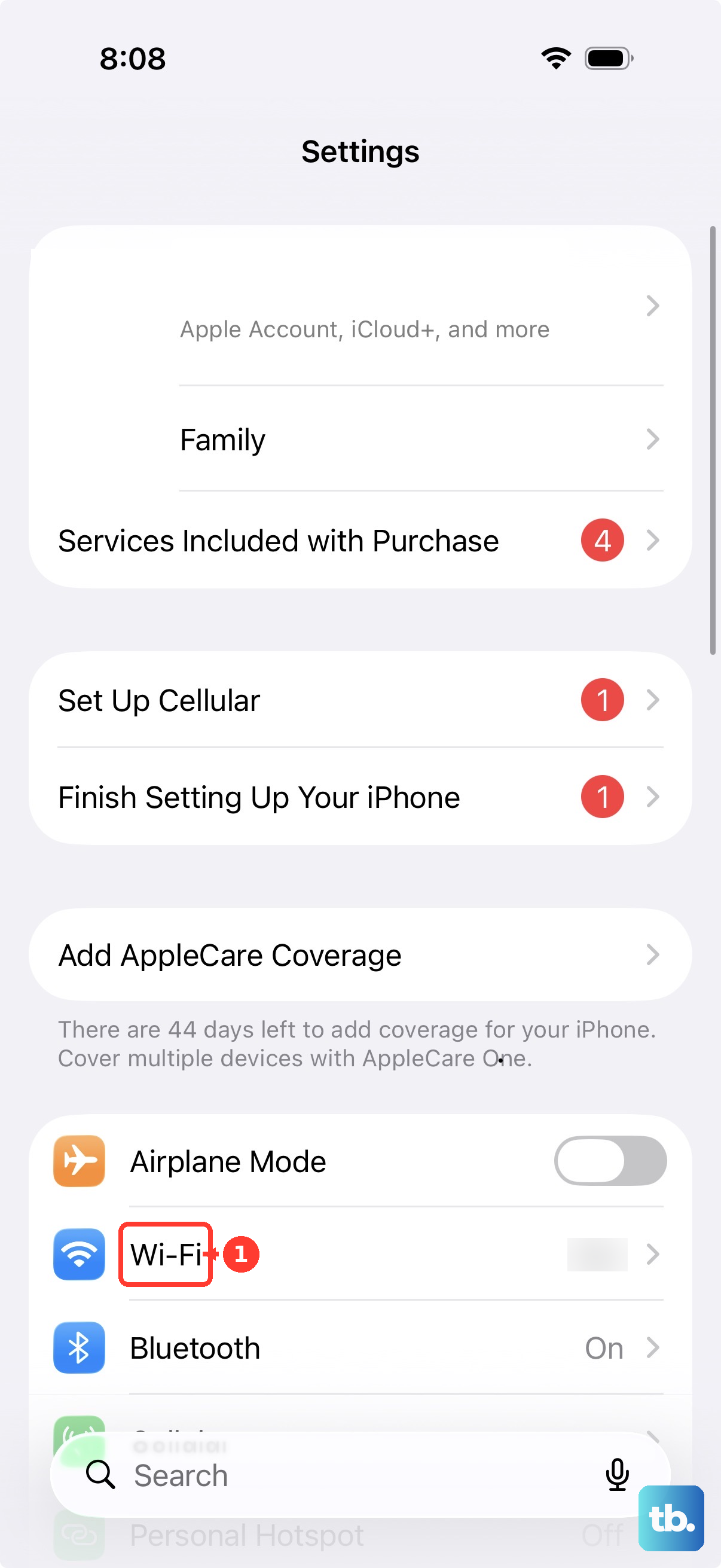
Select Automatic, enter the PAC file address in URL, and tap Save. If you were given a server address and port instead, choose Manual and enter those details in Server and Port. The automatic option needs the PAC file address to use that configuration.
Turn off a manual proxy
To disable a manually configured proxy, return to Settings > Wi-Fi and tap the same network’s ⓘ info button. Open Configure Proxy, select Off, and tap Save. Use this route where editing is permitted.
If a configuration profile supplies the proxy, use the applicable profile removal steps below. When your organization enforces the profile or prevents removal, ask your administrator to change or withdraw the proxy policy.
Set a proxy during iPhone setup
Apple provides a route to network proxy settings during Setup Assistant. On Hello, press Home or swipe up, then select your language and country or region. On Quick Start, tap Set Up Without Another Device.
On Choose a Wi-Fi Network, press Home or hold Side for 2 seconds. Tap Wi-Fi Settings, then tap the network’s ⓘ info button. Configure the HTTP proxy from that network’s details using the manual or automatic settings above.
Install a supplied proxy profile
If your organization supplies a Wi-Fi configuration profile through a website or email, download that profile. It must contain the Wi-Fi proxy configuration you need. Apple requires you to install a downloaded profile within 8 minutes.
Open Settings, then select Profile Downloaded or Enroll in [organization name], depending on the option shown. Tap Install and complete the onscreen instructions for that profile. The installation prompts depend on the profile you receive.
Create a proxy profile on your Mac
Get Apple Configurator from Apple’s Mac App Store listing for the Mac companion application. Open Apple Configurator and choose File > New Profile. In General, enter Name and Identifier.
Select the Wi-Fi payload, click Configure, and enter the network and proxy settings. Choose File > Save to save the profile. Connect your iPhone to the Mac, tap Trust on the iPhone if prompted, and enter its passcode if required.
Select the iPhone in Apple Configurator, then choose Actions > Add > Profiles. Select your saved profile and click Add Profiles. If the iPhone is unsupervised, complete the additional onscreen installation steps.
Deploy a network proxy through management
If you administer managed iPhones, create a Wi-Fi configuration in your management service using Apple’s com.apple.wifi.managed payload. For manual configuration, set ProxyType to Manual and supply ProxyServer and ProxyServerPort. Include ProxyUsername and ProxyPassword when credentials are required.
For automatic configuration, set ProxyType to Auto and supply ProxyPACURL. Assign the profile to the iPhone using your management service, whose menu labels vary by vendor. Apple permits Wi-Fi profiles on unsupervised devices, but the ProxyType setting is forbidden under User Enrollment.
If you use Cisco Meraki Systems Manager with a network that provides working WPAD discovery, open its Wi-Fi settings payload. Set Proxy Setup to Automatic and leave the proxy configuration URL blank, then deploy the profile to the enrolled iPhone. Keep these blank-URL steps within the Meraki management workflow; for the iPhone’s own Automatic setting, enter the supplied PAC URL.
Deploy a global HTTP proxy
For HTTP traffic beyond a single Wi-Fi network, an administrator can deploy Apple’s Global HTTP Proxy payload, com.apple.proxy.http.global. This route applies to supervised, managed iPhones, and Apple lists Automated Device Enrollment for the payload. Your management service determines the precise console menus.
Choose Manual and supply Hostname and Port, plus Authentication and Password if required. Alternatively, choose automatic configuration and supply Proxy server URL. Deploy the payload through your management service.
Remove a profile or management settings
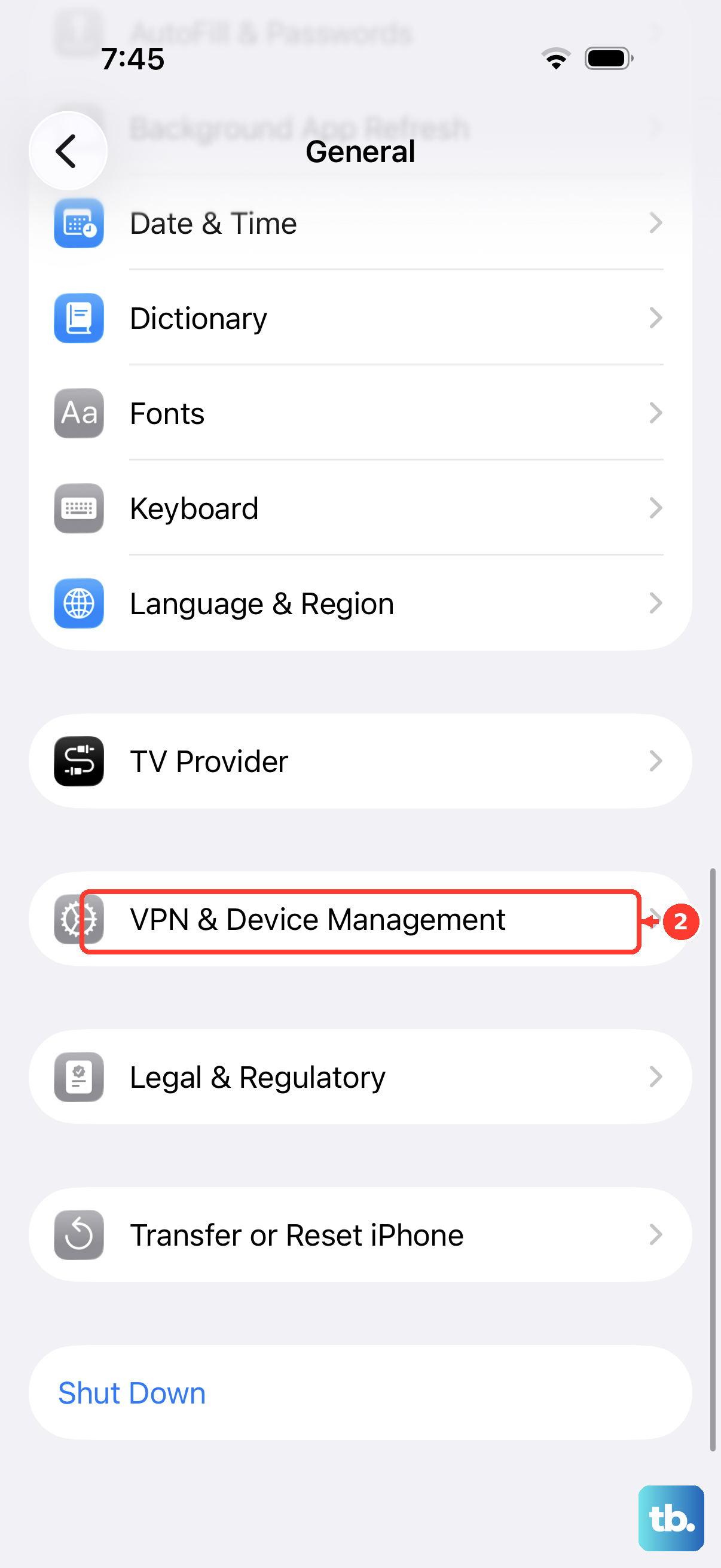
Removing a configuration profile also removes its associated settings, apps, and data. To remove a removable proxy profile on your iPhone, open Settings > General > VPN & Device Management and select the relevant configuration profile. Tap Remove Profile, enter the device passcode if requested, then tap Remove. If your organization enforces the profile, ask your administrator to change or withdraw it.
Removing the profile through Apple Configurator also removes the profile’s associated settings, apps, and data. Connect the iPhone to the Mac running Apple Configurator, then select the device. Choose Actions > Remove > Profiles, confirm that you want to remove the profiles, and click Remove. This route applies only when Apple Configurator is permitted to remove that profile.
Removing management also removes other settings and certificates supplied by management. Where enrollment removal is permitted, open Settings > General > VPN & Device Management, select the management entry, and tap Remove Management. If removal is restricted, your administrator must change or withdraw the proxy policy.
Frequently Asked Questions
Can you enter an IP address instead of a hostname?
Yes, the Server field accepts either the proxy hostname or its IP address. Enter the corresponding port number in Port.
How do you configure the proxy on another Wi-Fi network?
Repeat the setup for each additional Wi-Fi network that needs the proxy. Connect to that network, tap its ⓘ info button, and enter the configuration under Configure Proxy.
Why might installing a downloaded profile be restricted away from home?
Apple says Stolen Device Protection can impose an additional profile installation restriction outside familiar locations. That restriction can apply when you try to install your organization’s downloaded profile.
Can an administrator install multiple global HTTP proxy payloads?
Apple allows only one Global HTTP Proxy payload on an iPhone. If you administer the device and need a different global configuration, change the existing policy through your management service.