Trying to clear Roblox’s cache? The right button depends on your device: Android offers a direct cache cleanup, while other platforms use broader resets or reinstallation. Find your device below for the exact steps and what each option removes.
Clear Roblox cache on Android
On a Pixel or another Android device with the same controls, open Settings > Apps > See all apps > Roblox > Storage & cache.
Tap Clear cache. This removes temporary files without resetting the app’s local data.
On a Samsung Galaxy phone or tablet, open Settings > Apps > Roblox > Storage.
Tap Clear cache. Android menu labels vary by manufacturer and software version.
If clearing the cache doesn’t help, reset Roblox’s app data from the same storage screen. On Pixel, choose Clear storage or Clear data, then confirm with OK; on Samsung, choose Clear data > Delete. This resets local preferences and sign-in state, so sign in again when you reopen Roblox.
Remove Roblox’s local app data on Windows
For desktop installations using the local Roblox folder on supported 64-bit Windows 10 or Windows 11, use this broader cleanup:
- 1.Uninstall Roblox through Start > Settings > Apps > Installed apps > Roblox > More > Uninstall. Windows 10 uses Apps & features.
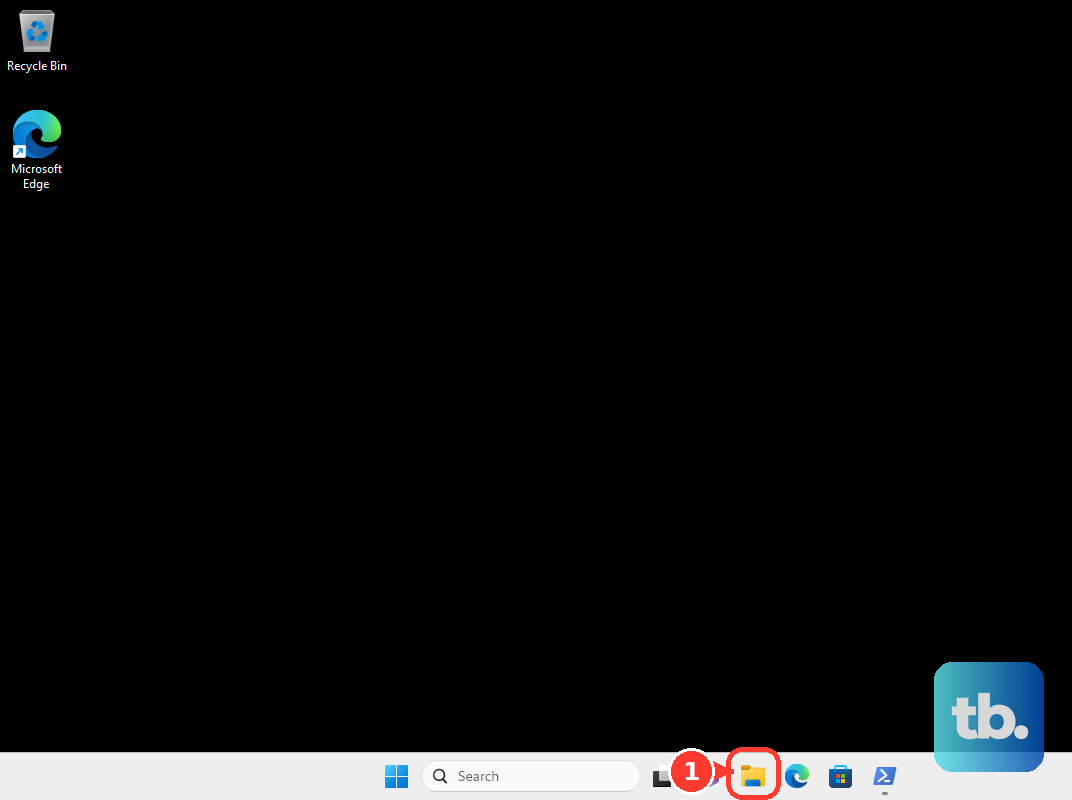
- 2.Open File Explorer and navigate to
C:\Users\<your Windows username>\AppData\Local, replacing the placeholder with your Windows username. - 3.Preserve any Roblox Studio files you deliberately saved inside the Roblox folder before proceeding.
- 4.Delete the Roblox folder from that location. This removes the whole folder, including app data, rather than only temporary cache files. Do not substitute a folder under
AppData\Local\Packages. - 5.Restart Windows.
- 6.Reinstall Roblox from its official download page.
Delete and reinstall Roblox on iPhone or iPad
Use deletion and reinstallation when you need a broader Roblox app cleanup on iPhone or iPad. Apple’s Offload App option preserves documents and data; deleting the app removes its related data.
Open Settings > General > iPhone Storage or iPad Storage > Roblox.
Choose Delete App.
Confirm the deletion. Parental controls and device management can restrict this action.
Reinstall Roblox from the App Store.
Clean up Roblox website data in your browser
Use browser cleanup when the Roblox website is the problem. It clears website data, not the separate Roblox Player app’s cache.
In desktop Chrome, open More > Delete browsing data.
Set the time range to All time.
Select Cached images and files.
Deselect categories you want to keep. Selecting Cookies and other site data also resets website sign-in and local website storage.
Click Delete data.
For Safari on Mac, open Safari > Settings > Privacy > Manage Website Data.
Select the Roblox-related entries.
Click Remove to delete their website cache and cookies. Remove All clears the stored data for every listed website.
If browser cleanup doesn’t help and the problem occurs inside Roblox Player, use the app cleanup or reinstallation steps for your device.
Reach the Android cache controls on Chromebook
Select the time on your Chromebook.
Open Settings > Apps > Manage Google Play preferences > Android settings.
Within Android settings, open Apps > Roblox > Storage & cache.
Choose Clear cache.
Tip: These controls apply to the Android Roblox app on Chromebooks with Google Play; Android menu labels vary, and school management can restrict access.
Reset Roblox data and cache on a Fire tablet
Amazon’s combined cleanup applies to Fire tablets from the 8th generation onward where Roblox is available and compatible. It resets app data as well as clearing temporary files.
Open Settings > Apps & Notifications > Manage All Applications. The application list is labeled See all... apps on some versions.
Select Roblox > Storage.
Tap Clear Data or Clear Storage. This resets local app data, including preferences and sign-in state.
Tap Clear Cache to finish the combined cleanup.
Reinstall Roblox on Mac
Reinstallation replaces the Mac app; it does not guarantee removal of every separate cache directory.
Quit Roblox.
If it won’t close, press Command+Option+Esc.
Select Roblox in the force-quit window.
Choose Force Quit.
Open Applications in Finder.
Move Roblox to the Trash.
Empty the Trash.
Reinstall Roblox from its official download page.
Clear the PS5 system software cache
Turn off your PS5 by holding its power button for three seconds.
Once the console is off, hold the power button again until the second beep, approximately seven seconds later, then release it.
Connect the controller using a USB cable.
Press the PS button on the controller.
Choose Clear Cache and Rebuild Database > Clear System Software Cache.
Tip: This clears the PS5’s system cache, not a Roblox-specific cache; PS4 does not have this Safe Mode cache command.
Frequently Asked Questions
How do I reinstall Roblox on Android if clearing its data doesn't help?
Open Google Play Store > Profile icon > Manage apps & devices > Manage > Roblox > Uninstall. Then open Roblox’s store listing and install it again. Roblox recommends reinstallation as a broader troubleshooting option.
Can I clear only Roblox’s website data in Firefox?
Yes. Visit the Roblox website and select the shield or padlock beside the address bar. Choose Clear cookies and site data. Firefox removes cookies, site data, and temporary cached files and pages for that website.
Can I reload the Roblox website without using Chrome’s cached files?
Yes. On the Roblox webpage, press Ctrl+Shift+R on Windows or ChromeOS, or Command+Shift+R on Mac. This reloads the page while ignoring cached content; it does not erase the entire browser cache.
What can I try on PS4 instead of clearing the PS5 system cache?
Reinstall Roblox. Highlight Roblox on the home screen, press OPTIONS, and select Delete. Open Library and download Roblox again. This replaces the application rather than performing a cache-only cleanup.