Safari history can pile up across your Apple devices, along with cookies, cache, recent searches, and website permissions on iPhone. The fastest fix is picking the right Safari or Settings path for the device in front of you. Start with the common iPhone cleanup, then use the device-specific steps below when you need a narrower or different reset.
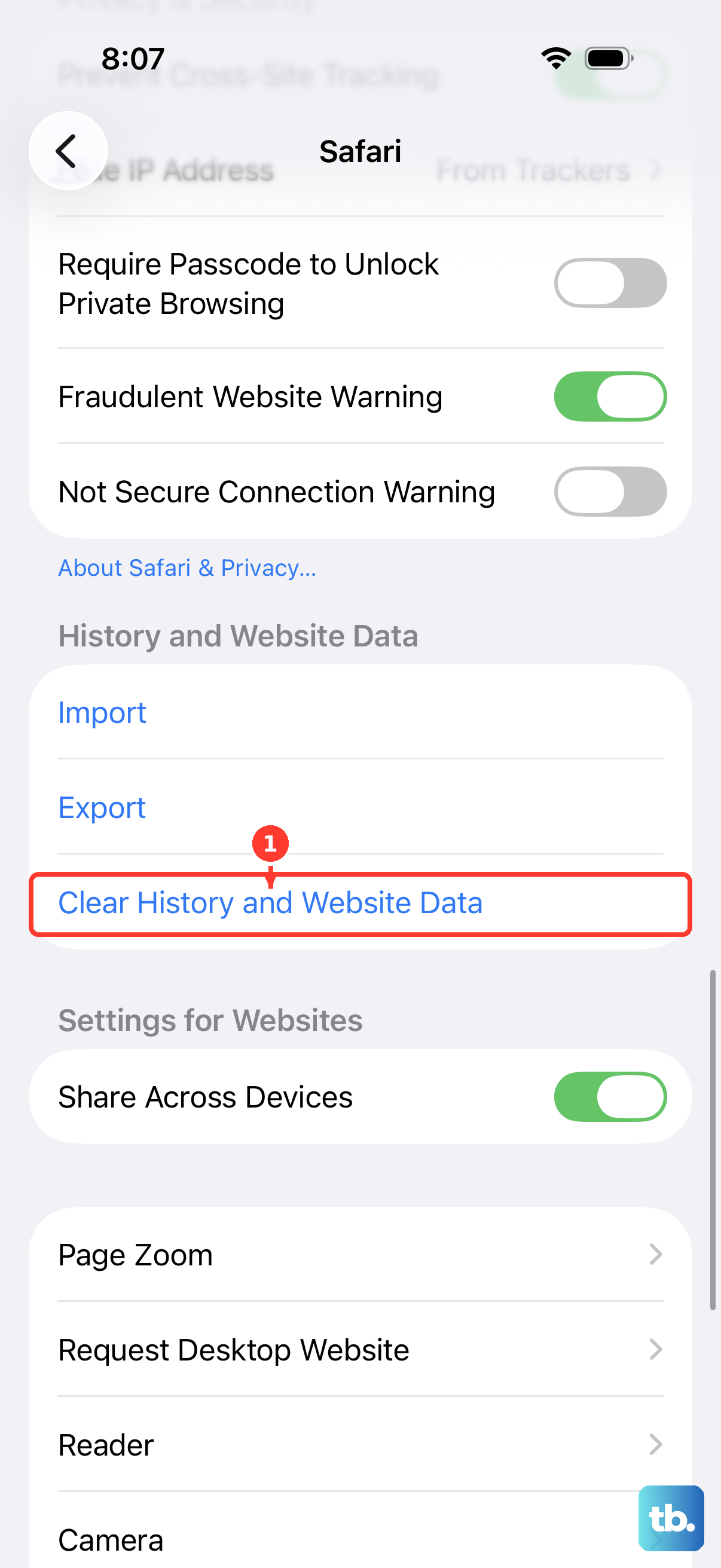
Clear Safari History On iPhone From Settings
Use this path when you want the broad cleanup from the iPhone Settings app.
- 1.Open Settings.
- 2.Tap Apps, then tap Safari.
- 3.Tap Clear History and Website Data.
- 4.Choose the timeframe you want to clear.
- 5.Tap Clear History.
Erase History Inside Safari On iPhone
This fixes Safari history without leaving the Safari app.
Open the Safari app.
Tap the More button, then open Bookmarks. If your Tabs layout is Bottom or Top, tap the Show Bookmarks button instead.
Tap the History button.
Tap the More button again.
Tap Clear.
Under Clear Timeframe, choose how much history to remove.
Choose a Safari profile or All Profiles.
Tap Clear History.
Remove Certain Websites On iPhone
Use this when one site needs to disappear from Safari history, but the rest of your browsing history should stay put. It removes selected history entries instead of clearing a whole timeframe.
Open Safari.
Tap the More button, then open Bookmarks. If your Tabs layout is Bottom or Top, tap the Show Bookmarks button instead.
Tap the History button.
Tap the More button.
Choose Select Websites.
Select the websites you want to remove.
Tap the Trash button.
Clear Safari History On iPad
Open the Safari app on your iPad.
Tap the Show Sidebar button.
Open History.
Tap the More button.
Tap Clear.
Under Clear Timeframe, choose how much browsing history to clear.
Choose a Safari profile or All Profiles.
Tap Clear History.
For a full Safari cleanup on iPad, use the Safari history controls above.
Wipe Safari History On Mac
On a Mac, Safari clears history from the menu bar.
- 1.Open Safari.
- 2.Click History in the menu bar.
- 3.Click Clear History.
- 4.Open the pop-up menu.
- 5.Choose how far back you want to clear.
Set Automatic History Removal On Mac
For a hands-off cleanup schedule, open Safari, click Safari, then choose Settings.
Click General, open Remove history items, and choose when Safari should remove items from history.
This setting does not clear everything immediately. It tells Safari how long to keep history before removing it automatically.
Clear Safari History On Apple Vision Pro
This fixes Safari history on Apple Vision Pro.
Open the Safari app.
Tap the Show Sidebar button.
Open History.
Tap Clear.
Choose how much to clear.
For the Settings route, open Settings.
Go to Apps.
Tap Safari.
Choose Clear History and Website Data.
Handle Blocked Safari History Clearing
On a managed work or school device, the organization can allow or prevent Safari history clearing. That control applies to supervised iPhone, iPad, Mac, and Apple Vision Pro devices on iOS 26, iPadOS 26, macOS 26, or visionOS 26 or later.
When Clear or Clear History and Website Data is missing or unavailable on a managed device, contact the organization that manages it.
If this method fails on a personal device, use the device-specific Safari or Settings steps above.
Skip Older Advice And Use Erase Options Carefully
Old iPod touch and older iOS-style instructions use Settings, Safari, then Clear History and Website Data. On current iPhone guidance, the path is Settings, Apps, then Safari.
Deleting Safari deletes locally stored Safari history and website data, but Apple lists Safari as deletable only in the European Union on iPhone and iPad, and in Japan on iPhone only.
Before deleting Safari, install another browser and set it as the default browser app.
Factory resetting an iPhone, iPad, iPod touch, Mac, or Apple Vision Pro clears Safari history as part of erasing the whole device.
If deleting Safari or erasing the device is more than you need, go back to the normal Clear History or Clear History and Website Data option for your device.
Frequently Asked Questions
Does clearing Safari history also clear cookies and cache on iPhone?
Yes. The iPhone Settings method clears Safari history, recent searches, cookies, cache, and website permissions on the device.
Will clearing Safari history on Mac remove it from my other Apple devices?
If iCloud is set up for Safari on your Mac and other Apple devices, browsing history is removed from all of them.
Can Private Browsing clear existing Safari history?
No. Private Browsing keeps future visited pages out of History, but it does not remove Safari history that already exists.
Is there a Siri command to clear Safari history?
No current Apple-published Siri or Apple Intelligence command clears Safari browsing history.