You sit down to check your Yahoo Mail and the screen pushes back. Maybe you typed your password a few times, then got a lockout message. Maybe a verification code never showed up, or an Account Key prompt that never appears stands between you and your inbox.
The good news is that most lockouts are recoverable, and several clear themselves on their own. This guide walks through every verified way back in, ordered from the quickest and most common to the genuine last resort, across the web, the Yahoo Mail app on iOS and Android, and the situations that trip people up most.
Work top to bottom. The first fix that matches your symptom is usually the one that gets you back to your messages.
Wait Out a Temporary Lock (or Skip the Wait)
If you saw a lockout message after several failed sign-in attempts, Yahoo has temporarily locked the account to protect it. This is the single most common cause, and it resolves itself.
A locked account unlocks automatically after 12 hours (some of Yahoo's pages describe this as up to a day) even if you do nothing. You do not have to contact anyone or take any action to ride it out.
If you cannot wait, you do not have to. Go to the Sign-in Helper, verify your identity with your recovery phone or email, and you regain access immediately. Once you are back in, secure the account and update your recovery information so the lockout does not keep repeating.
Use the Sign-in Helper to Reset Your Password
This is the core recovery tool for a forgotten password, a forgotten Yahoo ID, or any lockout you want to clear right now. It works from any web browser.
- 1.Go to the Sign-in Helper at login.yahoo.com/forgot.
- 2.Enter your recovery email address, or click "Use recovery phone number" to use your recovery mobile number instead.
- 3.Click "Next".
- 4.Follow the on-screen instructions and enter the verification code Yahoo sends to your recovery phone or email.
- 5.Once you are back in, create a new strong password.
If you suspect someone else got into the account, review your settings for changes you did not make and secure everything before you do anything else.
Get a Missing Verification Code to Arrive
Recovery stalls most often at the code step. If the text or email never lands, work through these checks in order.
Click "Resend" within the first five minutes to request a new code.
Confirm you are using a mobile number, not a landline; SMS codes can only be sent to mobile numbers.
Check that your device or plan has not hit its sending or data limit.
Verify the mobile number or alternate email on file is actually correct.
If you are using email, make sure the alternate address was not deleted, check the spam folder, and confirm your provider is not blocking Yahoo.
If a verification link no longer works and shows "The URL has expired and you need to request a new one", simply request a fresh one and use it promptly.
Sign In Another Way When the Account Key Prompt Fails
Account Key sends a passwordless approval prompt to your phone. When it does not arrive, or you no longer have that phone, you can route around it.
Enable notifications in the Yahoo Mail app and on your device, then click "Resend" on the Yahoo page to generate a new prompt.
If it still does not arrive, go to the Yahoo sign-in page, enter your email address, and select "Next".
Choose "Use text or email to sign in" or "Try another way to sign in".
Enter the missing digits of your phone number, then select "Submit".
If you have phone access, choose "Yes, text me a verification code".
If you do not have phone access, verify your alternate email address instead.
Enter the verification code, then select "Continue" to reach your account.
If you get an "Uh-oh" error, you have hit the daily text-message limit. Wait 24 hours, then sign in through the Yahoo Mail mobile app. Note that Account Key cannot be used at the same time as two-step verification.
Complete Sign-in When Two-Step Verification Is On
With two-step verification enabled, Yahoo asks for a second factor after your password. Any one of these completes it.
Enter the verification code sent to your phone, then click "Verify".
Enter the code shown in your authenticator app, then click "Verify".
Click "Approve from phone", select "Yes, send me a notification", then tap "Yes" in the Yahoo app.
If you set up two-step verification with an authenticator app or a security key, Yahoo issued you a one-time emergency recovery code at setup with the instruction to print or write it down and keep it safe. Keep that code accessible; it is your fallback for the times you cannot use your phone or authenticator.
Fix "Invalid ID or Password" and Sign-in Loops
Sometimes the account is fine and the browser is the problem. If you see "Invalid ID or password" or the page keeps bouncing you back to sign-in, the cause is often a stale saved password or corrupted site data.
Check that Caps Lock and Num Lock are off, and update your browser's autofill if you recently changed the password; the saved value goes stale after a change.
Try signing in with a different supported web browser to learn whether the issue is the browser or the account.
If sign-in keeps looping, click "Not you?" on the sign-in page, re-enter your Yahoo ID and password, and click "Sign in".
If that fails, clear the browser's cookies, quit and restart the browser, then try the main sign-in page or the Yahoo Mail sign-in page.
If recovery works in a different browser, the original browser is the culprit, usually corrupted cookies, an ad blocker, or strict tracking protection blocking Yahoo's recovery scripts. If you suspect someone else accessed the account, use the Sign-in Helper, change the password, and review your settings for unauthorized changes.
Restore an Account Created With a Facebook or Google ID
If you originally created your Yahoo account using a Facebook or Google ID and lost access after a long gap, recover it through the same Sign-in Helper.
Go to the Sign-in Helper at login.yahoo.com/forgot.
Enter your Facebook or Google ID (the email address) in the "Yahoo ID" field, then select "Continue".
Follow the on-screen instructions to regain access.
After you are in, set a new password for the account.
Change Your Password Once You Are Back In
After recovering access, set a fresh password. The path differs slightly between desktop and the mobile app.
On a desktop browser, sign in to the Yahoo Account security page at login.yahoo.com/account/security. Under "Ways of signing in", click "Password", enter your new password, and click "Continue". If there is no "Password" option, Account Key is enabled and must be turned off first before you can set a password.
In the Yahoo Mail app on iOS or Android, tap the profile icon, tap "Manage Accounts", then "Account Info" (shown as "Account" in the Yahoo Mail app). Tap "Security", scroll down and tap "Change password", enter the new password, and tap "Continue".
Update or Remove Bad Recovery Information
Outdated recovery info is what turns a quick reset into a dead end, so fix it the moment you are back in. Keeping a valid phone and alternate email on file is the difference between a five-minute recovery and none at all.
On desktop, sign in to the Yahoo Account security page; under "Ways of signing in" click "Add email" or "Add phone number", enter the info, click "Next", and follow the verification prompts.
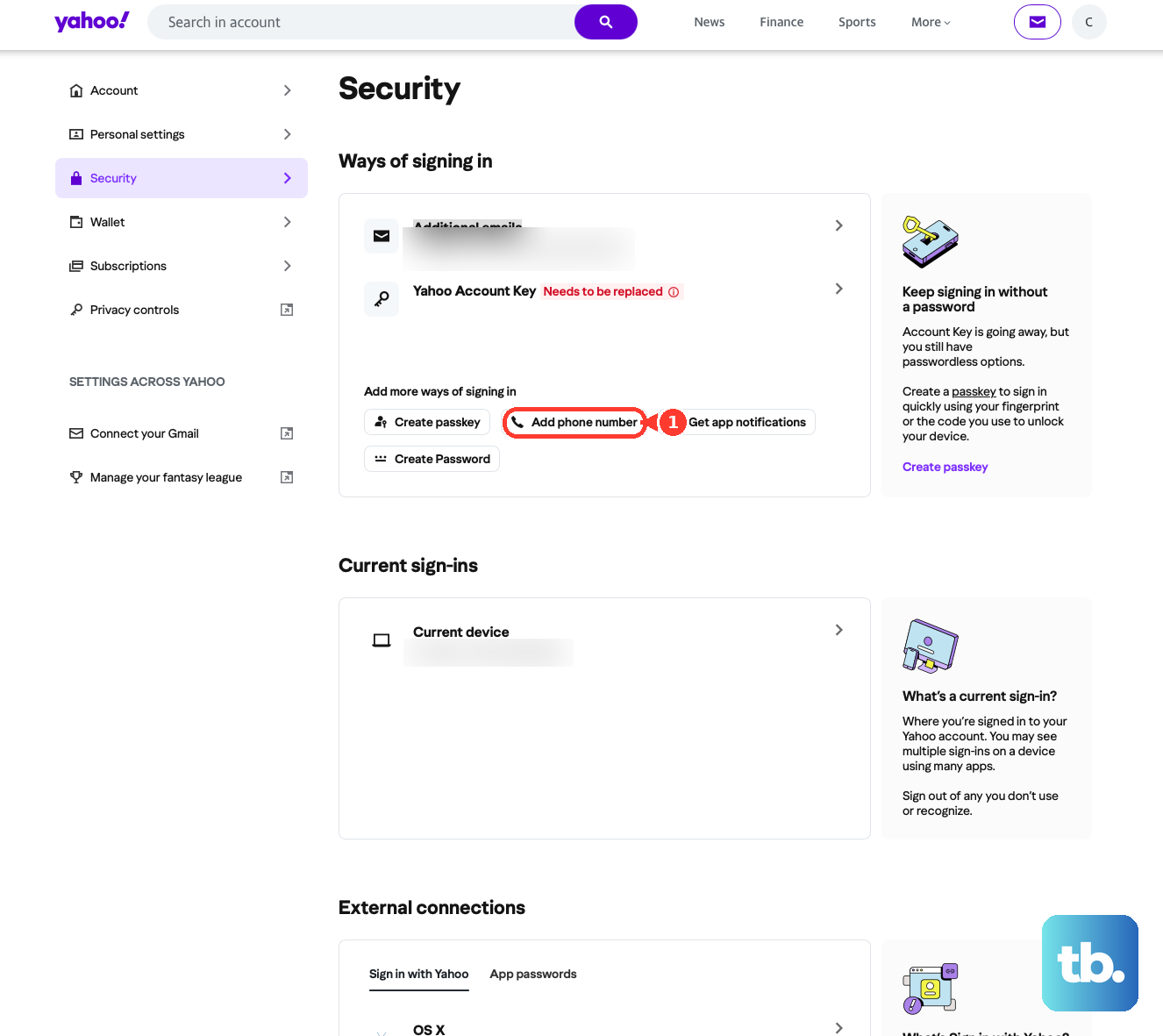
In the mobile app, tap the profile icon (upper left), then "Manage account privacy" > "Your privacy controls" > "Security"; under "Ways of signing in" tap "Add email" or "Add phone number" and follow the prompts. To remove an old or wrong method, open the Security page, click "Phone numbers" or "Additional emails", click the trash icon next to the entry, then confirm removal.
When Recovery Is Not Possible
There is one hard limit worth knowing. If you have forgotten your password and your recovery phone or email is wrong or inaccessible, Yahoo states on multiple official pages that you may not be able to regain access and would need to create a new account. Keep the new account's recovery information current from day one.
For other help, go to Yahoo Help Central, select your product, and click "Contact Us" where available; options may include email, chat, or help articles, and you can also reach Yahoo Customer Care on Facebook or @yahoocare on X. To stay safe, verify that any support or recovery web address ends in "yahoo.com" before you enter anything.
Frequently Asked Questions
How long does a locked Yahoo account stay locked?
A locked account unlocks automatically after 12 hours, described on some Yahoo pages as up to a day, even if you take no action. To get in sooner, use the Sign-in Helper with your recovery phone or email to restore access immediately.
Why do I keep getting locked out even with the right password?
Repeated lockouts can be triggered when your IP address is hidden or constantly changing (such as on a VPN or proxy), when sign-in attempts come from different geographic locations in a short time, or when someone with a similar Yahoo ID keeps entering the wrong password on your ID. That person cannot actually get in without your password.
My verification code never arrives. What should I check first?
Click "Resend" within the first five minutes, then confirm the number on file is a mobile number, since SMS codes can only be sent to mobile numbers and a landline will never receive one. Also check your device or plan limits and, for email codes, your spam folder and that the alternate address still exists.
I lost the phone with my authenticator app. Can I still get in?
If you saved the one-time emergency recovery code that Yahoo issued when you set up two-step verification (it tells you to print or write it down and keep it safe), use it as your fallback. If you no longer have your phone and never saved that code, recovery may not be possible and you may need to create a new account.
What does the "Uh-oh" error during Account Key sign-in mean?
It means you have exceeded the daily text-message limit. Wait 24 hours, then sign in through the Yahoo Mail mobile app. Remember that Account Key cannot be used at the same time as two-step verification.
Recovery fails in my browser but the account seems fine. Now what?
Try a different supported browser, or clear cookies and restart. If it works elsewhere, the problem is the original browser, usually corrupted cookies or site data, an ad blocker, or strict tracking protection blocking Yahoo's recovery scripts, not your account.