Outlook resets get messy fast because new Outlook, classic Outlook, Outlook for Mac, mobile Outlook, and Outlook on the web all use different reset tools. Start with the light reset that fits your version, then move to profile, cache, repair, or reinstall steps only when the smaller fix does not work. Here is the clean path that uses current Microsoft-supported options.
1. Find your Outlook version first
Before you reset anything, match the app in front of you. The reset button for new Outlook will not fix a classic Outlook profile, and classic Outlook profile tools do not apply to new Outlook.
New Outlook for Windows uses Windows app repair, Windows app reset, and the olk.exe --reset command. Classic Outlook for Windows uses profiles, Office repair, data-file repair, Safe Mode, and supported Outlook.exe switches.
Outlook for Mac has a built-in account cache reset and a current profile creation flow. Outlook for iOS and Outlook for Android have a built-in Reset Account option.
Outlook.com and Outlook on the web reset individual settings such as appearance, reading pane, and search history. Want the old Windows Outlook back? Use the switch-back steps in section 3 before you delete profiles, remove accounts, or reinstall Office.
2. Restart and reset new Outlook for Windows
- 1.Right-click Start and select Task Manager.
- 2.Select Microsoft Outlook.
- 3.Choose End task.
- 4.Close Task Manager.
- 5.Open Outlook again.
If Outlook still acts broken, repair the app from Windows Settings. On Windows 11, go to Start > Settings > Apps > Installed apps, select the More icon next to Outlook, open Advanced options, then choose Repair.
On Windows 10, go to Start > Settings > Apps > Apps & features, select Outlook, open Advanced options, then choose Repair.
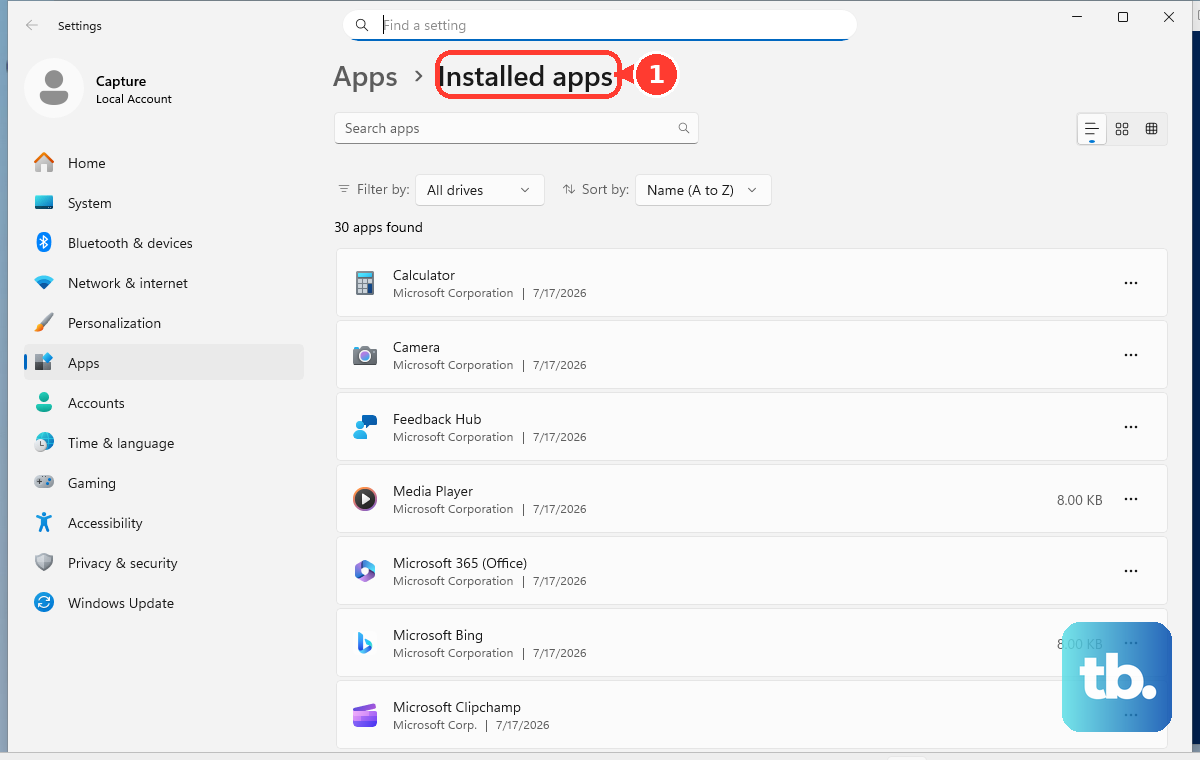
When Repair does not fix it, return to Advanced options and choose Reset. If Outlook does not show those Windows app buttons, close Outlook and run the reset switch with the full path.
Microsoft says Office startup commands need the full path to the product’s .exe, and new Outlook sits in a versioned package folder, so open Terminal or PowerShell, run (Get-AppxPackage Microsoft.OutlookForWindows).InstallLocation to get that path, then run "<install path>\olk.exe" --reset and open Outlook again. Microsoft describes that command as deleting local files and the WebView2 cache and returning new Outlook to a first-run state.
3. Switch back to classic Outlook
Use this when your real goal is to stop new Outlook from opening. In new Outlook for Windows, select the toggle at the top right, then choose Switch back to classic Outlook. That makes classic Outlook open next time.
For a one-time launch, choose Use classic Outlook this time instead. If the toggle is gone, check that classic Outlook is actually installed first. Microsoft says the toggle may not appear when classic Outlook for Windows is not on the device, and no registry edit installs it.
Look for Outlook (classic) in the Start menu app list, the icon without the New tag, and launch it from there. If it is missing, install it from Microsoft’s classic Outlook install page.
When classic Outlook is installed and the toggle is still gone, use Microsoft’s registry path for this specific problem. Open Start, type Registry Editor, open Registry Editor, go to Computer\HKEY_CURRENT_USER\Software\Microsoft\Office\16.0\Outlook\Preferences, double-click UseNewOutlook, enter 0 in Value Data, then launch classic Outlook from Start.
4. Repair or replace a classic Outlook profile
Start with the built-in profile repair when classic Outlook opens but mail, account sign-in, or connection behavior is wrong. Open classic Outlook, choose File > Account Settings > Account Settings, open the Email tab, select your account or profile, choose Repair, follow the wizard, then restart Outlook.
When repair does not solve it, create a fresh profile and keep the old one until the new one works. Hold Shift while starting Outlook, select Options in the profile picker, then create or add a profile. You can also right-click Start, select Run, type Outlook.exe /profiles, and press Enter.
There is also a Control Panel route, with one real limit: Microsoft says the Mail applet cannot add accounts or profiles for Microsoft 365, Outlook.com, or other Exchange accounts that require Modern Authentication, so use the profile picker above for those. For the accounts it does handle, close Outlook, search Windows for Control Panel, then open User Accounts > Mail > Show Profiles.
Choose Add, enter a profile name, select OK, add your email account, then choose Prompt for a profile to be used when you want Outlook to ask which profile to open. Only remove the old profile after the new one works.
In classic Outlook, go to File > Account Settings > Manage Profiles > Show Profiles, select the old profile, then choose Remove. Microsoft warns that removing a profile removes offline data, not data stored in PST files or online accounts such as Outlook.com, Exchange, or Microsoft 365.
5. Fix classic Outlook panes and views
A messy folder pane, missing folder, broken view, bad search criteria, or scrambled To-Do Bar needs a targeted reset, not a new profile. Close Outlook, press Windows key + R, type the command that matches the problem, then choose OK.
Outlook.exe /resetnavpane resets navigation and folder pane customizations. Outlook.exe /cleanviews restores default views and removes all custom views. Outlook.exe /resetfolders restores missing folders at the default delivery location. Outlook.exe /resetfoldernames resets default folder names.
Outlook.exe /resetquicksteps restores default Quick Steps and deletes user-created Quick Steps. Outlook.exe /resetsearchcriteria resets Instant Search criteria. Outlook.exe /resetsharedfolders removes shared folders from the Folder Pane. Outlook.exe /resettodobar clears and regenerates the To-Do Bar task list.
Pick one command at a time. That keeps the reset limited to the broken Outlook area.
6. Open classic Outlook when it freezes
Safe Mode is the fastest add-in test for classic Outlook. Right-click Start, choose Run, type Outlook.exe /safe, and select OK. You can also press the Windows key, type outlook.exe /safe, and press Enter.
If Outlook opens in Safe Mode, turn off add-ins from inside Outlook. Go to File > Options > Add-ins, select COM Add-ins, choose Go, clear the check boxes in the list, then choose OK and restart Outlook. Re-enable add-ins one at a time after Outlook opens normally.
For a damaged PST file, exit Outlook and open SCANPST.EXE from the Office folder. Choose Browse, select your Outlook Data File with the .pst extension, choose Start, then select Repair when errors are found. Microsoft says Exchange .ost files can be deleted and recreated from the server when Outlook opens again.
When the Office install is damaged, repair Microsoft 365 or Office. On Windows 11, right-click Start, choose Installed apps, select your Microsoft 365 or Office product, open the ellipses menu, choose Modify, then choose Online Repair > Repair for Click-to-Run installs or Repair > Continue for MSI installs.
7. Refresh Outlook on Mac or mobile
On Mac: Make sure the Mac is connected to the server before resetting the account cache. Open Outlook, go to Tools > Accounts, select the account, choose Manage at the bottom, then select Reset Account. Microsoft cautions that this deletes information that has not synchronized with the server.
Mac profiles are narrower than they sound. Microsoft documents them for Outlook for Microsoft 365 for Mac, only when you have two or more accounts, and the feature is still rolling out gradually. Where it is available, select the All Accounts profile button from the menu options on the left, then use the Create Profiles window to create the new profile.
If you do not see it, Reset Account above remains the supported Mac reset. If you are still in legacy Outlook for Mac, switch to the current app by opening legacy Outlook and turning off the Legacy Outlook switch. If the switch is missing, update from Help > Check for Updates or from the Apple App Store.
On iPhone or Android: Force close Outlook, reopen it, and test the account. To reset the account, open Outlook, go to Settings, select the email account, then choose Reset Account. To remove and add it again, open Settings > Accounts, select the email account, choose Remove Account, then add it again from Outlook account setup.
For mobile contact sync problems, check the account type before the permissions. Microsoft says IMAP and POP can only sync email, so calendar and contacts need an account that supports Exchange ActiveSync, and starting March 1, 2026 devices running ActiveSync versions lower than 16.1 can no longer connect.
With the right account type in place, reset the permission path too. On iPhone, open the iOS Settings app, select Outlook, and turn on Contacts and Background App Refresh. Then open Outlook, go to Settings, tap your account, and turn on Sync Contacts.
On Android, open phone Settings > Applications > Outlook, make sure Contacts is enabled, then open Outlook, go to Settings, tap your account, and turn on Sync Contacts.
8. Reset Outlook on the web
Outlook.com and Outlook on the web reset by setting, not by reinstalling. For the reading pane, use View > Layout > Reading pane, then choose Show on the right, Show on the bottom, or Hide.
For theme and dark mode, open Settings > General > Appearance, choose Dark, Light, or Use system settings under Dark mode, then select Save. To clear search history, sign in to Outlook with your personal, work, or school account, then go to Settings > General > Privacy and data and choose the delete-search-history action shown there.
9. Reinstall Outlook last
Use reinstalling after the version-specific reset, profile, cache, and repair steps fail. For new Outlook or another uninstallable Windows app, open Start > All apps, find Outlook, right-click it, and choose Uninstall. You can also go to Start > Settings > Apps > Installed apps, find the app, open More, and select Uninstall.
For Microsoft 365 or Office installs that include classic Outlook, go to Control Panel > Programs > Programs and features, select your Microsoft 365 product, then choose Uninstall. Suite installs generally cannot remove only Outlook unless Outlook was purchased standalone.
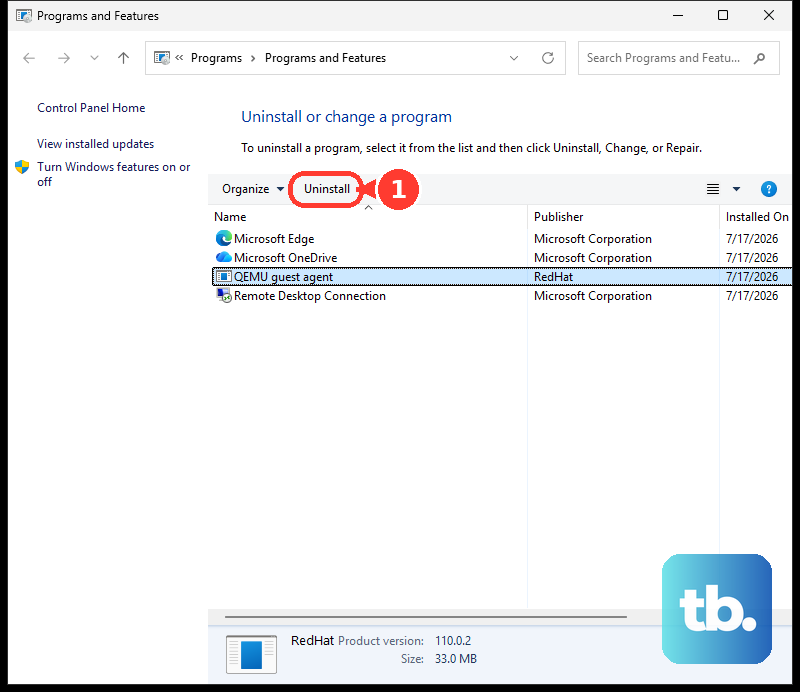
To install new Outlook for Windows again, open the Microsoft Store, get Outlook for Windows, then choose Open. Microsoft requires Windows 10 version 17763.0 or later to download new Outlook.
To reinstall Microsoft 365 or Office 2024 apps, go to https://m365.cloud.microsoft/apps, sign in, select Install apps, then follow the prompts for your account. To reinstall standalone classic Outlook for Windows, use Microsoft’s classic Outlook install page, select the language, choose Download, and follow the installer prompts.
On a work or school computer, your organization controls access to new Outlook, the new Outlook toggle, and app package removal. Use your IT admin’s policy before editing registry values, removing app packages, or reinstalling Office on a managed device.
Frequently Asked Questions
Does resetting Outlook delete my emails?
A reset does not delete mail stored in Outlook.com, Exchange, or Microsoft 365. Deeper resets remove local offline data, cached files, custom views, profiles, or unsynced Mac account data, so sync Outlook before using those steps.
What is the fastest way to reset new Outlook for Windows?
End Microsoft Outlook in Task Manager and reopen it. If that fails, use Windows Settings > Apps > Installed apps > Outlook > Advanced options > Repair, then Reset. If those buttons are missing, run olk.exe --reset using the full path from (Get-AppxPackage Microsoft.OutlookForWindows).InstallLocation.
How do I fully reset classic Outlook without reinstalling Office?
Create a new Outlook profile. Hold Shift while starting Outlook, select Options in the profile picker, and add a new profile. Keep the old profile until the new one works.
Can I reset Outlook.com from the browser?
You can reset specific web settings such as the reading pane, theme, dark mode, and search history. Microsoft does not document a one-click full reset for Outlook.com or Outlook on the web.