TikTok Watch history has a habit of vanishing right when you need to find one video again. The fix starts with the current mobile-app menu, then moves through cache, update, reinstall, and recovery options that actually match TikTok’s current setup.
1. Open the current Watch history menu
Use the TikTok mobile app for this. On iPhone, iPad, or Android, open TikTok, then go to Profile > Menu > Settings and privacy > Activity center > Watch history.
Start here because older shortcuts point to the wrong place. TikTok in a desktop or mobile browser does not show the same Watch history surface.
2. Turn Watch history back on
Open Profile, tap Menu, and choose Settings and privacy. Open Activity center, then tap Watch history.
Tap the Settings or gear control, then switch Watch history on. If the page opens but stays empty, this is the control to check first.
Some accounts and app builds do not show that gear control. When it is missing, move straight to the app refresh steps below.
3. Restart TikTok and refresh the connection
Close TikTok completely, then reopen it. Check Activity center > Watch history again.
Still blank? Restart your phone or tablet, then confirm that Wi-Fi or mobile data works.
Reopen TikTok after that. Return to Profile > Menu > Settings and privacy > Activity center > Watch history.
4. Clear the TikTok cache
A stale cache can make Activity center load old or incomplete data. Clear TikTok’s in-app cache first.
Tap Profile, tap Menu, and open Settings and privacy. Choose Free up space, find Cache, and tap Clear.
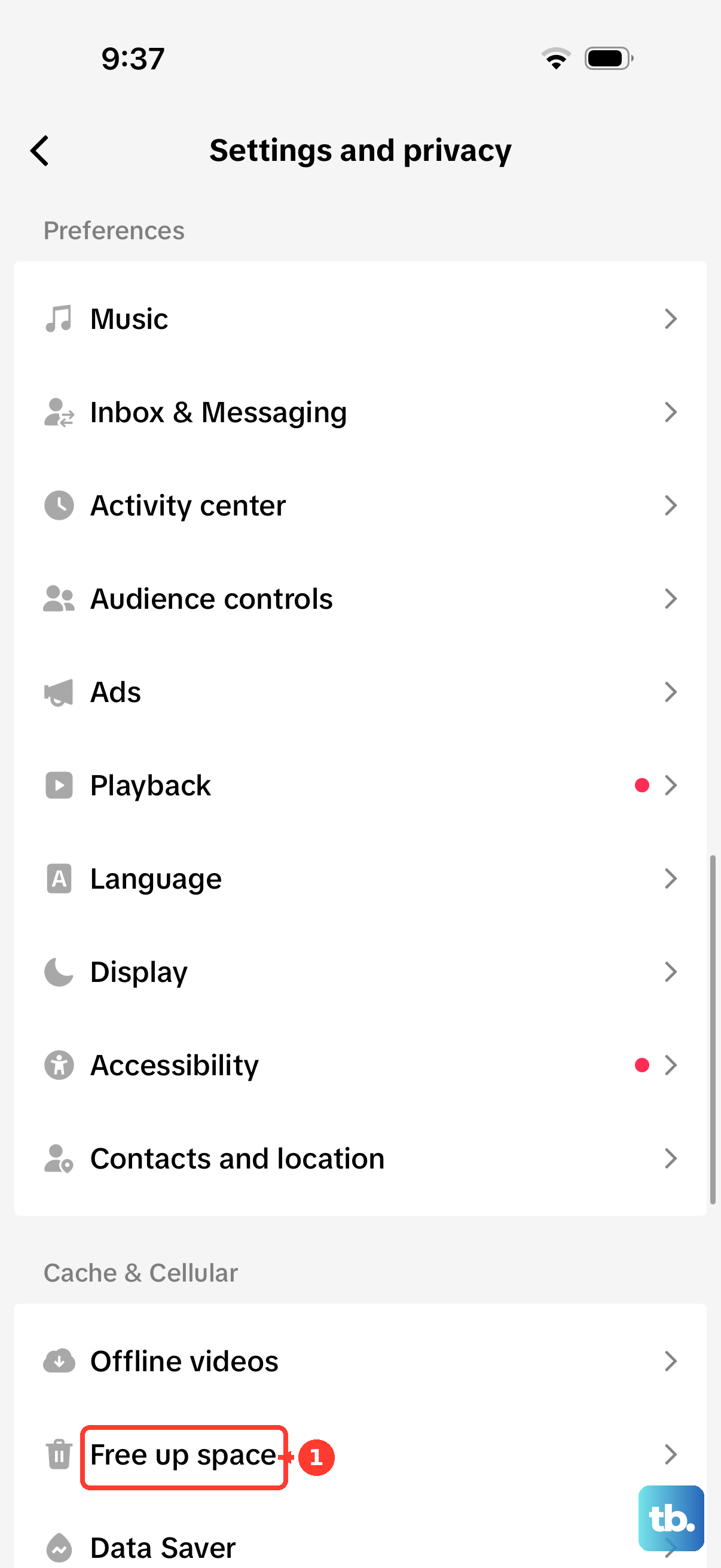
Reopen TikTok afterward. Check Watch history again.
5. Update or reinstall TikTok
On iPhone or iPad, open the TikTok page in the App Store. Tap Update or Open.
On Android, open the TikTok page in Google Play. Tap Update or Open.
If Watch history disappeared after an app change, update TikTok from the official store page. When updating does not fix it, reinstall TikTok.
On iPhone or iPad, touch and hold TikTok. Then tap Remove App > Delete App > Delete, reinstall TikTok from the App Store, and sign in again.
On Android, open Google Play, search for TikTok, and tap Uninstall. Tap Install, sign back in, and check Activity center > Watch history.
6. Reset TikTok storage on Android
Android has one deeper cleanup step before reinstalling. Go to Settings > Apps or Applications > TikTok > Storage or Storage and cache > Clear cache.
If Watch history still fails, stay on the same screen. Tap Clear storage or Clear data, then confirm the prompt.
Reopen TikTok and sign in again. Check Activity center > Watch history.
This removes local app data and settings. It does not bring back deleted server-side Watch history.
7. Find missing videos with search or data export
Tap Search, enter keywords from the video, creator, title, or topic, and tap Search. Open More options, tap Filters, choose Watched when that filter appears, and tap Apply.
When Watch history opens but the video is not there, use TikTok search with the watched filter. For a deeper pull, request your TikTok data.
Go to Profile > Menu > Settings and privacy > Account > Download your data. Choose a file format, wait for the file, and download it.
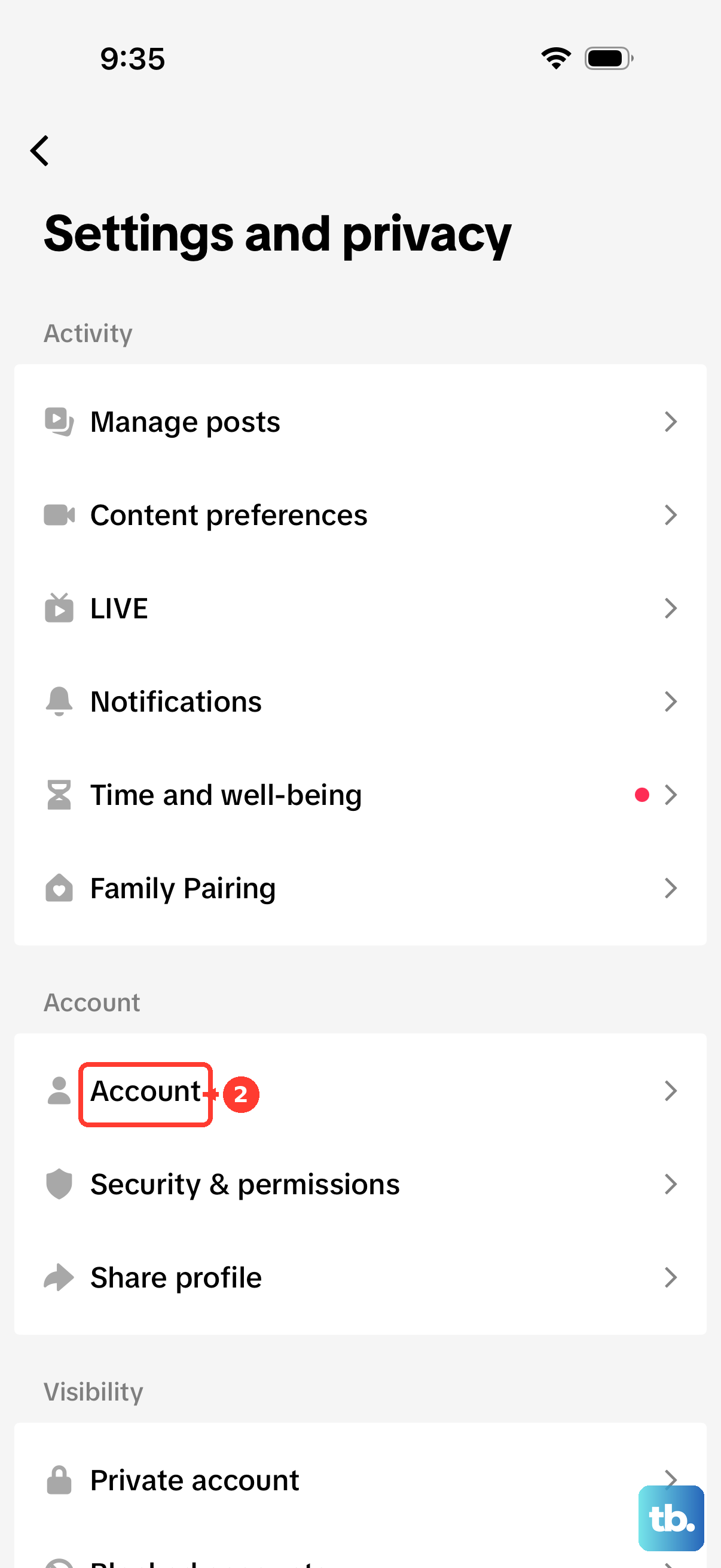
TikTok lists watch video history as account data included in exports for supported accounts and regions.
8. Stop chasing videos Watch history cannot show
Not every missing video is a bug. Current consumer guides place TikTok Watch history at 180 days.
Removed videos, private videos, LIVE videos, and Stories do not belong in that regular Watch history list. Skip the old period-search trick from older tutorials.
Use Activity center > Watch history. Use normal Search > More options > Filters with Watched when that filter is present.
For a teen account, open Profile > Menu > Settings and privacy. Review the available account settings.
From the linked parent account, open Family Pairing. Choose the teen account, then review the controls.
If Watch history is still missing after the app is current, cache is cleared, the device has restarted, and TikTok has been reinstalled, report it. Go to Profile > Menu > Settings and privacy > Report a problem, then describe that Activity center > Watch history is missing or not updating.
Frequently Asked Questions
Why is my TikTok Watch history not updating?
Restart TikTok, check Wi-Fi or mobile data, clear TikTok’s cache, update the app, and confirm Watch history is turned on from Activity center.
Does TikTok Watch history work on the web?
Use the TikTok mobile app. Current guidance points to Profile, Settings and privacy, Activity center, and Watch history inside the iOS and Android app.
Will reinstalling TikTok delete my account?
No. Deleting and reinstalling the app removes local app data, then you sign back in. It does not restore deleted server-side Watch history.
Why can’t I find an old video in TikTok Watch history?
Current guides report a 180-day Watch history window. Videos also disappear from the list when they are removed, made private, LIVE videos, or Stories.