
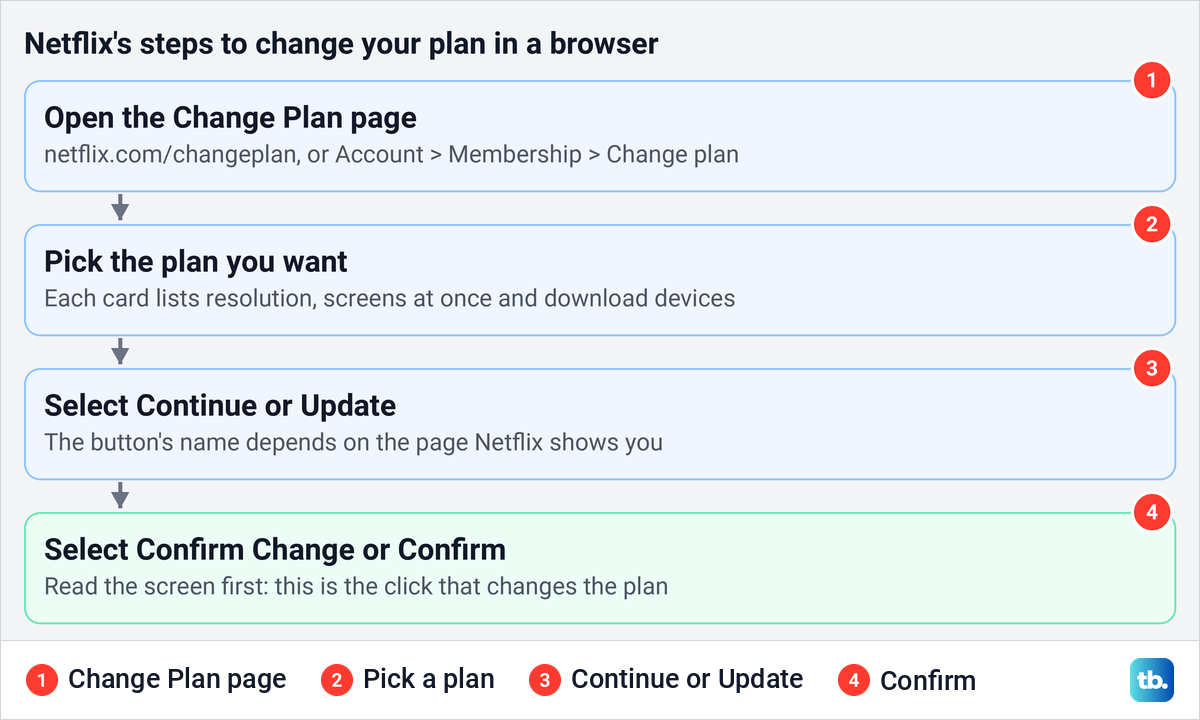
To change your Netflix plan when Netflix bills you directly, open netflix.com/changeplan in a phone or computer browser, sign in, pick the plan you want, select Continue or Update, then select Confirm Change or Confirm. A higher-priced plan then starts immediately. A lower-priced plan starts on your next billing date, and you keep the features you pay for now until then.
If a phone or internet provider or another partner bills you for Netflix, start with Netflix's help article for that partner instead. Netflix says partner and package accounts may not have the option to change the plan on Netflix, and that article sets out the timing and what you can change.
The same page sits behind Account > Membership > Change plan if you would rather click through the menus. Changing plans does not end the membership. If what you really want is for the charges to stop, cancel your Netflix subscription instead, because no plan on this page is free.
The short version
- Netflix bills you: netflix.com/changeplan in any browser, pick a plan, then confirm.
- Through the menus: Account > Membership > Change plan.
- Timing when Netflix bills you: upgrades start at once, downgrades on your next billing date.
- A partner or package bills you: follow Netflix's help article for that partner, which sets the options and the timing.
- Compare first: screens at the same time, resolution, download devices, ads and extra member slots.
- No Change plan option: leave a Kids profile, check for a pause or a hold, then check who bills you.
Change your Netflix plan in a browser
Netflix's plan-change instructions start in a browser, and they are the same on a phone and a computer. Open Chrome, Safari or any other browser, go to netflix.com/changeplan and sign in if Netflix asks. If a profile screen appears, pick an adult profile, because Netflix hides the option while a Kids profile is active.
When we selected Change plan on the Membership page, Netflix opened a page titled Change Plan, with an invitation to try out a new plan and a reminder that you can always switch back. Below it sat one card for each plan offered, each listing the monthly price, video and sound quality, resolution, supported devices, how many devices your household can watch on at the same time, and download devices.
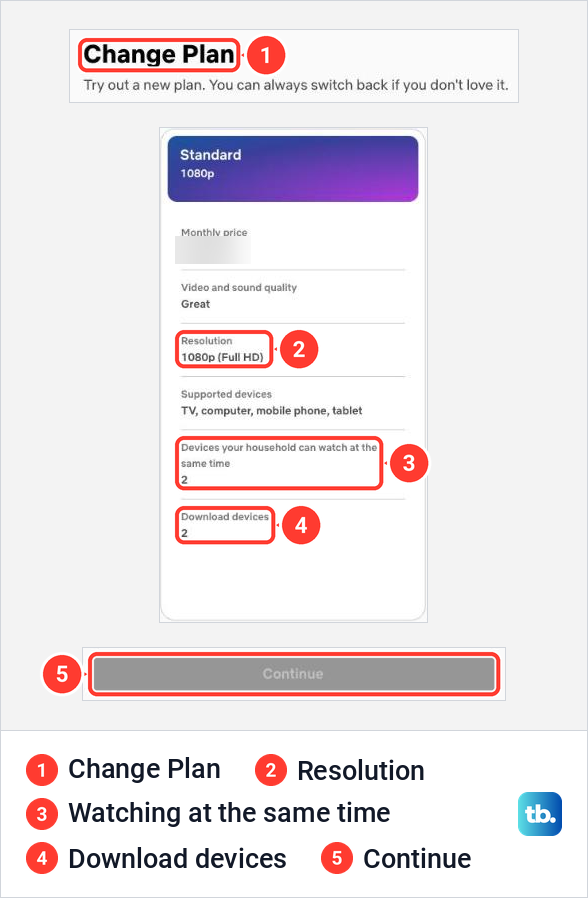
The plan you are on now carries a Current Plan tag, so you can compare the other cards against it at a glance. With no other plan picked, the Continue button at the bottom of the page stayed grey for us. Under the button, small print said that HD, Full HD, 4K and HDR depend on your internet service and device, and that not every title comes in every resolution.
Netflix's next steps are short. Choose the plan you want, then select Continue or Update, whichever your page shows. Netflix then asks you to select Confirm Change or Confirm, and that is the click that changes the plan, so read what the screen says about the new plan and its price before you press it.
The plans and prices on that page are the ones Netflix sells in your country, and they differ from country to country. On Netflix's Plans and Pricing page, select your country to see the current plans and prices, then check your own Change Plan page for the choices your account actually has. Treat any price you read elsewhere, including on older guides, as out of date until that page or your own Change Plan page agrees.
Find Change plan on your Account page
If you are already in Netflix on a computer, select your profile picture in the top right corner and choose Account. The Account page has a menu on the left with Overview, Membership, Security, Devices and Profiles. Select Membership.
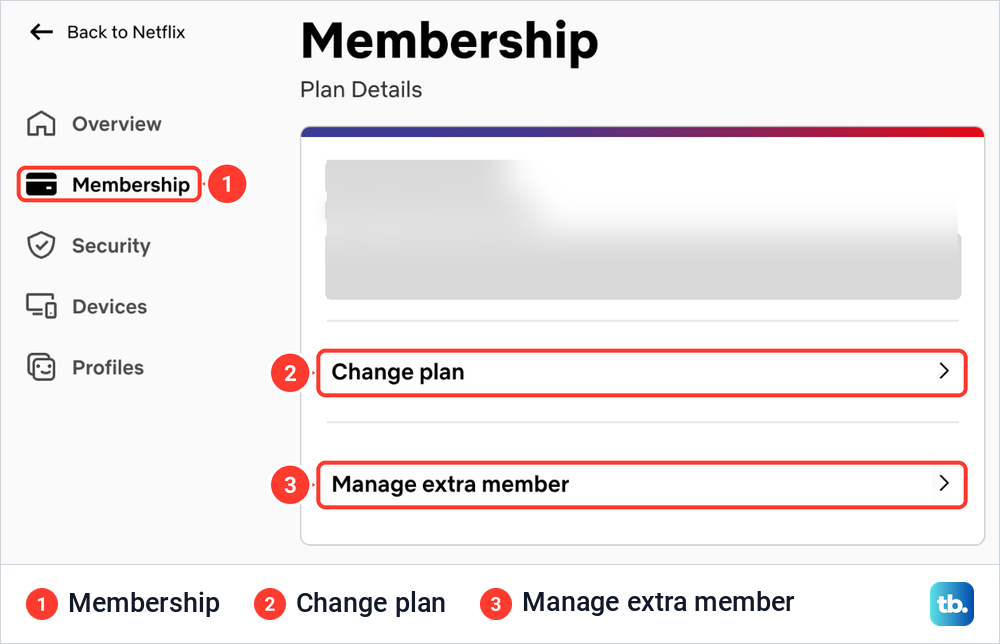
On the account we used, Membership opened on a Plan Details card that named the plan and described it in one line. Directly under that line were two rows, Change plan and Manage extra member. Change plan is the one that opens the Change Plan page, and Manage extra member matters if you pay for someone outside your home, as a later section explains.
There is one more way in, and it catches people who meant to cancel. When we clicked Cancel Membership at the bottom of the Membership page, Netflix did not cancel anything. It opened a page called Manage your membership with two closed choices, Change plan and Cancel. Opening Cancel shows a Finish Cancellation button, and that one does end the membership, so leave it alone if you only want a cheaper plan.
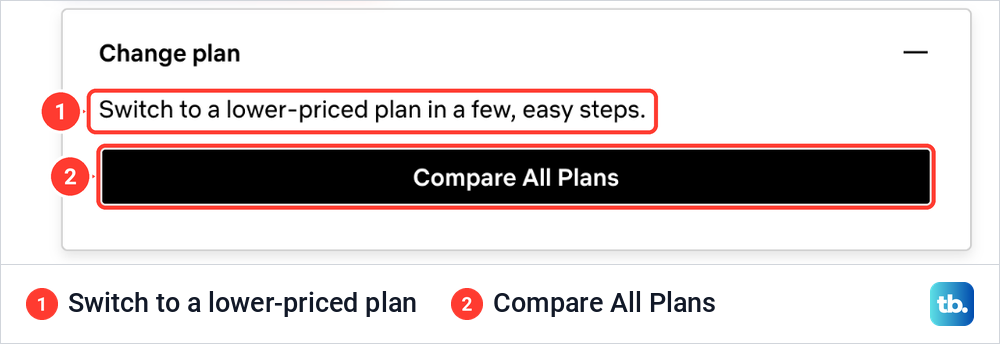
Opening Change plan there showed the line Switch to a lower-priced plan in a few, easy steps, above a Compare All Plans button. That is a downgrade offer inside the cancel flow, so if you only want a cheaper plan, the Membership route above is the calmer way to get there. Leaving that page without pressing anything changed nothing for us.
Compare the features before you choose
Each plan card answers the same questions, but the labels are easy to misread. Use this table to match what you care about with the line to read on the card, and with the one thing to check before you confirm.
| What matters to you | Read this on the plan card | Check before you confirm |
|---|---|---|
| Watching at the same time at home | Devices your household can watch at the same time | This is screens at once, not how many devices can be signed in |
| A sharper picture | Resolution, and video and sound quality | Your TV, the title and your connection must all support it |
| Watching offline | Download devices | A smaller plan allows fewer phones and tablets with downloads |
| Paying for someone outside your home | Extra member slots on Netflix's plans page | Plans with ads cannot add an extra member |
| The lowest bill | Monthly price | If the cheapest option has ads, check locked titles and download limits |
Netflix's plans page lists Standard with 2 screens at a time, 1080p and 2 download devices, and Premium with 4 screens at a time, 4K with HDR and 6 download devices. Standard can add one extra member and Premium up to two, where extra members are offered. The lineup below Standard varies by country, so read your own Change Plan page for the cheapest option.
Screens at once is easy to misread. Netflix says the plan limits how many devices can play at the same time, but it does not restrict how many devices you can add to the account. The page we saw also reminded us that only people who live with you may use your account.
A 4K plan does not guarantee a 4K picture. Netflix lists 15 Mbps or faster for Ultra HD, says most but not all titles come in HD or 4K, and says every device in the chain has to support that quality. If the picture drops or Netflix keeps buffering after an upgrade, check the connection first, and our steps to stop Netflix buffering cover the rest.
When your new Netflix plan starts
When Netflix bills you, the direction of the change decides the timing. Netflix says a change to a higher-priced plan takes effect immediately, so the extra screens, sharper picture or extra download devices are yours the moment you confirm. A change to a lower-priced plan takes effect on your next billing date, and you keep the higher plan's features until then.
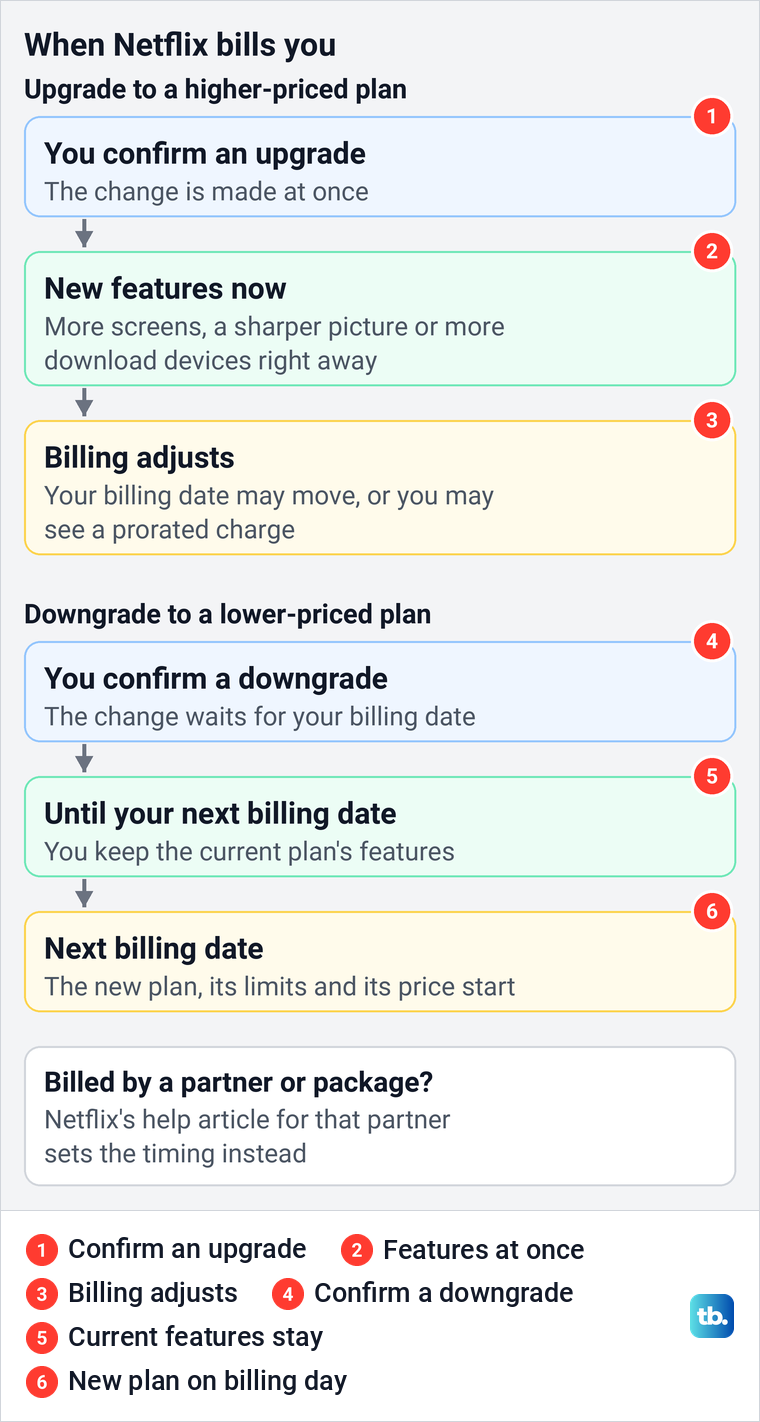
That second rule matters if you downgrade to save money this month. Nothing gets cheaper right away, and nothing is lost right away either, so you can finish a 4K series or use your current download allowance until the billing date.
Check your next payment after an upgrade
An upgrade can move money and dates around. Netflix says your billing date may change based on the remaining balance of your last payment, or you may be charged a prorated amount for the balance. It also warns that a change to a higher-priced plan, or buying an extra member slot, can mean more than one charge in the same month.
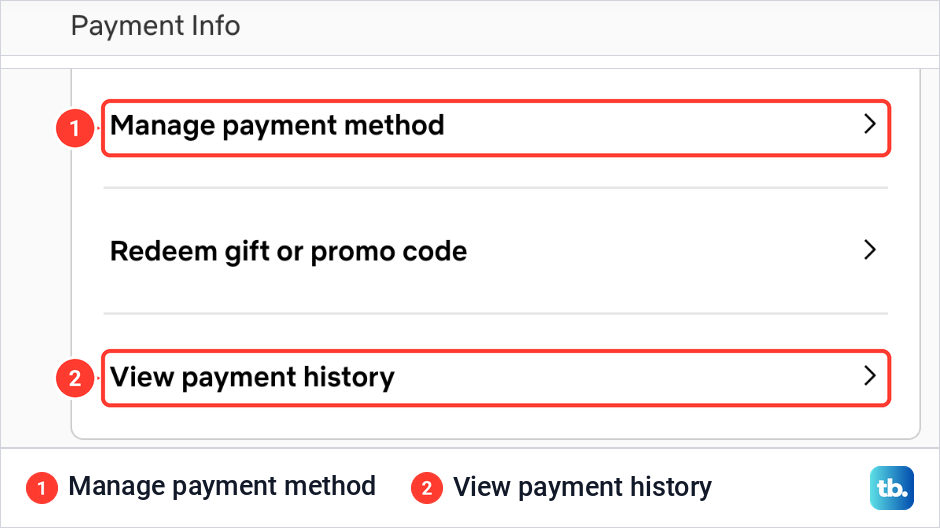
The place to check is on the same Membership page. Ours had a Payment Info card with Manage payment method, Redeem gift or promo code and View payment history. Netflix says payment history shows your billing history along with the price and applicable taxes for your subscription, so it is the record to compare with your bank statement.
If the card or account that pays is the problem rather than the plan, change your Netflix payment method before the next charge. Netflix lists an account on hold among the reasons the plan cannot be changed, so sort out any payment problem first.
Switch to Netflix with ads
Netflix's ad-supported plan, where your country has one, trades a lower price for a different experience. Netflix says to expect a few short ads per hour, and a small number of titles are not available on it because of licensing, shown with a lock icon. The small print on the page we saw added that live events include ads on any Netflix plan, so a no-ads plan does not remove those.
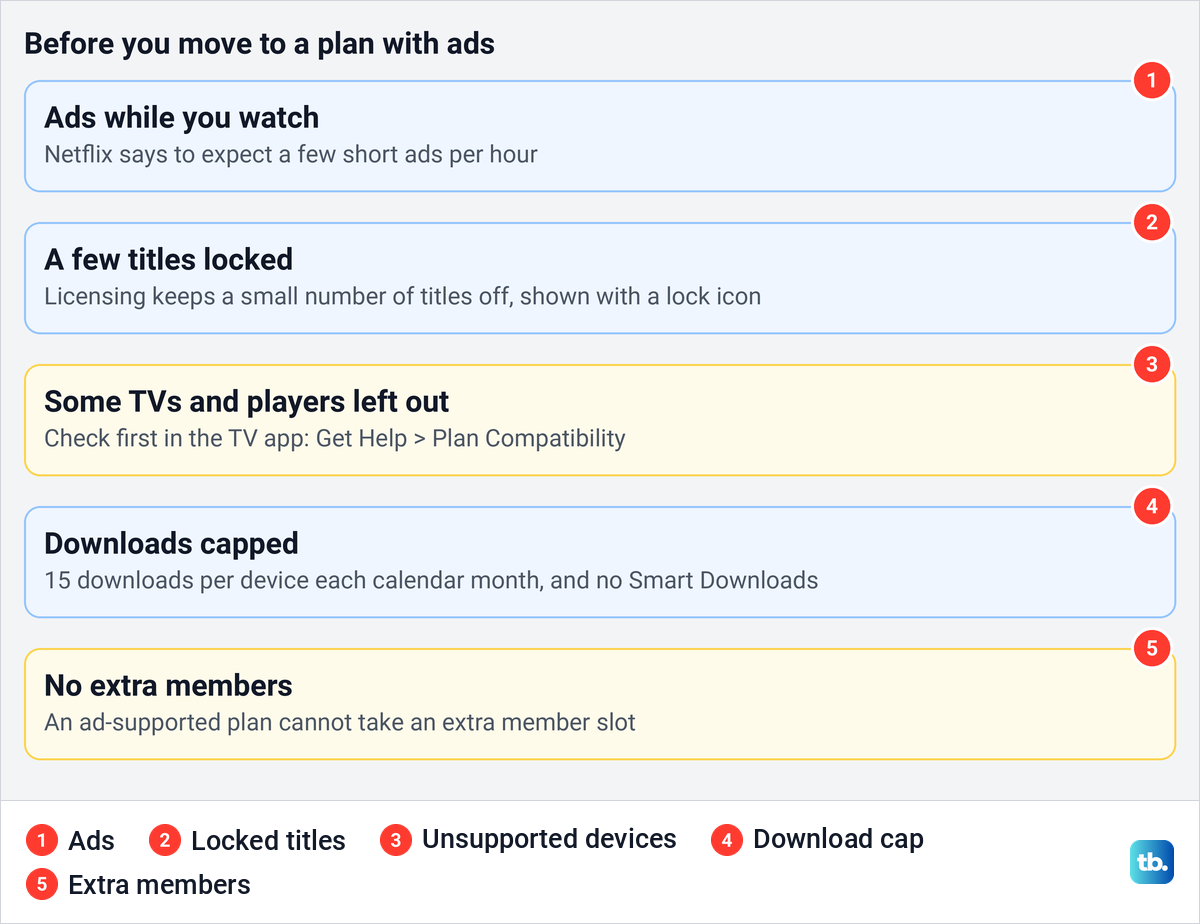
Check your TV before you switch. Netflix says a few devices cannot use an ad-supported plan because their software cannot be updated, and its TV app has a check for this. On the Netflix home screen, press the back button on the remote to reach the menu, then select Get Help and Plan Compatibility. Go left to your profile icon first if the menu runs along the top, or look at the bottom if it runs down the left.
Netflix says that if your TV or streaming device does not show Plan Compatibility, it cannot be used with an ad-supported plan. On a Roku, update Netflix on Roku before you run the check, and if Netflix works on your phone but not on the TV after the change, the steps to fix Netflix on the TV when the phone works rule out the usual causes before you blame the plan.
Downloads shrink too. Netflix says ad-supported plans are limited to 15 downloads per device per calendar month, resetting on the first day of each month, and Smart Downloads is not available with ads. Extra members cannot be added to an ad-supported plan, which matters if you pay for someone outside your home today.
Check downloads before you downgrade
Every plan allows a set number of phones and tablets to hold downloads at once. If the new plan allows fewer download devices than you use, Netflix shows You have downloads on too many devices the next time you try to download on a device over the limit, with the advice to remove downloads from another device or go to netflix.com/changeplan for plan options.
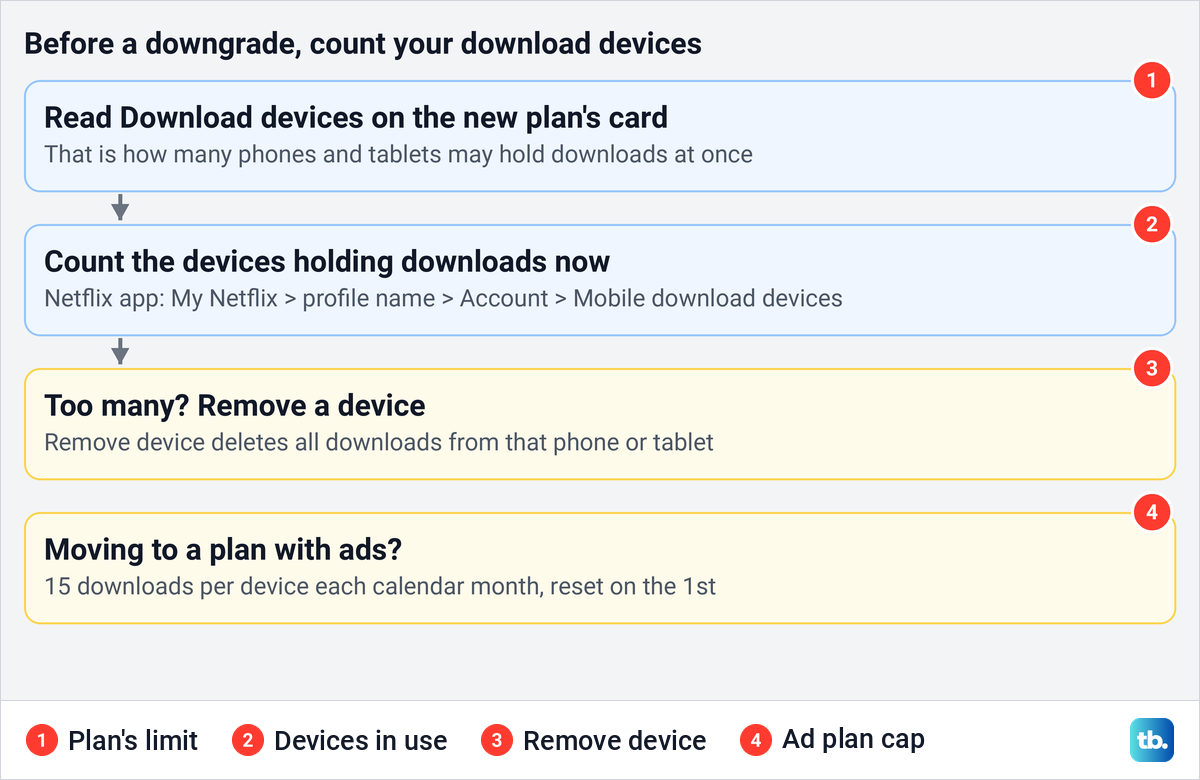
Count the devices that hold downloads before you confirm a downgrade. Netflix's fix in its app is My Netflix, then the profile name, Account, Mobile download devices under Devices, and Remove device, which deletes all downloads from that device. A browser has the same list on Netflix's Manage Download Devices page.
Netflix does not promise what happens to files already saved when a downgrade starts, so do not count on them. Watch what matters before your billing date, or plan to download it again on a device the new plan allows.
Handle extra members before you switch
An extra member is someone outside your home who gets their own account, password and profile, paid for by you. Netflix says your plan determines how many extra member slots you can add. Moving to a plan with fewer slots, or to a plan with ads, can collide with a slot you already pay for.
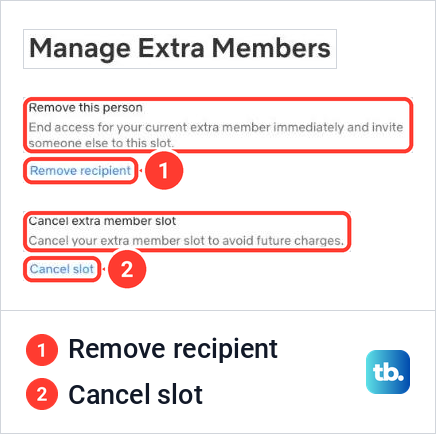
We opened Manage extra member from Membership and found a page called Manage Extra Members with two separate controls. Remove recipient said it ends access for your current extra member immediately and lets you invite someone else to the slot. Cancel slot said it cancels the slot to avoid future charges.
Those two do different things. Netflix says that after you cancel a slot, the extra member can keep watching until the end of the current billing period. Removing the recipient instead cuts that person off immediately, and Netflix allows that change up to twice per calendar month.
Package accounts have stricter rules. Netflix says that if you try to move a package plan to a lower-priced plan with more extra member slots than it allows, you may be told to cancel extra members first and wait until the end of the extra member billing period. Linking an account with too many slots to a package cancels all its extra members immediately, so sort the slots out before either change.
Why Change plan is missing
Netflix gives three reasons the option can be missing: the account is on hold, the account is paused, or a Kids profile is active when you open the Change Plan page. The Kids profile is the easy one to miss on a shared computer. Switch to an adult profile and open the page again, and if you also want to limit what children can watch, set up parental controls on Netflix separately.
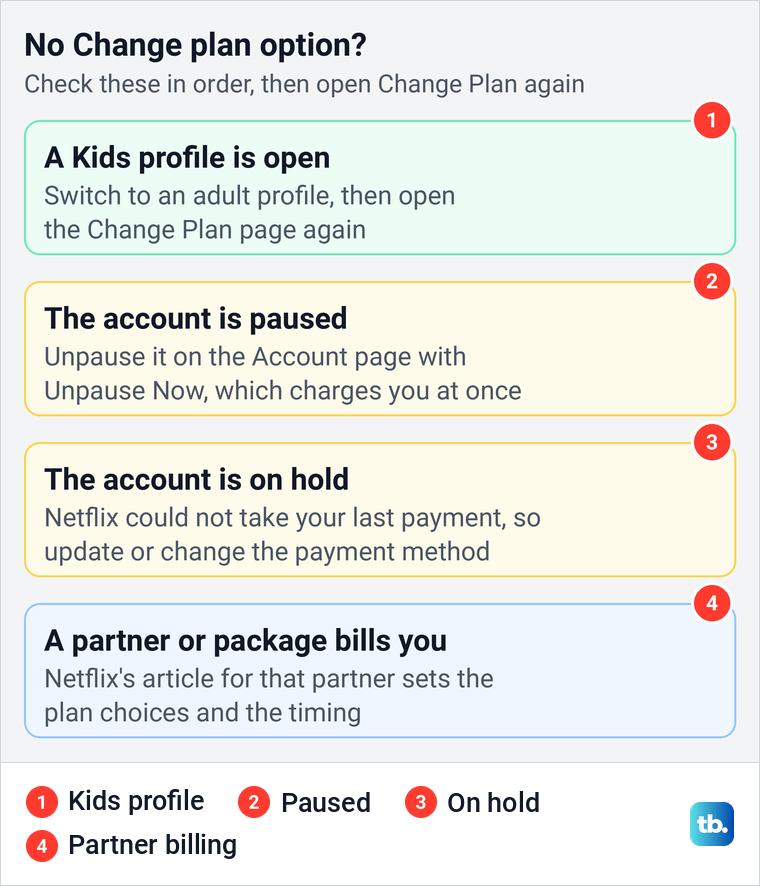
A hold means Netflix could not process your last payment, and Netflix's fix is to update or change your payment method under Manage payment method. A paused membership can be unpaused from the Account page with Unpause Now on the Ready to watch banner, and Netflix says that charges you immediately and updates your billing date.
The fourth reason is billing: a partner or package may not let you change the plan on Netflix, as the next section explains. If you are not sure who charges you, Netflix says the Membership section of your Account page shows a link or instructions for your payment partner, and the steps to find subscriptions on your bank statement show which company takes the money.
Change a plan billed by a partner
When a phone or internet provider includes Netflix in a package, Netflix points you to its help article for that provider for plan change timing and eligibility. The rules differ from one provider to the next. Search Netflix's Help Center for your provider's name and follow that article rather than general advice.
Apple billing is a shrinking case. Netflix says billing through Apple is no longer available for most new or rejoining members, and it sends Apple-billed members to Apple to change their plan. Apple's steps on an iPhone are to open Settings, tap your name, tap Subscriptions, tap Netflix, then tap See All Plans and follow the instructions on screen.
Netflix says upgrades through Apple are effective immediately, charge the full price of the new plan that day and move the billing date to that day, with a prorated refund for the unused part of the old plan. Downgrades take effect on the next billing date, the same as on Netflix. A member who moved away from Apple billing must wait until the next billing period before changing plans, or the account goes back to Apple billing.
Two groups of Apple-billed members have a longer route. Netflix says that if you signed up before May 10, 2014, or through a Netflix gaming app, you must first cancel Netflix through Apple, and our guide to cancel subscriptions on iPhone covers that step. Once your billing period ends and the account has closed, you can rejoin with a new payment method and then change the plan.
Check that the plan change worked
Go back to Account > Membership after you confirm. The Plan Details card names your plan, so after an upgrade it should show the new one straight away. After a downgrade, Netflix's rule is that the new plan starts on your next billing date, so judge the change on that date and compare it with your payment history.
A plan change you did not make is a warning sign. If the plan or the payment details changed without you, follow the steps to recover a hacked Netflix account first, then change the password. Once the account is yours again, sign out of Netflix on all devices so nobody stays logged in with the old details.
How we tested this guide
We tested this on Netflix on the web in Chrome, going through Membership to the Change Plan cards, the Manage your membership page and Manage Extra Members.
Frequently Asked Questions
Can I change my Netflix plan on my phone?
Yes, in the phone's browser, when Netflix bills you directly. Open netflix.com/changeplan in Safari or Chrome, sign in, choose a plan, select Continue or Update, then Confirm Change or Confirm.
Can I change my Netflix plan on my TV?
Netflix's instructions send you to the Change Plan page in a browser. Open it on a phone or computer signed in to the same account. The plan covers the whole account, TV included, once the change takes effect.
When does a Netflix upgrade or downgrade start?
An upgrade starts immediately. A downgrade starts on your next billing date, and you keep your current plan's features until then, unless a partner package sets different timing.
Will upgrading Netflix change my billing date?
It can. Netflix says your billing date may change, or you may be charged a prorated amount, so check View payment history under Membership after you confirm.
Why can't I see Change plan on my Netflix account?
Netflix lists an account on hold, a paused account and an active Kids profile as the reasons. If none applies, a partner or package that bills you may not allow plan changes on Netflix.
Can I switch to Netflix with ads if I pay for an extra member?
Extra members cannot be added to an ad-supported plan. Decide what happens to the slot first: canceling it lets the person watch to the end of the billing period, while removing them ends their access immediately.
Do I lose my downloads if I downgrade Netflix?
The new plan may allow fewer devices with downloads, and plans with ads cap downloads at 15 per device each month. Netflix does not promise that saved files survive the change, so watch what matters before the billing date.