Changing your network adapter's MAC address starts with finding the setting your device and driver actually support. Wi-Fi privacy controls generate an address, while supported Ethernet adapters and Linux connection profiles accept one you choose. Start with the instructions for your device below, then use the restoration options if the new address causes connection trouble.
Turn on random hardware addresses in Windows 11
This gives supported Windows 11 Wi-Fi adapters a generated address without requiring a custom value.
Open Settings, select Network & internet, and open Wi-Fi. Set Random hardware addresses to On. This control appears only with supporting Wi-Fi hardware and does not change an Ethernet address.
For just one saved network instead, open Manage known networks from the Wi-Fi settings. Select the network, then set its Random hardware addresses control to On. The change takes effect when you next connect.
Enter a specific Ethernet address
Supported Intel Ethernet adapters accept a custom MAC address through their Windows driver settings. The adapter and driver must expose Locally Administered Address; this support does not extend to Intel Wi-Fi adapters. A registry editor or changer app is not a supported bypass for that limitation.
Open Device Manager and expand Network adapters. Right-click your Intel Ethernet adapter and select Properties. Open the Advanced tab and select Locally Administered Address.
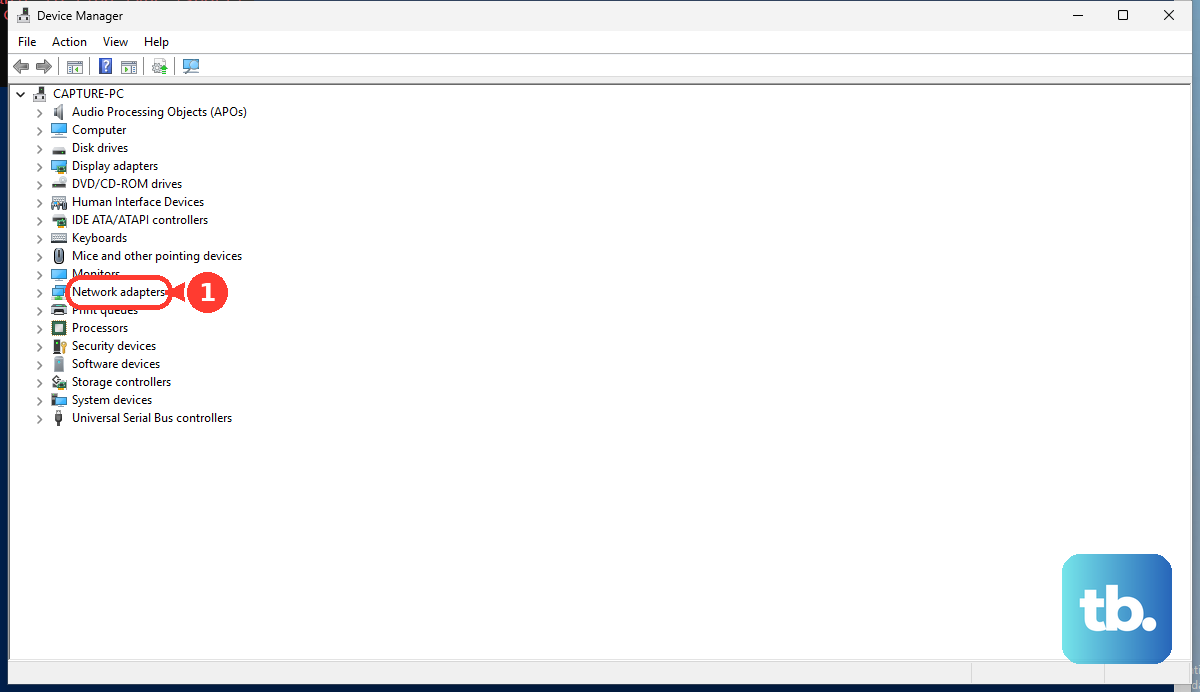
Enter your desired address as 12 hexadecimal digits, such as 021122334455. Do not assign the same address to two active devices on the same network. Confirm the change.
If this method fails, try PowerShell below on an adapter whose driver supports address changes. PowerShell has the same driver requirement.
Apply a custom address with PowerShell
Open PowerShell as administrator, then run Get-NetAdapter to identify the adapter's name. Run Set-NetAdapter -Name "Ethernet" -MacAddress "02-11-22-33-44-55", replacing Ethernet with your adapter's name and the example address with your chosen address. The command normally restarts the adapter. Use this method only with a driver that supports changing the MAC address.
Set a private Wi-Fi address on Apple devices
On macOS Sequoia 15+, iOS 18+, and iPadOS 18+, choose a generated address for an individual Wi-Fi network.
- 1.On a Mac, open Apple menu > System Settings > Wi-Fi. On an iPhone or iPad, open Settings > Wi-Fi.
- 2.On the Mac, open Details or More Info beside the network. On the iPhone or iPad, tap More Info beside it; for a saved, disconnected network, tap Edit first.
- 3.Open Private Wi-Fi Address. This control does not accept a custom hexadecimal address, and the Mac setting does not edit Ethernet addresses.
- 4.Choose Fixed to retain a private address for that network, Rotating to change it every two weeks, or Off to use the hardware address.
Choose a randomized address on Android
This switches a supported Android Wi-Fi connection from the device address to a randomized address.
Open Settings on an Android 10 or later device, then open the Wi-Fi network's Network details. The route to this screen depends on the manufacturer. Select Privacy and choose Use randomized MAC. This applies to that network and does not provide a custom-address field.
On a moto g power 2026, open Settings > Network & internet and tap Wi-Fi. Tap the gear beside the network, select Privacy, and choose Use randomized MAC.
Assign a custom address to a Linux connection profile
On Linux systems managed by NetworkManager, set the address in the connection profile; the driver must accept it.
Run nmcli connection show to identify your connection profile. For Wi-Fi, run sudo nmcli connection modify "PROFILE" 802-11-wireless.cloned-mac-address 02:11:22:33:44:55. Replace PROFILE with your profile name and the sample address with your chosen address.
For Ethernet, use 802-3-ethernet.cloned-mac-address instead. Instead of a literal address, use random for randomization, stable for a stable generated address, or permanent to request the hardware address.
Run nmcli connection down "PROFILE" to disconnect the profile, then run nmcli connection up "PROFILE" to reactivate it. Repeat this down-and-up sequence after changing the address setting.
Restore the original address if the connection fails
If the connection stops working after an address change, return to the control you used. Each platform has its own way to remove the override.
For Windows Wi-Fi, set Random hardware addresses to Off in the global or saved-network setting you changed. On Apple devices, select Off under the network's Private Wi-Fi Address setting. On Android, select Use device MAC under the network's Privacy setting.
For Intel Ethernet, return to Device Manager, open the adapter's Properties, select the Advanced tab, select Locally Administered Address, and clear the value. With no address entered, the adapter uses its original network address. Intel has retired PROSet and its Adapter Configuration Utility. Their replacement, Ethernet Cmdlets, supports only Intel Ethernet 600, 700, and 800 Series adapters on Windows Server and Azure Stack HCI.
For NetworkManager, run sudo nmcli connection modify "PROFILE" 802-11-wireless.cloned-mac-address permanent, substituting your profile name. For Ethernet, use 802-3-ethernet.cloned-mac-address. The value permanent requests the hardware address; preserve keeps the existing address and does not guarantee restoration.
Run nmcli connection down "PROFILE" to disconnect that profile, then run nmcli connection up "PROFILE" to reactivate it. If a custom or randomized address still prevents a connection, try the matching hardware-address restoration above before making another address change.
Frequently Asked Questions
Does changing my MAC address replace the factory address?
Most methods change the operational address presented to the local network while leaving the factory address intact. Switching between Ethernet and Wi-Fi uses a different interface and address rather than changing the original adapter.
Will forgetting a Wi-Fi network give me a new MAC address?
Android preserves a persistent randomized address when you forget and re-add a network. Current Apple devices obtain a new private address by forgetting and rejoining with private addressing enabled, except when less than 24 hours have passed since the last time that network was forgotten.
Does Android generate a new randomized MAC every time I reconnect?
A quick reconnect does not guarantee a new address. Android's non-persistent randomization follows connection and timing conditions. On Android 11 or later devices that expose it, the Wi-Fi non-persistent MAC randomization control is in Developer options.
What does the 02 at the start of the example MAC address mean?
The example 02:11:22:33:44:55 is a locally administered unicast address. It is an example value, not an address reserved for your device.