
Seeing a "SIM Not Provisioned" message on your Samsung Galaxy S25 FE can stop you in your tracks. It means your phone can't connect to your carrier's network, so you're stuck without calls, texts, or mobile data. This usually happens because the SIM card isn't properly activated or there's a hiccup in the connection between your phone and the carrier.
I'd start with the simplest fix first, which is often just restarting the phone. A quick reboot can clear out temporary software glitches that might be blocking the network connection. Just press and hold the side button, then tap "Restart" on the screen.
Check Your SIM Card Activation
If this is a brand new SIM card you just got, it might not be activated yet. This is the most common reason for the error. You'll need to contact your carrier's customer service to check the activation status. They can verify on their end if your SIM is properly registered in their system.
For prepaid plans, also double-check your account balance. If you've run out of credit, your service might be suspended, which can trigger this provisioned error. You can usually check this through your carrier's mobile app or website.
Reinsert the SIM Card
It's worth taking the SIM tray out for a quick inspection. The card might not be seated perfectly, or there could be a bit of dust on the contacts. Grab the SIM ejector tool that came with your S25 FE and pop open the tray on the bottom edge.
Take out the SIM card and look at the gold contacts. If you see any smudges or debris, gently wipe them with a soft, dry cloth. Then, place the SIM back in the tray, making sure it's oriented correctly and clicks into place. Reinsert the tray and power your phone back on.
Refresh Your Network Connection
Your phone might just need a nudge to re-establish its link to the cell towers. Swipe down from the top of the screen twice to open your full Quick Settings panel. Tap the Airplane Mode icon to turn it on, wait about 15 seconds, then tap it again to turn it off.
You can also try manually selecting your network. Go to Settings > Connections > Mobile networks > Network operators. Tap "Search networks," wait for the list to populate, and then select your specific carrier from the results. Sometimes the automatic selection gets confused, especially after a recent software update.
Update Your Phone's Software
Since the S25 FE runs on Android 15 with One UI 7, there's a chance a software bug is interfering with the SIM recognition. Samsung and carriers often release patches for connectivity issues. Go to Settings > Software update and tap "Download and install."
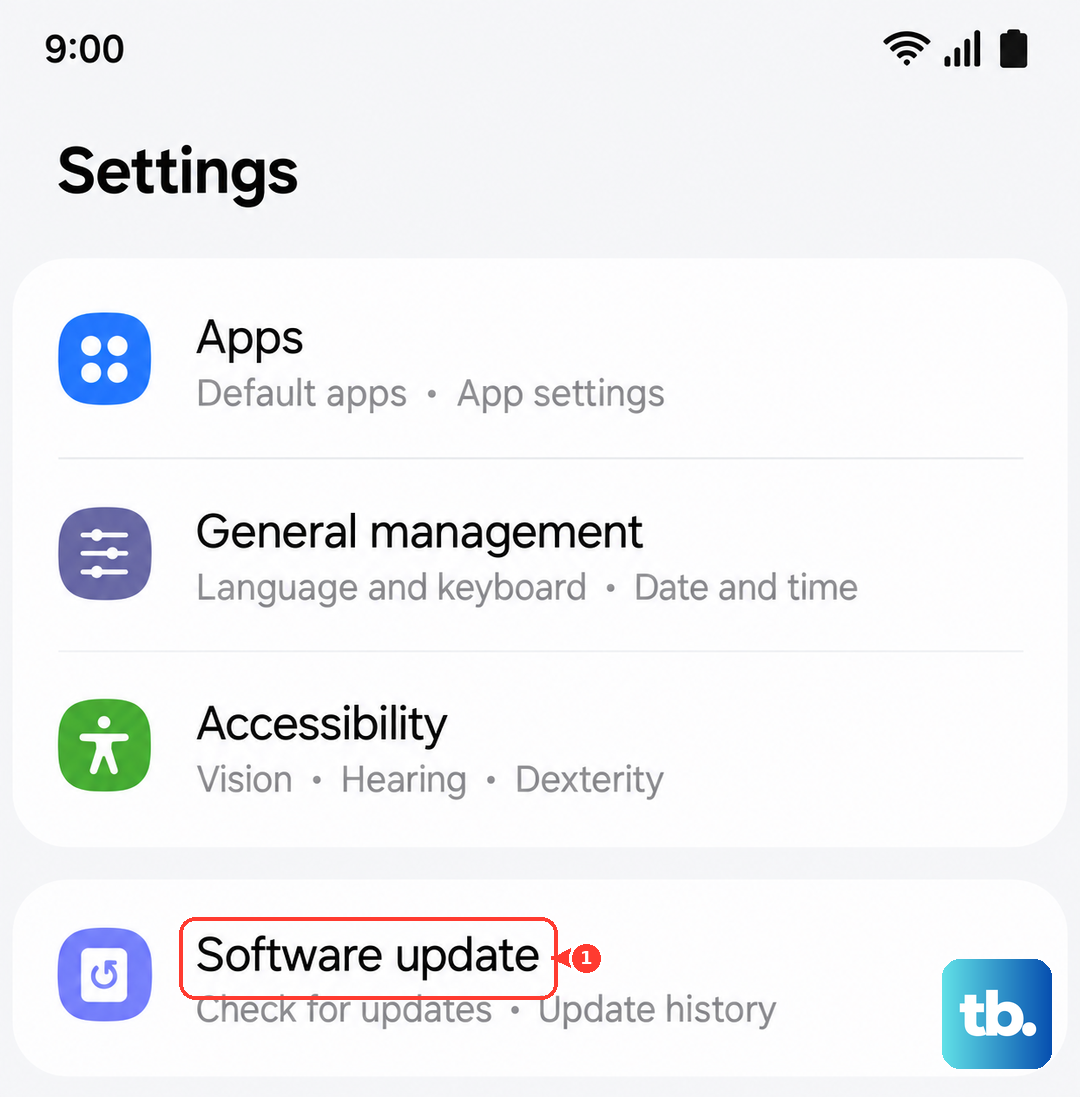
While you're there, check for updates to the Carrier Services app via the Google Play Store. This app helps manage communication between your phone and your carrier's network. Open the Play Store, tap your profile icon, go to "Manage apps and device," and see if any updates are available under the updates tab.
Reset Your Network Settings
If the error persists, resetting your network settings can clear out any corrupted configuration data. This will erase all your saved Wi-Fi networks, Bluetooth pairings, and mobile network preferences, so you'll have to set those up again.
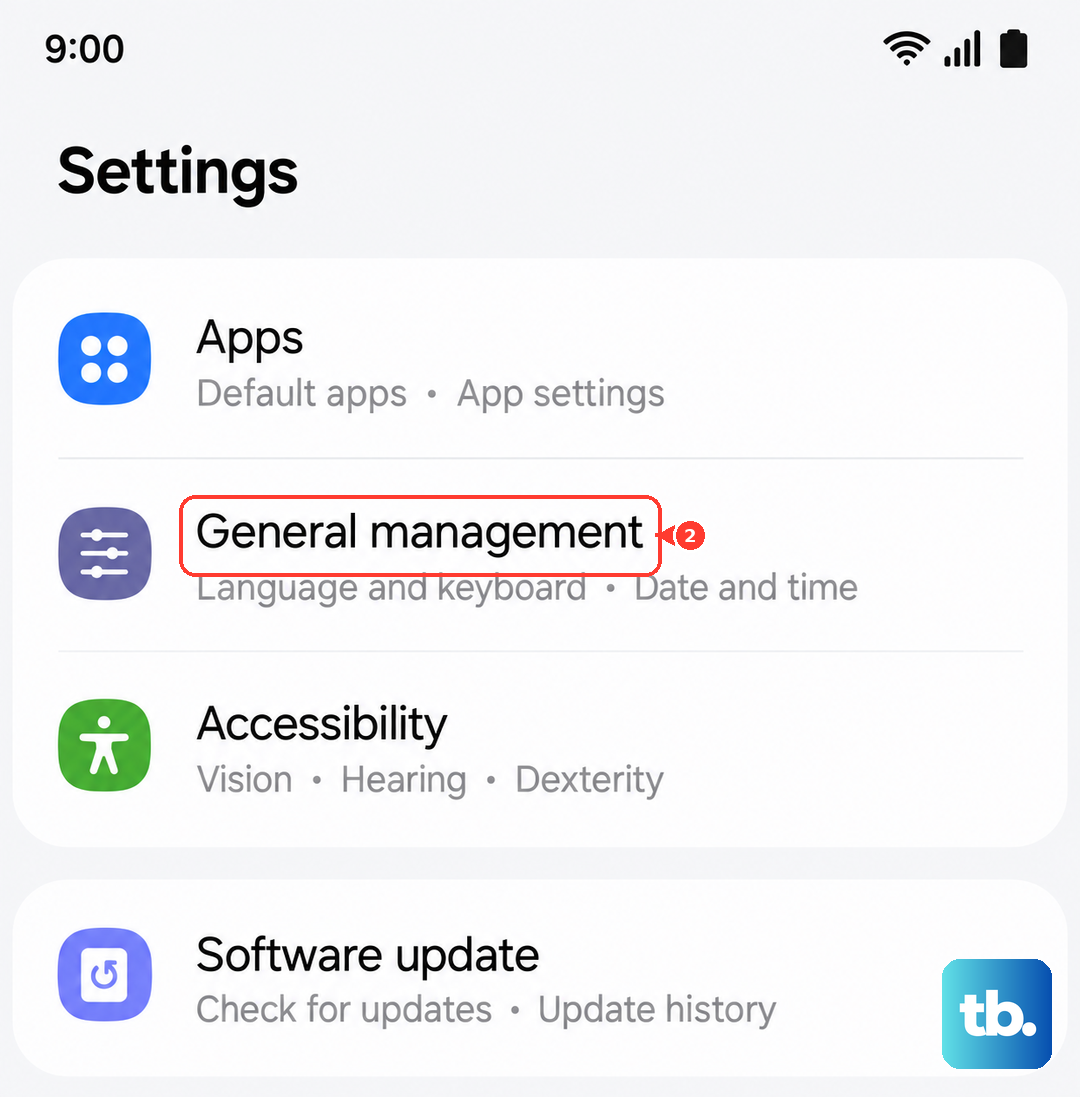
To do this, go to Settings > General management > Reset > Reset network settings. Tap "Reset settings" and confirm. Your phone will reboot, and you can then try reinserting your SIM to see if it's recognized.
Try the SIM in Another Phone
This is a great way to figure out where the problem actually lies. If you have access to another unlocked phone, power it off and insert your S25 FE's SIM card. Turn that phone on and see if it gets service.
If the SIM works perfectly in the other device, then the issue is likely with your Galaxy S25 FE's hardware or software. If the SIM also shows as "not provisioned" in the second phone, then the problem is definitely with the SIM card or your carrier account.
Contact Your Mobile Carrier
At this point, reaching out to your carrier's support is the best move. They can run diagnostics on your line, check for any widespread network outages in your area, and confirm your SIM card's status. Be ready to provide your phone number and account details.
They might need to reprovision your SIM on their network, which is essentially a remote reset from their side. If the SIM card itself is damaged or too old, they can usually issue a replacement, which you can often pick up in a store or have mailed to you. With a new SIM, they'll transfer your number and activate it for you.