
Seeing that "SIM Card Not Provisioned" message on your Samsung Galaxy S25 can stop you in your tracks. It means your phone can see the SIM card, but it can't connect to your carrier's network to activate service. This usually points to an account or activation issue rather than a hardware problem with the phone itself.
Before you do anything else, try the quickest fix. Pull down the notification shade twice to see your full quick settings panel and tap the Airplane Mode icon. Wait about 15 seconds, then tap it again to turn it off. This forces your phone's modem to disconnect and search for the network again, which can clear up a temporary glitch.
Confirm Your SIM Card is Activated
If you just got a new SIM card or a new phone number, it might not be fully activated on your carrier's system yet. This is the most common reason for this error. The best thing to do is contact your mobile provider directly.
You can usually call them from another phone or use their online chat support. They can check your account status in real-time and push the activation through if it's stuck. I'd start with this step if you're setting up a brand new S25.
Check Your Account and Plan Status
For prepaid plans, a lack of funds will suspend service and cause this error. Log into your carrier's app or website to check your balance. If you're on a postpaid contract, make sure your bill is paid and there are no outstanding issues on the account.
Sometimes a plan change or upgrade hasn't fully processed on the carrier's side. A quick call to customer service can confirm everything is in good standing and refresh your line on their network.
Reinsert the SIM Card in Your S25
It's worth taking the SIM tray out for a quick inspection. Turn off your Galaxy S25 first. Use the SIM ejector tool that came in the box (or a small paperclip) to pop out the tray on the bottom edge of the phone.
Take out the SIM card and look at the gold contacts. If you see any dust or debris, gently wipe it with a soft, dry cloth. Blow into the SIM tray slot as well to clear any lint. Carefully reinsert the SIM, making sure it's seated flush in the tray, and push the tray back in until it clicks. Power your phone back on.
Manually Select Your Network Operator
Your phone might be trying to connect to a partner network it can't actually register on. You can force it to search for and pick your home carrier. Go to Settings > Connections > Mobile networks.
Tap on Network operators. Your S25 will search for a moment. When the list appears, select your specific carrier's name from the options. Don't choose "Select automatically" this time. Wait a minute to see if the signal bars appear and the error goes away.
Update Your Phone's Software
A bug in One UI or the carrier settings profile can sometimes interfere with network registration. Make sure your Galaxy S25 is running the latest software. Go to Settings > Software update and tap Download and install.
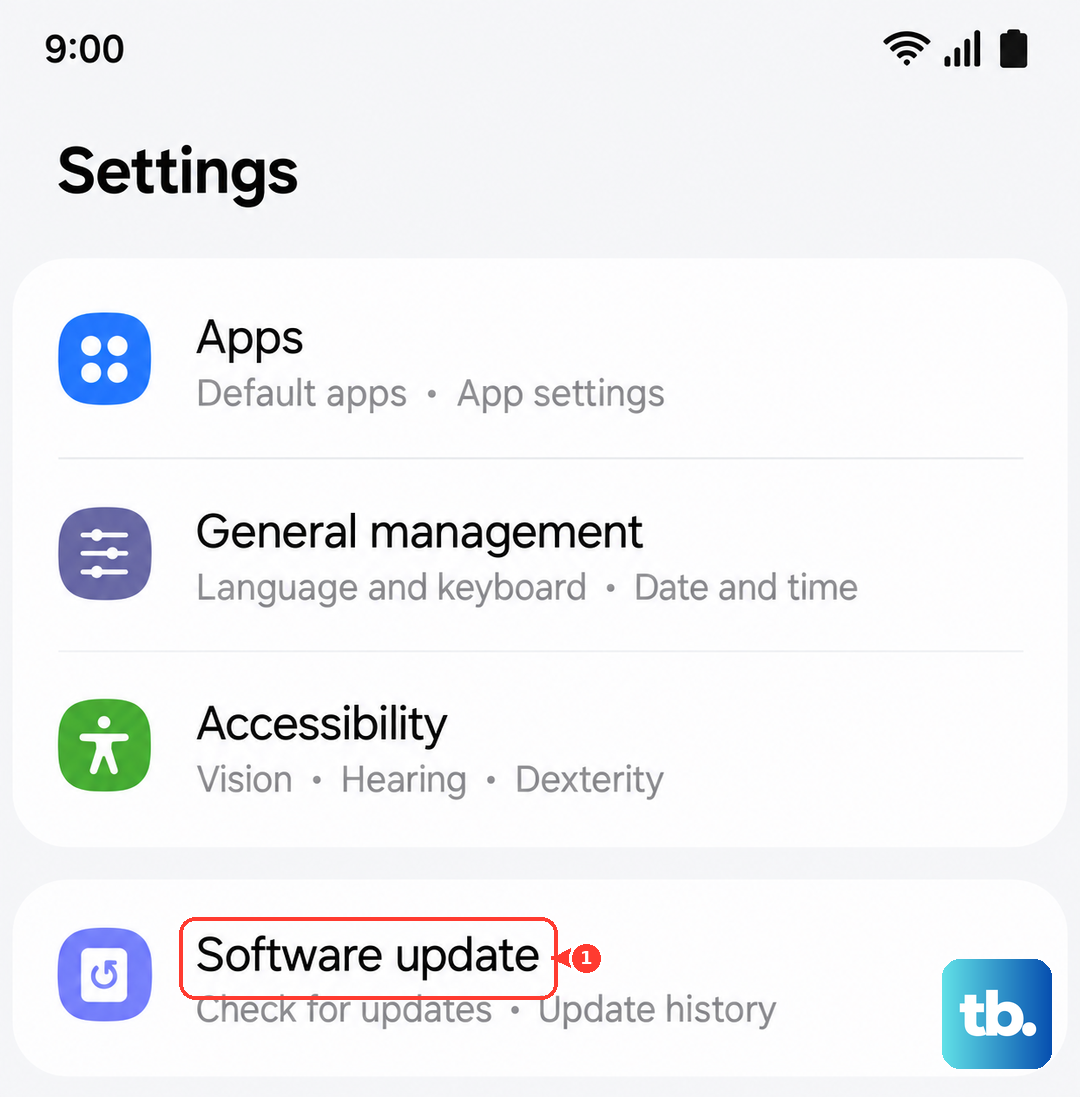
Also, open the Galaxy Store app and check for any updates there, as carrier-specific updates sometimes come through that channel instead of Google Play. Keeping everything updated ensures you have the latest compatibility fixes for your network.
Reset the Network Settings on Your S25
This clears all your saved Wi-Fi passwords, Bluetooth pairings, and cellular network data without touching your personal files. It's a strong step for persistent network issues. Go to Settings > General management > Reset.
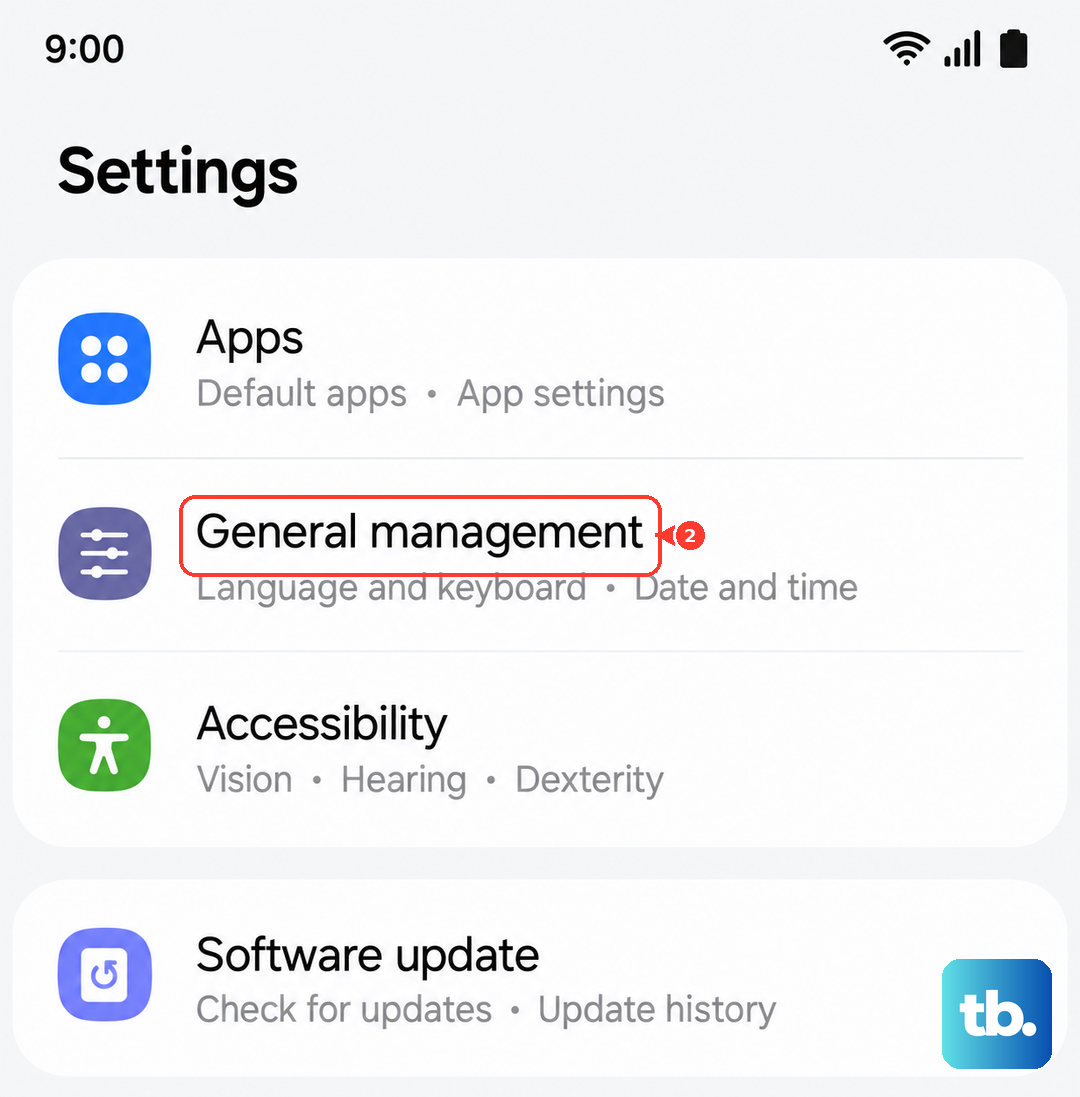
Tap on Reset network settings. You'll need to enter your PIN or password to confirm. After the phone reboots, you'll have to reconnect to Wi-Fi and re-pair Bluetooth devices, but it often resolves stubborn provisioning errors.
Try Your SIM Card in Another Phone
This test tells you where the problem actually lies. If you have access to another unlocked phone, power it off and insert your S25's SIM card. Turn that phone on and see if it gets service.
If the SIM works perfectly in the other device, the issue is likely with your Galaxy S25's software or network configuration. If the SIM also shows as not provisioned in the second phone, then the problem is definitely with the SIM card or your carrier account.
Contact Your Carrier for a SIM Replacement
If you've tried everything else, the SIM card itself could be faulty or outdated. SIM cards can wear out or get damaged internally over time. Contact your mobile provider and explain the steps you've tried.
They can often deactivate the old SIM and activate a new replacement for you. Many carriers can ship you one for free or let you pick one up at a local store. Once you get the new SIM, you'll usually need to call them or visit their website to activate it with your phone number.
Perform a Factory Reset (Last Resort)
This is the nuclear option, so make sure you have a full backup of your S25 first. A factory reset will erase all your data and return the phone to its out-of-the-box state. Sometimes a deep software corruption can cause this error, and a reset can clear it.
You can do this through the settings: go to Settings > General management > Reset > Factory data reset. After the reset is complete, set up the phone as new (don't restore from a backup initially) and see if the SIM error is gone before you restore your apps and data.