Trying to turn off your tablet, but holding the power button opens an assistant instead? The shutdown shortcut depends on your model, and some tablets need two buttons pressed together. Find your device below for the button shortcut and on-screen shutdown controls.
Turn off an iPad
These methods shut down iPads with or without a Home button.
On an iPad without a Home button, hold the top button and either volume button together until the Power Off slider appears. Release the buttons, then drag the Power Off slider.
On an iPad with a Home button, hold only the top button until the shutdown slider appears. Then drag the shutdown slider.
For the on-screen route on iPadOS 27, open Settings. Tap General, select Shut Down, then drag the shutdown slider.
Get Samsung's power menu instead of an assistant
When a Galaxy Tab's multifunction Side button is assigned to an assistant, holding it opens that assistant instead of the power menu.
Hold Side and Volume down together for a few seconds, until the power menu appears. Release both buttons when the menu opens; a longer hold triggers a force restart. Tap Power off, then tap Power off again to confirm.
On a Galaxy tablet with a dedicated Power button, hold that button alone until the power menu appears. Tap Power off, then tap Power off again.
For the on-screen method, open Quick settings with a two-finger downward swipe. On One UI 7 and later with separate notification and Quick settings panels, use a downward swipe from the upper-right corner instead. Tap the Power icon, select Power off, then confirm with another tap on Power off.
Power down a Google Pixel Tablet
Hold Power and Volume up together to open the power menu. Tap Power off.
For the on-screen method, swipe down from the top of the screen. Tap the Power icon, then select Power off.
Remember the difference: Pixel Tablet uses Volume up for this shortcut, while Samsung uses Volume down.
Open the shutdown menu on Windows tablets
On a Windows 11 tablet, including a Surface Pro or Surface Go, open Start.
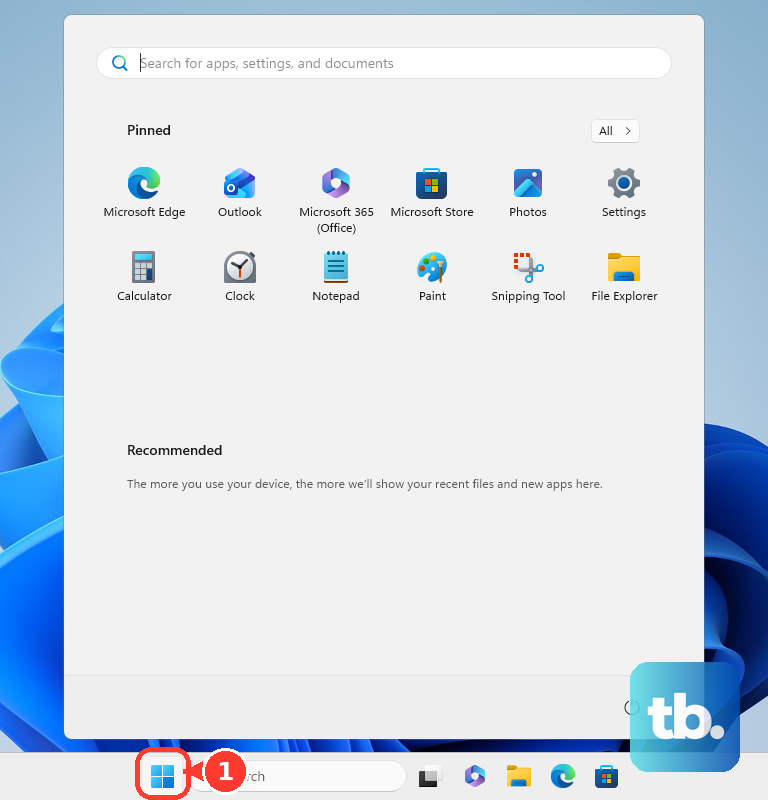
Select Power, then choose Shut down. For another touchscreen route, touch and hold Start. Select Shut down or sign out, then tap Shut down.
If the menu method fails on a Surface, hold its Power button for four seconds. Swipe down on the shutdown screen. If that procedure also fails, hold Power until the screen turns off, approximately ten seconds, releasing the button as soon as it does.
Find the power control on Fire and other Android tablets
These sequences shut down Fire tablets and the Android models listed below.
On an Amazon Fire tablet, hold Power for up to three seconds until the shutdown request appears. Select OK. That's the last step; holding Power again for two to three seconds turns the tablet back on.
For Lenovo Android tablets, follow Lenovo's general shutdown instructions: hold Power for about eight seconds. Button timing and menu layouts depend on the model. Tap Power off.
For Lenovo tablets with a Power icon in Quick Settings, swipe down from the top of the screen. Swipe down again to expand the panel, tap the Power icon at the top, then select Power off.
On a REDMI Pad SE 8.7 4G, hold Power to display the shutdown slider. This sequence applies to that specific model. Slide your finger from the middle toward Power off.
On Huawei tablets using the power-off menu for HarmonyOS 2.x, 3.x, 4.0, 4.2, 4.3, 5.1, or 6.0, hold Power until the power-off and restart screen opens. Tap Power off.
If the confirmation displays Keep alarms active, select it only if you want configured alarms to remain active. This option depends on the device. Tap Power off again.
On HONOR devices with the shutdown menu described here, hold Power for a few seconds. The exact confirmation sequence varies across HONOR Pad models. Tap Power off, then select Touch to power off.
Shut down a tablet running ChromeOS
These controls apply to ChromeOS tablets, detachables, and convertible Chromebooks. The system tray gives you an on-screen shutdown route.
Select the time at the bottom right. Choose Power, then select Shut down.
On a device with a hardware-button power menu, hold the Power button until that menu appears. Use a hold, since a brief press puts some convertible tablets to sleep. Tap Power off.
Switch off an E Ink tablet
On a BOOX tablet, hold Power to open its shutdown control. Tap Power off.
On a reMarkable Paper Pro, hold Power for about three seconds, until it asks whether you want to turn off the device. Tap Turn off.
For the Paper Pro's hardware-only shutdown method, hold Power for at least ten seconds. Release the button after shutdown. The separate 25-second hold enters factory-reset mode, so don't extend the hold to that point.
A BOOX shutdown image remains visible after power-off, so the image alone isn't evidence that the tablet is still running.
Frequently Asked Questions
Can I turn off an iPad from Control Center?
Yes. On iPadOS 27, open Control Center. Touch and hold the Power button in the upper-right corner. Drag the shutdown slider. The icon requires a hold, not a quick tap.
How do I turn off a frozen Lenovo or Fire tablet?
For Lenovo Android tablets covered by Lenovo's general instructions, hold Power and Volume down together for more than eight seconds to force shutdown. Don't transfer that timing to other brands. Amazon's frozen-tablet procedure uses a Power-button hold of 40 seconds or until restart; it is a troubleshooting procedure, not a reliable way to leave a Fire tablet switched off.
Can my tablet shut down automatically at a set time?
Scheduled shutdown depends on the model. On REDMI Pad SE 8.7 4G, open Settings > Battery > Additional features > Schedule power on/off. Set Power off time. On Huawei tablets with scheduling, open Settings > Accessibility features > Scheduled power on/off, or use Settings > System > Scheduled power on/off where that path appears. Enable the schedule and set its shutdown time and repeat cycle. BOOX also supports shutdown after inactivity on configurations with Inactivity Shutdown or Auto Shutdown settings.
Why is the shutdown control missing on my work or school tablet?
School or work policies restrict shutdown controls on some managed tablets. Contact your administrator for help.











