

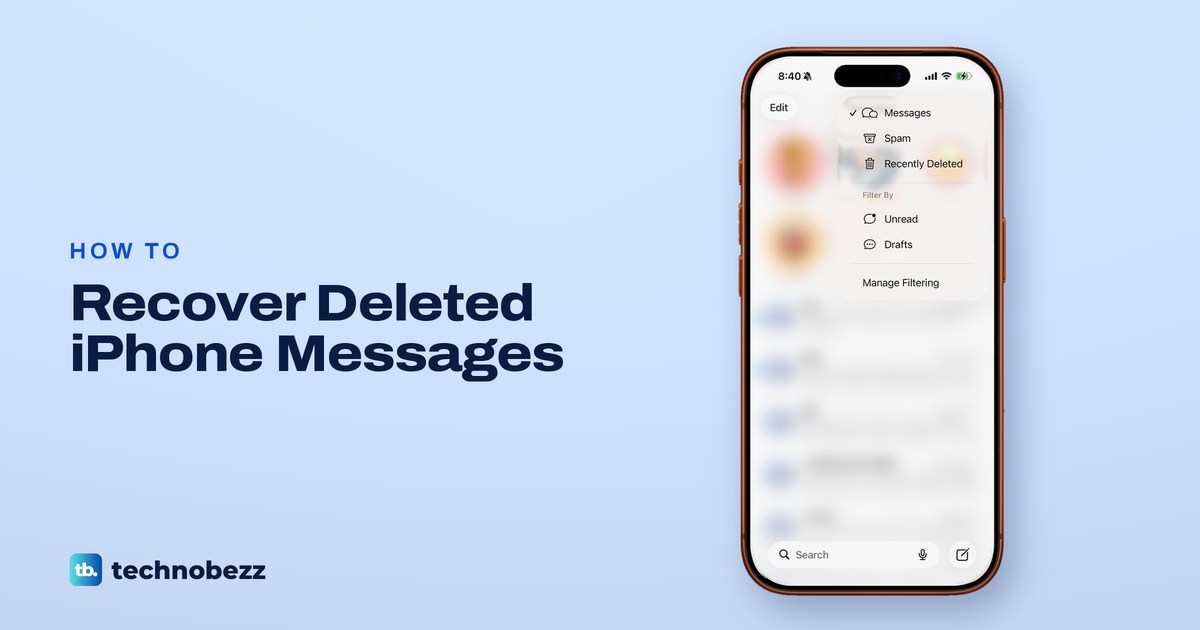
To see deleted messages on iPhone, open Messages, tap the Filters button (three lines) at the top right of the conversation list, then tap Recently Deleted. Select the conversation, tap Recover and confirm within about 30 days of deleting it. It brings back just the conversations you pick without changing anything else on the iPhone.
On iOS 16 to 18, Apple's route starts at the top left instead: tap Edit, then Show Recently Deleted, or tap Filters, then Recently Deleted. On our iPhone 17 Pro with iOS 26.6, Recently Deleted sat in the top-right Filters menu and not under Edit. If the text is older or no longer listed, a copy elsewhere is the next hope: another device, an older backup that actually holds it, or the person you were texting.
The short version
- Recent texts: Messages, then the Filters button at the top right, then Recently Deleted, then Recover.
- Time limit: recover within 30 days. Apple's two pages say up to 30 and 30 to 40 days.
- iOS 16 to 18: tap Edit at the top left, then Show Recently Deleted, or Filters at the top left, then Recently Deleted.
- Messages in iCloud: it syncs deletions too, so switching it on cannot undo one.
- Older texts: only a backup made before the deletion, with Messages in iCloud off, can hold them, and restoring it means erasing the iPhone.
Where to look for a deleted text
Start at the top of this table and stop at the first row that fits. The rows get more drastic as you go down. The last two replace what is on the iPhone, and anything that changed after the backup and is not saved elsewhere can be lost.
| Where to look | When it helps | What it costs |
|---|---|---|
| Recently Deleted in Messages | Deleted within the last 30 days on iOS 16 or later | Nothing, you pick what comes back |
| Messages in iCloud | The texts are still stored in iCloud but missing from this iPhone | Nothing, but deletions sync too |
| Another Mac or iPad, or the other person | A copy still exists outside your iPhone | Nothing on your iPhone changes |
| An older iCloud backup | Made before the deletion while Messages in iCloud was off | You must erase the iPhone first |
| An older computer backup | Same conditions, saved on a Mac or PC | The whole iPhone goes back to that backup |
How to see Recently Deleted messages on iPhone
Open Messages and tap the back arrow until you see the full conversation list, not a single chat. On our iPhone the list had Edit at the top left and a round button with three lines at the top right. Apple calls that the Filters button.
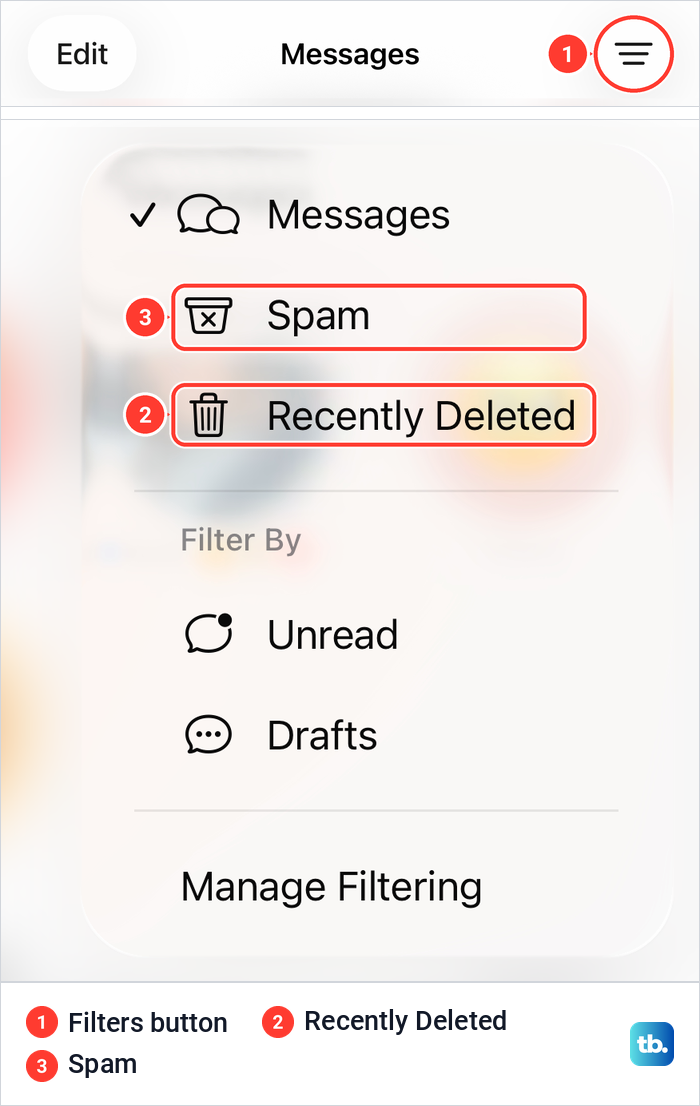
Tap the Filters button. Our menu listed Messages with a checkmark, Spam and Recently Deleted, then Filter By with Unread and Drafts, and Manage Filtering at the bottom. Tap Recently Deleted to open the folder. Apple says you need iOS 16 or later for it, and the folder is where you choose the deleted conversations to bring back.
Before you assume a text was deleted, check the other folders in the same menu, starting with Spam. If a message is still in its conversation but never alerted you, it was not lost, and you can troubleshoot text message notifications on iPhone instead.
Apple says that with Screen Unknown Senders turned on under Manage Filtering, messages from unknown senders are filtered into another folder and you don't get notified about them unless you want to be. Its steps to review them are to tap the Filters button, then Unknown Senders.
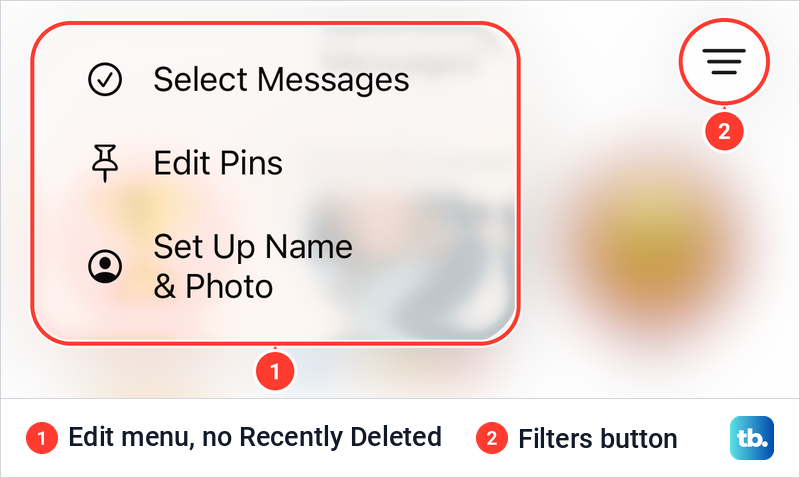
Many guides send you to Edit instead. That matches Apple's guides for iOS 16 to 18, which say to tap Edit in the top-left corner, then Show Recently Deleted, or Filters in the top-left corner, then Recently Deleted. On iOS 26.6 our Edit menu held only Select Messages, Edit Pins and Set Up Name & Photo, so if you don't see it under Edit, close the menu and use the Filters button at the top right.
If Messages closes before you can reach the menu, fix the iPhone Messages app crashing first. Leave everything else alone while you do, because the clock on deleted texts keeps running.
Recover a deleted conversation
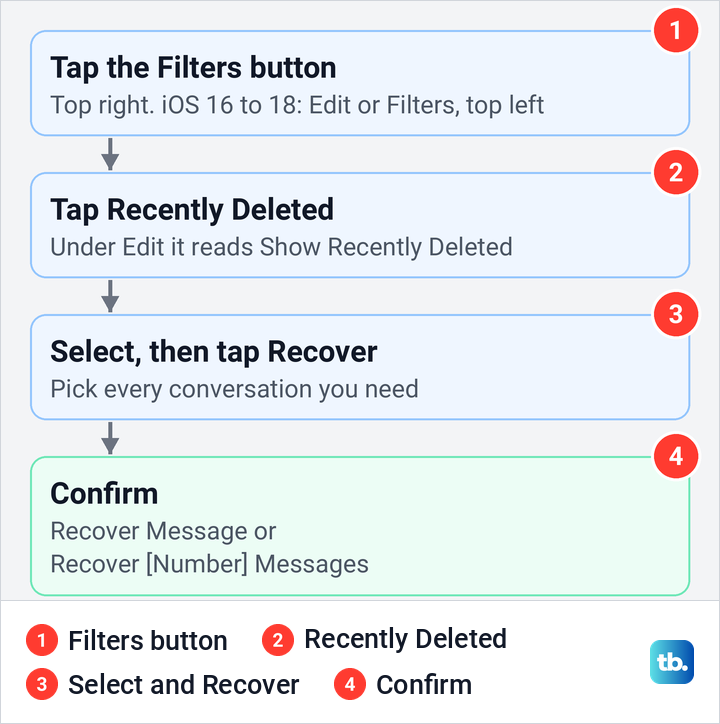
Inside Recently Deleted, Apple's steps are to choose the conversations with the messages you want to restore, tap Recover, then tap Recover Message or Recover [Number] Messages to confirm. Select every conversation you need before you tap Recover, so one confirmation brings them all back.
If you use Messages in iCloud, Apple says recovering a conversation on your iPhone recovers it on all your devices where Messages in iCloud is on. That works only on devices signed in to the same Apple Account. You can't recover messages on anyone else's device, so a recovery on your iPhone does nothing to the other person's copy.
Apple lists two kinds of message you can't recover. A message you pulled back with Undo Send is permanently deleted, and audio messages that expire before being saved aren't recoverable. Apple also notes a catch for conversations that include non-iMessage participants: if you blocked someone in one, deleted it and then recovered it, future messages from that contact aren't automatically deleted.
How long deleted texts stay recoverable
Apple gives two numbers. Its iPhone User Guide says you can recover deleted texts for up to 30 days, while its support article on recovering messages says within the last 30 to 40 days. Treat 30 days as the deadline and recover as soon as you notice the loss.
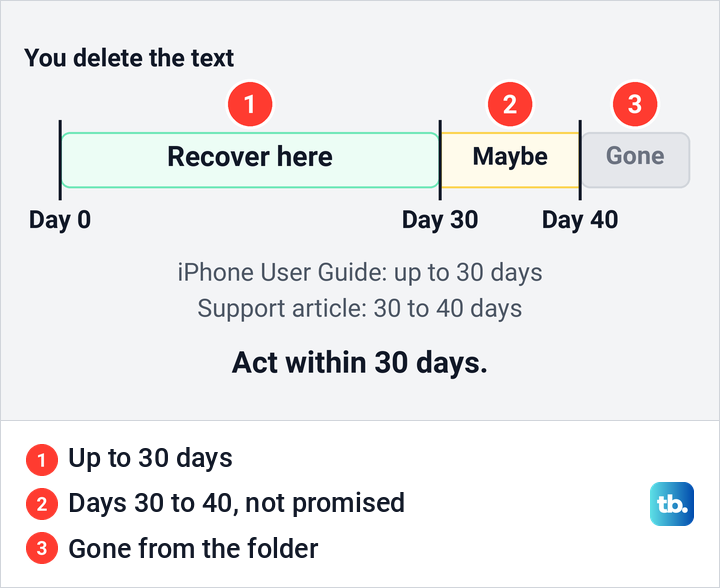
Two more limits apply. Apple says a message deleted before you updated to iOS 16 can't be recovered with Recently Deleted, and you can permanently remove items from the folder before the 30 days are up. Once a conversation has gone from Recently Deleted, the only copies left are on other devices, in an older backup or with the other person.
Why Recently Deleted is empty or missing
An empty folder usually means one of three things. The text was deleted longer ago than the folder keeps it, it was removed from Recently Deleted by hand, or it was never deleted from this iPhone at all. A Mac follows the same pattern, and Apple says there that if you don't see Recently Deleted, you may not have deleted a conversation within the last 30 days.
Check the setting that deletes old texts on its own. Apple's path is Settings > Apps > Messages > Keep Messages, and it warns that with any option other than Forever, conversations and their attachments are removed automatically after that period.
Check Messages in iCloud
Messages in iCloud keeps the same conversations on every device signed in to your Apple Account. Apple says that when you turn it on, any messages currently stored in iCloud become accessible on the device. It is not an undo button, though: Apple also says that if you send, receive or delete a message on one device, those updates appear everywhere.
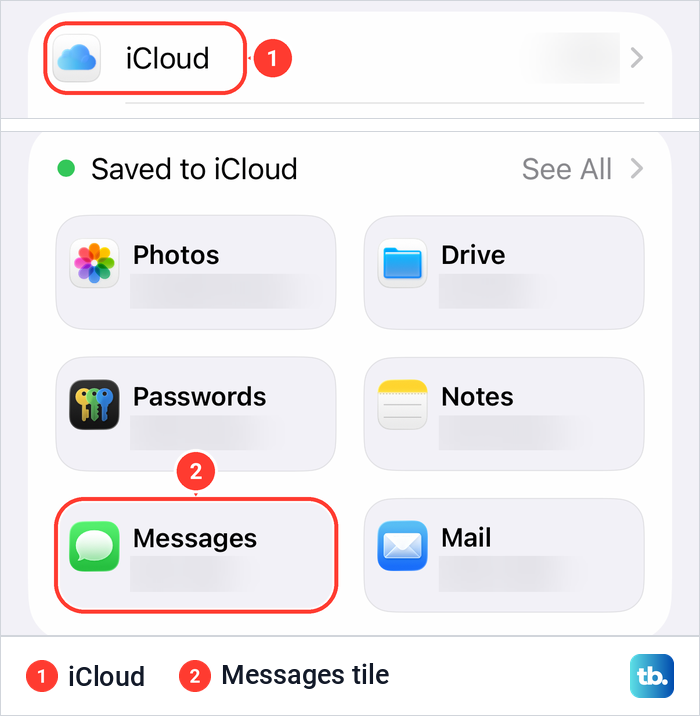
Apple's route is Settings > [your name] > iCloud, then See All (or Show All) and Messages in iCloud. On our iPhone the iCloud page showed a Saved to iCloud grid, and the Messages tile opened the setting directly, with See All at the top right of the grid.
The page opened with Apple's own line about storing your messages in iCloud in case you need to restore this iPhone or set up a new one. Below it were Use on this iPhone, switched on, then Manage Storage, Keep Messages reading Forever, In iCloud, Status and a blue Sync Now button.
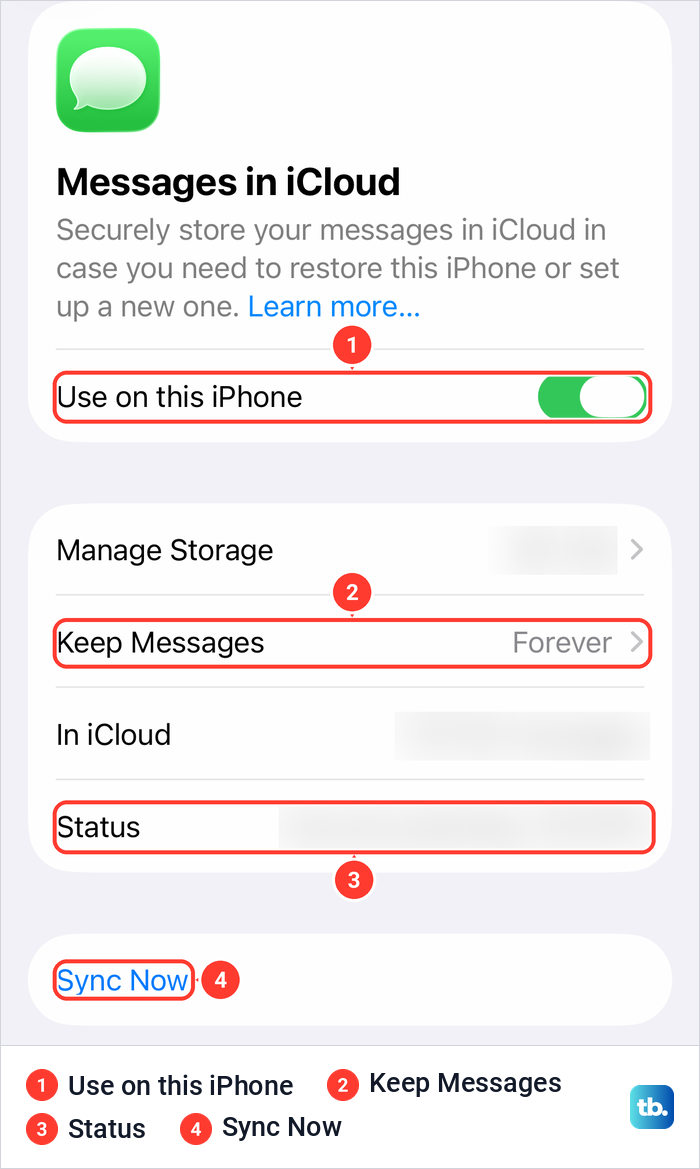
If the switch is off and the missing texts were on another of your devices, turning it on brings in what iCloud still holds. Apple requires two-factor authentication, iCloud Keychain and the same Apple Account on each device, and says it may take some time for all your messages to appear. If texts that are on your iPad still don't show up, work through the steps for iCloud not syncing.
If iCloud storage is full, Apple says iCloud apps won't stay up to date across your devices, so check your available iCloud storage, which Apple shows at the top of the iCloud page. Be careful with deleting in the meantime: our guide to deleting messages from iCloud explains why removing a synced conversation removes it from your other devices too.
Find out whether an older backup has your texts
A backup can only return texts it holds, and Apple is clear about when that is. If you haven't turned on Messages in iCloud, your messages are included in iCloud Backup. If you use Messages in iCloud, they sync to iCloud and aren't included in the backup. Computer backups also leave out messages already synced and stored in iCloud.
The switch you see today does not tell you how it was set when an old backup was made. Backups made while Messages in iCloud was on hold no messages, so work out when you turned it on. If that was recently, a backup from before that day could still hold your old texts.
To see when your iPhone last backed up, open Settings > [your name] > iCloud > iCloud Backup. Our Backup page showed Back Up This iPhone, Back Up Over Cellular, a Back Up Now button, a line reading Last successful backup with its date and time, and an All Device Backups list with two devices, one marked This iPhone.
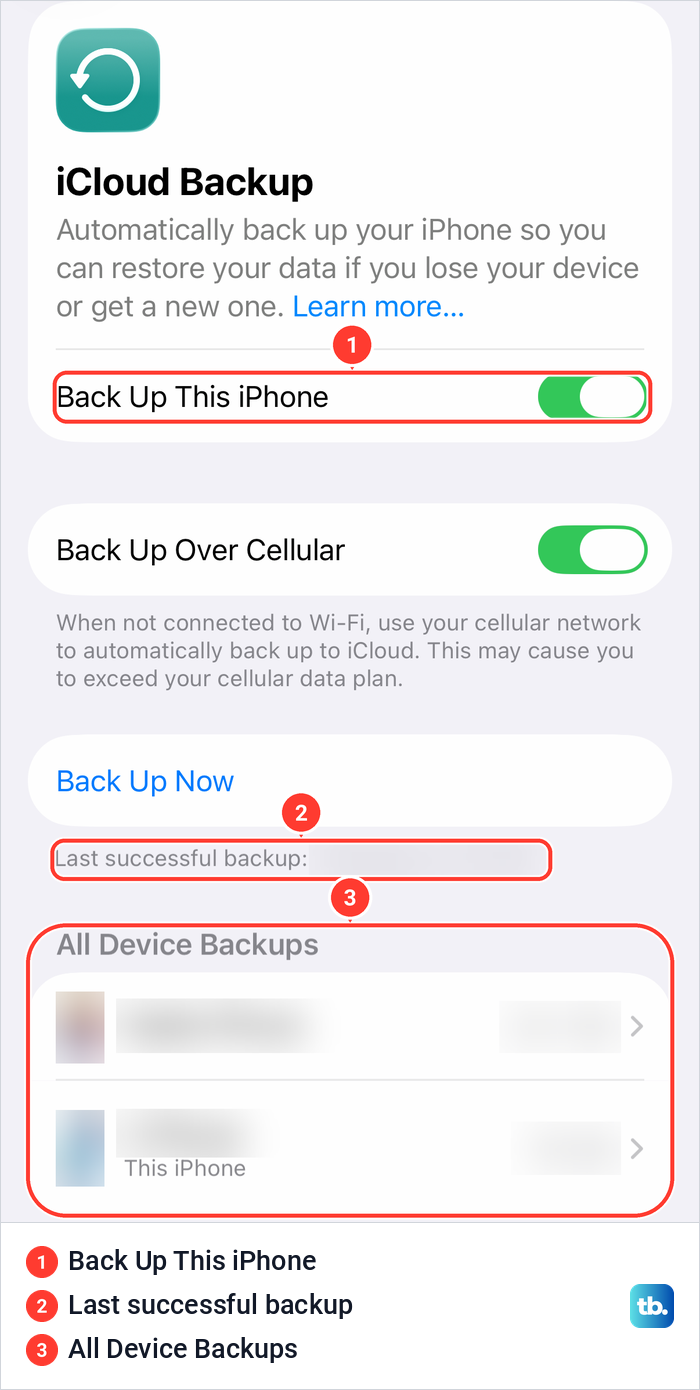
Don't tap Back Up Now hoping to save the deleted texts. A new backup cannot recreate a copy from before the deletion.
Apple says iCloud also backs up your iPhone automatically every day when it is connected to power, locked and on Wi-Fi, so check the Last successful backup date and decide quickly if you are counting on an older iCloud backup. Apple also warns that if you set an iPhone up as new and then decide to restore an older iCloud backup, you should do it as soon as possible, because the new backups will overwrite your previously saved ones.
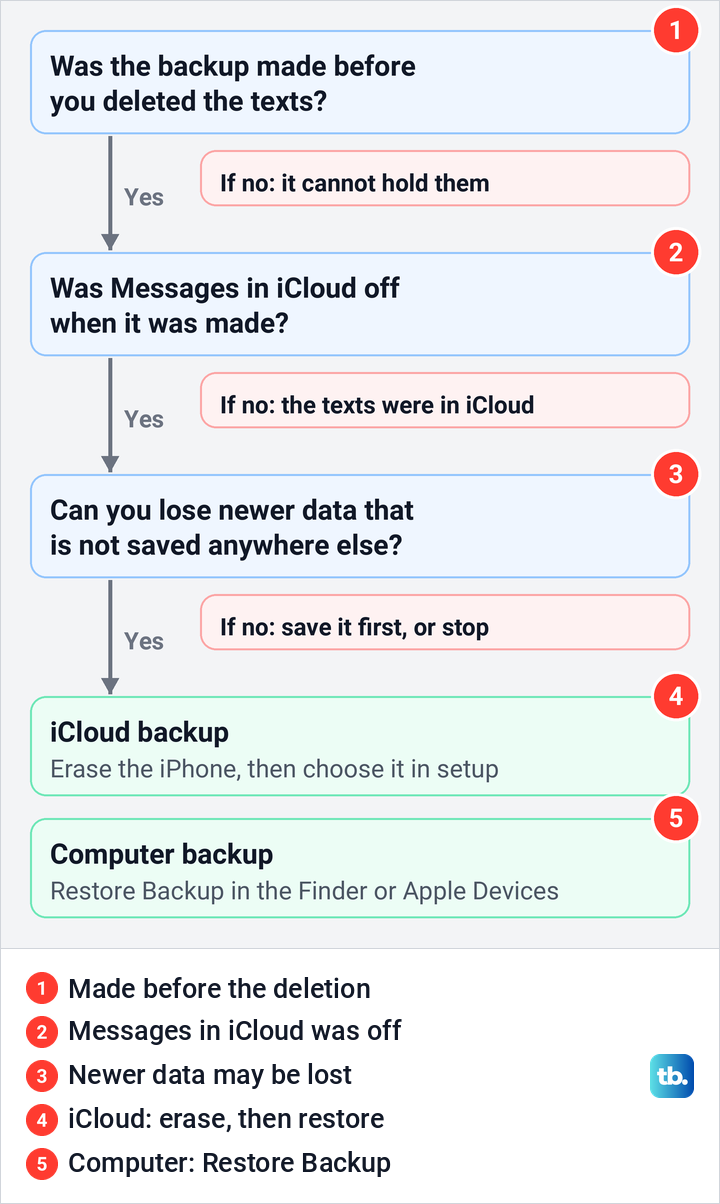
Work through three questions before you restore anything. Was the backup made before you deleted the texts? Was Messages in iCloud off at the time? Can you afford to lose every photo, message and setting that changed after that date and is not stored elsewhere?
Restore an iCloud backup to get texts back
Only go on if all three answers are yes. Apple's restore is for the whole iPhone, and there is no option to restore only Messages. Its steps start on the Hello screen, so an iPhone that is already set up must erase all of its content first. Save anything newer than the backup before you start, such as photos that are not in iCloud.
On our iPhone the way in was Settings > General > Transfer or Reset iPhone, where Erase All Content and Settings sat below a separate Reset button. Reset is not the step a restore needs: it opened a list of settings resets, and Apple says it is for resetting settings while keeping your content.
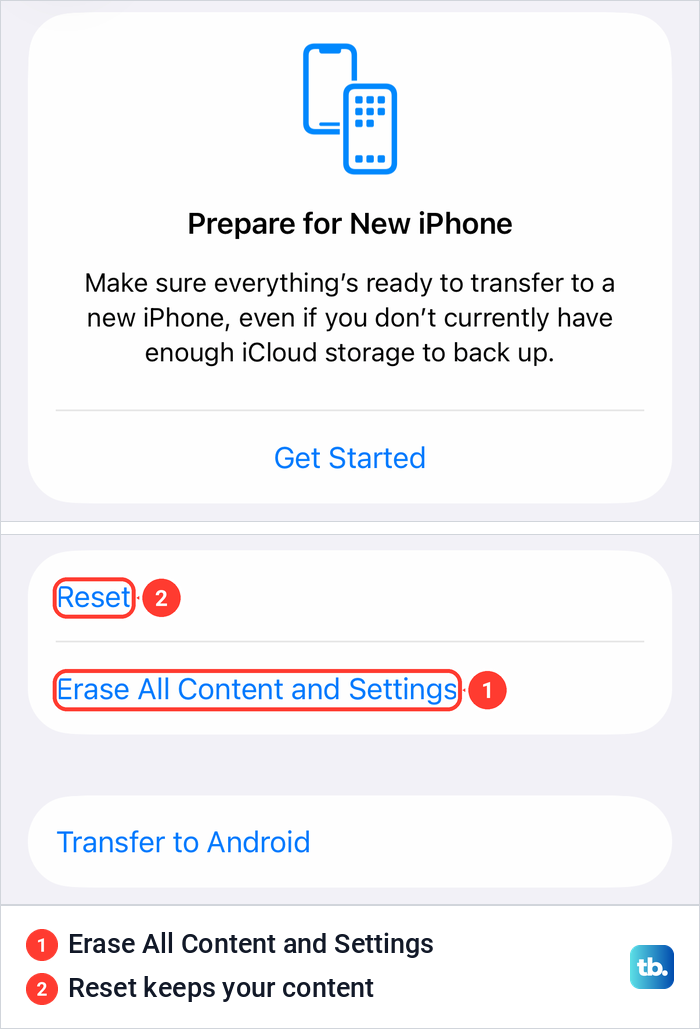
Apple's erase guide also lets you choose whether to keep or erase an eSIM, and an erased eSIM means asking your carrier to reactivate your plan. Read how to erase an iPhone before you tap anything on that page. Apple says you may be asked for your iPhone passcode or Apple Account password, so have both ready.
After the erase, Apple's steps are to follow the setup until the Transfer Your Apps & Data screen, tap From iCloud Backup, sign in to your Apple Account and choose a backup. Apple says to look at the date and size of each and pick the most relevant, which here means the last one made before the deletion.
Apple says the progress bar might need a few minutes to an hour, and content keeps restoring in the background for several hours or days. For every screen in between, follow our full guide to restoring an iPhone from a backup. If it stalls before the transfer starts, see our guide to fixing an iCloud restore stuck on estimating time.
Restore a backup from a computer
A backup on a Mac or PC follows the same rules: it holds your texts only if Messages in iCloud was off when it was made. On a Mac, find your saved iPhone backups and their dates before you connect the phone, so you know which one predates the deletion.
Apple's steps are to open the Finder, or the Apple Devices app on Windows, and connect the iPhone with a USB cable. Apple says to use iTunes on Windows without the Apple Devices app, or on macOS Mojave or earlier. Select the iPhone, select Restore Backup, look at the date of each backup and pick the most relevant.
Click Restore and wait. If the backup is encrypted, Apple says you will be asked for its password, so find it before you begin. Keep the iPhone connected after it restarts until it finishes syncing with the computer. As with iCloud, the whole iPhone goes back to that backup, not just Messages.
Check another device, the other person or your carrier
A Mac signed in to your Apple Account has its own Recently Deleted, which Apple places under View > Recently Deleted in Messages. With Messages in iCloud on everywhere, a deletion on your iPhone reaches the Mac too, so this helps mainly when the Mac or iPad keeps its messages on its own.
The person you were texting is often the simplest source. Apple says you can delete messages from your iPhone without affecting what your recipients see, so their copy is still there unless they deleted it. The exception is Undo Send, which Apple says retracts a message within 2 minutes from both phones.
Carrier records are the last place to look, and AT&T's help page shows their limits. AT&T says its online usage shows the phone numbers, type of message and time for texts sent over the cellular network, and that no one on the account can see the content. It adds that Apple iMessages use Wi-Fi or data and won't show in its text logs. Other carriers set their own rules, so ask yours what it keeps.
How we tested this guide
We tested this on an iPhone 17 Pro with iOS 26.6, going through the Messages Filters menu and the Messages in iCloud page.
Frequently Asked Questions
Can I see a deleted message before recovering it?
Recently Deleted lists the conversations you deleted so you can find the right one. Apple's steps are to choose the conversation and recover it, which puts it back in Messages where you can read all of it. If it turns out to be the wrong one, you can delete it again.
Why is there no Recently Deleted in my Messages app?
On iOS 26 it is in the Filters menu at the top right of the conversation list, not under Edit. On iOS 16 to 18 Apple's guides say to tap Edit at the top left, then Show Recently Deleted, or Filters at the top left, then Recently Deleted. You need iOS 16 or later, and on a Mac Apple says the folder may not appear if nothing was deleted in the last 30 days.
Can I recover a text deleted more than 30 days ago?
Maybe, but it is not promised. Apple's iPhone User Guide says up to 30 days and its support article says 30 to 40, so check Recently Deleted anyway until day 40. If the text is not there, look for a copy on another device, ask the other person, or check for a backup made before the deletion while Messages in iCloud was off.
Will turning on Messages in iCloud bring back deleted texts?
Only texts that iCloud still holds. Apple says deletions appear everywhere once Messages in iCloud is on, so a conversation deleted while it was on is gone from iCloud too, apart from what is still in Recently Deleted.
Can I restore only messages from an iCloud backup?
No. Apple's restore brings back the whole backup, and an iPhone that is already set up has to be erased first. Anything newer than the backup that is not stored elsewhere is lost.
Can my carrier or the other person give me the text?
The other person can, if they still have it, because deleting on your iPhone doesn't change their copy. For a carrier, ask what it keeps: AT&T, for one, shows numbers and times for texts but says no one on the account can see the content.